📎 AI Summary:
The thread discusses a Windows 7 user’s concern about having 84 processes running in Task Manager, which seems higher than expected, and questions whether this impacts system performance. A respondent explains that the number of processes can fluctuate naturally depending on system activity and running programs, and suggests that unless the computer displays symptoms like slowing down, this is generally normal. Overall, the conversation indicates that a high process count is typical and not necessarily harmful unless accompanied by performance issues.

Oralocs

New Member
Member details
Joined
Dec 11, 2013
Messages
2
Thread Author #1
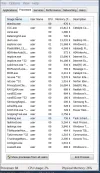
My Task Manager reports 84 processes running, though only a small number are shown in the processes pane. see attached snip.

Why do I have so many, is it affecting performance and should I terminate them? They just come up again when I restart. I remember having just a few in the past.

I'm running Win 7 x64 Pro on an i7 with a 250 GB Samsung SSD for the OS and a 1 TB for user data. I have just Internet Explorer and Windows Explorer on the task bar and Norton Security running.

Thanks
 

Attachments

  • Capture 1.webp
    Capture 1.webp
    72.6 KB · Views: 316
    Microsoft Defender: No threats detected Scan details
Solution
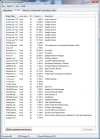
The number of processes varies, as the computer is somewhat of a living being. With only Windows and Google Chrome plus a few extras, I had 91 processes running, with AMD FX-8120 CPU, 8 cores, jumping between 1-6%, up to 29% at times of load. After a restart, I now have 86 processes... it's not a constant.

Unless you have problems with performance = your computer stalls, or something else, I see no problem.

Pauli

Fantastic Member
Premium Supporter
Member details
Joined
Mar 1, 2012
Messages
2,484
The number of processes varies, as the computer is somewhat of a living being. With only Windows and Google Chrome plus a few extras, I had 91 processes running, with AMD FX-8120 CPU, 8 cores, jumping between 1-6%, up to 29% at times of load. After a restart, I now have 86 processes... it's not a constant.

Unless you have problems with performance = your computer stalls, or something else, I see no problem.
 

Attachments

  • Processes.webp
    Processes.webp
    83.8 KB · Views: 266
    Microsoft Defender: No threats detected Scan details
Solution