📎 AI Summary:
The thread discusses issues with creating system images in Windows 10 Pro, with the original poster encountering specific error codes and suspecting conflicts with security software or backup settings. Various users suggest troubleshooting steps, including disabling security programs, checking background processes, and trying different backup solutions. Ultimately, the original poster resolves the problem by disabling custom power plans created by Iolo System Mechanic, switching to Windows' high-performance mode, which allows successful system image creation.

brkkab

Excellent Member
Member details
Joined
Mar 4, 2013
Messages
2,346
Thread Author #1
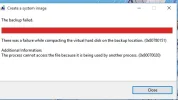
Every time I try to make a system image in Windows 10 Pro x64 I get the following error message. Error code 0x807080151 along with error code0x80070020 at the bottom of the same page. Here's a screenshot of it.Shadow Copy, etc. is on/started. I've tried stopping them & restarting them. Also ran checkdisk and sfc /scannow. Nothing found.
 

Attachments

  • Capture.webp
    Capture.webp
    14.1 KB · Views: 312
    Microsoft Defender: No threats detected Scan details
Solution
**SOLVED** Iolo System Mechanic Standard's created power plans were the culprit. I disabled them, switched my pc to Windows' High Performance plan and System Image is working now. I forgot all about checking that one before I posted this.

brkkab

Excellent Member
Member details
Joined
Mar 4, 2013
Messages
2,346
Thread Author #4
I'm wondering if it's something to do with using FileHistory, too. I don't know why it would be, as I'm only trying to do a system image, not use the full blown Windows 7 Backup for a image and a backup of document's, etc..
It's also, not the Insider Preview version of Windows 10.
 

Joe S

Excellent Member
Member details
Joined
Jan 12, 2009
Messages
3,781
I always make my images from the Acronis boot disk. Then nothing is running or updating in the background to cause problems.
Joe
 

Saltgrass

Excellent Member
Microsoft Community Contributor
Member details
Joined
Oct 16, 2009
Messages
15,153
You are trying to do a backup of a VM? I have no experience with VM, but where is the backup location in relation to the VM?
 

MikeHawthorne

Essential Member
Microsoft Community Contributor
Member details
Joined
May 25, 2009
Messages
6,684
Hi

I don't know what's causing the problem, but I've been using EaseUS TODO backup and recovery Free, with good results.
I've made 22 backups and restored 7 times since I started using Windows 10.

Link Removed

So if you want to get a image made you could give it a try.

It makes it's own recovery disk in either Linux or WindowsPE format and it literally only takes a couple of clicks to make a backup.

Mike
 

brkkab

Excellent Member
Member details
Joined
Mar 4, 2013
Messages
2,346
Thread Author #10
**SOLVED** Iolo System Mechanic Standard's created power plans were the culprit. I disabled them, switched my pc to Windows' High Performance plan and System Image is working now. I forgot all about checking that one before I posted this.
 
Solution