


Starfox27
Fantastic Member
Member details
- Joined
- May 22, 2014
- Messages
- 39
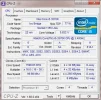
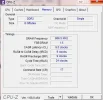
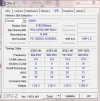
Hey I'm having this error while playing Civilization: Beyond Earth where my computer will just get a black screen and the audio begins to loop. The only solution is to turn off power and restart. Here's my W7F zip along with some cpu-z imgs from my previous BSOD post (and some additional ones) & my bugcheck (which is what I think should be the main issue)
I couldn't get img for other tabs so I'll list them.
Motherboard
Manufacturer: Asrock
Model: Z77 Extreme4
Chipset: Intel; Ivy Bridge; Rev: 09
Southbridge: Intel; Z77; Rev: 04
LPCIO Nuvoton; NCT6776
Bios: American Megatrends Inc
Version: P2.50
Date: 10/31/2012
Graphics Interface:
Version PCI-E, link width x8, max supported x16
Graphics: Nvidia GeForce GTX 770
Clocks: core 135 Mhz, memory 324 mhz
Memory: size 2112 mbytes
From the event viewer, I can see the bugcheck was 0x00000116 which is VIDEO_TDR_ERROR. I've had gpu driver conflicts (switched from AMD to nvidia ~1 yr ago) in the past and I've used display driver uninstaller to install new nvidia drivers/along with getting rid of AMD drivers. I think my previous post referenced a BSOD regarding drivers but it was fixed. Thanks in advance.
https://onedrive.live.com/redir?resid=14BDB3B716A52FAF!137&authkey=!AE00bFqigu__s_w&ithint=file,zip
Here's the skydrive link for my bugcheck memory dump since it was too large to upload.
I couldn't get img for other tabs so I'll list them.
Motherboard
Manufacturer: Asrock
Model: Z77 Extreme4
Chipset: Intel; Ivy Bridge; Rev: 09
Southbridge: Intel; Z77; Rev: 04
LPCIO Nuvoton; NCT6776
Bios: American Megatrends Inc
Version: P2.50
Date: 10/31/2012
Graphics Interface:
Version PCI-E, link width x8, max supported x16
Graphics: Nvidia GeForce GTX 770
Clocks: core 135 Mhz, memory 324 mhz
Memory: size 2112 mbytes
From the event viewer, I can see the bugcheck was 0x00000116 which is VIDEO_TDR_ERROR. I've had gpu driver conflicts (switched from AMD to nvidia ~1 yr ago) in the past and I've used display driver uninstaller to install new nvidia drivers/along with getting rid of AMD drivers. I think my previous post referenced a BSOD regarding drivers but it was fixed. Thanks in advance.
https://onedrive.live.com/redir?resid=14BDB3B716A52FAF!137&authkey=!AE00bFqigu__s_w&ithint=file,zip
Here's the skydrive link for my bugcheck memory dump since it was too large to upload.
Attachments
-
Microsoft Defender: No threats detected Scan detailsW7F_25-10-2014.zip1.7 MB · Views: 313
-
 Microsoft Defender: No threats detected Scan detailsCPU.webp36.9 KB · Views: 329
 -
 Microsoft Defender: No threats detected Scan detailsCpuz Memory.webp19.8 KB · Views: 279
 -
 Microsoft Defender: No threats detected Scan detailsCpuz SPD.webp29.7 KB · Views: 306