CptnSniperz

New Member
Joined
Sep 26, 2011
Messages
2
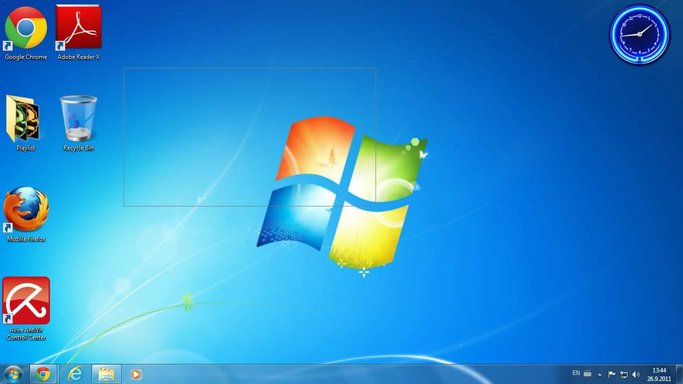
When I Left Click Or Right Click And Draggggg! It Doesn't Show Blue Color Any More :confused: Is There A Way To Fix It?

It Didn't Show The Mouse On The Screen Shot BTW
 

Attachments

  • Untitled.webp
    Untitled.webp
    52.8 KB · Views: 803
Solution
I am not completely sure about what you are doing, but if you select an item for dragging, after you release it, the "select" box will be maintained until you click somewhere else on the screen. Maybe just clicking another location will clear the box.

If that isn't it, you appear to be using basic video drivers. Is this your final install or are you going to update the video drivers.

If it isn't that, perhaps updating your mouse drivers or checking how the buttons are set up might help.


Saltgrass

Excellent Member
Microsoft Community Contributor
Joined
Oct 16, 2009
Messages
15,155
I am not completely sure about what you are doing, but if you select an item for dragging, after you release it, the "select" box will be maintained until you click somewhere else on the screen. Maybe just clicking another location will clear the box.

If that isn't it, you appear to be using basic video drivers. Is this your final install or are you going to update the video drivers.

If it isn't that, perhaps updating your mouse drivers or checking how the buttons are set up might help.
 

Solution