

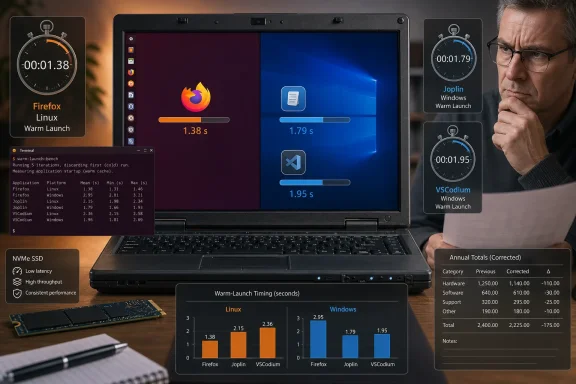
The test, reported by How-To Geek’s Nick Lewis, used the same laptop, NVMe drive, CPU, and 16GB of RAM in a dual-boot configuration. That is the right instinct: comparing separate PCs invites the SSD, memory configuration, firmware settings, cooling, background software, and battery profile to overwhelm any operating-system effect. Three frequently used applications were chosen—Firefox, Joplin, and VSCodium—and timed with Hyperfine on both platforms.
Lewis is also unusually candid about the main limitation. Hyperfine measures command completion, not the instant an application window is painted, interactive, and ready for work. That distinction is especially important for Firefox and Electron-based applications such as Joplin and VSCodium, where the launcher process, background processes, renderer, extension host, and visible UI do not necessarily complete their work at the same moment.
The article’s result is therefore real as a measure of its stated commands on its stated machine. It is not yet a reproducible measure of what users usually mean when they say an app “opens.”
Firefox produces nearly all of the claimed Linux advantage
The reported median warm-launch numbers put Firefox at 0.8 seconds on Windows and 0.47 seconds on Linux. With the author’s stated habit of opening Firefox 41 times a day, that 0.33-second gap becomes consequential on paper: more than 4,940 seconds per year, or about 82 minutes.
That is the entire story. Joplin and VSCodium ran slower in the Linux measurements cited by How-To Geek: Joplin at 0.14 seconds on Linux versus 0.08 seconds on Windows, and VSCodium at 0.29 seconds on Linux versus 0.22 seconds on Windows. In other words, two of the three tested programs favored Windows; Firefox’s much higher stated launch frequency carried Linux to the overall win.
That makes the conclusion useful for people whose workday resembles Lewis’s—browser-centric, repeatedly opening Firefox, and performed on older mid-range hardware. It does not establish that a Windows PC has a platform-wide application-launch problem, nor that Linux will make an arbitrary user’s daily workflow faster. Change the browser, reduce the number of launches, keep Firefox open all day, or use a newer system, and the annual estimate changes rapidly.
The author says the gap was marginal on a newer and more powerful desktop, which is consistent with the narrowness of the laptop result. The article does not identify the Windows release and build, Linux distribution and desktop environment, kernel version, Firefox channel and version, package formats, graphics driver, power mode, or the exact commands passed to Hyperfine. Those omissions matter more than the 0.33-second Firefox difference suggests.
The annual arithmetic contains small but clear errors
How-To Geek presents the annual calculation as median launch time multiplied by daily launches and 365 days. Recalculating the figures printed in the article exposes several discrepancies.
| Platform and app | Stated median | Stated launches per day | Recalculated annual wait |
|---|---|---|---|
| Windows Firefox | 0.80 seconds | 41 | 11,972.0 seconds |
| Windows Joplin | 0.08 seconds | 13 | 379.6 seconds |
| Windows VSCodium | 0.22 seconds | 9 | 722.7 seconds |
| Linux Firefox | 0.47 seconds | 41 | 7,031.6 seconds |
| Linux Joplin | 0.14 seconds | 13 | 664.3 seconds |
| Linux VSCodium | 0.29 seconds | 9 | 952.7 seconds |
The Windows total from those inputs is 13,074.3 seconds, not 13,027 seconds. The two non-Firefox Windows applications add to 1,102.3 seconds, not the 1,055 seconds stated in the article. The Linux total is 8,648.5 seconds, not 8,650.5 seconds.
The corrected difference is 4,425.8 seconds a year—about 1 hour, 13 minutes, and 46 seconds. The article’s published difference, based on its displayed totals, is 4,376.5 seconds, or about 1 hour and 13 minutes. So the numerical slips do not reverse the conclusion; Linux still comes out ahead under this author’s assumptions. But they do matter because the calculation is the article’s central claim, and because the supposed precision of annualized performance accounting can be misleading when the measurement itself is only expressed to hundredths of a second.
More fundamentally, an annual estimate built from 41 browser starts per day is sensitive to small behavioral changes. Opening Firefox 20 times per day instead of 41 cuts its annual advantage roughly in half. Leaving Firefox running, as many users do, cuts it more severely still. An hour annually is about 12 seconds per day, and it only appears as a meaningful figure after the same sub-second delay is multiplied thousands of times.
Process completion is not the same as a usable application
Hyperfine is a capable command-line benchmark utility. It performs multiple runs, reports statistics, can include warm-up runs, and provides options to control cache effects. Its own documentation also makes clear that cache state can materially influence timing, offering separate controls for intentionally warm and cold caches.
That is relevant here because the test’s first launch was dramatically slower than later launches. How-To Geek reports an initial Firefox run of 7.05 seconds, followed by results around seven- to nine-tenths of a second in Windows. The author reasonably chose the median of subsequent behavior rather than letting a first run dominate the average. Yet the result is no longer “how long Firefox takes to open after a reboot” or “how long an app takes to launch cold”; it is a warm-path test with an unspecified cache state and unspecified handling of background processes.
There is a second complication. Modern desktop applications can delegate work to existing processes and return control to the calling shell before the application becomes visually usable. Electron’s own documentation distinguishes the application becoming ready, a browser window being created, and the point at which a window is ready to show after its renderer has drawn for the first time. Visual Studio Code’s engineering team similarly treats a visible, usable editor state—such as a blinking cursor—as a meaningful startup milestone.
A command timer does not automatically capture any of those user-facing states. How-To Geek acknowledges this limitation, but then uses the command-time medians to calculate an annual figure framed as time “waiting for” applications to open. That is a bigger inferential step than the article allows.
A stronger comparison would define a visible completion condition for each app and use the same condition on each operating system. For example, Firefox could be timed to a loaded local test page with a known element rendered; Joplin to its main window being responsive with a selected note visible; and VSCodium to an editor window with the extension host settled and a file ready to edit. The tester would also need to report cold-start and warm-start numbers separately, randomize the order of operating-system runs, capture background CPU and disk activity, and publish raw timings rather than only a short table.
Windows cleanup can help, but disabling protection is the wrong default
How-To Geek suggests reducing background load by trimming startup applications, limiting automatic updaters, and potentially turning off Microsoft Defender’s on-access scanning when the user is confident in an application. The startup-app advice is sensible, particularly for a laptop that is slow immediately after sign-in. Microsoft’s own Windows documentation says Task Manager can identify startup applications and assigns an impact category based on CPU time and disk I/O during startup.
But startup impact measures boot and sign-in behavior; it does not prove that a particular startup entry is responsible for a browser taking 0.8 seconds rather than 0.47 seconds to complete a launch command. Users should disable entries only after identifying what they do and whether they provide a needed service, synchronization function, driver component, backup job, or security control. A startup entry that is merely inconvenient is one thing; a device-management agent or backup client is another.
The Microsoft Defender recommendation needs an even firmer boundary. Defender’s real-time protection does inspect files as they are accessed, and Microsoft recognizes that exclusions can improve performance in specific compatibility or performance cases. Yet Microsoft also warns that every exclusion reduces protection. Disabling real-time protection wholesale to chase a fraction of a second from application startup is a poor trade for ordinary Windows users and a nonstarter for managed business PCs.
For an administrator investigating a persistent slowdown, the practical route is measurement: reproduce the delay, inspect CPU, disk, and Defender activity with appropriate performance tools, identify the exact scanned path or process, and consider a tightly scoped exclusion only where policy permits and the business case is documented. “Turn off Defender and see” may diagnose a cause; it should not be treated as a durable optimization.
Package choice can explain some Linux results too
The article’s Linux advice—prefer a native distribution package over Snap or Flatpak if application startup is slow—points toward a variable that was not controlled in the test. Packaging format can change startup behavior through sandboxing, runtimes, mounted images, portals, filesystem paths, and the version of libraries shipped with the application. It can also change between distributions and over time.
That weakens any claim about “Linux” as a single comparable platform. A Firefox package supplied by one distribution, Firefox’s own package, a Flatpak build, and a Snap build are not interchangeable performance subjects merely because they display the same browser UI. The same applies to VSCodium and Joplin, whose package source and bundled runtime can alter their startup path.
Windows has analogous variation: Microsoft Store packages, traditional installers, portable builds, browser profiles, extensions, endpoint security products, OneDrive synchronization, and third-party shell integrations can all alter the observed result. The same hardware controls one category of confounder. It does not normalize the two software stacks.
The defensible takeaway from How-To Geek’s experiment is modest and still useful: on one particular dual-boot laptop, a frequently launched Firefox command completed substantially faster under the tested Linux installation, and that subjective responsiveness can add up for a browser-heavy user. The corrected arithmetic says the stated habits would save about 74 minutes a year. Before treating that as a reason to switch operating systems—or to weaken Windows security—the next measurement should time when each application is actually ready to use, with the operating-system builds, packages, profiles, cache state, and raw results on the record.