

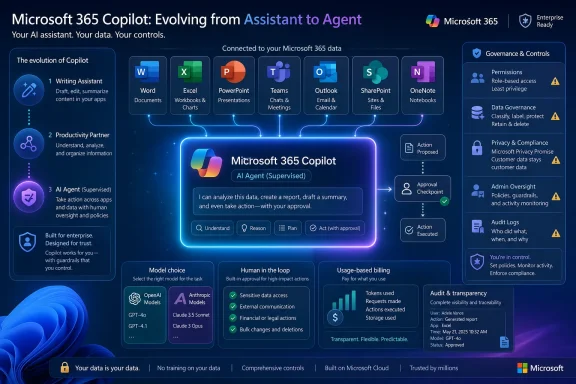
Geeky Gadgets’ roundup, based on a Mike Tholfsen video, correctly identifies several features that Microsoft has documented. The practical news for Windows users and Microsoft 365 administrators is less about an eight-item feature drop than a shift in Copilot’s role: Microsoft is moving from in-app drafting assistance toward agentic work that can create, edit, schedule, send, and coordinate across Microsoft 365. That shift comes with licensing, billing, permissions, and data-handling conditions that the roundup largely skips.
GPT-5.6 Is Real, but It Was Announced in July
Microsoft announced OpenAI’s GPT-5.6 family for Microsoft 365 Copilot on July 9, 2026, saying it would roll out to Word, Excel, PowerPoint, Copilot Chat, and Copilot Cowork. Microsoft describes GPT-5.6 as its preferred model for knowledge work and says Copilot can select it automatically when the task warrants it; some users may also see it in a model selector.
That is more specific than the claim that Copilot now dynamically switches between GPT-5.6 and Claude simply to make reports more detailed or summaries shorter. Microsoft’s Cowork documentation says its Auto mode selects a model suited to the task, but the models available depend on what an organization permits. In other words, a user cannot assume that GPT-5.6, Claude, or every listed option will appear in their tenant.
The Anthropic portion also deserves more scrutiny than a feature list allows. Microsoft’s current Cowork model documentation identifies Claude Fable 5 (Preview) as an Anthropic preview model, not merely “Claude,” and says an administrator must explicitly enable it. Microsoft further warns that prompts and responses are retained by the model provider when that model is selected. Its documentation points administrators to Anthropic’s subprocessor terms for the relevant data-handling details.
For IT departments, this is the actual decision point. GPT-5.6 is being integrated as a Microsoft 365 Copilot model, while the Anthropic preview carries a separate enablement and retention consideration. “Use the best model automatically” sounds simple in a user demo; it is a governance choice in a regulated tenant.
Cowork Is an Agent Service, Not a Workflow Tab
Cowork is the most consequential addition in the roundup, because it crosses the line from generating suggested content to taking actions. Microsoft says Cowork can send emails, schedule meetings, create Word documents, Excel workbooks, PowerPoint decks and PDFs, post in Teams, manage files, search organizational content, and run scheduled prompts.
It is not, however, a lightweight feature that every Microsoft 365 subscriber can turn on from a new tab. Microsoft’s own Cowork product page says it is available to Microsoft 365 Copilot customers through usage-based billing, and administrators enable it in the Microsoft 365 admin center. Microsoft Learn also states that Cowork requires a Microsoft 365 Copilot license for plugin use.
The approval model is the key safeguard. Microsoft says Cowork pauses for approval before sensitive actions such as sending an email or making a significant update, and that actions are auditable. That means it is not an unattended automation engine in the way a Power Automate flow can be. It is a supervised agent intended to move work through several steps while leaving the user responsible for the consequential moment.
There is an operational consequence for sysadmins: Cowork broadens Copilot’s effective permission surface. Microsoft says it respects existing user and administrator permissions, which is reassuring but also means Cowork can act wherever the signed-in user already has access. A user with broad SharePoint, Exchange, Teams, Dynamics 365, or browser-session access may be able to ask the agent to traverse a correspondingly broad set of systems.
Microsoft’s local-browser documentation makes that especially clear. When Cowork uses the local browser in Microsoft Edge, it works in a hidden Edge tab using the user’s existing cookies, single sign-on state, and sessions. The agent gets no more access than the user has manually—but no more is not the same thing as little. Organizations deploying Cowork should test it against real user roles, conditional-access policies, browser controls, audit retention, and least-privilege practices before enabling it broadly.
Copilot Notebooks Are Broader, but Not “All Microsoft 365 Licenses”
The claim that Copilot Notebooks are now available across all Microsoft 365 licenses is inaccurate. Microsoft Support says Notebooks require a Microsoft 365 Copilot or Copilot Chat license, along with a SharePoint or OneDrive service plan to create notebooks. Microsoft also makes the feature available to Microsoft 365 Personal, Family, and Premium subscribers.
That is a broader audience than the original Copilot add-on audience, particularly because Copilot Chat is available in more enterprise and education scenarios. It is still not a blanket entitlement for every Microsoft 365 commercial, education, or consumer plan.
Notebooks are also not OneNote notebooks with an AI label attached. Microsoft describes them as scoped AI workspaces that collect selected Copilot chats, files, meeting notes, links, and Copilot Pages. Copilot then grounds its responses in that curated material rather than treating the whole tenant as the project’s context.
That makes them useful for a product launch plan, a customer account review, an audit preparation package, a research dossier, or a course module. It also introduces a sharing consideration: sharing a Copilot Notebook can give collaborators access to the files inside it. Microsoft says shared-notebook participants currently receive editing access; there is no read-only member role.
The timing also undercuts the “August” narrative. Microsoft Support’s main Notebooks getting-started page was last updated in April 2026, while later support material documented expanded availability and education features. Microsoft’s Notebook Study Guide documentation says Enterprise and Education Copilot Chat users, including Education A1, A3, and A5 users, can access Copilot Notebooks at no additional cost. Those are meaningful rollouts, but they are staged availability changes, not evidence of a single August launch.
Real-Time Editing Did Not Arrive in Copilot Pages This Month
“Real-time editing arrives” is the most misleading part of the submitted headline. Microsoft has long positioned Loop as its live co-authoring layer, and its current comparison documentation still describes Loop—not Copilot Pages—as the product with real-time co-authoring, presence indicators, and shared cursors.
Copilot Pages are editable and shareable persistent canvases generated from Copilot responses. They can appear in the Microsoft 365 Copilot app, Microsoft365.com, and Loop, and users can add Pages to Notebooks. They are useful for turning a chat result into a working draft rather than letting an answer vanish in a conversation history.
Microsoft’s support documentation is inconsistent on exactly how far collaborative Notebook work has progressed. The April 2026 Notebook page says teams can share notebooks and co-create in real time. But Microsoft’s January comparison page characterizes Notebooks as lower-collaboration, says full notebooks are private, and says individual Pages can be shared. A June Notebook FAQ then discusses sharing Notebooks directly and confirms that invited members have editing access.
The most defensible conclusion is that shared Notebooks have expanded, but Microsoft’s documentation has not fully caught up with the feature’s evolving behavior. Administrators should validate the sharing model in their own tenant rather than treating “real-time editing” as a universally available new Copilot Pages capability.
Prompt Lab and File Support Are Administrative Features as Much as User Features
Prompt Lab is more than a richer gallery of example prompts. Microsoft Learn documents an administrative system for creating, importing, publishing, pinning, and measuring organizational prompts. Administrators can publish up to 1,000 prompts, with filters for task type and department, and users can search those prompts in Prompt Lab or receive them as suggestions while typing in Copilot.
The catch is that Microsoft lists organizational prompts as a Frontier preview capability. Access is therefore not a standard guarantee for every tenant, and Microsoft warns that preview capabilities can change. Published prompts may also take roughly three hours to appear in Prompt Lab.
This is a useful distinction for organizations trying to standardize Copilot use. A generic template library helps an individual write a better prompt. Organizational prompts can enforce a department’s preferred structure for executive briefs, incident reports, customer follow-ups, project status updates, or approved language—without expecting every employee to memorize a prompt-engineering playbook.
The stated expansion of .md, .txt, and .rtf file support is plausible as part of Copilot’s growing ingestion and attachment capabilities, but it is the least substantiated item in the eight-feature roundup. Microsoft’s public Notebook guidance emphasizes Office files, PDFs, Copilot Pages, meeting notes, links, and other referenced content; its education documentation lists supported content formats for specific Study Guide functions and does not establish a blanket claim that every Copilot surface handles Markdown, plain text, and RTF identically.
That difference matters. A file being attachable to Copilot Chat does not automatically mean it can serve as a Notebook reference, generate an infographic, feed every agent workflow, or retain formatting when turned into a PowerPoint deck. Users should test the target Copilot surface and output type rather than relying on an umbrella “expanded file support” promise.
The Practical Change Is Delegation, With Guardrails Still Required
Microsoft 365 Copilot can now produce more complete artifacts from prompts, including Word drafts, spreadsheet work, PowerPoint presentations, and material assembled from Notebook context. The company’s July GPT-5.6 announcement and current Cowork documentation support that direction. But a polished deck with charts and visuals remains generated output that needs a human owner to verify data, rights, formatting, and claims before it goes to customers or executives.
The same applies to AI-generated infographics and editing suggestions. Copilot can reduce the mechanical work of assembling information, but it does not establish that the underlying numbers are current, that a visual tells the right story, or that a rephrased policy statement preserves its legal meaning. The more polished the artifact becomes, the easier it is for an unverified error to travel farther.
Microsoft has delivered real expansion here, especially with GPT-5.6, Cowork’s supervised actions, and wider Copilot Notebook access. The missing headline is that these features are arriving on different schedules, under different licenses, and with different data and admin controls. For organizations on Windows and Microsoft 365, the immediate task is not to find all eight buttons—it is to decide which users should be allowed to let Copilot move from drafting work to doing it.