
Windows Central’s argument that Microsoft could package the improvements as “Windows 12” gets at a real problem: Windows 11 launched with a sharply reduced taskbar feature set, a Start menu many desktop users found rigid, and hardware requirements that excluded otherwise capable PCs. But Microsoft’s own 26H2 documentation points in the other direction. This is an annual Windows 11 feature update using the same shared servicing model as recent releases, designed to be easy to adopt on current Windows 11 installations.
For organizations that still remember the work attached to a Windows 10-to-Windows 11 move, that is good news. A fresh major-version label would imply a new migration decision. Microsoft is instead describing 26H2 as a continuation of Windows 11’s servicing path—one that fixes visible regressions without making administrators requalify their fleets as though a new desktop OS had landed.
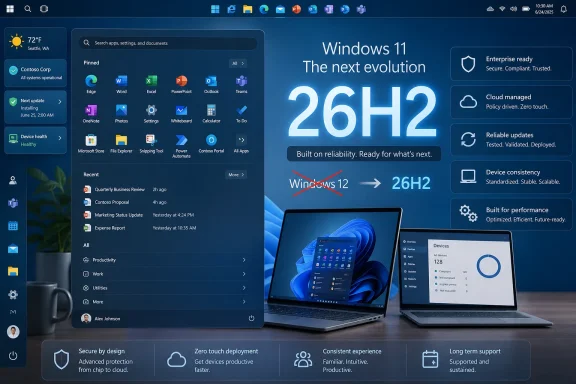 Taskbar placement is returning, but it is not a new platform
Microsoft announced in May that Windows 11 would again let users move the taskbar to the top or sides of the display. The company also outlined a smaller taskbar option, icon alignment that adapts to the taskbar’s location, and application labels intended to make open windows easier to distinguish.
Those are direct responses to some of Windows 11’s most persistent usability complaints. Windows 11 originally removed the ability to place the taskbar anywhere but the bottom edge, even though top- and side-mounted taskbars had been standard, supported preferences in earlier releases. Microsoft later restored several missing controls, including never-combine behavior, but taskbar positioning remained an unusually visible reminder that the newer shell had shipped with less flexibility than its predecessor.
The latest Release Preview builds are now carrying the taskbar and Start work for Windows 11 versions 24H2 and 25H2. Windows Central reported on August 15 that the changes had entered the Release Preview Channel, the final public Insider stage before wider release. That is stronger evidence than an early Canary or Experimental build: Microsoft has moved beyond showing the ideas and is validating them on builds tied to supported production releases.
Still, Release Preview is not the same as general availability. Microsoft has not publicly committed to a precise release day for every interface change, and its feature rollout system can phase capabilities in gradually after an update is installed. Users should not assume that seeing version 26H2—or installing a cumulative update associated with it—guarantees that every new taskbar control will appear immediately.
That rollout caveat is one reason a “Windows 12” label would be misleading. A major Windows version historically carried a comparatively identifiable launch package. The current Windows model separates the annual version number, monthly servicing, controlled feature rollout, and Insider-channel testing. The practical experience is iterative by design.
Start menu control is the substantive part of the update
The Start menu revisions are more consequential than cosmetic rearrangement. Microsoft has said users will be able to independently show or hide the Pinned, Recommended, and All sections; adjust the Start menu’s size; and hide the account name and profile image. The company is also renaming the Recommended area to Recent and says it is improving the relevance of files surfaced there.
For a home user, the change allows a more restrained Start experience: pinned apps without a large recommendation area, for example. For a business user, the result can be less visual noise and faster access to applications and recent work. Microsoft has also published management guidance for commercial devices, including policies to control Start menu categories and configured pins.
There is an important limitation. Microsoft’s May announcement said recently installed apps would remain visible because Microsoft regards them as a primary discovery path for newly installed software alongside the Microsoft Store. In other words, the new controls do not amount to a blank-check return to the Windows 10 Start menu. Microsoft is making Windows 11’s existing design more configurable, not restoring every old layout or adopting a single “classic” mode.
That is a reasonable product decision, even if it will disappoint users who want Start to behave exactly as it did in Windows 10. The more important correction is that Microsoft is treating Start as something users should shape around their work rather than a fixed promotional and recommendation surface. The change also has a management angle: IT can specify an intended layout without relying entirely on end users to find several scattered personalization settings.
Microsoft is making a servicing case, not a Windows 12 case
Microsoft’s June guidance for Windows 11 version 26H2 is unusually explicit about the release model. The company says 26H2 uses the same shared servicing model as recent annual Windows releases and should be easy for devices already running recent versions of Windows 11 to adopt. It also says the next feature update is planned for the second half of 2026.
That shared-platform language is the decisive evidence against calling the release Windows 12. A new brand number would create expectations around application compatibility, hardware readiness, security baselines, support lifecycles, licensing, deployment rings, and image management. Microsoft is presenting 26H2 as an in-family update precisely to avoid those disruptions.
There is already a recent example of why version labels do not always indicate a dramatic technical break. Windows 11 version 26H1 was scoped primarily for select new PCs arriving in early 2026 and was not designed as a conventional feature update for existing Windows 11 devices. Microsoft maintained the Windows 11 name because the relationship between the releases is one of servicing and hardware enablement, rather than a wholesale replacement of the operating system.
Administrators should treat 26H2 the same way they would treat any annual Windows 11 deployment: validate critical line-of-business applications, drivers, endpoint security tooling, custom Start policies, shell extensions, and device-management baselines. The fact that the visible changes include the taskbar and Start menu does not make them irrelevant to enterprise testing. Shell changes can expose assumptions in kiosk configurations, profile customizations, accessibility tools, remote-support products, and software that interacts with the Explorer process.
But the required work is still a feature-update validation exercise, not a Windows 12 migration program. That is a smaller and more manageable commitment.
The quality initiative has a clearer test than a new name
Microsoft’s March Windows quality announcement set goals that reached beyond the taskbar and Start menu. It cited faster responsiveness in core experiences, improvements to driver and application reliability, better Windows Hello behavior, fewer update interruptions, and continued security work under the company’s Secure Future Initiative. Microsoft has since shipped preview fixes affecting Explorer reliability, Start, taskbar startup behavior, lock-screen interactions, and third-party credential-provider scenarios.
This is where Windows Central’s broader concern deserves attention. A movable taskbar and adjustable Start menu are visible signals that Microsoft has listened, but they cannot by themselves repair confidence in Windows 11. The test is whether the company delivers the less glamorous work consistently: fewer Explorer failures, better driver behavior, predictable updates, reliable sign-in, and a desktop shell that does not become less capable when Microsoft refreshes it.
The source material calls this work “K2,” an internal shorthand used in Windows Central reporting for Microsoft’s quality push. Microsoft’s public materials are more restrained; they speak of a commitment to Windows quality rather than assigning the effort a market-facing product identity. That discrepancy is worth keeping straight. K2 may be useful shorthand for reporting, but it is not a product Microsoft has announced, licensed, or promised as a discrete upgrade.
Nor should the improved Windows 11 experience be read as proof that an AI-first Windows 12 is imminent. Copilot+ PCs and AI features remain part of Microsoft’s PC strategy, but the documented 26H2 changes are heavily focused on ordinary desktop mechanics: Start, taskbar positioning, shell responsiveness, device reliability, and servicing. For now, the evidence says Microsoft’s most substantial Windows response to criticism is basic usability work—not a new AI-branded operating-system generation.
What users and administrators should watch next
The immediate milestone is broader availability of the Release Preview changes and Microsoft’s final release documentation for version 26H2. That documentation should settle which capabilities are included at launch, which are under gradual rollout, and whether the taskbar placement feature reaches all supported Windows 11 editions at the same time.
Users should avoid forcing pre-release builds onto production PCs merely to recover taskbar placement. The new controls are close enough to public rollout that waiting for the supported release is the sensible choice, particularly on machines used for work or managed by an organization. Businesses should begin checking Start menu policy behavior and taskbar-dependent workflows now if they expect to deploy 26H2 soon after availability.
Microsoft does not need to call this Windows 12. It needs to ship Windows 11 version 26H2 without regressions, keep the restored controls reliable after monthly updates, and demonstrate that “quality” means more than returning features that should not have been removed.
