📎 AI Summary:
The thread discusses how to set up WebMartix3 to automatically start on Windows Server 2012 R2 before user login. The original poster seeks advice on configuring task scheduler but is unsuccessful, and later learns that achieving this functionality may require virtualization management tools like Hyper-V, which can run the program independently of user login. Responses suggest using Hyper-V hosted virtual machines for this purpose and provide resources, with overall sentiment indicating that setting an application to launch before login is complex and involves advanced server management techniques.

Jin Chua

Active Member
Member details
Joined
Jan 14, 2015
Messages
4
Thread Author #1
Please advise me how to setup WebMartix3 open when Windows Server 2012 R2 bootup.

I want it to start the program (WebMartix3) before I login my account. (meaning it will start the program before I keying my password in the login screen of Windows Server 2012 R2)

I had tried Task Scheduler but It would work, maybe I doesn't know how to set.


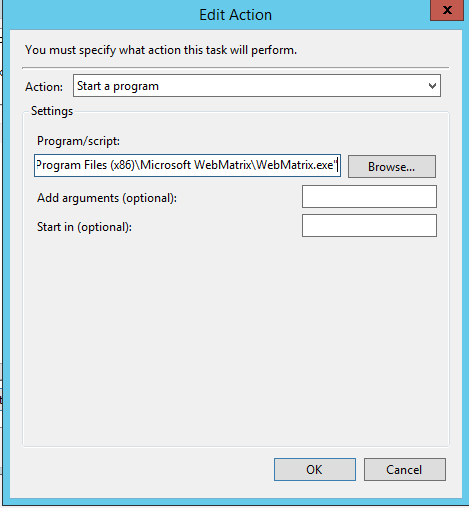
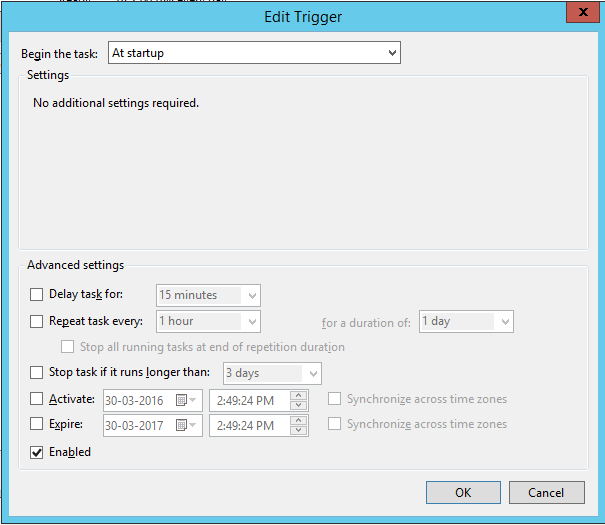
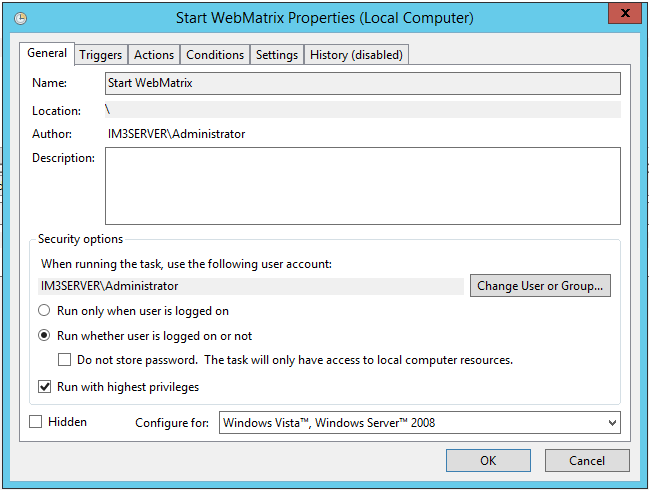
below is my Task Scheduler for my WebMartix3 to Load when Computer Startup.
It didn't work.
bPjnbMV.png

vCJ7Q2u.png


u1KyYHc.png
 

Solution
hyper-v is a v managment tool you can install server 12r2 on a phy-server (install hyper-v on that server) then install a copy of server12r2 on the hyper-v... this last V-server could run software at boot time because hyper-v is managing it from the outside.

p.s, hyper-v is not understood outside networking types so most online stuff is aimed at them... I'm at work but if I find something later I'll post it here for you.
note; one hyperserver per system is a hard rule so that V-server12r2 inside hyper-v can't have hyper-v running inside itself to add another level.

ussnorway

Windows Forum Team
Staff member
Member details
Joined
May 22, 2012
Messages
4,599
to make it happen BEFORE you log in would require a outside management tool like hyper-v... in effect these tools run a admin account first then you log in over the top of that.
 

Jin Chua

Active Member
Member details
Joined
Jan 14, 2015
Messages
4
Thread Author #3
I had installed Hyper-V in the Windows Server 2012 R2, do you know how to set it up?
or is there any tutorial on the website that i can follow?

searched "Hyper-V Startup Application" on google & youtube, but still can't find any information.
 

Neemobeer

Windows Forum Team
Staff member
Member details
Joined
Jul 4, 2015
Messages
8,995
Why do you need a IDE to launch before you login? Better yet why do you need an IDE on a server?
 

ussnorway

Windows Forum Team
Staff member
Member details
Joined
May 22, 2012
Messages
4,599
hyper-v is a v managment tool you can install server 12r2 on a phy-server (install hyper-v on that server) then install a copy of server12r2 on the hyper-v... this last V-server could run software at boot time because hyper-v is managing it from the outside.

p.s, hyper-v is not understood outside networking types so most online stuff is aimed at them... I'm at work but if I find something later I'll post it here for you.
note; one hyperserver per system is a hard rule so that V-server12r2 inside hyper-v can't have hyper-v running inside itself to add another level.
 
Last edited:
Solution

ussnorway

Windows Forum Team
Staff member
Member details
Joined
May 22, 2012
Messages
4,599
hyper-v on older systems;


good text and images here = Link Removed

remote manage hyper-v


windows 10 blocks the old work group work arounds and you have to change options = Link Removed

some other options = Resources and Tools for IT Professionals | TechNet