📎 AI Summary:
The thread discusses a Windows Server 2012 system that failed to boot after running chkdsk, with the initial poster suspecting hardware issues like a failing CMOS battery or drive errors. The second user recommends checking the full error message and suggests that a dead CMOS battery might cause firmware reset issues, leading to boot problems related to boot mode and SATA configuration. The original poster later resolves the issue by switching the BIOS setting from IDE to AHCI, which was possible after addressing the CMOS failure, and successfully restores the server. Overall, the thread emphasizes the importance of BIOS settings and hardware health in troubleshooting boot issues.

Devilstompa

New Member
Joined
Apr 1, 2019
Messages
21
Thread Author #1
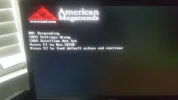
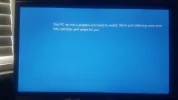
Hello I was working on my server didnt even touch the drives and it wont boot i have windows server 2012. I ran chkdsk and it found 7 errors says it fixed them but still wont boot ? blue screen says system wont boot ? could a old cmos be the problem ? I have a ssd samsung 850pro for main drive then 2 4tb hdds in raid. Im not seeing any error messages either. The blue screen goes to fast to see what error it is to
 

Last edited:
Solution
Well I would start up by fixing the firmware issue (your CMOS battery needs to be replaced) One possible problem is your firmware reset due to the battery being bad and you now have a mismatch between the boot type and how the OS is setup (example firmware is set to legacy boot and OS is GPT\UEFI) or the SATA mode is incorrect (ACHI vs emulation)

Neemobeer

Windows Forum Team
Staff member
Joined
Jul 4, 2015
Messages
8,995
Can you post the full error message or a screenshot?
 

Devilstompa

New Member
Joined
Apr 1, 2019
Messages
21
Thread Author #3
Here is the error message.
 

Attachments

  • 20190722_132008.webp
    20190722_132008.webp
    610.2 KB · Views: 147
  • 20190721_102337.webp
    20190721_102337.webp
    586.9 KB · Views: 125

Neemobeer

Windows Forum Team
Staff member
Joined
Jul 4, 2015
Messages
8,995
Well I would start up by fixing the firmware issue (your CMOS battery needs to be replaced) One possible problem is your firmware reset due to the battery being bad and you now have a mismatch between the boot type and how the OS is setup (example firmware is set to legacy boot and OS is GPT\UEFI) or the SATA mode is incorrect (ACHI vs emulation)
 

Solution

Devilstompa

New Member
Joined
Apr 1, 2019
Messages
21
Thread Author #5
I actually got the server up and running it was simple I installed in ahci and it was set as ide because the cmos failed. Thank you for the help.