Beatkeeper

New Member
Joined
Jan 31, 2009
Messages
36
Any advice on backing up my message folders and also contacts as i,m away to do a win 7 reintall, any advice would be great thanks
 

Solution
Yes that is where all you outlook data is stored, you are not seeing the actual extension because you are hideing extensions of known file types, uncheck that box under tools, folder options view and you will see that it says Outlook.pst on another note that's a pretty large .pst file earlier versions of Outlook, seemed to have some troubles if your .pst file started getting close to 2 gigs, yours is 1.6 gigs, I believe that Outlook 2007 handles larger .pst files pretty well so if you have outlook 2007 installed or are upgrading to it, kindly disregard. But from a shear performance standpoint you might think about archiving and compacting. Just a thought

cybercore

New Member
Joined
Jul 7, 2009
Messages
15,626
Welcome to windows7forums.

Outlook settings are in these 4 folders:


%USERPROFILE%\Application Data\Microsoft\Outlook

%USERPROFILE%\Local Settings\Application Data\Microsoft\Outlook

%USERPROFILE%\AppData\Roaming\Microsoft\Outlook

%USERPROFILE%\AppData\Local\Microsoft\Outlook


Link Removed - Invalid URL
 

Beatkeeper

New Member
Joined
Jan 31, 2009
Messages
36
hi cybercore when i open and of those folders i can bot see any trace of a .pst file please see image for when i opened %USERPROFILE%\Local Settings\Application Data\Microsoft\Outlook folder


Link Removed due to 404 Error

Is the outlook data file the important one? Still super confused?


cybercore

New Member
Joined
Jul 7, 2009
Messages
15,626
Could you please look for .pst files exactly in this folder:

%USERPROFILE%\AppData\Local\Microsoft\Outlook

(Folder options > View > Show hidden files and folders)


~~~~~~~~~~~~~~

As for the large Outlook.dat (?), I'm not sure what it does.
 

Beatkeeper

New Member
Joined
Jan 31, 2009
Messages
36
Hi there thanks for the help, i have looked in the folder %USERPROFILE%\AppData\Local\Microsoft\Outlook
Capture.jpg

And this is what im faced with? Is there something i must do within outlook to create this .pst file as it aint there? Please help me as im goes nuts and need to back up outlook folders and contacts etc, and yes i have unhidden files folders in control panel
 

Last edited:

cybercore

New Member
Joined
Jul 7, 2009
Messages
15,626
Did you check other folders:

Welcome to windows7forums.

Outlook settings are in these 4 folders:


%USERPROFILE%\Application Data\Microsoft\Outlook

%USERPROFILE%\Local Settings\Application Data\Microsoft\Outlook

%USERPROFILE%\AppData\Roaming\Microsoft\Outlook

%USERPROFILE%\AppData\Local\Microsoft\Outlook


Outlook 2010 Backup and File Locations


Did you try these links:


Beatkeeper

New Member
Joined
Jan 31, 2009
Messages
36
i have looked in all the folders but no .pst files. I have tried using the mailbackup but get so far and then get a pop up message saying "outlook2003-2007 is running. Please close and then press ok." Which i do but still get the message, i have even tried shutting down outlook in task manager? Any more ideas?
 

cybercore

New Member
Joined
Jul 7, 2009
Messages
15,626
Check in

C:\ProgramData\Microsoft\OFFICE\


~~~~~~~~~~


You may want to open your system disc C and in the search box type in *.pst.
 

Beatkeeper

New Member
Joined
Jan 31, 2009
Messages
36
it seems that the file "outlook data file" is the .pst file just another name i think, can anyone confirm?
 

Beatkeeper

New Member
Joined
Jan 31, 2009
Messages
36
outlook data file?

Can anyone confirm that this is or contains the .pst info? As i cant find my .pst file anywhere im believe me i HAVE looked everywhere.
 

Trouble

Noob Whisperer
Joined
Nov 30, 2009
Messages
13,722
Your .pst file should be located here
C:\Users\YourUserName\AppData\Local\Microsoft\Outlook
You will have to enable "Show hidden files, folders and drives inorder to see it
Open tools->folder options->view tab from the menu bar or
Click Organize then choose folder and search options then the view tab
 

Beatkeeper

New Member
Joined
Jan 31, 2009
Messages
36
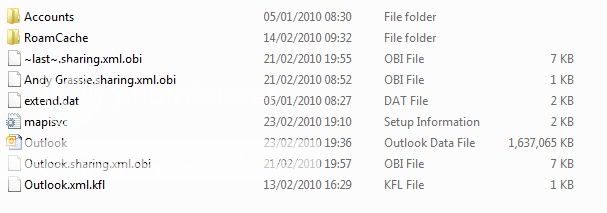
Ok i have looked in all possible folders and this is the best i get, i,m presuming the "outlook data file" is the .pst with ALL my info in it as there is no other real options? Will the said file contain all my messages and cotcts, calender etc, as i want to back it up for a reinstall of win 7 as i,m using a RC vesion, thanks for any feedback.
Capture.jpg
 

Trouble

Noob Whisperer
Joined
Nov 30, 2009
Messages
13,722
Yes that is where all you outlook data is stored, you are not seeing the actual extension because you are hideing extensions of known file types, uncheck that box under tools, folder options view and you will see that it says Outlook.pst on another note that's a pretty large .pst file earlier versions of Outlook, seemed to have some troubles if your .pst file started getting close to 2 gigs, yours is 1.6 gigs, I believe that Outlook 2007 handles larger .pst files pretty well so if you have outlook 2007 installed or are upgrading to it, kindly disregard. But from a shear performance standpoint you might think about archiving and compacting. Just a thought
 

Solution