📎 AI Summary:
The thread discusses the change in how the Calculator behaves in Windows 8 compared to Windows 7, noting that it no longer hovers above other windows and instead opens on the desktop. Participants share solutions, such as using store apps like Snap Calculator or searching for the desktop version via search functions. Overall, users seek ways to make the calculator stay on top for multitasking, with some suggesting third-party apps or scripting methods, and concluding with tips on accessing both calculator types in Windows 8.

terryleemartin

Active Member
Member details
Joined
Nov 21, 2012
Messages
28
Thread Author #1
In Windows 7 you were able to open up a Website or some other window and hit the calculator key on your keyboard, or open the calculator some other way, and it would hover above the window you were viewing. With Windows 8, when you open the calculator, it takes you to the desktop. If you are trying to add up items on a screen, you can't do that anymore. Unless someone has figured it out ----
 

Solution
In Windows 7 you were able to open up a Website or some other window and hit the calculator key on your keyboard, or open the calculator some other way, and it would hover above the window you were viewing. With Windows 8, when you open the calculator, it takes you to the desktop. If you are trying to add up items on a screen, you can't do that anymore. Unless someone has figured it out ----

Hmm, are you talking about the gadget calculator or the actual accessory calculator? If you're looking for a desktop program (not a Windows 8 app), for a calculator that stays on top, that's just a simple property for the window drawn out by the Win32API. I could create a program that would send a message to this...

kemical

Essential Member
Member details
Joined
Aug 28, 2007
Messages
36,163
Try finding a calculator via the Store. They may have one that works in the Modern UI?
 

terryleemartin

Active Member
Member details
Joined
Nov 21, 2012
Messages
28
Thread Author #3
I appreciate the suggestion Kemical. There are lots of calculators in the app store. I'll find one that works. Thank you
 

kemical

Essential Member
Member details
Joined
Aug 28, 2007
Messages
36,163
Let me know Terry if you don't find some thing that works for you..
 

terryleemartin

Active Member
Member details
Joined
Nov 21, 2012
Messages
28
Thread Author #5
Kemical -- the one that works the best for me is called Snap Calculator. You can snap it to the side and it only cost $1.49. It's worth it.
 

AceInfinity

Senior Member
Microsoft MVP
Member details
Joined
Aug 12, 2011
Messages
161
In Windows 7 you were able to open up a Website or some other window and hit the calculator key on your keyboard, or open the calculator some other way, and it would hover above the window you were viewing. With Windows 8, when you open the calculator, it takes you to the desktop. If you are trying to add up items on a screen, you can't do that anymore. Unless someone has figured it out ----

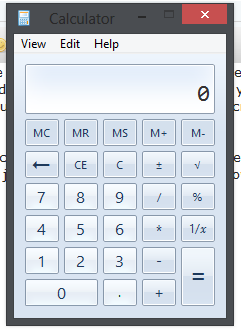
Hmm, are you talking about the gadget calculator or the actual accessory calculator? If you're looking for a desktop program (not a Windows 8 app), for a calculator that stays on top, that's just a simple property for the window drawn out by the Win32API. I could create a program that would send a message to this:

mWqdF.png


Calculator, telling it to stay on top of all other Windows if someone wanted that. Otherwise I think the program AutoHotKey or whatever it was called, can be scripted to do the same?

edit: I'm probably way off with what you were trying to do here though if you were talking about that desktop gadget... Sorry. :cold:

~Ace
 

Solution

MikeHawthorne

Essential Member
Microsoft Community Contributor
Member details
Joined
May 25, 2009
Messages
6,684
Hi

I'm running Windows 8 Pro and I'm not seeing that happen.
I just clicked it on my keyboard and it opened on top of the window I'm in.

Link Removed

Mike
 

Sander

New Member
Member details
Joined
Sep 28, 2014
Messages
1
Okay, so I know this is an old thread. But for those who still wonders.
Windows 8 have two types of calculator. One is the app and the other one is the normal desktop calculator. Just do Windowsflag + S and search for "calculator".