

📎 AI Summary:
The thread discusses a user's experience with a Windows system update, including performing backups, driver updates, and BIOS upgrades, with feedback suggesting these steps are helpful but not strictly necessary. The user reports the update process took about 90 minutes and successfully resolved some issues, such as a registry message and locating a media folder. Additionally, a user inquires about a failed cumulative update (KB4505057) and whether it might cause problems, with others indicating that the recent update KB4503293 appears to have installed successfully and generally advising that missing previous updates may not be critical unless specific issues arise. Overall, the sentiment is positive regarding the update process, with minor concerns about specific update files.
The thread discusses a user's experience with a Windows system update, including performing backups, driver updates, and BIOS upgrades, with feedback suggesting these steps are helpful but not strictly necessary. The user reports the update process took about 90 minutes and successfully resolved some issues, such as a registry message and locating a media folder. Additionally, a user inquires about a failed cumulative update (KB4505057) and whether it might cause problems, with others indicating that the recent update KB4503293 appears to have installed successfully and generally advising that missing previous updates may not be critical unless specific issues arise. Overall, the sentiment is positive regarding the update process, with minor concerns about specific update files.


Just finished the update. For my system it took about 90 minutes. Happily the update looks to have cured a couple of issues. My photos now open without that message about the registry that I was getting yesterday. A;so, not sure if I did it or the update did it, but I found the media folder where my audio books reside. I still am not getting the transparency feature to work - no big deal-just like the way the task bar looks when it's applied. As everyone said, update should go smoothly and it did!! Thanks to all.

umitsayman
Senior Member
Member details
- Joined
- Jun 15, 2019
- Messages
- 2
Hello folks, I recently updated to v1903 x64 with success on June 12, 2019.
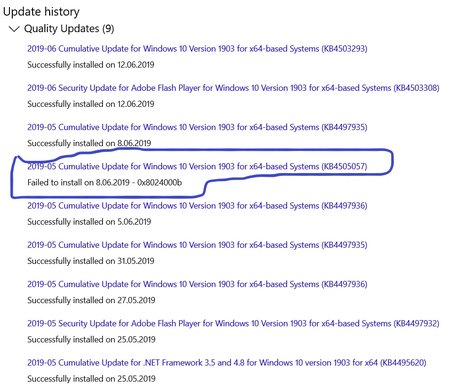
When I check my update history, I saw that 2019-05 Cumulative Update (KB4505057) had failed to update on 8.06.2019 which did not try to update by itself, instead my computer updated to 2019-06 (KB4503293) with success.
I wonder if the missing (KB4505057) will be an issue in operations or should I simply neglect this failure???
If it is a must to have the KB4503293, will it cause problems to force to update with an iso or whatever??? Please respond..
When I check my update history, I saw that 2019-05 Cumulative Update (KB4505057) had failed to update on 8.06.2019 which did not try to update by itself, instead my computer updated to 2019-06 (KB4503293) with success.
I wonder if the missing (KB4505057) will be an issue in operations or should I simply neglect this failure???
If it is a must to have the KB4503293, will it cause problems to force to update with an iso or whatever??? Please respond..
Attachments
-
 Microsoft Defender: No threats detected Scan detailsAnnotation 2019-06-12 163146.webp88 KB · Views: 154

helpifIcan
Fantastic Member
Member details
- Joined
- Jun 20, 2009
- Messages
- 932
I THINK that a later update has the pervious updates included.


