

Google fixed CVE-2026-11641 on June 8, 2026, in Chrome’s Stable Channel update for desktop, closing a critical Windows-only use-after-free flaw in the browser’s Bluetooth code before version 149.0.7827.103 that could let a remote attacker execute code through a crafted web page. The detail that matters is not simply “Bluetooth,” and not even “critical.” It is the combination of a web-delivered exploit path, required user gestures, Windows-specific exposure, and a Chrome release that also carried a much louder actively exploited V8 bug. That mix makes CVE-2026-11641 easy to misread as background noise when it is exactly the sort of browser bug enterprise patching programs are supposed to catch quickly.
The phrase “use after free in Bluetooth” sounds like something that belongs in a device driver bulletin or a Windows hardware stack advisory. In this case, the vulnerable component is Chrome’s handling of Bluetooth-related browser functionality, and the attack arrives through the web. That distinction matters because administrators who treat Bluetooth as a peripheral risk may underestimate what a browser-exposed Bluetooth flaw changes.
Chrome has supported Web Bluetooth for years as part of the broader push to let web applications talk to nearby devices under user control. The security bargain has always been that the browser mediates access: pages do not simply grab devices in the background, and prompts or gestures are supposed to keep users in the loop. CVE-2026-11641 cuts into that bargain because memory-safety bugs live below the permission model.
The NVD description says exploitation required convincing the user to perform specific UI gestures. That is a real constraint, but it is not a comfort blanket. Modern phishing and malvertising campaigns are very good at turning “click here,” “connect this,” “continue,” and “allow” into routine motions that users barely register.
For Windows users, the practical reading is straightforward: this is not about whether you personally use Bluetooth headphones. It is about whether a vulnerable Chrome build contains reachable code that a malicious page can steer into unsafe memory behavior. If Chrome says the severity is critical, the responsible assumption is that the browser vendor believes the failure mode is severe even if the exploit details remain restricted.
Chrome’s update model is designed to make this boring. Consumer installs usually pull updates automatically and apply them after restart. Enterprise fleets, VDI pools, kiosk systems, shared workstations, and tightly controlled images are where “automatic” becomes a policy question rather than a guarantee.
The danger zone is the machine that has downloaded an update but not restarted the browser. Chrome can be patched on disk while still running vulnerable code in memory until the process exits. In environments where users keep browser sessions open for days, the restart prompt is not administrative trivia; it is part of the remediation.
The safest enterprise posture is to verify build inventory rather than assume the update landed. The target is Chrome 149.0.7827.103 or later on Windows for this CVE. Anything earlier should be treated as exposed until updated and restarted.
The key field is user interaction. In browser security, that often means the attacker needs the victim to visit a page, click through a prompt, perform a gesture, or interact with a crafted interface. That is a barrier, but it is also the normal operating model of the web.
High attack complexity is more meaningful. It suggests exploitation may depend on specific state, timing, heap layout, device-related behavior, or UI sequencing. But attackers do not need an exploit that works perfectly on every visit if they can target enough users or refine the lure for a specific organization.
Administrators should avoid the classic CVSS trap: reading “High” as “not urgent” because another item in the same release is being discussed as a zero-day. Browser memory-corruption bugs with network reach and code-execution impact belong in the fast lane. The fact that this one needs gestures makes user training relevant, not sufficient.
CVE-2026-11641 is different. There is no public indication from Google’s advisory that this Bluetooth use-after-free was being exploited in the wild at disclosure. The bug was reported by Google on May 28, and the associated Chromium issue remained restricted when the advisory went out. That is normal for Chrome security releases, especially when related projects or most users have not yet received fixes.
But a lack of public exploit confirmation is not a reason to delay. Chrome’s release notes routinely withhold technical details until patch adoption is broad. This protects users from copycat exploitation, but it also forces defenders to act with incomplete information.
That is the permanent asymmetry of browser patching. Attackers can reverse-engineer patches, diff source changes when they become visible, and weaponize patterns across related code. Defenders get a CVE, a component name, a version boundary, and a short description. The right move is not to wait for a proof-of-concept.
This is not an argument that Web Bluetooth is inherently reckless. There are legitimate uses: device setup flows, diagnostics tools, medical and fitness peripherals, education hardware, point-of-sale accessories, and internal enterprise applications. The web won because it reduced deployment friction, and hardware workflows were never going to stay outside the browser forever.
The trade-off is that every new bridge from a web page to local capability becomes part of the threat model. Permission prompts help with intent, but memory corruption bugs ignore intent. A user may believe they are authorizing a benign interaction while the vulnerable component is being driven into a state the permission model was never designed to reason about.
Windows magnifies the stakes because it is the dominant desktop platform in many managed environments. A Chrome bug limited to Windows can still be a fleet-scale issue for schools, hospitals, local governments, manufacturers, and large enterprises. Platform-specific does not mean niche.
That chronology matters for teams that ingest CVE data into scanners, ticketing systems, and exposure dashboards. A vulnerability can appear before the CPE mapping is fully populated or before NVD has assigned its own CVSS assessment. If your workflow depends on a scanner lighting up only after enrichment is complete, you may lose critical hours.
The CPE configuration is also a good example of why human review still matters. The affected software is Chrome, and the platform condition is Windows. That does not make Windows itself the vulnerable product in the same way as a kernel flaw or Windows component bug. It means the vulnerable Chrome condition is scoped to systems running on Windows.
For reporting and remediation, that distinction prevents confusion. The fix is a Chrome update, not a Windows Update package. Microsoft Edge, Brave, Vivaldi, Opera, and Electron-based products may require separate tracking depending on whether the underlying Chromium code path and vendor release cadence apply, but the CVE as described here is specifically Chrome on Windows.
For managed Chrome deployments, admins should check update policies, version pinning, extension compatibility gates, and restart enforcement. The most common failure mode in mature environments is not ignorance of the patch; it is a slow exception process that lets outdated browser versions linger on “special” machines. Those exceptions are where browser CVEs go to become incident reports.
Security teams should also review whether Web Bluetooth is allowed by policy. Chrome enterprise policies can restrict hardware APIs in ways that make sense for organizations with no legitimate web-based Bluetooth workflows. That is a defense-in-depth measure, not a substitute for patching.
The important mindset shift is to treat browser hardware APIs as privileged surface. If an organization would not casually allow arbitrary sites to interact with USB devices, serial ports, or local files, it should not treat Bluetooth prompts as harmless pop-ups. The browser is now a policy enforcement point for the workstation, and weak policy there becomes workstation exposure.
For IT teams, proof requires inventory. Endpoint management tools should report installed Chrome versions, but defenders should also account for per-user installs, unmanaged developer machines, lab systems, jump boxes, and offline images. Chrome’s rapid-release model reduces exposure only when the deployment reality matches the update assumption.
There is also a communication problem. Users hear “Chrome update” constantly, and urgency fatigue is real. A short internal advisory should emphasize that this release includes critical memory-safety fixes and a separate actively exploited V8 issue, while keeping the ask simple: restart Chrome today.
Incident response teams do not need to hunt for CVE-2026-11641 exploitation unless they have specific indicators, which are not public in the advisory. But they should watch for outdated Chrome versions in high-risk user groups, especially those exposed to untrusted web content, phishing lures, device setup workflows, or unmanaged browsing.
Google has invested heavily in fuzzing, sanitizers, sandboxing, site isolation, and newer memory-safety efforts. Those investments matter; without them, the browser would be far more dangerous. But the June 8 release shows the scale of the challenge: dozens of security fixes across UI, media, graphics, networking, payments, extensions, and hardware-facing components.
The uncomfortable truth is that the browser is too large and too privileged to be judged by old expectations. Every feature that makes Chrome a richer application platform also gives security engineers another lifecycle to manage and attackers another state machine to explore. Memory safety is not a niche compiler debate; it is one of the central security problems of the consumer and enterprise desktop.
That does not mean users should panic. It means patch velocity, exploit mitigations, API policy, and browser process isolation have to be treated as one system. CVE-2026-11641 is one bug, but it is also a symptom of a platform that now mediates much of the local machine.
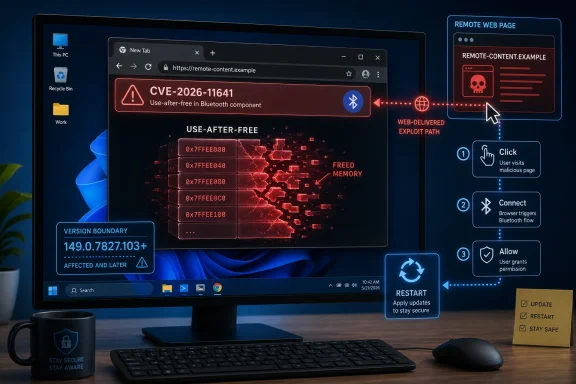 Chrome’s Bluetooth Bug Is a Browser Problem, Not a Pairing Problem
The phrase “use after free in Bluetooth” sounds like something that belongs in a device driver bulletin or a Windows hardware stack advisory. In this case, the vulnerable component is Chrome’s handling of Bluetooth-related browser functionality, and the attack arrives through the web. That distinction matters because administrators who treat Bluetooth as a peripheral risk may underestimate what a browser-exposed Bluetooth flaw changes.Chrome has supported Web Bluetooth for years as part of the broader push to let web applications talk to nearby devices under user control. The security bargain has always been that the browser mediates access: pages do not simply grab devices in the background, and prompts or gestures are supposed to keep users in the loop. CVE-2026-11641 cuts into that bargain because memory-safety bugs live below the permission model.
The NVD description says exploitation required convincing the user to perform specific UI gestures. That is a real constraint, but it is not a comfort blanket. Modern phishing and malvertising campaigns are very good at turning “click here,” “connect this,” “continue,” and “allow” into routine motions that users barely register.
For Windows users, the practical reading is straightforward: this is not about whether you personally use Bluetooth headphones. It is about whether a vulnerable Chrome build contains reachable code that a malicious page can steer into unsafe memory behavior. If Chrome says the severity is critical, the responsible assumption is that the browser vendor believes the failure mode is severe even if the exploit details remain restricted.
The Version Number Is the Boundary Between Theory and Exposure
Chrome’s June 8 Stable Channel update moved desktop builds to 149.0.7827.102/.103 for Windows and Mac, and 149.0.7827.102 for Linux. CVE-2026-11641 is described as affecting Google Chrome on Windows before 149.0.7827.103. That makes the version check the first operational task, not an afterthought.Chrome’s update model is designed to make this boring. Consumer installs usually pull updates automatically and apply them after restart. Enterprise fleets, VDI pools, kiosk systems, shared workstations, and tightly controlled images are where “automatic” becomes a policy question rather than a guarantee.
The danger zone is the machine that has downloaded an update but not restarted the browser. Chrome can be patched on disk while still running vulnerable code in memory until the process exits. In environments where users keep browser sessions open for days, the restart prompt is not administrative trivia; it is part of the remediation.
The safest enterprise posture is to verify build inventory rather than assume the update landed. The target is Chrome 149.0.7827.103 or later on Windows for this CVE. Anything earlier should be treated as exposed until updated and restarted.
“User Interaction Required” Is Not the Same as “Hard to Exploit”
The CISA-ADP CVSS 3.1 vector gives this vulnerability a 7.5 High score: network attack vector, high attack complexity, no privileges required, user interaction required, unchanged scope, and high impact across confidentiality, integrity, and availability. That scoring sounds less alarming than Chrome’s own “Critical” label, but the two are not necessarily in conflict. CVSS is a structured model; vendor severity often reflects exploitability knowledge, component sensitivity, and internal context that public scoring cannot fully express.The key field is user interaction. In browser security, that often means the attacker needs the victim to visit a page, click through a prompt, perform a gesture, or interact with a crafted interface. That is a barrier, but it is also the normal operating model of the web.
High attack complexity is more meaningful. It suggests exploitation may depend on specific state, timing, heap layout, device-related behavior, or UI sequencing. But attackers do not need an exploit that works perfectly on every visit if they can target enough users or refine the lure for a specific organization.
Administrators should avoid the classic CVSS trap: reading “High” as “not urgent” because another item in the same release is being discussed as a zero-day. Browser memory-corruption bugs with network reach and code-execution impact belong in the fast lane. The fact that this one needs gestures makes user training relevant, not sufficient.
Google’s Quietest Critical Bugs Often Hide Behind the Loudest One
The June 8 Chrome release fixed 74 security issues, with a long run of critical and high-severity entries. It also included CVE-2026-11645, a V8 out-of-bounds memory access issue for which Google said an exploit existed in the wild. That zero-day naturally drew the headlines.CVE-2026-11641 is different. There is no public indication from Google’s advisory that this Bluetooth use-after-free was being exploited in the wild at disclosure. The bug was reported by Google on May 28, and the associated Chromium issue remained restricted when the advisory went out. That is normal for Chrome security releases, especially when related projects or most users have not yet received fixes.
But a lack of public exploit confirmation is not a reason to delay. Chrome’s release notes routinely withhold technical details until patch adoption is broad. This protects users from copycat exploitation, but it also forces defenders to act with incomplete information.
That is the permanent asymmetry of browser patching. Attackers can reverse-engineer patches, diff source changes when they become visible, and weaponize patterns across related code. Defenders get a CVE, a component name, a version boundary, and a short description. The right move is not to wait for a proof-of-concept.
Bluetooth Keeps Expanding the Browser’s Attack Surface
The browser used to be a document viewer with scripting. It is now an application runtime with graphics acceleration, payments, USB, HID, media capture, passkeys, file-system access, service workers, and hardware-adjacent APIs. Bluetooth sits squarely inside that expansion.This is not an argument that Web Bluetooth is inherently reckless. There are legitimate uses: device setup flows, diagnostics tools, medical and fitness peripherals, education hardware, point-of-sale accessories, and internal enterprise applications. The web won because it reduced deployment friction, and hardware workflows were never going to stay outside the browser forever.
The trade-off is that every new bridge from a web page to local capability becomes part of the threat model. Permission prompts help with intent, but memory corruption bugs ignore intent. A user may believe they are authorizing a benign interaction while the vulnerable component is being driven into a state the permission model was never designed to reason about.
Windows magnifies the stakes because it is the dominant desktop platform in many managed environments. A Chrome bug limited to Windows can still be a fleet-scale issue for schools, hospitals, local governments, manufacturers, and large enterprises. Platform-specific does not mean niche.
The NVD Record Shows How Vulnerability Data Arrives in Layers
The NVD entry for CVE-2026-11641 is a useful reminder that public vulnerability records are not born complete. The CVE arrived from Chrome on June 8 with the core description, CWE-416 classification, and references. CISA-ADP added a CVSS 3.1 vector later the same day. NIST’s initial analysis on June 9 added affected configuration information tying Google Chrome versions before 149.0.7827.103 to Microsoft Windows.That chronology matters for teams that ingest CVE data into scanners, ticketing systems, and exposure dashboards. A vulnerability can appear before the CPE mapping is fully populated or before NVD has assigned its own CVSS assessment. If your workflow depends on a scanner lighting up only after enrichment is complete, you may lose critical hours.
The CPE configuration is also a good example of why human review still matters. The affected software is Chrome, and the platform condition is Windows. That does not make Windows itself the vulnerable product in the same way as a kernel flaw or Windows component bug. It means the vulnerable Chrome condition is scoped to systems running on Windows.
For reporting and remediation, that distinction prevents confusion. The fix is a Chrome update, not a Windows Update package. Microsoft Edge, Brave, Vivaldi, Opera, and Electron-based products may require separate tracking depending on whether the underlying Chromium code path and vendor release cadence apply, but the CVE as described here is specifically Chrome on Windows.
Enterprise IT Should Treat This as a Browser Runtime Incident
The operational response should look like a browser runtime incident, not a peripheral lockdown exercise. Disabling Bluetooth at the OS level may reduce some adjacent risk in certain environments, but it is not the primary remediation for a vulnerable Chrome build. The fix is updating Chrome and ensuring the running process is replaced.For managed Chrome deployments, admins should check update policies, version pinning, extension compatibility gates, and restart enforcement. The most common failure mode in mature environments is not ignorance of the patch; it is a slow exception process that lets outdated browser versions linger on “special” machines. Those exceptions are where browser CVEs go to become incident reports.
Security teams should also review whether Web Bluetooth is allowed by policy. Chrome enterprise policies can restrict hardware APIs in ways that make sense for organizations with no legitimate web-based Bluetooth workflows. That is a defense-in-depth measure, not a substitute for patching.
The important mindset shift is to treat browser hardware APIs as privileged surface. If an organization would not casually allow arbitrary sites to interact with USB devices, serial ports, or local files, it should not treat Bluetooth prompts as harmless pop-ups. The browser is now a policy enforcement point for the workstation, and weak policy there becomes workstation exposure.
The Patch Is Simple; Proving It Landed Is the Work
For individual users, the advice is mundane because good security often is: open Chrome’s About page, let it check for updates, and restart the browser. On Windows, the relevant safe line for CVE-2026-11641 is 149.0.7827.103 or newer. If the browser says it is updated but asks for a relaunch, the job is not done.For IT teams, proof requires inventory. Endpoint management tools should report installed Chrome versions, but defenders should also account for per-user installs, unmanaged developer machines, lab systems, jump boxes, and offline images. Chrome’s rapid-release model reduces exposure only when the deployment reality matches the update assumption.
There is also a communication problem. Users hear “Chrome update” constantly, and urgency fatigue is real. A short internal advisory should emphasize that this release includes critical memory-safety fixes and a separate actively exploited V8 issue, while keeping the ask simple: restart Chrome today.
Incident response teams do not need to hunt for CVE-2026-11641 exploitation unless they have specific indicators, which are not public in the advisory. But they should watch for outdated Chrome versions in high-risk user groups, especially those exposed to untrusted web content, phishing lures, device setup workflows, or unmanaged browsing.
Memory Safety Remains Chrome’s Unfinished Business
CVE-2026-11641 belongs to CWE-416, the familiar use-after-free class that has haunted browsers for decades. In simple terms, the software keeps using a memory object after it has been released, creating a path for crashes, corruption, or attacker-controlled behavior. In a browser, where hostile input is the default assumption, that class of bug is particularly dangerous.Google has invested heavily in fuzzing, sanitizers, sandboxing, site isolation, and newer memory-safety efforts. Those investments matter; without them, the browser would be far more dangerous. But the June 8 release shows the scale of the challenge: dozens of security fixes across UI, media, graphics, networking, payments, extensions, and hardware-facing components.
The uncomfortable truth is that the browser is too large and too privileged to be judged by old expectations. Every feature that makes Chrome a richer application platform also gives security engineers another lifecycle to manage and attackers another state machine to explore. Memory safety is not a niche compiler debate; it is one of the central security problems of the consumer and enterprise desktop.
That does not mean users should panic. It means patch velocity, exploit mitigations, API policy, and browser process isolation have to be treated as one system. CVE-2026-11641 is one bug, but it is also a symptom of a platform that now mediates much of the local machine.
The Practical Reading for WindowsForum Readers
CVE-2026-11641 is not the flashiest Chrome bug in the June 8 release, but it is exactly the kind of issue that should make Windows administrators tighten their browser-update assumptions. The exploit path is remote, the impact is code execution, the component is hardware-adjacent, and the public details are intentionally sparse.- Chrome on Windows should be updated to 149.0.7827.103 or later to address CVE-2026-11641.
- A browser restart is required before users can assume the patched code is actually running.
- The vulnerability is in Chrome’s Bluetooth-related browser code, not a Windows Bluetooth driver bulletin.
- The required UI gestures reduce drive-by simplicity but do not make phishing or crafted-page exploitation implausible.
- Enterprise teams should verify Chrome fleet versions rather than waiting for NVD enrichment or scanner CPE logic to catch up.
- Organizations with no business need for Web Bluetooth should consider restricting it by browser policy after patching is complete.
References
- Primary source: NVD / Chromium
Published: 2026-06-15T19:13:48-07:00
NVD - CVE-2026-11641
 nvd.nist.gov
- Security advisory: MSRC
Published: 2026-06-15T19:13:48-07:00
Original feed URL
Security Update Guide - Microsoft Security Response Center
 msrc.microsoft.com
- Related coverage: radar.offseq.com
CVE-2026-11641: Use after free in Google Chrome - Live Threat Intelligence - Threat Radar | OffSeq.com
Detailed information about CVE-2026-11641: Use after free in Google Chrome affecting Google Chrome. Get real-time updates, technical details, and mitigation strradar.offseq.com
