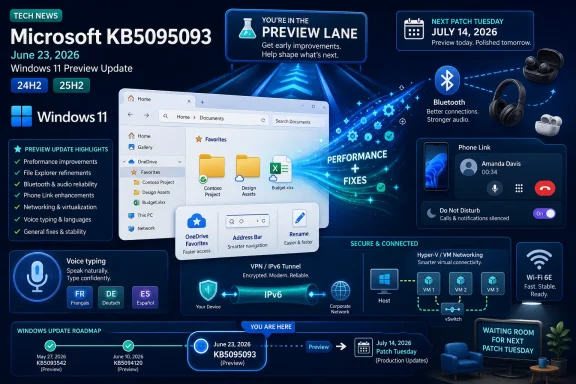
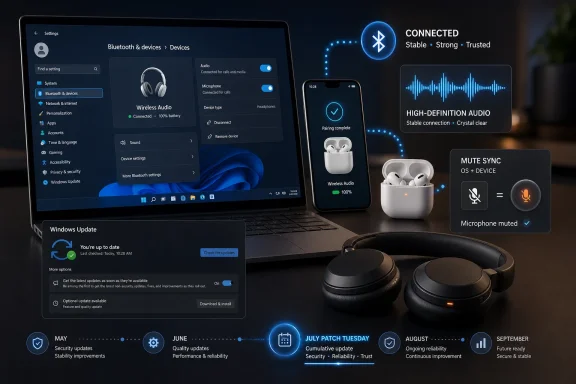
Microsoft released Windows 11 KB5095093 on June 23, 2026, as an optional preview update for Windows 11 versions 24H2 and 25H2, and its most consequential fix may be a broad Bluetooth reliability push affecting AirPods, Beats Studio Pro, LE Audio devices, mute sync, reconnect behavior, and voice-call stability. That is not the flashiest part of the update, but it may be the part users actually feel first. For years, Bluetooth on Windows has been the kind of subsystem people diagnose with folk medicine: toggle this, forget that device, reboot twice, disable LE Audio, blame the earbuds, blame the laptop, then quietly give up.
The notable thing about this update is not that Microsoft fixed one pairing edge case. It is that the company appears to be treating Bluetooth audio as a stack-wide experience problem rather than a driver footnote. In a world where the default personal computer headset is increasingly a pair of wireless earbuds designed first for phones, Windows can no longer afford to behave like Bluetooth is an accessory bus bolted onto the side of the operating system.
Windows users have learned to tolerate Bluetooth in a way they would never tolerate Wi-Fi, keyboards, or display output. A headset that works perfectly with an iPhone, Android phone, or tablet may become a temperamental science project on a Windows laptop, especially when microphones, multipoint pairing, sleep resume, and newer LE Audio paths enter the picture. That gap matters because Bluetooth audio is no longer a convenience feature; for many workers, students, gamers, and commuters, it is the audio stack.
KB5095093 lands in that context. The update is officially a cumulative preview for Windows 11 24H2 and 25H2, moving systems to OS builds 26100.8737 and 26200.8737 respectively. It also arrives alongside more visible changes, including Point-in-time restore, update pause refinements, File Explorer fixes, widget changes, and other polish that will probably dominate casual release-note scanning.
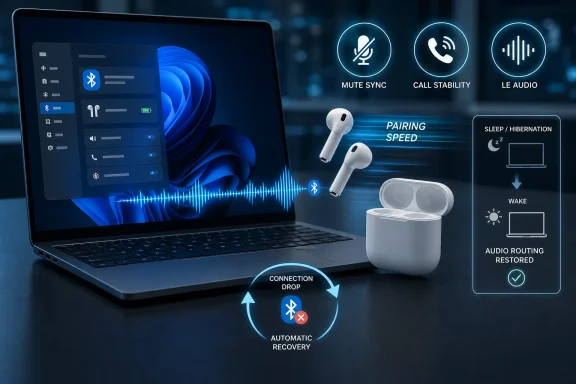
But the Bluetooth section is unusually dense. Microsoft says the update improves compatibility with certain Bluetooth audio devices, helps AirPods appear faster in pairing mode, improves microphone reliability on Beats Studio Pro headphones, keeps microphone mute state in sync with Hands-Free Profile devices, improves stability with some PC-maker Bluetooth drivers, improves call quality with classic audio devices, improves LE Audio streaming after a connection drop, and reduces the time LE Audio accessories take to begin playback while the microphone is active.
That is not one bug. That is a pattern.
The pattern is what makes the update interesting. Microsoft is not simply smoothing the Settings app or nudging a single Apple device into compliance. It is working at the messy intersection of Bluetooth profiles, OEM drivers, modern earbuds, sleep states, telephony modes, and the awkward audio compromises that appear when a device must both play and capture sound at the same time.
That is especially true with AirPods because they have trained users to expect pairing to be nearly ceremonial. Open the lid near an Apple device and the ecosystem performs competence. Bring those same earbuds to Windows and the experience can feel like stepping back into an older era of Bluetooth discovery, where timing, mode, driver state, and luck all matter too much.
Microsoft’s fix for faster AirPods appearance in pairing mode is therefore more symbolic than it looks. It acknowledges that Windows is judged against phone-first ecosystems, not against the Bluetooth control panel of 2012. A pairing list that updates too slowly is not merely a UI issue; it is a credibility issue.
The Beats Studio Pro microphone fix carries a similar message. Premium headphones are increasingly sold as all-purpose work, travel, music, and meeting devices. If the microphone is unreliable on Windows, the headset becomes unreliable in the place where many users spend their workday. Microsoft does not need to own the headset market to be blamed when the headset fails during a Teams call.
The Apple angle will get attention because AirPods and Beats are recognizable names. But the larger story is that Windows has to interoperate better with devices whose center of gravity is outside the PC industry. Bluetooth audio is now a consumer-electronics ecosystem problem, and Windows cannot solve it by assuming every accessory was built with Windows as the primary host.
That is the important distinction. LE Audio is not the villain. The trouble is the transition period, where old profiles, new profiles, OEM Bluetooth radios, vendor drivers, headset firmware, and Windows audio routing all have to behave as though they were designed by one team with one set of assumptions. They were not.
When one earbud disappears, reconnects slowly, or refuses to behave until LE Audio is disabled, the user does not care which layer misbehaved. They see Windows failing to perform a basic task. That is why KB5095093’s LE Audio fixes matter: Microsoft says the update improves streaming reliability after a connection is lost and restored, and reduces the delay before LE Audio accessories start playing audio when the microphone is being used.
That last detail is particularly revealing. Bluetooth audio often gets ugly when a device moves from listening mode into call mode. Users experience it as delay, stutter, degraded quality, or sudden changes in behavior when a microphone activates. Engineers see competing requirements: bidirectional audio, power management, codec support, profile negotiation, and driver timing.
For years, those compromises have made Bluetooth headsets on Windows feel like they have two personalities. In music playback, they may be fine. In meetings, games, calls, recordings, and voice chat, they can suddenly become fragile. Any update that reduces that mode-switch penalty chips away at one of the oldest complaints about Bluetooth audio on PCs.
The fact that it needed explicit improvement says a lot about where Windows Bluetooth has been. Modern headsets often have touch controls, physical mute buttons, LEDs, tones, or companion-app indicators. Windows has its own mixer, meeting apps have their own mute controls, and Bluetooth profiles carry their own assumptions. When those states drift, the user is left in the worst possible position: unsure whether they are muted.
No one wants to debug mute state in the middle of a call. It is a tiny failure with outsized social consequences. The operating system can survive a delayed reconnect; it is harder to forgive a platform that leaves you uncertain about whether your microphone is live.
This is why the HFP sync improvement should not be dismissed as a niche headset feature. It is a workplace reliability fix. The remote-work era made audio state a core part of computing etiquette, and Windows has to treat mute state with the same seriousness it treats battery status, network status, or camera permissions.
There is also an accessibility and confidence angle here. Clear, consistent state feedback matters for users who rely on hardware controls, visual indicators, or predictable system behavior. A mute button that means the same thing across the headset and OS is not luxurious polish; it is the minimum viable contract.
KB5095093 reportedly improves the consistency and smoothness of the Bluetooth settings experience. That is less glamorous than a codec fix, but it is central to whether the whole subsystem feels trustworthy. When the control surface is sluggish, users cannot distinguish between a device problem and a UI problem.
This matters because Bluetooth troubleshooting is iterative. Users pair, unpair, reconnect, remove, re-add, toggle, test audio, switch microphones, close the case, open the case, and try again. If Settings lags or misreports state during that sequence, it injects noise into every diagnostic step.
A better Bluetooth page will not make a weak radio stronger or a bad OEM driver good. But it can reduce the ritualistic feel of troubleshooting. It can also make Windows feel less like it is hiding the truth about what is connected.
The operating system’s job is not only to connect devices. It is to make device state legible. Windows has often failed at that with Bluetooth, and this update appears to recognize that reliability includes the interface used to recover from unreliability.
That chaos shows up when a headset that worked before lunch will not reconnect after the lid opens. The device is still paired. Bluetooth is still on. Windows may even claim everything is normal. Yet audio routes incorrectly, a microphone vanishes, or the headset sits in limbo until the user manually reconnects or reboots.
Microsoft says KB5095093 reduces the time it takes for Bluetooth devices to reconnect after waking the PC from sleep or hibernation. It also addresses a scenario where disconnecting a Bluetooth device to connect it elsewhere could make returning to the previous Windows connection slower or unreliable. Those are exactly the kinds of lifecycle bugs that make Bluetooth feel flaky even when initial pairing succeeds.
The significance is that Microsoft is paying attention to the full day of device use, not just the first pairing. A headset is not “working” if it pairs cleanly at 9 a.m. and then falls apart after a meeting, a commute, a lunch break, or a lid-close event. Reliability is temporal. It has to survive real user behavior.
For IT departments, this is not an aesthetic concern. Every reconnect failure can become a helpdesk ticket, a wasted meeting, or a user workaround that bypasses standard equipment. If a company issues Bluetooth headsets and Windows laptops, the platform’s ability to recover gracefully from sleep is part of the fleet’s productivity baseline.
Classic audio paths are still deeply relevant because many headsets, drivers, enterprise environments, and call scenarios depend on them. The update’s improvements to voice-call quality and reliability when audio and microphone are used together on classic devices speak to a long-standing compromise. Bluetooth stereo playback and microphone capture have historically not coexisted gracefully, and the mode shift into call behavior can still surprise users.
The reference to certain PC manufacturer drivers and error code 0x9F also points to the limits of Microsoft’s control. Windows Bluetooth is not just Windows. It is Windows plus OEM driver packages, radio firmware, audio components, headset firmware, and sometimes enterprise driver management. A fix in the operating system can improve behavior, but the ecosystem remains distributed.
That is why this update should be welcomed without being oversold. Microsoft can reduce friction and harden the stack, but it cannot instantly erase every vendor-specific failure. Some Bluetooth problems will still be driver bugs. Some will still be headset firmware bugs. Some will still be caused by cheap adapters, aggressive power management, or years of paired-device cruft.
Even so, operating-system-level improvements matter precisely because they can raise the floor. Most users will not install experimental headset firmware or swap Bluetooth chipsets. They will install Windows updates. If KB5095093 makes the common cases less fragile, it does more good than a dozen support articles telling people to remove and re-pair devices.
That tension is not new. Microsoft’s preview updates are a staging ground for non-security fixes and feature refinements. They can deliver meaningful quality-of-life improvements before the next broad release, but they also require users to opt into a slightly more proactive update posture. For a single consumer laptop with broken earbuds, that may be a worthwhile bet. For a managed environment, it is a testing decision.
The Bluetooth fixes complicate that calculus because audio reliability is both mundane and mission-critical. A broken headset does not sound like a security emergency, but it can halt a call, disrupt training, interfere with accessibility, or undermine a support workflow. In some organizations, audio failures are productivity incidents.
Administrators should also remember that Bluetooth behavior is hardware-dependent. A fix that improves AirPods discovery on one Intel-based laptop may be irrelevant to a fleet using different radios. A Beats microphone improvement may matter to executives using premium headsets and not at all to warehouse devices. Testing should therefore include the actual accessories people use, not just a generic Bluetooth mouse and keyboard.
The update’s optional status also affects user expectations. If one employee installs it and reports that AirPods suddenly behave better, another employee on the same Windows version but without the preview may not see the same improvement. In mixed environments, helpdesk staff should track build numbers, not just “Windows 11 24H2” or “Windows 11 25H2.”
This is where Microsoft’s broader Windows 11 strategy becomes relevant. The company has spent years trying to make Windows feel modern through visual polish, AI surfaces, widgets, app integration, and update controls. But the parts that most shape daily trust are often less glamorous: audio, Bluetooth, sleep, File Explorer, Settings, power, search, and recovery.
KB5095093 is interesting because it bundles both worlds. Point-in-time restore and update pause refinements are platform-control features. File Explorer and Settings improvements are daily usability fixes. Bluetooth reliability touches the lived reality of a PC as a communications device. Together, they suggest Microsoft knows Windows 11’s reputation cannot be repaired by new surfaces alone.
The Bluetooth fixes also expose how much the PC has changed. A laptop is now expected to behave as a meeting room, phone extension, gaming station, entertainment device, and managed enterprise endpoint. Wireless audio crosses all of those identities. The more roles Windows tries to play, the less acceptable it is for Bluetooth to behave like an afterthought.
This is especially important for Windows on Arm and ultraportable PCs, where users expect phone-like resume, battery life, and accessory behavior. If Microsoft wants Windows devices to compete with tablets and MacBooks in the premium mobility space, Bluetooth cannot be one of the features users apologize for.
What KB5095093 does instead is show a healthier engineering priority. It targets the connective tissue of the experience: discovery, mute state, call reliability, LE Audio recovery, microphone behavior, Settings responsiveness, and reconnect timing. These are the parts that determine whether users perceive the system as stable.
That perception matters because Bluetooth failures are cumulative. One failed pairing is an annoyance. Repeated reconnect failures become a reputation. A headset that sometimes loses one earbud becomes a story users tell themselves about Windows. Those stories are difficult to reverse because they are built from lived experience, not marketing.
Microsoft’s challenge is that it must now make Bluetooth improvement feel continuous. If KB5095093 is followed by more compatibility fixes, better driver coordination, clearer troubleshooting, and fewer regressions, users may gradually stop assuming the worst. If it is a one-off burst of attention, the old narrative will return quickly.
The company should also be more explicit about Bluetooth quality in release communication. Users understand “AirPods pair faster.” They understand “mute state now syncs.” They understand “headsets reconnect faster after sleep.” These are concrete promises. Microsoft often buries this kind of practical improvement below more strategic branding, even though it may be the thing that most changes the user’s day.
The notable thing about this update is not that Microsoft fixed one pairing edge case. It is that the company appears to be treating Bluetooth audio as a stack-wide experience problem rather than a driver footnote. In a world where the default personal computer headset is increasingly a pair of wireless earbuds designed first for phones, Windows can no longer afford to behave like Bluetooth is an accessory bus bolted onto the side of the operating system.
 Windows Finally Admits Bluetooth Is a Daily-Use Feature
Windows users have learned to tolerate Bluetooth in a way they would never tolerate Wi-Fi, keyboards, or display output. A headset that works perfectly with an iPhone, Android phone, or tablet may become a temperamental science project on a Windows laptop, especially when microphones, multipoint pairing, sleep resume, and newer LE Audio paths enter the picture. That gap matters because Bluetooth audio is no longer a convenience feature; for many workers, students, gamers, and commuters, it is the audio stack.KB5095093 lands in that context. The update is officially a cumulative preview for Windows 11 24H2 and 25H2, moving systems to OS builds 26100.8737 and 26200.8737 respectively. It also arrives alongside more visible changes, including Point-in-time restore, update pause refinements, File Explorer fixes, widget changes, and other polish that will probably dominate casual release-note scanning.
But the Bluetooth section is unusually dense. Microsoft says the update improves compatibility with certain Bluetooth audio devices, helps AirPods appear faster in pairing mode, improves microphone reliability on Beats Studio Pro headphones, keeps microphone mute state in sync with Hands-Free Profile devices, improves stability with some PC-maker Bluetooth drivers, improves call quality with classic audio devices, improves LE Audio streaming after a connection drop, and reduces the time LE Audio accessories take to begin playback while the microphone is active.
That is not one bug. That is a pattern.
The pattern is what makes the update interesting. Microsoft is not simply smoothing the Settings app or nudging a single Apple device into compliance. It is working at the messy intersection of Bluetooth profiles, OEM drivers, modern earbuds, sleep states, telephony modes, and the awkward audio compromises that appear when a device must both play and capture sound at the same time.
AirPods Are the Headline Because Windows Lost the Pairing Moment
AirPods pairing faster is the kind of fix that sounds small until you remember how pairing failures shape user trust. The first few seconds of pairing are where users decide whether the problem is the PC, the earbuds, the driver, Windows 11, or themselves. When a device does not appear in the Bluetooth list quickly, the modern instinct is not patience; it is suspicion.That is especially true with AirPods because they have trained users to expect pairing to be nearly ceremonial. Open the lid near an Apple device and the ecosystem performs competence. Bring those same earbuds to Windows and the experience can feel like stepping back into an older era of Bluetooth discovery, where timing, mode, driver state, and luck all matter too much.
Microsoft’s fix for faster AirPods appearance in pairing mode is therefore more symbolic than it looks. It acknowledges that Windows is judged against phone-first ecosystems, not against the Bluetooth control panel of 2012. A pairing list that updates too slowly is not merely a UI issue; it is a credibility issue.
The Beats Studio Pro microphone fix carries a similar message. Premium headphones are increasingly sold as all-purpose work, travel, music, and meeting devices. If the microphone is unreliable on Windows, the headset becomes unreliable in the place where many users spend their workday. Microsoft does not need to own the headset market to be blamed when the headset fails during a Teams call.
The Apple angle will get attention because AirPods and Beats are recognizable names. But the larger story is that Windows has to interoperate better with devices whose center of gravity is outside the PC industry. Bluetooth audio is now a consumer-electronics ecosystem problem, and Windows cannot solve it by assuming every accessory was built with Windows as the primary host.
The LE Audio Promise Ran Into the Windows Reality
Bluetooth LE Audio was supposed to be one of those quiet platform upgrades that makes everything better: lower power, better efficiency, newer codecs, improved broadcast possibilities, and a more modern foundation for wireless audio. On Windows, as on other platforms, the promise has been real. The experience has also been uneven enough that some users learned to disable LE Audio just to get their earbuds behaving normally.That is the important distinction. LE Audio is not the villain. The trouble is the transition period, where old profiles, new profiles, OEM Bluetooth radios, vendor drivers, headset firmware, and Windows audio routing all have to behave as though they were designed by one team with one set of assumptions. They were not.
When one earbud disappears, reconnects slowly, or refuses to behave until LE Audio is disabled, the user does not care which layer misbehaved. They see Windows failing to perform a basic task. That is why KB5095093’s LE Audio fixes matter: Microsoft says the update improves streaming reliability after a connection is lost and restored, and reduces the delay before LE Audio accessories start playing audio when the microphone is being used.
That last detail is particularly revealing. Bluetooth audio often gets ugly when a device moves from listening mode into call mode. Users experience it as delay, stutter, degraded quality, or sudden changes in behavior when a microphone activates. Engineers see competing requirements: bidirectional audio, power management, codec support, profile negotiation, and driver timing.
For years, those compromises have made Bluetooth headsets on Windows feel like they have two personalities. In music playback, they may be fine. In meetings, games, calls, recordings, and voice chat, they can suddenly become fragile. Any update that reduces that mode-switch penalty chips away at one of the oldest complaints about Bluetooth audio on PCs.
The Mute Button Fix Is Small, Human, and Overdue
One of the most practical changes in KB5095093 is mute-state synchronization between Windows’ audio mixer and Bluetooth headsets using Hands-Free Profile. If the user mutes the microphone in Windows, the headset should understand that state. If the user unmutes using a headset control, Windows should reflect the change. That sounds obvious because it is obvious.The fact that it needed explicit improvement says a lot about where Windows Bluetooth has been. Modern headsets often have touch controls, physical mute buttons, LEDs, tones, or companion-app indicators. Windows has its own mixer, meeting apps have their own mute controls, and Bluetooth profiles carry their own assumptions. When those states drift, the user is left in the worst possible position: unsure whether they are muted.
No one wants to debug mute state in the middle of a call. It is a tiny failure with outsized social consequences. The operating system can survive a delayed reconnect; it is harder to forgive a platform that leaves you uncertain about whether your microphone is live.
This is why the HFP sync improvement should not be dismissed as a niche headset feature. It is a workplace reliability fix. The remote-work era made audio state a core part of computing etiquette, and Windows has to treat mute state with the same seriousness it treats battery status, network status, or camera permissions.
There is also an accessibility and confidence angle here. Clear, consistent state feedback matters for users who rely on hardware controls, visual indicators, or predictable system behavior. A mute button that means the same thing across the headset and OS is not luxurious polish; it is the minimum viable contract.
The Settings App Was Part of the Bluetooth Problem
Bluetooth failures on Windows have always been made worse by the place users go to fix them. Settings should be the calm, authoritative view of connected hardware. Too often, the Bluetooth & devices page has behaved like an unreliable witness: lagging behind actual device state, showing stale connection information, or hesitating just long enough to make users click the wrong thing.KB5095093 reportedly improves the consistency and smoothness of the Bluetooth settings experience. That is less glamorous than a codec fix, but it is central to whether the whole subsystem feels trustworthy. When the control surface is sluggish, users cannot distinguish between a device problem and a UI problem.
This matters because Bluetooth troubleshooting is iterative. Users pair, unpair, reconnect, remove, re-add, toggle, test audio, switch microphones, close the case, open the case, and try again. If Settings lags or misreports state during that sequence, it injects noise into every diagnostic step.
A better Bluetooth page will not make a weak radio stronger or a bad OEM driver good. But it can reduce the ritualistic feel of troubleshooting. It can also make Windows feel less like it is hiding the truth about what is connected.
The operating system’s job is not only to connect devices. It is to make device state legible. Windows has often failed at that with Bluetooth, and this update appears to recognize that reliability includes the interface used to recover from unreliability.
Sleep Resume Is Where PC Bluetooth Goes to Die
Another important fix concerns reconnection after sleep or hibernation. This is one of the most PC-specific pain points in Bluetooth audio. Phones and tablets sleep aggressively too, but their hardware and software stacks are more vertically integrated. Windows laptops live in a more chaotic world of different chipsets, firmware, power policies, drivers, docks, corporate images, and peripheral histories.That chaos shows up when a headset that worked before lunch will not reconnect after the lid opens. The device is still paired. Bluetooth is still on. Windows may even claim everything is normal. Yet audio routes incorrectly, a microphone vanishes, or the headset sits in limbo until the user manually reconnects or reboots.
Microsoft says KB5095093 reduces the time it takes for Bluetooth devices to reconnect after waking the PC from sleep or hibernation. It also addresses a scenario where disconnecting a Bluetooth device to connect it elsewhere could make returning to the previous Windows connection slower or unreliable. Those are exactly the kinds of lifecycle bugs that make Bluetooth feel flaky even when initial pairing succeeds.
The significance is that Microsoft is paying attention to the full day of device use, not just the first pairing. A headset is not “working” if it pairs cleanly at 9 a.m. and then falls apart after a meeting, a commute, a lunch break, or a lid-close event. Reliability is temporal. It has to survive real user behavior.
For IT departments, this is not an aesthetic concern. Every reconnect failure can become a helpdesk ticket, a wasted meeting, or a user workaround that bypasses standard equipment. If a company issues Bluetooth headsets and Windows laptops, the platform’s ability to recover gracefully from sleep is part of the fleet’s productivity baseline.
Classic Audio Still Matters in the LE Audio Era
It is tempting to frame this update as a forward-looking LE Audio story, but Microsoft’s release notes also point to classic Bluetooth audio and Hands-Free Profile. That is the right emphasis. The installed base is not moving in one clean wave from old Bluetooth audio to new Bluetooth audio. It is a messy overlap, and Windows has to serve all of it.Classic audio paths are still deeply relevant because many headsets, drivers, enterprise environments, and call scenarios depend on them. The update’s improvements to voice-call quality and reliability when audio and microphone are used together on classic devices speak to a long-standing compromise. Bluetooth stereo playback and microphone capture have historically not coexisted gracefully, and the mode shift into call behavior can still surprise users.
The reference to certain PC manufacturer drivers and error code 0x9F also points to the limits of Microsoft’s control. Windows Bluetooth is not just Windows. It is Windows plus OEM driver packages, radio firmware, audio components, headset firmware, and sometimes enterprise driver management. A fix in the operating system can improve behavior, but the ecosystem remains distributed.
That is why this update should be welcomed without being oversold. Microsoft can reduce friction and harden the stack, but it cannot instantly erase every vendor-specific failure. Some Bluetooth problems will still be driver bugs. Some will still be headset firmware bugs. Some will still be caused by cheap adapters, aggressive power management, or years of paired-device cruft.
Even so, operating-system-level improvements matter precisely because they can raise the floor. Most users will not install experimental headset firmware or swap Bluetooth chipsets. They will install Windows updates. If KB5095093 makes the common cases less fragile, it does more good than a dozen support articles telling people to remove and re-pair devices.
Optional Preview Updates Are Still a Trust Exercise
There is a catch: KB5095093 is an optional preview update. That means many users will not receive it automatically on the same cadence as a mandatory Patch Tuesday security release, and cautious administrators may wait for the changes to roll into a later cumulative update. The people most annoyed by Bluetooth bugs may be the most eager to install it; the people responsible for stable fleets may be the most reluctant.That tension is not new. Microsoft’s preview updates are a staging ground for non-security fixes and feature refinements. They can deliver meaningful quality-of-life improvements before the next broad release, but they also require users to opt into a slightly more proactive update posture. For a single consumer laptop with broken earbuds, that may be a worthwhile bet. For a managed environment, it is a testing decision.
The Bluetooth fixes complicate that calculus because audio reliability is both mundane and mission-critical. A broken headset does not sound like a security emergency, but it can halt a call, disrupt training, interfere with accessibility, or undermine a support workflow. In some organizations, audio failures are productivity incidents.
Administrators should also remember that Bluetooth behavior is hardware-dependent. A fix that improves AirPods discovery on one Intel-based laptop may be irrelevant to a fleet using different radios. A Beats microphone improvement may matter to executives using premium headsets and not at all to warehouse devices. Testing should therefore include the actual accessories people use, not just a generic Bluetooth mouse and keyboard.
The update’s optional status also affects user expectations. If one employee installs it and reports that AirPods suddenly behave better, another employee on the same Windows version but without the preview may not see the same improvement. In mixed environments, helpdesk staff should track build numbers, not just “Windows 11 24H2” or “Windows 11 25H2.”
The Real Competition Is the Phone in Your Pocket
The harsh truth for Microsoft is that users compare Windows Bluetooth to their phones, not to previous Windows releases. If earbuds pair instantly with a phone, reconnect after sleep-like idle states, switch modes during calls, and show consistent battery and mute state, then Windows looks bad when it stumbles. The technical complexity may be greater on PCs, but the user’s patience is not.This is where Microsoft’s broader Windows 11 strategy becomes relevant. The company has spent years trying to make Windows feel modern through visual polish, AI surfaces, widgets, app integration, and update controls. But the parts that most shape daily trust are often less glamorous: audio, Bluetooth, sleep, File Explorer, Settings, power, search, and recovery.
KB5095093 is interesting because it bundles both worlds. Point-in-time restore and update pause refinements are platform-control features. File Explorer and Settings improvements are daily usability fixes. Bluetooth reliability touches the lived reality of a PC as a communications device. Together, they suggest Microsoft knows Windows 11’s reputation cannot be repaired by new surfaces alone.
The Bluetooth fixes also expose how much the PC has changed. A laptop is now expected to behave as a meeting room, phone extension, gaming station, entertainment device, and managed enterprise endpoint. Wireless audio crosses all of those identities. The more roles Windows tries to play, the less acceptable it is for Bluetooth to behave like an afterthought.
This is especially important for Windows on Arm and ultraportable PCs, where users expect phone-like resume, battery life, and accessory behavior. If Microsoft wants Windows devices to compete with tablets and MacBooks in the premium mobility space, Bluetooth cannot be one of the features users apologize for.
Microsoft’s Fix Is Welcome Because the Bar Was Too Low
There is a temptation to treat this update as a redemption story: Windows Bluetooth was bad, Microsoft fixed it, AirPods are happy, everyone moves on. That is too neat. Bluetooth on Windows has been frustrating for too many users across too many devices for one optional update to close the book.What KB5095093 does instead is show a healthier engineering priority. It targets the connective tissue of the experience: discovery, mute state, call reliability, LE Audio recovery, microphone behavior, Settings responsiveness, and reconnect timing. These are the parts that determine whether users perceive the system as stable.
That perception matters because Bluetooth failures are cumulative. One failed pairing is an annoyance. Repeated reconnect failures become a reputation. A headset that sometimes loses one earbud becomes a story users tell themselves about Windows. Those stories are difficult to reverse because they are built from lived experience, not marketing.
Microsoft’s challenge is that it must now make Bluetooth improvement feel continuous. If KB5095093 is followed by more compatibility fixes, better driver coordination, clearer troubleshooting, and fewer regressions, users may gradually stop assuming the worst. If it is a one-off burst of attention, the old narrative will return quickly.
The company should also be more explicit about Bluetooth quality in release communication. Users understand “AirPods pair faster.” They understand “mute state now syncs.” They understand “headsets reconnect faster after sleep.” These are concrete promises. Microsoft often buries this kind of practical improvement below more strategic branding, even though it may be the thing that most changes the user’s day.
The Bluetooth Fixes That Actually Change the Day
KB5095093 is not just another preview update with a long changelog; it is a useful snapshot of where Windows 11 still needs to earn trust. The Bluetooth changes matter because they touch pairing, calls, mute state, reconnect behavior, and modern LE Audio rather than one isolated accessory complaint.- Windows 11 versions 24H2 and 25H2 receive KB5095093 as an optional preview update dated June 23, 2026, with OS builds 26100.8737 and 26200.8737.
- AirPods should appear faster during pairing, while Beats Studio Pro headphones should see improved microphone reliability.
- Bluetooth headsets using Hands-Free Profile should now keep microphone mute state more consistently synchronized with Windows.
- LE Audio devices should recover more reliably after interrupted connections and begin playback faster when the microphone is active.
- Bluetooth devices should reconnect more quickly after sleep or hibernation, reducing one of the most common laptop audio frustrations.
- Administrators should test the update against real fleet hardware and headsets because Bluetooth behavior remains dependent on drivers, firmware, and accessory combinations.
References
- Primary source: Windows Latest
Published: Thu, 25 Jun 2026 02:07:51 GMT
Microsoft is killing Windows 11's worst Bluetooth bugs, AirPods and Beats now work better
Microsoft has just rolled out the biggest concentrated Windows 11 Bluetooth update yet, introducing faster AirPods pairing. www.windowslatest.com
- Official source: support.microsoft.com
- Related coverage: allthings.how
Windows 11 KB5095093 preview brings Point-in-time Restore (build 26200.8728)
The July 2026 preview update adds system recovery snapshots, calendar-based update pausing, and quieter Widgets across 25H2 and 24H2.allthings.how - Related coverage: thewincentral.com
Windows 11 Update KB5095093: Download link & What's new - WinCentral
Microsoft has released Windows 11 KB5095093 Preview Update (Builds 26100.8737 and 26200.8737), bringing File Explorer enhancements, Point-in-Time Restore, Widgets improvements, and numerous fixes. - Read in Windows 11 News on WinCentral thewincentral.com
- Official source: catalog.update.microsoft.com
- Related coverage: abueloinformatico.es

- Related coverage: windowscentral.com
"Minimize downtime and simplify troubleshooting": Microsoft's powerful new recovery tool is quietly fixing System Restore. Here's how it actually works. | Windows Central
System Restore has long been the go-to option for Windows recovery, but it's certainly not perfect. Microsoft's new Point-in-Time Restore aims to fill in the blanks.www.windowscentral.com - Related coverage: enjoypclife.net
Windows 11 オプションパッチ「KB5095093」公開:ポイントインタイムリストアなど多数の新機能を追加
Microsoftは2026年6月23日、Windows 11(バージョン24H2・25H2)向けの累積更新プログラム/オプションパッチ「KB5095093」(プレビュー)をリリースしました。Patch Tuesdayとは別に毎月末に配信さ... enjoypclife.net
- Related coverage: bd.com
whitelisted microsoft and third party patches bd alaris products november 2025
PDF documentwww.bd.com
- Official source: learn-attachment.microsoft.com