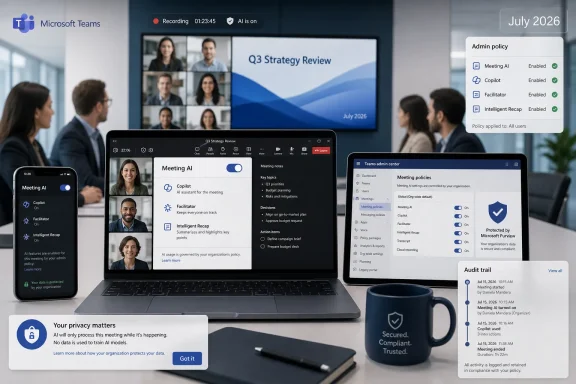
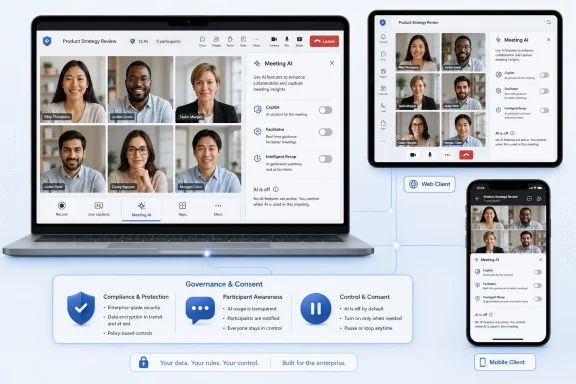
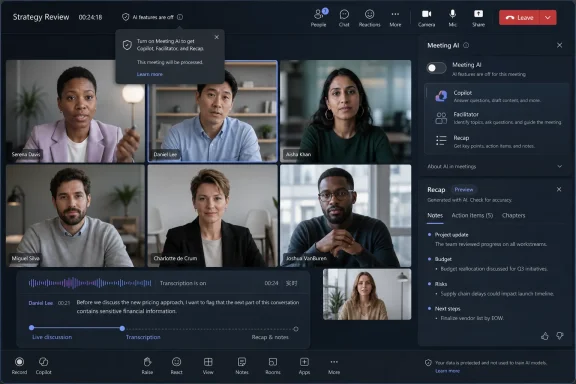
Microsoft is adding an in-meeting “Meeting AI” control to Microsoft Teams in July 2026, giving licensed organizers and presenters a live toggle for Copilot, Facilitator, and Recap across desktop, web, and mobile clients. The change, first spotted by Windows Latest in Microsoft’s admin-center messaging, is small in interface terms and large in product-politics terms. It is Microsoft conceding that workplace AI cannot be treated like spellcheck: always present, vaguely helpful, and culturally invisible. In meetings, the presence of AI is itself part of the meeting.
The new Teams control arrives after months of mounting discomfort around Microsoft’s ambition to make Copilot feel ambient inside Microsoft 365. According to the Microsoft admin-center note reported by Windows Latest, the company will let licensed organizers and presenters turn “Meeting AI” on or off during live meetings, with rollout beginning in Targeted Release in early July 2026 and reaching General Availability later in the month.
That sounds like the sort of checkbox change that usually disappears into a Microsoft 365 roadmap digest. It is not. Teams meetings are where corporate policy, personal privacy, legal discoverability, managerial surveillance, productivity theater, and actual collaboration all collide in a single window.
Microsoft’s framing is careful. The toggle does not rewrite tenant policy, bypass licensing, or alter compliance obligations. It appears only where policy already allows Meeting AI, which means administrators still hold the outer perimeter. But within that perimeter, Microsoft is finally admitting that the person running a meeting needs a brake pedal.
That matters because Teams AI features do not merely decorate the interface. Copilot can answer questions about meeting content. Facilitator can generate notes and action items. Recap can turn live conversation into a structured artifact after the call. These are useful tools, but they are also tools that transform spoken workplace conversation into machine-readable material with a longer afterlife than the meeting itself.
The problem is not that this pitch is fake. Anyone who has joined a chaotic project call late, missed a decision, or tried to reconstruct action items from memory can see the appeal. Teams AI is useful precisely because meetings are often badly run and poorly documented.
The problem is that Microsoft’s productivity pitch has often treated user control as a secondary implementation detail. For many workers, especially in regulated industries or politically sensitive organizations, the difference between “AI is available” and “AI is active” is not semantic. It changes how people speak.
That is the real concession in this update. Microsoft is not backing away from Copilot, Facilitator, or intelligent recap. It is backing away from the idea that an administrator’s permission is enough to settle the social contract inside the meeting room.
Microsoft’s own documentation around Copilot in Teams has long made clear that meeting intelligence depends on speech-to-text data. Transcription can be retained, temporary, policy-governed, or disabled depending on configuration. Intelligent recap similarly depends on licensing and transcription settings, with Teams Premium and Microsoft 365 Copilot customers getting access to richer post-meeting summaries.
That architecture creates a tension Microsoft cannot polish away with marketing language. To summarize a meeting, Teams needs a representation of the meeting. To answer questions about what was said, it needs access to what was said. To generate notes and tasks, it must decide what mattered.
For a weekly engineering stand-up, that may be a productivity win. For a legal strategy call, a performance review, a union discussion, a merger conversation, a medical-services planning meeting, or a security incident bridge, it may be unacceptable. A universal AI posture cannot fit all of those contexts.
The in-meeting toggle acknowledges that the risk category of a meeting can change after it starts. A routine planning call can veer into personnel matters. A customer update can become a contractual dispute. A technical conversation can reveal security-sensitive information. The calendar invite rarely knows that in advance.
That is the correct model for enterprise IT, even if it disappoints users hoping for a personal “no AI ever” switch. Organizations need central controls for compliance, retention, eDiscovery, auditability, and licensing. A Teams feature that let presenters override policy would be dead on arrival in serious enterprises.
But Microsoft’s design also exposes the next layer of complexity. If a tenant allows Meeting AI broadly, meeting organizers and presenters become the practical custodians of AI use in real time. That creates a new kind of meeting etiquette and a new operational burden.
The chair of a meeting may now need to say, explicitly, whether AI is on. Presenters may need to understand whether disabling Meeting AI also affects recap availability. Participants may need confidence that “off” means off for the relevant AI functions, not merely hidden from view.
Microsoft says the toggle respects existing compliance and licensing requirements. That is reassuring, but it also means the toggle is not a universal privacy cure. It is a runtime control inside a larger governance machine.
According to the report, when Meeting AI is used with transcription, the two remain connected. Turning on Meeting AI can turn on transcription and generate a recap. Starting transcription can enable Meeting AI and recap. In plain English: if a meeting needs to avoid AI entirely, it is not enough to think about Copilot alone.
That dependency is logical from a technical standpoint. Copilot and recap need text to reason over. Facilitator needs meeting content to generate notes. Transcription is the bridge between live conversation and AI output.
But from a user standpoint, the coupling is where confusion lives. Many workers think of transcription as an accessibility or recordkeeping feature, not as a prerequisite pipeline for AI. Others think of Copilot as a separate assistant they can choose to invoke, not as part of a broader meeting-intelligence system.
Microsoft needs to be painfully clear in the interface here. If enabling transcription also enables Meeting AI or recap under certain conditions, Teams should say so in the moment, not bury it in admin documentation. A live meeting is no place for policy archaeology.
That impression intensified with Microsoft’s newer Facilitator work, reported by Windows Latest and TechRadar, in which Teams can proactively detect knowledge gaps or uncertainty during a meeting and supply answers in chat using web search. Microsoft has said that capability is not turned on by default and must be enabled, but the reaction has been predictable. The line between “helpful assistant” and “software listening for confusion” is culturally thin.
This is where Microsoft’s enterprise advantage becomes a liability. Teams is not a novelty app that people voluntarily install for fun. It is the meeting room for millions of workers whose employers choose the platform. When Microsoft changes the behavior of Teams, it changes the workplace environment.
Facilitator may be useful. It may even become indispensable in some settings. But the more proactive it becomes, the more important it is that meeting leaders can suspend it instantly and visibly. AI that participates in meetings must be interruptible.
The company has become fluent in the language of security boundaries, tenant controls, Purview compliance, and organizational governance. That language matters to admins. It does not always satisfy users who are looking at a glowing Copilot icon during a live conversation and wondering what is being captured.
Teams sits at the uncomfortable intersection of those audiences. The administrator wants enforceable defaults. The compliance officer wants retention clarity. The presenter wants meeting flow. The employee wants to know whether a sensitive comment is being summarized by a model. The customer wants to know whether their words will become part of someone else’s searchable corporate memory.
A mid-meeting switch is an attempt to reconcile those perspectives without slowing Microsoft’s AI roadmap. It is less a philosophical reversal than a product-management correction. Microsoft still wants AI in the meeting. It now accepts that the meeting sometimes wants AI out.
Microsoft’s documentation says intelligent recap is available to users with Teams Premium or Microsoft 365 Copilot licenses, with richer features depending on transcription and recording policies. Copilot in Teams meetings has its own dependencies, including whether the organization allows Copilot during meetings and whether transcription is retained or temporary. Facilitator adds still another layer, especially in Teams Rooms scenarios.
This complexity is not accidental. Microsoft 365 is now a stack of entitlements, policy gates, and client experiences. The trouble is that meetings are live events, not licensing diagrams.
If a presenter sees a Meeting AI toggle, they need to know what it controls. If they do not see it, they need to know whether policy, licensing, client version, meeting type, or rollout timing is the reason. If a recap appears after a call, participants need to know why it exists and which setting produced it.
Microsoft can solve some of this with interface design. It can solve more with admin messaging. But the deeper issue is that Copilot-era Microsoft 365 is becoming difficult to reason about without a dedicated administrator. That may be fine for enterprises. It is punishing for smaller organizations.
That logic breaks down in enterprise collaboration. A feature can be valuable in one meeting and inappropriate in the next. It can be approved by the organization and still wrong for the moment. It can be helpful to the organizer and chilling to a participant.
A visible off switch is therefore not anti-AI. It is a condition for responsible AI adoption. The more powerful the feature, the more obvious the control should be.
Microsoft appears to understand this better now than it did during the earliest Copilot land grab. The Meeting AI toggle does not require a trip to the Teams admin center during a live call. It does not ask presenters to edit a policy. It puts control where the risk emerges: inside the meeting.
That is good product design because it reflects the reality of work. Meetings are dynamic. So are the boundaries around them.
Microsoft cannot answer all of that with a switch. Nor can administrators. A compliant AI deployment can still feel coercive if employees believe they have no meaningful say.
The deeper workplace question is not whether Teams can disable Copilot, Facilitator, and Recap. It is who gets to decide when meeting intelligence is appropriate. In most companies, the answer will be “management and IT.” That may be structurally unavoidable, but it should not be culturally invisible.
Organizations rolling out these features should treat the July toggle as a governance prompt, not a mere usability improvement. They should decide which meetings require AI off by default. They should document when transcription implies recap or meeting intelligence. They should train presenters to announce AI status at the start of sensitive calls. They should not wait for an employee complaint to discover that the policy was unclear.
Teams is one of the main ways Microsoft turns Windows PCs into endpoints for Microsoft 365 work. Efficiency mode improvements, simplified meeting controls, and Copilot integration all feed the same strategy: make Teams feel like the operating layer for office collaboration. The more AI is woven into that layer, the more Windows users experience Microsoft’s AI strategy as a daily workplace condition rather than a product announcement.
That is why small controls matter. A Windows user may never read the Microsoft 365 roadmap, but they will notice whether a meeting is being summarized. They will notice whether Copilot is present. They will notice whether a presenter can turn it off without fumbling through settings.
Microsoft has spent years teaching users that Teams is where work happens. Now it must teach them that Teams is also where work can be protected from unnecessary automation.
That does not make deployment simple, but it gives organizations a better script. Admins can explain that policy defines the boundaries, organizers and presenters manage live use, and transcription remains a critical dependency. That is a more honest model than pretending one global setting can handle every meeting scenario.
It also gives Microsoft’s defenders a stronger argument. The company can say it is not forcing AI into every meeting where Copilot is licensed. It can point to live controls, tenant respect, and opt-in behavior for newer proactive Facilitator capabilities.
Still, the burden shifts to implementation. If the toggle is hard to find, inconsistently labeled, delayed across clients, or unclear about transcription side effects, Microsoft will squander the goodwill. A control that users do not understand is not really control.
Without a live control, asking to disable AI can sound like an accusation: you do not trust the organizer, the company, Microsoft, or the meeting. With an official toggle in the meeting interface, disabling AI becomes a normal meeting-management action, like muting participants, stopping recording, or changing presenter permissions.
That normalization matters. Many workers will not object to AI if doing so requires a policy argument in front of colleagues. They may stay silent even when the topic is sensitive. A presenter who can simply say, “We’re turning Meeting AI off for this section,” gives everyone a cleaner way through.
This is how responsible defaults become culture. Not through white papers, but through controls that make the safer action easy to perform at the right moment.
The revised timing now points to a U.S. rollout starting in early July and completing around mid-July, with broader global availability expected by the end of July. That means some Teams tenants may not see the control immediately even if they meet the licensing and policy requirements.
For IT admins, the practical takeaway is to treat July as a phased deployment window rather than a single launch date. If the toggle is missing, the cause may be rollout timing, region, client availability, licensing, or tenant policy — not necessarily a configuration error.
 Microsoft Discovers That Consent Is a Feature
The new Teams control arrives after months of mounting discomfort around Microsoft’s ambition to make Copilot feel ambient inside Microsoft 365. According to the Microsoft admin-center note reported by Windows Latest, the company will let licensed organizers and presenters turn “Meeting AI” on or off during live meetings, with rollout beginning in Targeted Release in early July 2026 and reaching General Availability later in the month.That sounds like the sort of checkbox change that usually disappears into a Microsoft 365 roadmap digest. It is not. Teams meetings are where corporate policy, personal privacy, legal discoverability, managerial surveillance, productivity theater, and actual collaboration all collide in a single window.
Microsoft’s framing is careful. The toggle does not rewrite tenant policy, bypass licensing, or alter compliance obligations. It appears only where policy already allows Meeting AI, which means administrators still hold the outer perimeter. But within that perimeter, Microsoft is finally admitting that the person running a meeting needs a brake pedal.
That matters because Teams AI features do not merely decorate the interface. Copilot can answer questions about meeting content. Facilitator can generate notes and action items. Recap can turn live conversation into a structured artifact after the call. These are useful tools, but they are also tools that transform spoken workplace conversation into machine-readable material with a longer afterlife than the meeting itself.
The Toggle Is Not a Retreat From AI, but a Retreat From Inevitability
It would be easy to read this as Microsoft “caving,” and Windows Latest uses that language for a reason. The company has spent the Copilot era pushing AI into the center of its productivity suite, from Windows to Office to Teams. The promise has been consistent: less busywork, better recall, faster synthesis, fewer lost decisions.The problem is not that this pitch is fake. Anyone who has joined a chaotic project call late, missed a decision, or tried to reconstruct action items from memory can see the appeal. Teams AI is useful precisely because meetings are often badly run and poorly documented.
The problem is that Microsoft’s productivity pitch has often treated user control as a secondary implementation detail. For many workers, especially in regulated industries or politically sensitive organizations, the difference between “AI is available” and “AI is active” is not semantic. It changes how people speak.
That is the real concession in this update. Microsoft is not backing away from Copilot, Facilitator, or intelligent recap. It is backing away from the idea that an administrator’s permission is enough to settle the social contract inside the meeting room.
Teams Meetings Are Where AI Stops Being Abstract
Much of the AI debate in Windows and Microsoft 365 has been strangely abstract. Users argue about models, hallucinations, licensing, and whether Copilot deserves a key on the keyboard. In Teams, the debate becomes less theoretical because AI is listening to people talk.Microsoft’s own documentation around Copilot in Teams has long made clear that meeting intelligence depends on speech-to-text data. Transcription can be retained, temporary, policy-governed, or disabled depending on configuration. Intelligent recap similarly depends on licensing and transcription settings, with Teams Premium and Microsoft 365 Copilot customers getting access to richer post-meeting summaries.
That architecture creates a tension Microsoft cannot polish away with marketing language. To summarize a meeting, Teams needs a representation of the meeting. To answer questions about what was said, it needs access to what was said. To generate notes and tasks, it must decide what mattered.
For a weekly engineering stand-up, that may be a productivity win. For a legal strategy call, a performance review, a union discussion, a merger conversation, a medical-services planning meeting, or a security incident bridge, it may be unacceptable. A universal AI posture cannot fit all of those contexts.
The in-meeting toggle acknowledges that the risk category of a meeting can change after it starts. A routine planning call can veer into personnel matters. A customer update can become a contractual dispute. A technical conversation can reveal security-sensitive information. The calendar invite rarely knows that in advance.
Admin Policy Still Rules the Room
The new control should not be confused with user sovereignty. Microsoft is preserving the standard enterprise hierarchy: tenant policy first, meeting configuration second, presenter control third. If Meeting AI is disabled by policy, the toggle does not appear.That is the correct model for enterprise IT, even if it disappoints users hoping for a personal “no AI ever” switch. Organizations need central controls for compliance, retention, eDiscovery, auditability, and licensing. A Teams feature that let presenters override policy would be dead on arrival in serious enterprises.
But Microsoft’s design also exposes the next layer of complexity. If a tenant allows Meeting AI broadly, meeting organizers and presenters become the practical custodians of AI use in real time. That creates a new kind of meeting etiquette and a new operational burden.
The chair of a meeting may now need to say, explicitly, whether AI is on. Presenters may need to understand whether disabling Meeting AI also affects recap availability. Participants may need confidence that “off” means off for the relevant AI functions, not merely hidden from view.
Microsoft says the toggle respects existing compliance and licensing requirements. That is reassuring, but it also means the toggle is not a universal privacy cure. It is a runtime control inside a larger governance machine.
The Transcription Dependency Is the Trap Door
The most important detail in the Windows Latest report is not the toggle itself. It is the relationship between Meeting AI and transcription.According to the report, when Meeting AI is used with transcription, the two remain connected. Turning on Meeting AI can turn on transcription and generate a recap. Starting transcription can enable Meeting AI and recap. In plain English: if a meeting needs to avoid AI entirely, it is not enough to think about Copilot alone.
That dependency is logical from a technical standpoint. Copilot and recap need text to reason over. Facilitator needs meeting content to generate notes. Transcription is the bridge between live conversation and AI output.
But from a user standpoint, the coupling is where confusion lives. Many workers think of transcription as an accessibility or recordkeeping feature, not as a prerequisite pipeline for AI. Others think of Copilot as a separate assistant they can choose to invoke, not as part of a broader meeting-intelligence system.
Microsoft needs to be painfully clear in the interface here. If enabling transcription also enables Meeting AI or recap under certain conditions, Teams should say so in the moment, not bury it in admin documentation. A live meeting is no place for policy archaeology.
Facilitator Turns Helpful Notes Into a Governance Problem
Facilitator is the feature that best captures Microsoft’s dilemma. On paper, it is exactly the sort of AI people claim to want: an assistant that takes notes, tracks decisions, and records follow-ups while humans focus on discussion. In practice, it also makes Teams feel less like a communication tool and more like an observer.That impression intensified with Microsoft’s newer Facilitator work, reported by Windows Latest and TechRadar, in which Teams can proactively detect knowledge gaps or uncertainty during a meeting and supply answers in chat using web search. Microsoft has said that capability is not turned on by default and must be enabled, but the reaction has been predictable. The line between “helpful assistant” and “software listening for confusion” is culturally thin.
This is where Microsoft’s enterprise advantage becomes a liability. Teams is not a novelty app that people voluntarily install for fun. It is the meeting room for millions of workers whose employers choose the platform. When Microsoft changes the behavior of Teams, it changes the workplace environment.
Facilitator may be useful. It may even become indispensable in some settings. But the more proactive it becomes, the more important it is that meeting leaders can suspend it instantly and visibly. AI that participates in meetings must be interruptible.
Microsoft Is Learning From the Recall Problem
The Teams toggle also fits a broader pattern in Microsoft’s AI rollout: features that look technically impressive can become reputational liabilities if users believe the company has skipped the consent step. Windows Recall was the loudest example, but not the only one. The lesson is that AI features tied to personal or workplace context require more than policy assurances.The company has become fluent in the language of security boundaries, tenant controls, Purview compliance, and organizational governance. That language matters to admins. It does not always satisfy users who are looking at a glowing Copilot icon during a live conversation and wondering what is being captured.
Teams sits at the uncomfortable intersection of those audiences. The administrator wants enforceable defaults. The compliance officer wants retention clarity. The presenter wants meeting flow. The employee wants to know whether a sensitive comment is being summarized by a model. The customer wants to know whether their words will become part of someone else’s searchable corporate memory.
A mid-meeting switch is an attempt to reconcile those perspectives without slowing Microsoft’s AI roadmap. It is less a philosophical reversal than a product-management correction. Microsoft still wants AI in the meeting. It now accepts that the meeting sometimes wants AI out.
The Licensing Story Remains Messy
The new Meeting AI control is limited to licensed organizers and presenters, which means it inherits the complexity of Microsoft 365 licensing. Copilot, Teams Premium, intelligent recap, transcription policies, meeting templates, sensitivity labels, and room-device behavior all overlap in ways that can be hard to explain even to experienced administrators.Microsoft’s documentation says intelligent recap is available to users with Teams Premium or Microsoft 365 Copilot licenses, with richer features depending on transcription and recording policies. Copilot in Teams meetings has its own dependencies, including whether the organization allows Copilot during meetings and whether transcription is retained or temporary. Facilitator adds still another layer, especially in Teams Rooms scenarios.
This complexity is not accidental. Microsoft 365 is now a stack of entitlements, policy gates, and client experiences. The trouble is that meetings are live events, not licensing diagrams.
If a presenter sees a Meeting AI toggle, they need to know what it controls. If they do not see it, they need to know whether policy, licensing, client version, meeting type, or rollout timing is the reason. If a recap appears after a call, participants need to know why it exists and which setting produced it.
Microsoft can solve some of this with interface design. It can solve more with admin messaging. But the deeper issue is that Copilot-era Microsoft 365 is becoming difficult to reason about without a dedicated administrator. That may be fine for enterprises. It is punishing for smaller organizations.
The Best Enterprise Feature Is Sometimes a Visible Off Switch
There is a tendency in tech product design to treat opt-out controls as evidence of failure. If the feature is good, the thinking goes, people will want it on. If users disable it, perhaps the product team did not explain it well enough.That logic breaks down in enterprise collaboration. A feature can be valuable in one meeting and inappropriate in the next. It can be approved by the organization and still wrong for the moment. It can be helpful to the organizer and chilling to a participant.
A visible off switch is therefore not anti-AI. It is a condition for responsible AI adoption. The more powerful the feature, the more obvious the control should be.
Microsoft appears to understand this better now than it did during the earliest Copilot land grab. The Meeting AI toggle does not require a trip to the Teams admin center during a live call. It does not ask presenters to edit a policy. It puts control where the risk emerges: inside the meeting.
That is good product design because it reflects the reality of work. Meetings are dynamic. So are the boundaries around them.
This Will Not End the Backlash
The toggle will reduce one category of complaint, but it will not settle the debate over AI in Teams. Some users object to Copilot because they distrust generative AI generally. Some object because they worry about data exposure. Some object because they believe employers will use AI summaries as performance evidence. Some simply do not want software mediating human conversation.Microsoft cannot answer all of that with a switch. Nor can administrators. A compliant AI deployment can still feel coercive if employees believe they have no meaningful say.
The deeper workplace question is not whether Teams can disable Copilot, Facilitator, and Recap. It is who gets to decide when meeting intelligence is appropriate. In most companies, the answer will be “management and IT.” That may be structurally unavoidable, but it should not be culturally invisible.
Organizations rolling out these features should treat the July toggle as a governance prompt, not a mere usability improvement. They should decide which meetings require AI off by default. They should document when transcription implies recap or meeting intelligence. They should train presenters to announce AI status at the start of sensitive calls. They should not wait for an employee complaint to discover that the policy was unclear.
The Windows Angle Is Really the Work Angle
For WindowsForum readers, the immediate client story is straightforward: Microsoft says the Meeting AI control is coming across Windows, macOS, mobile, and web. But the Windows significance is broader than client parity.Teams is one of the main ways Microsoft turns Windows PCs into endpoints for Microsoft 365 work. Efficiency mode improvements, simplified meeting controls, and Copilot integration all feed the same strategy: make Teams feel like the operating layer for office collaboration. The more AI is woven into that layer, the more Windows users experience Microsoft’s AI strategy as a daily workplace condition rather than a product announcement.
That is why small controls matter. A Windows user may never read the Microsoft 365 roadmap, but they will notice whether a meeting is being summarized. They will notice whether Copilot is present. They will notice whether a presenter can turn it off without fumbling through settings.
Microsoft has spent years teaching users that Teams is where work happens. Now it must teach them that Teams is also where work can be protected from unnecessary automation.
July’s Toggle Gives IT a Script It Badly Needed
The practical value of this feature may be less technical than procedural. IT departments now have a cleaner answer when users ask whether AI can be disabled during a sensitive meeting. The answer is no longer a maze of policy caveats and pre-meeting configuration alone. It can include a visible in-meeting control, provided the tenant permits it and the right people are licensed.That does not make deployment simple, but it gives organizations a better script. Admins can explain that policy defines the boundaries, organizers and presenters manage live use, and transcription remains a critical dependency. That is a more honest model than pretending one global setting can handle every meeting scenario.
It also gives Microsoft’s defenders a stronger argument. The company can say it is not forcing AI into every meeting where Copilot is licensed. It can point to live controls, tenant respect, and opt-in behavior for newer proactive Facilitator capabilities.
Still, the burden shifts to implementation. If the toggle is hard to find, inconsistently labeled, delayed across clients, or unclear about transcription side effects, Microsoft will squander the goodwill. A control that users do not understand is not really control.
The Real Win Is Making AI Less Awkward to Refuse
The most underrated effect of a visible Meeting AI toggle may be social. It makes turning AI off less confrontational.Without a live control, asking to disable AI can sound like an accusation: you do not trust the organizer, the company, Microsoft, or the meeting. With an official toggle in the meeting interface, disabling AI becomes a normal meeting-management action, like muting participants, stopping recording, or changing presenter permissions.
That normalization matters. Many workers will not object to AI if doing so requires a policy argument in front of colleagues. They may stay silent even when the topic is sensitive. A presenter who can simply say, “We’re turning Meeting AI off for this section,” gives everyone a cleaner way through.
This is how responsible defaults become culture. Not through white papers, but through controls that make the safer action easy to perform at the right moment.
The July Change Draws a New Line Around the Meeting Room
Microsoft’s update is narrow, but the lessons are concrete for anyone administering or using Teams in the Copilot era.- Microsoft is adding a live Meeting AI toggle in Teams so licensed organizers and presenters can turn Copilot, Facilitator, and Recap on or off during meetings where policy allows it.
- The rollout is scheduled to begin with Targeted Release in early July 2026, move to General Availability in mid-July, and complete by the end of July 2026.
- Tenant policies still control whether the feature appears, so the toggle does not override administrative decisions or compliance boundaries.
- Transcription remains central because meeting AI features depend on speech-to-text data, and organizations that want no AI involvement must understand how transcription, recap, and Copilot interact.
- The control is especially important for sensitive meetings because the risk profile of a conversation can change after the call begins.
- Microsoft’s bigger challenge is no longer proving that Teams AI can be useful, but proving that users and organizations can confidently say no when usefulness is not the priority.
Update: Rollout Was Delayed From June and Split by Region (July 5, 2026)
XDA’s follow-up, citing the same Microsoft 365 Message Center notice surfaced by Windows Latest, adds a rollout detail not in the original report: Microsoft had apparently planned to begin the Teams Meeting AI toggle rollout in the United States in early June, but that schedule slipped to early July.The revised timing now points to a U.S. rollout starting in early July and completing around mid-July, with broader global availability expected by the end of July. That means some Teams tenants may not see the control immediately even if they meet the licensing and policy requirements.
For IT admins, the practical takeaway is to treat July as a phased deployment window rather than a single launch date. If the toggle is missing, the cause may be rollout timing, region, client availability, licensing, or tenant policy — not necessarily a configuration error.
References
- Primary source: Windows Latest
Published: Sat, 04 Jul 2026 23:37:27 GMT
Microsoft caves after Teams AI backlash, will let you turn off Copilot, Facilitator and Recap mid-meeting
Microsoft caves on Teams AI, will let you turn off Copilot, Facilitator, and Recap during meetings on Windows and other platforms. www.windowslatest.com
- Related coverage: techradar.com
Microsoft Teams has a slightly creepy new feature which will watch and listen to your meetings — but thankfully only if you let it | TechRadar
Microsoft Teams Facilitator will be watching all your meetingswww.techradar.com - Official source: support.microsoft.com
Facilitator in Microsoft Teams meetings | Microsoft Support
AI-generated notes automate note-taking during Teams meetings to capture the discussion in real-time with action items and follow-up tasks.support.microsoft.com - Official source: microsoft.com
Microsoft 365 Roadmap | Microsoft 365
The Microsoft 365 Roadmap lists updates that are currently planned for applicable subscribers. Check here for more information on the status of new features and updates.www.microsoft.com
- Official source: learn.microsoft.com
Facilitator in Teams Rooms - Microsoft Teams | Microsoft Learn
This user guide provides comprehensive setup instructions and information on using the Facilitator agent within Teams Rooms. The AI-powered Facilitator agent or app lets meeting participants hold unscheduled meetings and use Facilitator to transcribe the entire meeting conversation and create...learn.microsoft.com - Related coverage: levelupm365.com
Microsoft 365 Roadmap Updates July 2026 – Level Up M365
Photo credit: Copilot These monthly updates are coming at us with haste! Be sure to follow here so you don’t miss out. For today, let’s take a gander at July’s Microsoft 365 roadmap. Wh…levelupm365.com
- Related coverage: windowscentral.com
Microsoft 365 is paywalling most of Copilot in its Office apps | Windows Central
Commercial customers will soon need a Microsoft 365 Copilot license to use Copilot Chat in Word, Excel, PowerPoint, and OneNote.www.windowscentral.com - Official source: adoption.microsoft.com
- Related coverage: davyntt.com
- Official source: cdn-dynmedia-1.microsoft.com
</rdf:Alt> </dc:title> <dc:creator> <rdf:Seq> <rdf:li>Ryan Fowles
PDF documentcdn-dynmedia-1.microsoft.com
Last edited: