4Tb Ssd Hdd

clives

New Member
Joined
Oct 6, 2021
Messages
3
Greetings,

I have a Samsung 4TB SSD Drive.

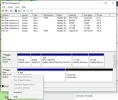
It is shown as 2TB allocated and 2 TB unallocated (free).
I want a single drive/partition of 3.9TB.

I have looked at disk manager, but cannot see how to add the majority of the "free" partition to the 1.9TB allocated??

I have also viewed diskpart, but cannot merge the two partitions into one??

Any suggestions?

Thanks
Clive

An image from '4Tb Ssd Hdd'. Disk management showing Disk 0 with multiple partitions including 950.71 GB NTFS and Disk 1 mostly unallocated with 2048 GB allocated.
 

Last edited by a moderator:
Solution
If the standard Windows tools do not cope with the task of partitioning or merging a disk partition, then it is better to use third-party software. In this regard, the Partition Recovery program has proven itself very well. She can easily cope with such a task.

Mike

Windows Forum Admin
Staff member
Premium Supporter
Joined
Jul 22, 2005
Messages
9,250
Right click on the bottom 2048.00GB partition and you should see an option to Extend the volume. If not, you can try a third party partition utility.
 

Neemobeer

Windows Forum Team
Staff member
Joined
Jul 4, 2015
Messages
8,998
It if doesn't give you the option to extend I would wager it's using the MBR partition scheme. It will need to be changed to GPT since MBR has a 2TB partition size limit.
 

clives

New Member
Joined
Oct 6, 2021
Messages
3
Greetings,

The drive is MBR format.
I selected the Drive, but the convert from MBR to GPT format is greyed out??
 

Attachments

  • MBR.webp
    MBR.webp
    14.1 KB · Views: 159

clives

New Member
Joined
Oct 6, 2021
Messages
3
This seems to have worked..

DISKPART> select disk 1

DISKPART> clean

DISKPART> convert gpt
 

Neemobeer

Windows Forum Team
Staff member
Joined
Jul 4, 2015
Messages
8,998
Yup Microsoft doesn't have a convert option, but there are tools to do so without losing data.
 

Mirerex

Active Member
Joined
Jul 20, 2020
Messages
7
If the standard Windows tools do not cope with the task of partitioning or merging a disk partition, then it is better to use third-party software. In this regard, the Partition Recovery program has proven itself very well. She can easily cope with such a task.
 

Solution
Back
Top