

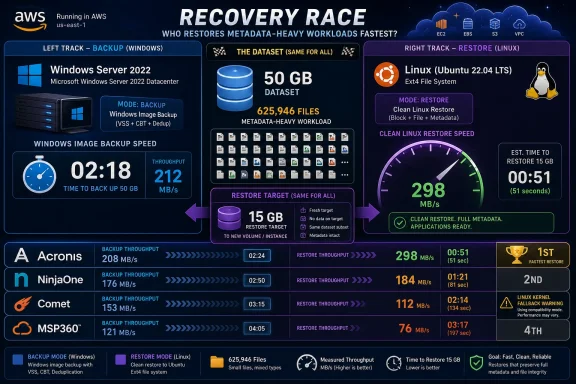
Acronis Cyber Protect Cloud Backup led four of six measured backup and restore dimensions in a same-infrastructure benchmark against NinjaOne Backup, Comet Backup, and MSP360 Managed Backup, using Windows Server 2022 and Ubuntu 26.04 systems on AWS with a 50 GB, 625,946-file workload and a 15 GB restore target. The result is not a universal coronation, because backup products are bought for ecosystems, pricing, workload coverage, storage control, and recovery behavior as much as for stopwatch numbers. But it does expose a useful truth for MSPs and IT teams: the fastest product in one backup mode can become the slowest in another, and Linux support remains the place where marketing matrices most often meet kernel reality.
The usual backup software comparison starts with a feature grid, then quietly assumes that “supports Windows,” “supports Linux,” “image backup,” and “file backup” are comparable claims across vendors. This benchmark is useful because it did the less glamorous thing: it forced four products to process the same ugly data set on the same class of infrastructure and then asked them to restore a realistic chunk of it.
That workload matters. A 50 GB directory with 625,946 files is not the same thing as a 50 GB disk image, even if the storage bill is similar. Small files punish enumeration, metadata handling, agent CPU overhead, hashing, change detection, and per-object pipeline design in ways that a sequential block image can hide.
That is why the headline result is not simply “Acronis won.” Acronis won the most dimensions, but the more important story is that the products separated by mode. NinjaOne and MSP360 were fastest on Windows image backup, Comet led Windows file backup, and Acronis dominated restore and Linux coverage.
For administrators, that is the part that changes the buying conversation. If the backup estate is mostly Windows servers protected by image backup, NinjaOne or MSP360 may look excellent. If the estate includes Linux servers and the success criterion is clean block-level coverage plus fast recovery, the ranking changes quickly.
On Windows, Acronis was not the fastest image-backup product. Its full-system run took 17 minutes, behind NinjaOne and MSP360 at 10 minutes and slightly behind Comet at 16 minutes. In a procurement spreadsheet that ranks only Windows image backup elapsed time, Acronis would not land at the top.
But that narrow view misses where Acronis separated itself. Its Windows restore of the 15 GB medium subdirectory completed in 2 minutes 31 seconds, or 99.3 MB/s, the fastest Windows restore in the test. On Linux, it completed the block-level image run cleanly and restored the same 15 GB target in 2 minutes 29 seconds, or 100.7 MB/s.
The Linux result is especially important because it was not just fast; it was clean. Acronis was the only product whose Linux block-level backup completed without vendor warnings. Comet completed its Linux image job but warned that its snapshot driver was in best-effort fallback mode against Ubuntu 26.04’s 7.0 kernel. MSP360 did not expose Linux image backup in the tested tier. NinjaOne did not have generally available Linux backup support in the console tier used for the benchmark.
This is the difference between a benchmark win and an operational win. A backup that finishes with a warning may be useful in a lab table, but production administrators have to decide whether they would trust it during an outage. Acronis was the only product here that turned Linux block-level backup from a caveat into a usable measured result.
That gap should not be waved away. Image backup is still the default mental model for many server recovery plans because it preserves the whole machine state and makes bare-metal or virtual recovery easier to reason about. If the job is “protect this Windows server quickly every night,” the 10-minute result is a meaningful advantage.
But the test also warns against attributing everything to backend storage. MSP360 and Comet both exposed Wasabi-backed storage in the benchmark environment, yet they landed in different tiers on Windows image backup. That suggests the agent pipeline, chunking, dedupe, compression, snapshot handling, and service architecture mattered at least as much as the object storage label.
NinjaOne’s result is also a reminder that RMM-native backup is no longer automatically a lightweight add-on. In this run, NinjaOne’s Windows image backup tied for first, and its fast agent deployment fit the product’s broader RMM story. For customers already using NinjaOne for monitoring, patching, and scripting, turning on backup from a policy console is operationally attractive.
The catch is that image speed did not generalize. NinjaOne went from tied-first in Windows image backup to last in Windows file backup, where the same 50 GB corpus took 229 minutes. That is not a rounding error; it is a product-shape revelation.
This is where the benchmark becomes more valuable than a vendor demo. File backup is not merely “image backup, but smaller.” On a corpus with more than 600,000 files, the agent has to enumerate, inspect, track, and move huge numbers of filesystem objects. Products that look similar in a disk-image test can diverge dramatically when the work becomes metadata-heavy.
Comet’s win in Windows file backup fits its design identity. The product exposes a broad protected-item model, including files and folders, disk image, databases, Exchange, Hyper-V, VMware, Microsoft 365, application folders, program output, and Windows Server Backup. That does not prove performance by itself, but it does reflect a backup-first architecture rather than a backup tab inside a larger device-management suite.
Acronis again looked balanced rather than singularly dominant. It did not win Windows file backup, but 20.9 MB/s placed it far ahead of MSP360 and NinjaOne. More importantly, its Linux file backup came in at 52.1 MB/s, making it the cross-platform file-mode leader in the broader comparison.
MSP360’s file throughput was consistent across Windows and Linux, with 6.30 MB/s on Windows and 6.43 MB/s on Linux. Consistency is not useless; administrators like predictable behavior. But in this case, the predictable behavior was a bottleneck that persisted across platforms.
The Windows restore field was relatively tight compared with file backup. Acronis restored the 15 GB target at 99.3 MB/s. MSP360 restored at 86.2 MB/s. Comet’s comparable full-download restore landed at 85.7 MB/s. NinjaOne restored at 83.3 MB/s. The whole Windows spread fit inside a roughly 16 MB/s band.
That means a buyer should not exaggerate the Windows restore difference in isolation. Acronis led, but the others were not catastrophically behind on this specific restore target. In a real incident, authentication, operator familiarity, runbook quality, network egress, and knowing which recovery point is clean may dominate the last half-minute of transfer time.
Linux told a sharper story because not every product could play equally. Acronis restored at 100.7 MB/s, MSP360 at 84.8 MB/s, and Comet at 78.9 MB/s in the comparable full-download path. NinjaOne did not have a generally available Linux backup path in the tested configuration.
The restore workflow also matters. Acronis surfaced bottleneck labels such as “Read from source 100%” or “Write to destination 100%,” giving operators a clue about whether the rate limiter was source, destination, or cloud path. MSP360 exposed phase transitions during image backup. NinjaOne’s monitoring stack flagged its own backup engine’s CPU consumption during the long file run. These bits of observability are not cosmetic; they shape how quickly an administrator can tell whether a slow job is broken, saturated, or merely doing expensive work.
This is not the same thing as saying Comet restores all workloads 222x faster. The comparable fresh-path restore downloaded the full 15.07 GB and took 2 minutes 55 seconds. The deduplication advantage depends on matching content already existing at the destination.
Still, the feature deserves attention because many recovery workflows are not clean-room restores. Administrators rerun test restores, validate failover procedures, recover partially damaged folders, and sometimes restore over data that is mostly intact but no longer trusted. In those cases, avoiding redundant transfer can be more than a benchmark trick.
Comet also had the most transparent hosted deployment posture in one respect: the console showed its default storage vault as Wasabi. MSP360 also used Wasabi-backed storage, but Comet’s UI made the backend especially explicit. For MSPs that care about understanding where the data path goes, that visibility is welcome.
The Linux image warning, however, is the counterweight. Comet completed the run, but it warned that the snapshot driver was operating in best-effort fallback mode on Ubuntu 26.04’s 7.0 kernel and that resulting images might be inconsistent. In a performance table, that can be listed. In a production risk register, it needs a red flag.
Acronis came closest to the version of Linux support that administrators generally mean when they ask for server backup parity. Its agent required extra work on Ubuntu 26.04, including package and kernel-module handling, because the test used an operating system release ahead of the vendor’s stated support matrix. But once installed, it completed Linux block-level backup cleanly and delivered the fastest Linux restore.
Comet had agent parity by version and exposed Linux disk image backup, but the kernel compatibility warning changes the interpretation of the result. A backup that works cleanly on one kernel line and falls back on another is not necessarily flawed; kernel-adjacent backup tooling is hard. But it means buyers must test the exact distributions and kernels they run, not merely accept a Linux checkbox.
MSP360 was simpler: Linux was file-only in the tested environment. Its own edition comparison materials describe Linux as file-level only, which matches the benchmark observation. That may be fine for Linux workloads where application-level backups, database dumps, configuration management, and file-level recovery are the plan. It is not equivalent to system-image recovery.
NinjaOne’s Linux story was the most split. The Linux RMM agent installed cleanly on Ubuntu 26.04, with patching and monitoring available, but the general-availability console tier did not expose backup. NinjaOne’s documentation describes Linux file/folder backup as early access for Debian-based distributions, which means customers should treat it as a roadmap item unless they are actively enrolled and validated with vendor support.
MSP360 and Comet both surfaced Wasabi-backed storage in the tested setup, yet MSP360 tied for fastest Windows image backup while Comet led Windows file backup and trailed slightly in Windows image. Same broad storage family, different behavior. The agent and service pipeline were doing real work.
NinjaOne took the opposite approach: vendor-managed AWS storage, with no bring-your-own S3, Wasabi, Cloudflare R2, or Azure Blob bucket in the tested workflow. That simplifies onboarding. There is no IAM policy to write, no bucket lifecycle configuration to validate, and fewer storage-provider choices to explain to a junior technician.
The trade-off is control. MSPs and enterprises with established object storage policies may prefer tools that let them bring their own repository, enforce their own retention controls, and reason directly about storage invoices. Others will gladly trade that control for a managed destination that works without a storage-engineering project.
Acronis sits in its own cloud-service model, and in this test it self-disclosed cloud-ingest or cloud-download bottlenecks in job activity. That is a useful form of honesty. When the bottleneck is the cloud path, the operator can stop hunting for a local disk problem that does not exist.
Acronis used a cloud console and device registration flow, with a small Windows web installer that fetched a much larger payload at runtime. The Linux installer was heavier and more hands-on, especially on Ubuntu 26.04, but the result was broad backup coverage. Acronis felt like a protection platform first, with backup as the center of gravity but endpoint protection concepts nearby.
NinjaOne felt like an RMM platform that happens to make backup a policy object. The Windows agent installed quickly, the device appeared immediately, and backup configuration lived inside the Windows Server Policy. That is exactly what existing NinjaOne customers will want: fewer consoles, fewer deployment rituals, and backup tied to the operational model they already use.
Comet felt like a backup product built for people who expect backup products to have knobs. The hosted server, account portal, management console, storage vaults, protected-item types, and connected-device actions all emphasized backup mechanics. That can look less streamlined than a single unified RMM console, but it also gives backup specialists a direct map of what the system is doing.
MSP360 landed between those worlds. Its getting-started wizard walked through agent install, storage subscription, and plan creation. The storage step, including trial activation and payment flow, was more commercially visible than the others. Once inside, its Windows image process exposed useful phase detail, while Linux remained constrained to file-level backup.
If the most important job is fast Windows image backup, NinjaOne and MSP360 deserve attention. They both completed the Windows system disk image in 10 minutes. If backup is being added to an RMM-standardized Windows fleet, NinjaOne’s policy-driven model may matter more than its weak file-mode result.
If the most important job is Windows file backup across dense small-file trees, Comet’s 32.43 MB/s result is the standout. Its smart-restore behavior also gives it a recovery trick the others did not show. But Linux image consistency on modern kernels needs careful validation before administrators treat it as a full cross-platform image solution.
If the most important job is mixed Windows and Linux protection with clean Linux block-level backup and strong restore speed, Acronis is the benchmark’s strongest candidate. It was not first in every Windows backup category, but it was the only product that combined broad mode coverage with top restore performance across both operating systems.
If the most important job is storage-policy flexibility and predictable file-level behavior, MSP360 may still appeal despite the performance gaps. Its model fits buyers who want object-storage choice and a centralized MSP console. But Linux image backup was not present in the tested path, and its file throughput suggests that dense small-file workloads need extra scrutiny.
There was no variance reporting because each backup and restore ran once. That means the numbers should be read as measured observations, not statistical laws. Cloud backup performance can move with regional load, transient network behavior, object-store throttling, agent version changes, and compression or dedupe interactions that differ across data sets.
The workload also favors some questions over others. It is excellent for exposing small-file enumeration costs and basic restore throughput. It does not answer Microsoft 365 backup quality, Google Workspace coverage, Hyper-V recovery behavior, VMware integration, RDS protection, Azure SQL handling, ransomware rollback design, immutability implementation, or support quality under pressure.
Ubuntu 26.04 is also an aggressive Linux choice. It is useful precisely because it stresses kernel-adjacent backup support, but it may be ahead of some vendors’ formal support matrices. In production, administrators should test the exact OS releases, kernels, filesystems, secure boot settings, and snapshot mechanisms they actually run.
That caveat does not weaken the benchmark. It makes it more honest. The purpose of a benchmark like this is not to end evaluation; it is to show where a sales claim turns into engineering behavior.
Acronis should be on the shortlist for mixed Windows and Linux estates where restore speed and clean Linux image backup matter. NinjaOne should be on the shortlist for Windows-heavy shops already invested in its RMM model and prioritizing fast image backup. Comet should be on the shortlist for backup-centric MSPs that care about file-mode performance, restore deduplication, and deployment flexibility. MSP360 should be on the shortlist for buyers who prioritize storage choice, MSP workflows, and fast Windows image backup but can live with file-level Linux.
The benchmark also suggests a practical test plan for anyone repeating the evaluation. Do not run only a full-image backup of a quiet VM and call the product validated. Run a dense file tree. Restore a subdirectory. Re-restore over an existing target. Test Linux with the real kernel. Watch CPU. Read the warning logs.
Most backup disappointments are not caused by products lacking a feature in the abstract. They come from a feature behaving differently under the customer’s actual data shape. This benchmark’s biggest contribution is that it made those data-shape differences visible.
The rest of the field is more specialized than defeated. NinjaOne and MSP360 tied for the fastest Windows image backup. Comet won Windows file backup and showed a smart-restore dedupe behavior that could be extremely useful in repeated or partial restore scenarios. MSP360 delivered consistent file and restore behavior across platforms, even if that consistency came at lower file-backup throughput.
The lesson for WindowsForum readers is practical rather than tribal:
 The Benchmark Was Really a Test of Assumptions
The usual backup software comparison starts with a feature grid, then quietly assumes that “supports Windows,” “supports Linux,” “image backup,” and “file backup” are comparable claims across vendors. This benchmark is useful because it did the less glamorous thing: it forced four products to process the same ugly data set on the same class of infrastructure and then asked them to restore a realistic chunk of it.That workload matters. A 50 GB directory with 625,946 files is not the same thing as a 50 GB disk image, even if the storage bill is similar. Small files punish enumeration, metadata handling, agent CPU overhead, hashing, change detection, and per-object pipeline design in ways that a sequential block image can hide.
That is why the headline result is not simply “Acronis won.” Acronis won the most dimensions, but the more important story is that the products separated by mode. NinjaOne and MSP360 were fastest on Windows image backup, Comet led Windows file backup, and Acronis dominated restore and Linux coverage.
For administrators, that is the part that changes the buying conversation. If the backup estate is mostly Windows servers protected by image backup, NinjaOne or MSP360 may look excellent. If the estate includes Linux servers and the success criterion is clean block-level coverage plus fast recovery, the ranking changes quickly.
Acronis Looked Less Like a Sprinter Than a Decathlete
Acronis led Windows restore, Linux image, Linux file, and Linux restore in this run. That is four of six measured dimensions, and it was the only vendor to lead more than one. The pattern matters more than any single number because backup tools are rarely deployed for one pristine workload.On Windows, Acronis was not the fastest image-backup product. Its full-system run took 17 minutes, behind NinjaOne and MSP360 at 10 minutes and slightly behind Comet at 16 minutes. In a procurement spreadsheet that ranks only Windows image backup elapsed time, Acronis would not land at the top.
But that narrow view misses where Acronis separated itself. Its Windows restore of the 15 GB medium subdirectory completed in 2 minutes 31 seconds, or 99.3 MB/s, the fastest Windows restore in the test. On Linux, it completed the block-level image run cleanly and restored the same 15 GB target in 2 minutes 29 seconds, or 100.7 MB/s.
The Linux result is especially important because it was not just fast; it was clean. Acronis was the only product whose Linux block-level backup completed without vendor warnings. Comet completed its Linux image job but warned that its snapshot driver was in best-effort fallback mode against Ubuntu 26.04’s 7.0 kernel. MSP360 did not expose Linux image backup in the tested tier. NinjaOne did not have generally available Linux backup support in the console tier used for the benchmark.
This is the difference between a benchmark win and an operational win. A backup that finishes with a warning may be useful in a lab table, but production administrators have to decide whether they would trust it during an outage. Acronis was the only product here that turned Linux block-level backup from a caveat into a usable measured result.
Windows Image Backup Split the Field Into Two Camps
The Windows image test produced the cleanest split. NinjaOne and MSP360 completed their full system disk image runs in 10 minutes. Acronis took 17 minutes. Comet took 16 minutes. That creates a two-tier picture: NinjaOne and MSP360 as the image-backup speed leaders, with Acronis and Comet trailing by roughly six to seven minutes.That gap should not be waved away. Image backup is still the default mental model for many server recovery plans because it preserves the whole machine state and makes bare-metal or virtual recovery easier to reason about. If the job is “protect this Windows server quickly every night,” the 10-minute result is a meaningful advantage.
But the test also warns against attributing everything to backend storage. MSP360 and Comet both exposed Wasabi-backed storage in the benchmark environment, yet they landed in different tiers on Windows image backup. That suggests the agent pipeline, chunking, dedupe, compression, snapshot handling, and service architecture mattered at least as much as the object storage label.
NinjaOne’s result is also a reminder that RMM-native backup is no longer automatically a lightweight add-on. In this run, NinjaOne’s Windows image backup tied for first, and its fast agent deployment fit the product’s broader RMM story. For customers already using NinjaOne for monitoring, patching, and scripting, turning on backup from a policy console is operationally attractive.
The catch is that image speed did not generalize. NinjaOne went from tied-first in Windows image backup to last in Windows file backup, where the same 50 GB corpus took 229 minutes. That is not a rounding error; it is a product-shape revelation.
File Backup Punished the Products That Treated Files Like an Afterthought
The Windows file-mode spread was brutal. Comet led at 32.43 MB/s, Acronis followed at 20.9 MB/s, MSP360 came in at 6.30 MB/s, and NinjaOne trailed at 3.64 MB/s. The gap between first and last was roughly 8.9x.This is where the benchmark becomes more valuable than a vendor demo. File backup is not merely “image backup, but smaller.” On a corpus with more than 600,000 files, the agent has to enumerate, inspect, track, and move huge numbers of filesystem objects. Products that look similar in a disk-image test can diverge dramatically when the work becomes metadata-heavy.
Comet’s win in Windows file backup fits its design identity. The product exposes a broad protected-item model, including files and folders, disk image, databases, Exchange, Hyper-V, VMware, Microsoft 365, application folders, program output, and Windows Server Backup. That does not prove performance by itself, but it does reflect a backup-first architecture rather than a backup tab inside a larger device-management suite.
Acronis again looked balanced rather than singularly dominant. It did not win Windows file backup, but 20.9 MB/s placed it far ahead of MSP360 and NinjaOne. More importantly, its Linux file backup came in at 52.1 MB/s, making it the cross-platform file-mode leader in the broader comparison.
MSP360’s file throughput was consistent across Windows and Linux, with 6.30 MB/s on Windows and 6.43 MB/s on Linux. Consistency is not useless; administrators like predictable behavior. But in this case, the predictable behavior was a bottleneck that persisted across platforms.
Restore Speed Is Where Backup Marketing Meets the Help Desk
Backup speed is seductive because it is easy to measure and easy to sell. Restore speed is where users feel the outage. In this benchmark, Acronis produced the fastest measured restore on both Windows and Linux, and that should carry more weight than it often does.The Windows restore field was relatively tight compared with file backup. Acronis restored the 15 GB target at 99.3 MB/s. MSP360 restored at 86.2 MB/s. Comet’s comparable full-download restore landed at 85.7 MB/s. NinjaOne restored at 83.3 MB/s. The whole Windows spread fit inside a roughly 16 MB/s band.
That means a buyer should not exaggerate the Windows restore difference in isolation. Acronis led, but the others were not catastrophically behind on this specific restore target. In a real incident, authentication, operator familiarity, runbook quality, network egress, and knowing which recovery point is clean may dominate the last half-minute of transfer time.
Linux told a sharper story because not every product could play equally. Acronis restored at 100.7 MB/s, MSP360 at 84.8 MB/s, and Comet at 78.9 MB/s in the comparable full-download path. NinjaOne did not have a generally available Linux backup path in the tested configuration.
The restore workflow also matters. Acronis surfaced bottleneck labels such as “Read from source 100%” or “Write to destination 100%,” giving operators a clue about whether the rate limiter was source, destination, or cloud path. MSP360 exposed phase transitions during image backup. NinjaOne’s monitoring stack flagged its own backup engine’s CPU consumption during the long file run. These bits of observability are not cosmetic; they shape how quickly an administrator can tell whether a slow job is broken, saturated, or merely doing expensive work.
Comet’s Smart Restore Is the Benchmark’s Most Interesting Edge Case
Comet did not win the overall benchmark, but it produced the most distinctive recovery behavior. When the 15 GB restore target already existed on disk, Comet’s smart-restore deduplication downloaded only 67.84 MB of new content and completed in 1 minute 27 seconds. That is a roughly 222x reduction in wire transfer for that specific re-restore scenario.This is not the same thing as saying Comet restores all workloads 222x faster. The comparable fresh-path restore downloaded the full 15.07 GB and took 2 minutes 55 seconds. The deduplication advantage depends on matching content already existing at the destination.
Still, the feature deserves attention because many recovery workflows are not clean-room restores. Administrators rerun test restores, validate failover procedures, recover partially damaged folders, and sometimes restore over data that is mostly intact but no longer trusted. In those cases, avoiding redundant transfer can be more than a benchmark trick.
Comet also had the most transparent hosted deployment posture in one respect: the console showed its default storage vault as Wasabi. MSP360 also used Wasabi-backed storage, but Comet’s UI made the backend especially explicit. For MSPs that care about understanding where the data path goes, that visibility is welcome.
The Linux image warning, however, is the counterweight. Comet completed the run, but it warned that the snapshot driver was operating in best-effort fallback mode on Ubuntu 26.04’s 7.0 kernel and that resulting images might be inconsistent. In a performance table, that can be listed. In a production risk register, it needs a red flag.
Linux Remains the Great Backup Reality Check
The benchmark’s most important operating-system lesson is blunt: Linux support is not one thing. It can mean a clean block-level image agent, a file-only agent, an early-access file backup, an RMM agent with no backup tab, or a disk-image workflow that finishes with consistency warnings. Those are not interchangeable.Acronis came closest to the version of Linux support that administrators generally mean when they ask for server backup parity. Its agent required extra work on Ubuntu 26.04, including package and kernel-module handling, because the test used an operating system release ahead of the vendor’s stated support matrix. But once installed, it completed Linux block-level backup cleanly and delivered the fastest Linux restore.
Comet had agent parity by version and exposed Linux disk image backup, but the kernel compatibility warning changes the interpretation of the result. A backup that works cleanly on one kernel line and falls back on another is not necessarily flawed; kernel-adjacent backup tooling is hard. But it means buyers must test the exact distributions and kernels they run, not merely accept a Linux checkbox.
MSP360 was simpler: Linux was file-only in the tested environment. Its own edition comparison materials describe Linux as file-level only, which matches the benchmark observation. That may be fine for Linux workloads where application-level backups, database dumps, configuration management, and file-level recovery are the plan. It is not equivalent to system-image recovery.
NinjaOne’s Linux story was the most split. The Linux RMM agent installed cleanly on Ubuntu 26.04, with patching and monitoring available, but the general-availability console tier did not expose backup. NinjaOne’s documentation describes Linux file/folder backup as early access for Debian-based distributions, which means customers should treat it as a roadmap item unless they are actively enrolled and validated with vendor support.
The Storage Backend Did Not Decide the Race
Backup buyers often ask where the data lands before asking how the agent behaves. That instinct is understandable. Storage location affects compliance, cost, immutability, egress, sovereignty, and vendor lock-in. But this benchmark shows why backend branding is not enough to predict performance.MSP360 and Comet both surfaced Wasabi-backed storage in the tested setup, yet MSP360 tied for fastest Windows image backup while Comet led Windows file backup and trailed slightly in Windows image. Same broad storage family, different behavior. The agent and service pipeline were doing real work.
NinjaOne took the opposite approach: vendor-managed AWS storage, with no bring-your-own S3, Wasabi, Cloudflare R2, or Azure Blob bucket in the tested workflow. That simplifies onboarding. There is no IAM policy to write, no bucket lifecycle configuration to validate, and fewer storage-provider choices to explain to a junior technician.
The trade-off is control. MSPs and enterprises with established object storage policies may prefer tools that let them bring their own repository, enforce their own retention controls, and reason directly about storage invoices. Others will gladly trade that control for a managed destination that works without a storage-engineering project.
Acronis sits in its own cloud-service model, and in this test it self-disclosed cloud-ingest or cloud-download bottlenecks in job activity. That is a useful form of honesty. When the bottleneck is the cloud path, the operator can stop hunting for a local disk problem that does not exist.
Trial Experience Foreshadowed Operational Philosophy
The setup paths were not just administrative trivia. They reflected each vendor’s product philosophy.Acronis used a cloud console and device registration flow, with a small Windows web installer that fetched a much larger payload at runtime. The Linux installer was heavier and more hands-on, especially on Ubuntu 26.04, but the result was broad backup coverage. Acronis felt like a protection platform first, with backup as the center of gravity but endpoint protection concepts nearby.
NinjaOne felt like an RMM platform that happens to make backup a policy object. The Windows agent installed quickly, the device appeared immediately, and backup configuration lived inside the Windows Server Policy. That is exactly what existing NinjaOne customers will want: fewer consoles, fewer deployment rituals, and backup tied to the operational model they already use.
Comet felt like a backup product built for people who expect backup products to have knobs. The hosted server, account portal, management console, storage vaults, protected-item types, and connected-device actions all emphasized backup mechanics. That can look less streamlined than a single unified RMM console, but it also gives backup specialists a direct map of what the system is doing.
MSP360 landed between those worlds. Its getting-started wizard walked through agent install, storage subscription, and plan creation. The storage step, including trial activation and payment flow, was more commercially visible than the others. Once inside, its Windows image process exposed useful phase detail, while Linux remained constrained to file-level backup.
The Fastest Product Depends on the Failure You Are Planning For
It is tempting to turn the table into a single stack ranking. Acronis led four dimensions, so Acronis won. That is fair as a benchmark summary, but it is incomplete as buying advice.If the most important job is fast Windows image backup, NinjaOne and MSP360 deserve attention. They both completed the Windows system disk image in 10 minutes. If backup is being added to an RMM-standardized Windows fleet, NinjaOne’s policy-driven model may matter more than its weak file-mode result.
If the most important job is Windows file backup across dense small-file trees, Comet’s 32.43 MB/s result is the standout. Its smart-restore behavior also gives it a recovery trick the others did not show. But Linux image consistency on modern kernels needs careful validation before administrators treat it as a full cross-platform image solution.
If the most important job is mixed Windows and Linux protection with clean Linux block-level backup and strong restore speed, Acronis is the benchmark’s strongest candidate. It was not first in every Windows backup category, but it was the only product that combined broad mode coverage with top restore performance across both operating systems.
If the most important job is storage-policy flexibility and predictable file-level behavior, MSP360 may still appeal despite the performance gaps. Its model fits buyers who want object-storage choice and a centralized MSP console. But Linux image backup was not present in the tested path, and its file throughput suggests that dense small-file workloads need extra scrutiny.
A Single-Pass Benchmark Is a Flashlight, Not a Verdict
The benchmark was deliberately narrow: Windows Server 2022, Ubuntu 26.04, AWS infrastructure, a 50 GB workload with 625,946 files, full image jobs, file-mode jobs, and a 15 GB file-level restore target. That is enough to expose differences, but not enough to describe every environment.There was no variance reporting because each backup and restore ran once. That means the numbers should be read as measured observations, not statistical laws. Cloud backup performance can move with regional load, transient network behavior, object-store throttling, agent version changes, and compression or dedupe interactions that differ across data sets.
The workload also favors some questions over others. It is excellent for exposing small-file enumeration costs and basic restore throughput. It does not answer Microsoft 365 backup quality, Google Workspace coverage, Hyper-V recovery behavior, VMware integration, RDS protection, Azure SQL handling, ransomware rollback design, immutability implementation, or support quality under pressure.
Ubuntu 26.04 is also an aggressive Linux choice. It is useful precisely because it stresses kernel-adjacent backup support, but it may be ahead of some vendors’ formal support matrices. In production, administrators should test the exact OS releases, kernels, filesystems, secure boot settings, and snapshot mechanisms they actually run.
That caveat does not weaken the benchmark. It makes it more honest. The purpose of a benchmark like this is not to end evaluation; it is to show where a sales claim turns into engineering behavior.
The Numbers Point to Different Shortlists, Not One Universal Winner
The cleanest reading is that Acronis had the best all-around showing, but the best shortlist depends on the buyer’s environment. That distinction is not hedging. It is how backup software should be evaluated.Acronis should be on the shortlist for mixed Windows and Linux estates where restore speed and clean Linux image backup matter. NinjaOne should be on the shortlist for Windows-heavy shops already invested in its RMM model and prioritizing fast image backup. Comet should be on the shortlist for backup-centric MSPs that care about file-mode performance, restore deduplication, and deployment flexibility. MSP360 should be on the shortlist for buyers who prioritize storage choice, MSP workflows, and fast Windows image backup but can live with file-level Linux.
The benchmark also suggests a practical test plan for anyone repeating the evaluation. Do not run only a full-image backup of a quiet VM and call the product validated. Run a dense file tree. Restore a subdirectory. Re-restore over an existing target. Test Linux with the real kernel. Watch CPU. Read the warning logs.
Most backup disappointments are not caused by products lacking a feature in the abstract. They come from a feature behaving differently under the customer’s actual data shape. This benchmark’s biggest contribution is that it made those data-shape differences visible.
The Recovery Race Has a Winner, but the Buying Decision Has Conditions
Acronis leaves this benchmark with the broadest claim because it led four of six measured dimensions and was the only product to complete Linux block-level backup without warnings. That is the most important concrete result.The rest of the field is more specialized than defeated. NinjaOne and MSP360 tied for the fastest Windows image backup. Comet won Windows file backup and showed a smart-restore dedupe behavior that could be extremely useful in repeated or partial restore scenarios. MSP360 delivered consistent file and restore behavior across platforms, even if that consistency came at lower file-backup throughput.
The lesson for WindowsForum readers is practical rather than tribal:
- Acronis delivered the strongest cross-platform result in this run, especially where Linux image backup and restore speed mattered.
- NinjaOne and MSP360 were the fastest Windows image-backup products, each completing the measured system disk image in 10 minutes.
- Comet was the fastest Windows file-backup product and the only product to avoid retransferring nearly all data during a same-location re-restore.
- Linux backup support varied sharply, from clean block-level imaging to file-only support to early-access availability.
- Storage backend labels did not explain the performance differences by themselves, because agent design and service pipeline behavior clearly mattered.
- The benchmark should be treated as a starting point for workload-specific validation, not as a substitute for testing your own data, kernel, storage policy, and recovery runbook.
References
- Primary source: AIMultiple
Published: 2026-05-22T11:40:08.152644
- Related coverage: msp360.com
FAQ | MSP360 Managed Backup | MSP360
Find answers to the most popular questions about MSP360 Managed Backup regarding its initial setup, licensing, customization and more.www.msp360.com
- Related coverage: ninjaone.com
NinjaOne Backup: Configuring File/Folder Backup Plans - NinjaOne
Configure file and folder backup plans for Windows and macOS devices and choose the right options for your data protection needs.www.ninjaone.com - Related coverage: help.msp360.com
- Related coverage: acronis.com
Supported systems – Acronis Cyber Protect
Information on versions and system requirements for Acronis Cyber Protect. www.acronis.com
- Related coverage: pcworld.com
MSP360 Managed Backup review: Track and manage backups for all your PCs | PCWorld
With its web-based console, MSP360 Managed Backup provides imaging and file backup services for multiple devices at a reasonable price.www.pcworld.com
- Related coverage: forum.msp360.com
Managed Backup Linux - MSP360 Forum
This is for all discussions related to the Linux version of MSP360 Managed Backup forum.msp360.com
- Related coverage: get.msp360.com
