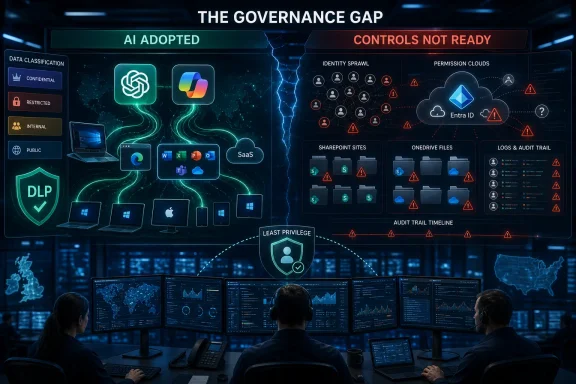
Heimdal’s 2026 AI risk research says ChatGPT is present in 71% of UK IT environments and Microsoft Copilot in 68%, while IT and security teams on both sides of the Atlantic increasingly worry that governance, visibility, and security controls are lagging behind adoption. The headline is not that enterprise AI has arrived; that argument is over. The more uncomfortable point is that AI has arrived through a familiar enterprise doorway: useful tools first, permission models later. For Windows shops, Microsoft 365 tenants, SaaS sprawl, and help-desk overload, the new AI risk story looks less like science fiction and more like a permissions audit nobody has time to finish.
The important shift in Heimdal’s findings is not merely that IT teams are using AI. It is that AI tools have become part of the operating fabric of the modern IT estate, in much the same way SaaS collaboration suites did a decade ago. ChatGPT and Microsoft Copilot are no longer exotic experiments run by innovation teams; they are everyday productivity layers touching documents, tickets, source code, chats, and customer records.
That changes the security conversation. A pilot can be ring-fenced, watched, and quietly killed if it goes wrong. A widely adopted AI tool becomes a dependency, and dependencies have a way of surviving long after the original risk memo has been forgotten.
The optimistic case is obvious and, frankly, compelling. IT and security teams are drowning in repetitive work: triage, log review, policy drafting, ticket summaries, documentation, user guidance, and the thousand small tasks that consume a week without ever feeling strategic. If nearly three-quarters of teams are losing roughly a quarter of their time to low-value repetitive work, it is not surprising that AI looks less like a luxury and more like a pressure valve.
That is why the most overworked teams are often the most optimistic. They do not need to be sold a vision of AI transforming work someday. They are already using it to claw back hours from the operational grind.
But this is where the cheerful productivity story starts to bend. The tools that reduce toil also create new paths for data to move, new prompts for sensitive context to leak, and new third-party integrations for attackers to abuse. In enterprise security, every helpful shortcut eventually becomes part of the attack surface.
Security operations centers are asked to detect faster, report better, retain more telemetry, support more cloud services, and respond to more incidents with roughly the same human attention span as before. Infrastructure teams are patching hybrid estates, managing identity sprawl, and explaining to users why a sign-in challenge is not optional. Help desks are expected to be both concierge and compliance function. Documentation is always out of date because the environment changes faster than anyone can write it down.
AI slots neatly into that mess. It can summarize alerts, draft remediation steps, write scripts, classify tickets, produce first-pass documentation, and translate vendor noise into something closer to operational language. For exhausted teams, this is not hype; it is relief.
That relief matters because security programs often fail not from lack of policy but from lack of capacity. A theoretically perfect control that nobody has time to maintain is not a control. A policy exception register that never gets reviewed is not governance. A data classification scheme that collapses when users paste content into whatever tool helps them finish the day is not strategy.
AI’s appeal, then, is partly a symptom of enterprise fragility. Teams are adopting it because they need leverage. The problem is that leverage cuts both ways.
Traditional security architectures were built around devices, networks, identities, and applications that had clearer boundaries. Even cloud-era security, messy as it became, still tended to ask recognizable questions: who has access, from where, to which application, using what device, under what policy? AI complicates the picture because it consumes and produces information across boundaries.
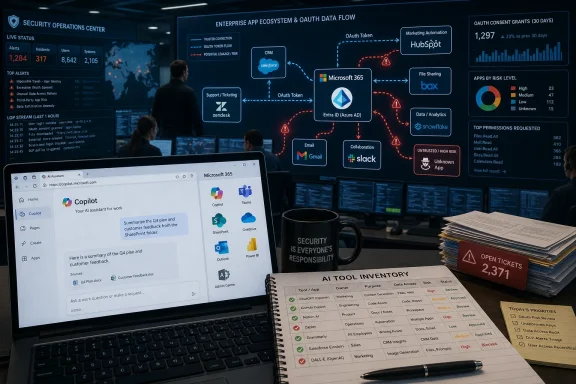
A user does not simply “access” an AI tool. They feed it context. They ask it to reason across documents. They invite it into email, chat, CRM records, ticketing systems, repositories, and calendars. They may connect it through plugins, browser extensions, OAuth grants, or vendor integrations that security teams do not routinely review. The tool becomes less an application than a mediator between many applications.
That is why visibility keeps appearing as the real problem. If an organization cannot see which AI tools are in use, which accounts authorized them, what scopes were granted, what data they can read, and where outputs are stored, then “AI risk management” becomes a slogan. The same applies to Microsoft Copilot deployments inside Microsoft 365. The risk is not simply Copilot itself; it is the quality of the tenant’s permissions, retention, labeling, sharing, and access hygiene before Copilot starts surfacing what users were technically already allowed to see.
This is a deeply WindowsForum kind of issue because it lives in the unglamorous middle layer of enterprise IT. Not the flashy demo. Not the catastrophic Hollywood breach. The day-to-day reality is Entra ID permissions, Microsoft 365 sharing links, Teams channels, SharePoint sites, browser sessions, endpoint policy, and logs that may or may not answer the question an auditor asks six months later.
Shadow AI follows the same logic, except the stakes are higher because the value proposition is unusually broad. A user might bring an unsanctioned AI tool into procurement, HR, engineering, legal review, customer support, or incident response. The tool can be used for summarization one minute and decision support the next. It can handle harmless boilerplate and sensitive internal strategy in the same chat history.
That makes the phrase shadow AI slightly misleading. The problem is not only rogue tools. It is also approved tools used in ways nobody mapped, third-party tools connected by OAuth grants nobody reviewed, and legitimate integrations that outlive the business process that justified them. Shadow does not always mean malicious or even secret. Sometimes it means forgotten.
The Salesloft Drift incident is a useful warning because it shows how an AI-adjacent integration can become a data path into systems that matter more than the tool itself. Attackers reportedly abused compromised OAuth tokens tied to the Drift integration with Salesforce, enabling access to data across multiple customer environments. The memorable line from Heimdal’s framing is blunt: Drift was the AI tool; Salesforce held the data.
That distinction is central. Security teams may approve or tolerate an AI chatbot because it appears to handle a narrow customer engagement function. But the integration behind it may have access into CRM records, support cases, contact data, and other business-critical information. The risk is not always in the chatbot interface users see. It is in the token, the scope, the integration, and the stale assumption that someone else checked it.
A compromised password may be reset. A stolen token can sometimes behave like pre-approved trust, especially if monitoring is weak and scopes are broad. A third-party integration can look legitimate to downstream systems because, from the application’s perspective, it is legitimate. That is what makes OAuth abuse so difficult for organizations that still think about access primarily in terms of interactive user sign-ins.
The AI wave increases the number of these trust relationships. AI assistants want context. Context lives in other systems. The fastest way to provide context is to connect the assistant to those systems. The more aggressively organizations pursue productivity, the more tempting it becomes to grant broad access now and rationalize it later.
This is not an argument against OAuth or integrations. Modern enterprise software would be unusable without delegated access. It is an argument against treating delegated access as a one-time procurement checkbox rather than a living security object.
For Microsoft-heavy environments, the lesson should feel familiar. Entra ID app consent, Graph permissions, service principals, conditional access, audit logs, and data governance are no longer back-office configuration details. They are AI security primitives. If an AI tool can reason over everything a connected identity can reach, then identity hygiene is data-loss prevention by another name.
Organizations with poor visibility can appear calmer because they have fewer facts to worry about. They do not see which tools employees use, which prompts contain sensitive material, which outputs are copied into customer communications, or which integrations retain access after a trial ends. Their confidence may be an artifact of darkness.
By contrast, teams with fuller visibility often become more anxious because they can see the real shape of the environment. They discover duplicate tools, unauthorized browser extensions, permissive SaaS grants, weak data labeling, and users pasting information into tools that were never reviewed for retention or training policies. The risk was not created by the dashboard. The dashboard simply ended the fantasy.
This is a common maturity curve in security. Asset discovery makes the estate look worse before it makes it better. Vulnerability scanning creates more tickets before it reduces exposure. Cloud posture management often begins by proving that nobody had an accurate inventory. AI governance is likely to follow the same arc.
The difference is speed. AI adoption has moved faster than most compliance programs can absorb. A new collaboration suite once required procurement, deployment, training, and migration. An AI tool can enter the environment through a browser tab, a plugin, a SaaS feature toggle, or an existing enterprise license. Governance has to chase a moving target that users experience as a productivity upgrade.
This disconnect is dangerous because AI governance is not only a technical problem. It is a budget, policy, accountability, and risk-ownership problem. If executives believe the matter is mostly handled, they will underfund the boring work that actually reduces exposure. If practitioners believe the risk is not under control but lack authority to slow adoption, the result is organizational theater: dashboards for the board, exceptions for the business, and anxiety for the people on call.
The mismatch also reflects different incentives. Executives are rewarded for enabling transformation, reducing costs, and demonstrating that the company is not falling behind. Practitioners are rewarded, or blamed, based on whether systems hold up under attack, audit, and outage. One group sees AI as strategic acceleration. The other sees a new layer of unreviewed access paths.
Both perspectives contain truth. AI can reduce toil and improve responsiveness. It can also turn poor permissions into visible leakage and forgotten integrations into breach paths. The failure mode is not optimism; it is optimism without operational evidence.
Adam Pilton’s warning about misplaced confidence lands because security programs often confuse the existence of tools with readiness. Buying a secure web gateway, CASB, DLP platform, identity product, or AI governance feature does not mean the organization understands where sensitive data flows. The stack matters. The operating model matters more.
The central Copilot security lesson has been repeated often enough to sound banal: it respects existing permissions. But that reassurance has a second edge. If existing permissions are messy, overbroad, inherited, stale, or poorly understood, Copilot can make that mess more discoverable. The tool may not create access where none existed, but it can make latent access operationally meaningful.
That is a governance problem many enterprises postponed during the Microsoft 365 boom. SharePoint sites proliferated. Teams channels became document repositories. External sharing was enabled for perfectly reasonable business reasons. Former project members retained access. Sensitivity labels were inconsistently applied. Retention rules reflected legal compromise more than security clarity.
Copilot turns that accumulated entropy into a board-level AI issue. Suddenly, the question is not only “Who can open this document?” but “What can an assistant infer, summarize, and surface from the corpus this user can reach?” The security boundary remains permission-based, but the practical effect of permission changes when discovery becomes conversational.
This does not make Copilot uniquely reckless. In some ways, Microsoft’s advantage is that enterprises already have administrative controls, audit capabilities, compliance tooling, and identity infrastructure around the platform. But it does mean that Copilot readiness is less about flipping on an AI feature and more about doing the tenant hygiene work organizations should have done anyway.
Organizations need to know which AI tools are in use, which data they can touch, whether prompts and outputs are retained, whether customer or regulated data is permitted, which third parties process the data, which integrations have delegated access, and how those grants are reviewed and revoked. They need policy, but policy without telemetry is paperwork. They need visibility, but visibility without enforcement is surveillance.
The first step is inventory. Not the annual spreadsheet kind, but a living inventory of sanctioned tools, observed tools, browser extensions, SaaS integrations, OAuth grants, enterprise app consents, and AI features embedded inside existing platforms. In 2026, “we do not use that AI tool” is not a reliable statement unless telemetry backs it up.
The second step is classification. Data leakage cannot be managed if the organization does not know which data matters most. Not every prompt is a crisis. Not every output needs review. But regulated data, credentials, customer records, legal material, source code, security findings, and unreleased business information deserve different treatment from generic marketing copy.
The third step is revocation discipline. Integrations should expire, scopes should be minimized, and access should be reviewed after projects end. The enterprise world is full of doors that remain open because closing them might break something and nobody owns the risk. AI makes that habit more expensive.
A better model is constrained enablement. Give users approved tools that are good enough to reduce the temptation of unsanctioned alternatives. Define what data can be used and what cannot. Make secure defaults easier than workarounds. Provide clear escalation paths for unusual use cases. Monitor for violations, but also study them as evidence that the sanctioned process may be broken.
This is especially important for IT practitioners themselves. Security and infrastructure teams are power users of AI because their work is text-heavy, code-adjacent, and overloaded. They will use AI to draft PowerShell, explain logs, summarize incidents, and write policies. If the organization’s AI rules are vague or unrealistic, the people responsible for enforcing them will be among the first to experience the contradiction.
The security challenge is therefore cultural as well as technical. AI governance cannot be written as if users are passive risks to be controlled. Users are adopting these tools because the work demands it. A credible governance program starts from that fact rather than pretending adoption can be wished back into a pilot phase.
Can the organization list its AI tools and integrations? Can it identify unsanctioned usage? Can it show which OAuth grants allow access to CRM, email, file stores, or ticketing systems? Can it detect unusual data access through a third-party integration? Can it revoke access quickly? Can it prove that sensitive data is labeled consistently enough for policy to matter?
These are not abstract governance questions. They are incident-response questions waiting to happen. During a breach, the organization will not have time to discover for the first time how an AI chatbot was connected to Salesforce, what scopes it held, or which logs record its activity. That work must exist before the incident.
The same applies to vendor assurance. AI suppliers and SaaS providers will publish security statements, but customers still need to understand data flow, retention, subprocessors, isolation, model training policies, administrative controls, and breach notification processes. Procurement questionnaires are not enough if the answers never translate into operational monitoring.
Executives should want this discipline because it protects the productivity story. AI adoption will slow not because security teams are skeptical, but because a handful of preventable incidents will teach boards that enthusiasm without controls is expensive. The organizations that keep moving fastest will be the ones that make AI safe enough to trust.
The opportunity is that AI readiness aligns with work IT teams already know they need to do. Clean up identity. Review app consent. Rationalize SharePoint and Teams permissions. Classify sensitive data. Tighten external sharing. Monitor browser extensions. Revisit DLP policies. Improve logging. Define retention. Train users on what cannot go into prompts. None of this is conceptually new, which is both comforting and damning.
The AI layer makes these tasks more urgent because it changes the usability of existing data access. A forgotten folder permission is one thing when a user has to know where to look. It is another when an assistant can synthesize relevant information from across the estate. Search changed enterprise knowledge once; AI assistants are changing it again.
Administrators should resist framing this as a Microsoft-only issue or a ChatGPT-only issue. Most enterprises will use several AI tools at once, often through both sanctioned suites and point solutions. The risk model must follow the data, not the brand.
That should reshape how enterprises think about AI procurement. Approval should not be a one-time gate. It should trigger lifecycle management: initial review, scope limitation, logging requirements, renewal checks, incident playbooks, and periodic revalidation. If an AI tool connects to high-value systems, its integration deserves the same seriousness as privileged access.
The same principle applies internally. A business unit may have a legitimate reason to connect an AI assistant to CRM data. But the organization still needs to ask how much data the assistant needs, whether read-only access is sufficient, whether access can be segmented, and how anomalous retrieval would be detected. Least privilege is not less relevant because a tool is AI-powered. It is more relevant because the tool’s purpose is to extract value from data.
The Drift lesson also exposes a gap between personal provisioning and organizational exposure. Heimdal notes that affected teams may not have personally provisioned the tool that became the path in. That is the nature of SaaS supply chains. Your risk can be created by a decision made elsewhere, months earlier, by people who had no reason to imagine the integration would become incident-response evidence.
AI is no longer waiting outside the enterprise firewall asking for permission to enter; it is already inside the browser, the productivity suite, the CRM workflow, and the admin console. The choice facing IT teams in 2026 is not adoption versus resistance, but whether they can turn a chaotic productivity surge into a governed operating model before the next integration breach turns another helpful assistant into the way in.
 AI Has Crossed From Pilot Project to Plumbing
The important shift in Heimdal’s findings is not merely that IT teams are using AI. It is that AI tools have become part of the operating fabric of the modern IT estate, in much the same way SaaS collaboration suites did a decade ago. ChatGPT and Microsoft Copilot are no longer exotic experiments run by innovation teams; they are everyday productivity layers touching documents, tickets, source code, chats, and customer records.That changes the security conversation. A pilot can be ring-fenced, watched, and quietly killed if it goes wrong. A widely adopted AI tool becomes a dependency, and dependencies have a way of surviving long after the original risk memo has been forgotten.
The optimistic case is obvious and, frankly, compelling. IT and security teams are drowning in repetitive work: triage, log review, policy drafting, ticket summaries, documentation, user guidance, and the thousand small tasks that consume a week without ever feeling strategic. If nearly three-quarters of teams are losing roughly a quarter of their time to low-value repetitive work, it is not surprising that AI looks less like a luxury and more like a pressure valve.
That is why the most overworked teams are often the most optimistic. They do not need to be sold a vision of AI transforming work someday. They are already using it to claw back hours from the operational grind.
But this is where the cheerful productivity story starts to bend. The tools that reduce toil also create new paths for data to move, new prompts for sensitive context to leak, and new third-party integrations for attackers to abuse. In enterprise security, every helpful shortcut eventually becomes part of the attack surface.
Productivity Is Winning Because the Workload Is Real
It is easy to mock executive enthusiasm for AI as another round of vendor-driven transformation theater. That would miss why adoption is sticking. IT teams are not embracing AI only because boards like the word; they are embracing it because the current workload model is unsustainable.Security operations centers are asked to detect faster, report better, retain more telemetry, support more cloud services, and respond to more incidents with roughly the same human attention span as before. Infrastructure teams are patching hybrid estates, managing identity sprawl, and explaining to users why a sign-in challenge is not optional. Help desks are expected to be both concierge and compliance function. Documentation is always out of date because the environment changes faster than anyone can write it down.
AI slots neatly into that mess. It can summarize alerts, draft remediation steps, write scripts, classify tickets, produce first-pass documentation, and translate vendor noise into something closer to operational language. For exhausted teams, this is not hype; it is relief.
That relief matters because security programs often fail not from lack of policy but from lack of capacity. A theoretically perfect control that nobody has time to maintain is not a control. A policy exception register that never gets reviewed is not governance. A data classification scheme that collapses when users paste content into whatever tool helps them finish the day is not strategy.
AI’s appeal, then, is partly a symptom of enterprise fragility. Teams are adopting it because they need leverage. The problem is that leverage cuts both ways.
The Security Stack Was Built for Yesterday’s SaaS, Not Today’s AI
Heimdal’s finding that only four in ten teams consider their security stack ready for AI-related risk should make enterprise buyers pause. That figure is not just an indictment of immature AI governance. It is a warning that many organizations are adding AI capabilities on top of control planes that were already struggling with SaaS.Traditional security architectures were built around devices, networks, identities, and applications that had clearer boundaries. Even cloud-era security, messy as it became, still tended to ask recognizable questions: who has access, from where, to which application, using what device, under what policy? AI complicates the picture because it consumes and produces information across boundaries.
A user does not simply “access” an AI tool. They feed it context. They ask it to reason across documents. They invite it into email, chat, CRM records, ticketing systems, repositories, and calendars. They may connect it through plugins, browser extensions, OAuth grants, or vendor integrations that security teams do not routinely review. The tool becomes less an application than a mediator between many applications.
That is why visibility keeps appearing as the real problem. If an organization cannot see which AI tools are in use, which accounts authorized them, what scopes were granted, what data they can read, and where outputs are stored, then “AI risk management” becomes a slogan. The same applies to Microsoft Copilot deployments inside Microsoft 365. The risk is not simply Copilot itself; it is the quality of the tenant’s permissions, retention, labeling, sharing, and access hygiene before Copilot starts surfacing what users were technically already allowed to see.
This is a deeply WindowsForum kind of issue because it lives in the unglamorous middle layer of enterprise IT. Not the flashy demo. Not the catastrophic Hollywood breach. The day-to-day reality is Entra ID permissions, Microsoft 365 sharing links, Teams channels, SharePoint sites, browser sessions, endpoint policy, and logs that may or may not answer the question an auditor asks six months later.
Shadow AI Is Just Shadow IT With Better Marketing
Enterprises have lived through this movie before. Consumer cloud storage appeared before sanctioned file-sharing programs matured. Messaging apps spread before communications governance caught up. Developers adopted cloud services before centralized cloud security teams had a full inventory. The name changes, but the pattern remains: users route around friction when the sanctioned path is slower than the work.Shadow AI follows the same logic, except the stakes are higher because the value proposition is unusually broad. A user might bring an unsanctioned AI tool into procurement, HR, engineering, legal review, customer support, or incident response. The tool can be used for summarization one minute and decision support the next. It can handle harmless boilerplate and sensitive internal strategy in the same chat history.
That makes the phrase shadow AI slightly misleading. The problem is not only rogue tools. It is also approved tools used in ways nobody mapped, third-party tools connected by OAuth grants nobody reviewed, and legitimate integrations that outlive the business process that justified them. Shadow does not always mean malicious or even secret. Sometimes it means forgotten.
The Salesloft Drift incident is a useful warning because it shows how an AI-adjacent integration can become a data path into systems that matter more than the tool itself. Attackers reportedly abused compromised OAuth tokens tied to the Drift integration with Salesforce, enabling access to data across multiple customer environments. The memorable line from Heimdal’s framing is blunt: Drift was the AI tool; Salesforce held the data.
That distinction is central. Security teams may approve or tolerate an AI chatbot because it appears to handle a narrow customer engagement function. But the integration behind it may have access into CRM records, support cases, contact data, and other business-critical information. The risk is not always in the chatbot interface users see. It is in the token, the scope, the integration, and the stale assumption that someone else checked it.
OAuth Has Become the New Forgotten Password
For years, enterprise security teams trained users not to reuse passwords, not to click suspicious links, and not to approve strange sign-in prompts. Those lessons still matter, but the modern SaaS estate has shifted enormous trust into tokens and delegated permissions. OAuth grants are convenient precisely because they reduce friction. They are dangerous for the same reason.A compromised password may be reset. A stolen token can sometimes behave like pre-approved trust, especially if monitoring is weak and scopes are broad. A third-party integration can look legitimate to downstream systems because, from the application’s perspective, it is legitimate. That is what makes OAuth abuse so difficult for organizations that still think about access primarily in terms of interactive user sign-ins.
The AI wave increases the number of these trust relationships. AI assistants want context. Context lives in other systems. The fastest way to provide context is to connect the assistant to those systems. The more aggressively organizations pursue productivity, the more tempting it becomes to grant broad access now and rationalize it later.
This is not an argument against OAuth or integrations. Modern enterprise software would be unusable without delegated access. It is an argument against treating delegated access as a one-time procurement checkbox rather than a living security object.
For Microsoft-heavy environments, the lesson should feel familiar. Entra ID app consent, Graph permissions, service principals, conditional access, audit logs, and data governance are no longer back-office configuration details. They are AI security primitives. If an AI tool can reason over everything a connected identity can reach, then identity hygiene is data-loss prevention by another name.
Data Leakage Is the Risk Teams See When They Finally Look
Heimdal’s research notes that 56% of UK respondents highlighted data leakage as a concern, and that teams with full visibility into AI use were more likely to flag leakage than teams with no visibility. That pattern is telling. Awareness does not eliminate risk; it reveals it.Organizations with poor visibility can appear calmer because they have fewer facts to worry about. They do not see which tools employees use, which prompts contain sensitive material, which outputs are copied into customer communications, or which integrations retain access after a trial ends. Their confidence may be an artifact of darkness.
By contrast, teams with fuller visibility often become more anxious because they can see the real shape of the environment. They discover duplicate tools, unauthorized browser extensions, permissive SaaS grants, weak data labeling, and users pasting information into tools that were never reviewed for retention or training policies. The risk was not created by the dashboard. The dashboard simply ended the fantasy.
This is a common maturity curve in security. Asset discovery makes the estate look worse before it makes it better. Vulnerability scanning creates more tickets before it reduces exposure. Cloud posture management often begins by proving that nobody had an accurate inventory. AI governance is likely to follow the same arc.
The difference is speed. AI adoption has moved faster than most compliance programs can absorb. A new collaboration suite once required procurement, deployment, training, and migration. An AI tool can enter the environment through a browser tab, a plugin, a SaaS feature toggle, or an existing enterprise license. Governance has to chase a moving target that users experience as a productivity upgrade.
The Executive-Practitioner Gap Is the Most Dangerous Finding
The sharpest number in the Heimdal research is not the percentage of environments running ChatGPT or Copilot. It is the confidence gap between executives and frontline practitioners. In the US, 29% of executives reportedly say AI risk is under control, compared with only 7% of practitioners. In the UK, the gap is smaller but still meaningful.This disconnect is dangerous because AI governance is not only a technical problem. It is a budget, policy, accountability, and risk-ownership problem. If executives believe the matter is mostly handled, they will underfund the boring work that actually reduces exposure. If practitioners believe the risk is not under control but lack authority to slow adoption, the result is organizational theater: dashboards for the board, exceptions for the business, and anxiety for the people on call.
The mismatch also reflects different incentives. Executives are rewarded for enabling transformation, reducing costs, and demonstrating that the company is not falling behind. Practitioners are rewarded, or blamed, based on whether systems hold up under attack, audit, and outage. One group sees AI as strategic acceleration. The other sees a new layer of unreviewed access paths.
Both perspectives contain truth. AI can reduce toil and improve responsiveness. It can also turn poor permissions into visible leakage and forgotten integrations into breach paths. The failure mode is not optimism; it is optimism without operational evidence.
Adam Pilton’s warning about misplaced confidence lands because security programs often confuse the existence of tools with readiness. Buying a secure web gateway, CASB, DLP platform, identity product, or AI governance feature does not mean the organization understands where sensitive data flows. The stack matters. The operating model matters more.
Microsoft Copilot Makes Tenant Hygiene Impossible to Ignore
For Windows and Microsoft 365 administrators, Copilot deserves special attention because it arrives inside an ecosystem many organizations already depend on. That is both its advantage and its risk. Copilot does not need to persuade users to move work into a new platform; in many cases, the work is already in Exchange, Teams, SharePoint, OneDrive, Word, Excel, PowerPoint, and the wider Microsoft Graph.The central Copilot security lesson has been repeated often enough to sound banal: it respects existing permissions. But that reassurance has a second edge. If existing permissions are messy, overbroad, inherited, stale, or poorly understood, Copilot can make that mess more discoverable. The tool may not create access where none existed, but it can make latent access operationally meaningful.
That is a governance problem many enterprises postponed during the Microsoft 365 boom. SharePoint sites proliferated. Teams channels became document repositories. External sharing was enabled for perfectly reasonable business reasons. Former project members retained access. Sensitivity labels were inconsistently applied. Retention rules reflected legal compromise more than security clarity.
Copilot turns that accumulated entropy into a board-level AI issue. Suddenly, the question is not only “Who can open this document?” but “What can an assistant infer, summarize, and surface from the corpus this user can reach?” The security boundary remains permission-based, but the practical effect of permission changes when discovery becomes conversational.
This does not make Copilot uniquely reckless. In some ways, Microsoft’s advantage is that enterprises already have administrative controls, audit capabilities, compliance tooling, and identity infrastructure around the platform. But it does mean that Copilot readiness is less about flipping on an AI feature and more about doing the tenant hygiene work organizations should have done anyway.
AI Risk Management Will Be Won in Inventories, Not Slogans
The phrase “AI risk management” can easily become vendor fog. Every security category now has an AI story, and every AI vendor now has a security paragraph. The practical work is less glamorous.Organizations need to know which AI tools are in use, which data they can touch, whether prompts and outputs are retained, whether customer or regulated data is permitted, which third parties process the data, which integrations have delegated access, and how those grants are reviewed and revoked. They need policy, but policy without telemetry is paperwork. They need visibility, but visibility without enforcement is surveillance.
The first step is inventory. Not the annual spreadsheet kind, but a living inventory of sanctioned tools, observed tools, browser extensions, SaaS integrations, OAuth grants, enterprise app consents, and AI features embedded inside existing platforms. In 2026, “we do not use that AI tool” is not a reliable statement unless telemetry backs it up.
The second step is classification. Data leakage cannot be managed if the organization does not know which data matters most. Not every prompt is a crisis. Not every output needs review. But regulated data, credentials, customer records, legal material, source code, security findings, and unreleased business information deserve different treatment from generic marketing copy.
The third step is revocation discipline. Integrations should expire, scopes should be minimized, and access should be reviewed after projects end. The enterprise world is full of doors that remain open because closing them might break something and nobody owns the risk. AI makes that habit more expensive.
Security Teams Need Guardrails That Users Will Actually Use
The wrong response to AI risk is blanket prohibition. Not because prohibition is philosophically bad, but because it often fails operationally. If employees believe AI helps them do their jobs and the approved route is absent, slow, or inferior, they will find another route. Security teams that ignore that reality end up governing only the users honest enough to ask permission.A better model is constrained enablement. Give users approved tools that are good enough to reduce the temptation of unsanctioned alternatives. Define what data can be used and what cannot. Make secure defaults easier than workarounds. Provide clear escalation paths for unusual use cases. Monitor for violations, but also study them as evidence that the sanctioned process may be broken.
This is especially important for IT practitioners themselves. Security and infrastructure teams are power users of AI because their work is text-heavy, code-adjacent, and overloaded. They will use AI to draft PowerShell, explain logs, summarize incidents, and write policies. If the organization’s AI rules are vague or unrealistic, the people responsible for enforcing them will be among the first to experience the contradiction.
The security challenge is therefore cultural as well as technical. AI governance cannot be written as if users are passive risks to be controlled. Users are adopting these tools because the work demands it. A credible governance program starts from that fact rather than pretending adoption can be wished back into a pilot phase.
The Board Wants Acceleration, the SOC Wants Evidence
The executive-practitioner confidence gap will not close through reassurance. It will close through measurable controls. Boards and senior leaders should stop asking whether AI risk is “under control” as a general sentiment and start asking for evidence that specific failure modes are being managed.Can the organization list its AI tools and integrations? Can it identify unsanctioned usage? Can it show which OAuth grants allow access to CRM, email, file stores, or ticketing systems? Can it detect unusual data access through a third-party integration? Can it revoke access quickly? Can it prove that sensitive data is labeled consistently enough for policy to matter?
These are not abstract governance questions. They are incident-response questions waiting to happen. During a breach, the organization will not have time to discover for the first time how an AI chatbot was connected to Salesforce, what scopes it held, or which logs record its activity. That work must exist before the incident.
The same applies to vendor assurance. AI suppliers and SaaS providers will publish security statements, but customers still need to understand data flow, retention, subprocessors, isolation, model training policies, administrative controls, and breach notification processes. Procurement questionnaires are not enough if the answers never translate into operational monitoring.
Executives should want this discipline because it protects the productivity story. AI adoption will slow not because security teams are skeptical, but because a handful of preventable incidents will teach boards that enthusiasm without controls is expensive. The organizations that keep moving fastest will be the ones that make AI safe enough to trust.
Windows Shops Have a Narrow Window to Get the Basics Right
For Windows-centric organizations, the next phase of AI risk management will be deeply practical. Microsoft’s ecosystem gives administrators a rich set of identity, endpoint, information protection, and compliance tools, but richness is not the same as readiness. Many tenants have years of configuration drift, legacy exceptions, and access decisions made under deadline pressure.The opportunity is that AI readiness aligns with work IT teams already know they need to do. Clean up identity. Review app consent. Rationalize SharePoint and Teams permissions. Classify sensitive data. Tighten external sharing. Monitor browser extensions. Revisit DLP policies. Improve logging. Define retention. Train users on what cannot go into prompts. None of this is conceptually new, which is both comforting and damning.
The AI layer makes these tasks more urgent because it changes the usability of existing data access. A forgotten folder permission is one thing when a user has to know where to look. It is another when an assistant can synthesize relevant information from across the estate. Search changed enterprise knowledge once; AI assistants are changing it again.
Administrators should resist framing this as a Microsoft-only issue or a ChatGPT-only issue. Most enterprises will use several AI tools at once, often through both sanctioned suites and point solutions. The risk model must follow the data, not the brand.
The Practical Lesson From Drift Is That Approval Is Not Control
The Drift breach example matters because it punctures a comforting assumption: that risk lives mainly in tools employees secretly adopt. In reality, approved tools can be dangerous when their integrations are poorly monitored, their tokens are overpowered, or their access remains trusted after the environment changes.That should reshape how enterprises think about AI procurement. Approval should not be a one-time gate. It should trigger lifecycle management: initial review, scope limitation, logging requirements, renewal checks, incident playbooks, and periodic revalidation. If an AI tool connects to high-value systems, its integration deserves the same seriousness as privileged access.
The same principle applies internally. A business unit may have a legitimate reason to connect an AI assistant to CRM data. But the organization still needs to ask how much data the assistant needs, whether read-only access is sufficient, whether access can be segmented, and how anomalous retrieval would be detected. Least privilege is not less relevant because a tool is AI-powered. It is more relevant because the tool’s purpose is to extract value from data.
The Drift lesson also exposes a gap between personal provisioning and organizational exposure. Heimdal notes that affected teams may not have personally provisioned the tool that became the path in. That is the nature of SaaS supply chains. Your risk can be created by a decision made elsewhere, months earlier, by people who had no reason to imagine the integration would become incident-response evidence.
The AI Security Reckoning Will Be Administrative Before It Is Magical
The most concrete lessons from Heimdal’s research are not futuristic. They are administrative, procedural, and measurable. That may disappoint anyone hoping for a single AI security product to solve the problem, but it should reassure IT teams that the path forward is understandable.- Organizations should treat AI tools as part of the core SaaS estate rather than as experimental side projects.
- Visibility into AI use will often increase reported concern because it reveals real data flows and forgotten integrations.
- OAuth grants, app consents, and third-party integrations need routine review because they can become durable access paths into higher-value systems.
- Microsoft Copilot readiness depends heavily on Microsoft 365 permission hygiene, data classification, and tenant governance.
- Executive confidence should be tested against operational evidence, not sentiment or vendor assurances.
- Security teams should provide usable approved AI paths, because unrealistic bans tend to produce shadow adoption rather than control.
AI is no longer waiting outside the enterprise firewall asking for permission to enter; it is already inside the browser, the productivity suite, the CRM workflow, and the admin console. The choice facing IT teams in 2026 is not adoption versus resistance, but whether they can turn a chaotic productivity surge into a governed operating model before the next integration breach turns another helpful assistant into the way in.
References
- Primary source: IT Pro
Published: 2026-06-22T14:51:16.291161
IT teams are bullish on AI tools, but they’re worried security practices can’t keep pace | IT Pro
Executives and IT teams are at odds over the risks associated with AI adoptionwww.itpro.com - Related coverage: crn.com
Palo Alto Networks, Zscaler Among Victims Of Salesforce Third-Party Breach
Palo Alto Networks and Zscaler confirmed they’re among the latest victims in the campaign targeting widespread theft of Salesforce data through compromising Salesloft Drift, a popular third-party Salesforce application.www.crn.com - Related coverage: techradar.com
Salesloft breached to steal OAuth tokens for Salesforce data-theft attacks | TechRadar
Revenue workflow platform hit via a third partywww.techradar.com - Related coverage: theregister.com
Stolen OAuth tokens expose Palo Alto customer data
: Security firm's Salesforce instance accessed using credentials stolen from Salesloft's Drift platform breachwww.theregister.com - Related coverage: 360sec.com
Inside the Salesloft Drift Breach: OAuth Token Theft & Salesforce Supply Chain Attack Analysis - 360 Security Group
Comprehensive analysis of the August 2025 Salesloft Drift breach where threat actor UNC6395 compromised GitHub, stole AWS credentials, and exfiltrated OAuth tokens to access hundreds of Salesforce instances. Includes IOCs, attack timeline, and defensive controls.360sec.com - Related coverage: bleepingcomputer.com
Salesloft breached to steal OAuth tokens for Salesforce data-theft attacks
Hackers breached sales automation platform Salesloft to steal OAuth and refresh tokens from its Drift chat agent integration with Salesforce to pivot to customer environments and exfiltrate data. The ShinyHunters extortion group claims responsibility for these additional Salesforce attacks.www.bleepingcomputer.com