

Amazon’s plan to bring Alexa to Windows 10 PCs in early 2018 reshaped conversations about where voice assistants belong — not just in speakers and phones, but on the primary computing surface millions of people use every day — and the rollout that followed exposed both the promise and the fragility of adding cloud voice assistants to the PC ecosystem.
Amazon announced at CES 2018 that it was preparing a Windows 10 app that would put Alexa on select PCs from major OEMs, with an initial rollout aimed for Q1 2018 on devices from Acer, ASUS, HP, and Lenovo. This move extended Alexa’s reach beyond Echo devices into the wider world of laptops, convertibles, and all‑in‑ones, and directly challenged Microsoft’s Cortana as the on‑device assistant for Windows users. OEMs immediately supported the initiative: Acer published a notice that several Aspire, Spin, Switch, and Swift notebooks — and Aspire all‑in‑one PCs — would receive Alexa via updates or preloading starting in Q1 2018. These devices typically featured far‑field microphones and sound hardware tuned for voice pickup, enabling a hands‑free Alexa experience. By late 2018 the Alexa app had graduated from marketing pages and OEM announcements to public availability in the Microsoft Store, with Amazon publishing an Alexa client for Windows 10 that allowed core Alexa functionality on compatible machines. The app supported voice queries, smart‑home control, lists and reminders, Audible and Kindle integration, and access to thousands of Alexa skills — though feature parity with Echo devices and mobile apps was not complete at launch.
Two patterns emerged from community feedback that are still instructive:
Future success for any assistant on PC will depend on:
Note: specific device support, Store availability, and feature sets changed often after the initial 2018 announcement; users should check the latest OEM documentation and the Microsoft Store listing for the current state of Alexa on specific Windows models before committing critical workflows to a desktop client.
Source: Born2Invest https://born2invest.com/?b=style-252819912/
 Background / Overview
Amazon announced at CES 2018 that it was preparing a Windows 10 app that would put Alexa on select PCs from major OEMs, with an initial rollout aimed for Q1 2018 on devices from Acer, ASUS, HP, and Lenovo. This move extended Alexa’s reach beyond Echo devices into the wider world of laptops, convertibles, and all‑in‑ones, and directly challenged Microsoft’s Cortana as the on‑device assistant for Windows users. OEMs immediately supported the initiative: Acer published a notice that several Aspire, Spin, Switch, and Swift notebooks — and Aspire all‑in‑one PCs — would receive Alexa via updates or preloading starting in Q1 2018. These devices typically featured far‑field microphones and sound hardware tuned for voice pickup, enabling a hands‑free Alexa experience. By late 2018 the Alexa app had graduated from marketing pages and OEM announcements to public availability in the Microsoft Store, with Amazon publishing an Alexa client for Windows 10 that allowed core Alexa functionality on compatible machines. The app supported voice queries, smart‑home control, lists and reminders, Audible and Kindle integration, and access to thousands of Alexa skills — though feature parity with Echo devices and mobile apps was not complete at launch. Why the Windows move mattered
Alexa’s ecosystem versus Cortana’s integration
Unlike Cortana, which is built into Windows and tied to Microsoft services, Alexa brought a large third‑party ecosystem: tens of thousands of skills, broad smart‑home vendor support, and deep integration with Amazon services such as Amazon Music, shopping, and Audible. For OEMs and users invested in the Alexa smart‑home ecosystem, adding Alexa to a PC made that ecosystem accessible from the primary productivity surface without buying additional hardware. This strategic ecosystem play is what made the announcement consequential.Hardware enabling: far‑field microphones and “Always On”
The PCs targeted for Alexa integration were often those shipping with far‑field microphones and audio subsystems designed to hear wake words from across the room. Windows 10’s device partner messaging around CES highlighted an industry push toward always‑on experiences — fast wake, long battery life, and far‑field voice capture — which made Alexa’s hands‑free behavior viable on laptops and desktops. OEMs specifically called out hardware that could support Alexa’s wake‑word listening without compromising battery or audio quality.A legitimate desktop use case
On a desk, a voice assistant is useful for quick, hands‑free interactions: setting timers, checking calendars, controlling lights and thermostats while working, or asking quick questions without breaking focus. For users who already relied on Alexa at home, gluing the PC into that same account and skill set simplified workflows and reduced friction. The desktop environment also opened up visual affordances (larger UI, multiple windows, camera feeds) that complement voice control for device management and multi‑step tasks.Timeline of the rollout and key milestones
- Announcement at CES 2018: Amazon and partner OEMs announced plans for Alexa on select Windows 10 PCs, with OEMs like Acer publicly listing devices due for updates in Q1 2018.
- OEM updates and preloads through 2018: Acer, Lenovo, HP and others began shipping either pre‑loaded Alexa or updates that added Alexa functionality on specific models. Early updates focused on enabling voice capture and integrating the Alexa client.
- Microsoft Store app (November 2018): Amazon released the Alexa app in the Microsoft Store, broadening availability beyond OEM‑bundled devices while still requiring specific Windows versions and hardware for hands‑free operation.
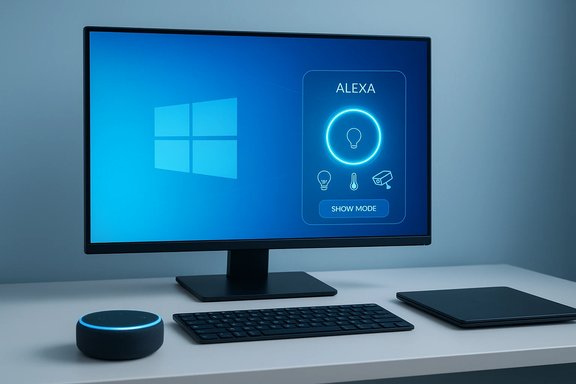
- Feature expansions (2021 and later): Amazon introduced “Show Mode” and other PC‑specific experiences that turned compatible Windows machines into Echo Show‑like displays, expanding the interaction model beyond voice to include persistent visual interfaces.
Technical specifics and requirements
Windows versions and hardware requirements
At launch and for subsequent releases, the Alexa for PC client required a relatively modern Windows 10 build (the app required Windows 10 version 17134.0 or higher at one point) and benefited from machines with far‑field microphone arrays for hands‑free wake‑word support. OEM‑preloaded devices often used audio firmware and drivers that supported low‑power voice detection. Machines lacking these audio features could still run the Alexa app but often without the hands‑free or always‑listening behavior.Feature set — what translated to the PC
- Voice queries and responses (Alexa voice model)
- Smart‑home control and routines (where skills and devices were available)
- Lists, reminders, timers, shopping lists, and to‑dos synced with Amazon account
- Media playback for supported services (Amazon Music, SiriusXM, iHeartRadio at launch) and Audible/Kindle reading
- Access to Alexa Skills, with varying support for skills that require Echo‑specific features (for example, voice calling and certain media services were initially limited)
Limitations and parity gaps
The Windows client did not always match the mobile or Echo experience feature‑for‑feature. Early app releases lacked some streaming service support, and certain communications features (like specific calling and messaging behaviors) were constrained by the desktop environment and store policies. OEM‑specific features such as Show Mode or companion integrations varied between manufacturers and were often region‑locked at first.Strengths: What the Alexa‑on‑PC strategy got right
- Ecosystem leverage. Amazon correctly leveraged its installed base of skills and third‑party integrations to make the PC a natural extension of the Alexa home. This reduced friction for users who already relied on Alexa devices.
- OEM buy‑in. Partnering with OEMs that were shipping always‑on, far‑field audio hardware created a better out‑of‑the‑box experience than a generic app could deliver on arbitrary PCs. Preloading Alexa on select SKUs simplified adoption and marketing.
- Product differentiation. For OEMs, Alexa was a differentiator at retail — a preinstalled assistant that consumers recognized and could try immediately. This was useful for lower‑friction demo experiences on store floors and in bundled marketing.
Risks and tradeoffs: privacy, reliability, and platform fragility
Data and privacy concerns
Any cloud‑based assistant sends audio and usage data to remote servers for processing. Adding Alexa to a general‑purpose PC — a device often used for document editing, email, browsing, and work — surfaced new privacy concerns. Users working on sensitive material could inadvertently activate Alexa and send snippets of audio to Amazon if hands‑free wake‑word detection triggered. Configuring privacy settings, limiting microphone access, and auditing voice history became essential to managing these risks. Community and forum threads later underscored these anxieties as the Windows client matured and OEMs shipped different privacy controls.Maintenance, support, and the peril of platform changes
The Windows app model depends on ongoing vendor and platform support — Windows updates, Store listings, OEM update channels, and Amazon’s continued investment. Over time, distribution changes, regional availability issues, and altered support priorities reduced the Windows client’s reliability in some markets. Users reported that the Store listing vanished or was region‑restricted, and the app’s behavior could differ between updates. Unsupported or semi‑supported clients present security risks if they stop receiving patches.Security surface area
Installing voice assistants on PCs can widen the attack surface: permission misuse, flawed installers from third‑party mirrors, or Android emulator workarounds create additional security vulnerabilities. Community guidance frequently emphasized installing the official Microsoft Store client when available and avoiding archived or unofficial installers. Those workarounds sometimes introduced malware risk or stability problems.Real‑world experience and community feedback
Early community reports were mixed. Where hardware and region support aligned, Alexa on PCs worked well for routine smart‑home control and basic queries; users praised the convenience of desktop voice control. Conversely, where Store availability, feature parity, or OEM integration lagged, the experience felt like a half‑measure — a desktop app that often deferred to Echo hardware for the fastest or most reliable behavior. Community threads and troubleshooting guides proliferated, documenting how to install via Store links, tweak privacy settings, or work around missing features.Two patterns emerged from community feedback that are still instructive:
- When Amazon and an OEM shipped a preconfigured experience (for example, a Lenovo machine with Show Mode), users had a smooth, curated experience.
- When users attempted to retrofit Alexa onto arbitrary PCs without far‑field mics or when regional Store support was absent, they encountered limitations that undermined the convenience argument.
Strategic analysis: What OEMs, Microsoft, and Amazon gained — and lost
For Amazon
Bringing Alexa to Windows expanded the assistant’s surface area and reinforced Amazon’s ecosystem as a multiplatform service rather than hardware‑bound. Every additional PC that could run Alexa represented potential engagement, more skill usage, and deeper integration into users’ daily routines.For OEMs
Alexa was a sellable feature at retail, enabling manufacturers to tout familiar voice capabilities as part of the out‑of‑box experience. For OEMs pursuing “Always On, Always Connected” messaging, Alexa complemented hardware investments in far‑field audio and battery efficiency.For Microsoft
The arrival of Alexa on Windows created competition for Cortana but also validated Windows as a flexible platform for third‑party assistants. The larger implication for Microsoft was the recognition that multiple ecosystems would coexist on Windows, raising questions about where Microsoft’s own assistant should focus (productivity) and how open the OS should be to rival assistants.The hidden costs
The integration also illustrated hidden costs: support overhead for OEMs (drivers, firmware, driver‑store interactions for low‑power audio), complexity for Amazon in maintaining desktop clients across device variants and Windows updates, and for Microsoft, the perpetual balancing act of enabling third‑party services while preserving native capabilities.The longer arc: evolution since 2018
The initial Alexa for PC story did not end in 2018. Amazon continued to refine the experience: the Alexa app reached the Microsoft Store, Show Mode launched to bring Echo Show‑style visuals to compatible PCs, and OEM partnerships evolved to include hardware with “Alexa built‑in” and PWA/web experiences. Meanwhile, platform changes and broader strategic shifts — including Microsoft sharpening Cortana for productivity and Amazon experimenting with more web‑first Alexa surfaces — meant that Alexa’s PC presence never settled into a single, predictable pattern. Community archives and forum discussions in later years show a recurring theme: desktop Alexa can be useful, but it is fragile if the supporting distribution channels or OEM integrations change. Many long‑term users who relied on Alexa for automation began to prefer dedicated Echo hardware for reliability, or they migrated critical automations to cloud routines independent of any single client.Practical guidance for Windows users today
- Install from the Microsoft Store when possible: it provides the safest, most update‑friendly path when the app is listed for your region.
- Confirm hardware compatibility: far‑field microphones and the OEM’s Alexa‑enabled firmware are the difference between hands‑free convenience and a manual push‑to‑talk app.
- Audit privacy settings: disable microphone access when not needed, review voice history in your Amazon account, and limit assistant privileges for sensitive use cases.
- Use dedicated Echo hardware for mission‑critical automations: if a routine is essential (security cameras, door locks, or family alerts), prefer an Echo device that Amazon actively supports.
- Treat archived installers and emulator workarounds cautiously: they expand the attack surface and can leave you with outdated binaries lacking security patches.
What went right — and what to watch for in future desktop assistant strategies
What went right was the concept: voice should not be shoehorned into a single device class. Alexa on Windows made the desktop a first‑class interaction surface for voice. What requires vigilance going forward is the sustainability of multi‑surface assistants: the combination of OEM support, timely updates, careful privacy controls, and clear user expectations.Future success for any assistant on PC will depend on:
- Seamless cross‑device continuity: preserving context and sessions across phone, speaker, and PC.
- Transparent privacy controls: clear, easily accessible toggles for microphone and voice history.
- Robust update channels: Store listings, OEM firmware updates, and a clear security patch cadence.
- Native integrations where appropriate: assistants that can act on local tasks without exfiltrating sensitive context unnecessarily.
Conclusion
The January 2018 promise that “Alexa would hit Windows 10 PCs in Q1” catalyzed a significant shift in how vendors, developers, and users think about voice on the primary productivity surface. The subsequent rollout validated the use cases — voice control for smart homes, quick hands‑free tasks, and a familiar ecosystem for Amazon customers — while also exposing technical, privacy, and support challenges that persist in hybrid environments. For Windows enthusiasts and IT buyers, the lesson is pragmatic: voice assistants on PCs can be powerful and convenient, but they are only as reliable as the hardware, distribution channels, and maintenance commitments behind them. Use the PC client where it makes sense, prefer supported hardware for mission‑critical tasks, and treat desktop voice as part of a larger, cross‑device strategy rather than a complete replacement for dedicated devices.Note: specific device support, Store availability, and feature sets changed often after the initial 2018 announcement; users should check the latest OEM documentation and the Microsoft Store listing for the current state of Alexa on specific Windows models before committing critical workflows to a desktop client.
Source: Born2Invest https://born2invest.com/?b=style-252819912/
