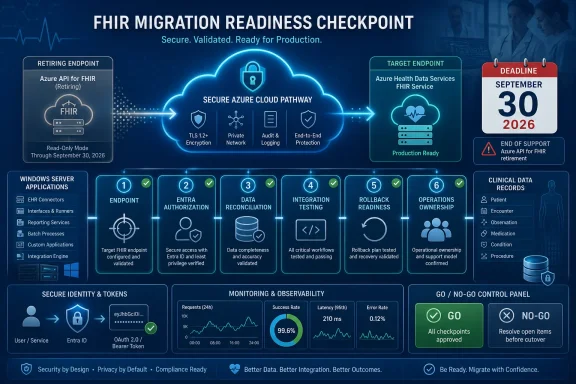
Microsoft will retire Azure API for FHIR on September 30, 2026, but healthcare IT teams should treat endpoint discovery—not database migration—as the immediate priority. Before planning a cutover, administrators need to identify every Windows service, IIS application, scheduled task, desktop utility, script, and service account that still references
Microsoft’s migration guidance makes clear that moving FHIR data is only part of the transition. Application workloads must point to new endpoints, permissions must be configured again, and jobs previously attached to the legacy service must be recreated or redirected. A missed dependency could therefore remain invisible until a prescription workflow, patient portal, interface engine, or nightly export fails.
New Azure API for FHIR deployments have already been blocked since April 1, 2025. After September 30, customers will be unable to create or manage accounts, access data through the Azure portal or APIs, use SDKs and client tools against the retired service, receive updates, or obtain Microsoft support.
A useful inventory begins with the Azure resource but does not stop there. The legacy resource tells administrators what is being retired; it does not necessarily reveal which Windows machines, application registrations, credentials, or third-party integrations depend on it.
Use this sequence to build a defensible inventory:
An initial Resource Graph query can separate the two:
The output should become the authoritative service register, but not the complete dependency register. Add columns for application owner, technical owner, production status, migration wave, validation state, rollback decision, and final decommission approval.
For Key Vault, Resource Graph can identify vaults but should not be treated as a secret-content search engine. Inventory the vaults, then have authorized application owners inspect secret names, tags, configuration mappings, and deployment templates for references to each legacy FHIR service. Avoid copying credentials or protected configuration into spreadsheets, tickets, or migration chat channels.
Begin with application source, deployment repositories, configuration-management systems, and known integration directories. Search for both the legacy domain and the SMART proxy marker:
Run searches under an account authorized to inspect the relevant directories, and protect the output. Matching lines can contain client identifiers, Key Vault references, connection details, or other sensitive configuration.
The search scope should include:
Export task definitions and search their command lines:
This will not find an endpoint hidden inside a script or compiled executable, but it identifies where deeper inspection is required. Administrators should also review Windows services by executable path and service account, then trace those binaries back to their configuration and owners.
For every legacy FHIR service, examine App registrations and Enterprise applications for:
Do not assume a successful token request proves migration readiness. A client may obtain a token but still use the wrong audience, lack the necessary permissions on the target service, send requests to the old URL, or depend on callback behavior that has changed.
This is the same retirement pattern Windows administrators have encountered with Azure AD Graph and other Microsoft service transitions: identity, endpoint, and application dependencies must be migrated together. A technically complete data copy cannot compensate for an unmodified client or an orphaned service principal.
Use available Azure API for FHIR audit and diagnostic records, application logs, proxy logs, IIS logs, endpoint-monitoring data, and Windows Event Log entries to identify actual callers. Correlate request activity with client identities, source systems, operational schedules, and application owners.
The resulting inventory should classify each dependency as:
First, provision and configure the target Azure Health Data Services FHIR service. Recreate the required identity permissions, application settings, jobs, and monitoring before directing production clients to it.
Next, migrate and validate the data using an approved migration pattern. Validation should cover more than a total record count: teams should confirm that the resources needed by representative workflows can be retrieved and interpreted correctly by the applications that consume them.
Then move lower-risk clients first. Update endpoints and permissions, execute both routine and failure-path tests, and monitor authentication failures, authorization denials, unexpected response handling, latency, retries, and application errors.
A production wave should have a written rollback decision. That plan needs to state whether the old endpoint can be restored temporarily, how writes made during the test window will be reconciled, who can authorize rollback, and when rollback becomes unsafe because the two services have diverged.
The final cutover should include explicit downtime and communication planning even if the design aims for minimal disruption. Application owners, clinical operations, service desk staff, security teams, and interface support teams need a shared timeline and clear escalation route.
Only after every confirmed dependency has passed validation should teams stop old pipelines, remove obsolete credentials and configuration, archive the inventory and test evidence, and decommission the legacy account. September 30 must be the retirement backstop, not the first full-scale production test.
The remaining window gives healthcare IT teams a choice: discover dependencies now and conduct a phased, observable cutover, or let the retirement date discover them through failed Windows services and broken clinical workflows. The database may be the largest asset being moved, but the dependency inventory is what determines whether anyone can still use it.
azurehealthcareapis.com or the legacy SMART proxy callback path.Microsoft’s migration guidance makes clear that moving FHIR data is only part of the transition. Application workloads must point to new endpoints, permissions must be configured again, and jobs previously attached to the legacy service must be recreated or redirected. A missed dependency could therefore remain invisible until a prescription workflow, patient portal, interface engine, or nightly export fails.
New Azure API for FHIR deployments have already been blocked since April 1, 2025. After September 30, customers will be unable to create or manage accounts, access data through the Azure portal or APIs, use SDKs and client tools against the retired service, receive updates, or obtain Microsoft support.
 Build the Dependency Inventory Before Moving Data
A useful inventory begins with the Azure resource but does not stop there. The legacy resource tells administrators what is being retired; it does not necessarily reveal which Windows machines, application registrations, credentials, or third-party integrations depend on it.Use this sequence to build a defensible inventory:
- Identify every legacy Azure API for FHIR resource across all subscriptions and tenants.
- Record each service name, subscription, resource group, region, endpoint, authentication audience, access policy, and SMART proxy setting.
- Search Microsoft Entra app registrations for endpoint references, redirect URIs, permissions, owners, and credentials associated with those services.
- Inspect Key Vault secret names and application configuration references without exporting secret values into an unsecured report.
- Search Windows servers and source repositories for legacy domains and SMART proxy callback paths.
- Map each match to an application owner, service account, clinical workflow, support team, and acceptable outage window.
- Confirm the dependency through logs or controlled testing instead of assuming every configuration match represents active traffic.
Microsoft.HealthcareApis/services, while the target FHIR service under Azure Health Data Services uses the workspace-based resource type Microsoft.HealthcareApis/workspaces/fhirservices.An initial Resource Graph query can separate the two:
Code:
Resources
| where type in~ (
    'microsoft.healthcareapis/services',
    'microsoft.healthcareapis/workspaces/fhirservices'
)
| project subscriptionId, resourceGroup, name, type, kind, location, id
| order by type asc, name ascFor Key Vault, Resource Graph can identify vaults but should not be treated as a secret-content search engine. Inventory the vaults, then have authorized application owners inspect secret names, tags, configuration mappings, and deployment templates for references to each legacy FHIR service. Avoid copying credentials or protected configuration into spreadsheets, tickets, or migration chat channels.
Search Windows Where Azure Cannot See
The most dangerous dependencies are often outside the Azure resource graph: a PowerShell script copied to an integration server, an IIS application with an oldweb.config, a Windows service installed years ago, or a desktop utility using a locally stored JSON settings file.Begin with application source, deployment repositories, configuration-management systems, and known integration directories. Search for both the legacy domain and the SMART proxy marker:
Code:
$Roots = @(
    'C:\inetpub',
    'C:\ProgramData',
    'C:\Scripts',
    'D:\Apps'
)

$Patterns = @(
    'azurehealthcareapis\.com',
    'AadSmartOnFhirProxy',
    'FhirServerUrl',
    'FHIR_URL'
)

Get-ChildItem $Roots -Recurse -File -ErrorAction SilentlyContinue |
    Where-Object {
        $_.Extension -in '.config','.json','.xml','.yml','.yaml',
                         '.ps1','.cmd','.bat','.cs','.js','.txt'
    } |
    Select-String -Pattern $Patterns |
Select-Object Path, LineNumber, PatternThe search scope should include:
- IIS
web.configfiles, application settings, deployment transforms, and environment-specific overrides. - Windows service installation directories and configuration stored under
C:\ProgramData. - Task Scheduler actions, arguments, scripts, and the accounts under which tasks run.
- PowerShell modules, batch files, integration-engine scripts, and operational runbooks.
- Desktop application configuration under program directories and user profiles where policy permits inspection.
- CI/CD variables, infrastructure templates, release definitions, and configuration-management repositories.
- Registry values used by older Windows applications to store server names or API settings.
Export task definitions and search their command lines:
Code:
Get-ScheduledTask | ForEach-Object {
    foreach ($Action in $_.Actions) {
        [pscustomobject]@{
            TaskPath  = $_.TaskPath
            TaskName  = $_.TaskName
            Execute   = $Action.Execute
            Arguments = $Action.Arguments
            RunAs     = $_.Principal.UserId
        }
    }
} | Where-Object {
    $_.Arguments -match 'azurehealthcareapis|FHIR|AadSmartOnFhirProxy' -or
    $_.Execute -match 'FHIR'
}Entra Applications Reveal the Authentication Blast Radius
Changing the endpoint does not automatically transfer authorization. Microsoft explicitly requires permissions to be set up again for application workloads, making the Entra inventory as important as the data migration.For every legacy FHIR service, examine App registrations and Enterprise applications for:
- Redirect URIs containing
azurehealthcareapis.comor/AadSmartOnFhirProxy/callback. - Applications whose names, owners, documentation, or deployment records connect them to the service.
- Client applications using service principals rather than interactive user authentication.
- Certificates and secrets that are also deployed to Windows services, IIS application pools, or scheduled tasks.
- Access policies and role assignments that must be reproduced and tested against the target service.
- Authentication audiences or token requests tied to the old resource identifier.
/AadSmartOnFhirProxy/callback path is particularly valuable as a discovery signature. Its presence in a redirect URI, configuration file, or troubleshooting document strongly suggests that the application was designed around the legacy SMART on FHIR proxy flow and requires more than a simple hostname replacement.Do not assume a successful token request proves migration readiness. A client may obtain a token but still use the wrong audience, lack the necessary permissions on the target service, send requests to the old URL, or depend on callback behavior that has changed.
This is the same retirement pattern Windows administrators have encountered with Azure AD Graph and other Microsoft service transitions: identity, endpoint, and application dependencies must be migrated together. A technically complete data copy cannot compensate for an unmodified client or an orphaned service principal.
Logs Separate Live Dependencies From Historical Debris
Configuration searches produce candidates, not proof. A retired test application can contain the same endpoint as an active clinical service, while an active dependency may construct its URL dynamically and never appear as a complete string on disk.Use available Azure API for FHIR audit and diagnostic records, application logs, proxy logs, IIS logs, endpoint-monitoring data, and Windows Event Log entries to identify actual callers. Correlate request activity with client identities, source systems, operational schedules, and application owners.
The resulting inventory should classify each dependency as:
- Confirmed active through recent request or workflow evidence.
- Expected active but not yet observed because it runs infrequently.
- Configured but apparently inactive, pending owner confirmation.
- Historical or duplicate, approved for removal.
- Unknown, requiring escalation before cutover.
Cut Over by Workflow, Not by Server Count
Microsoft recommends assessing readiness, preparing the target service and its configurations, migrating data and applications, and then cutting over and decommissioning the legacy account. Healthcare organizations should translate that sequence into migration waves organized around clinical and operational workflows.First, provision and configure the target Azure Health Data Services FHIR service. Recreate the required identity permissions, application settings, jobs, and monitoring before directing production clients to it.
Next, migrate and validate the data using an approved migration pattern. Validation should cover more than a total record count: teams should confirm that the resources needed by representative workflows can be retrieved and interpreted correctly by the applications that consume them.
Then move lower-risk clients first. Update endpoints and permissions, execute both routine and failure-path tests, and monitor authentication failures, authorization denials, unexpected response handling, latency, retries, and application errors.
A production wave should have a written rollback decision. That plan needs to state whether the old endpoint can be restored temporarily, how writes made during the test window will be reconciled, who can authorize rollback, and when rollback becomes unsafe because the two services have diverged.
The final cutover should include explicit downtime and communication planning even if the design aims for minimal disruption. Application owners, clinical operations, service desk staff, security teams, and interface support teams need a shared timeline and clear escalation route.
Only after every confirmed dependency has passed validation should teams stop old pipelines, remove obsolete credentials and configuration, archive the inventory and test evidence, and decommission the legacy account. September 30 must be the retirement backstop, not the first full-scale production test.
The remaining window gives healthcare IT teams a choice: discover dependencies now and conduct a phased, observable cutover, or let the retirement date discover them through failed Windows services and broken clinical workflows. The database may be the largest asset being moved, but the dependency inventory is what determines whether anyone can still use it.
References
- Primary source: learn.microsoft.com
Move Azure API for FHIR instance to a different subscription or resource group | Microsoft Learn
This article describes how to move Azure an API for FHIR instancelearn.microsoft.com - Primary source: WindowsForum
Azure AD Graph API Retirement: Essential Migration Guide for 2025 | Windows Forum
Microsoft’s looming retirement of the Azure AD Graph API is no longer a warning on the horizon—it’s now a fixed endpoint for IT departments, software...windowsforum.com