

Google Chrome users on Windows can block the browser’s automatic download of a roughly 4GB local AI model by setting the
The controversy began with a familiar modern software pattern: a feature arrives before the consent model around it feels finished. Reports this week described Chrome downloading a large
For years, browser updates have quietly delivered codecs, certificate changes, safe browsing databases, translation components, DRM modules, and other machinery most users never see. That arrangement was tolerated because the components were usually small, directly connected to basic browsing, or plainly security-related. A multi-gigabyte AI model crosses a psychological line because it feels less like maintenance and more like a product decision being staged on the user’s machine.
That distinction matters. Local AI is often marketed as the privacy-preserving alternative to cloud inference, and in many cases it can be. Processing text locally can reduce the need to send page context, prompts, or derived content to a remote server. But privacy is not the only axis of consent, and the presence of a local model changes the bargain from “the browser renders the web” to “the browser provisions AI infrastructure on my device.”
The Chrome episode is therefore not best understood as a scandal about 4GB of storage in isolation. It is a preview of the next browser platform war: not tabs, search boxes, or extension stores, but who controls the local AI stack that sits between users and the web.
On Windows, the Edge path is:
For Chrome, the equivalent policy path is:
The DWORD value is the same in both places:
For command-line deployment, the Chrome form is:
And for Edge:
That is wonderfully direct by modern standards. It is also revealing. The cleanest way to say “no, do not download a multi-gigabyte AI model” is not a prominent consumer-facing settings page, but a policy channel designed for managed fleets.
Microsoft’s documentation says the policy supports dynamic refresh, meaning admins can apply it without requiring a browser restart. It also places the feature in the world of enterprise governance: Group Policy, registry configuration, and device management rather than user preference. That framing is practical for IT departments, but it leaves home users in the awkward position of borrowing corporate plumbing to express an ordinary consumer choice.
This is not new. Power users have long used policy keys to tame browser behavior, disable promotional features, rein in background services, or suppress integrations. What is new is the size and strategic importance of the thing being controlled. The local AI model is not a cosmetic nuisance; it is a foundational component for a generation of browser features that vendors are desperate to normalize.
That is why the Chrome reports landed so sharply. A 4GB model is not catastrophic on a modern desktop with a 2TB SSD and fast fiber. It is very different on a 128GB laptop, a metered connection, a shared family PC, a classroom device, or a corporate fleet where multiplied storage and bandwidth costs become real operational concerns.
The issue is amplified by the way browsers have become always-on software distribution channels. Chrome and Edge update themselves. Components update separately from the main executable. Profiles sync. Experiments roll out by cohort. Flags appear and disappear. The result is a browser that is no longer a single application in the traditional sense, but a constantly changing substrate.
That substrate has enormous power. It can deliver security fixes rapidly, which is good. It can also deliver heavyweight AI capabilities with minimal ceremony, which is controversial. The same machinery that keeps users safe from zero-days can quietly populate a machine with model weights most users could not identify and may not know how to remove.
The more charitable interpretation is that Google is building toward a future where local AI is a default browser capability, just as translation and password generation became default browser capabilities. The less charitable interpretation is that the company is using its browser market position to pre-stage AI infrastructure before users have meaningfully opted into the features it enables. Both interpretations can be partly true.
Yet in this particular case, Edge’s documented policy is an important artifact. Microsoft’s browser policy documentation plainly describes a setting that controls whether the foundational GenAI model is downloaded and used for local inference. It also says that disabling the policy blocks the download and removes an existing model.
That does not make Edge philosophically superior. It does show that Microsoft understands this is a governable behavior, not an unavoidable technical detail. A browser vendor can expose the switch. A vendor can document the values. A vendor can make the policy refresh dynamically. A vendor can let admins say no.
The uncomfortable part for Google is that the same Chromium policy name appears in Chromium’s policy definitions, and Chrome can respect the same kind of control. In other words, the escape hatch exists because the enterprise world demands it. The consumer world gets to discover it only after someone notices the disk usage and traces the component.
For WindowsForum readers, this is the practical center of the story. If you manage systems, you do not need to wait for the AI branding debate to settle. You can set policy. You can document the change. You can decide whether local AI model downloads belong in your standard browser baseline.
But the broader lesson is more damning: if a setting is important enough for enterprise admins, it is probably important enough for ordinary users too.
A local AI model does not fit neatly into any of those categories. It is not merely an update, because it enables a new class of behavior. It is not merely a feature, because it is shared infrastructure that other features may consume. It is not merely a service, because it occupies local storage and may run local inference. It is not merely an experiment, because its footprint is large enough to matter.
That category confusion is why users react with words like “silent,” “forced,” and “without consent.” Vendors may argue that consent was covered by general browser terms, update policies, or AI feature defaults. Users tend to interpret consent more concretely: did the browser tell me it was about to download several gigabytes for local AI, and did it give me an obvious way to decline?
The answer, at least according to the current wave of reporting and user complaints, is not reassuring enough. There may be flags. There may be enterprise policies. There may be UI settings in some builds. There may be hardware gates and staged rollouts. But if the average user discovers the behavior by hunting through application data folders, the transparency model has already failed.
This is the part of the debate browser makers should take seriously. The public is not objecting only because AI is involved. It is objecting because the browser has become a privileged installer of opaque capabilities, and the trust account is overdrawn.
But local inference does not magically become harmless because it avoids a server round trip. It introduces new questions that browser vendors have not answered with enough clarity.
The first is resource governance. Who decides when a model is downloaded, updated, retained, or removed? A browser that can quietly download 4GB today may download larger or more numerous models tomorrow. If every major app ships its own model, users will not get one efficient local AI layer; they will get a landfill of duplicated weights.
The second is feature coupling. Users may think they are enabling a convenience feature — page summaries, writing help, smart history search — while unknowingly accepting a large model deployment. If a model supports multiple features, disabling one feature may not remove the underlying component. That is logical from an engineering perspective and maddening from a user-control perspective.
The third is auditability. Enterprise admins can inspect policies, package behavior, and disk usage across fleets. Ordinary users cannot easily tell which app installed which model, whether it is still used, whether it will be re-downloaded, or what data flows through it. A folder named
These are not reasons to reject on-device AI outright. They are reasons to stop pretending local deployment is a purely technical implementation detail. The model is now part of the product, and products need comprehensible controls.
A model file is not a traditional executable, but operationally it behaves like software supply. It has a version. It has provenance. It consumes storage. It may affect performance. It may be updated independently. It may interact with user content. It may need to be inventoried for compliance and incident response.
That means browser AI models are going to be pulled into the same conversations that already govern extensions, password managers, sync, telemetry, cloud clipboard features, and browser sign-in. The model itself might be benign. The deployment pattern is what triggers the review.
This is where Microsoft’s policy language helps enterprises, even if the consumer story remains thin. A clear setting gives admins a switch to add to baselines. It also allows organizations to run controlled pilots rather than accept vendor defaults. On one group of devices, local AI can be allowed; on another, blocked. That is how this should work.
The danger for vendors is that clumsy defaults will cause broad defensive disablement. If admins perceive browser AI as an uncontrolled resource sink, they will shut it off at the policy layer before evaluating whether any feature is useful. A bad rollout can poison the well for a good technology.
Yet here it is again, functioning as the clearest mechanism for refusal. That says something unflattering about modern settings design. Consumer settings panels have become friendlier, flatter, and less complete, while the real controls remain buried in policy tables and administrative templates.
To be fair, enterprise policy is not a bad mechanism. It is durable, scriptable, auditable, and suitable for deployment at scale. For Windows 11 Pro users, the registry approach is accessible enough if they are comfortable with elevated commands. But “open Registry Editor and create a DWORD” is not an acceptable mainstream answer to “how do I stop my browser downloading 4GB of AI?”
The better design would be obvious. A browser should expose a plain setting for local AI model downloads, show the storage impact, explain what features depend on it, and provide a remove button that persists. It should distinguish between cloud AI features, local AI features, and model storage. It should not require users to learn enterprise policy names to reclaim disk space.
The registry workaround is useful. It is also an indictment.
Microsoft has Copilot and Edge. Google has Gemini and Chrome. Apple has Apple Intelligence and Safari-adjacent system services. Browser makers that do not build local AI hooks risk looking behind; those that do risk looking presumptuous. The incentives all point in the same direction: ship the model, enable the feature, measure engagement, refine the consent story later.
That is precisely why policy controls matter now. The first generation of local browser AI will set user expectations for the next decade. If the norm becomes silent provisioning with obscure opt-outs, users will learn to distrust AI features before they learn what they can do. If the norm becomes visible storage, clear toggles, and reversible choices, local AI has a much better chance of being accepted.
The market will not solve this on its own because the largest vendors benefit from default placement. A user who would never manually download a 4GB model may still end up with one because it arrived as part of the browser. Once installed, the model lowers friction for future features. The technical default becomes the product strategy.
That is the real story behind the registry key. A small administrative value is acting as a counterweight to an industry default that is being written faster than users can evaluate it.
Source: Neowin Official Windows 11 Registry mod blocks automatic download of 4GB AI model on Google Chrome
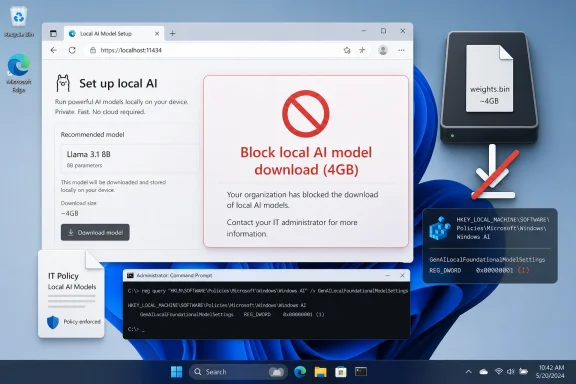
GenAILocalFoundationalModelSettings enterprise policy to Disallowed, a registry-based control documented for Chromium-derived browsers and surfaced this week after reports of silent Gemini Nano model downloads. The fix is simple; the implications are not. A single DWORD has become the most legible expression of a larger fight over whether browser vendors get to treat local disk, bandwidth, and compute as assumed infrastructure for AI features users may never have asked for.
 The Browser Has Become the AI Runtime, Whether Users Noticed or Not
The controversy began with a familiar modern software pattern: a feature arrives before the consent model around it feels finished. Reports this week described Chrome downloading a large weights.bin file associated with on-device AI, widely understood to be tied to Gemini Nano, Google’s smaller local model intended to power browser-side generative features. The file’s size — around 4GB — made the behavior impossible to dismiss as a routine browser component update.For years, browser updates have quietly delivered codecs, certificate changes, safe browsing databases, translation components, DRM modules, and other machinery most users never see. That arrangement was tolerated because the components were usually small, directly connected to basic browsing, or plainly security-related. A multi-gigabyte AI model crosses a psychological line because it feels less like maintenance and more like a product decision being staged on the user’s machine.
That distinction matters. Local AI is often marketed as the privacy-preserving alternative to cloud inference, and in many cases it can be. Processing text locally can reduce the need to send page context, prompts, or derived content to a remote server. But privacy is not the only axis of consent, and the presence of a local model changes the bargain from “the browser renders the web” to “the browser provisions AI infrastructure on my device.”
The Chrome episode is therefore not best understood as a scandal about 4GB of storage in isolation. It is a preview of the next browser platform war: not tabs, search boxes, or extension stores, but who controls the local AI stack that sits between users and the web.
Microsoft’s Policy Is a Pressure Valve, Not a Philosophy
The registry switch now circulating among admins and enthusiasts is not a hack in the old sense. It is an enterprise policy:GenAILocalFoundationalModelSettings. Set to Allowed (0), the browser may download the foundational GenAI model and use it for local inference. Set to Disallowed (1), the browser should not download the model, and existing downloaded model files should be removed.On Windows, the Edge path is:
HKEY_LOCAL_MACHINE\SOFTWARE\Policies\Microsoft\EdgeFor Chrome, the equivalent policy path is:
HKEY_LOCAL_MACHINE\SOFTWARE\Policies\Google\ChromeThe DWORD value is the same in both places:
GenAILocalFoundationalModelSettings = 1For command-line deployment, the Chrome form is:
reg add "HKLM\SOFTWARE\Policies\Google\Chrome" /v "GenAILocalFoundationalModelSettings" /t REG_DWORD /d 1 /fAnd for Edge:
reg add "HKLM\SOFTWARE\Policies\Microsoft\Edge" /v "GenAILocalFoundationalModelSettings" /t REG_DWORD /d 1 /fThat is wonderfully direct by modern standards. It is also revealing. The cleanest way to say “no, do not download a multi-gigabyte AI model” is not a prominent consumer-facing settings page, but a policy channel designed for managed fleets.
Microsoft’s documentation says the policy supports dynamic refresh, meaning admins can apply it without requiring a browser restart. It also places the feature in the world of enterprise governance: Group Policy, registry configuration, and device management rather than user preference. That framing is practical for IT departments, but it leaves home users in the awkward position of borrowing corporate plumbing to express an ordinary consumer choice.
This is not new. Power users have long used policy keys to tame browser behavior, disable promotional features, rein in background services, or suppress integrations. What is new is the size and strategic importance of the thing being controlled. The local AI model is not a cosmetic nuisance; it is a foundational component for a generation of browser features that vendors are desperate to normalize.
Chrome’s 4GB File Makes the Invisible Cost of AI Visible
AI features have often been presented as ethereal services: a button appears, a summary is generated, a draft is suggested, a page is interpreted. Cloud AI hides the cost in data centers, subscriptions, latency, and terms of service. On-device AI puts some of that cost back where users can see it: disk space, battery life, memory pressure, downloads, update churn, and the possibility of duplicated models across apps.That is why the Chrome reports landed so sharply. A 4GB model is not catastrophic on a modern desktop with a 2TB SSD and fast fiber. It is very different on a 128GB laptop, a metered connection, a shared family PC, a classroom device, or a corporate fleet where multiplied storage and bandwidth costs become real operational concerns.
The issue is amplified by the way browsers have become always-on software distribution channels. Chrome and Edge update themselves. Components update separately from the main executable. Profiles sync. Experiments roll out by cohort. Flags appear and disappear. The result is a browser that is no longer a single application in the traditional sense, but a constantly changing substrate.
That substrate has enormous power. It can deliver security fixes rapidly, which is good. It can also deliver heavyweight AI capabilities with minimal ceremony, which is controversial. The same machinery that keeps users safe from zero-days can quietly populate a machine with model weights most users could not identify and may not know how to remove.
The more charitable interpretation is that Google is building toward a future where local AI is a default browser capability, just as translation and password generation became default browser capabilities. The less charitable interpretation is that the company is using its browser market position to pre-stage AI infrastructure before users have meaningfully opted into the features it enables. Both interpretations can be partly true.
Edge Is Not Innocent, but It Is More Explicitly Governable
Microsoft Edge sits in a strange position here. It shares the Chromium foundation with Chrome and has its own heavy strategic interest in AI through Copilot, Windows, Microsoft 365, and Azure. Microsoft is hardly a bystander in the industry’s rush to put generative AI everywhere.Yet in this particular case, Edge’s documented policy is an important artifact. Microsoft’s browser policy documentation plainly describes a setting that controls whether the foundational GenAI model is downloaded and used for local inference. It also says that disabling the policy blocks the download and removes an existing model.
That does not make Edge philosophically superior. It does show that Microsoft understands this is a governable behavior, not an unavoidable technical detail. A browser vendor can expose the switch. A vendor can document the values. A vendor can make the policy refresh dynamically. A vendor can let admins say no.
The uncomfortable part for Google is that the same Chromium policy name appears in Chromium’s policy definitions, and Chrome can respect the same kind of control. In other words, the escape hatch exists because the enterprise world demands it. The consumer world gets to discover it only after someone notices the disk usage and traces the component.
For WindowsForum readers, this is the practical center of the story. If you manage systems, you do not need to wait for the AI branding debate to settle. You can set policy. You can document the change. You can decide whether local AI model downloads belong in your standard browser baseline.
But the broader lesson is more damning: if a setting is important enough for enterprise admins, it is probably important enough for ordinary users too.
The Consent Problem Is Bigger Than the Registry Key
Software vendors have spent the last decade blurring the difference between updates, features, services, and experiments. That ambiguity has served them well. If something is an update, it can be automatic. If it is a feature, it can be enabled by default. If it is a service, it can be governed by cloud-side policy. If it is an experiment, it can be rolled out quietly and measured.A local AI model does not fit neatly into any of those categories. It is not merely an update, because it enables a new class of behavior. It is not merely a feature, because it is shared infrastructure that other features may consume. It is not merely a service, because it occupies local storage and may run local inference. It is not merely an experiment, because its footprint is large enough to matter.
That category confusion is why users react with words like “silent,” “forced,” and “without consent.” Vendors may argue that consent was covered by general browser terms, update policies, or AI feature defaults. Users tend to interpret consent more concretely: did the browser tell me it was about to download several gigabytes for local AI, and did it give me an obvious way to decline?
The answer, at least according to the current wave of reporting and user complaints, is not reassuring enough. There may be flags. There may be enterprise policies. There may be UI settings in some builds. There may be hardware gates and staged rollouts. But if the average user discovers the behavior by hunting through application data folders, the transparency model has already failed.
This is the part of the debate browser makers should take seriously. The public is not objecting only because AI is involved. It is objecting because the browser has become a privileged installer of opaque capabilities, and the trust account is overdrawn.
On-Device AI Solves One Problem and Creates Three More
The industry pitch for on-device AI is coherent. Running models locally can reduce latency, preserve some data privacy, and allow features to work offline or with less cloud dependency. On Windows, where Microsoft is building toward AI PCs with neural processing units, the appeal is obvious. The local machine becomes part of the inference fabric.But local inference does not magically become harmless because it avoids a server round trip. It introduces new questions that browser vendors have not answered with enough clarity.
The first is resource governance. Who decides when a model is downloaded, updated, retained, or removed? A browser that can quietly download 4GB today may download larger or more numerous models tomorrow. If every major app ships its own model, users will not get one efficient local AI layer; they will get a landfill of duplicated weights.
The second is feature coupling. Users may think they are enabling a convenience feature — page summaries, writing help, smart history search — while unknowingly accepting a large model deployment. If a model supports multiple features, disabling one feature may not remove the underlying component. That is logical from an engineering perspective and maddening from a user-control perspective.
The third is auditability. Enterprise admins can inspect policies, package behavior, and disk usage across fleets. Ordinary users cannot easily tell which app installed which model, whether it is still used, whether it will be re-downloaded, or what data flows through it. A folder named
OptGuideOnDeviceModel or a file named weights.bin is not a consent interface.These are not reasons to reject on-device AI outright. They are reasons to stop pretending local deployment is a purely technical implementation detail. The model is now part of the product, and products need comprehensible controls.
IT Departments Will Treat AI Models Like Unapproved Software
For sysadmins, the question is not whether Gemini Nano is interesting or whether local inference has promise. The question is whether a browser may unilaterally introduce a multi-gigabyte executable-adjacent asset into a managed environment. In most serious environments, the answer is “not without policy review.”A model file is not a traditional executable, but operationally it behaves like software supply. It has a version. It has provenance. It consumes storage. It may affect performance. It may be updated independently. It may interact with user content. It may need to be inventoried for compliance and incident response.
That means browser AI models are going to be pulled into the same conversations that already govern extensions, password managers, sync, telemetry, cloud clipboard features, and browser sign-in. The model itself might be benign. The deployment pattern is what triggers the review.
This is where Microsoft’s policy language helps enterprises, even if the consumer story remains thin. A clear setting gives admins a switch to add to baselines. It also allows organizations to run controlled pilots rather than accept vendor defaults. On one group of devices, local AI can be allowed; on another, blocked. That is how this should work.
The danger for vendors is that clumsy defaults will cause broad defensive disablement. If admins perceive browser AI as an uncontrolled resource sink, they will shut it off at the policy layer before evaluating whether any feature is useful. A bad rollout can poison the well for a good technology.
The Windows Registry Becomes the Consumer’s Last Court of Appeal
There is an irony in watching ordinary users reach forHKLM\SOFTWARE\Policies in 2026 to control an AI feature in a mainstream browser. The Windows Registry has spent decades as both a power tool and a warning label. It is where administrators enforce order and where home users are told not to touch anything unless they know exactly what they are doing.Yet here it is again, functioning as the clearest mechanism for refusal. That says something unflattering about modern settings design. Consumer settings panels have become friendlier, flatter, and less complete, while the real controls remain buried in policy tables and administrative templates.
To be fair, enterprise policy is not a bad mechanism. It is durable, scriptable, auditable, and suitable for deployment at scale. For Windows 11 Pro users, the registry approach is accessible enough if they are comfortable with elevated commands. But “open Registry Editor and create a DWORD” is not an acceptable mainstream answer to “how do I stop my browser downloading 4GB of AI?”
The better design would be obvious. A browser should expose a plain setting for local AI model downloads, show the storage impact, explain what features depend on it, and provide a remove button that persists. It should distinguish between cloud AI features, local AI features, and model storage. It should not require users to learn enterprise policy names to reclaim disk space.
The registry workaround is useful. It is also an indictment.
Google and Microsoft Are Racing Toward the Same Default
It would be easy to cast this as a Google problem and stop there. That would be too generous to the rest of the industry. Every major platform vendor is moving toward local AI as a default capability, and browsers are among the most attractive places to deploy it because they sit directly in the path of reading, writing, searching, shopping, coding, and work.Microsoft has Copilot and Edge. Google has Gemini and Chrome. Apple has Apple Intelligence and Safari-adjacent system services. Browser makers that do not build local AI hooks risk looking behind; those that do risk looking presumptuous. The incentives all point in the same direction: ship the model, enable the feature, measure engagement, refine the consent story later.
That is precisely why policy controls matter now. The first generation of local browser AI will set user expectations for the next decade. If the norm becomes silent provisioning with obscure opt-outs, users will learn to distrust AI features before they learn what they can do. If the norm becomes visible storage, clear toggles, and reversible choices, local AI has a much better chance of being accepted.
The market will not solve this on its own because the largest vendors benefit from default placement. A user who would never manually download a 4GB model may still end up with one because it arrived as part of the browser. Once installed, the model lowers friction for future features. The technical default becomes the product strategy.
That is the real story behind the registry key. A small administrative value is acting as a counterweight to an industry default that is being written faster than users can evaluate it.
The Registry DWORD Tells Admins Where the Fight Is Moving
The practical answer for Windows admins is to treat local GenAI model downloads as a managed browser capability, not a harmless background component. Decide whether you want it, set policy accordingly, and document the rationale before users discover unexplained storage changes on their own. The consumer answer is less elegant, but the same principle applies: if local AI is not something you want your browser provisioning automatically, the policy key is the cleanest current line in the sand.- Chrome can be configured on Windows through
HKLM\SOFTWARE\Policies\Google\Chromeby settingGenAILocalFoundationalModelSettingsas a DWORD with value1. - Edge can be configured through
HKLM\SOFTWARE\Policies\Microsoft\Edgeusing the same DWORD name and the same value. - The
Allowed (0)setting permits automatic model download and local inference, whileDisallowed (1)blocks the download and should remove an existing model. - The policy is designed for enterprise management, but Windows 11 Pro users can apply it locally through Registry Editor or an elevated command prompt.
- The larger concern is not merely the size of one Chrome model, but the precedent of browsers silently provisioning local AI infrastructure as a default behavior.
Source: Neowin Official Windows 11 Registry mod blocks automatic download of 4GB AI model on Google Chrome
