stathis74

New Member
Joined
Feb 9, 2015
Messages
16
Could you please someone help me with this problem:

Unable to load image \SystemRoot\System32\Drivers\dvb7700all.sys, Win32 error 0n2
*** WARNING: Unable to verify timestamp for dvb7700all.sys
*** ERROR: Module load completed but symbols could not be loaded for dvb7700all.sys
\Driver\DVB7700ALL
 

Solution
Where can I find this driver to uninstall it? I looked every ware but nothing with this name.
Typically all your driver (.sys files) are located here
C:\Windows\System32\Drivers
So if you have identified the Driver Name and are showing file extensions then you should be able to simply rename the driver from dvb7700all.sys to dvb7700all.OLD.
This technique should effectively break the driver and prevent it from loading on the next reboot.
If that is or was in fact the cause of your Blue Screens then you should be able to tell soon enough and if not the process is easily reversed by simply renaming it back to dvb7700all.sys
Hi,
In order to help you we need to read the dump file created when your machine blue screened. The Dump files are found in a folder marked Minidump. This folder can be found in the main Windows folder. If you can't find it or no dump files are present then you probably need to change settings so they get created:
Go to Start and type in sysdm.cpl and press Enter
Click on the Advanced tab
Click on the Startup and Recovery Settings button
Ensure that Automatically restart is unchecked
Under the Write Debugging Information header select Small memory dump (256 kB) in the dropdown box
Ensure that the Small Dump Directory is listed as %systemroot%\Minidump << where your .dmp files can be
found later.
Click and apply to exit the dialogs.

dvb7700all.sys is a YUAN DVB-T/Analog Hybrid TV Tuner driver. Try either removing or updating but really we need to see the dump file to help further. Once you have some dump files simply zip them up and send them in. This threads explains better:
Link Removed
 

Code:
*******************************************************************************
*                                                                             *
*                        Bugcheck Analysis                                    *
*                                                                             *
*******************************************************************************

Use !analyze -v to get detailed debugging information.

BugCheck 9F, {3, fffffa80081ff060, fffff80004fc5518, fffffa800ab06c10}
Probably caused by : usbhub.sys

Followup: MachineOwner
Hi,
this bugcheck occurs due to a drivers not responding correctly. Try updating the USB drivers using the machines support site found here:
Link Removed

Do you have anything attached via the USB port besides a mouse. An external drive perhaps?

Check Windows isn't corrupt by looking in the start menu for Command prompt, right click on it, click properties and then run as admin. Type:
sfc /scannow
Press enter and await results.
 

3 times a week I use an external driver and a flush driver and once a week I use a HDMI cable to connect to tv.

Results from the sfc/scannow: "the windows resource protection found no integrity violation"
 

Yes, but still when try to turn off the laptop takes 10 minutes and then BSOD
 

Code:
*******************************************************************************
*                                                                             *
*                        Bugcheck Analysis                                    *
*                                                                             *
*******************************************************************************

Use !analyze -v to get detailed debugging information.

BugCheck 9F, {3, fffffa8008325440, fffff80004f8b518, fffffa800435cc10}
Probably caused by : usbhub.sys

Followup: MachineOwner
---------
Hi,
same again really although looking through the dump file further I can see the driver associated with the bsod is:
dvb7700all.sys Thu Jul 18 08:26:25 2013: YUAN DVB-T/Analog Hybried TV Tuner
Code:
FAILURE_BUCKET_ID:  X64_0x9F_3_POWER_DOWN_dvb7700all_IMAGE_usbhub.sys
Try removing the above driver and see if the bsod continues. If the bsod stops then try installing it again although do check for a later version. If there isn't one then try the same driver again. It could be that it simply got corrupted.
 

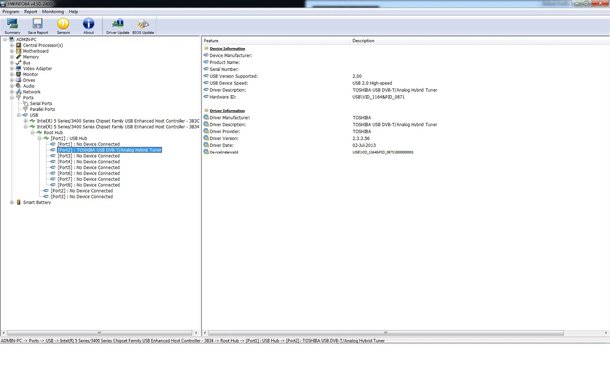
Where can I find this driver to uninstall it? I looked every ware but nothing with this name.
 

Try checking the Device manager or the add and remove programs list.
 

This is where I found it with another application.
 

Attachments

  • 7.webp
    7.webp
    76.1 KB · Views: 302
No, you need to uninstall the Toshiba USB DVB-T/Analog Hybrid Tuner driver which is below it.
 

HWinNFO64 is not giving me an option to uninstall it. And in Revo Unistaller Pro that I'm using, I can't find it.
 

What about in Device manager? If you use the HWinfo64 as a guide as to where it is and try and remove it there.
 

Back
Top