Windows 7 Can't reinstall WMP12 in W7....

myvinyl333

New Member
Joined
Dec 23, 2009
Messages
24
WMP 12 was running in the background, so I figured out how to disable it, which did not solve the issue. Now I cannot load it back or use WMP11? Fan still runs...any ideas short of reloading OS again?
jorge

Link Removed
 

Solution
First of all, I would not downgrade WMP 12 to 11, I do not see a good reason why.

Link Removed


1. Type services.msc on windows 7 search bar

2. Stop Windows Media Player Network
Sharing Service.

3. Take Ownership of following files

All files in “Program Files\Windows Media Player\” folder
All files starting with “wmp” in System32 folder
wmploc.dll.mui in “Sytem32\en-us\” folder

4. Now Run Windows Media Player 11 Installer

5. Now type Regedit on Start Menu Search bar

6. Delete following Registry key

HKEY_LOCAL_MACHINE\Software\Microsoft\MediaPlayer\ Setup\Installed Versions“

(Don’t forget to take Backup of Registry before modifying/editing/deleting any registry key)

7. Reboot your Windows 7...

WMP doesn't have to run in the background unless you want it to. As for Windows Media Player Network Sharing Service running, you can disable it but then the wmp network features won't work. The same with WMP 11, I believe.

~~~~~~~~~~~~~~~~~~~~

If there is a problem with your wmp and you wish to reinstall it, then

1. uninstall it first:

How To Uninstall Windows Media Player 12 on Windows 7?

2. download and install it:

Link Removed
 

Did you delete this branch after uninstalling:

HKEY_LOCAL_MACHINE\Software\Microsoft\MediaPlayer\Setup\Installed Versions


~~~~~~~~~~~~~~~~~


Your hardware fan may not necessarily run high because of the wmp.
 

That link points to WMP 11, not 12 that ships with Windows 7.

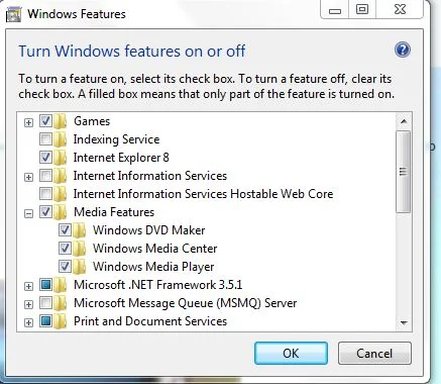
Go to Start ?> Run, and type optionalfeatures click on Media Features and check the box to re-install.
 

That link points to WMP 11, not 12 that ships with Windows 7.

Go to Start ?> Run, and type optionalfeatures click on Media Features and check the box to re-install.
w7..webp
i have the above window with no option to re-install...
 

Then uncheck it, reboot and go back and check it again.

If that doesn't work, you're in trounle..................re-installl the OS.
 

Last edited:
View attachment 5705
i have the above window with no option to re-install...

That window lets you turn a feature on or off, to reinstall (if you really need to reinstall) please see our posts above.

~~~~~~~~~~~~~~~~~

Why do you want to reinstall WMP 12, exactly what do you think is glitching in it and why do you think wmp 11 will be better ?
 

Last edited by a moderator:
I really think you'll get an error message trying to install WMP 11, as Windows 7 still has files related to WMP 12 on the hard drive.

Just a guess.

BTW, what site was this uninstall listed?
 

First of all, I would not downgrade WMP 12 to 11, I do not see a good reason why.

Link Removed


1. Type services.msc on windows 7 search bar

2. Stop Windows Media Player Network
Sharing Service.

3. Take Ownership of following files

All files in “Program Files\Windows Media Player\” folder
All files starting with “wmp” in System32 folder
wmploc.dll.mui in “Sytem32\en-us\” folder

4. Now Run Windows Media Player 11 Installer

5. Now type Regedit on Start Menu Search bar

6. Delete following Registry key

HKEY_LOCAL_MACHINE\Software\Microsoft\MediaPlayer\ Setup\Installed Versions“

(Don’t forget to take Backup of Registry before modifying/editing/deleting any registry key)

7. Reboot your Windows 7

Link Removed
Link Removed


~~~~~~~~~~~~~~

Again, I personally don't think it a good idea, it's just what some people prefer.
 

Solution
All the files in the c:\windows\System32 directory are also related to WMP 12:

C:\Windows\System32\WMPEncEn.dll
C:\Windows\System32\WMPhoto.dll
C:\Windows\System32\wmploc.DLL
C:\Windows\System32\wmpmde.dll
C:\Windows\System32\wmpps.dll
C:\Windows\System32\wmpshell.dll
C:\Windows\System32\wmpsrcwp.dll
C:\Windows\System32\wmsdmod.dll
C:\Windows\System32\WMNetMgr.dll
C:\Windows\System32\wmp.dll
C:\Windows\System32\wmpcm.dll
C:\Windows\System32\WmpDui.dll
C:\Windows\System32\wmpdxm.dll
C:\Windows\System32\wmpeffects.dll

As well as these:
C:\Windows\System32\en-US\wmpdui.dll.mui
C:\Windows\System32\en-US\WMPhoto.dll.mui
C:\Windows\System32\en-US\wmploc.DLL.mui
C:\Windows\System32\en-US\wmpshell.dll.mui

Due to Windows finally fixing "DLL Hell, I highly doubt these files can be overwritten by an earlier version of WMP
 

Last edited:
You're right, that's why it is worth taking ownership of those files:

cybercore said:
3. Take Ownership of following files

All files in “Program Files\Windows Media Player\” folder
All files starting with “wmp” in System32 folder
wmploc.dll.mui in “Sytem32\en-us\” folder
 

Back
Top