

Google shipped Chrome 149.0.7827.196/197 for Windows and macOS and 149.0.7827.196 for Linux on June 23, 2026, fixing CVE-2026-13033, a critical Blink Interest Groups memory-safety flaw that could let a remote attacker execute code through a crafted HTML page. The bug is not merely another line in the browser patch treadmill. It lands in the machinery that makes the modern web programmable, personalized, and profitable. For Windows users and administrators, the lesson is blunt: browser updates are now operating-system security updates in everything but name.
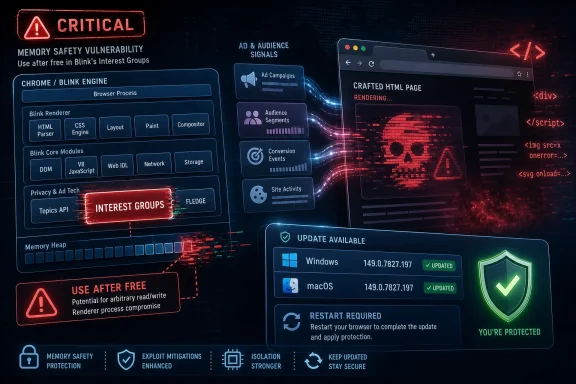
CVE-2026-13033 is described as an out-of-bounds read and write in Blink’s Interest Groups implementation, with Chrome versions prior to 149.0.7827.197 listed as affected. Google’s own release note called the Chromium severity “Critical,” and NVD’s entry says the issue could allow arbitrary code execution through a crafted HTML page.
That description is compact, but it is doing a lot of work. “Out-of-bounds” means code is reading or writing memory outside the region it was supposed to touch. In browser exploitation, that class of mistake can be a bridge from a weird renderer crash to something much more valuable: controlled memory corruption, information disclosure, and potentially code execution.
The “InterestGroups” part matters because it points to a component tied to browser-mediated advertising and privacy-preserving ad selection. This is not an ancient plug-in or abandoned corner of the platform. It is part of the modern browser’s attempt to move more ad logic into controlled browser APIs as third-party tracking mechanisms are curtailed.
That makes the vulnerability symbolically awkward for Chromium. The browser is increasingly asked to be privacy broker, app runtime, password vault, identity surface, graphics stack, PDF reader, and enterprise policy endpoint. Every new role adds code, and every pile of complex code creates new places where memory safety can fail.
That mismatch is not a contradiction so much as a reminder that vulnerability databases, vendor advisories, and exploitation reality move at different speeds. A crafted webpage still generally requires user interaction, even if the interaction is as mundane as visiting a malicious site or being redirected through a compromised one. That keeps the CVSS vector from looking like a wormable network daemon flaw.
But browsers are the place where user interaction is assumed. The web’s entire threat model begins with users opening pages supplied by people they do not know, code they did not audit, ads they did not choose, and scripts assembled from supply chains no single administrator controls. A requirement that a victim view a page is not much comfort when viewing pages is the browser’s job.
There is also a practical difference between “known exploited” and “worth racing to patch.” The public data for CVE-2026-13033 does not indicate active exploitation at the time of disclosure. That should lower panic, not urgency. Browser bugs have a short shelf life once disclosed, and the gap between patch publication and fleet-wide deployment is the window attackers watch.
Microsoft Edge is not Google Chrome, but it inherits large parts of Chromium’s engine and therefore participates in Chromium’s security weather. Enterprises that standardize on Edge for Microsoft 365 integration are still exposed to the broader Chromium patch cadence. The same is true for organizations that keep Chrome as the default browser while using Edge for legacy IE mode or internal apps.
This is why “we patched Windows” is no longer a complete endpoint-security sentence. A fully updated Windows 11 machine with an outdated Chromium browser is not fully updated in any meaningful user-risk sense. The browser is where authentication happens, where cloud dashboards live, where admin consoles open, and where session cookies become crown jewels.
The browser also has a privileged place in user behavior. Users will hesitate before launching an unknown executable, but they will click a link. Security training can reduce that risk, but it cannot turn the web into a trusted medium. The control point is patch velocity.
That is an ambitious bargain. Browser vendors tell users they can improve privacy by moving sensitive advertising logic into the browser, while telling advertisers they can still reach relevant audiences without the same tracking primitives. Technically, this means the browser takes on more state, more execution pathways, and more edge cases around auctions, origins, permissions, and data boundaries.
CVE-2026-13033 does not prove that this bargain is doomed. It does show why the bargain is expensive. When privacy-preserving ad infrastructure lives inside the browser engine, bugs in that infrastructure are no longer “ad tech bugs” in the ordinary sense. They are browser-engine bugs, potentially reachable through web content.
That distinction should shape how administrators read the advisory. This is not about whether a given organization likes targeted advertising. It is about the fact that the platform features built to reconcile privacy, monetization, and compatibility become part of the attack surface shipped to every desktop.
Chrome’s consumer update mechanism is famously aggressive. For home users, the most important action is usually to restart the browser after it downloads the update. The quiet failure mode is not that Chrome cannot update; it is that the browser remains open for days with a pending update badge that users ignore.
In managed environments, the problem is more bureaucratic. Admins may use update deferrals, maintenance windows, app-control rules, golden images, virtual desktops, or browser-management templates. Each layer can be reasonable in isolation and still produce a fleet where a critical browser fix takes too long to land.
There is a particular trap for organizations that test browser updates like traditional application releases. Browser compatibility matters, especially for line-of-business apps. But treating every security dot release as a miniature platform migration can leave users exposed to well-understood exploit classes for the sake of avoiding hypothetical UI regressions.
Still, absence of known exploitation is not a warranty. Chrome advisories routinely restrict bug details until most users have updated, precisely because the underlying reports can contain enough technical breadcrumbs to help attackers. Once a fix ships, skilled exploit developers can also compare patched and unpatched code to infer what changed.
That dynamic creates a race with an asymmetry built into it. Defenders must update every relevant endpoint. Attackers need only find the laggards. In a browser market with consumer devices, small-business machines, unmanaged contractors, VDI pools, and third-party Chromium browsers, laggards are not rare.
This is why the right operational question is not “Has this been exploited yet?” It is “How long would it take us to know every browser capable of reaching company resources has crossed the fixed build threshold?” If that answer is measured in weeks, the organization has a browser-management problem hiding inside its vulnerability-management program.
Chrome’s sandbox, Windows’ process mitigations, and modern exploit defenses all raise the cost of turning a renderer bug into full system compromise. That is good news, and it is one reason not every critical browser bug becomes a mass compromise event. But “harder” is not “impossible,” and attackers often chain vulnerabilities: a renderer flaw, a sandbox escape, a kernel bug, or a token-theft path through the user’s authenticated cloud session.
The most likely enterprise impact of a browser compromise may not look like a Hollywood-style takeover of the operating system. It may look like session theft, account abuse, access to internal SaaS dashboards, or malicious actions taken through a legitimate user’s browser context. In a cloud-first Windows estate, the browser session can be more valuable than the local machine.
This changes the patching calculus. A browser RCE is not just a desktop event. It is an identity event, a data-loss event, and potentially an administrative-plane event if privileged users browse from machines that also access management portals.
Chrome users can check for version 149.0.7827.197 on Windows and macOS, while Linux stable was listed at 149.0.7827.196 in Google’s advisory. But Chromium-based browsers do not always expose equivalent versioning in a way that maps cleanly to Google’s build numbers. Some vendors ship the fix under their own release numbers, and some lag behind.
For IT teams, that means asset inventory must know more than “browser installed.” It should know the browser family, channel, version, update policy, and whether the product is based on Chromium. A machine with Chrome, Edge, and a niche Chromium browser installed may have three different patch states.
This is also where consumer advice diverges from enterprise advice. A home user should update the browser they use. An administrator must account for the browser a user could use, the embedded browser component an application might invoke, and the unmanaged portable browser someone copied into a profile directory because a web app “worked better” there.
Slower can be safer for compatibility. It is not inherently safer for vulnerability exposure unless critical fixes arrive quickly and reliably. Extended Stable reduces feature churn, but it does not abolish the need to respond when Chromium lands a high-severity or critical security fix.
For regulated or change-averse environments, the sensible model is two-track. Feature changes can move through measured validation. Security dot releases need a faster lane, with limited testing focused on launch, authentication, key business apps, printing if relevant, and rollback readiness.
The alternative is false stability. A browser that does not change is comfortable only until the public exploit knowledge catches up with it. In 2026, standing still is an operational decision, not a neutral state.
Chromium has invested heavily in sanitizers, fuzzing, control-flow protections, sandboxing, and memory-hardening techniques. Google’s release notes regularly credit tools such as AddressSanitizer, MemorySanitizer, UndefinedBehaviorSanitizer, control-flow integrity, libFuzzer, and AFL-style fuzzing for catching bugs. Those systems are not window dressing; they are why many vulnerabilities are found before they become public disasters.
But tooling does not erase architectural complexity. A browser engine must parse hostile input, execute JavaScript, render graphics, decode media, manage permissions, isolate sites, handle forms, speak to hardware acceleration layers, and maintain compatibility with a web that punishes strictness. Security engineering in that environment is less like building a wall and more like maintaining a city under continuous construction.
This is where newer memory-safe language efforts matter, but they should not be oversold. Rewriting vast browser components is slow, risky, and constrained by performance and compatibility demands. The near-term defense remains layered: find bugs earlier, sandbox the damage, patch quickly, and reduce the number of machines that remain vulnerable after disclosure.
The modern browser does not merely display HTML. It executes code, schedules work across processes, invokes GPU paths, handles credentials, reads and writes local storage, mediates device permissions, and connects the user to authenticated services. An attacker who can trigger a browser-engine vulnerability has found a door into the user’s most active computing context.
Security teams often focus on email attachments because they feel tangible. Browser exploit delivery is more fluid. A user may never download anything, never see a warning, and never knowingly run a file. The page itself is the delivery mechanism.
That is why network filtering, DNS protection, browser isolation, exploit protection, and endpoint detection all have roles, but none replace updating. They can reduce the odds of reaching the exploit or increase the odds of detecting suspicious follow-on behavior. They cannot make a known vulnerable renderer safe by policy declaration.
The enterprise response is similarly simple in concept but harder in practice. First, identify all Chrome installations below the fixed version. Second, identify Chromium-based browsers that need corresponding vendor updates. Third, force or strongly prompt restarts where an update is installed but not active. Fourth, verify with inventory rather than trusting policy intent.
That last step is where many programs fail. A management console saying that automatic updates are enabled is not the same as proof that endpoints are running fixed binaries. Laptops sleep, users defer restarts, VDI images persist, software-update services break, and machines fall out of management scope.
Administrators should also pay attention to privileged browsing patterns. Domain admins, cloud admins, help-desk staff, developers with production access, and finance users should not be treated as ordinary patch targets. Their browser compromise has a different blast radius, and their update compliance deserves tighter scrutiny.
This cadence is not an aberration. Browser security now moves at the speed of continuous release. The old mental model of “Patch Tuesday plus occasional emergency” is insufficient for software that updates independently of the operating system and mediates most user-facing risk.
For Windows shops, that means browser patching should be operationalized like endpoint detection signatures or identity-risk policy, not like quarterly desktop application maintenance. It needs dashboards, exception handling, escalation, and evidence. It also needs someone with ownership when versions fall behind.
The hardest part may be cultural. Users experience browser restarts as interruptions. Help desks experience browser changes as ticket generators. Application owners fear breakage. Attackers count on all three reactions to slow defenders down.
For administrators, the lesson is broader than one CVE. Browser security needs the same discipline organizations claim to apply to operating systems, identity providers, and endpoint agents. If the browser is the front door to work, then browser patch compliance is front-door security.
 Chrome’s Latest Critical Bug Lives Where Advertising Meets the Browser Engine
CVE-2026-13033 is described as an out-of-bounds read and write in Blink’s Interest Groups implementation, with Chrome versions prior to 149.0.7827.197 listed as affected. Google’s own release note called the Chromium severity “Critical,” and NVD’s entry says the issue could allow arbitrary code execution through a crafted HTML page.That description is compact, but it is doing a lot of work. “Out-of-bounds” means code is reading or writing memory outside the region it was supposed to touch. In browser exploitation, that class of mistake can be a bridge from a weird renderer crash to something much more valuable: controlled memory corruption, information disclosure, and potentially code execution.
The “InterestGroups” part matters because it points to a component tied to browser-mediated advertising and privacy-preserving ad selection. This is not an ancient plug-in or abandoned corner of the platform. It is part of the modern browser’s attempt to move more ad logic into controlled browser APIs as third-party tracking mechanisms are curtailed.
That makes the vulnerability symbolically awkward for Chromium. The browser is increasingly asked to be privacy broker, app runtime, password vault, identity surface, graphics stack, PDF reader, and enterprise policy endpoint. Every new role adds code, and every pile of complex code creates new places where memory safety can fail.
The Severity Label Is the Simple Part
The public scoring around CVE-2026-13033 is still uneven. NVD had not yet assigned its own CVSS score when the entry was enriched, while CISA-ADP listed a CVSS 3.1 vector of AV:N/AC:L/PR:N/UI:R/S:U/C:H/I:H/A:H, producing a high 8.8 score. The vendor severity, however, is critical.That mismatch is not a contradiction so much as a reminder that vulnerability databases, vendor advisories, and exploitation reality move at different speeds. A crafted webpage still generally requires user interaction, even if the interaction is as mundane as visiting a malicious site or being redirected through a compromised one. That keeps the CVSS vector from looking like a wormable network daemon flaw.
But browsers are the place where user interaction is assumed. The web’s entire threat model begins with users opening pages supplied by people they do not know, code they did not audit, ads they did not choose, and scripts assembled from supply chains no single administrator controls. A requirement that a victim view a page is not much comfort when viewing pages is the browser’s job.
There is also a practical difference between “known exploited” and “worth racing to patch.” The public data for CVE-2026-13033 does not indicate active exploitation at the time of disclosure. That should lower panic, not urgency. Browser bugs have a short shelf life once disclosed, and the gap between patch publication and fleet-wide deployment is the window attackers watch.
Blink Is the Attack Surface Windows Cannot Fence Off
For WindowsForum readers, the interesting part is not that Chrome had a memory bug. It is that a browser component can carry the same operational importance as the monthly Windows cumulative update. Chrome, Edge, Brave, Vivaldi, Opera, and other Chromium-derived browsers all sit on a shared architectural foundation, even when their release timing and branding differ.Microsoft Edge is not Google Chrome, but it inherits large parts of Chromium’s engine and therefore participates in Chromium’s security weather. Enterprises that standardize on Edge for Microsoft 365 integration are still exposed to the broader Chromium patch cadence. The same is true for organizations that keep Chrome as the default browser while using Edge for legacy IE mode or internal apps.
This is why “we patched Windows” is no longer a complete endpoint-security sentence. A fully updated Windows 11 machine with an outdated Chromium browser is not fully updated in any meaningful user-risk sense. The browser is where authentication happens, where cloud dashboards live, where admin consoles open, and where session cookies become crown jewels.
The browser also has a privileged place in user behavior. Users will hesitate before launching an unknown executable, but they will click a link. Security training can reduce that risk, but it cannot turn the web into a trusted medium. The control point is patch velocity.
Interest Groups Put Privacy Engineering Under a Security Microscope
The Interest Groups subsystem is associated with the browser’s effort to support advertising use cases without returning to the old model of unconstrained cross-site tracking. The idea behind such APIs is that the browser becomes an arbiter: it stores or processes certain audience signals locally and mediates ad selection in a more controlled way.That is an ambitious bargain. Browser vendors tell users they can improve privacy by moving sensitive advertising logic into the browser, while telling advertisers they can still reach relevant audiences without the same tracking primitives. Technically, this means the browser takes on more state, more execution pathways, and more edge cases around auctions, origins, permissions, and data boundaries.
CVE-2026-13033 does not prove that this bargain is doomed. It does show why the bargain is expensive. When privacy-preserving ad infrastructure lives inside the browser engine, bugs in that infrastructure are no longer “ad tech bugs” in the ordinary sense. They are browser-engine bugs, potentially reachable through web content.
That distinction should shape how administrators read the advisory. This is not about whether a given organization likes targeted advertising. It is about the fact that the platform features built to reconcile privacy, monetization, and compatibility become part of the attack surface shipped to every desktop.
The Patch Is Small; the Deployment Problem Is Not
Google’s stable-channel update included 18 security fixes, four of them marked critical in the public release note. Alongside CVE-2026-13033, the update addressed critical WebGL use-after-free flaws and a critical Autofill use-after-free. That cluster is a familiar browser-security story: graphics, form handling, identity-adjacent features, and engine internals all converge in a single release.Chrome’s consumer update mechanism is famously aggressive. For home users, the most important action is usually to restart the browser after it downloads the update. The quiet failure mode is not that Chrome cannot update; it is that the browser remains open for days with a pending update badge that users ignore.
In managed environments, the problem is more bureaucratic. Admins may use update deferrals, maintenance windows, app-control rules, golden images, virtual desktops, or browser-management templates. Each layer can be reasonable in isolation and still produce a fleet where a critical browser fix takes too long to land.
There is a particular trap for organizations that test browser updates like traditional application releases. Browser compatibility matters, especially for line-of-business apps. But treating every security dot release as a miniature platform migration can leave users exposed to well-understood exploit classes for the sake of avoiding hypothetical UI regressions.
The “No Known Exploitation” Comfort Has an Expiration Date
CISA’s enrichment for CVE-2026-13033 indicated no known exploitation at the time of its assessment. That is useful context. It means defenders are not currently looking at a public zero-day emergency on the evidence available.Still, absence of known exploitation is not a warranty. Chrome advisories routinely restrict bug details until most users have updated, precisely because the underlying reports can contain enough technical breadcrumbs to help attackers. Once a fix ships, skilled exploit developers can also compare patched and unpatched code to infer what changed.
That dynamic creates a race with an asymmetry built into it. Defenders must update every relevant endpoint. Attackers need only find the laggards. In a browser market with consumer devices, small-business machines, unmanaged contractors, VDI pools, and third-party Chromium browsers, laggards are not rare.
This is why the right operational question is not “Has this been exploited yet?” It is “How long would it take us to know every browser capable of reaching company resources has crossed the fixed build threshold?” If that answer is measured in weeks, the organization has a browser-management problem hiding inside its vulnerability-management program.
The Windows Angle Is Bigger Than Chrome
Windows administrators have lived through a decade of endpoint hardening: Credential Guard, virtualization-based security, Smart App Control, Attack Surface Reduction rules, application control, and an increasingly opinionated Microsoft Defender stack. Those controls matter. They also coexist with a daily workflow in which the browser is the primary application platform.Chrome’s sandbox, Windows’ process mitigations, and modern exploit defenses all raise the cost of turning a renderer bug into full system compromise. That is good news, and it is one reason not every critical browser bug becomes a mass compromise event. But “harder” is not “impossible,” and attackers often chain vulnerabilities: a renderer flaw, a sandbox escape, a kernel bug, or a token-theft path through the user’s authenticated cloud session.
The most likely enterprise impact of a browser compromise may not look like a Hollywood-style takeover of the operating system. It may look like session theft, account abuse, access to internal SaaS dashboards, or malicious actions taken through a legitimate user’s browser context. In a cloud-first Windows estate, the browser session can be more valuable than the local machine.
This changes the patching calculus. A browser RCE is not just a desktop event. It is an identity event, a data-loss event, and potentially an administrative-plane event if privileged users browse from machines that also access management portals.
Chromium’s Shared Foundation Turns Vendor Choice Into Timing Risk
Chromium’s success has created an unusual security monoculture. The upside is that bugs found and fixed in the shared project can benefit a broad ecosystem. The downside is that a serious flaw in a shared component becomes a synchronized risk across many products, with mitigation depending on how quickly each downstream vendor picks up, tests, and ships the fix.Chrome users can check for version 149.0.7827.197 on Windows and macOS, while Linux stable was listed at 149.0.7827.196 in Google’s advisory. But Chromium-based browsers do not always expose equivalent versioning in a way that maps cleanly to Google’s build numbers. Some vendors ship the fix under their own release numbers, and some lag behind.
For IT teams, that means asset inventory must know more than “browser installed.” It should know the browser family, channel, version, update policy, and whether the product is based on Chromium. A machine with Chrome, Edge, and a niche Chromium browser installed may have three different patch states.
This is also where consumer advice diverges from enterprise advice. A home user should update the browser they use. An administrator must account for the browser a user could use, the embedded browser component an application might invoke, and the unmanaged portable browser someone copied into a profile directory because a web app “worked better” there.
Extended Stable Is a Trade, Not a Shield
Google’s enterprise browser documentation has long framed Stable as the default channel for most users and Extended Stable as a slower feature cadence that still receives critical fixes. That distinction is important because some organizations hear “slower channel” and mentally translate it to “safer channel.”Slower can be safer for compatibility. It is not inherently safer for vulnerability exposure unless critical fixes arrive quickly and reliably. Extended Stable reduces feature churn, but it does not abolish the need to respond when Chromium lands a high-severity or critical security fix.
For regulated or change-averse environments, the sensible model is two-track. Feature changes can move through measured validation. Security dot releases need a faster lane, with limited testing focused on launch, authentication, key business apps, printing if relevant, and rollback readiness.
The alternative is false stability. A browser that does not change is comfortable only until the public exploit knowledge catches up with it. In 2026, standing still is an operational decision, not a neutral state.
Memory Safety Remains the Browser’s Oldest Unfinished Project
CVE-2026-13033 belongs to the long-running family of memory-safety flaws that have haunted C and C++ browser engines for decades. Out-of-bounds reads can disclose memory contents. Out-of-bounds writes can corrupt program state. Use-after-free bugs can turn old pointers into new opportunities. The names vary, but the pattern remains stubbornly familiar.Chromium has invested heavily in sanitizers, fuzzing, control-flow protections, sandboxing, and memory-hardening techniques. Google’s release notes regularly credit tools such as AddressSanitizer, MemorySanitizer, UndefinedBehaviorSanitizer, control-flow integrity, libFuzzer, and AFL-style fuzzing for catching bugs. Those systems are not window dressing; they are why many vulnerabilities are found before they become public disasters.
But tooling does not erase architectural complexity. A browser engine must parse hostile input, execute JavaScript, render graphics, decode media, manage permissions, isolate sites, handle forms, speak to hardware acceleration layers, and maintain compatibility with a web that punishes strictness. Security engineering in that environment is less like building a wall and more like maintaining a city under continuous construction.
This is where newer memory-safe language efforts matter, but they should not be oversold. Rewriting vast browser components is slow, risky, and constrained by performance and compatibility demands. The near-term defense remains layered: find bugs earlier, sandbox the damage, patch quickly, and reduce the number of machines that remain vulnerable after disclosure.
The Crafted HTML Page Is the Most Underestimated Threat Model
The phrase “crafted HTML page” can sound almost quaint. It should not. A crafted page can arrive through a phishing link, a compromised legitimate site, a malicious ad placement, a poisoned search result, a chat message, or an internal wiki page edited after an account compromise.The modern browser does not merely display HTML. It executes code, schedules work across processes, invokes GPU paths, handles credentials, reads and writes local storage, mediates device permissions, and connects the user to authenticated services. An attacker who can trigger a browser-engine vulnerability has found a door into the user’s most active computing context.
Security teams often focus on email attachments because they feel tangible. Browser exploit delivery is more fluid. A user may never download anything, never see a warning, and never knowingly run a file. The page itself is the delivery mechanism.
That is why network filtering, DNS protection, browser isolation, exploit protection, and endpoint detection all have roles, but none replace updating. They can reduce the odds of reaching the exploit or increase the odds of detecting suspicious follow-on behavior. They cannot make a known vulnerable renderer safe by policy declaration.
The Right Response Is Boring, Fast, and Measurable
The consumer response to CVE-2026-13033 is simple: open Chrome’s About page, let it update, and restart the browser. On Windows, the target fixed Chrome build is 149.0.7827.197 or later. Users should not assume that downloading happened if the browser has not restarted.The enterprise response is similarly simple in concept but harder in practice. First, identify all Chrome installations below the fixed version. Second, identify Chromium-based browsers that need corresponding vendor updates. Third, force or strongly prompt restarts where an update is installed but not active. Fourth, verify with inventory rather than trusting policy intent.
That last step is where many programs fail. A management console saying that automatic updates are enabled is not the same as proof that endpoints are running fixed binaries. Laptops sleep, users defer restarts, VDI images persist, software-update services break, and machines fall out of management scope.
Administrators should also pay attention to privileged browsing patterns. Domain admins, cloud admins, help-desk staff, developers with production access, and finance users should not be treated as ordinary patch targets. Their browser compromise has a different blast radius, and their update compliance deserves tighter scrutiny.
The June Chrome Cadence Shows How Fast the Ground Moves
CVE-2026-13033 arrived in a busy Chrome 149 cycle. Earlier June updates had already addressed large numbers of vulnerabilities, including other critical memory-safety issues and at least one separately reported flaw that drew zero-day attention. By late June, the stable channel had moved again, folding in another batch of security fixes.This cadence is not an aberration. Browser security now moves at the speed of continuous release. The old mental model of “Patch Tuesday plus occasional emergency” is insufficient for software that updates independently of the operating system and mediates most user-facing risk.
For Windows shops, that means browser patching should be operationalized like endpoint detection signatures or identity-risk policy, not like quarterly desktop application maintenance. It needs dashboards, exception handling, escalation, and evidence. It also needs someone with ownership when versions fall behind.
The hardest part may be cultural. Users experience browser restarts as interruptions. Help desks experience browser changes as ticket generators. Application owners fear breakage. Attackers count on all three reactions to slow defenders down.
The Build Number Is the Boundary Line This Week
CVE-2026-13033 is a reminder that security advice becomes useful only when it resolves into concrete action. The concrete line for Chrome on Windows is version 149.0.7827.197 or later. Anything earlier belongs on the wrong side of the risk ledger.For administrators, the lesson is broader than one CVE. Browser security needs the same discipline organizations claim to apply to operating systems, identity providers, and endpoint agents. If the browser is the front door to work, then browser patch compliance is front-door security.
- Chrome users on Windows and macOS should be on 149.0.7827.197 or later, while Linux users should be on the fixed 149.0.7827.196 build or later.
- CVE-2026-13033 affects Blink’s Interest Groups implementation and is publicly described as a memory-safety flaw that can be triggered by crafted web content.
- The public record did not indicate known exploitation at disclosure time, but the bug’s critical vendor severity makes slow patching a poor bet.
- Enterprise teams should verify running browser versions, not merely update-policy settings, because pending restarts and unmanaged installations routinely create false confidence.
- Chromium-based browsers beyond Google Chrome should be reviewed separately, since shared engine risk does not guarantee simultaneous downstream patch delivery.
- Privileged users deserve special attention because a browser compromise in an authenticated admin session can become an identity and cloud-control-plane incident.
References
- Primary source: NVD / Chromium
Published: 2026-06-26T17:46:40-07:00
NVD - CVE-2026-13033
 nvd.nist.gov
- Security advisory: MSRC
Published: 2026-06-26T17:46:40-07:00
Original feed URL
Security Update Guide - Microsoft Security Response Center
 msrc.microsoft.com
- Related coverage: govcert.gov.hk
GovCERT.HK - Security Alert (A26-06-27): Multiple Vulnerabilities in Google Chrome
Security Alert (A26-06-27): Multiple Vulnerabilities in Google Chromewww.govcert.gov.hk
