

Google fixed CVE-2026-13973 in Chrome 150.0.7871.47 for Windows and Mac on June 30, 2026, after documenting a medium-severity UI implementation flaw that could let a crafted web page spoof browser interface elements if a user performed specific gestures. The bug is not the kind of headline-grabbing browser escape that usually sends patch teams scrambling, but it is exactly the kind of trust-boundary defect that matters in a modern browser. As recorded by NVD and CISA’s ADP enrichment, exploitation requires user interaction, has high attack complexity, and produces partial impact rather than full compromise. That should lower panic, not priority: UI spoofing is how attackers turn almost harmless into good enough to fool a human.
The immediate facts are straightforward. Google’s Chrome Releases blog announced Chrome 150’s promotion to the stable channel on Tuesday, June 30, 2026, for Windows, Mac, and Linux, with rollout expected over the following days and weeks. The Windows and Mac builds were listed as 150.0.7871.46/.47, while Linux received 150.0.7871.46.
Buried inside that release was a very large security payload. Google said the Chrome 150 desktop update included 433 security fixes, a figure large enough to make any single medium-severity CVE look like a footnote. CVE-2026-13973 is one of those footnotes, listed by Google as “Inappropriate implementation in UI” and reported internally by Google on May 16, 2026.
That placement matters. A bug does not need to be independently famous to be operationally relevant. In a browser release carrying critical use-after-free issues, GPU and rendering defects, V8 bugs, and sandbox-adjacent problems, a UI spoofing flaw can look comparatively mild. But attackers do not care whether a vulnerability wins the severity contest; they care whether it helps move a user from doubt to action.
NVD’s description frames the issue narrowly: Chrome before 150.0.7871.47 allowed a remote attacker, after convincing a user to engage in specific UI gestures, to perform UI spoofing via a crafted HTML page. CISA’s ADP scoring gave it a CVSS 3.1 base score of 4.2, marked medium, with network attack vector, high complexity, no privileges required, and required user interaction. CISA also mapped it to CWE-451, the weakness category for user interface misrepresentation of critical information.
That combination tells us something important. This is not a drive-by remote-code-execution story. It is a trust presentation story, and the web’s security model has always depended on users correctly interpreting what the browser is telling them.
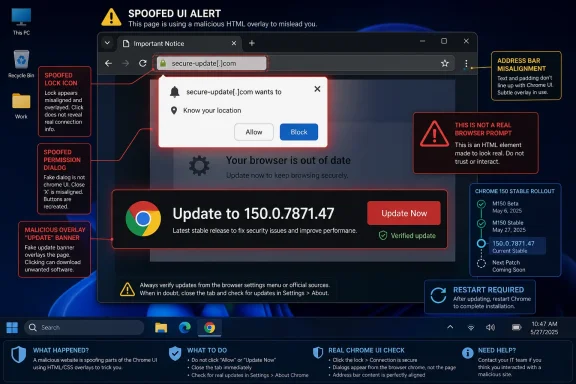
UI spoofing attacks exploit the gap between those two realities. If a crafted page can make part of the page look like trusted browser chrome, or can confuse the timing and placement of a sensitive browser UI element, the attacker does not need to break cryptography. The attacker only needs the user to believe the wrong thing for long enough to click, approve, type, download, or ignore a warning.
That is why CWE-451 is a useful label here. “User Interface Misrepresentation of Critical Information” sounds dry, but it names a class of weakness that sits at the seam between code and cognition. The browser may know the difference between a real permission prompt and a fake one. The user may not, especially if the fake prompt appears at just the right time, after just the right scroll, drag, click, or full-screen transition.
Google’s public advisory does not disclose technical details for CVE-2026-13973, and that is normal. Chrome release notes routinely say that access to bug details and links may remain restricted until most users have received the fix, and the specific Chromium issue attached to this CVE is permission-gated at the time of publication. That leaves defenders with the shape of the risk rather than a proof of concept.
But the shape is enough. A crafted HTML page plus specific user gestures points toward interaction-driven deception rather than silent exploitation. In practical terms, that could mean a malicious site attempting to make browser UI, page UI, or security-relevant signals appear in a misleading relationship. The important word is “could”: without the underlying bug thread, responsible analysis should stop short of inventing a precise exploit chain.
That distinction is easy to miss in enterprise patching. Security teams often triage by severity label because they have to. Critical and high CVEs get the emergency path; medium CVEs enter the next maintenance window; low CVEs become background noise. The problem is that browser bugs do not always map cleanly to that queue.
A UI spoofing flaw can be an enabler. It can make phishing more convincing. It can create confusion around a login prompt, a permission dialog, an extension workflow, a download warning, a payment page, a passkey ceremony, or a web app install surface. If the attacker’s objective is credential theft or user authorization rather than memory corruption, a medium UI flaw may be enough to increase success rates.
CISA’s SSVC enrichment is reassuring but not dismissive. It recorded no known exploitation, not automatable, and partial technical impact. That means defenders do not have evidence of active abuse as of the enrichment timestamp, and the attack likely depends on human behavior. It does not mean the class of bug is irrelevant.
This is where Chrome’s design burden becomes visible. Modern browsers are not only document renderers. They are password managers, identity brokers, payment containers, app launchers, device permission routers, PDF viewers, download managers, enterprise policy clients, and operating-system-adjacent platforms. The more security decisions Chrome surfaces through UI, the more important it becomes that web content cannot convincingly impersonate or distort that UI.
Google’s own Chrome Releases post listed Windows/Mac as 150.0.7871.46/.47. That split often reflects platform, rollout, or packaging differences inside the same stable update family. But vulnerability databases need clean version boundaries, and endpoint inventories need a yes-or-no answer. If a scanner says “fixed at .46” while the CVE says “fixed at .47,” the safe operational answer is to treat 150.0.7871.47 or later as the target where available.
This is especially true in mixed Windows fleets. Chrome may update silently through Google Update, through enterprise-managed update policies, through bundled application deployment tools, or through third-party patch platforms. Microsoft Edge, Brave, Vivaldi, Opera, and Electron-based applications add another layer because they inherit Chromium code on their own schedules, not necessarily Google Chrome’s exact release cadence.
For Chrome itself, the check is simple: open Chrome’s About page or navigate to chrome://settings/help and let the browser complete its update check. For managed Windows machines, inventory should confirm not just that Chrome is on major version 150, but that it has crossed the relevant patched build threshold. Major version alone is not enough.
NVD’s “Are we missing a CPE?” prompt is a reminder of how imperfect vulnerability metadata can be in the first days after publication. CPEs often lag, change, or oversimplify. The original vendor advisory remains the anchor, and in this case the vendor’s stable-channel announcement plus the CVE text point defenders toward Chrome 150.0.7871.47 or later where that build exists.
That has become more important as authentication has improved. Passkeys, password managers, hardware security keys, conditional access, and better phishing-resistant flows all reduce the value of simple credential capture. Attackers respond by attacking the decision moments around those protections. They try to trick users into approving prompts, installing “required” components, trusting fake browser warnings, or interacting with deceptive overlays that look like part of the browser.
CVE-2026-13973 fits that pattern at the category level. It does not claim credential theft, remote code execution, or sandbox escape. It claims UI spoofing after specific gestures. In security operations terms, that means the highest risk is not a wormable event but a targeted lure: a page that needs the user to do something just plausible enough.
For home users, the advice is boring and correct: update Chrome, restart it, and be cautious of pages that ask for unusual gestures before showing a prompt or “browser” message. For IT pros, the advice is to verify update completion and resist the urge to dismiss medium browser UI bugs as cosmetic. Cosmetic is when a button looks odd. Security UI spoofing is when a user may be led to misread the browser’s authority.
The larger Windows angle is browser diversity. If an organization has standardized on Chrome, patching Chrome is the immediate task. If it allows Chromium-derived browsers, the task becomes policy and inventory: which browsers are installed, which update channels are used, and how quickly downstream vendors consume Chromium security fixes. The CVE is named against Chrome, but the underlying Chromium issue may be relevant to projects that share the affected component, depending on their codebase and release status.
It is also frustrating. Security teams want to know whether a bug affects a workflow they care about. Researchers want to understand the root cause. Browser competitors and downstream Chromium projects want to map the issue against their own forks. Journalists want to explain more than a one-line CVE description. Instead, everyone gets a short phrase, a component name, a severity label, and a restricted bug ID.
That opacity creates room for sloppy analysis. One third-party vulnerability database labeled CVE-2026-13973 as an XSS flaw, which is not what the NVD description says. The authoritative text describes inappropriate UI implementation leading to UI spoofing via crafted HTML after user gestures. Those are not interchangeable claims. Cross-site scripting has a specific meaning; UI spoofing has a different one.
This is why prose attribution matters. Google says the update includes the fix and lists the component as UI. NVD describes the vulnerable condition and affected pre-150.0.7871.47 versions. CISA’s ADP enrichment supplies the CVSS vector, CWE mapping, and SSVC posture. Anything beyond that is inference until the Chromium issue becomes public or Google expands the advisory.
The upside is that defenders do not need exploit details to act. They need to know whether the browser version is patched, whether the bug is actively exploited, whether emergency action is warranted, and whether adjacent browsers need scrutiny. On those points, the available record is clear enough: update Chrome, verify rollout, watch downstream Chromium vendors, and do not treat “medium” as “ignore.”
But security also depends on the user interface telling the truth in a way humans can reliably understand. A lock icon must mean what users think it means. A permission prompt must be distinguishable from page content. A download warning must not be easy to bury under choreography. A full-screen page must not get to pretend it is the operating system. A browser-managed credential flow must not be visually confused with attacker-controlled HTML.
The hard part is that the web is built to draw convincing things. HTML and CSS can imitate almost any interface. JavaScript can time motion, focus, pointer capture, transitions, pop-ups, overlays, and input responses. The browser therefore has to maintain not only technical separation but perceptual separation. That is a much harder product problem than it sounds.
CVE-2026-13973 appears to sit in that territory. The phrase “specific UI gestures” suggests that simple page load is not enough; the user must interact in a particular way. That lowers exploitability, but it also hints at the modern attack surface: not just what a page displays, but what happens when a user drags, clicks, scrolls, opens, focuses, accepts, dismisses, enters full screen, or responds to layered UI.
For administrators, this is an argument for patching browsers as first-class infrastructure. A browser update is not a convenience release. It is a repair to the organization’s main user-facing security boundary.
The enterprise reality is messier. Some environments pin browser versions for compatibility. Some use update deferrals. Some package Chrome into golden images that lag behind live channels. Some run dedicated kiosk systems where interactive updates are not obvious. Some rely on vulnerability scanners whose CPE logic may not yet match the vendor’s patched-build language.
That is where CVE-2026-13973 becomes a useful test case. If a fleet cannot quickly answer “Which Chrome builds are installed, and have they restarted into the patched version?” it has a browser governance problem larger than this medium CVE. The same process will be needed for the critical bugs in the same Chrome 150 release and for the next emergency browser patch after that.
Microsoft shops should also remember that Chrome is rarely the only Chromium consumer on a Windows endpoint. Edge follows Microsoft’s own update pipeline. Electron apps may carry embedded Chromium versions that are invisible to users and unevenly patched by application vendors. Security teams should avoid assuming that “Chrome patched” means “Chromium risk eliminated.”
The practical path is layered. Patch Chrome immediately. Confirm version and restart state. Monitor Microsoft Edge and other Chromium-based browser advisories. Check whether line-of-business applications embed Chromium or WebView components. And for high-risk users, keep reinforcing that browser prompts and web-page prompts are not the same thing, even when attackers try to blur the line.
That scale changes how we should read individual CVEs. CVE-2026-13973 is not isolated in the sense that a simple command-line utility bug might be isolated. It lives in an ecosystem where UI, input, permissions, page rendering, full-screen behavior, and identity workflows all interact. The browser’s attack surface is the accumulation of those interactions.
It also changes the patching rhythm. Browser updates have become a permanent background process, not a monthly ceremony. Google’s documentation for enterprise update options has long distinguished stable, extended stable, beta, dev, and canary channels, with different cadences and risk profiles. The tradeoff is familiar: faster channels reduce exposure to known security bugs but increase change velocity; slower channels reduce churn but demand disciplined security response.
For most users, Stable remains the right answer. For enterprises, the question is not whether to update but how to test and deploy quickly enough that browser CVEs do not become a standing exposure. Extended Stable can make sense in controlled environments, but it should not become a euphemism for neglect.
The Chrome 150 release also illustrates why vulnerability management teams should read vendor advisories, not just scanner output. NVD enrichment may lag. CPEs may be incomplete or inconsistent. Third-party summaries may misclassify the bug. The vendor advisory gives the release context; NVD gives the standardized vulnerability record; CISA ADP gives useful scoring and decision-support enrichment. You need all three to understand the operational picture.
For Windows users and administrators, the response should be concrete rather than theatrical.
 Chrome’s Small UI Bug Lands Inside a Very Large Security Release
The immediate facts are straightforward. Google’s Chrome Releases blog announced Chrome 150’s promotion to the stable channel on Tuesday, June 30, 2026, for Windows, Mac, and Linux, with rollout expected over the following days and weeks. The Windows and Mac builds were listed as 150.0.7871.46/.47, while Linux received 150.0.7871.46.Buried inside that release was a very large security payload. Google said the Chrome 150 desktop update included 433 security fixes, a figure large enough to make any single medium-severity CVE look like a footnote. CVE-2026-13973 is one of those footnotes, listed by Google as “Inappropriate implementation in UI” and reported internally by Google on May 16, 2026.
That placement matters. A bug does not need to be independently famous to be operationally relevant. In a browser release carrying critical use-after-free issues, GPU and rendering defects, V8 bugs, and sandbox-adjacent problems, a UI spoofing flaw can look comparatively mild. But attackers do not care whether a vulnerability wins the severity contest; they care whether it helps move a user from doubt to action.
NVD’s description frames the issue narrowly: Chrome before 150.0.7871.47 allowed a remote attacker, after convincing a user to engage in specific UI gestures, to perform UI spoofing via a crafted HTML page. CISA’s ADP scoring gave it a CVSS 3.1 base score of 4.2, marked medium, with network attack vector, high complexity, no privileges required, and required user interaction. CISA also mapped it to CWE-451, the weakness category for user interface misrepresentation of critical information.
That combination tells us something important. This is not a drive-by remote-code-execution story. It is a trust presentation story, and the web’s security model has always depended on users correctly interpreting what the browser is telling them.
The Browser Chrome Is a Security Boundary, Not Decoration
For ordinary users, the browser’s top-level interface is scenery: address bar, lock icon, permission prompts, downloads shelf, profile bubble, extension badges, tab strip, and warning pages. For security engineers, those elements are part of the control plane. They tell the user where they are, what is trusted, what is local, what is remote, what has permission, and what deserves suspicion.UI spoofing attacks exploit the gap between those two realities. If a crafted page can make part of the page look like trusted browser chrome, or can confuse the timing and placement of a sensitive browser UI element, the attacker does not need to break cryptography. The attacker only needs the user to believe the wrong thing for long enough to click, approve, type, download, or ignore a warning.
That is why CWE-451 is a useful label here. “User Interface Misrepresentation of Critical Information” sounds dry, but it names a class of weakness that sits at the seam between code and cognition. The browser may know the difference between a real permission prompt and a fake one. The user may not, especially if the fake prompt appears at just the right time, after just the right scroll, drag, click, or full-screen transition.
Google’s public advisory does not disclose technical details for CVE-2026-13973, and that is normal. Chrome release notes routinely say that access to bug details and links may remain restricted until most users have received the fix, and the specific Chromium issue attached to this CVE is permission-gated at the time of publication. That leaves defenders with the shape of the risk rather than a proof of concept.
But the shape is enough. A crafted HTML page plus specific user gestures points toward interaction-driven deception rather than silent exploitation. In practical terms, that could mean a malicious site attempting to make browser UI, page UI, or security-relevant signals appear in a misleading relationship. The important word is “could”: without the underlying bug thread, responsible analysis should stop short of inventing a precise exploit chain.
Medium Severity Is Not the Same as Medium Importance
The CVSS vector assigned by CISA is almost an essay in miniature: AV:N/AC:H/PR:N/UI:R/S:U/C:N/I:L/A:L. Network reachable, high complexity, no privileges, user interaction required, unchanged scope, no confidentiality impact, low integrity impact, and low availability impact. In the scoring world, that lands at 4.2. In the real world, it means “unlikely to own the machine by itself, but plausible as part of a con.”That distinction is easy to miss in enterprise patching. Security teams often triage by severity label because they have to. Critical and high CVEs get the emergency path; medium CVEs enter the next maintenance window; low CVEs become background noise. The problem is that browser bugs do not always map cleanly to that queue.
A UI spoofing flaw can be an enabler. It can make phishing more convincing. It can create confusion around a login prompt, a permission dialog, an extension workflow, a download warning, a payment page, a passkey ceremony, or a web app install surface. If the attacker’s objective is credential theft or user authorization rather than memory corruption, a medium UI flaw may be enough to increase success rates.
CISA’s SSVC enrichment is reassuring but not dismissive. It recorded no known exploitation, not automatable, and partial technical impact. That means defenders do not have evidence of active abuse as of the enrichment timestamp, and the attack likely depends on human behavior. It does not mean the class of bug is irrelevant.
This is where Chrome’s design burden becomes visible. Modern browsers are not only document renderers. They are password managers, identity brokers, payment containers, app launchers, device permission routers, PDF viewers, download managers, enterprise policy clients, and operating-system-adjacent platforms. The more security decisions Chrome surfaces through UI, the more important it becomes that web content cannot convincingly impersonate or distort that UI.
The Version Number Confusion Is a Patch-Management Trap
There is also a subtle versioning wrinkle in the user-supplied NVD change history. NIST’s initial CPE configuration reportedly listed Chrome versions up to, but excluding, 150.0.7871.46, while the CVE description says “prior to 150.0.7871.47.” The CVE record’s affected data also contains the familiar “lessThan 150.0.7871.47” language. For Windows administrators, that mismatch is not just trivia.Google’s own Chrome Releases post listed Windows/Mac as 150.0.7871.46/.47. That split often reflects platform, rollout, or packaging differences inside the same stable update family. But vulnerability databases need clean version boundaries, and endpoint inventories need a yes-or-no answer. If a scanner says “fixed at .46” while the CVE says “fixed at .47,” the safe operational answer is to treat 150.0.7871.47 or later as the target where available.
This is especially true in mixed Windows fleets. Chrome may update silently through Google Update, through enterprise-managed update policies, through bundled application deployment tools, or through third-party patch platforms. Microsoft Edge, Brave, Vivaldi, Opera, and Electron-based applications add another layer because they inherit Chromium code on their own schedules, not necessarily Google Chrome’s exact release cadence.
For Chrome itself, the check is simple: open Chrome’s About page or navigate to chrome://settings/help and let the browser complete its update check. For managed Windows machines, inventory should confirm not just that Chrome is on major version 150, but that it has crossed the relevant patched build threshold. Major version alone is not enough.
NVD’s “Are we missing a CPE?” prompt is a reminder of how imperfect vulnerability metadata can be in the first days after publication. CPEs often lag, change, or oversimplify. The original vendor advisory remains the anchor, and in this case the vendor’s stable-channel announcement plus the CVE text point defenders toward Chrome 150.0.7871.47 or later where that build exists.
Windows Users Should Read This as a Browser Trust Update
WindowsForum readers have a particular reason to care about a Chrome UI spoofing bug. On Windows, the browser is not merely an application; for many users it is the daily shell for identity, email, storage, admin consoles, remote management portals, SaaS dashboards, banking, and collaboration. The browser’s UI is often the only thing standing between a user and a convincing fake.That has become more important as authentication has improved. Passkeys, password managers, hardware security keys, conditional access, and better phishing-resistant flows all reduce the value of simple credential capture. Attackers respond by attacking the decision moments around those protections. They try to trick users into approving prompts, installing “required” components, trusting fake browser warnings, or interacting with deceptive overlays that look like part of the browser.
CVE-2026-13973 fits that pattern at the category level. It does not claim credential theft, remote code execution, or sandbox escape. It claims UI spoofing after specific gestures. In security operations terms, that means the highest risk is not a wormable event but a targeted lure: a page that needs the user to do something just plausible enough.
For home users, the advice is boring and correct: update Chrome, restart it, and be cautious of pages that ask for unusual gestures before showing a prompt or “browser” message. For IT pros, the advice is to verify update completion and resist the urge to dismiss medium browser UI bugs as cosmetic. Cosmetic is when a button looks odd. Security UI spoofing is when a user may be led to misread the browser’s authority.
The larger Windows angle is browser diversity. If an organization has standardized on Chrome, patching Chrome is the immediate task. If it allows Chromium-derived browsers, the task becomes policy and inventory: which browsers are installed, which update channels are used, and how quickly downstream vendors consume Chromium security fixes. The CVE is named against Chrome, but the underlying Chromium issue may be relevant to projects that share the affected component, depending on their codebase and release status.
Google’s Disclosure Model Helps Users by Frustrating Researchers
Google’s Chrome advisory gives enough information to patch and not enough information to reproduce. That is not an accident. Browser vendors routinely restrict bug details until fixes have propagated because public exploit details can compress the window between disclosure and abuse. Chrome’s global install base makes that caution defensible.It is also frustrating. Security teams want to know whether a bug affects a workflow they care about. Researchers want to understand the root cause. Browser competitors and downstream Chromium projects want to map the issue against their own forks. Journalists want to explain more than a one-line CVE description. Instead, everyone gets a short phrase, a component name, a severity label, and a restricted bug ID.
That opacity creates room for sloppy analysis. One third-party vulnerability database labeled CVE-2026-13973 as an XSS flaw, which is not what the NVD description says. The authoritative text describes inappropriate UI implementation leading to UI spoofing via crafted HTML after user gestures. Those are not interchangeable claims. Cross-site scripting has a specific meaning; UI spoofing has a different one.
This is why prose attribution matters. Google says the update includes the fix and lists the component as UI. NVD describes the vulnerable condition and affected pre-150.0.7871.47 versions. CISA’s ADP enrichment supplies the CVSS vector, CWE mapping, and SSVC posture. Anything beyond that is inference until the Chromium issue becomes public or Google expands the advisory.
The upside is that defenders do not need exploit details to act. They need to know whether the browser version is patched, whether the bug is actively exploited, whether emergency action is warranted, and whether adjacent browsers need scrutiny. On those points, the available record is clear enough: update Chrome, verify rollout, watch downstream Chromium vendors, and do not treat “medium” as “ignore.”
The Real Risk Is the Human-Machine Contract
Browser security has spent two decades hardening memory safety, sandboxing renderers, isolating sites, limiting cross-origin data exposure, and making exploit chains more expensive. That work matters. Chrome 150’s advisory is packed with the familiar vocabulary of browser hardening: use-after-free, type confusion, out-of-bounds access, validation failures, and policy enforcement bugs.But security also depends on the user interface telling the truth in a way humans can reliably understand. A lock icon must mean what users think it means. A permission prompt must be distinguishable from page content. A download warning must not be easy to bury under choreography. A full-screen page must not get to pretend it is the operating system. A browser-managed credential flow must not be visually confused with attacker-controlled HTML.
The hard part is that the web is built to draw convincing things. HTML and CSS can imitate almost any interface. JavaScript can time motion, focus, pointer capture, transitions, pop-ups, overlays, and input responses. The browser therefore has to maintain not only technical separation but perceptual separation. That is a much harder product problem than it sounds.
CVE-2026-13973 appears to sit in that territory. The phrase “specific UI gestures” suggests that simple page load is not enough; the user must interact in a particular way. That lowers exploitability, but it also hints at the modern attack surface: not just what a page displays, but what happens when a user drags, clicks, scrolls, opens, focuses, accepts, dismisses, enters full screen, or responds to layered UI.
For administrators, this is an argument for patching browsers as first-class infrastructure. A browser update is not a convenience release. It is a repair to the organization’s main user-facing security boundary.
The Patch Is Simple, the Inventory Is Not
The direct remediation is uncomplicated: run Chrome 150.0.7871.47 or later where that build applies. Google’s stable-channel release says the update rolls out over days and weeks, which is normal for Chrome. Users who wait for automatic updates will often receive it without drama, but the browser still needs to restart to complete installation.The enterprise reality is messier. Some environments pin browser versions for compatibility. Some use update deferrals. Some package Chrome into golden images that lag behind live channels. Some run dedicated kiosk systems where interactive updates are not obvious. Some rely on vulnerability scanners whose CPE logic may not yet match the vendor’s patched-build language.
That is where CVE-2026-13973 becomes a useful test case. If a fleet cannot quickly answer “Which Chrome builds are installed, and have they restarted into the patched version?” it has a browser governance problem larger than this medium CVE. The same process will be needed for the critical bugs in the same Chrome 150 release and for the next emergency browser patch after that.
Microsoft shops should also remember that Chrome is rarely the only Chromium consumer on a Windows endpoint. Edge follows Microsoft’s own update pipeline. Electron apps may carry embedded Chromium versions that are invisible to users and unevenly patched by application vendors. Security teams should avoid assuming that “Chrome patched” means “Chromium risk eliminated.”
The practical path is layered. Patch Chrome immediately. Confirm version and restart state. Monitor Microsoft Edge and other Chromium-based browser advisories. Check whether line-of-business applications embed Chromium or WebView components. And for high-risk users, keep reinforcing that browser prompts and web-page prompts are not the same thing, even when attackers try to blur the line.
Chrome 150 Shows the Scale Problem Behind Every Browser CVE
The number 433 deserves attention. A single stable-channel browser release containing hundreds of security fixes is both a sign of a healthy reporting pipeline and a reminder of the scale of the modern browser. Chrome is an operating environment with rendering engines, graphics layers, media stacks, PDF handling, Bluetooth, USB, password management, enterprise policy, accessibility, extensions, remote desktop features, and more.That scale changes how we should read individual CVEs. CVE-2026-13973 is not isolated in the sense that a simple command-line utility bug might be isolated. It lives in an ecosystem where UI, input, permissions, page rendering, full-screen behavior, and identity workflows all interact. The browser’s attack surface is the accumulation of those interactions.
It also changes the patching rhythm. Browser updates have become a permanent background process, not a monthly ceremony. Google’s documentation for enterprise update options has long distinguished stable, extended stable, beta, dev, and canary channels, with different cadences and risk profiles. The tradeoff is familiar: faster channels reduce exposure to known security bugs but increase change velocity; slower channels reduce churn but demand disciplined security response.
For most users, Stable remains the right answer. For enterprises, the question is not whether to update but how to test and deploy quickly enough that browser CVEs do not become a standing exposure. Extended Stable can make sense in controlled environments, but it should not become a euphemism for neglect.
The Chrome 150 release also illustrates why vulnerability management teams should read vendor advisories, not just scanner output. NVD enrichment may lag. CPEs may be incomplete or inconsistent. Third-party summaries may misclassify the bug. The vendor advisory gives the release context; NVD gives the standardized vulnerability record; CISA ADP gives useful scoring and decision-support enrichment. You need all three to understand the operational picture.
The Lesson in CVE-2026-13973 Is Trust the Patch, Not the Prompt
CVE-2026-13973 is unlikely to be remembered as the defining Chrome vulnerability of 2026. It is medium severity, not known to be exploited according to CISA’s enrichment, and dependent on user interaction. Yet it captures a security truth that is easy to forget: when a browser UI lies, or can be made to appear to lie, the user becomes part of the exploit surface.For Windows users and administrators, the response should be concrete rather than theatrical.
- Chrome should be updated to 150.0.7871.47 or later where available, and the browser should be restarted so the patched build is actually running.
- Vulnerability teams should treat the CVE text’s “prior to 150.0.7871.47” language as the safer threshold if scanner metadata still shows inconsistent CPE boundaries.
- CISA’s ADP enrichment lowers the urgency compared with an exploited critical bug, but it does not justify skipping the update.
- Chromium-based browsers and embedded Chromium runtimes should be tracked separately because they do not all inherit Google Chrome fixes on the same schedule.
- User-awareness guidance should emphasize that browser-controlled prompts, permission dialogs, and address-bar signals are security boundaries, not decorative UI.
- Security teams should watch for later disclosure of the restricted Chromium issue, because the public exploitability picture may become clearer after most users are patched.
References
- Primary source: NVD / Chromium
Published: 2026-07-03T07:00:41-07:00
NVD - CVE-2026-13973
 nvd.nist.gov
- Security advisory: MSRC
Published: 2026-07-03T07:00:41-07:00
Original feed URL
Security Update Guide - Microsoft Security Response Center
 msrc.microsoft.com
- Related coverage: cvefeed.io
CVE-2026-13973 - Google Chrome UI Spoofing
Inappropriate implementation in UI in Google Chrome prior to 150.0.7871.47 allowed a remote attacker who convinced a user to engage in specific UI gestures to perform UI spoofing via a crafted HTML page. (Chromium security severity: Medium)cvefeed.io
