

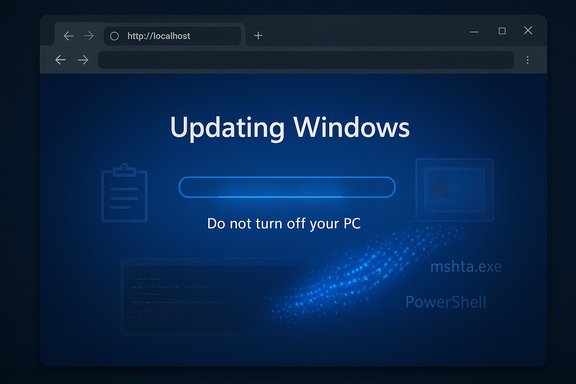
A high-fidelity fake Windows 11 update screen has been weaponized in a new ClickFix campaign to trick victims into executing commands that load in-memory steganographic payloads, ultimately delivering the LummaC2/Lumma stealer and the Rhadamanthys infostealer to compromised machines.
Background
This campaign is the latest evolution of the long-running ClickFix social‑engineering family, which has repeatedly relied on human trust to convert simple user actions into full system compromise. Early ClickFix variants used fake CAPTCHAs and “human verification” prompts; the current wave substitutes those lures with an almost-native-looking Windows Update UI rendered inside the browser to lower suspicion and increase click-through and paste-and-run rates. Security teams first documented clusters of these Windows‑update lures in evidence collected from late September through October 2025. Analysts observed dozens of incidents across multiple regions and multiple industries, demonstrating that the technique scales quickly once a convincing visual lure is crafted and rehosted.Overview: Why this matters
- Human-in-the-loop attacks scale: By engineering a single, intuitive action (Win+R then Ctrl+V), attackers convert habitual user behavior into an execution vector that bypasses many automated protections.
- Fileless and in-memory techniques blunt signatures: The chain reconstructs and executes payloads in RAM from innocuous-looking resources, leaving minimal disk artifacts for traditional AV to flag.
- Trusted binaries abused: The campaign relies on signed Microsoft binaries such as mshta.exe and the .NET runtime to bootstrap and run complex loaders, making anomaly detection harder.
Technical breakdown: the ClickFix Windows‑Update chain
1. The visual lure: full‑screen fake Windows Update UI
Attackers host a web page that forces the browser into full‑screen and renders a convincing Windows Update animation, progress bars, and text that mimics native update messaging. The page may play a voiceover or show system-like prompts such as “Do not turn off your PC.” At the end of the animation, the page instructs the user to open the Run dialog (Win+R) and paste a command to "complete the update." Some pages automatically copy the malicious command to the clipboard via JavaScript to remove user friction.2. Execution pivot: clipboard → Win+R → mshta.exe
The command the victim pastes typically calls mshta.exe with a remote URL. Because mshta.exe is a signed Microsoft interpreter for HTML Applications (HTA), it is often allowed by default and does not raise the same alerts as a newly downloaded EXE. The mshta stage pulls a small script or JScript that subsequently launches obfuscated PowerShell. This living‑off‑the‑land pivot is well-known, but the campaign’s novelty is in combining it with automatic clipboard poisoning and stego payloads.3. PowerShell → reflectively loaded .NET assembly
The mshta-supplied script fetches a PowerShell one‑liner that contains a Base64 encoded or obfuscated .NET assembly. That assembly is decrypted and reflectively loaded into the .NET CLR, allowing the loader to run without writing a full DLL/EXE to disk. Reflective loading is a common technique for staying fileless and evading endpoint scanners that focus on disk artifacts.4. Steganographic PNG loader: pixels as payload carriers
The loaded .NET “Stego Loader” decodes hidden bytes inside PNG images’ pixel channels — often tuned to use one color channel (for example, the red channel) to carry encrypted fragments. The extracted bytes are AES‑decrypted and revealed to be Donut‑packed shellcode (a shellcode format used to produce position‑independent PE payloads). The loader reconstructs the shellcode entirely in memory and then executes it directly, with no obvious EXE on disk. This steganographic step is the pivot from script-based delivery to pure memory execution and is the primary reason this wave evades traditional scanners.5. Final payloads: LummaC2 and Rhadamanthys
Observed final payloads include the Rhadamanthys infostealer and the Lumma family (sometimes referred to as LummaC2). Both are credential‑and-cookie focused: they harvest saved browser passwords, session cookies, form data, and cryptocurrency wallet information. Stolen session tokens and cookies are especially valuable because they can enable account takeovers without immediate password changes. Multiple vendor analyses and CERTs corroborate that these specific payloads have been delivered through the Windows Update ClickFix lures.Steganography & in‑memory execution: why defenders miss it
Steganography hides payload bytes in plain‑sight images that are normally benign. Traditional network filters and AV engines scan for appended or malformed PE headers, suspicious MIME types, or known malicious URLs — not for legitimate‑looking PNGs with altered pixel channels. Once the pixel-encoded bytes are reassembled and executed in memory, disk-based forensics often find no clear “smoking gun.” Memory captures and EDR telemetry become the only reliable evidence. Huntress and other responders highlight that this flow leaves ephemeral artifacts, requiring quick capture and specialized analysis.Attribution and takedowns: partial wins, long game
A mid‑November law enforcement action (referred to in public reporting as Operation Endgame or similar coordinated takedowns) targeted major parts of the Rhadamanthys and Lumma infrastructure. Reports disagree on exact numbers — some analyses reference over 1,000 seized servers, while public press coverage around prior Lumma disruption mentioned 2,300 domains seized during other operations earlier in 2025. These takedowns significantly disrupted C2 and hosting, but they did not neutralize the lure pages, which are trivial to rehost on new domains or CDNs. Attackers responded quickly by rotating domains and changing hosting providers. Analysts therefore treat the takedowns as meaningful but temporary setbacks rather than permanent defeats. Treat takedowns as noise‑reduction, not eradication. Flag on unverifiable numbers: public reporting varies by operation and timing; the exact seizure counts depend on which action (and which researchers) are referenced. Readers should treat exact domain/server totals with caution until a named enforcement report is published.How to detect the ClickFix Windows‑Update lure in the wild
- Monitor process parent/child chains and flag anomalies such as explorer.exe spawning mshta.exe, mshta.exe spawning PowerShell, or browsers launching mshta.exe unexpectedly. These sequences are a common triage indicator.
- Look for PowerShell activity that contains long Base64 blobs, Win32 API calls, or reflective loading indicators (for example, Assembly.Load or use of reflection APIs).
- Hunt for repeated or unusually large requests for PNG images that are then accessed by non‑image processing code paths; these images may be carriers for pixel-encoded data rather than UI assets.
- Query RunMRU and CMD/PowerShell command history to identify recent clipboard‑pasted one‑liner invocations from users — a telltale sign of ClickFix-style social engineering.
- Enable network detections for hex-encoded URL patterns and unusual second‑octet encoding schemes; research observed a consistent pattern where the second octet of the IP was hex‑encoded in mshta calls.
Immediate containment and remediation checklist (for incident responders)
- Isolate affected hosts from the network to prevent further C2 communication and lateral movement.
- Capture a full memory image — the loader and payloads are memory-only and may be present only in RAM.
- Preserve EDR telemetry and Windows event logs (PowerShell Script Block Logging, Sysmon, Process Creation events).
- Rotate credentials and revoke sessions for accounts used on the suspected host; treat cookies and stored web sessions as compromised.
- Run an offline, multi‑engine scan (Defender Offline or a rescue ISO) and consider full reimage if persistence cannot be ruled out.
- Deploy threat hunting signatures across endpoint telemetry for explorer.exe → mshta.exe chains and for the distinctive PNG fetch patterns.
Practical mitigations for enterprise IT and admins
- Disable the Windows Run box via Group Policy where possible for managed desktops to eliminate Win+R as a simple execution vector. This is a blunt but effective mitigation against the ClickFix vector.
- Harden PowerShell: enable Constrained Language Mode where practical, enforce signed scripts only, and enable Script Block Logging with logs forwarded to a central SIEM. These controls increase friction for in‑memory loaders.
- Block or monitor mshta.exe execution centrally and create alerts for unexpected parent processes such as explorer.exe or browser processes spawning mshta.exe or PowerShell.
- Implement conditional access and session revocation policies so that a large-scale credential theft can be contained by forcing reauthentication and invalidating sessions quickly.
- User education targeting one habit: short, specific campaigns that teach “never paste commands from websites or videos into the Run box, CMD or PowerShell” reduce these attacks more effectively than generic phishing slides. Simulated exercises showing the click→paste→run flow reinforce the lesson.
Threat actor playbook: why attackers will keep using this
Attackers pick tactics with high success-per-effort ratios. ClickFix’s advantages:- Low operational cost: creating and rehosting a fake UI is trivial compared to developing zero‑day exploits.
- High yield: credential, cookie, and wallet theft can be rapidly monetized or sold on criminal marketplaces.
- Resilience: takedowns of hosting and C2 are disruptive but easily countered by moving to new domains or decentralized infrastructure.
Critical analysis: strengths, weaknesses, and enterprise risk
Notable strengths of the campaign
- Psychological realism: the Windows Update animation exploits an existing trusted mental model. Users have been trained to accept OS update flows — attackers leveraged that trust very effectively.
- Technical stealth: by reconstructing shellcode from PNG pixels and executing entirely in memory, the campaign minimizes forensic surface and evades many signature‑based defenses.
- Operational agility: the campaign’s reliance on simple hosting and HTML/JavaScript lures means infrastructure can be rotated quickly following takedowns.
Weaknesses and actionable defender leverage
- Behavioral single point of failure: the entire chain depends on a human action — pasting and executing the clipboard content. A well‑targeted user education program that eliminates this single habit dramatically reduces risk.
- Detectable process chains: once the command executes, the mshta→PowerShell→.NET chain creates detectable telemetry in EDR products — defenders that monitor for these patterns can detect compromises early.
- Network artifacts during image fetching: while the images are benign-looking, their fetch patterns (size, frequency, repeated requests) can be profiled and blocked by network-layer IDS/EDR correlation rules.
Enterprise risk (ranked)
- Credential theft and account takeover — highest immediate business impact; stolen session tokens can bypass MFA in some flows.
- Data exfiltration / fraud — rapid monetization from stolen wallets and banking credentials.
- Lateral movement and secondary payloads — compromised credentials may allow attackers to deploy RATs or ransomware subsequently.
- Compliance and reputational damage — breaches involving customer records or financial access can trigger regulatory exposure and brand damage.
Operational playbook for defenders (concise steps)
- Immediately deploy detections for explorer.exe → mshta.exe and mshta.exe → PowerShell call chains.
- Add SIEM rules to flag PowerShell -EncodedCommand usage and large PNG fetches followed by memory‑only process creations.
- Push a targeted one‑line user warning through internal channels: “Never paste commands from websites or videos into Run, CMD, or PowerShell.”
- Roll out a temporary policy to block mshta.exe where business operations allow and enable PowerShell Constrained Language Mode on high‑risk endpoints.
- Prepare a forensic runbook that prioritizes RAM capture, RunMRU review, and session revocation for suspected compromises.
What vendors and defenders should watch next
- Migration of stego techniques into other common image formats or the use of CDN caching to further blur indicators.
- Increased automation of the lure creation pipeline (templated Windows Update screens in multiple languages), which would broaden victim reach.
- Cross‑family re-use: campaign actors may begin delivering other commodity tools (NetSupport, AsyncRAT, or ransomware droppers) using the same flow. Historical ClickFix waves have pivoted payloads rapidly.
Final verdict and recommended posture
The ClickFix fake Windows 11 update campaign is a clear example of social engineering amplified by modern stealth techniques. Its novelty lies less in exploit complexity and more in operational craft: an intuitive, authoritative UI married to a fileless stego loader yields a high-payoff attack that’s difficult to detect using legacy heuristics.Defense is straightforward in concept but demanding in practice: remove the enabling user habit, harden PowerShell and mshta usage, and require robust EDR/SIEM telemetry to catch the in-memory reconstruction phase. Law enforcement takedowns help, but they are not a substitute for durable enterprise controls and focused user education.
The threat remains active and adaptable; organizations should treat the campaign as high-priority, immediately review Run box usage and PowerShell policies, and operationalize memory capture and session revocation steps in their incident response playbooks. Conclusion: the bad actors have shown they can make pixels do the dirty work — defenders must respond by hardening both the technical stack and the one human habit the attack chain exploits.
Source: Пепелац Ньюс https://pepelac.news/en/posts/id13237-fake-windows-11-update-pushes-lummac2-rhadamanthys/
