

Microsoft said in May 2026 that Copilot Studio now offers generally available computer-using agents, an early-release redesigned workflows experience, new Work IQ interoperability features, and generally available real-time voice agents in North America through Dynamics 365 Contact Center. The announcement is less about another chatbot upgrade than about Microsoft’s preferred shape of enterprise automation: agents that can click, reason, hand off, escalate, and be governed from the same Microsoft-controlled stack. That is a powerful pitch for organizations with aging systems and sprawling processes. It is also a reminder that the hard part of agentic AI is no longer the demo; it is the operating model.
For the past two years, enterprise AI has been sold largely through the language of productivity: summarize this meeting, draft that email, explain this document, answer that question. Microsoft’s latest Copilot Studio update pushes into a more consequential category. It is about systems that act.
That distinction matters. A chatbot can be wrong and still leave the user in control of the final action. An agent that operates a legacy application, updates a service order, routes a customer call, or triggers a workflow is participating in the business process itself. The stakes move from convenience to accountability.
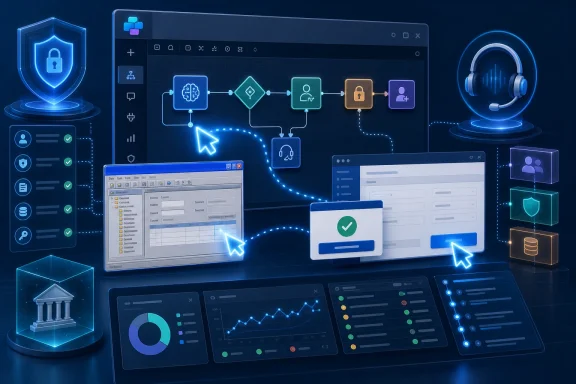
Microsoft’s announcement is built around that shift. Computer-using agents are now generally available, meaning Copilot Studio agents can interact with websites and desktop applications through the user interface when APIs are missing or insufficient. The redesigned workflow canvas, meanwhile, is meant to combine deterministic process logic with AI-driven steps on a single surface. Work IQ extensibility and agent-to-agent communication aim to make the resulting systems less isolated.
The underlying thesis is clear: Microsoft wants Copilot Studio to become the orchestration layer for work that cannot be neatly contained inside Microsoft 365 prompts. That makes the product more ambitious, but also more exposed to the messy realities of enterprise IT.
Computer-using agents promise a different path. Instead of requiring every system to expose a clean programmable interface, the agent can navigate the graphical interface much as a person would. It can read screens, fill fields, click buttons, and recover when the path through an application is not exactly the same as last time.
This is the alluring part of the story. It suggests that organizations do not need to wait for a full modernization project before automating tedious back-office work. A company with a proprietary desktop app, an old web portal, or a third-party system with no usable integration may be able to automate around the edges.
But the same feature also moves AI closer to the point of irreversible action. Clicking through a UI is not merely retrieving information; it can create records, approve transactions, submit forms, and change downstream data. That means credential management, logging, model choice, environment isolation, and exception handling are not supporting details. They are the product.
Microsoft appears to understand this, at least in the framing. The company is emphasizing secure credential management, model selection for different automation scenarios, monitoring, and more resilient behavior when interfaces change. Those are the right nouns. Whether they are enough depends on how transparently administrators can see what happened, why it happened, and how to stop it when the agent’s interpretation of a screen goes sideways.
That is exactly the kind of business process where traditional automation struggles. The inputs vary, attachments arrive in unpredictable forms, edge cases are normal, and the system of record cannot simply be swapped out because a new AI platform would prefer a cleaner architecture. In that world, a computer-using agent is less a novelty than a workaround with executive appeal.
The case study also reveals the trade-off. Automating through a UI can reduce manual effort, but it can also preserve the underlying fragility of the environment. If the proprietary platform remains difficult to integrate, the agent becomes a bridge over technical debt rather than a cure for it.
That may still be the right business decision. Not every legacy system deserves a multimillion-dollar replacement project. But IT leaders should be honest about what they are buying. Computer use can make automation possible in places where APIs do not exist; it does not magically turn old systems into well-instrumented, semantically rich platforms.
In practice, the best deployments will probably treat computer use as a controlled execution method inside a broader automation design. The agent should click only where it must. Business rules, approvals, validation, and audit should live in places administrators can reason about without replaying a screen recording.
Microsoft says the new workflow experience, now available in early release environments, gives builders a unified visual canvas for orchestrating agentic automation. Instead of building logic across disconnected surfaces, teams can place actions, decisions, AI steps, and existing agents into a single process. Agent nodes can be dropped into workflows when a step needs reasoning, knowledge retrieval, or tool orchestration rather than simple if-then logic.
That is a pragmatic admission. Enterprises do not want every process to become an open-ended agent conversation. They want deterministic handling where the rules are known, AI assistance where ambiguity exists, and explicit escalation when neither is enough. The phrase Microsoft uses — structured where needed, adaptive where valuable — is vendor language, but the design principle is sound.
The risk is that visual workflow tools can become deceptively comforting. A tidy canvas does not guarantee a tidy system. Once a workflow can invoke agents, and those agents can call tools, operate UIs, consult organizational context, and communicate with other agents, the diagram may show the route while hiding the real behavior.
This is where node-level testing and lifecycle visibility become essential. Microsoft says builders can validate workflow behavior earlier and see clearer approval and publishing states for agents. That is necessary because the failure mode of enterprise agent platforms will not always be a spectacular hallucination. More often, it will be a stalled deployment, a misconfigured environment, an agent acting on stale context, or a workflow branch nobody tested because it only happens on the third Tuesday after a vendor changes a form.
Microsoft is trying to blend the two. A workflow can enforce sequence, approvals, business logic, and integration points. An agent can interpret messy inputs, retrieve context, reason through ambiguous decisions, and operate tools. If that balance is right, organizations get automation that is both flexible and governable.
If the balance is wrong, they get the worst of both worlds. A workflow that depends too heavily on agent judgment becomes difficult to validate. An agent trapped inside overly rigid process logic becomes a more expensive chatbot with extra steps. The craft is in knowing which parts of a process should be rules and which parts should be delegated.
This is not just a product design issue. It is an organizational skill. Business users may know the exception paths but not the compliance requirements. Developers may know the system interfaces but not the human workaround that keeps the process alive. Security teams may know the risk but not the operational urgency. Copilot Studio’s promise depends on getting those groups to build together, not merely giving each of them a nicer canvas.
That is why Microsoft’s emphasis on early validation and lifecycle status is welcome but insufficient on its own. Enterprises will need internal design patterns for agentic workflows: when to require approval, when to allow autonomous action, when to log screen interactions, when to fall back to a human, and when not to automate at all.
The ambition is straightforward. Agents should not be isolated bots with their own narrow memory and toolset. They should be able to share information, delegate tasks, connect to enterprise resources, and operate across environments without every integration being custom-built from scratch.
This is where Microsoft’s platform advantage becomes obvious. The company already sits across identity, productivity, collaboration, device management, cloud infrastructure, business applications, and security tooling for many enterprises. If Copilot Studio agents can inherit or connect into those layers cleanly, Microsoft can offer a more coherent story than point solutions trying to integrate into the Microsoft estate from the outside.
But context is also liability. The richer the agent’s understanding of the organization, the more important boundaries become. Which files, messages, workflows, customer records, and operational systems can the agent use? Can it infer sensitive information from patterns even when individual data objects are protected? Does agent-to-agent communication expand capability or quietly widen the blast radius?
Microsoft’s answer will likely lean on existing permissions, governance, and compliance controls. That is sensible, but not magical. Administrators have learned from years of Microsoft 365 deployments that inherited permissions can faithfully reproduce old mistakes at new scale. An agent grounded in messy enterprise data can be very useful; it can also be very confidently misled by the same stale, overexposed, or inconsistently classified information that humans have been working around for years.
Microsoft’s embrace of interoperability is therefore practical. It lowers friction for adoption and gives developers a more standardized way to connect agents to tools and services. The REST API and CLI support should also matter to platform teams that want agent systems to fit into existing development and operations workflows rather than live as low-code islands.
Still, interoperability inside a platform is never neutral. The more Copilot Studio becomes the place where agents, workflows, Work IQ context, voice interactions, and UI automation meet, the more Microsoft becomes the default control plane. That may be exactly what many customers want. Centralization can reduce chaos, especially when departments are already spinning up AI pilots faster than IT can inventory them.
The trade-off is dependency. Once business processes are modeled in Copilot Studio, grounded in Work IQ, governed through Microsoft controls, and connected to Dynamics 365 or Power Platform assets, switching costs rise. Microsoft is not just selling features; it is shaping the architecture of enterprise automation around its cloud.
That does not make the strategy sinister. It makes it Microsoft. The company has always been most effective when it turns a category into a platform and a platform into administrative gravity.
Microsoft says these voice agents can identify callers, answer questions, take action during conversations, and transfer customers to live agents while preserving context. Server-to-server voice support is intended to connect the experience into existing service and operational systems. The goal is to move beyond rigid phone trees into more natural, responsive customer interactions.
Anyone who has shouted “representative” into an IVR system understands the appeal. Voice support is full of repetitive authentication, basic status checks, routing, and information gathering. A good AI voice agent could reduce wait times and spare human agents from the most mechanical work.
But voice is unforgiving. Latency feels like confusion. A bad escalation feels like abandonment. A context-losing handoff feels worse than starting from scratch because the system has already consumed the customer’s patience. The governance guide Microsoft is promoting alongside the feature is not optional reading; it is the difference between a promising deployment and a brand-damaging experiment.
The operational questions are concrete. Can the organization test escalations under realistic conditions? Can supervisors monitor AI-handled calls with the same seriousness as human-handled ones? Are customers clearly informed when they are speaking to an AI system? Can the agent refuse or escalate when the caller’s intent touches regulated, emotional, or high-risk scenarios?
Voice agents also collapse the distance between automation architecture and customer trust. A workflow bug in a back office may be discovered by an employee with access to a workaround. A voice agent failure is experienced directly by the customer, in real time, with no patience for the distinction between Copilot Studio, Dynamics 365 Contact Center, and the company that deployed it.
Token consumption is not an abstract metric for organizations deploying agents across departments. Every retrieval step, tool call, classification, reasoning pass, and generated response can add cost and latency. A pilot that looks compelling with dozens of transactions may become economically awkward at hundreds of thousands.
Improving orchestration is therefore not just about model quality. It is about deciding when an agent needs to reason, when it can call a tool, when it should reuse context, when it should stop, and how to avoid expensive loops. A cheaper agent that completes the work reliably is more valuable than a dazzling one that burns budget rethinking every step.
The reported performance gains should be treated as Microsoft’s own measurement, not an independent benchmark. Still, the direction is important. Enterprise agent platforms will compete not only on intelligence but on efficiency per completed task. The market will eventually care less about how impressive a single interaction looks and more about cost, throughput, reliability, and auditability.
That is another reason the workflow layer matters. If Microsoft can make Copilot Studio agents more predictable in how they use tools and models, administrators have a better chance of forecasting cost. If not, agentic automation may inherit the worst cloud-era surprise: the bill that arrives after everyone declares the pilot a success.
Agent programs will not scale if every deployment depends on tribal knowledge. Someone needs to know which agents are drafts, which are approved, which are live, which failed to publish, and which are still being tested against updated workflows. In a large organization, this is not a convenience. It is basic hygiene.
The broader pattern is that Microsoft is trying to surround agent autonomy with familiar enterprise controls. That includes publishing status, workflow validation, credential management, monitoring, governance guidance, and integration into existing Microsoft admin concepts. The company knows that agents will be rejected by serious IT departments if they look like clever black boxes.
The problem is that visibility must be deep enough to be useful. A green status indicator does not answer why an agent chose a particular tool, what data it used, what screen it saw, or whether it followed the intended policy path. The next phase of enterprise agent management will need observability closer to distributed systems monitoring than chatbot analytics.
Admins will want traces, not vibes. They will want to replay decisions, inspect tool calls, compare versions, enforce approvals, and detect drift. If Copilot Studio becomes the platform Microsoft wants it to be, the audit trail may become as important as the agent builder.
That could be a relief. Many IT teams are caught between executive pressure to “use AI” and the reality that their most valuable processes run through systems that do not fit cleanly into modern API-first architectures. Computer-using agents provide a plausible answer: automate the interface where no better interface exists.
It also creates more work. Someone has to decide where the agent runs, which credentials it uses, how it is monitored, what happens when the UI changes, and how exceptions reach humans. Someone has to distinguish a process that is safe to automate from one that merely looks repetitive. Someone has to explain to leadership that “the agent can click the button” is not the same as “the organization is ready for the agent to click the button.”
Security teams will focus on identity and permissions. Operations teams will focus on reliability and recovery. Developers and Power Platform makers will focus on tool integration and workflow design. Business owners will focus on throughput and cost. The deployment will succeed only if those concerns meet before production, not after the first bad transaction.
There is also a cultural adjustment. Traditional automation often fails when reality deviates from the script. Agentic automation may fail when it improvises too well. The governance posture has to shift from “does this script do exactly what we wrote?” to “under what conditions is this system allowed to decide?”
Computer-using agents should be evaluated first on constrained, observable processes. The best candidates have clear inputs, well-defined success criteria, recoverable errors, and a business owner who understands the exception paths. The worst candidates are high-impact, low-visibility processes where a mistaken click can create legal, financial, or customer harm before anyone notices.
Workflow agent nodes should be treated as powerful components, not magic steps. A workflow that delegates reasoning to an agent should specify what the agent may decide, what it may not decide, when it must escalate, and what evidence it must return. Otherwise the workflow canvas becomes a diagram of intent rather than a control surface.
Voice agents deserve an even higher bar. If the experience cannot preserve context during handoff, handle interruption, respect escalation triggers, and make monitoring practical, it should not be put in front of customers at scale. The cost of a bad voice bot is paid in trust.
Work IQ and agent-to-agent communication should trigger permission reviews. More connected agents can complete more useful work, but they can also propagate context and action across boundaries that were previously separated by friction. In enterprise security, friction is sometimes accidental protection.
 Microsoft Moves Copilot Studio From Conversation to Execution
For the past two years, enterprise AI has been sold largely through the language of productivity: summarize this meeting, draft that email, explain this document, answer that question. Microsoft’s latest Copilot Studio update pushes into a more consequential category. It is about systems that act.That distinction matters. A chatbot can be wrong and still leave the user in control of the final action. An agent that operates a legacy application, updates a service order, routes a customer call, or triggers a workflow is participating in the business process itself. The stakes move from convenience to accountability.
Microsoft’s announcement is built around that shift. Computer-using agents are now generally available, meaning Copilot Studio agents can interact with websites and desktop applications through the user interface when APIs are missing or insufficient. The redesigned workflow canvas, meanwhile, is meant to combine deterministic process logic with AI-driven steps on a single surface. Work IQ extensibility and agent-to-agent communication aim to make the resulting systems less isolated.
The underlying thesis is clear: Microsoft wants Copilot Studio to become the orchestration layer for work that cannot be neatly contained inside Microsoft 365 prompts. That makes the product more ambitious, but also more exposed to the messy realities of enterprise IT.
The UI Is Now an Automation Target, Not Just a Human Interface
The headline feature is computer use, and it is easy to understand why Microsoft is leading with it. Many companies still run critical processes through applications that were never designed for modern automation. They may have no API, a limited API, a costly integration layer, or a vendor portal that changes just often enough to punish brittle robotic process automation.Computer-using agents promise a different path. Instead of requiring every system to expose a clean programmable interface, the agent can navigate the graphical interface much as a person would. It can read screens, fill fields, click buttons, and recover when the path through an application is not exactly the same as last time.
This is the alluring part of the story. It suggests that organizations do not need to wait for a full modernization project before automating tedious back-office work. A company with a proprietary desktop app, an old web portal, or a third-party system with no usable integration may be able to automate around the edges.
But the same feature also moves AI closer to the point of irreversible action. Clicking through a UI is not merely retrieving information; it can create records, approve transactions, submit forms, and change downstream data. That means credential management, logging, model choice, environment isolation, and exception handling are not supporting details. They are the product.
Microsoft appears to understand this, at least in the framing. The company is emphasizing secure credential management, model selection for different automation scenarios, monitoring, and more resilient behavior when interfaces change. Those are the right nouns. Whether they are enough depends on how transparently administrators can see what happened, why it happened, and how to stop it when the agent’s interpretation of a screen goes sideways.
Legacy Systems Are the Opportunity and the Trap
The most persuasive use case in Microsoft’s announcement is not a futuristic office assistant. It is Graebel, a relocation services company dealing with large volumes of messy, unstructured requests and a proprietary platform called Global Connect that lacked API support. According to Microsoft, Graebel worked with GET AI and Microsoft to build a Copilot Studio service order agent that reads incoming emails, validates requests against business rules, operates Global Connect through the UI, and escalates exceptions through workflows.That is exactly the kind of business process where traditional automation struggles. The inputs vary, attachments arrive in unpredictable forms, edge cases are normal, and the system of record cannot simply be swapped out because a new AI platform would prefer a cleaner architecture. In that world, a computer-using agent is less a novelty than a workaround with executive appeal.
The case study also reveals the trade-off. Automating through a UI can reduce manual effort, but it can also preserve the underlying fragility of the environment. If the proprietary platform remains difficult to integrate, the agent becomes a bridge over technical debt rather than a cure for it.
That may still be the right business decision. Not every legacy system deserves a multimillion-dollar replacement project. But IT leaders should be honest about what they are buying. Computer use can make automation possible in places where APIs do not exist; it does not magically turn old systems into well-instrumented, semantically rich platforms.
In practice, the best deployments will probably treat computer use as a controlled execution method inside a broader automation design. The agent should click only where it must. Business rules, approvals, validation, and audit should live in places administrators can reason about without replaying a screen recording.
The Workflow Canvas Is Microsoft’s Answer to Agent Sprawl
The redesigned workflows experience may prove more important than computer use over the long run. UI automation gets attention because it is visible and dramatic. Workflow design determines whether the resulting system can be maintained.Microsoft says the new workflow experience, now available in early release environments, gives builders a unified visual canvas for orchestrating agentic automation. Instead of building logic across disconnected surfaces, teams can place actions, decisions, AI steps, and existing agents into a single process. Agent nodes can be dropped into workflows when a step needs reasoning, knowledge retrieval, or tool orchestration rather than simple if-then logic.
That is a pragmatic admission. Enterprises do not want every process to become an open-ended agent conversation. They want deterministic handling where the rules are known, AI assistance where ambiguity exists, and explicit escalation when neither is enough. The phrase Microsoft uses — structured where needed, adaptive where valuable — is vendor language, but the design principle is sound.
The risk is that visual workflow tools can become deceptively comforting. A tidy canvas does not guarantee a tidy system. Once a workflow can invoke agents, and those agents can call tools, operate UIs, consult organizational context, and communicate with other agents, the diagram may show the route while hiding the real behavior.
This is where node-level testing and lifecycle visibility become essential. Microsoft says builders can validate workflow behavior earlier and see clearer approval and publishing states for agents. That is necessary because the failure mode of enterprise agent platforms will not always be a spectacular hallucination. More often, it will be a stalled deployment, a misconfigured environment, an agent acting on stale context, or a workflow branch nobody tested because it only happens on the third Tuesday after a vendor changes a form.
Determinism and AI Are Being Forced Into the Same Room
The most interesting design tension in Copilot Studio is between deterministic workflows and adaptive agents. Traditional automation succeeds when the world is predictable. AI agents are being introduced precisely because the world is not.Microsoft is trying to blend the two. A workflow can enforce sequence, approvals, business logic, and integration points. An agent can interpret messy inputs, retrieve context, reason through ambiguous decisions, and operate tools. If that balance is right, organizations get automation that is both flexible and governable.
If the balance is wrong, they get the worst of both worlds. A workflow that depends too heavily on agent judgment becomes difficult to validate. An agent trapped inside overly rigid process logic becomes a more expensive chatbot with extra steps. The craft is in knowing which parts of a process should be rules and which parts should be delegated.
This is not just a product design issue. It is an organizational skill. Business users may know the exception paths but not the compliance requirements. Developers may know the system interfaces but not the human workaround that keeps the process alive. Security teams may know the risk but not the operational urgency. Copilot Studio’s promise depends on getting those groups to build together, not merely giving each of them a nicer canvas.
That is why Microsoft’s emphasis on early validation and lifecycle status is welcome but insufficient on its own. Enterprises will need internal design patterns for agentic workflows: when to require approval, when to allow autonomous action, when to log screen interactions, when to fall back to a human, and when not to automate at all.
Work IQ Is the Context Layer Microsoft Needs Everyone to Trust
Work IQ is Microsoft’s attempt to make agents more context-aware across the enterprise. In the broader Copilot strategy, it represents an intelligence layer grounded in organizational data, work patterns, collaboration signals, and Microsoft Graph-adjacent context. In this update, Microsoft is extending Work IQ with a REST API, command-line interface capabilities, support for remote Model Context Protocol servers, and generally available agent-to-agent communication in Copilot Studio.The ambition is straightforward. Agents should not be isolated bots with their own narrow memory and toolset. They should be able to share information, delegate tasks, connect to enterprise resources, and operate across environments without every integration being custom-built from scratch.
This is where Microsoft’s platform advantage becomes obvious. The company already sits across identity, productivity, collaboration, device management, cloud infrastructure, business applications, and security tooling for many enterprises. If Copilot Studio agents can inherit or connect into those layers cleanly, Microsoft can offer a more coherent story than point solutions trying to integrate into the Microsoft estate from the outside.
But context is also liability. The richer the agent’s understanding of the organization, the more important boundaries become. Which files, messages, workflows, customer records, and operational systems can the agent use? Can it infer sensitive information from patterns even when individual data objects are protected? Does agent-to-agent communication expand capability or quietly widen the blast radius?
Microsoft’s answer will likely lean on existing permissions, governance, and compliance controls. That is sensible, but not magical. Administrators have learned from years of Microsoft 365 deployments that inherited permissions can faithfully reproduce old mistakes at new scale. An agent grounded in messy enterprise data can be very useful; it can also be very confidently misled by the same stale, overexposed, or inconsistently classified information that humans have been working around for years.
Interoperability Is Also a Lock-In Strategy
Support for standards such as MCP is important because the agent ecosystem is fragmenting quickly. Enterprises are experimenting with specialized agents, external tools, custom line-of-business systems, and multiple model providers. No serious organization wants every agent integration to become a bespoke connector with its own security model and maintenance burden.Microsoft’s embrace of interoperability is therefore practical. It lowers friction for adoption and gives developers a more standardized way to connect agents to tools and services. The REST API and CLI support should also matter to platform teams that want agent systems to fit into existing development and operations workflows rather than live as low-code islands.
Still, interoperability inside a platform is never neutral. The more Copilot Studio becomes the place where agents, workflows, Work IQ context, voice interactions, and UI automation meet, the more Microsoft becomes the default control plane. That may be exactly what many customers want. Centralization can reduce chaos, especially when departments are already spinning up AI pilots faster than IT can inventory them.
The trade-off is dependency. Once business processes are modeled in Copilot Studio, grounded in Work IQ, governed through Microsoft controls, and connected to Dynamics 365 or Power Platform assets, switching costs rise. Microsoft is not just selling features; it is shaping the architecture of enterprise automation around its cloud.
That does not make the strategy sinister. It makes it Microsoft. The company has always been most effective when it turns a category into a platform and a platform into administrative gravity.
Voice Agents Bring the Automation Debate to the Customer
Real-time voice agents are now generally available in North America through Dynamics 365 Contact Center, and this part of the announcement may be the most sensitive. Back-office automation can fail in private. Customer voice automation fails in public, often while someone is already frustrated.Microsoft says these voice agents can identify callers, answer questions, take action during conversations, and transfer customers to live agents while preserving context. Server-to-server voice support is intended to connect the experience into existing service and operational systems. The goal is to move beyond rigid phone trees into more natural, responsive customer interactions.
Anyone who has shouted “representative” into an IVR system understands the appeal. Voice support is full of repetitive authentication, basic status checks, routing, and information gathering. A good AI voice agent could reduce wait times and spare human agents from the most mechanical work.
But voice is unforgiving. Latency feels like confusion. A bad escalation feels like abandonment. A context-losing handoff feels worse than starting from scratch because the system has already consumed the customer’s patience. The governance guide Microsoft is promoting alongside the feature is not optional reading; it is the difference between a promising deployment and a brand-damaging experiment.
The operational questions are concrete. Can the organization test escalations under realistic conditions? Can supervisors monitor AI-handled calls with the same seriousness as human-handled ones? Are customers clearly informed when they are speaking to an AI system? Can the agent refuse or escalate when the caller’s intent touches regulated, emotional, or high-risk scenarios?
Voice agents also collapse the distance between automation architecture and customer trust. A workflow bug in a back office may be discovered by an employee with access to a workaround. A voice agent failure is experienced directly by the customer, in real time, with no patience for the distinction between Copilot Studio, Dynamics 365 Contact Center, and the company that deployed it.
The New Orchestrator Shows Microsoft Knows Cost Matters
Microsoft also says a new orchestration layer in Copilot Studio improves evaluation performance by roughly 20 percent while reducing net token consumption by 50 percent, based on Microsoft usage data from 2026. The feature is currently in early release environments and applies automatically. That may sound like an implementation detail, but it addresses one of the most important enterprise AI questions: how much does useful autonomy cost at scale?Token consumption is not an abstract metric for organizations deploying agents across departments. Every retrieval step, tool call, classification, reasoning pass, and generated response can add cost and latency. A pilot that looks compelling with dozens of transactions may become economically awkward at hundreds of thousands.
Improving orchestration is therefore not just about model quality. It is about deciding when an agent needs to reason, when it can call a tool, when it should reuse context, when it should stop, and how to avoid expensive loops. A cheaper agent that completes the work reliably is more valuable than a dazzling one that burns budget rethinking every step.
The reported performance gains should be treated as Microsoft’s own measurement, not an independent benchmark. Still, the direction is important. Enterprise agent platforms will compete not only on intelligence but on efficiency per completed task. The market will eventually care less about how impressive a single interaction looks and more about cost, throughput, reliability, and auditability.
That is another reason the workflow layer matters. If Microsoft can make Copilot Studio agents more predictable in how they use tools and models, administrators have a better chance of forecasting cost. If not, agentic automation may inherit the worst cloud-era surprise: the bill that arrives after everyone declares the pilot a success.
Visibility Is Becoming a Product Feature, Not an Admin Afterthought
The update also includes agent lifecycle visibility improvements, giving creators and IT teams clearer status signals around generation, testing, publishing, and errors. This sounds mundane compared with computer-using agents and real-time voice, but it may be one of the features administrators notice first.Agent programs will not scale if every deployment depends on tribal knowledge. Someone needs to know which agents are drafts, which are approved, which are live, which failed to publish, and which are still being tested against updated workflows. In a large organization, this is not a convenience. It is basic hygiene.
The broader pattern is that Microsoft is trying to surround agent autonomy with familiar enterprise controls. That includes publishing status, workflow validation, credential management, monitoring, governance guidance, and integration into existing Microsoft admin concepts. The company knows that agents will be rejected by serious IT departments if they look like clever black boxes.
The problem is that visibility must be deep enough to be useful. A green status indicator does not answer why an agent chose a particular tool, what data it used, what screen it saw, or whether it followed the intended policy path. The next phase of enterprise agent management will need observability closer to distributed systems monitoring than chatbot analytics.
Admins will want traces, not vibes. They will want to replay decisions, inspect tool calls, compare versions, enforce approvals, and detect drift. If Copilot Studio becomes the platform Microsoft wants it to be, the audit trail may become as important as the agent builder.
Windows Shops Will See This as Both Relief and More Work
For WindowsForum readers, the practical significance is not that Copilot Studio has another set of AI features. It is that Microsoft is extending agentic automation into the terrain Windows-heavy organizations know well: desktop applications, browser-based portals, identity-bound workflows, contact centers, and legacy business systems that are too important to retire and too awkward to love.That could be a relief. Many IT teams are caught between executive pressure to “use AI” and the reality that their most valuable processes run through systems that do not fit cleanly into modern API-first architectures. Computer-using agents provide a plausible answer: automate the interface where no better interface exists.
It also creates more work. Someone has to decide where the agent runs, which credentials it uses, how it is monitored, what happens when the UI changes, and how exceptions reach humans. Someone has to distinguish a process that is safe to automate from one that merely looks repetitive. Someone has to explain to leadership that “the agent can click the button” is not the same as “the organization is ready for the agent to click the button.”
Security teams will focus on identity and permissions. Operations teams will focus on reliability and recovery. Developers and Power Platform makers will focus on tool integration and workflow design. Business owners will focus on throughput and cost. The deployment will succeed only if those concerns meet before production, not after the first bad transaction.
There is also a cultural adjustment. Traditional automation often fails when reality deviates from the script. Agentic automation may fail when it improvises too well. The governance posture has to shift from “does this script do exactly what we wrote?” to “under what conditions is this system allowed to decide?”
The Fine Print Belongs in the Architecture Review
Microsoft’s announcement is optimistic, as product announcements are supposed to be. The responsible reading is neither cynicism nor credulity. These features are meaningful because they address genuine enterprise pain: brittle RPA, disconnected workflows, inaccessible legacy systems, fragmented context, and dreadful voice automation. They are risky for exactly the same reason: they touch real systems.Computer-using agents should be evaluated first on constrained, observable processes. The best candidates have clear inputs, well-defined success criteria, recoverable errors, and a business owner who understands the exception paths. The worst candidates are high-impact, low-visibility processes where a mistaken click can create legal, financial, or customer harm before anyone notices.
Workflow agent nodes should be treated as powerful components, not magic steps. A workflow that delegates reasoning to an agent should specify what the agent may decide, what it may not decide, when it must escalate, and what evidence it must return. Otherwise the workflow canvas becomes a diagram of intent rather than a control surface.
Voice agents deserve an even higher bar. If the experience cannot preserve context during handoff, handle interruption, respect escalation triggers, and make monitoring practical, it should not be put in front of customers at scale. The cost of a bad voice bot is paid in trust.
Work IQ and agent-to-agent communication should trigger permission reviews. More connected agents can complete more useful work, but they can also propagate context and action across boundaries that were previously separated by friction. In enterprise security, friction is sometimes accidental protection.
The Copilot Studio Bet Comes Down to Control at the Moment of Action
The concrete lessons from Microsoft’s May 2026 Copilot Studio update are less about AI novelty than operational discipline. The platform is becoming more capable, but capability shifts the burden toward architecture, governance, and proof under real conditions.- Computer-using agents are now a generally available way to automate websites and desktop applications when APIs are absent, limited, or impractical.
- The redesigned workflows experience is Microsoft’s attempt to combine predictable process orchestration with adaptive AI reasoning on one canvas.
- Work IQ extensibility, MCP support, REST and CLI access, and agent-to-agent communication point toward a more connected agent ecosystem.
- Real-time voice agents are now generally available in North America through Dynamics 365 Contact Center, but customer-facing deployments need unusually strong escalation and monitoring discipline.
- Microsoft’s claimed orchestration improvements suggest that cost and efficiency are becoming central measures for enterprise agent platforms, not afterthoughts.
- The biggest deployment risk is not whether an agent can perform a task in a demo, but whether the organization can govern what happens when the task changes in production.
References
- Primary source: Microsoft
Published: Tue, 26 May 2026 16:00:00 GMT

What’s new in Copilot Studio: May 2026 updates and features | Microsoft Copilot Blog
Explore what's new in Copilot Studio, May 2026: computer-using agents are now available, plus redesigned workflows and Work IQ extensibility.www.microsoft.com - Official source: techcommunity.microsoft.com
Computer-using agents in Microsoft Copilot Studio are now generally available | Microsoft Community Hub
The next chapter of enterprise AI isn't about chatting with assistants—it's about agents that actually do the work. techcommunity.microsoft.com
- Related coverage: chatforest.com
Microsoft Copilot Studio Computer Use Is Now GA — What Enterprises Need to Know — ChatForest
Copilot Studio computer use is GA: AI agents that see your screen, click, type, and scroll through any app — including SAP, legacy intranets, and tools with no API. Vision-based navigation, not brittle selectors. Session replay, DLP policies, Azure Key Vault support. But desktop success rates... chatforest.com
- Official source: learn.microsoft.com

Overview of Microsoft Copilot Studio 2026 release wave 1
Overview of Microsoft Copilot Studio 2026 release wave 1learn.microsoft.com - Related coverage: azurefeeds.com
Computer-using agents in Microsoft Copilot Studio are now generally available
The next chapter of enterprise AI isn’t about chatting with assistants—it’s about agents that actually do the work. Until now, automating long-tail, UI-driven business processes meant […] azurefeeds.com
- Official source: cdn-dynmedia-1.microsoft.com
- Related coverage: techradar.com
Microsoft's Copilot Cowork uses Anthropic AI to conquer all your biggest work tasks
Microsoft and Anthropic team up to release Copilot Cowork, a more effective way of getting work done.www.techradar.com
- Related coverage: windowscentral.com

Microsoft 365 Copilot "Wave 3" expands with more agentic AI control
Microsoft is rolling out more AI agent control, expanded model support, and a new subscription tier to Microsoft 365. www.windowscentral.com
