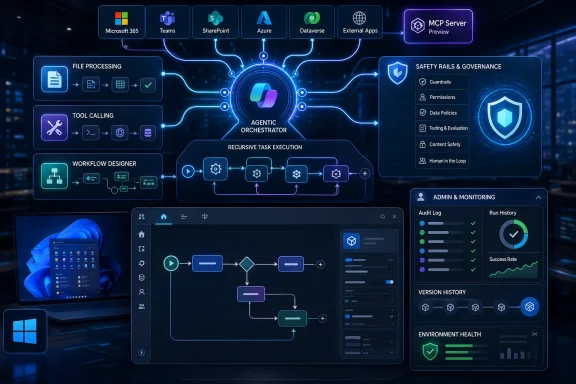
Microsoft announced on June 9, 2026, that Copilot Studio is getting a major upgrade for businesses building AI agents and automated workflows, with a redesigned authoring experience, fewer configuration tabs, stronger orchestration, and tooling meant to make multi-step tasks more reliable. The pitch is simple: the AI agent era will not be won by chatbots that answer one question well, but by systems that can take work across the finish line. Microsoft is trying to move Copilot Studio from a promising low-code builder into the operational layer for enterprise automation. That shift makes the product more powerful, but it also raises the stakes for governance, testing, cost control, and the very Windows-adjacent question of who gets to automate what inside the organization.
The most important word in Microsoft’s Copilot Studio upgrade is not “agentic,” “AI,” or even “workflow.” It is reliable. That is the word enterprise buyers care about when the demo ends and the agent is asked to update a customer record, summarize a ticket, open a procurement request, route an approval, and notify a team without wandering off into a hallucinated cul-de-sac.
Copilot Studio has always lived in a slightly awkward place in Microsoft’s product universe. It inherited some DNA from Power Virtual Agents, sits beside Power Automate, plugs into Microsoft 365, and increasingly overlaps with Azure AI Foundry and the broader Copilot stack. That sprawl has been both its strength and its weakness: it can reach into the systems businesses already use, but it has often felt like a product assembled from several Microsoft eras at once.
The new upgrade is Microsoft’s attempt to tame that complexity. Reducing the authoring interface from nine configuration tabs to four is not just cosmetic housekeeping. It is a signal that Microsoft understands a basic truth about enterprise AI adoption: most organizations do not fail because they lack imagination, they fail because the tooling makes the path from prototype to maintainable system too brittle.
The new agentic orchestrator sits at the center of that bet. Microsoft says it is designed to help agents follow instructions more accurately and complete complex tasks more consistently. In plain English, the orchestrator is the part of the system that decides what needs to happen next, which tool or workflow should be invoked, and how the agent should keep context as the task moves through multiple steps.
That is where the Copilot Studio story becomes more interesting than another AI product refresh. Microsoft is not merely trying to make agents smarter in the abstract. It is trying to make them dependable enough to be embedded into the messy workflows that define real businesses.
A streamlined interface does not automatically make an AI agent safe, useful, or accurate. But it can make the difference between an organization where only a small center of excellence can build anything and one where departments can prototype agents under IT guardrails. That is the sweet spot Microsoft is chasing: broad participation without total anarchy.
This is also where the Windows ecosystem angle comes into focus. For many IT pros, Microsoft’s AI products are not abstract cloud services. They are showing up inside Teams, Outlook, SharePoint, Dynamics, the Microsoft 365 admin center, Power Platform, and eventually the workflows that determine how users interact with workstations, applications, and data. A cleaner Copilot Studio authoring surface could make agent creation more accessible, but it also means more people may be able to create automations that touch sensitive systems.
The old enterprise model assumed that automation was mostly built by specialists. The new model assumes that a business analyst, operations lead, HR manager, or support supervisor might describe a workflow in natural language and refine it with a visual designer. That is powerful, but it changes the job of IT from builder to governor.
Microsoft seems to understand that shift. Recent Copilot Studio updates have emphasized agent inventory, evaluations, readiness checks, identities, and administrative visibility. Those are not glamorous features, but they are exactly the controls enterprises need if AI agents are going to move beyond experiments.
The redesigned interface therefore has two audiences. It makes life easier for makers, but it also makes Microsoft’s platform easier to standardize across an enterprise. A scattered tool is hard to govern; a more coherent one can be wrapped in policy.
A multi-step task can fail in many ways. The agent can misunderstand the initial request. It can select the wrong tool. It can lose context between steps. It can ask for information it already has, skip an approval, call a connector with the wrong identity, or produce a confident summary of a workflow that never actually completed. The more useful the agent becomes, the more expensive its mistakes become.
Microsoft’s emphasis on a stronger agentic orchestrator is a recognition that large language models alone are not enough. The model may be the reasoning engine, but enterprise automation needs a traffic controller. It needs a system that can interpret instructions, map them to available tools, respect guardrails, and recover when one piece of the chain fails.
That is especially important because Copilot Studio is not just generating text. It can connect to organizational data, call workflows, interact with Microsoft 365 services, use connectors, and increasingly automate across web and desktop environments. Once an AI system can act, not merely answer, orchestration becomes a security and reliability concern.
For sysadmins, the interesting question is not whether the new orchestrator produces better demos. It is whether it produces more predictable runtime behavior. Can it be tested? Can its decisions be audited? Can it explain why it selected one tool instead of another? Can IT constrain it to approved actions and identities? Can failures be diagnosed without reverse-engineering a black box?
Microsoft has been adding pieces that point in that direction, including evaluation tools, agent readiness views, activity maps, and administrative inventory capabilities. But the industry is still early in figuring out what good operational hygiene looks like for AI agents. Traditional monitoring tells you whether a service is up. Agent monitoring must tell you whether the system made the right decision for the right reason.
Microsoft’s recent updates point in that direction. The platform has been moving toward a unified workflow experience, visual design, agent flows, prompt nodes, Microsoft 365 Copilot nodes, human-in-the-loop steps, asynchronous responses, and the ability to call agents from workflows or workflows from agents. That is not a chatbot roadmap. It is an automation roadmap with AI embedded in the control plane.
This is where Copilot Studio overlaps most directly with Power Automate. For years, Microsoft’s automation story has revolved around triggers, connectors, approvals, and flows. Copilot Studio adds conversational intent, generative reasoning, and agent orchestration on top. The endgame is not that every employee chats with a bot all day; it is that natural language becomes one way to initiate, supervise, and modify automation.
That could be genuinely useful. A support manager might ask an agent to investigate repeated incidents from a specific customer, pull related tickets, summarize the likely root cause, draft a response, create an engineering task, and request approval before sending anything externally. A finance team might use an agent to extract invoice data, check it against policy, flag exceptions, and route ambiguous cases to humans. A field service operation might combine desktop automation, knowledge retrieval, and scheduling workflows into one guided process.
But it also means organizations need to think carefully about where determinism ends and probability begins. Some parts of a workflow should be flexible: interpreting a messy user request, summarizing a long document, or choosing the right knowledge source. Other parts should be rigid: applying a spending limit, enforcing a data loss prevention rule, requiring a manager’s approval, or writing to a system of record.
The best Copilot Studio implementations will not be the ones that hand everything to an AI model. They will be the ones that use the model for interpretation and coordination while keeping critical business rules explicit, testable, and auditable.
That is the “why Microsoft” argument. A business may not want another standalone AI agent vendor with a separate permission model, separate logging, separate identity layer, and separate data connectors. It may prefer to build inside the Microsoft tenant it already governs, even if that means accepting Microsoft’s pace, licensing model, and product complexity.
This is also why Copilot Studio is becoming strategically important. Microsoft 365 Copilot gives users a general assistant. Copilot Studio gives organizations a way to create task-specific agents. The first sells the idea of AI at work; the second tries to convert that idea into operational automation.
The upgrade also reflects Microsoft’s broader agentic strategy. The company has been pushing toward systems where agents can use enterprise context, connect to tools, and collaborate across apps. Copilot Studio is one of the places where that strategy becomes tangible for customers who do not want to start with raw APIs or custom model orchestration.
The risk, of course, is lock-in by convenience. The more organizations build agents that rely on Microsoft 365 context, Microsoft connectors, Microsoft workflow formats, and Microsoft governance tooling, the more difficult it becomes to move those automations elsewhere. That is not new; enterprise platforms have always created gravity. But AI agents may deepen that gravity because they blend data access, business logic, identity, and user interaction into one operational layer.
For WindowsForum readers, this is familiar territory. Microsoft’s ecosystem works best when its pieces reinforce each other, and it frustrates most when the seams between those pieces become opaque. Copilot Studio’s upgrade is another turn of that wheel.
AI agent sprawl is the next version of app sprawl and flow sprawl. Every department will want its own automation. Some agents will be useful. Some will be abandoned after a pilot. Some will retain access to data long after their original owner changes roles. Some will duplicate workflows that already exist. Some will become quietly business-critical before IT realizes anyone depends on them.
That is why inventory matters. Organizations need to know which agents exist, who owns them, what data they can access, where they are published, which connectors they use, and whether they are still active. Without that visibility, agent adoption becomes a shadow IT problem wearing a Copilot badge.
Identity is equally important. If agents act through broad user permissions or shared service accounts, administrators will struggle to enforce least privilege or trace responsibility. Agent-specific identities, scoped connector permissions, and Conditional Access controls are the kinds of infrastructure features that make AI automation compatible with enterprise security practice.
Microsoft’s challenge is to make these controls usable without turning Copilot Studio back into a maze. The company can simplify the authoring experience, but it cannot simplify away the real complexity of enterprise governance. Someone still has to decide which agents can access HR data, which can write to customer systems, which require human approval, and which are safe to expose in Teams or on a public website.
That division of responsibility will become a major cultural shift. Business teams may create the agents, but IT and security teams will own the blast radius.
A Copilot Studio agent that works in a test chat with three clean examples may fail when confronted with real users, malformed inputs, missing permissions, contradictory documents, stale SharePoint sites, or a backend system that returns an unexpected error. The agent may still respond fluently, which can make failure harder to detect. Traditional software often breaks noisily. AI systems can break politely.
That is why evaluation has to become part of the build process. Organizations need representative test sets, regression checks, human review, conversation tracing, and defined success criteria. “It seemed to work when I asked it” is not a deployment standard.
The new Copilot Studio experience may lower the barrier to building, but enterprises should raise the bar for publishing. A cleaner authoring interface should not mean agents go live without ownership, documentation, monitoring, fallback paths, and security review. In fact, the easier creation becomes, the more important those publishing gates become.
This is where IT pros can bring old lessons to a new stack. Change management, access control, incident response, audit logging, lifecycle management, and rollback planning are not obsolete because the interface is conversational. They are more necessary because the system’s behavior is less deterministic.
Microsoft’s platform can help, but it cannot replace organizational discipline. Copilot Studio may make agents easier to build; it will not automatically make them wise.
In theory, computer use gives organizations a bridge. If an app lacks a clean API, an agent may still be able to navigate it, fill out forms, click buttons, and extract information. That sounds a lot like robotic process automation, but with a more flexible AI-driven layer on top.
The attraction is obvious. Enterprises have decades of brittle processes trapped behind screens. If Copilot Studio can combine UI automation with workflows, approvals, data access, and conversational control, Microsoft can offer a more adaptive version of automation for environments where perfect integration is not realistic.
The danger is also obvious. UI automation is fragile. Buttons move, labels change, sessions expire, pop-ups appear, and permissions vary. A human can adapt instinctively; an agent may misinterpret the screen or continue with partial context. When the task involves real business systems, that fragility matters.
This is why Microsoft’s reliability message is so important. Computer-using agents cannot just be clever. They need guardrails, observability, and clear handoff points. They need to know when to stop and ask for help rather than improvising through a workflow they no longer understand.
For Windows-heavy organizations, this is a particularly relevant frontier. Desktop automation has always tempted businesses with the promise of integrating the unintegratable. AI may make that more capable, but it does not eliminate the need to modernize systems where possible. An agent clicking through a legacy app can be a pragmatic bridge; it should not become an excuse to preserve every broken process forever.
This is a major difference from traditional productivity software. A Word license does not become dramatically more expensive because a user writes a longer memo. An agent that reasons through a complex task, calls multiple tools, invokes premium models, searches enterprise data, and retries failed steps can create a cost profile that feels less predictable.
Microsoft has been working to expose usage and estimation tools, but enterprises will still need to develop internal economics for agent adoption. Which processes are worth automating with AI? Which should remain deterministic flows? Which require premium reasoning models? Which can use cheaper models? Which should be limited by policy because the value of the task does not justify the compute?
This will become a familiar governance conversation. Not every workflow deserves an agent. Not every agent deserves the most capable model. Not every department should be allowed to scale usage without budget accountability.
There is also a hidden labor cost. Someone has to maintain prompts, connectors, knowledge sources, permissions, evaluations, and exception handling. AI agents may reduce repetitive work, but they create new operational work around supervision and improvement. The organizations that budget only for licenses will be surprised.
Microsoft’s platform advantage is that it can bundle agent building into existing enterprise relationships. Its challenge is that customers are becoming more sophisticated about AI spend. The age of “try Copilot because it is new” is giving way to “prove this automation saves more than it costs.”
Microsoft’s differentiator is breadth. It owns the productivity surface, the identity layer, the collaboration hub, the developer platform, the cloud infrastructure, and a huge installed base of Windows and Microsoft 365 customers. Copilot Studio is one way to turn that breadth into a programmable agent ecosystem.
That breadth is also a product management problem. Microsoft must make Copilot Studio coherent while adjacent products evolve quickly. Customers already have to understand the differences between Microsoft 365 Copilot agents, Copilot Studio agents, Azure AI Foundry agents, Power Automate flows, Teams integrations, Graph connectors, and now various model choices and orchestration patterns. The upgrade’s simplified interface helps, but the portfolio still risks confusion.
The winning enterprise agent platform will not merely offer the best model. It will offer the clearest path from business request to governed production deployment. That path includes identity, data access, testing, monitoring, cost management, lifecycle controls, and integration with existing work surfaces.
Microsoft has many of those ingredients. The question is whether it can make them feel like one product instead of a family reunion.
If it succeeds, Copilot Studio becomes more than a low-code builder. It becomes the place where businesses encode repeatable AI-assisted work. If it fails, customers may use it for demos and departmental experiments while turning to more specialized platforms for production-grade agent operations.
A smarter orchestrator may improve task completion, but the orchestration layer must be surrounded by constraints. The agent should know which tools exist, what each tool is allowed to do, when to ask for missing information, and when to stop. It should operate inside a security model that assumes mistakes will happen.
That is the right way to think about enterprise AI. The goal is not to create a digital employee who roams freely through company systems. The goal is to create bounded automation that can interpret messy human intent while executing within defined operational rules.
This framing should appeal to IT administrators who have watched hype cycles come and go. The useful version of Copilot Studio is not magic. It is a workbench for building controlled agents that combine language understanding, workflow automation, and enterprise data access. That is still ambitious, but it is a more credible ambition than promising fully autonomous office workers.
Microsoft’s challenge is to keep the story grounded. “Build smarter AI agents” is a fine headline. “Build agents that can be tested, governed, audited, and retired when they are no longer needed” is the enterprise reality.
For organizations already invested in Microsoft 365, the upgrade makes Copilot Studio harder to ignore. A cleaner authoring interface lowers the adoption barrier, while a stronger orchestrator aims at the reliability gap that has held many agent projects back. But the same improvements that make agents easier to create also make governance more urgent.
The concrete reading is straightforward:
Microsoft’s Copilot Studio upgrade is a bet that the next phase of enterprise AI will be built not around better chat, but around better execution. If the new orchestrator and redesigned workflow experience deliver, Copilot Studio could become one of the more important pieces of Microsoft’s business software stack. If they do not, the platform risks becoming another place where impressive prototypes go to stall. Either way, the direction is clear: AI agents are moving from the edge of the Microsoft ecosystem toward its administrative and operational center, and the next year will test whether enterprises are ready to govern them as seriously as they build them.
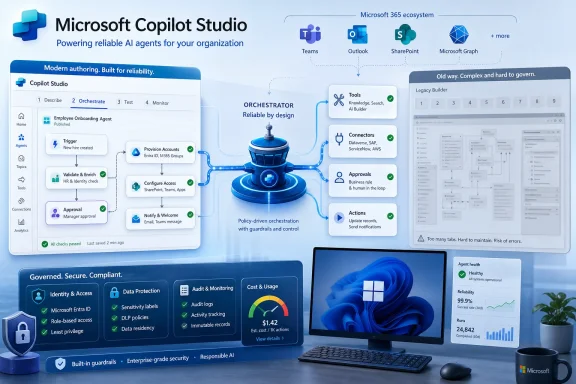 Microsoft Is Selling Reliability, Not Just Intelligence
The most important word in Microsoft’s Copilot Studio upgrade is not “agentic,” “AI,” or even “workflow.” It is reliable. That is the word enterprise buyers care about when the demo ends and the agent is asked to update a customer record, summarize a ticket, open a procurement request, route an approval, and notify a team without wandering off into a hallucinated cul-de-sac.Copilot Studio has always lived in a slightly awkward place in Microsoft’s product universe. It inherited some DNA from Power Virtual Agents, sits beside Power Automate, plugs into Microsoft 365, and increasingly overlaps with Azure AI Foundry and the broader Copilot stack. That sprawl has been both its strength and its weakness: it can reach into the systems businesses already use, but it has often felt like a product assembled from several Microsoft eras at once.
The new upgrade is Microsoft’s attempt to tame that complexity. Reducing the authoring interface from nine configuration tabs to four is not just cosmetic housekeeping. It is a signal that Microsoft understands a basic truth about enterprise AI adoption: most organizations do not fail because they lack imagination, they fail because the tooling makes the path from prototype to maintainable system too brittle.
The new agentic orchestrator sits at the center of that bet. Microsoft says it is designed to help agents follow instructions more accurately and complete complex tasks more consistently. In plain English, the orchestrator is the part of the system that decides what needs to happen next, which tool or workflow should be invoked, and how the agent should keep context as the task moves through multiple steps.
That is where the Copilot Studio story becomes more interesting than another AI product refresh. Microsoft is not merely trying to make agents smarter in the abstract. It is trying to make them dependable enough to be embedded into the messy workflows that define real businesses.
The New Interface Admits the Old Model Was Too Heavy
The reduction from nine tabs to four matters because enterprise software complexity has a way of defeating its own target audience. Low-code platforms promise democratized creation, but they often bury users under permissions, channels, variables, system topics, connectors, security settings, and deployment controls before a useful agent ever reaches production. Microsoft’s redesign acknowledges that the maker experience itself had become part of the friction.A streamlined interface does not automatically make an AI agent safe, useful, or accurate. But it can make the difference between an organization where only a small center of excellence can build anything and one where departments can prototype agents under IT guardrails. That is the sweet spot Microsoft is chasing: broad participation without total anarchy.
This is also where the Windows ecosystem angle comes into focus. For many IT pros, Microsoft’s AI products are not abstract cloud services. They are showing up inside Teams, Outlook, SharePoint, Dynamics, the Microsoft 365 admin center, Power Platform, and eventually the workflows that determine how users interact with workstations, applications, and data. A cleaner Copilot Studio authoring surface could make agent creation more accessible, but it also means more people may be able to create automations that touch sensitive systems.
The old enterprise model assumed that automation was mostly built by specialists. The new model assumes that a business analyst, operations lead, HR manager, or support supervisor might describe a workflow in natural language and refine it with a visual designer. That is powerful, but it changes the job of IT from builder to governor.
Microsoft seems to understand that shift. Recent Copilot Studio updates have emphasized agent inventory, evaluations, readiness checks, identities, and administrative visibility. Those are not glamorous features, but they are exactly the controls enterprises need if AI agents are going to move beyond experiments.
The redesigned interface therefore has two audiences. It makes life easier for makers, but it also makes Microsoft’s platform easier to standardize across an enterprise. A scattered tool is hard to govern; a more coherent one can be wrapped in policy.
Orchestration Is Where AI Agents Either Grow Up or Fall Apart
The new orchestrator is the headline technical change because orchestration is the difference between a chatbot and an agent. A chatbot responds. An agent plans, invokes tools, monitors intermediate results, and adapts. That distinction sounds neat in a keynote, but in production it is where most of the hard problems live.A multi-step task can fail in many ways. The agent can misunderstand the initial request. It can select the wrong tool. It can lose context between steps. It can ask for information it already has, skip an approval, call a connector with the wrong identity, or produce a confident summary of a workflow that never actually completed. The more useful the agent becomes, the more expensive its mistakes become.
Microsoft’s emphasis on a stronger agentic orchestrator is a recognition that large language models alone are not enough. The model may be the reasoning engine, but enterprise automation needs a traffic controller. It needs a system that can interpret instructions, map them to available tools, respect guardrails, and recover when one piece of the chain fails.
That is especially important because Copilot Studio is not just generating text. It can connect to organizational data, call workflows, interact with Microsoft 365 services, use connectors, and increasingly automate across web and desktop environments. Once an AI system can act, not merely answer, orchestration becomes a security and reliability concern.
For sysadmins, the interesting question is not whether the new orchestrator produces better demos. It is whether it produces more predictable runtime behavior. Can it be tested? Can its decisions be audited? Can it explain why it selected one tool instead of another? Can IT constrain it to approved actions and identities? Can failures be diagnosed without reverse-engineering a black box?
Microsoft has been adding pieces that point in that direction, including evaluation tools, agent readiness views, activity maps, and administrative inventory capabilities. But the industry is still early in figuring out what good operational hygiene looks like for AI agents. Traditional monitoring tells you whether a service is up. Agent monitoring must tell you whether the system made the right decision for the right reason.
Workflows Are Becoming the Real Product
The Copilot brand has trained users to think in terms of assistants, but Copilot Studio’s future increasingly looks like workflow infrastructure. The agent is the visible interface. The workflow is the durable business asset.Microsoft’s recent updates point in that direction. The platform has been moving toward a unified workflow experience, visual design, agent flows, prompt nodes, Microsoft 365 Copilot nodes, human-in-the-loop steps, asynchronous responses, and the ability to call agents from workflows or workflows from agents. That is not a chatbot roadmap. It is an automation roadmap with AI embedded in the control plane.
This is where Copilot Studio overlaps most directly with Power Automate. For years, Microsoft’s automation story has revolved around triggers, connectors, approvals, and flows. Copilot Studio adds conversational intent, generative reasoning, and agent orchestration on top. The endgame is not that every employee chats with a bot all day; it is that natural language becomes one way to initiate, supervise, and modify automation.
That could be genuinely useful. A support manager might ask an agent to investigate repeated incidents from a specific customer, pull related tickets, summarize the likely root cause, draft a response, create an engineering task, and request approval before sending anything externally. A finance team might use an agent to extract invoice data, check it against policy, flag exceptions, and route ambiguous cases to humans. A field service operation might combine desktop automation, knowledge retrieval, and scheduling workflows into one guided process.
But it also means organizations need to think carefully about where determinism ends and probability begins. Some parts of a workflow should be flexible: interpreting a messy user request, summarizing a long document, or choosing the right knowledge source. Other parts should be rigid: applying a spending limit, enforcing a data loss prevention rule, requiring a manager’s approval, or writing to a system of record.
The best Copilot Studio implementations will not be the ones that hand everything to an AI model. They will be the ones that use the model for interpretation and coordination while keeping critical business rules explicit, testable, and auditable.
The Microsoft 365 Gravity Well Keeps Getting Stronger
Copilot Studio’s advantage is not that it exists in isolation. Its advantage is that Microsoft can wire it into the software estate where many organizations already live. Teams, Outlook, SharePoint, OneDrive, Dynamics, Power Platform, Microsoft Graph, Entra, Purview, and the Microsoft 365 admin stack give Copilot Studio a distribution and governance story that smaller agent platforms cannot easily match.That is the “why Microsoft” argument. A business may not want another standalone AI agent vendor with a separate permission model, separate logging, separate identity layer, and separate data connectors. It may prefer to build inside the Microsoft tenant it already governs, even if that means accepting Microsoft’s pace, licensing model, and product complexity.
This is also why Copilot Studio is becoming strategically important. Microsoft 365 Copilot gives users a general assistant. Copilot Studio gives organizations a way to create task-specific agents. The first sells the idea of AI at work; the second tries to convert that idea into operational automation.
The upgrade also reflects Microsoft’s broader agentic strategy. The company has been pushing toward systems where agents can use enterprise context, connect to tools, and collaborate across apps. Copilot Studio is one of the places where that strategy becomes tangible for customers who do not want to start with raw APIs or custom model orchestration.
The risk, of course, is lock-in by convenience. The more organizations build agents that rely on Microsoft 365 context, Microsoft connectors, Microsoft workflow formats, and Microsoft governance tooling, the more difficult it becomes to move those automations elsewhere. That is not new; enterprise platforms have always created gravity. But AI agents may deepen that gravity because they blend data access, business logic, identity, and user interaction into one operational layer.
For WindowsForum readers, this is familiar territory. Microsoft’s ecosystem works best when its pieces reinforce each other, and it frustrates most when the seams between those pieces become opaque. Copilot Studio’s upgrade is another turn of that wheel.
Governance Is the Quiet Feature Enterprises Should Watch
The most consequential Copilot Studio improvements may be the ones that never make a flashy demo. Agent inventory, agent identities, readiness status, issue severity, connector permissions, retention settings, and evaluation tooling are the features that determine whether enterprises can safely scale from five agents to five hundred.AI agent sprawl is the next version of app sprawl and flow sprawl. Every department will want its own automation. Some agents will be useful. Some will be abandoned after a pilot. Some will retain access to data long after their original owner changes roles. Some will duplicate workflows that already exist. Some will become quietly business-critical before IT realizes anyone depends on them.
That is why inventory matters. Organizations need to know which agents exist, who owns them, what data they can access, where they are published, which connectors they use, and whether they are still active. Without that visibility, agent adoption becomes a shadow IT problem wearing a Copilot badge.
Identity is equally important. If agents act through broad user permissions or shared service accounts, administrators will struggle to enforce least privilege or trace responsibility. Agent-specific identities, scoped connector permissions, and Conditional Access controls are the kinds of infrastructure features that make AI automation compatible with enterprise security practice.
Microsoft’s challenge is to make these controls usable without turning Copilot Studio back into a maze. The company can simplify the authoring experience, but it cannot simplify away the real complexity of enterprise governance. Someone still has to decide which agents can access HR data, which can write to customer systems, which require human approval, and which are safe to expose in Teams or on a public website.
That division of responsibility will become a major cultural shift. Business teams may create the agents, but IT and security teams will own the blast radius.
Low-Code Does Not Mean Low-Discipline
The phrase “low-code” has always been slightly dangerous. It suggests accessibility, which is good. It can also suggest that engineering discipline is optional, which is false. AI agents intensify that tension because they can make a prototype feel magical long before it is safe.A Copilot Studio agent that works in a test chat with three clean examples may fail when confronted with real users, malformed inputs, missing permissions, contradictory documents, stale SharePoint sites, or a backend system that returns an unexpected error. The agent may still respond fluently, which can make failure harder to detect. Traditional software often breaks noisily. AI systems can break politely.
That is why evaluation has to become part of the build process. Organizations need representative test sets, regression checks, human review, conversation tracing, and defined success criteria. “It seemed to work when I asked it” is not a deployment standard.
The new Copilot Studio experience may lower the barrier to building, but enterprises should raise the bar for publishing. A cleaner authoring interface should not mean agents go live without ownership, documentation, monitoring, fallback paths, and security review. In fact, the easier creation becomes, the more important those publishing gates become.
This is where IT pros can bring old lessons to a new stack. Change management, access control, incident response, audit logging, lifecycle management, and rollback planning are not obsolete because the interface is conversational. They are more necessary because the system’s behavior is less deterministic.
Microsoft’s platform can help, but it cannot replace organizational discipline. Copilot Studio may make agents easier to build; it will not automatically make them wise.
Computer-Using Agents Push Automation Beyond APIs
One of the broader Copilot Studio developments around this upgrade cycle is the emergence of computer-using agents: systems that can interact with web and desktop applications through user interfaces rather than relying only on formal APIs. This matters because many enterprises still depend on legacy applications, internal portals, and line-of-business tools that were never designed for modern integration.In theory, computer use gives organizations a bridge. If an app lacks a clean API, an agent may still be able to navigate it, fill out forms, click buttons, and extract information. That sounds a lot like robotic process automation, but with a more flexible AI-driven layer on top.
The attraction is obvious. Enterprises have decades of brittle processes trapped behind screens. If Copilot Studio can combine UI automation with workflows, approvals, data access, and conversational control, Microsoft can offer a more adaptive version of automation for environments where perfect integration is not realistic.
The danger is also obvious. UI automation is fragile. Buttons move, labels change, sessions expire, pop-ups appear, and permissions vary. A human can adapt instinctively; an agent may misinterpret the screen or continue with partial context. When the task involves real business systems, that fragility matters.
This is why Microsoft’s reliability message is so important. Computer-using agents cannot just be clever. They need guardrails, observability, and clear handoff points. They need to know when to stop and ask for help rather than improvising through a workflow they no longer understand.
For Windows-heavy organizations, this is a particularly relevant frontier. Desktop automation has always tempted businesses with the promise of integrating the unintegratable. AI may make that more capable, but it does not eliminate the need to modernize systems where possible. An agent clicking through a legacy app can be a pragmatic bridge; it should not become an excuse to preserve every broken process forever.
The Cost Model Will Shape the Real Adoption Curve
The article announcing Copilot Studio’s upgrade focuses on capability, but cost will decide how broadly organizations deploy it. AI agents are not just software licenses. They consume model capacity, connector operations, workflow runs, storage, monitoring, and administrative attention. The more autonomous and multi-step they become, the more variable their operating costs may be.This is a major difference from traditional productivity software. A Word license does not become dramatically more expensive because a user writes a longer memo. An agent that reasons through a complex task, calls multiple tools, invokes premium models, searches enterprise data, and retries failed steps can create a cost profile that feels less predictable.
Microsoft has been working to expose usage and estimation tools, but enterprises will still need to develop internal economics for agent adoption. Which processes are worth automating with AI? Which should remain deterministic flows? Which require premium reasoning models? Which can use cheaper models? Which should be limited by policy because the value of the task does not justify the compute?
This will become a familiar governance conversation. Not every workflow deserves an agent. Not every agent deserves the most capable model. Not every department should be allowed to scale usage without budget accountability.
There is also a hidden labor cost. Someone has to maintain prompts, connectors, knowledge sources, permissions, evaluations, and exception handling. AI agents may reduce repetitive work, but they create new operational work around supervision and improvement. The organizations that budget only for licenses will be surprised.
Microsoft’s platform advantage is that it can bundle agent building into existing enterprise relationships. Its challenge is that customers are becoming more sophisticated about AI spend. The age of “try Copilot because it is new” is giving way to “prove this automation saves more than it costs.”
The Competitive Stakes Are Bigger Than Copilot Studio
Copilot Studio’s upgrade is not happening in a vacuum. Every major enterprise software company is racing to define the AI agent layer: Salesforce with agents tied to CRM, ServiceNow with workflow automation, Google with Workspace and cloud AI tooling, OpenAI and Anthropic through developer platforms and enterprise partnerships, and a crowded field of startups promising autonomous business processes.Microsoft’s differentiator is breadth. It owns the productivity surface, the identity layer, the collaboration hub, the developer platform, the cloud infrastructure, and a huge installed base of Windows and Microsoft 365 customers. Copilot Studio is one way to turn that breadth into a programmable agent ecosystem.
That breadth is also a product management problem. Microsoft must make Copilot Studio coherent while adjacent products evolve quickly. Customers already have to understand the differences between Microsoft 365 Copilot agents, Copilot Studio agents, Azure AI Foundry agents, Power Automate flows, Teams integrations, Graph connectors, and now various model choices and orchestration patterns. The upgrade’s simplified interface helps, but the portfolio still risks confusion.
The winning enterprise agent platform will not merely offer the best model. It will offer the clearest path from business request to governed production deployment. That path includes identity, data access, testing, monitoring, cost management, lifecycle controls, and integration with existing work surfaces.
Microsoft has many of those ingredients. The question is whether it can make them feel like one product instead of a family reunion.
If it succeeds, Copilot Studio becomes more than a low-code builder. It becomes the place where businesses encode repeatable AI-assisted work. If it fails, customers may use it for demos and departmental experiments while turning to more specialized platforms for production-grade agent operations.
The Agent Era Needs Boring Enterprise Plumbing
The irony of AI agents is that their success depends on deeply unglamorous plumbing. The more impressive the agent appears, the more it depends on permissions, connectors, schemas, logs, retry behavior, test data, human approvals, and administrative controls. Microsoft’s Copilot Studio upgrade is notable because it seems to recognize that reality.A smarter orchestrator may improve task completion, but the orchestration layer must be surrounded by constraints. The agent should know which tools exist, what each tool is allowed to do, when to ask for missing information, and when to stop. It should operate inside a security model that assumes mistakes will happen.
That is the right way to think about enterprise AI. The goal is not to create a digital employee who roams freely through company systems. The goal is to create bounded automation that can interpret messy human intent while executing within defined operational rules.
This framing should appeal to IT administrators who have watched hype cycles come and go. The useful version of Copilot Studio is not magic. It is a workbench for building controlled agents that combine language understanding, workflow automation, and enterprise data access. That is still ambitious, but it is a more credible ambition than promising fully autonomous office workers.
Microsoft’s challenge is to keep the story grounded. “Build smarter AI agents” is a fine headline. “Build agents that can be tested, governed, audited, and retired when they are no longer needed” is the enterprise reality.
The Practical Read for WindowsForum Readers
The Copilot Studio upgrade should be read less as a one-off feature drop and more as a signpost for Microsoft’s direction. The company wants AI agents to become a normal way businesses automate work across Microsoft 365 and beyond. That means Windows administrators, Microsoft 365 admins, Power Platform owners, security teams, and business technologists will increasingly be pulled into the same conversation.For organizations already invested in Microsoft 365, the upgrade makes Copilot Studio harder to ignore. A cleaner authoring interface lowers the adoption barrier, while a stronger orchestrator aims at the reliability gap that has held many agent projects back. But the same improvements that make agents easier to create also make governance more urgent.
The concrete reading is straightforward:
- Microsoft is positioning Copilot Studio as an enterprise agent and workflow platform, not merely a chatbot builder.
- The redesigned authoring experience is meant to reduce maker friction by collapsing configuration complexity from nine tabs to four.
- The new agentic orchestrator is aimed at improving multi-step task reliability, which is the central weakness of many AI agent deployments.
- IT teams should focus early on inventory, identity, connector permissions, evaluation, and lifecycle management before agent sprawl becomes difficult to control.
- The most successful deployments will combine AI flexibility with deterministic workflow rules, human approvals, and clear operational boundaries.
- Cost management will become part of agent governance because multi-step AI workflows can consume resources in less predictable ways than traditional software.
Microsoft’s Copilot Studio upgrade is a bet that the next phase of enterprise AI will be built not around better chat, but around better execution. If the new orchestrator and redesigned workflow experience deliver, Copilot Studio could become one of the more important pieces of Microsoft’s business software stack. If they do not, the platform risks becoming another place where impressive prototypes go to stall. Either way, the direction is clear: AI agents are moving from the edge of the Microsoft ecosystem toward its administrative and operational center, and the next year will test whether enterprises are ready to govern them as seriously as they build them.
References
- Primary source: dawan.africa
Published: 2026-06-09T18:04:12.572074
Microsoft Upgrades Copilot Studio to Build Smarter AI Agents and Workflows | Dawan Africa | Dawan Africa
New update introduces advanced orchestration tools, simplified agent building and stronger workflow automation for businesses using AI systems.www.dawan.africa - Related coverage: tomsguide.com
Biggest Microsoft Build 2026 announcements — agentic AI, RTX Spark Dev Box, GitHub Copilot app, new MAI models, and more | Tom's Guide
All the big news from Microsoft's AI-focused eventwww.tomsguide.com - Official source: microsoft.com
What’s new in Copilot Studio: May 2026 updates and features | Microsoft Copilot Blog
Explore what's new in Copilot Studio, May 2026: computer-using agents are now available, plus redesigned workflows and Work IQ extensibility.www.microsoft.com - Official source: learn.microsoft.com
Microsoft 365 Roadmap | Microsoft 365
The Microsoft 365 Roadmap lists updates that are currently planned for applicable subscribers. Check here for more information on the status of new features and updates.learn.microsoft.com
- Related coverage: rcpmag.com
Microsoft Puts Scout at the Center of Its Agentic AI Strategy at Build 2026 -- Redmond Channel Partner
Microsoft Scout announced as a key piece of the company's vision for software driven by autonomous agents at Build 2026.rcpmag.com - Related coverage: windowscentral.com
Microsoft Copilot Wave 3 adds AI agents and E7 Frontier Suite | Windows Central
Microsoft Copilot is rolling out more agentic AI control and model support in a new subscription tier for Microsoft 365.www.windowscentral.com
- Official source: cdn-dynmedia-1.microsoft.com
- Official source: fpc.microsoft.com