

CNET’s January 16, 2026 “Best Laptops of 2026” roundup matters because it no longer reads like a simple ranking of fast, thin notebooks; it reflects a market being sorted into Copilot+ Windows PCs, older x86 Windows laptops, and MacBooks. The practical answer for buyers is straightforward: if you want the newest Windows AI features and better battery-life potential, start with Copilot+ PCs; if you need maximum legacy compatibility, scrutinize the processor architecture; if you live in Apple’s ecosystem, MacBooks remain the cleanest alternative. The interesting part is not that CNET has favorites. It is that laptop shopping itself is becoming a platform decision again.
For years, “best laptop” lists were mostly a negotiation among screen quality, keyboard feel, performance, weight, ports, and price. Windows buyers could assume that most machines differed by degree rather than by kind. A Core i5 ultraportable and a Ryzen business notebook might benchmark differently, but they lived in the same software universe.
That assumption is now weaker. Microsoft’s Copilot+ PC branding has created a new line inside the Windows market, and CNET’s latest roundup sits right on top of that divide. A laptop can be a Windows laptop and still not be part of Microsoft’s preferred AI-hardware tier.
That matters because buyers do not experience categories as marketing terms. They experience them as battery runtime, app behavior, driver support, webcam effects, AI features, heat, fan noise, and the unpleasant moment when a work tool refuses to run the way it did on the old machine. The list may look like consumer advice, but the subtext is procurement strategy.
Microsoft defines Copilot+ PCs as a class of Windows 11 AI PCs with neural processing units capable of more than 40 TOPS. That is the number that separates a generic “AI PC” sticker from Microsoft’s current Copilot+ tier. It is also the reason the laptop aisle now needs a more careful reading than “Windows or Mac.”
Copilot+ PCs shift the buyer’s question from “How fast is the CPU?” to “Where does the machine run new Windows workloads?” The point of the NPU is not that it replaces the CPU or GPU. It is that certain AI tasks can be routed to specialized silicon built for lower-power inference, leaving the main processor less burdened.
For consumers, that sounds abstract until it becomes a feature checkbox. For IT departments, it becomes a lifecycle question. If a fleet refresh is supposed to last several years, buying just below the Copilot+ line could mean owning machines that run Windows 11 perfectly well but sit outside Microsoft’s most heavily promoted local-AI feature path.
That does not automatically make every Copilot+ PC the best laptop. It does mean the label is increasingly a proxy for where Microsoft expects the premium Windows experience to go. CNET’s roundup is interesting because it captures that moment: the laptop market is not merely comparing products, it is sorting buyers into futures.
A Snapdragon X Elite laptop can be a compelling Copilot+ PC because it combines Microsoft’s AI hardware threshold with the battery-life ambitions that Arm vendors have long promised. For web work, office apps, media, messaging, and mainstream productivity, that can be exactly the right formula. The appeal is obvious: a quiet, responsive laptop that feels closer to the all-day mobility expectations Apple normalized.
But Windows compatibility has always been the catch in the Arm story. Emulation and native Arm64 app availability have improved, but “improved” is not the same as “irrelevant.” If your daily workload depends on niche VPN clients, old peripherals, specialized engineering software, legacy plug-ins, anti-cheat systems, or vendor utilities that assume x86, the architecture still matters.
This is where CNET-style recommendations can be both helpful and dangerous. A laptop can be excellent for the reviewer’s test suite and still be the wrong machine for a buyer whose work depends on one stubborn driver. The WindowsForum reader should treat any Snapdragon recommendation as a prompt to audit apps, not as a reason to panic.
Intel and AMD entries make the category easier for enterprise IT to absorb. They preserve the x86 software baseline that organizations understand, while still meeting the NPU threshold Microsoft has set for Copilot+ status. That combination is powerful because it lets buyers pursue AI-readiness without reopening every old Windows-on-Arm compatibility debate.
For many enthusiasts, this is the sweet spot. An Intel Core Ultra 7 200V Series 2 or AMD Ryzen AI 300 Series Copilot+ PC promises the new Windows AI hardware class while staying closer to the traditional Windows ecosystem. It is not automatically faster in every workload, and it is not automatically better value, but it reduces the number of unknowns.
That is why the market split is more nuanced than “Copilot+ good, old Windows bad.” The real split is between Arm Copilot+ machines, x86 Copilot+ machines, non-Copilot+ x86 machines, and MacBooks. Each category has a different risk profile.
A non-Copilot+ x86 laptop may still be the safest choice for compatibility. If the machine is intended for accounting software, line-of-business apps, device management tools, label printers, lab equipment, CAD add-ons, or old corporate images, boring can be a virtue. Windows has a vast ecosystem precisely because it carries decades of assumptions forward.
But buyers should stop pretending that every new Windows laptop is equally future-facing. A traditional x86 laptop without a qualifying NPU may remain a practical purchase, especially at the right price, but it is not the center of Microsoft’s Copilot+ story. That distinction will matter more as Windows features, OEM marketing, and software demos increasingly assume local AI acceleration.
The better way to evaluate these machines is to ask what you are buying them for. If the answer is stable productivity, known compatibility, and cost control, a traditional x86 laptop can still make sense. If the answer is “I want the Windows feature set Microsoft will advertise most aggressively over the next few years,” Copilot+ deserves priority.
That pressure explains why Copilot+ PCs matter beyond AI features. The category is also Microsoft’s answer to the perception that Windows laptops are less consistent. If Copilot+ becomes a meaningful badge for thin, efficient, long-lasting machines, it helps Windows OEMs tell a simpler story against Apple.
But the MacBook comparison cuts both ways. Apple’s advantage is not just silicon. It is control. Apple manages the hardware, operating system, core apps, and update cadence in a way the Windows ecosystem does not. Microsoft can define Copilot+ requirements, but it still depends on multiple chip vendors and OEMs executing well.
That makes Windows more flexible and more chaotic. A buyer can find touchscreens, convertibles, gaming laptops, repairable business machines, OLED ultraportables, workstation-class notebooks, and budget devices in ways Apple does not attempt to match. The price of that variety is that a “best laptop” list cannot flatten the decision into one winner.
For individuals, the compatibility audit can be simple. List the apps you cannot replace, the browser extensions you rely on, the devices you plug in, and any games or creative tools that matter. Then check whether they are native, emulated, supported, or known to be troublesome on the platform you are considering.
For businesses, the audit is more formal. Test endpoint security, VPN, device management, print drivers, accessibility tools, remote support agents, browser controls, Office add-ins, and any line-of-business applications before committing to a large purchase. A laptop category can be strategically correct and operationally painful at the same time.
This is where x86 Copilot+ PCs have a strong argument. They reduce the AI-readiness risk without introducing as much software uncertainty. Snapdragon systems may still be excellent choices for many users, but they demand more validation in environments where legacy Windows assumptions remain deeply embedded.
This is why Snapdragon’s role in the Copilot+ story has been so important. The pitch is not merely that Windows can run AI tasks locally. It is that a Windows laptop can feel more like the modern mobile computers people already admire: instant, efficient, and quiet. That is a persuasive message after years of thin Windows laptops that could be excellent one generation and mediocre the next.
Intel and AMD now have to compete on the same terrain. They are not simply defending x86 compatibility; they are defending x86 efficiency. If their Copilot+ chips deliver strong battery life while preserving familiar software behavior, they blunt the most obvious reason to choose Arm.
For buyers, the practical lesson is to separate battery claims from category labels. Copilot+ status tells you the NPU meets Microsoft’s threshold. It does not, by itself, guarantee that the display, battery size, thermal design, firmware, and OEM power tuning are excellent. Reviews still matter because implementation still matters.
The sharper view is that Copilot+ status changes the floor for certain premium Windows machines. It tells the buyer the device belongs to Microsoft’s current AI-capable class. It does not tell the buyer whether the keyboard is mushy, whether the display is reflective, whether the fan curve is annoying, or whether the OEM filled the system with trialware.
This is where broad roundups like CNET’s can still help. They compress hands-on impressions across categories that are increasingly hard for buyers to compare. But the reader has to decode the list through the new market structure. A “best overall” laptop, a “best MacBook,” a “best Windows ultraportable,” and a “best value” pick may now represent different platform bets rather than simple price tiers.
That is also why WindowsForum’s long-running laptop discussions remain useful. Past community coverage around CNET’s Windows picks, 2025 performance and design roundups, and general laptop buying trends shows the same recurring pattern: the best machine depends less on the award label than on the workload. Copilot+ raises the stakes, but it does not repeal that rule.
If you want a MacBook, the decision is mostly about which Apple laptop fits your budget and workload. If you want Windows, the next question is whether you want Copilot+ capability. If you do, the next question is whether you can accept Arm compatibility tradeoffs or prefer an Intel or AMD Copilot+ PC.
If you do not care about Copilot+ features, traditional x86 Windows laptops remain viable. In fact, they may become better bargains as OEMs and retailers promote the newer AI-branded models more aggressively. The risk is not immediate uselessness; it is buying a machine that feels one marketing generation behind sooner than expected.
That is the real meaning of CNET’s 2026 roundup. The list is not merely ranking laptops. It is reflecting a market where “Windows laptop” is no longer specific enough.
The first distinction is between Copilot+ as a hardware capability and Copilot+ as a deployed business value. A machine can meet the NPU threshold and still offer little immediate benefit to a particular organization if users are locked into workflows where local AI features do not matter. Conversely, creative, accessibility, translation, meeting, and research-heavy teams may see value sooner.
The second distinction is architecture. Snapdragon X Elite machines may be excellent for some roles, but they should be validated against the organization’s actual software stack. Intel Core Ultra 7 200V Series 2 and AMD Ryzen AI 300 Series systems may be easier to integrate where x86 assumptions dominate, but they still deserve testing for firmware maturity, driver behavior, manageability, and battery performance.
The sensible 2026 enterprise move is not to ban Copilot+ or rush into it. It is to define user cohorts. Give mobile-first knowledge workers, executives, and AI-curious teams a pilot group; keep compatibility-sensitive roles on proven x86 machines until testing says otherwise; and avoid treating a consumer “best laptop” badge as a substitute for fleet validation.
A buyer choosing among a Snapdragon Copilot+ PC, an Intel Copilot+ PC, an AMD Copilot+ PC, a non-Copilot+ x86 laptop, and a MacBook is really choosing constraints. The Snapdragon buyer may be optimizing for mobility and new Windows AI features while accepting a deeper compatibility check. The x86 Copilot+ buyer may be optimizing for balance. The traditional Windows buyer may be optimizing for price and known software behavior. The MacBook buyer may be optimizing for ecosystem coherence.
This is a healthier way to read rankings. Instead of asking whether CNET’s top pick is “right,” ask which constraint the reviewer is prioritizing. Thinness, price, performance, battery life, AI readiness, repairability, display quality, and app compatibility are not interchangeable values.
The best laptop is the one whose compromises match your life. The market’s mistake is pretending those compromises disappeared.
That does not mean every buyer needs to agonize over AI. Some people just need a laptop that opens a browser, runs Office, joins meetings, and survives a commute. But even those buyers benefit from understanding why two Windows laptops at similar prices may have very different long-term positioning.
The Copilot+ badge should be treated as a meaningful signal, not a magic spell. It tells you the machine has an NPU capable of more than 40 TOPS and belongs to Microsoft’s current Windows 11 AI PC class. It does not tell you that your app will run, your battery will last all day, or your IT department will approve the machine.
That is why the best practical buying advice is boring but durable: define the workload first, then pick the platform lane, then compare reviews. The order matters. Reverse it, and a roundup can talk you into a beautiful mistake.
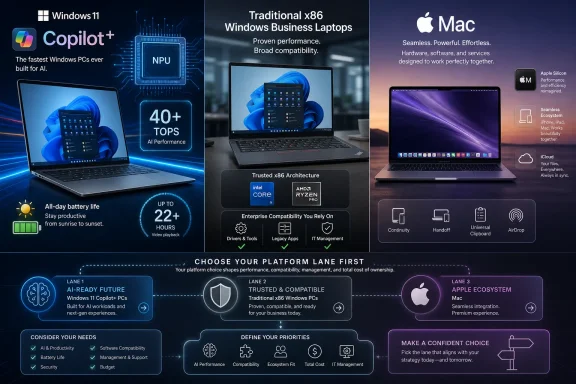 Laptop Rankings Are Becoming Platform Maps
For years, “best laptop” lists were mostly a negotiation among screen quality, keyboard feel, performance, weight, ports, and price. Windows buyers could assume that most machines differed by degree rather than by kind. A Core i5 ultraportable and a Ryzen business notebook might benchmark differently, but they lived in the same software universe.That assumption is now weaker. Microsoft’s Copilot+ PC branding has created a new line inside the Windows market, and CNET’s latest roundup sits right on top of that divide. A laptop can be a Windows laptop and still not be part of Microsoft’s preferred AI-hardware tier.
That matters because buyers do not experience categories as marketing terms. They experience them as battery runtime, app behavior, driver support, webcam effects, AI features, heat, fan noise, and the unpleasant moment when a work tool refuses to run the way it did on the old machine. The list may look like consumer advice, but the subtext is procurement strategy.
Microsoft defines Copilot+ PCs as a class of Windows 11 AI PCs with neural processing units capable of more than 40 TOPS. That is the number that separates a generic “AI PC” sticker from Microsoft’s current Copilot+ tier. It is also the reason the laptop aisle now needs a more careful reading than “Windows or Mac.”
The Copilot+ Label Is Doing More Work Than the Spec Sheet Admits
The old Windows buying advice was easy: buy the newest Intel or AMD processor you can afford, avoid too little memory, and do not cheap out on the display. That advice is not obsolete, but it is incomplete. A 2026 Windows laptop can be modern, expensive, and fast without necessarily being the kind of Windows PC Microsoft is optimizing its AI pitch around.Copilot+ PCs shift the buyer’s question from “How fast is the CPU?” to “Where does the machine run new Windows workloads?” The point of the NPU is not that it replaces the CPU or GPU. It is that certain AI tasks can be routed to specialized silicon built for lower-power inference, leaving the main processor less burdened.
For consumers, that sounds abstract until it becomes a feature checkbox. For IT departments, it becomes a lifecycle question. If a fleet refresh is supposed to last several years, buying just below the Copilot+ line could mean owning machines that run Windows 11 perfectly well but sit outside Microsoft’s most heavily promoted local-AI feature path.
That does not automatically make every Copilot+ PC the best laptop. It does mean the label is increasingly a proxy for where Microsoft expects the premium Windows experience to go. CNET’s roundup is interesting because it captures that moment: the laptop market is not merely comparing products, it is sorting buyers into futures.
Snapdragon Changed the Windows Conversation, but x86 Did Not Leave
The first wave of Copilot+ attention gave Qualcomm’s Snapdragon X Elite a starring role because it made Windows on Arm feel like a mainstream laptop proposition rather than a curiosity for patient early adopters. That matters because Windows on Arm is not just another chip option. It changes the compatibility conversation in ways buyers need to understand before they click purchase.A Snapdragon X Elite laptop can be a compelling Copilot+ PC because it combines Microsoft’s AI hardware threshold with the battery-life ambitions that Arm vendors have long promised. For web work, office apps, media, messaging, and mainstream productivity, that can be exactly the right formula. The appeal is obvious: a quiet, responsive laptop that feels closer to the all-day mobility expectations Apple normalized.
But Windows compatibility has always been the catch in the Arm story. Emulation and native Arm64 app availability have improved, but “improved” is not the same as “irrelevant.” If your daily workload depends on niche VPN clients, old peripherals, specialized engineering software, legacy plug-ins, anti-cheat systems, or vendor utilities that assume x86, the architecture still matters.
This is where CNET-style recommendations can be both helpful and dangerous. A laptop can be excellent for the reviewer’s test suite and still be the wrong machine for a buyer whose work depends on one stubborn driver. The WindowsForum reader should treat any Snapdragon recommendation as a prompt to audit apps, not as a reason to panic.
Intel and AMD Make Copilot+ Less Exotic
The more consequential development for many Windows buyers is that Copilot+ no longer means “Arm by default.” Microsoft’s current Copilot+ PC lineup includes Snapdragon X Elite, Intel Core Ultra 7 200V Series 2, and AMD Ryzen AI 300 Series options. That creates a much more familiar path for buyers who want the Copilot+ tier without taking on an architecture shift.Intel and AMD entries make the category easier for enterprise IT to absorb. They preserve the x86 software baseline that organizations understand, while still meeting the NPU threshold Microsoft has set for Copilot+ status. That combination is powerful because it lets buyers pursue AI-readiness without reopening every old Windows-on-Arm compatibility debate.
For many enthusiasts, this is the sweet spot. An Intel Core Ultra 7 200V Series 2 or AMD Ryzen AI 300 Series Copilot+ PC promises the new Windows AI hardware class while staying closer to the traditional Windows ecosystem. It is not automatically faster in every workload, and it is not automatically better value, but it reduces the number of unknowns.
That is why the market split is more nuanced than “Copilot+ good, old Windows bad.” The real split is between Arm Copilot+ machines, x86 Copilot+ machines, non-Copilot+ x86 machines, and MacBooks. Each category has a different risk profile.
Traditional x86 Windows Laptops Are Not Dead; They Are Being Repositioned
The existence of Copilot+ PCs does not make conventional x86 Windows laptops obsolete. Plenty of buyers do not need local AI features, and many would be better served by a discounted business-class machine with known thermals, mature drivers, and a serviceable chassis. The problem is not that these laptops stopped being useful. The problem is that their place in the market is changing.A non-Copilot+ x86 laptop may still be the safest choice for compatibility. If the machine is intended for accounting software, line-of-business apps, device management tools, label printers, lab equipment, CAD add-ons, or old corporate images, boring can be a virtue. Windows has a vast ecosystem precisely because it carries decades of assumptions forward.
But buyers should stop pretending that every new Windows laptop is equally future-facing. A traditional x86 laptop without a qualifying NPU may remain a practical purchase, especially at the right price, but it is not the center of Microsoft’s Copilot+ story. That distinction will matter more as Windows features, OEM marketing, and software demos increasingly assume local AI acceleration.
The better way to evaluate these machines is to ask what you are buying them for. If the answer is stable productivity, known compatibility, and cost control, a traditional x86 laptop can still make sense. If the answer is “I want the Windows feature set Microsoft will advertise most aggressively over the next few years,” Copilot+ deserves priority.
MacBooks Remain the Control Group Windows Cannot Ignore
Every Windows laptop ranking now has a shadow competitor: the MacBook. Apple’s machines changed buyer expectations around standby behavior, battery life, thermals, and performance per watt. Even when a roundup is nominally about all laptops, Windows machines are being judged in a world where Apple Silicon reset the baseline.That pressure explains why Copilot+ PCs matter beyond AI features. The category is also Microsoft’s answer to the perception that Windows laptops are less consistent. If Copilot+ becomes a meaningful badge for thin, efficient, long-lasting machines, it helps Windows OEMs tell a simpler story against Apple.
But the MacBook comparison cuts both ways. Apple’s advantage is not just silicon. It is control. Apple manages the hardware, operating system, core apps, and update cadence in a way the Windows ecosystem does not. Microsoft can define Copilot+ requirements, but it still depends on multiple chip vendors and OEMs executing well.
That makes Windows more flexible and more chaotic. A buyer can find touchscreens, convertibles, gaming laptops, repairable business machines, OLED ultraportables, workstation-class notebooks, and budget devices in ways Apple does not attempt to match. The price of that variety is that a “best laptop” list cannot flatten the decision into one winner.
The Compatibility Question Is Now a First-Class Buying Criterion
The most important advice for Windows buyers in 2026 is to start with software, not silicon. The best laptop on paper is the wrong laptop if it compromises the applications that pay your bills. That is especially true when the market is split among Arm-based Copilot+ PCs, x86-based Copilot+ PCs, traditional x86 Windows laptops, and MacBooks.For individuals, the compatibility audit can be simple. List the apps you cannot replace, the browser extensions you rely on, the devices you plug in, and any games or creative tools that matter. Then check whether they are native, emulated, supported, or known to be troublesome on the platform you are considering.
For businesses, the audit is more formal. Test endpoint security, VPN, device management, print drivers, accessibility tools, remote support agents, browser controls, Office add-ins, and any line-of-business applications before committing to a large purchase. A laptop category can be strategically correct and operationally painful at the same time.
This is where x86 Copilot+ PCs have a strong argument. They reduce the AI-readiness risk without introducing as much software uncertainty. Snapdragon systems may still be excellent choices for many users, but they demand more validation in environments where legacy Windows assumptions remain deeply embedded.
Battery Life Is the Feature That Makes AI PCs Sellable
AI features may define the Copilot+ brand, but battery life is what will make many people care. Local AI is difficult to explain to a normal laptop buyer. A machine that lasts longer away from the wall is not.This is why Snapdragon’s role in the Copilot+ story has been so important. The pitch is not merely that Windows can run AI tasks locally. It is that a Windows laptop can feel more like the modern mobile computers people already admire: instant, efficient, and quiet. That is a persuasive message after years of thin Windows laptops that could be excellent one generation and mediocre the next.
Intel and AMD now have to compete on the same terrain. They are not simply defending x86 compatibility; they are defending x86 efficiency. If their Copilot+ chips deliver strong battery life while preserving familiar software behavior, they blunt the most obvious reason to choose Arm.
For buyers, the practical lesson is to separate battery claims from category labels. Copilot+ status tells you the NPU meets Microsoft’s threshold. It does not, by itself, guarantee that the display, battery size, thermal design, firmware, and OEM power tuning are excellent. Reviews still matter because implementation still matters.
AI Features Are the Bonus, Not the Whole Purchase
There is a temptation to make Copilot+ buying advice revolve entirely around AI features. That would be a mistake. AI capability is part of the purchase, but a laptop remains a physical tool: keyboard, trackpad, screen, hinge, ports, webcam, speakers, chassis, thermals, serviceability, and support still decide whether a machine is pleasant to own.The sharper view is that Copilot+ status changes the floor for certain premium Windows machines. It tells the buyer the device belongs to Microsoft’s current AI-capable class. It does not tell the buyer whether the keyboard is mushy, whether the display is reflective, whether the fan curve is annoying, or whether the OEM filled the system with trialware.
This is where broad roundups like CNET’s can still help. They compress hands-on impressions across categories that are increasingly hard for buyers to compare. But the reader has to decode the list through the new market structure. A “best overall” laptop, a “best MacBook,” a “best Windows ultraportable,” and a “best value” pick may now represent different platform bets rather than simple price tiers.
That is also why WindowsForum’s long-running laptop discussions remain useful. Past community coverage around CNET’s Windows picks, 2025 performance and design roundups, and general laptop buying trends shows the same recurring pattern: the best machine depends less on the award label than on the workload. Copilot+ raises the stakes, but it does not repeal that rule.
The Buyer’s Decision Tree Has Changed
The old laptop decision tree started with size and price. The new one starts with platform assumptions. That may feel like regression, but it is actually a more honest way to buy in 2026.If you want a MacBook, the decision is mostly about which Apple laptop fits your budget and workload. If you want Windows, the next question is whether you want Copilot+ capability. If you do, the next question is whether you can accept Arm compatibility tradeoffs or prefer an Intel or AMD Copilot+ PC.
If you do not care about Copilot+ features, traditional x86 Windows laptops remain viable. In fact, they may become better bargains as OEMs and retailers promote the newer AI-branded models more aggressively. The risk is not immediate uselessness; it is buying a machine that feels one marketing generation behind sooner than expected.
That is the real meaning of CNET’s 2026 roundup. The list is not merely ranking laptops. It is reflecting a market where “Windows laptop” is no longer specific enough.
IT Departments Should Treat Copilot+ as a Pilot Program Before a Fleet Standard
For sysadmins, the worst purchase is not an underpowered laptop. It is a laptop that creates support ambiguity. Copilot+ PCs introduce exactly the kind of ambiguity that needs structured testing before standardization.The first distinction is between Copilot+ as a hardware capability and Copilot+ as a deployed business value. A machine can meet the NPU threshold and still offer little immediate benefit to a particular organization if users are locked into workflows where local AI features do not matter. Conversely, creative, accessibility, translation, meeting, and research-heavy teams may see value sooner.
The second distinction is architecture. Snapdragon X Elite machines may be excellent for some roles, but they should be validated against the organization’s actual software stack. Intel Core Ultra 7 200V Series 2 and AMD Ryzen AI 300 Series systems may be easier to integrate where x86 assumptions dominate, but they still deserve testing for firmware maturity, driver behavior, manageability, and battery performance.
The sensible 2026 enterprise move is not to ban Copilot+ or rush into it. It is to define user cohorts. Give mobile-first knowledge workers, executives, and AI-curious teams a pilot group; keep compatibility-sensitive roles on proven x86 machines until testing says otherwise; and avoid treating a consumer “best laptop” badge as a substitute for fleet validation.
Enthusiasts Should Stop Buying Specs and Start Buying Constraints
Enthusiasts love spec sheets because spec sheets feel objective. TOPS numbers, CPU families, display resolutions, and memory configurations all matter. They just do not answer the whole question anymore.A buyer choosing among a Snapdragon Copilot+ PC, an Intel Copilot+ PC, an AMD Copilot+ PC, a non-Copilot+ x86 laptop, and a MacBook is really choosing constraints. The Snapdragon buyer may be optimizing for mobility and new Windows AI features while accepting a deeper compatibility check. The x86 Copilot+ buyer may be optimizing for balance. The traditional Windows buyer may be optimizing for price and known software behavior. The MacBook buyer may be optimizing for ecosystem coherence.
This is a healthier way to read rankings. Instead of asking whether CNET’s top pick is “right,” ask which constraint the reviewer is prioritizing. Thinness, price, performance, battery life, AI readiness, repairability, display quality, and app compatibility are not interchangeable values.
The best laptop is the one whose compromises match your life. The market’s mistake is pretending those compromises disappeared.
The 2026 Shortlist Should Start With Three Lanes
The cleanest interpretation of CNET’s 2026 laptop landscape is that buyers should sort candidates into three lanes before comparing individual models. First are Copilot+ Windows PCs, which align most closely with Microsoft’s current AI hardware direction. Second are traditional x86 Windows machines, which remain attractive for compatibility, price, and known workflows. Third are MacBooks, which continue to offer a tightly integrated alternative for users willing or eager to live outside Windows.That does not mean every buyer needs to agonize over AI. Some people just need a laptop that opens a browser, runs Office, joins meetings, and survives a commute. But even those buyers benefit from understanding why two Windows laptops at similar prices may have very different long-term positioning.
The Copilot+ badge should be treated as a meaningful signal, not a magic spell. It tells you the machine has an NPU capable of more than 40 TOPS and belongs to Microsoft’s current Windows 11 AI PC class. It does not tell you that your app will run, your battery will last all day, or your IT department will approve the machine.
That is why the best practical buying advice is boring but durable: define the workload first, then pick the platform lane, then compare reviews. The order matters. Reverse it, and a roundup can talk you into a beautiful mistake.
The Real 2026 Laptop Upgrade Checklist
CNET’s roundup is useful because it captures a market in transition, but the buyer still has to translate that transition into a purchase. The move is not to chase every AI-branded machine. It is to understand what the branding now separates.- A Copilot+ PC is the Windows 11 AI PC class to prioritize if you want Microsoft’s current local-AI hardware direction and an NPU capable of more than 40 TOPS.
- A Snapdragon X Elite laptop deserves special attention for mobility-focused users, but it should be checked carefully against must-have Windows apps, drivers, games, and peripherals.
- An Intel Core Ultra 7 200V Series 2 or AMD Ryzen AI 300 Series Copilot+ PC is likely the safer Copilot+ lane for buyers who want AI readiness while staying within familiar x86 assumptions.
- A traditional x86 Windows laptop can still be the right buy when compatibility, price, and predictable support matter more than Copilot+ positioning.
- A MacBook remains the cleanest alternative when the buyer values Apple’s integrated hardware-software ecosystem more than Windows flexibility.
- A “best laptop” award should be treated as the start of the buying process, not the end of it, because platform fit now matters as much as benchmark rank.
References
- Primary source: tomsguide.com
Best of Computex 2026: The 17 greatest gadgets from the world’s largest computing show | Tom's Guide
From chips and handhelds to monitors and laptops, these are our top picks of the best 17 products and innovations at Computex 2026.www.tomsguide.com - Independent coverage: techradar.com
The best student laptops in 2026: our top tested picks for college and school | TechRadar
We're bringing you all our top picks for the best student laptops, from Windows machines to Apple MacBooks and more.www.techradar.com - Independent coverage: tomshardware.com
Best Laptops 2026: Our benchmarked picks for productivity, portability, and battery life | Tom's Hardware
Prime portable PCs for work, play, and general use.www.tomshardware.com - Independent coverage: milled.com
CNET: Best Laptops of 2026: Top Picks Tested by CNET | Milled
These are the best laptops my colleagues and I have reviewed, from basic models to high-powered gaming systems and everything in between.milled.com - Independent coverage: forbes.com
Best Laptops 2026 - Forbes Vetted
After testing over 20 models, here are the best laptops based on performance, battery life, display quality and more.www.forbes.com - Independent coverage: consumerreports.org
13 Best Laptops of 2026, Tested by Our Experts - Consumer Reports
The best laptops and Chromebooks provide speed, power, and long battery life. Consumer Reports provides the top picks for a range of tasks.www.consumerreports.org
- Independent coverage: bestreviews.guide
10 Best Cnet Laptops 2026 in the US | There's One Clear Winner | BestReviews.guide
BestReviews.guide analyzes thousands of articles and customer reviews to find the top-rated products at today's lowest prices. Best products, best offers.www.bestreviews.guide - Independent coverage: lists.norml.org
best laptops of 2026 top picks tested by cnet - lists norml
Everything you need to know about best laptops of 2026 top picks tested by cnet. In-depth visual insights and reports on lists norml.lists.norml.org - Independent coverage: dormgearhq.com
Best Laptops for College Students 2026
MacBook Air M5 ($1099) wins overall for 2026 — 18-hour battery, top resale value. MacBook Neo ($599) wins on DGH Cost-per-Year-of-Use.www.dormgearhq.com
