

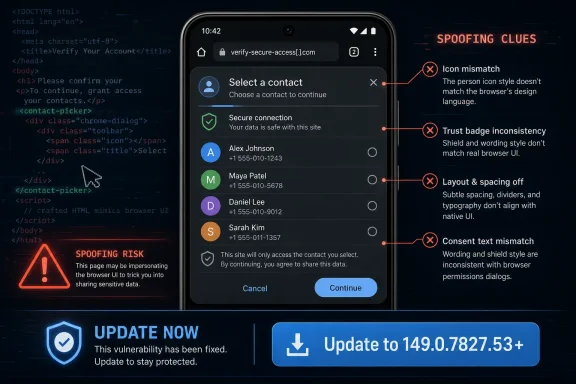
Google Chrome on Android before version 149.0.7827.53 contains CVE-2026-11172, a medium-severity Chromium flaw published June 4, 2026, in which incorrect Contact Picker security UI could let a remote attacker spoof interface cues through a crafted HTML page. The bug is not the sort of memory-corruption monster that usually dominates Chrome security coverage, but that is exactly why it deserves attention. It sits at the boundary between browser trust, Android permissions, and user intent — the place where modern web security increasingly wins or loses.
The phrase “incorrect security UI” sounds almost polite, as if the problem were a mislabeled button or a cosmetic regression. In security terms, it is more serious than that. CVE-2026-11172 is categorized under CWE-451, User Interface Misrepresentation of Critical Information, which means the vulnerability is about whether the user can correctly understand what the browser is asking them to do.
That distinction matters because the Contact Picker is designed to be a safety valve. It lets a website ask the user to select contact information without granting the site broad, silent access to an address book. The browser is supposed to mediate that transaction with a clear, trustworthy interface that separates the user’s private data from whatever a web page might want.
A spoofing flaw weakens that mediation. If a crafted page can make the security UI appear misleading, or can manipulate the user’s perception of what is happening, then the browser’s permission model becomes less about formal access controls and more about the user’s ability to decode a potentially hostile presentation. That is a bad place to put ordinary users, and it is an awkward place to put enterprise administrators who depend on browser prompts behaving consistently.
The Chromium project rated the issue Medium. CISA’s ADP scoring, however, attached a CVSS 3.1 score of 8.8, which lands in High territory. That split is not unusual for browser bugs, but it tells a familiar story: browser vendors often weigh exploitability and product-specific context, while vulnerability databases and downstream scanners may emphasize worst-case impact.
That architecture only works if the broker is visibly trustworthy. The moment the browser’s security UI can be spoofed, the user may no longer know whether they are selecting one contact, approving a sensitive disclosure, or interacting with page-controlled content pretending to be browser chrome. In a privacy-sensitive workflow, confusion is the vulnerability.
For WindowsForum readers, the Android-specific nature of this CVE may seem like a reason to file it under mobile miscellany. That would be too narrow. Chrome’s security model is cross-platform in concept even when individual bugs are platform-specific in execution. Administrators who manage Chrome on Windows, Android Enterprise devices, ChromeOS, and mixed BYOD fleets need to track not only whether a vulnerability affects the desktop build in front of them, but whether it exposes a class of trust failure that will reappear elsewhere.
The most important thing about CVE-2026-11172 is not that it involves contacts. It is that it involves the user’s ability to distinguish browser-mediated consent from web content. That is a recurring problem in the modern web, from fake login prompts to abused notification permission flows to malicious overlays that impersonate operating-system dialogs.
CVE-2026-11172 requires user interaction. That lowers the score in one sense, because the attacker cannot simply spray packets at a device and win. But browser exploitation has always lived comfortably inside user interaction. The web is an interaction machine: users click links, respond to prompts, accept shares, scan QR codes, and move between apps all day.
The attack described for this CVE is a crafted HTML page. That is the web’s lowest-friction delivery vehicle. It can arrive through email, chat, social media, a malicious ad chain, a compromised legitimate site, or a link embedded in a document. In other words, the required setup is not exotic.
The CISA-ADP vector marks the vulnerability as network exploitable, low attack complexity, requiring no privileges, and requiring user interaction. It also marks potential confidentiality, integrity, and availability impacts as high. That does not prove every real-world exploit would achieve catastrophic results, but it does explain why scanners and compliance dashboards may shout louder than Chromium’s Medium label.
That matters for patch triage. Desktop Chrome administrators should not ignore the larger Chrome 149 security train, but this particular CVE is tied to Android’s Contact Picker surface. Mobile device management teams, Android Enterprise admins, and organizations with bring-your-own-device policies should be the ones paying closest attention to this item.
The CPE modeling also explains why vulnerability management can get messy. A product CPE for Chrome and an OS CPE for Android may appear together, while Linux scanners or distro trackers may still ingest the CVE because Chromium is an upstream project used across packages. That does not always mean the exact Android Contact Picker bug is practically exploitable on every Chromium-derived package. It means the vulnerability ecosystem is trying to map a moving upstream browser project onto downstream packages, platforms, and scanners that do not always share the same model.
This is where administrators need judgment. If your vulnerability dashboard flags CVE-2026-11172 on a Linux server because a Chromium package exists somewhere in inventory, the right response is not panic. The right response is to determine whether that package is actually exposed to users, whether the downstream vendor considers it affected, and whether the relevant browser version has been updated or superseded.
That is understandable, but it is also how permission-surface bugs become under-managed. Enterprise patch programs are good at reacting to words like “remote code execution,” “sandbox escape,” and “actively exploited.” They are less consistent when the issue is framed as misleading UI, incorrect security presentation, or user interface spoofing.
The operational result is a two-tiered response. Desktop fleets get emergency browser patching because the headlines are loud. Mobile browsers, especially on personally owned Android devices, may drift until auto-update catches up or until a user happens to connect to the right network and power conditions. For a contacts-related spoofing flaw, that delay is precisely where the risk lives.
Chrome’s update model is one of the best things about the browser ecosystem, but it is not magic. Managed Android devices still depend on policy, Play Store update behavior, user compliance, and organizational visibility. A patched version number only helps if the device actually reaches it.
Modern browsers have moved more sensitive workflows into browser-controlled prompts. That is the right architectural direction. The more a browser can provide standardized, privileged, hard-to-spoof interfaces for permissions and data sharing, the less every website has to invent its own risky consent ritual.
But the consequence is that browser UI becomes more valuable to attackers. If users are trained to trust a system picker, a permission sheet, or a browser-native dialog, then any flaw that lets a page blur the boundary around that UI becomes a lever. The attacker does not need to defeat cryptography or break the Android sandbox if they can convince the user that the browser is asking for one thing while the page is orchestrating another.
This is why security UI bugs often feel underwhelming in a CVE feed and alarming in practice. They exploit the gap between what the system knows and what the user believes. That gap is where phishing lives, and browser vendors have spent two decades trying to shrink it.
Mobile browsers run full-screen, integrate with system sharesheets and pickers, and move users fluidly among apps, overlays, custom tabs, and web views. A website can feel like an app; an app can open a web view; a browser can invoke a native picker; and a picker can return information to web content. Each transition is legitimate, but each transition also asks the user to keep track of who is asking and who receives the answer.
The Contact Picker sits directly in that mobile ambiguity. It is meant to provide a constrained, user-approved bridge between a website and sensitive personal data. If the browser’s presentation of that bridge is wrong, the user may cross it under false assumptions.
Android’s permission model has improved substantially over the years, especially around one-time permissions, scoped data access, and clearer privacy prompts. But web-mediated access is still tricky because the web page is not an installed app in the traditional sense. Users may not have a persistent mental model of the site’s permissions, reputation, or data handling, especially when they arrive through a one-off link.
But the risk is broader than a contact record. A successful spoofing flow can be part of a social-engineering chain. A malicious page that extracts or confirms contact information can use it to personalize follow-on phishing, impersonate colleagues, or seed business-email-compromise attempts. Attackers value address books because trust networks are more useful than raw credentials.
Availability impact in a CVSS vector may look odd for a UI issue, and administrators should be careful not to overinterpret it without exploit details. Still, the confidentiality and integrity angles are easier to see. If a user is misled about what they are selecting or consenting to, the attacker may obtain data or induce actions the user would not otherwise approve.
For regulated industries, the governance question is uncomfortable. If a browser flaw causes a user to disclose contact data through a misleading security interface, is that a user mistake, a vendor vulnerability, or an organizational control failure? In practice, it may be all three.
That division is obsolete. A user’s Android browser may touch corporate identity providers, SaaS dashboards, shared documents, password reset flows, and internal links sent through collaboration tools. It may not be domain-joined, but it is part of the enterprise attack surface.
CVE-2026-11172 is a reminder that mobile Chrome is not simply a miniature version of desktop Chrome. It has platform-specific APIs and UI surfaces that deserve platform-specific patch visibility. If a security team can tell you the exact Chrome build on every Windows laptop but cannot tell you whether enrolled Android devices have reached 149.0.7827.53 or later, the inventory is incomplete.
For BYOD environments, the answer is harder but not impossible. Conditional access policies can require reasonably current OS and app versions. MDM or mobile application management can enforce browser baselines for managed work profiles. Security awareness can nudge users to verify Chrome updates through the Play Store, though awareness alone should never be the primary control.
That inconsistency is annoying, but it is not useless noise. It is a signal that browser vulnerability management cannot be reduced to a single severity column. Administrators need to read the affected platform, version floor, exploit preconditions, and available fixed builds.
The common mistake is to argue about the score instead of patching the product. Whether an organization labels CVE-2026-11172 Medium or High internally, the remediation path is straightforward: update Chrome on Android to a build at or beyond 149.0.7827.53, and verify that managed devices actually received the update.
The harder work is policy hygiene. Organizations should decide how quickly mobile browsers must patch after a Chrome stable security release, who owns exceptions, and how BYOD devices are handled when users decline updates. Without that policy, every browser CVE becomes a fresh negotiation.
This limited disclosure is defensible. Publishing a step-by-step UI spoofing recipe before the ecosystem updates would help attackers more than defenders. Yet it also means administrators have to make decisions without knowing exactly what the spoof looks like, how convincing it is, or whether it depends on specific Android versions or device configurations.
The right response is not to fill the gaps with invented certainty. We know the affected product and version range. We know the class of bug. We know the attack requires a crafted HTML page and user interaction. We do not know, from the public record, whether exploitation has been observed in the wild for this CVE.
That distinction matters because not every Chrome CVE deserves the same emergency tone. CVE-2026-11172 should be patched promptly, especially on managed Android devices, but it should not be described as an actively exploited zero-day unless evidence appears. Precision is not pedantry; it is how security teams avoid alert fatigue.
A Windows administrator may not manage Android kernel patches, but they often manage the identity systems and access policies those Android devices use. If a user’s mobile browser is phished, spoofed, or tricked into disclosing sensitive data, the consequences can land squarely in the Windows estate: compromised accounts, malicious OAuth grants, lateral phishing through Outlook, or help-desk resets triggered from a mobile session.
There is also a browser-family lesson. Microsoft Edge is Chromium-based, though this specific CVE is described for Google Chrome on Android. Chromium vulnerabilities can move unevenly across downstream browsers depending on whether the affected component is present, enabled, modified, or platform-specific. Administrators should avoid assuming automatic exposure, but they should also avoid assuming automatic immunity.
The broader point is that Chromium is now shared infrastructure. A bug in one browser’s mobile UI may not be a Windows desktop emergency, but it is still part of the ecosystem Windows users inhabit every day.
For administrators, the fix is still simple but the verification is harder. Managed Android fleets should report installed Chrome versions, update compliance, and devices stuck on older builds. Work-profile deployments should confirm that the managed browser, not merely the personal-profile app, is current.
Security teams should also review whether users are allowed to complete sensitive corporate workflows from unmanaged browsers. If the organization permits access to mail, documents, CRM, or identity portals from any mobile Chrome instance, then mobile browser patching is a first-class control, not a user preference.
The temptation is to treat a Contact Picker flaw as a privacy issue for consumers. That is too narrow. Corporate contacts are corporate data when they are synced into a user’s work profile, and personal contacts can become corporate risk when attackers use them to impersonate trust relationships.
That means the security UI is part of the attack surface. A bug that misrepresents a picker, prompt, permission, or disclosure is not a mere presentation problem. It is a control failure in the layer that tells users when they are about to hand over data.
The concrete lessons are narrow enough to act on and broad enough to remember:
 The Browser Bug Is Really a Trust Bug
The phrase “incorrect security UI” sounds almost polite, as if the problem were a mislabeled button or a cosmetic regression. In security terms, it is more serious than that. CVE-2026-11172 is categorized under CWE-451, User Interface Misrepresentation of Critical Information, which means the vulnerability is about whether the user can correctly understand what the browser is asking them to do.That distinction matters because the Contact Picker is designed to be a safety valve. It lets a website ask the user to select contact information without granting the site broad, silent access to an address book. The browser is supposed to mediate that transaction with a clear, trustworthy interface that separates the user’s private data from whatever a web page might want.
A spoofing flaw weakens that mediation. If a crafted page can make the security UI appear misleading, or can manipulate the user’s perception of what is happening, then the browser’s permission model becomes less about formal access controls and more about the user’s ability to decode a potentially hostile presentation. That is a bad place to put ordinary users, and it is an awkward place to put enterprise administrators who depend on browser prompts behaving consistently.
The Chromium project rated the issue Medium. CISA’s ADP scoring, however, attached a CVSS 3.1 score of 8.8, which lands in High territory. That split is not unusual for browser bugs, but it tells a familiar story: browser vendors often weigh exploitability and product-specific context, while vulnerability databases and downstream scanners may emphasize worst-case impact.
Contact Picker Was Supposed to Reduce the Blast Radius
The Contact Picker API exists because the old web model was too blunt. A site should not need sweeping access to a user’s contacts just to help fill in a shipping form, invite a friend, or share a phone number. A picker-based design lets the user choose a specific contact or field, keeping the browser in the middle as a broker rather than turning the website into a trusted contacts application.That architecture only works if the broker is visibly trustworthy. The moment the browser’s security UI can be spoofed, the user may no longer know whether they are selecting one contact, approving a sensitive disclosure, or interacting with page-controlled content pretending to be browser chrome. In a privacy-sensitive workflow, confusion is the vulnerability.
For WindowsForum readers, the Android-specific nature of this CVE may seem like a reason to file it under mobile miscellany. That would be too narrow. Chrome’s security model is cross-platform in concept even when individual bugs are platform-specific in execution. Administrators who manage Chrome on Windows, Android Enterprise devices, ChromeOS, and mixed BYOD fleets need to track not only whether a vulnerability affects the desktop build in front of them, but whether it exposes a class of trust failure that will reappear elsewhere.
The most important thing about CVE-2026-11172 is not that it involves contacts. It is that it involves the user’s ability to distinguish browser-mediated consent from web content. That is a recurring problem in the modern web, from fake login prompts to abused notification permission flows to malicious overlays that impersonate operating-system dialogs.
Medium Severity Does Not Mean Medium Consequence
Chrome advisories are full of severity labels, and the labels are useful. They are also incomplete. A Medium-rated flaw in a permission or identity surface can be more operationally relevant than a scarier-looking bug that requires a compromised renderer, a fragile exploit chain, or a narrow hardware condition.CVE-2026-11172 requires user interaction. That lowers the score in one sense, because the attacker cannot simply spray packets at a device and win. But browser exploitation has always lived comfortably inside user interaction. The web is an interaction machine: users click links, respond to prompts, accept shares, scan QR codes, and move between apps all day.
The attack described for this CVE is a crafted HTML page. That is the web’s lowest-friction delivery vehicle. It can arrive through email, chat, social media, a malicious ad chain, a compromised legitimate site, or a link embedded in a document. In other words, the required setup is not exotic.
The CISA-ADP vector marks the vulnerability as network exploitable, low attack complexity, requiring no privileges, and requiring user interaction. It also marks potential confidentiality, integrity, and availability impacts as high. That does not prove every real-world exploit would achieve catastrophic results, but it does explain why scanners and compliance dashboards may shout louder than Chromium’s Medium label.
NVD’s CPE Entry Tells a Practical Story
NVD’s initial analysis added a configuration that combines Google Chrome versions before 149.0.7827.53 with Android. That is a useful clarification. The affected product is not “all Chrome everywhere” in the broadest practical sense; the description is specifically Google Chrome on Android prior to 149.0.7827.53.That matters for patch triage. Desktop Chrome administrators should not ignore the larger Chrome 149 security train, but this particular CVE is tied to Android’s Contact Picker surface. Mobile device management teams, Android Enterprise admins, and organizations with bring-your-own-device policies should be the ones paying closest attention to this item.
The CPE modeling also explains why vulnerability management can get messy. A product CPE for Chrome and an OS CPE for Android may appear together, while Linux scanners or distro trackers may still ingest the CVE because Chromium is an upstream project used across packages. That does not always mean the exact Android Contact Picker bug is practically exploitable on every Chromium-derived package. It means the vulnerability ecosystem is trying to map a moving upstream browser project onto downstream packages, platforms, and scanners that do not always share the same model.
This is where administrators need judgment. If your vulnerability dashboard flags CVE-2026-11172 on a Linux server because a Chromium package exists somewhere in inventory, the right response is not panic. The right response is to determine whether that package is actually exposed to users, whether the downstream vendor considers it affected, and whether the relevant browser version has been updated or superseded.
The Chrome 149 Patch Train Was Already Crowded
CVE-2026-11172 did not arrive in a quiet week. Chrome 149 brought a large batch of security fixes, and the subsequent June patch cadence included additional attention around an actively exploited V8 vulnerability. In a crowded Chrome release cycle, an Android UI-spoofing bug can easily disappear beneath the noise of critical memory-safety flaws and zero-day headlines.That is understandable, but it is also how permission-surface bugs become under-managed. Enterprise patch programs are good at reacting to words like “remote code execution,” “sandbox escape,” and “actively exploited.” They are less consistent when the issue is framed as misleading UI, incorrect security presentation, or user interface spoofing.
The operational result is a two-tiered response. Desktop fleets get emergency browser patching because the headlines are loud. Mobile browsers, especially on personally owned Android devices, may drift until auto-update catches up or until a user happens to connect to the right network and power conditions. For a contacts-related spoofing flaw, that delay is precisely where the risk lives.
Chrome’s update model is one of the best things about the browser ecosystem, but it is not magic. Managed Android devices still depend on policy, Play Store update behavior, user compliance, and organizational visibility. A patched version number only helps if the device actually reaches it.
UI Spoofing Is the Oldest Web Trick Wearing New Clothes
The web has always had a spoofing problem. Attackers have faked browser windows, login forms, address bars, lock icons, OAuth prompts, CAPTCHA screens, update notices, and operating-system dialogs. What changes over time is not the attacker’s instinct, but the surface area that can be impersonated.Modern browsers have moved more sensitive workflows into browser-controlled prompts. That is the right architectural direction. The more a browser can provide standardized, privileged, hard-to-spoof interfaces for permissions and data sharing, the less every website has to invent its own risky consent ritual.
But the consequence is that browser UI becomes more valuable to attackers. If users are trained to trust a system picker, a permission sheet, or a browser-native dialog, then any flaw that lets a page blur the boundary around that UI becomes a lever. The attacker does not need to defeat cryptography or break the Android sandbox if they can convince the user that the browser is asking for one thing while the page is orchestrating another.
This is why security UI bugs often feel underwhelming in a CVE feed and alarming in practice. They exploit the gap between what the system knows and what the user believes. That gap is where phishing lives, and browser vendors have spent two decades trying to shrink it.
Android Makes the Boundary More Complicated
On desktop Windows, users usually understand that Chrome is a window, and that a website lives inside it. The model is not perfect, but the browser frame, tabs, address bar, and OS window controls provide context. On Android, that boundary can be thinner.Mobile browsers run full-screen, integrate with system sharesheets and pickers, and move users fluidly among apps, overlays, custom tabs, and web views. A website can feel like an app; an app can open a web view; a browser can invoke a native picker; and a picker can return information to web content. Each transition is legitimate, but each transition also asks the user to keep track of who is asking and who receives the answer.
The Contact Picker sits directly in that mobile ambiguity. It is meant to provide a constrained, user-approved bridge between a website and sensitive personal data. If the browser’s presentation of that bridge is wrong, the user may cross it under false assumptions.
Android’s permission model has improved substantially over the years, especially around one-time permissions, scoped data access, and clearer privacy prompts. But web-mediated access is still tricky because the web page is not an installed app in the traditional sense. Users may not have a persistent mental model of the site’s permissions, reputation, or data handling, especially when they arrive through a one-off link.
The Enterprise Risk Is Not Just Data Theft
Contacts are sensitive in obvious ways. They contain names, phone numbers, email addresses, job titles, family relationships, and sometimes notes that users forgot were synced from older systems. In corporate environments, they can reveal reporting structures, customer relationships, vendors, executives, incident-response contacts, and personal numbers that were never meant to leave a device.But the risk is broader than a contact record. A successful spoofing flow can be part of a social-engineering chain. A malicious page that extracts or confirms contact information can use it to personalize follow-on phishing, impersonate colleagues, or seed business-email-compromise attempts. Attackers value address books because trust networks are more useful than raw credentials.
Availability impact in a CVSS vector may look odd for a UI issue, and administrators should be careful not to overinterpret it without exploit details. Still, the confidentiality and integrity angles are easier to see. If a user is misled about what they are selecting or consenting to, the attacker may obtain data or induce actions the user would not otherwise approve.
For regulated industries, the governance question is uncomfortable. If a browser flaw causes a user to disclose contact data through a misleading security interface, is that a user mistake, a vendor vulnerability, or an organizational control failure? In practice, it may be all three.
Patch Management Has to Include the Browser in the Pocket
Many Windows-heavy organizations still treat mobile browser patching as a secondary concern. The managed Windows desktop has tooling, rings, dashboards, and change windows. The phone is often treated as a personal endpoint that happens to receive corporate mail.That division is obsolete. A user’s Android browser may touch corporate identity providers, SaaS dashboards, shared documents, password reset flows, and internal links sent through collaboration tools. It may not be domain-joined, but it is part of the enterprise attack surface.
CVE-2026-11172 is a reminder that mobile Chrome is not simply a miniature version of desktop Chrome. It has platform-specific APIs and UI surfaces that deserve platform-specific patch visibility. If a security team can tell you the exact Chrome build on every Windows laptop but cannot tell you whether enrolled Android devices have reached 149.0.7827.53 or later, the inventory is incomplete.
For BYOD environments, the answer is harder but not impossible. Conditional access policies can require reasonably current OS and app versions. MDM or mobile application management can enforce browser baselines for managed work profiles. Security awareness can nudge users to verify Chrome updates through the Play Store, though awareness alone should never be the primary control.
Scanners Will Overstate, Understate, and Still Be Useful
The vulnerability-management ecosystem will not handle this CVE perfectly. Some tools will flag broad Chromium packages because the CVE is attached to upstream Chrome. Others may miss Android-specific exposure if they do not collect mobile app inventory. Some dashboards will prioritize the CISA-ADP 8.8 score, while others will display Chromium’s Medium severity.That inconsistency is annoying, but it is not useless noise. It is a signal that browser vulnerability management cannot be reduced to a single severity column. Administrators need to read the affected platform, version floor, exploit preconditions, and available fixed builds.
The common mistake is to argue about the score instead of patching the product. Whether an organization labels CVE-2026-11172 Medium or High internally, the remediation path is straightforward: update Chrome on Android to a build at or beyond 149.0.7827.53, and verify that managed devices actually received the update.
The harder work is policy hygiene. Organizations should decide how quickly mobile browsers must patch after a Chrome stable security release, who owns exceptions, and how BYOD devices are handled when users decline updates. Without that policy, every browser CVE becomes a fresh negotiation.
Google’s Disclosure Leaves the Most Interesting Details Hidden
The public Chromium issue linked from the advisory requires permissions, which is normal for fresh browser security bugs. Vendors often restrict details until users have had time to patch, especially when exploit techniques could be copied. That leaves defenders with a familiar partial picture: a CVE description, a severity, a fixed version, a weakness category, and not much else.This limited disclosure is defensible. Publishing a step-by-step UI spoofing recipe before the ecosystem updates would help attackers more than defenders. Yet it also means administrators have to make decisions without knowing exactly what the spoof looks like, how convincing it is, or whether it depends on specific Android versions or device configurations.
The right response is not to fill the gaps with invented certainty. We know the affected product and version range. We know the class of bug. We know the attack requires a crafted HTML page and user interaction. We do not know, from the public record, whether exploitation has been observed in the wild for this CVE.
That distinction matters because not every Chrome CVE deserves the same emergency tone. CVE-2026-11172 should be patched promptly, especially on managed Android devices, but it should not be described as an actively exploited zero-day unless evidence appears. Precision is not pedantry; it is how security teams avoid alert fatigue.
Windows Users Still Have a Stake in an Android CVE
WindowsForum’s core audience may reasonably ask why a Chrome-on-Android Contact Picker flaw belongs in a Windows-centered publication. The answer is that the modern Windows environment is no longer bounded by the Windows device. Microsoft 365, Entra ID, Teams, Outlook, OneDrive, and countless third-party SaaS apps extend the Windows workplace onto mobile browsers.A Windows administrator may not manage Android kernel patches, but they often manage the identity systems and access policies those Android devices use. If a user’s mobile browser is phished, spoofed, or tricked into disclosing sensitive data, the consequences can land squarely in the Windows estate: compromised accounts, malicious OAuth grants, lateral phishing through Outlook, or help-desk resets triggered from a mobile session.
There is also a browser-family lesson. Microsoft Edge is Chromium-based, though this specific CVE is described for Google Chrome on Android. Chromium vulnerabilities can move unevenly across downstream browsers depending on whether the affected component is present, enabled, modified, or platform-specific. Administrators should avoid assuming automatic exposure, but they should also avoid assuming automatic immunity.
The broader point is that Chromium is now shared infrastructure. A bug in one browser’s mobile UI may not be a Windows desktop emergency, but it is still part of the ecosystem Windows users inhabit every day.
The Fix Is Simple; Proving It Happened Is Not
For individual users, the practical advice is refreshingly direct: update Chrome on Android. The vulnerable range is prior to 149.0.7827.53, so devices should be on that version or later. Users can check through Chrome’s About screen or the Google Play Store, depending on device and policy.For administrators, the fix is still simple but the verification is harder. Managed Android fleets should report installed Chrome versions, update compliance, and devices stuck on older builds. Work-profile deployments should confirm that the managed browser, not merely the personal-profile app, is current.
Security teams should also review whether users are allowed to complete sensitive corporate workflows from unmanaged browsers. If the organization permits access to mail, documents, CRM, or identity portals from any mobile Chrome instance, then mobile browser patching is a first-class control, not a user preference.
The temptation is to treat a Contact Picker flaw as a privacy issue for consumers. That is too narrow. Corporate contacts are corporate data when they are synced into a user’s work profile, and personal contacts can become corporate risk when attackers use them to impersonate trust relationships.
The Practical Reading of CVE-2026-11172
CVE-2026-11172 is not the loudest Chrome vulnerability of June 2026, but it is one of the cleaner examples of where browser security is heading. The browser is no longer just defending memory boundaries and script sandboxes. It is defending moments of human consent.That means the security UI is part of the attack surface. A bug that misrepresents a picker, prompt, permission, or disclosure is not a mere presentation problem. It is a control failure in the layer that tells users when they are about to hand over data.
The concrete lessons are narrow enough to act on and broad enough to remember:
- Chrome on Android should be updated to version 149.0.7827.53 or later to address CVE-2026-11172.
- The flaw is publicly described as a Contact Picker UI-spoofing issue triggered through a crafted HTML page, with user interaction required.
- Chromium’s Medium severity and CISA-ADP’s High CVSS score should be read as different risk lenses, not as proof that one party is “wrong.”
- Vulnerability dashboards may flag related Chromium packages in ways that require platform-aware triage rather than blind escalation.
- Enterprises should treat mobile browser version visibility as part of endpoint security, especially where Android devices access corporate identity, mail, or SaaS apps.
References
- Primary source: NVD / Chromium
Published: 2026-06-09T07:00:29-07:00
NVD - CVE-2026-11172
 nvd.nist.gov
- Security advisory: MSRC
Published: 2026-06-09T07:00:29-07:00
Original feed URL
Security Update Guide - Microsoft Security Response Center
 msrc.microsoft.com
- Related coverage: security.snyk.io
CVE-2026-11172 in chromium | CVE-2026-11172 | Snyk
CVE-2026-11172 in chromium | CVE-2026-11172security.snyk.io - Related coverage: cyber.gc.ca
Google Chrome security advisory (AV26-561) – Update 1 - Canadian Centre for Cyber Security
Google Chrome security advisory (AV26-561) – Update 1www.cyber.gc.ca - Related coverage: ubuntu.com
CVE-2026-11014 | Ubuntu
Ubuntu is an open source software operating system that runs from the desktop, to the cloud, to all your internet connected things. ubuntu.com
