

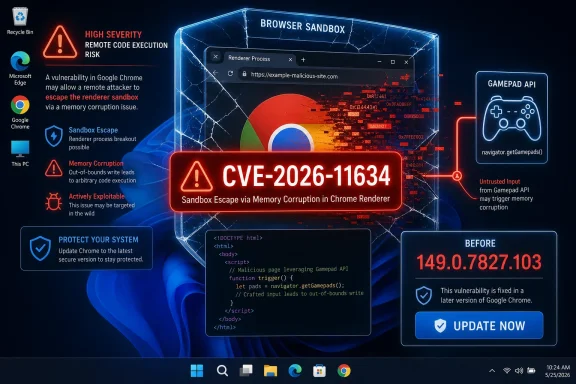
Google Chrome on Windows before version 149.0.7827.103 is affected by CVE-2026-11634, a critical use-after-free flaw in the browser’s Gamepad component that Google disclosed in June 2026 and that could let a remote attacker attempt a sandbox escape through a crafted HTML page. The practical message is less exotic than the component name suggests: this is a browser memory-safety bug with a path out of the renderer cage. For Windows users and administrators, it belongs in the “patch now, ask archaeology questions later” category. The interesting part is what this CVE says about the modern browser attack surface: even peripheral APIs that most people never knowingly use can become security-critical when exposed to the web.
The word Gamepad makes CVE-2026-11634 sound narrower than it is. It is tempting to imagine this as a niche problem for users who connect Xbox controllers, flight sticks, or other input devices to a Windows PC. That is the wrong frame.
The Gamepad API exists so web applications can read controller input. Games are the obvious use case, but the important security point is that the API sits inside the browser’s machinery for handling device-adjacent data, web content, permissions, and process boundaries. If that machinery mishandles memory, the attacker does not need the victim to think of themselves as a gamer.
The vulnerability is classified as a use-after-free, the familiar class of memory corruption flaw where software continues to use memory after it has been released. In browser exploitation, that kind of bug can become a primitive for confusing the program about what lives at a particular address. The public CVE description says exploitation would require a crafted HTML page, which puts this squarely in the drive-by web threat model: convince the user to visit or render hostile content, then let the browser do the rest.
The phrase that matters most is sandbox escape. Chrome’s security model assumes that web content is dangerous and tries to confine it inside restricted renderer processes. A bug that may help jump that boundary is not just another tab crash; it is an attack on one of the browser’s central safety promises.
That is why the CVSS vector attached by CISA’s enrichment work is so severe: network attack vector, low complexity, no privileges required, user interaction required, changed scope, and high impacts across confidentiality, integrity, and availability. In plain English, the attacker does not need an account on the target system, does not need local access, and does not need a complicated precondition beyond getting the victim to interact with hostile web content. The “user interaction required” part should not comfort anyone who has watched phishing, malvertising, compromised forums, and poisoned search results work at scale.
The score is not a guarantee of real-world weaponization. NVD had not yet provided its own full assessment in the supplied record, and the Chromium issue remains permission-restricted, which is normal for fresh browser vulnerabilities. But the shape of the bug is enough to justify urgency. Browser vendors do not label sandbox-escape-capable memory safety issues as critical because they are theoretically elegant; they do it because the exploit chain model is well understood.
A renderer escape also changes the risk calculus for enterprises. Browser compromise is no longer only about stealing what is visible inside the tab. Once an attacker can move beyond the renderer’s intended limits, the road opens toward credential theft, persistence attempts, lateral movement staging, and abuse of whatever tokens, files, or management agents the user context can reach.
That does not mean every Windows installation is equally exposed. Managed environments may have already received the fixed stable channel build, some users may be on alternative Chromium-based browsers with separate patch timing, and some systems may have policies limiting API exposure or risky browsing behavior. But as a fleet-management matter, “Chrome on Windows before 149.0.7827.103” is a clean enough condition to turn into inventory logic.
The CPE record also tells a small but useful story. NIST’s initial analysis combined the Chrome application CPE up to but excluding 149.0.7827.103 with Microsoft Windows as the operating-system condition. That is the sort of metadata vulnerability scanners depend on, and it is also where ambiguity can creep in when scanners lag, browser vendors ship staged rollouts, or downstream Chromium browsers patch at different speeds.
For home users, the action is simple: open Chrome’s About page and confirm the version is at or beyond the fixed build. For administrators, the question is broader: can you prove which endpoints are still running older Chrome builds, and can you force an update quickly enough that “auto-update will get there eventually” is no longer the plan?
The web’s security dilemma is that the browser must eagerly process untrusted input all day. It must parse markup, execute JavaScript, render graphics, negotiate permissions, handle devices, decode formats, and glue everything to the operating system without trusting any of it. Every convenience API widens the test matrix.
Gamepad support is a perfect example. Users experience it as plug-and-play browser gaming. Security engineers see asynchronous device events, permission and focus semantics, object lifetime management, and a bridge between web content and local hardware state. None of that means the API is bad; it means the API is part of a large, living attack surface.
This is also why “I do not use that feature” is a weak defense. Many browser bugs are not exploited through normal user intent. They are exploited because the browser exposes code paths to web content, and the attacker can attempt to drive those code paths directly.
The right operational response is to resist the urge to wait for a more satisfying narrative. Browser patches are among the few security updates where the distance between disclosure and broad attacker experimentation can be extremely short. Once a fixed build ships, attackers can diff code, study behavior changes, and look for the underlying flaw.
That is why the version number is the anchor. Prior to 149.0.7827.103 on Windows is the danger zone described in the CVE. At or beyond that fixed build is where ordinary users and IT teams need to land. The rest is useful for postmortems and threat hunting, but it should not be a precondition for deployment.
Enterprises should also remember that Chrome’s own updater is not a complete governance system. It is a delivery mechanism. Real assurance comes from endpoint telemetry, compliance reporting, update deadlines, and a willingness to close the browser when users leave it open for days.
For Windows administrators, the prudent move is to check every Chromium-based browser installed across the estate. Edge uses Microsoft’s own release pipeline, and third-party Chromium vendors maintain their own patch cadences. A Chrome fixed build is not the same thing as proof that every Chromium-family browser on a machine is safe.
This is where consumer habits complicate corporate policy. Users install secondary browsers for testing, privacy, compatibility, development, or simple preference. Those browsers may not be managed by the same update policy as the officially supported one. A vulnerability in a browser the help desk forgot about is still a vulnerability in a browser that can open a hostile page.
The same logic applies to embedded Chromium runtimes and Electron applications, though CVE mapping is often less direct there. Not every Chromium bug translates cleanly into every embedded runtime, but organizations that treat Chromium as a single browser miss the way Chromium has become infrastructure.
CVE-2026-11634 is one more reminder that defense-in-depth is not a slogan in browser security; it is the whole game. A memory bug in a component should be caught by code review, fuzzing, runtime checks, process isolation, permissions design, and sandbox boundaries. When a CVE description says the bug could potentially perform a sandbox escape, it means the layered model is being tested at one of its most important seams.
This is also why security teams should avoid treating browser updates as routine desktop hygiene only. They are routine, but they are also one of the most important forms of exploit-chain disruption available to defenders. Removing one link in a chain may be enough to turn a working attack into a crash, a dead end, or a telemetry event.
The long-term answer is not simply “patch faster,” though faster patching is necessary. The industry’s harder task is shrinking the amount of memory-unsafe code exposed directly to untrusted web content, then backing that up with designs that assume some bugs will still survive.
Inventory should capture the installed Chrome version, update channel, architecture, and last check-in time. Machines that have not rebooted or relaunched Chrome need special attention, because browser updates often sit in a half-applied state until the process exits. Remote and shared systems deserve extra scrutiny because users may leave browser sessions alive for long stretches.
Policy also matters. Chrome enterprise controls can set update behavior, relaunch notifications, and deadline enforcement. Those controls are sometimes softened to avoid user disruption, but a critical browser sandbox-escape issue is exactly the scenario where a little disruption is preferable to quiet exposure.
Security teams should also look beyond Chrome itself. Web gateways, EDR tools, and DNS controls may help blunt opportunistic delivery, but they do not replace patching. If a user can reach arbitrary web content with a vulnerable browser, the organization is betting that every upstream filter will be better than the attacker’s lure.
That gives defenders enough to act without waiting for exploit details. It also gives Windows enthusiasts a useful reminder: browser version numbers matter as much as OS build numbers when the browser is the application most exposed to the open Internet.
 A Gamepad Bug Is Still a Browser Bug
The word Gamepad makes CVE-2026-11634 sound narrower than it is. It is tempting to imagine this as a niche problem for users who connect Xbox controllers, flight sticks, or other input devices to a Windows PC. That is the wrong frame.The Gamepad API exists so web applications can read controller input. Games are the obvious use case, but the important security point is that the API sits inside the browser’s machinery for handling device-adjacent data, web content, permissions, and process boundaries. If that machinery mishandles memory, the attacker does not need the victim to think of themselves as a gamer.
The vulnerability is classified as a use-after-free, the familiar class of memory corruption flaw where software continues to use memory after it has been released. In browser exploitation, that kind of bug can become a primitive for confusing the program about what lives at a particular address. The public CVE description says exploitation would require a crafted HTML page, which puts this squarely in the drive-by web threat model: convince the user to visit or render hostile content, then let the browser do the rest.
The phrase that matters most is sandbox escape. Chrome’s security model assumes that web content is dangerous and tries to confine it inside restricted renderer processes. A bug that may help jump that boundary is not just another tab crash; it is an attack on one of the browser’s central safety promises.
The Sandbox Is the Prize, Not the Browser Tab
Modern Chrome is built around compartmentalization. A malicious webpage should not get unfettered access to the operating system just because it can run script, parse media, poke APIs, or stress obscure code paths. The browser sandbox exists to make exploitation harder after the first bug lands.That is why the CVSS vector attached by CISA’s enrichment work is so severe: network attack vector, low complexity, no privileges required, user interaction required, changed scope, and high impacts across confidentiality, integrity, and availability. In plain English, the attacker does not need an account on the target system, does not need local access, and does not need a complicated precondition beyond getting the victim to interact with hostile web content. The “user interaction required” part should not comfort anyone who has watched phishing, malvertising, compromised forums, and poisoned search results work at scale.
The score is not a guarantee of real-world weaponization. NVD had not yet provided its own full assessment in the supplied record, and the Chromium issue remains permission-restricted, which is normal for fresh browser vulnerabilities. But the shape of the bug is enough to justify urgency. Browser vendors do not label sandbox-escape-capable memory safety issues as critical because they are theoretically elegant; they do it because the exploit chain model is well understood.
A renderer escape also changes the risk calculus for enterprises. Browser compromise is no longer only about stealing what is visible inside the tab. Once an attacker can move beyond the renderer’s intended limits, the road opens toward credential theft, persistence attempts, lateral movement staging, and abuse of whatever tokens, files, or management agents the user context can reach.
Windows Is Not an Afterthought in This CVE
CVE-2026-11634 is specifically described as affecting Google Chrome on Windows prior to 149.0.7827.103. That specificity matters for WindowsForum readers because Chrome is often treated as a cross-platform blob: update the browser, move on. Here, the affected configuration is explicitly tied to the Windows operating system in the NVD change history.That does not mean every Windows installation is equally exposed. Managed environments may have already received the fixed stable channel build, some users may be on alternative Chromium-based browsers with separate patch timing, and some systems may have policies limiting API exposure or risky browsing behavior. But as a fleet-management matter, “Chrome on Windows before 149.0.7827.103” is a clean enough condition to turn into inventory logic.
The CPE record also tells a small but useful story. NIST’s initial analysis combined the Chrome application CPE up to but excluding 149.0.7827.103 with Microsoft Windows as the operating-system condition. That is the sort of metadata vulnerability scanners depend on, and it is also where ambiguity can creep in when scanners lag, browser vendors ship staged rollouts, or downstream Chromium browsers patch at different speeds.
For home users, the action is simple: open Chrome’s About page and confirm the version is at or beyond the fixed build. For administrators, the question is broader: can you prove which endpoints are still running older Chrome builds, and can you force an update quickly enough that “auto-update will get there eventually” is no longer the plan?
The Crafted HTML Page Remains the Oldest Modern Trick
The public description says a remote attacker could potentially trigger the issue via a crafted HTML page. That is an understated phrase that has carried a lot of security history. “Crafted HTML” can mean a page built to exercise a parser, timing edge, API sequence, object lifecycle, or memory layout in ways normal sites do not.The web’s security dilemma is that the browser must eagerly process untrusted input all day. It must parse markup, execute JavaScript, render graphics, negotiate permissions, handle devices, decode formats, and glue everything to the operating system without trusting any of it. Every convenience API widens the test matrix.
Gamepad support is a perfect example. Users experience it as plug-and-play browser gaming. Security engineers see asynchronous device events, permission and focus semantics, object lifetime management, and a bridge between web content and local hardware state. None of that means the API is bad; it means the API is part of a large, living attack surface.
This is also why “I do not use that feature” is a weak defense. Many browser bugs are not exploited through normal user intent. They are exploited because the browser exposes code paths to web content, and the attacker can attempt to drive those code paths directly.
Patch Management Has to Beat Curiosity
Fresh Chrome vulnerability records often leave defenders unsatisfied. The Chromium bug is restricted. The advisory language is compact. Public proof-of-concept details may be absent. NVD enrichment may lag behind the vendor disclosure. That vacuum invites speculation, especially when a bug has a high score and a scary phrase like sandbox escape attached.The right operational response is to resist the urge to wait for a more satisfying narrative. Browser patches are among the few security updates where the distance between disclosure and broad attacker experimentation can be extremely short. Once a fixed build ships, attackers can diff code, study behavior changes, and look for the underlying flaw.
That is why the version number is the anchor. Prior to 149.0.7827.103 on Windows is the danger zone described in the CVE. At or beyond that fixed build is where ordinary users and IT teams need to land. The rest is useful for postmortems and threat hunting, but it should not be a precondition for deployment.
Enterprises should also remember that Chrome’s own updater is not a complete governance system. It is a delivery mechanism. Real assurance comes from endpoint telemetry, compliance reporting, update deadlines, and a willingness to close the browser when users leave it open for days.
Chromium’s Shared Engine Turns One Vendor Bug Into a Platform Concern
Chrome is the named product in CVE-2026-11634, but Chromium is the foundation beneath a much wider browser ecosystem. Microsoft Edge, Brave, Vivaldi, Opera, and other Chromium-derived browsers do not automatically share identical exposure to every Chrome CVE, particularly when a bug is platform-specific or feature-gated. Still, defenders should not stop at the Google Chrome inventory line.For Windows administrators, the prudent move is to check every Chromium-based browser installed across the estate. Edge uses Microsoft’s own release pipeline, and third-party Chromium vendors maintain their own patch cadences. A Chrome fixed build is not the same thing as proof that every Chromium-family browser on a machine is safe.
This is where consumer habits complicate corporate policy. Users install secondary browsers for testing, privacy, compatibility, development, or simple preference. Those browsers may not be managed by the same update policy as the officially supported one. A vulnerability in a browser the help desk forgot about is still a vulnerability in a browser that can open a hostile page.
The same logic applies to embedded Chromium runtimes and Electron applications, though CVE mapping is often less direct there. Not every Chromium bug translates cleanly into every embedded runtime, but organizations that treat Chromium as a single browser miss the way Chromium has become infrastructure.
Memory Safety Is Still the Browser War’s Unfinished Business
Use-after-free bugs are not new, and that is precisely the problem. Browser vendors have spent years adding sandboxing, site isolation, exploit mitigations, fuzzing, MiraclePtr-style hardening, stronger allocators, and more memory-safe language experiments. Yet memory corruption keeps surfacing because browser engines are massive C++ systems that process hostile input at high speed.CVE-2026-11634 is one more reminder that defense-in-depth is not a slogan in browser security; it is the whole game. A memory bug in a component should be caught by code review, fuzzing, runtime checks, process isolation, permissions design, and sandbox boundaries. When a CVE description says the bug could potentially perform a sandbox escape, it means the layered model is being tested at one of its most important seams.
This is also why security teams should avoid treating browser updates as routine desktop hygiene only. They are routine, but they are also one of the most important forms of exploit-chain disruption available to defenders. Removing one link in a chain may be enough to turn a working attack into a crash, a dead end, or a telemetry event.
The long-term answer is not simply “patch faster,” though faster patching is necessary. The industry’s harder task is shrinking the amount of memory-unsafe code exposed directly to untrusted web content, then backing that up with designs that assume some bugs will still survive.
Administrators Need Evidence, Not Assurances
In managed Windows environments, the immediate question is not whether Chrome eventually updates. It is whether the organization can demonstrate that the vulnerable population has dropped to zero or to a consciously accepted exception list. That requires more than trusting a green icon somewhere in a patch dashboard.Inventory should capture the installed Chrome version, update channel, architecture, and last check-in time. Machines that have not rebooted or relaunched Chrome need special attention, because browser updates often sit in a half-applied state until the process exits. Remote and shared systems deserve extra scrutiny because users may leave browser sessions alive for long stretches.
Policy also matters. Chrome enterprise controls can set update behavior, relaunch notifications, and deadline enforcement. Those controls are sometimes softened to avoid user disruption, but a critical browser sandbox-escape issue is exactly the scenario where a little disruption is preferable to quiet exposure.
Security teams should also look beyond Chrome itself. Web gateways, EDR tools, and DNS controls may help blunt opportunistic delivery, but they do not replace patching. If a user can reach arbitrary web content with a vulnerable browser, the organization is betting that every upstream filter will be better than the attacker’s lure.
The Version Number Is the Line in the Sand
The concrete response to CVE-2026-11634 is refreshingly narrow, even if the security implications are broad. The affected population is Chrome on Windows before 149.0.7827.103. The vulnerability class is use-after-free. The exposed component is Gamepad. The possible outcome is a sandbox escape through crafted HTML.That gives defenders enough to act without waiting for exploit details. It also gives Windows enthusiasts a useful reminder: browser version numbers matter as much as OS build numbers when the browser is the application most exposed to the open Internet.
- Chrome for Windows should be updated to 149.0.7827.103 or later wherever it is installed.
- Systems that rely on automatic updates should still be checked, because a downloaded browser update may not take effect until Chrome is relaunched.
- Administrators should inventory other Chromium-based browsers rather than assuming a Chrome advisory covers the entire browser estate.
- The Gamepad component name should not be read as a gaming-only risk, because the vulnerability is reachable through web content.
- The absence of public exploit code in the advisory does not reduce the urgency of patching a critical browser memory-safety bug with sandbox-escape implications.
References
- Primary source: NVD / Chromium
Published: 2026-06-15T19:13:38-07:00
NVD - CVE-2026-11634
 nvd.nist.gov
- Security advisory: MSRC
Published: 2026-06-15T19:13:38-07:00
Original feed URL
Security Update Guide - Microsoft Security Response Center
 msrc.microsoft.com
- Related coverage: radar.offseq.com
CVE-2026-11634: Use after free in Google Chrome - Live Threat Intelligence - Threat Radar | OffSeq.com
Detailed information about CVE-2026-11634: Use after free in Google Chrome affecting Google Chrome. Get real-time updates, technical details, and mitigation strradar.offseq.com
