

Google Chrome before 149.0.7827.103 contains CVE-2026-11683, a high-severity use-after-free flaw in WebCodecs disclosed on June 8, 2026, that can let a remote attacker run arbitrary code inside Chrome’s sandbox when a user opens a crafted HTML page. The practical instruction is simple: update Chrome and Chromium-based browsers quickly, then verify the version actually landed. The more interesting story is that yet another browser bug sits in the media-processing path, where modern web performance and attack surface keep colliding. And yes, for asset managers staring at the NVD entry, the affected CPE picture is not as tidy as the one-line advisory makes it look.
CVE-2026-11683 is not the kind of vulnerability that announces itself with a scary name, a logo, or a theatrical proof of concept. It is a memory-safety bug in WebCodecs, the browser API that gives web applications lower-level access to video and audio encoding and decoding capabilities. That makes it a product of the modern web’s bargain: richer applications, faster media pipelines, and more native-like performance in exchange for more complicated code running closer to dangerous boundaries.
The reported condition is use after free, cataloged as CWE-416. In plain English, that means software continues to use a chunk of memory after it has already been released. If an attacker can shape what occupies that freed memory next, the bug can move from a crash to controlled behavior, and from controlled behavior to code execution.
The CVSS 3.1 score contributed by CISA-ADP is 8.8, with network attack vector, low attack complexity, no privileges required, and user interaction required. That last part matters, but it should not be over-comforting. “User interaction” in browser exploitation often means persuading a user to load a page, follow a link, open a malicious document that renders web content, or visit a compromised site.
The description says arbitrary code execution occurs inside a sandbox. That is a meaningful limitation, but not a full stop. Browser sandboxes are designed to contain renderer compromise, yet real-world attacks often chain renderer bugs with separate sandbox escapes, kernel flaws, GPU bugs, or broker-process weaknesses. A single Chrome code-execution CVE may be only one link in the chain, but defenders do not get to choose which link the attacker already has.
That shift has been good for legitimate developers. A web app that needs to process video frames with low latency cannot always afford to route everything through high-level media elements. WebCodecs gives developers more control over frames, encoders, decoders, and timing, which is precisely why it is attractive for demanding applications.
The security cost is that media parsing and processing are historically dangerous neighborhoods. Code that handles compressed video, timing-sensitive buffers, hardware acceleration, and cross-platform behavior tends to be intricate. Intricate code is where lifetime bugs hide.
A use-after-free in a browser media component is therefore not surprising. It is almost boring in the way recurring infrastructure problems become boring: not because they are harmless, but because the industry keeps rediscovering that complex memory management plus hostile input is an unforgiving combination.
If an attacker obtains code execution in the renderer, they may be able to manipulate the user’s active web context, read accessible page data, interfere with browser-rendered content, or stage a second exploit. Depending on site isolation, browser configuration, enterprise controls, and the target’s browsing state, the practical blast radius varies. That uncertainty is exactly why defenders patch rather than debate theoretical containment.
For Windows administrators, the bigger lesson is that browser sandboxing changes the shape of compromise rather than eliminating it. It may prevent a renderer bug from instantly becoming machine-level persistence. It may also buy detection time. But it does not make a crafted HTML exploit safe to leave unpatched.
That distinction is particularly important in enterprise fleets. Many organizations treat browser updates as routine hygiene rather than emergency response unless a vulnerability is confirmed exploited in the wild. CVE-2026-11683’s public record, as provided in the NVD material, does not describe known exploitation; it describes a high-severity bug with a plausible remote delivery path. That is still enough to justify accelerated deployment because browsers sit at the edge of nearly every workflow.
Chrome’s update model can obscure this in practice. Users often assume the browser is patched because Chrome updates automatically, but enterprise controls, pending restarts, profile state, software distribution delays, and managed update policies can leave machines behind. The browser may download an update and still run the older vulnerable binary until it restarts.
For individual users, the fix path is familiar: open Chrome’s About page, let the browser check for updates, and restart when prompted. For administrators, the right question is not whether Google released a patch; it is whether the installed version reported by endpoint inventory, EDR telemetry, or device management actually meets the fixed baseline.
Microsoft Edge, Brave, Vivaldi, Opera, and other Chromium-derived browsers deserve separate attention. A Chrome CVE is often a Chromium CVE in practice, but downstream browsers ship their own builds, versioning, release cadence, and enterprise update channels. The safe operational assumption is that Chromium-based browsers need vendor-specific verification rather than blind reliance on Chrome’s version number.
So, are we missing a CPE? Strictly speaking, the NVD entry is modeling the named product: Google Chrome. If the CVE assignment and vendor advisory identify Chrome, then a Chrome application CPE constrained by desktop operating systems is the expected core record. It is not necessarily an error that Microsoft Edge, Brave, Chromium, Electron apps, Android WebView, or Linux distribution packages are absent from that specific configuration.
But from a risk-management perspective, the CPE is probably narrower than the operational exposure map. WebCodecs lives in the Chromium world, and Chromium code reaches users through more than Google’s branded desktop browser. Whether those products are affected depends on whether they incorporated the vulnerable code path and whether their maintainers shipped the corresponding fix.
That is where vulnerability management systems often mislead. A scanner that keys only on the Google Chrome CPE may correctly flag Chrome while missing a Chromium-based browser with the same vulnerable component. Conversely, it may overgeneralize if it assumes every Chromium consumer is vulnerable without checking build integration and patch status. The correct answer is less satisfying but more accurate: the CPE is adequate for the named Chrome product, but defenders should not treat it as a complete inventory of Chromium-derived risk.
This is especially relevant on Windows. Many endpoints carry Chrome and Edge side by side, plus embedded Chromium runtimes inside collaboration tools, development utilities, launchers, and packaged desktop apps. Not every embedded runtime exposes the same attack path as a full browser, but the security history of Chromium teaches a conservative lesson: if hostile web content can reach the engine, the patch level matters.
This gap creates a familiar problem for security teams. Automated workflows may rank a vulnerability differently depending on whether they ingest vendor severity, CISA-ADP scoring, NVD scoring, EPSS, exploit intelligence, or scanner plugin logic. In the first days after disclosure, those feeds can disagree or update at different speeds.
For CVE-2026-11683, the available facts are enough to prioritize action. It is remotely reachable through crafted web content, requires no attacker authentication, has low attack complexity, affects confidentiality, integrity, and availability in the contributed vector, and lands in a browser component exposed to untrusted input. Waiting for every database field to settle is process theater.
That does not mean every patch must be treated as a four-alarm incident. It means organizations should separate enrichment completeness from operational urgency. A missing NVD score is a data-quality issue; a vulnerable browser on a user workstation is an exposure issue.
Memory corruption bugs still appear because C and C++ remain deep in the browser stack, especially around performance-sensitive code. Rust adoption, MiraclePtr-style mitigations, fuzzing, hardened allocators, and process isolation can reduce exploitability, but they do not erase decades of complexity. Chrome is safer than browsers used to be, and still too valuable a target to be safe enough.
The presence of WebCodecs in this story is a reminder that browser APIs are not just developer conveniences. Each API is a new contract between the open web and local compute resources. When that contract grants faster media access, it also invites more sophisticated inputs and more state transitions in native code.
That is not an argument to retreat from the capable web. It is an argument to price the risk honestly. If web apps are going to behave like native apps, browser patching must be managed with the urgency once reserved for operating-system patching.
Chrome can update in the background, but active sessions linger. Users keep dozens of tabs open. Virtual desktops stay alive for days. Kiosks, shared workstations, conference-room PCs, and lab machines become invisible exceptions. The update exists, but the vulnerable process remains in memory.
Good browser patch governance is therefore not just “enable automatic updates.” It includes restart enforcement, reporting, exception handling, and a defined deadline for high-severity browser CVEs. If the organization already has an endpoint management stack, this should be measurable within hours, not discovered during the next quarterly audit.
Security teams should also resist the urge to focus only on the browser with the loudest advisory. Chrome may be the named product here, but Windows fleets often include multiple Chromium channels: Stable, Beta, Extended Stable, per-user installs, system installs, portable copies, and third-party browsers. A clean dashboard for one channel can hide stale binaries elsewhere.
The more nuanced advice is to treat browser updates as a routine reflex, not a dramatic security event. The web browser is the application most users expose to unknown code every day. It is also the application most likely to hold active logins to banking, email, cloud storage, shopping, work tools, and identity providers.
Users should also be wary of the timing around public CVE disclosures. Once a vulnerability is named, described, and patched, defenders are not the only people reading. Attackers can compare fixed and vulnerable builds, study the patch, and look for a way to reproduce the bug. That does not guarantee mass exploitation, but it narrows the window in which delay is harmless.
The best consumer security behavior here is not exotic. Keep the browser current, retire unsupported operating systems, avoid installing unnecessary extensions, and do not postpone restarts indefinitely. In browser security, the mundane habits carry most of the weight.
CVE-2026-11683 is notable precisely because it is ordinary. It sits in a modern media API, affects a dominant browser, requires only crafted web content and user interaction, and is mitigated primarily by fast update adoption. That pattern describes much of the web’s security burden in 2026.
For WindowsForum readers, the practical answer is immediate: patch Chrome, verify the fixed version, and do not stop at the Google-branded browser if your fleet runs other Chromium software. The strategic answer is larger: browser patching is now core endpoint security, and every new high-performance web capability should be read not only as a developer feature, but as a future line item in the vulnerability queue.
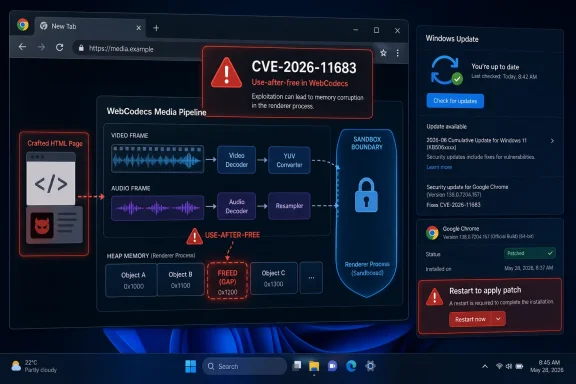 The Browser Patch Is Small; the Attack Surface Is Not
CVE-2026-11683 is not the kind of vulnerability that announces itself with a scary name, a logo, or a theatrical proof of concept. It is a memory-safety bug in WebCodecs, the browser API that gives web applications lower-level access to video and audio encoding and decoding capabilities. That makes it a product of the modern web’s bargain: richer applications, faster media pipelines, and more native-like performance in exchange for more complicated code running closer to dangerous boundaries.The reported condition is use after free, cataloged as CWE-416. In plain English, that means software continues to use a chunk of memory after it has already been released. If an attacker can shape what occupies that freed memory next, the bug can move from a crash to controlled behavior, and from controlled behavior to code execution.
The CVSS 3.1 score contributed by CISA-ADP is 8.8, with network attack vector, low attack complexity, no privileges required, and user interaction required. That last part matters, but it should not be over-comforting. “User interaction” in browser exploitation often means persuading a user to load a page, follow a link, open a malicious document that renders web content, or visit a compromised site.
The description says arbitrary code execution occurs inside a sandbox. That is a meaningful limitation, but not a full stop. Browser sandboxes are designed to contain renderer compromise, yet real-world attacks often chain renderer bugs with separate sandbox escapes, kernel flaws, GPU bugs, or broker-process weaknesses. A single Chrome code-execution CVE may be only one link in the chain, but defenders do not get to choose which link the attacker already has.
WebCodecs Is Where Performance Ambition Meets Memory Risk
WebCodecs exists because the browser is no longer just a document viewer. It is a video editor, conferencing client, streaming endpoint, game runtime, AI front end, and thin-client workstation. Those roles demand direct access to media primitives that older web APIs abstracted away.That shift has been good for legitimate developers. A web app that needs to process video frames with low latency cannot always afford to route everything through high-level media elements. WebCodecs gives developers more control over frames, encoders, decoders, and timing, which is precisely why it is attractive for demanding applications.
The security cost is that media parsing and processing are historically dangerous neighborhoods. Code that handles compressed video, timing-sensitive buffers, hardware acceleration, and cross-platform behavior tends to be intricate. Intricate code is where lifetime bugs hide.
A use-after-free in a browser media component is therefore not surprising. It is almost boring in the way recurring infrastructure problems become boring: not because they are harmless, but because the industry keeps rediscovering that complex memory management plus hostile input is an unforgiving combination.
“Inside the Sandbox” Is a Boundary, Not a Reassurance
The phrase “inside a sandbox” can sound like a downgrade. It is not. A sandboxed renderer compromise is still a serious event because the browser is where sessions, credentials, webmail, admin consoles, SaaS dashboards, and internal portals converge.If an attacker obtains code execution in the renderer, they may be able to manipulate the user’s active web context, read accessible page data, interfere with browser-rendered content, or stage a second exploit. Depending on site isolation, browser configuration, enterprise controls, and the target’s browsing state, the practical blast radius varies. That uncertainty is exactly why defenders patch rather than debate theoretical containment.
For Windows administrators, the bigger lesson is that browser sandboxing changes the shape of compromise rather than eliminating it. It may prevent a renderer bug from instantly becoming machine-level persistence. It may also buy detection time. But it does not make a crafted HTML exploit safe to leave unpatched.
That distinction is particularly important in enterprise fleets. Many organizations treat browser updates as routine hygiene rather than emergency response unless a vulnerability is confirmed exploited in the wild. CVE-2026-11683’s public record, as provided in the NVD material, does not describe known exploitation; it describes a high-severity bug with a plausible remote delivery path. That is still enough to justify accelerated deployment because browsers sit at the edge of nearly every workflow.
The Version Number Is the Control That Matters
The affected range is Chrome prior to 149.0.7827.103. That threshold is the most concrete operational fact in the disclosure. If an endpoint is running an earlier build, it should be considered exposed to this issue.Chrome’s update model can obscure this in practice. Users often assume the browser is patched because Chrome updates automatically, but enterprise controls, pending restarts, profile state, software distribution delays, and managed update policies can leave machines behind. The browser may download an update and still run the older vulnerable binary until it restarts.
For individual users, the fix path is familiar: open Chrome’s About page, let the browser check for updates, and restart when prompted. For administrators, the right question is not whether Google released a patch; it is whether the installed version reported by endpoint inventory, EDR telemetry, or device management actually meets the fixed baseline.
Microsoft Edge, Brave, Vivaldi, Opera, and other Chromium-derived browsers deserve separate attention. A Chrome CVE is often a Chromium CVE in practice, but downstream browsers ship their own builds, versioning, release cadence, and enterprise update channels. The safe operational assumption is that Chromium-based browsers need vendor-specific verification rather than blind reliance on Chrome’s version number.
NVD’s CPE Entry Tells Asset Managers Only Part of the Truth
The user-facing vulnerability text says Google Chrome prior to 149.0.7827.103 is affected. The NVD change record adds a CPE configuration for Google Chrome versions up to, but excluding, 149.0.7827.103, with operating-system CPEs for Windows, Linux, and macOS. That is consistent with Chrome’s desktop footprint, but it is not the whole browser ecosystem.So, are we missing a CPE? Strictly speaking, the NVD entry is modeling the named product: Google Chrome. If the CVE assignment and vendor advisory identify Chrome, then a Chrome application CPE constrained by desktop operating systems is the expected core record. It is not necessarily an error that Microsoft Edge, Brave, Chromium, Electron apps, Android WebView, or Linux distribution packages are absent from that specific configuration.
But from a risk-management perspective, the CPE is probably narrower than the operational exposure map. WebCodecs lives in the Chromium world, and Chromium code reaches users through more than Google’s branded desktop browser. Whether those products are affected depends on whether they incorporated the vulnerable code path and whether their maintainers shipped the corresponding fix.
That is where vulnerability management systems often mislead. A scanner that keys only on the Google Chrome CPE may correctly flag Chrome while missing a Chromium-based browser with the same vulnerable component. Conversely, it may overgeneralize if it assumes every Chromium consumer is vulnerable without checking build integration and patch status. The correct answer is less satisfying but more accurate: the CPE is adequate for the named Chrome product, but defenders should not treat it as a complete inventory of Chromium-derived risk.
This is especially relevant on Windows. Many endpoints carry Chrome and Edge side by side, plus embedded Chromium runtimes inside collaboration tools, development utilities, launchers, and packaged desktop apps. Not every embedded runtime exposes the same attack path as a full browser, but the security history of Chromium teaches a conservative lesson: if hostile web content can reach the engine, the patch level matters.
NVD Lag Is Normal, but It Complicates Triage
The NVD record shows no NIST CVSS score yet, while CISA-ADP contributed a CVSS 3.1 vector and score. That is not unusual. NVD enrichment often trails initial vendor publication, and the absence of a NIST score should not be read as a sign that the bug is unimportant.This gap creates a familiar problem for security teams. Automated workflows may rank a vulnerability differently depending on whether they ingest vendor severity, CISA-ADP scoring, NVD scoring, EPSS, exploit intelligence, or scanner plugin logic. In the first days after disclosure, those feeds can disagree or update at different speeds.
For CVE-2026-11683, the available facts are enough to prioritize action. It is remotely reachable through crafted web content, requires no attacker authentication, has low attack complexity, affects confidentiality, integrity, and availability in the contributed vector, and lands in a browser component exposed to untrusted input. Waiting for every database field to settle is process theater.
That does not mean every patch must be treated as a four-alarm incident. It means organizations should separate enrichment completeness from operational urgency. A missing NVD score is a data-quality issue; a vulnerable browser on a user workstation is an exposure issue.
The Chrome Security Model Keeps Buying Time, Not Immunity
Chrome’s security story has long depended on fast patching, site isolation, sandboxing, exploit mitigations, and a large bug bounty ecosystem. That model has worked better than the old browser monocultures of the early 2000s. It has also created a treadmill that never stops.Memory corruption bugs still appear because C and C++ remain deep in the browser stack, especially around performance-sensitive code. Rust adoption, MiraclePtr-style mitigations, fuzzing, hardened allocators, and process isolation can reduce exploitability, but they do not erase decades of complexity. Chrome is safer than browsers used to be, and still too valuable a target to be safe enough.
The presence of WebCodecs in this story is a reminder that browser APIs are not just developer conveniences. Each API is a new contract between the open web and local compute resources. When that contract grants faster media access, it also invites more sophisticated inputs and more state transitions in native code.
That is not an argument to retreat from the capable web. It is an argument to price the risk honestly. If web apps are going to behave like native apps, browser patching must be managed with the urgency once reserved for operating-system patching.
Enterprises Should Treat Browser Restarts as Security Work
The least glamorous part of this vulnerability is probably the most important: users need to restart the browser. In managed environments, that simple step is where patch compliance often goes to die.Chrome can update in the background, but active sessions linger. Users keep dozens of tabs open. Virtual desktops stay alive for days. Kiosks, shared workstations, conference-room PCs, and lab machines become invisible exceptions. The update exists, but the vulnerable process remains in memory.
Good browser patch governance is therefore not just “enable automatic updates.” It includes restart enforcement, reporting, exception handling, and a defined deadline for high-severity browser CVEs. If the organization already has an endpoint management stack, this should be measurable within hours, not discovered during the next quarterly audit.
Security teams should also resist the urge to focus only on the browser with the loudest advisory. Chrome may be the named product here, but Windows fleets often include multiple Chromium channels: Stable, Beta, Extended Stable, per-user installs, system installs, portable copies, and third-party browsers. A clean dashboard for one channel can hide stale binaries elsewhere.
The Consumer Advice Is Boring Because It Is Correct
For home users, this is one of those moments where the right advice is almost offensively simple. Update Chrome. Restart it. If you use another Chromium-based browser, update that too. Do not assume the operating system update handled it.The more nuanced advice is to treat browser updates as a routine reflex, not a dramatic security event. The web browser is the application most users expose to unknown code every day. It is also the application most likely to hold active logins to banking, email, cloud storage, shopping, work tools, and identity providers.
Users should also be wary of the timing around public CVE disclosures. Once a vulnerability is named, described, and patched, defenders are not the only people reading. Attackers can compare fixed and vulnerable builds, study the patch, and look for a way to reproduce the bug. That does not guarantee mass exploitation, but it narrows the window in which delay is harmless.
The best consumer security behavior here is not exotic. Keep the browser current, retire unsupported operating systems, avoid installing unnecessary extensions, and do not postpone restarts indefinitely. In browser security, the mundane habits carry most of the weight.
The Patch Note Leaves Administrators With Five Jobs
CVE-2026-11683 is a compact advisory with a broad operational tail. The vulnerability text tells us what broke and where the fixed Chrome line begins, but administrators still have to translate that into inventory, enforcement, and verification.- Confirm that Google Chrome installations are updated to 149.0.7827.103 or later, rather than merely assuming automatic updates completed.
- Check Chromium-based browsers separately, because their fixed versions and release timing may differ from Google Chrome’s desktop channel.
- Treat the NVD CPE as accurate for Google Chrome but incomplete as a map of every Chromium-derived exposure in the environment.
- Prioritize browser restart enforcement, because a downloaded update does not protect users who continue running vulnerable processes.
- Watch for follow-up vendor advisories, scanner plugin changes, and enrichment updates as NVD, CISA-ADP, and downstream vendors refine their records.
The Real Risk Is Normalizing Browser Memory Bugs
The industry has become dangerously good at absorbing browser vulnerability news. A high-severity memory bug appears, a stable-channel update ships, scanners light up, administrators push patches, and everyone moves on. That process is healthier than panic, but complacency is the wrong lesson.CVE-2026-11683 is notable precisely because it is ordinary. It sits in a modern media API, affects a dominant browser, requires only crafted web content and user interaction, and is mitigated primarily by fast update adoption. That pattern describes much of the web’s security burden in 2026.
For WindowsForum readers, the practical answer is immediate: patch Chrome, verify the fixed version, and do not stop at the Google-branded browser if your fleet runs other Chromium software. The strategic answer is larger: browser patching is now core endpoint security, and every new high-performance web capability should be read not only as a developer feature, but as a future line item in the vulnerability queue.
References
- Primary source: NVD / Chromium
Published: 2026-06-15T19:14:45-07:00
NVD - CVE-2026-11683
 nvd.nist.gov
- Security advisory: MSRC
Published: 2026-06-15T19:14:45-07:00
Original feed URL
Security Update Guide - Microsoft Security Response Center
 msrc.microsoft.com
- Related coverage: vulnerability.circl.lu
Vulnerability-Lookup
Vulnerability-Lookup - Fast vulnerability lookup correlation from different sources.vulnerability.circl.lu - Related coverage: radar.offseq.com
CVE-2026-11683: Use after free in Google Chrome - Live Threat Intelligence - Threat Radar | OffSeq.com
Detailed information about CVE-2026-11683: Use after free in Google Chrome affecting Google Chrome. Get real-time updates, technical details, and mitigation strradar.offseq.com
