

CVE-2026-12447 is listed in Microsoft’s Security Update Guide because the flaw is in Chromium’s WebRTC code, Google Chrome fixed it in June 2026, and Microsoft Edge inherits that same open-source browser engine rather than maintaining an entirely separate rendering stack. That is the plain answer, but it is also the useful one: the line between “Chrome vulnerability” and “Edge vulnerability” is now mostly a supply-chain boundary, not a product boundary. If Chromium ships a memory-safety fix for a component Edge consumes, Microsoft has to tell Windows and enterprise administrators whether Edge has absorbed that fix. The Security Update Guide entry is less about claiming ownership of the bug and more about declaring that Microsoft’s Chromium-based browser is no longer exposed.
The modern Microsoft Edge is not the Edge of the Windows 10 launch era. The original EdgeHTML browser was a Microsoft-controlled platform with its own engine, its own compatibility problems, and its own patch story. The Chromium-based Edge, which replaced it, is a Microsoft browser wrapped around the same open-source foundation used by Chrome and several other browsers.
That architectural decision solved one problem and created another. It gave Microsoft far better web compatibility and let Edge ride the same standards wave as Chrome, but it also meant that bugs in shared Chromium components became Edge-relevant by default. WebRTC is one of those components: a complex stack for real-time audio, video, and data communication in the browser.
So when a CVE says “Google Chrome” in the vulnerability description, that does not automatically mean “Chrome only.” It often means the vulnerability was assigned through Chrome’s process because Google is the Chromium project’s dominant security steward. Edge consumes that same code, then Microsoft ships it through Edge’s own update pipeline.
That is why the Microsoft Security Update Guide includes entries that look, at first glance, like they belong somewhere else. Microsoft is not saying Windows itself has a WebRTC heap overflow in the kernel. It is saying Microsoft Edge, as a Chromium-based application commonly deployed and managed on Windows systems, included the affected open-source code until updated.
A heap buffer overflow is the kind of old-fashioned memory corruption bug that modern browsers spend enormous engineering effort trying to contain. The attacker’s immediate prize is usually control inside a renderer process or another sandboxed browser component. That is not the same as instant full-system compromise, but it is also not harmless; browser exploit chains often start with exactly this type of bug and then pair it with a sandbox escape or privilege escalation.
The “inside a sandbox” phrase should not be read as a comfort blanket. Browser sandboxes are designed to limit damage, not to make memory corruption irrelevant. A successful exploit inside a sandbox can still threaten browser data, sessions, rendered content, and the integrity of what the user is doing in that browser context.
For administrators, the operative fact is simpler than the exploit mechanics. If Edge includes the affected Chromium WebRTC code and has not been updated to the fixed build, Edge is part of the exposure window. Once Microsoft ships an Edge version incorporating the Chromium fix, Microsoft documents that state in its own security machinery.
For a home user, the difference between a Chrome CVE and an Edge CVE may seem academic. The browser updates, the version number changes, and life goes on. In managed environments, however, the distinction affects asset inventories, vulnerability scanners, compliance dashboards, patch SLAs, and exception workflows.
Security teams do not ask, “Was this bug born at Google?” They ask, “Do we have affected software installed?” Since Edge is installed by default on supported Windows client systems and is widely used even where Chrome is also present, Microsoft has to surface Chromium-originated browser fixes in a Microsoft-consumable form.
That is the purpose of the wording in the MSRC entry: the vulnerability is in Chromium OSS, Microsoft Edge consumes Chromium OSS, and the guide entry announces that the latest Edge build is no longer vulnerable. It is boilerplate, but it is meaningful boilerplate. It tells defenders where responsibility moves after the upstream patch lands.
It also means WebRTC processes untrusted input at high speed, across media formats, codecs, network paths, timing-sensitive state machines, and device interfaces. That is a lot of parsing, buffering, negotiation, and concurrency inside one browser subsystem. Bugs in that territory are not surprising; they are the tax paid for making rich real-time communications work inside a web page.
The practical risk is not limited to users who knowingly join video calls. A crafted page can exercise browser APIs and code paths in ways that are not obvious to the user. If a vulnerability description says exploitation is possible via a crafted HTML page, the security model has to assume drive-by exposure through web content, not just a malicious meeting invite.
This is why WebRTC issues tend to get attention even when there is no public evidence of exploitation in the wild. They sit in a heavily reachable part of the browser, and the browser is still the most exposed application on many endpoints. The attack surface is not theoretical; it is where users spend their working day.
Edge normally updates independently of Windows cumulative updates. That is good for browser security because Chromium’s cadence is faster than the Windows servicing rhythm. It also means administrators cannot assume that installing Patch Tuesday updates alone necessarily proves every Edge instance has taken the relevant browser fix.
In consumer scenarios, Edge typically checks for updates automatically and applies them with minimal intervention. In enterprises, update controls can deliberately slow or redirect that process. Target version overrides, channel policies, maintenance windows, and application control tools can all create a gap between “Microsoft has released the fix” and “this endpoint is fixed.”
That gap is where Security Update Guide entries become operational. They give vulnerability management systems something to match against Microsoft products, even when the root cause lives upstream. Without that mapping, defenders would have to infer Edge exposure from Chrome advisories and Chromium commit history, which is a poor way to run enterprise patch governance.
That page shows the installed Edge version and normally triggers an update check. If an update is available, Edge may download it and prompt for a restart. The browser is not actually running the newly installed version until it has been restarted, which is a small but common source of false confidence.
For Chrome, the equivalent path is the three-dot menu, Help, then About Google Chrome, or
The fixed Chrome version referenced in public CVE data is 149.0.7827.155 and later. Edge’s versioning is not always identical to Chrome’s because Microsoft packages Chromium into Edge under its own release numbering and channel system. The important check is therefore not whether the Edge number visually matches Chrome’s number, but whether Microsoft’s current Edge security release incorporating the Chromium fix is installed.
That channel distinction matters in managed environments. A Beta or Dev build may contain a fix earlier than Stable, but it may not be appropriate for production. Extended Stable may intentionally lag feature releases while still receiving security fixes. A machine can therefore be “current” for its channel while not sharing the same version number as another device in the same organization.
The safe administrative practice is to compare against Microsoft’s Edge security release notes and the Security Update Guide rather than guessing from Chrome’s version string alone. Chromium is the shared source, but Edge is the deployed product. The fix matters only when it has landed in the Edge channel your machines are actually using.
That is also why vulnerability scanners sometimes produce confusing results around browser CVEs. Some scanners key off Chromium versions, others key off product versions, and others rely on registry data or installed-file metadata. If those data sources lag or interpret Edge’s channeling incorrectly, a patched machine can look vulnerable or a vulnerable machine can look clean.
That is especially true for Edge on Windows. Microsoft has woven Edge into enterprise identity flows, Microsoft 365 workflows, management services, IE mode compatibility, Defender integrations, and Windows defaults. Even in organizations that standardize on another browser, Edge is often present, launchable, and used by system components or users who do not care what the official standard says.
That makes Edge patch status a baseline security control, not an optional hygiene item. A vulnerability like CVE-2026-12447 may have a Chrome-branded origin story, but an unpatched Edge installation is still an unpatched browser. Attackers exploit reachable code, not branding distinctions.
For Windows administrators, the lesson is to include Edge in the same vulnerability management discipline as Windows, Office, Teams, and third-party browsers. The auto-updater helps, but “automatic” is not the same as “verified.” Mature environments measure the version actually present across endpoints.
A CVE assigned by Chrome does not mean Microsoft was uninvolved in remediation. Microsoft still has to ingest the upstream fix, test it, build Edge, ship it through its channels, document the exposure, and support customers who need to prove remediation. The work is downstream, but it is still work.
The same pattern appears across operating systems, container images, developer frameworks, and enterprise applications. Open-source consumption creates efficiency, but it also creates dependency on upstream disclosure and release timing. When the upstream project is Chromium, the cadence is fast and public; when it is a smaller library, the process can be murkier.
The healthy response is not to pretend that downstream vendors own every line of code in isolation. It is to demand clear mapping from component vulnerability to product impact. In this case, Microsoft’s answer is refreshingly direct: Chromium OSS had the issue, Edge consumes Chromium OSS, and the latest Edge build is no longer vulnerable.
Users should also remember that browser updates can be delayed by open sessions. People keep browsers open for days or weeks because tabs have become a substitute for memory. That habit can leave patched code unapplied until the process restarts.
For security-minded users, CVE-2026-12447 is a reminder that browser hardening is layered. Keeping the browser current is the first layer. Reducing unnecessary extensions, avoiding suspicious links, enabling enhanced security features where tolerable, and keeping the operating system patched all reduce the chance that one browser bug becomes a full compromise.
The important thing is not to over-personalize the Chrome label. If you use Edge, the relevant question is whether your Edge build has Microsoft’s corresponding fix. The vulnerable code path came from Chromium; the remediation arrives as an Edge update.
Start with managed Edge update policy. If target versions or rollback policies are configured, confirm they are not pinning users behind the fixed build. If Extended Stable is in use, verify that Microsoft has delivered the relevant security fix for that channel and that endpoints have installed it.
Next, validate from the endpoint side. Registry inventory, management reports, EDR software inventory, and Edge management tools should agree on the installed version. Where they do not agree, the discrepancy itself is worth investigating because stale software inventory is a vulnerability management problem hiding inside a vulnerability management process.
Finally, communicate the restart requirement. Browser updates are often treated as frictionless, but a long-running process can remain old until it exits. In high-risk windows, administrators may need to force browser restarts or use user notifications rather than relying on passive updating.
A sandboxed exploit may still expose sensitive information within the browser context. It may interact with content the user is authorized to view. It may also serve as the first stage in a chain, waiting for a second vulnerability to cross into broader system access.
Security teams should therefore treat sandboxed browser code execution as serious even if it is not an instant domain compromise. The browser is often where identity tokens, enterprise SaaS sessions, privileged admin portals, and internal applications converge. A bug that executes attacker-controlled code in that environment deserves attention.
That does not mean panic. There is no need to invent drama beyond the available facts. It means patching promptly, confirming versions, and not dismissing the issue because the CVE’s product name says Chrome while the installed browser says Edge.
Microsoft’s customers need a Microsoft product-impact view. If Edge is vulnerable because Chromium is vulnerable, that belongs in the Microsoft security record. Otherwise, every customer would have to maintain a separate mental model connecting Chrome releases, Chromium commits, Edge release notes, and local Edge deployment state.
The better criticism is not that Microsoft includes these entries. It is that the ecosystem still makes vulnerability correlation harder than it should be. Product names, upstream projects, downstream builds, channel-specific releases, and scanner logic do not always line up cleanly.
In that sense, CVE-2026-12447 is a small example of a much larger industry problem. The software supply chain has become shared, but security reporting is still often product-branded. Microsoft’s entry is an attempt to bridge that gap for Edge.
The user action is also simple. Open Edge’s About page, let it check for updates, and restart the browser if prompted. In an enterprise, do the same thing at fleet scale with management tooling rather than manually clicking through endpoints.
The bigger takeaway is that browser security has become a shared-responsibility chain. Google may assign and fix a Chromium flaw upstream. Microsoft must consume and ship the fix downstream. Users and administrators must make sure the fixed browser actually runs on their machines.
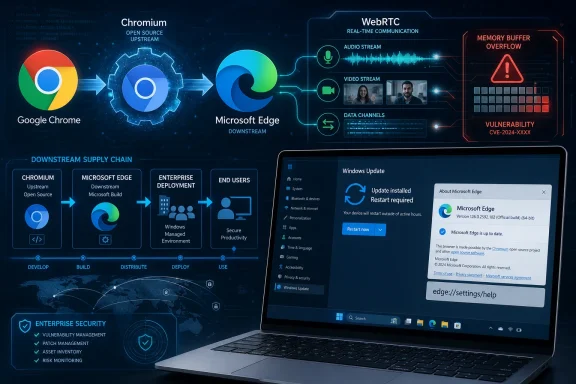 Edge Security Now Lives Downstream of Chromium
The modern Microsoft Edge is not the Edge of the Windows 10 launch era. The original EdgeHTML browser was a Microsoft-controlled platform with its own engine, its own compatibility problems, and its own patch story. The Chromium-based Edge, which replaced it, is a Microsoft browser wrapped around the same open-source foundation used by Chrome and several other browsers.That architectural decision solved one problem and created another. It gave Microsoft far better web compatibility and let Edge ride the same standards wave as Chrome, but it also meant that bugs in shared Chromium components became Edge-relevant by default. WebRTC is one of those components: a complex stack for real-time audio, video, and data communication in the browser.
So when a CVE says “Google Chrome” in the vulnerability description, that does not automatically mean “Chrome only.” It often means the vulnerability was assigned through Chrome’s process because Google is the Chromium project’s dominant security steward. Edge consumes that same code, then Microsoft ships it through Edge’s own update pipeline.
That is why the Microsoft Security Update Guide includes entries that look, at first glance, like they belong somewhere else. Microsoft is not saying Windows itself has a WebRTC heap overflow in the kernel. It is saying Microsoft Edge, as a Chromium-based application commonly deployed and managed on Windows systems, included the affected open-source code until updated.
The CVE Name Belongs to Chrome, but the Risk Travels with the Code
CVE-2026-12447 is described as a heap buffer overflow in WebRTC in Google Chrome prior to version 149.0.7827.155, allowing a remote attacker to execute code inside the browser sandbox via a crafted HTML page. That wording matters. It places the vulnerable component in the browser’s web-facing attack surface, where a user can be exposed simply by loading malicious or compromised content.A heap buffer overflow is the kind of old-fashioned memory corruption bug that modern browsers spend enormous engineering effort trying to contain. The attacker’s immediate prize is usually control inside a renderer process or another sandboxed browser component. That is not the same as instant full-system compromise, but it is also not harmless; browser exploit chains often start with exactly this type of bug and then pair it with a sandbox escape or privilege escalation.
The “inside a sandbox” phrase should not be read as a comfort blanket. Browser sandboxes are designed to limit damage, not to make memory corruption irrelevant. A successful exploit inside a sandbox can still threaten browser data, sessions, rendered content, and the integrity of what the user is doing in that browser context.
For administrators, the operative fact is simpler than the exploit mechanics. If Edge includes the affected Chromium WebRTC code and has not been updated to the fixed build, Edge is part of the exposure window. Once Microsoft ships an Edge version incorporating the Chromium fix, Microsoft documents that state in its own security machinery.
Microsoft’s Security Update Guide Is Also a Translation Layer
The Security Update Guide is not merely a bulletin board for bugs Microsoft engineers personally introduced. It is also a translation layer between upstream security work and Microsoft’s customers. That distinction is increasingly important because Windows estates are full of Microsoft-distributed software that depends on open-source projects.For a home user, the difference between a Chrome CVE and an Edge CVE may seem academic. The browser updates, the version number changes, and life goes on. In managed environments, however, the distinction affects asset inventories, vulnerability scanners, compliance dashboards, patch SLAs, and exception workflows.
Security teams do not ask, “Was this bug born at Google?” They ask, “Do we have affected software installed?” Since Edge is installed by default on supported Windows client systems and is widely used even where Chrome is also present, Microsoft has to surface Chromium-originated browser fixes in a Microsoft-consumable form.
That is the purpose of the wording in the MSRC entry: the vulnerability is in Chromium OSS, Microsoft Edge consumes Chromium OSS, and the guide entry announces that the latest Edge build is no longer vulnerable. It is boilerplate, but it is meaningful boilerplate. It tells defenders where responsibility moves after the upstream patch lands.
WebRTC Keeps Reappearing Because It Is Powerful and Exposed
WebRTC is the kind of browser feature security teams both need and distrust. It enables browser-based video calls, screen sharing, voice chat, peer-to-peer data channels, and real-time collaboration without a separate plug-in. That makes it essential to modern web applications, from conferencing platforms to remote support tools.It also means WebRTC processes untrusted input at high speed, across media formats, codecs, network paths, timing-sensitive state machines, and device interfaces. That is a lot of parsing, buffering, negotiation, and concurrency inside one browser subsystem. Bugs in that territory are not surprising; they are the tax paid for making rich real-time communications work inside a web page.
The practical risk is not limited to users who knowingly join video calls. A crafted page can exercise browser APIs and code paths in ways that are not obvious to the user. If a vulnerability description says exploitation is possible via a crafted HTML page, the security model has to assume drive-by exposure through web content, not just a malicious meeting invite.
This is why WebRTC issues tend to get attention even when there is no public evidence of exploitation in the wild. They sit in a heavily reachable part of the browser, and the browser is still the most exposed application on many endpoints. The attack surface is not theoretical; it is where users spend their working day.
“Latest Version” Is Doing More Work Than It Appears
Microsoft’s statement that the latest version of Edge is no longer vulnerable sounds reassuring, but it pushes the real question onto deployment. Which devices actually have the latest version? Which are pinned to a target version? Which are on Extended Stable? Which are offline, misconfigured, or blocked by update policy?Edge normally updates independently of Windows cumulative updates. That is good for browser security because Chromium’s cadence is faster than the Windows servicing rhythm. It also means administrators cannot assume that installing Patch Tuesday updates alone necessarily proves every Edge instance has taken the relevant browser fix.
In consumer scenarios, Edge typically checks for updates automatically and applies them with minimal intervention. In enterprises, update controls can deliberately slow or redirect that process. Target version overrides, channel policies, maintenance windows, and application control tools can all create a gap between “Microsoft has released the fix” and “this endpoint is fixed.”
That gap is where Security Update Guide entries become operational. They give vulnerability management systems something to match against Microsoft products, even when the root cause lives upstream. Without that mapping, defenders would have to infer Edge exposure from Chrome advisories and Chromium commit history, which is a poor way to run enterprise patch governance.
The Version Check Is the Fastest Reality Test
The user-facing answer to “How can I see the version of the browser?” is straightforward: open Microsoft Edge, select the three-dot menu in the upper-right corner, choose Settings, then choose About Microsoft Edge. You can also typeedge://settings/help into the address bar and press Enter.That page shows the installed Edge version and normally triggers an update check. If an update is available, Edge may download it and prompt for a restart. The browser is not actually running the newly installed version until it has been restarted, which is a small but common source of false confidence.
For Chrome, the equivalent path is the three-dot menu, Help, then About Google Chrome, or
chrome://settings/help in the address bar. In both browsers, the About page is more than an informational screen; it is also the manual update checkpoint. If you are validating remediation for CVE-2026-12447, this is the first place to look on an individual machine.The fixed Chrome version referenced in public CVE data is 149.0.7827.155 and later. Edge’s versioning is not always identical to Chrome’s because Microsoft packages Chromium into Edge under its own release numbering and channel system. The important check is therefore not whether the Edge number visually matches Chrome’s number, but whether Microsoft’s current Edge security release incorporating the Chromium fix is installed.
Version Numbers Are Evidence, Not Decoration
Browser version numbers can look like bureaucratic noise, but in a vulnerability response they are evidence. They tell you whether the binary on disk predates or postdates the fix. They also tell you which channel you are running: Stable, Beta, Dev, Canary, or Extended Stable.That channel distinction matters in managed environments. A Beta or Dev build may contain a fix earlier than Stable, but it may not be appropriate for production. Extended Stable may intentionally lag feature releases while still receiving security fixes. A machine can therefore be “current” for its channel while not sharing the same version number as another device in the same organization.
The safe administrative practice is to compare against Microsoft’s Edge security release notes and the Security Update Guide rather than guessing from Chrome’s version string alone. Chromium is the shared source, but Edge is the deployed product. The fix matters only when it has landed in the Edge channel your machines are actually using.
That is also why vulnerability scanners sometimes produce confusing results around browser CVEs. Some scanners key off Chromium versions, others key off product versions, and others rely on registry data or installed-file metadata. If those data sources lag or interpret Edge’s channeling incorrectly, a patched machine can look vulnerable or a vulnerable machine can look clean.
The Browser Has Become Part of the Patch Baseline
There was a time when browser patching could be treated as a desktop support nuisance. That era is over. The browser is now an application runtime, identity broker, document viewer, video client, password manager, single sign-on surface, and endpoint security boundary all at once.That is especially true for Edge on Windows. Microsoft has woven Edge into enterprise identity flows, Microsoft 365 workflows, management services, IE mode compatibility, Defender integrations, and Windows defaults. Even in organizations that standardize on another browser, Edge is often present, launchable, and used by system components or users who do not care what the official standard says.
That makes Edge patch status a baseline security control, not an optional hygiene item. A vulnerability like CVE-2026-12447 may have a Chrome-branded origin story, but an unpatched Edge installation is still an unpatched browser. Attackers exploit reachable code, not branding distinctions.
For Windows administrators, the lesson is to include Edge in the same vulnerability management discipline as Windows, Office, Teams, and third-party browsers. The auto-updater helps, but “automatic” is not the same as “verified.” Mature environments measure the version actually present across endpoints.
The Open-Source Supply Chain Is Not an Escape Clause
Microsoft’s use of Chromium is a pragmatic success story, but it also illustrates a larger security reality. Modern software products are assembled from shared components, and the vulnerability record often follows the component before it follows every downstream product. That can make CVE ownership look messy.A CVE assigned by Chrome does not mean Microsoft was uninvolved in remediation. Microsoft still has to ingest the upstream fix, test it, build Edge, ship it through its channels, document the exposure, and support customers who need to prove remediation. The work is downstream, but it is still work.
The same pattern appears across operating systems, container images, developer frameworks, and enterprise applications. Open-source consumption creates efficiency, but it also creates dependency on upstream disclosure and release timing. When the upstream project is Chromium, the cadence is fast and public; when it is a smaller library, the process can be murkier.
The healthy response is not to pretend that downstream vendors own every line of code in isolation. It is to demand clear mapping from component vulnerability to product impact. In this case, Microsoft’s answer is refreshingly direct: Chromium OSS had the issue, Edge consumes Chromium OSS, and the latest Edge build is no longer vulnerable.
Where the Risk Lands for Windows Users
For ordinary Windows users, the immediate task is simple: update the browser and restart it. If Edge says it is up to date on the About page, the main practical risk has probably been addressed. If it downloads an update, restart promptly rather than leaving the patched build waiting in the background.Users should also remember that browser updates can be delayed by open sessions. People keep browsers open for days or weeks because tabs have become a substitute for memory. That habit can leave patched code unapplied until the process restarts.
For security-minded users, CVE-2026-12447 is a reminder that browser hardening is layered. Keeping the browser current is the first layer. Reducing unnecessary extensions, avoiding suspicious links, enabling enhanced security features where tolerable, and keeping the operating system patched all reduce the chance that one browser bug becomes a full compromise.
The important thing is not to over-personalize the Chrome label. If you use Edge, the relevant question is whether your Edge build has Microsoft’s corresponding fix. The vulnerable code path came from Chromium; the remediation arrives as an Edge update.
Where the Risk Lands for Administrators
For administrators, the question is not whether one browser on one desk updates correctly. The question is whether the fleet does. That requires inventory, policy review, and some skepticism toward dashboards that compress complex browser channel behavior into a single red or green icon.Start with managed Edge update policy. If target versions or rollback policies are configured, confirm they are not pinning users behind the fixed build. If Extended Stable is in use, verify that Microsoft has delivered the relevant security fix for that channel and that endpoints have installed it.
Next, validate from the endpoint side. Registry inventory, management reports, EDR software inventory, and Edge management tools should agree on the installed version. Where they do not agree, the discrepancy itself is worth investigating because stale software inventory is a vulnerability management problem hiding inside a vulnerability management process.
Finally, communicate the restart requirement. Browser updates are often treated as frictionless, but a long-running process can remain old until it exits. In high-risk windows, administrators may need to force browser restarts or use user notifications rather than relying on passive updating.
The Sandbox Reduces Blast Radius, Not Urgency
The CVE description’s reference to code execution “inside a sandbox” can tempt organizations to downgrade urgency. That is understandable but dangerous. Browser vendors built sandboxes precisely because renderer compromise is a realistic event, not because renderer compromise is acceptable.A sandboxed exploit may still expose sensitive information within the browser context. It may interact with content the user is authorized to view. It may also serve as the first stage in a chain, waiting for a second vulnerability to cross into broader system access.
Security teams should therefore treat sandboxed browser code execution as serious even if it is not an instant domain compromise. The browser is often where identity tokens, enterprise SaaS sessions, privileged admin portals, and internal applications converge. A bug that executes attacker-controlled code in that environment deserves attention.
That does not mean panic. There is no need to invent drama beyond the available facts. It means patching promptly, confirming versions, and not dismissing the issue because the CVE’s product name says Chrome while the installed browser says Edge.
Microsoft’s Documentation Choice Is a Feature, Not Noise
Some administrators complain that the Security Update Guide is cluttered with Chromium CVEs. The annoyance is understandable; a long list of browser bugs can make it harder to spot Windows kernel, Office, Exchange, or SharePoint issues. But removing Chromium-originated Edge entries would make the guide less useful, not more.Microsoft’s customers need a Microsoft product-impact view. If Edge is vulnerable because Chromium is vulnerable, that belongs in the Microsoft security record. Otherwise, every customer would have to maintain a separate mental model connecting Chrome releases, Chromium commits, Edge release notes, and local Edge deployment state.
The better criticism is not that Microsoft includes these entries. It is that the ecosystem still makes vulnerability correlation harder than it should be. Product names, upstream projects, downstream builds, channel-specific releases, and scanner logic do not always line up cleanly.
In that sense, CVE-2026-12447 is a small example of a much larger industry problem. The software supply chain has become shared, but security reporting is still often product-branded. Microsoft’s entry is an attempt to bridge that gap for Edge.
The Practical Answer Hiding in the Advisory
The simplest reading of the advisory is the right one. This CVE appears in Microsoft’s Security Update Guide because Microsoft Edge uses Chromium, Chromium’s WebRTC code had a heap buffer overflow, and Microsoft is documenting the Edge update state for customers who track Microsoft products.The user action is also simple. Open Edge’s About page, let it check for updates, and restart the browser if prompted. In an enterprise, do the same thing at fleet scale with management tooling rather than manually clicking through endpoints.
The bigger takeaway is that browser security has become a shared-responsibility chain. Google may assign and fix a Chromium flaw upstream. Microsoft must consume and ship the fix downstream. Users and administrators must make sure the fixed browser actually runs on their machines.
The Edge Entry Means the Patch Clock Has Already Started
Here is the operational read of CVE-2026-12447 for WindowsForum readers:- Microsoft listed the CVE because Edge consumes Chromium open-source code, including the WebRTC component affected by the vulnerability.
- The Chrome branding on the CVE does not exclude Edge when the vulnerable code is shared through Chromium.
- The relevant user check in Edge is Settings, About Microsoft Edge, or directly visiting
edge://settings/help. - A downloaded browser update does not fully protect the session until Edge is restarted into the new build.
- Enterprise administrators should verify Edge’s deployed channel and version across endpoints rather than assuming Windows Update alone closed the gap.
- The phrase “inside a sandbox” lowers the likely blast radius of a single exploit, but it does not make browser code execution a low-priority issue.
References
- Primary source: MSRC
Published: 2026-06-19T13:52:29-07:00
Security Update Guide - Microsoft Security Response Center
 msrc.microsoft.com
- Related coverage: datacomm.com
Chromium: CVE-2026-7339 Heap buffer overflow in WebRTC - DataComm Networks Incorporated
This CVE was assigned by Chrome. Microsoft Edge (Chromium-based) ingests Chromium, which addresses this vulnerability. Please see [Google Chrome Releases](https://chromereleases.googleblog.com/2025) for more information.www.datacomm.com - Related coverage: netservicesgroup.com
Chromium: CVE-2026-4463 Heap buffer overflow in WebRTC - Network Services Group
This CVE was assigned by Chrome. Microsoft Edge (Chromium-based) ingests Chromium, which addresses this vulnerability. Please see [Google Chrome Releases](https://chromereleases.googleblog.com/2026) for more information.www.netservicesgroup.com - Related coverage: vulnerability.circl.lu
Vulnerability-Lookup
Vulnerability-Lookup - Fast vulnerability lookup correlation from different sources.vulnerability.circl.lu - Related coverage: precogs.ai
CVE-2026-4463: Heap buffer overflow in WebRTC in Google Chrome prior to 146 | Precogs AI | Precogs AI
Heap buffer overflow in WebRTC in Google Chrome prior to 146.www.precogs.ai - Official source: learn.microsoft.com
Release notes for Microsoft Edge Security Updates | Microsoft Learn
Release notes for Microsoft Edge Security Updateslearn.microsoft.com
- Related coverage: rapid7.com
Rapid7 Vulnerability Database
Rapid7's VulnDB is curated repository of vetted computer software exploits and exploitable vulnerabilities.www.rapid7.com - Related coverage: sentinelone.com
CVE-2026-9119: Google Chrome WebRTC Buffer Overflow Flaw
CVE-2026-9119 is a heap buffer overflow vulnerability in Google Chrome WebRTC. Learn about its impact, affected versions, and mitigation methods.www.sentinelone.com
- Related coverage: www2.gov.bc.ca
- Related coverage: hivepro.com
- Related coverage: advens.com
