

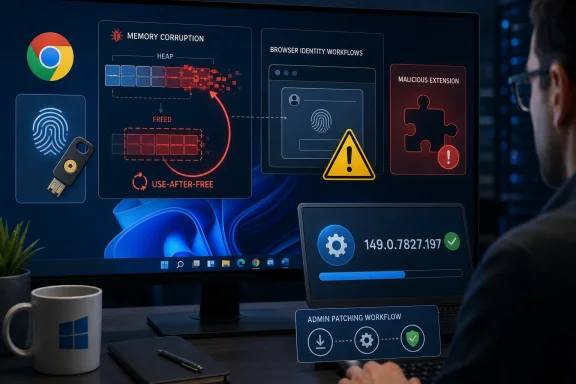
Google disclosed CVE-2026-13029 on June 24, 2026, as a high-severity use-after-free vulnerability in Chrome’s Web Authentication component affecting desktop versions before 149.0.7827.197, with exploitation requiring a user to install a malicious Chrome extension that could trigger heap corruption. The uncomfortable part is not that Chrome had another memory safety bug; that is almost the baseline condition of modern browser security. The real story is that the flaw sits where identity, extensions, and browser trust all overlap. For Windows users and administrators, this is less a “panic now” event than a reminder that browser patching and extension governance are now the same security conversation.
CVE-2026-13029 is not being described as a classic visit-a-bad-page-and-get-owned browser vulnerability. The public description says an attacker would need to convince a user to install a malicious extension, and the crafted Chrome Extension would then potentially exploit heap corruption through the Web Authentication code path. That matters because it raises the bar above casual browsing, but it does not move the issue into theoretical territory.
Extensions remain one of the browser’s most awkward trust boundaries. They are not arbitrary native executables, but they are also not just inert web pages. A user who installs the wrong extension has effectively invited third-party code into a privileged position inside the browser session, often with access to page content, identity workflows, and enterprise single sign-on activity.
The Web Authentication angle sharpens the risk. WebAuthn is the standard behind modern passkey and hardware-security-key sign-ins, the very machinery that is supposed to reduce phishing and password theft. A memory corruption flaw in that neighborhood does not mean passkeys are broken, but it does mean the browser code that brokers those trust ceremonies still has to survive the same old C++ memory hazards as everything else.
Google rated the Chromium severity as high, while CISA’s ADP scoring assigned a CVSS 3.1 base score of 7.5. NVD had not yet provided its own CVSS score at the time of the public record, and that gap is worth noting rather than smoothing over. Vulnerability databases are not simultaneous instruments; they are moving ledgers, and the first day or two of a CVE’s life often contains exactly this kind of partial enrichment.
That timing is a familiar Chrome rhythm. A bug is found or reported, access to issue details is restricted while users update, the stable build rolls out over days or weeks, and the CVE record fills in after the release train has already begun moving. From the outside, this can look like a messy sequence of blog post, CVE, NVD page, and third-party alerts. From the defender’s chair, it is simply the patch window.
The practical version number is the key detail. On Windows, systems should be on Chrome 149.0.7827.197 or later to be outside the affected range described in the CVE record. The Stable Channel advisory also lists 149.0.7827.196/197 for Windows and Mac, which can create a small amount of confusion when scanners, dashboards, and help-desk scripts compare exact strings.
That is where administrators should be careful. If a vulnerability feed says “prior to 149.0.7827.197,” treat 149.0.7827.197 as the safe target for Windows unless your tooling is explicitly accounting for Google’s split build numbering. Browser version drift is mundane until it becomes the difference between a clean compliance report and a fleet that still appears exposed.
Chrome extensions are attractive because they meet users where they already make trust decisions. A coupon helper, PDF converter, AI meeting summarizer, password-adjacent utility, crypto wallet companion, or productivity add-on can all look plausibly useful. The extension store model gives users a sense of managed safety, but it does not eliminate abuse, especially when attackers use lookalike branding, compromised developer accounts, delayed malicious behavior, or targeted distribution outside normal store discovery.
In that context, CVE-2026-13029 is a useful case study. The attacker does not merely need the browser to be old. The attacker needs an extension foothold and a vulnerable browser build, and then needs to exercise a bug in a sensitive browser subsystem. Each condition narrows the path, but defenders should want to break the chain at every link, not argue that one link is unlikely.
For home users, the answer is mostly behavioral and mechanical: update Chrome, remove extensions you do not actively use, and be skeptical of anything that asks for broad page access. For enterprises, the answer is policy: extension allowlists, blocked sideloading, managed browser settings, and telemetry that treats extension installation as a security-relevant event rather than a cosmetic preference.
This is the tension at the heart of the CVE. Passkeys and hardware security keys are sold, correctly, as a way to defeat large classes of phishing attacks. But the browser implementation that handles those flows is still software, and software accumulates the same kinds of bugs whether it is guarding a password field, rendering a canvas, parsing an image, or orchestrating a cryptographic login ceremony.
A use-after-free flaw is especially emblematic of this old problem. The program frees memory, then later uses it as though it were still valid. Under the right conditions, an attacker can turn that confusion into corruption of the heap, potentially steering execution or corrupting data structures in ways the original code never intended.
Modern Chrome has layers of mitigation, from sandboxing to exploit hardening to fuzzing and sanitizers. Those layers are why public descriptions often say “potentially” and why high severity does not automatically mean practical remote code execution on every machine. But defenders should not confuse mitigations with immunity. Browser security is built as a stack of speed bumps because the industry has learned, repeatedly, that no single barrier stays perfect.
Many Windows administrators have mature patching rituals for Windows Update, Microsoft Defender, Office, and Edge. Chrome sometimes sits in a separate lane: auto-updated for some users, packaged through endpoint management for others, frozen by line-of-business compatibility concerns in unlucky corners of the estate. That split-brain model is exactly where browser CVEs linger.
The extension story is even messier. A company may have strong controls over MSI installs and PowerShell execution while allowing users to add browser extensions with minimal review. From an attacker’s perspective, that is not a loophole; it is an invitation to pick the softer software supply chain.
Chrome Enterprise policies can restrict which extensions are allowed, force-install approved extensions, block external extension installs, and control permissions. Microsoft Intune, Group Policy, and other endpoint management tools can all play a role depending on the environment. The point is not that every organization needs a brutally locked-down browser, but that unmanaged extensions are increasingly hard to justify in any environment that also claims to take identity security seriously.
For practitioners, this is more than cosmetic. Vulnerability management systems depend on CPEs, version ranges, vendor advisories, and sometimes their own detection logic. When a browser ships multiple platform builds with slightly different version numbers, and the CVE record is still being enriched, dashboards can temporarily disagree about exposure.
The sane response is to anchor on the vendor advisory and the concrete fixed version. In this case, Chrome’s Stable Channel update is the operational source of truth for what shipped, while NVD’s record is useful for standardized tracking, CWE classification, CVSS data, and downstream scanner mapping. If those two appear to diverge in the first 48 hours, administrators should not wait for the prettiest database page before pushing the browser update.
This is also why “Are we missing a CPE?” should not be treated as a reason to ignore the CVE. A missing or awkward CPE usually means automation may be incomplete, not that the vulnerability is imaginary. When the product, affected version range, and vendor fix are all public, the patch decision is already made.
Browser vulnerabilities age quickly. Once a patch is public, attackers can study diffs, infer the bug class, and look for ways to weaponize similar paths. Google restricts bug details until most users are updated, but the existence of a fix still tells the world where to look. The clock that matters is not just publication day; it is the period after publication when unpatched machines remain common enough to reward exploit development.
The malicious-extension prerequisite also changes the likely attacker profile. This is less attractive for mass drive-by exploitation than a simple renderer bug triggered by a web page. It is more interesting for targeted campaigns, shady extension ecosystems, and scenarios where an attacker can persuade a specific user population to install a tailored add-on.
That is why high-value users deserve extra attention. Developers, finance staff, administrators, help-desk personnel, executives, and anyone with access to identity systems should not be casually installing browser add-ons. Their browser session is often a privileged console by another name.
For Windows users, Microsoft Edge is the obvious comparison. Edge uses Chromium, has its own release pipeline, and receives security fixes through Microsoft’s channels rather than Google’s Chrome installer. A Chrome CVE does not automatically prove an Edge exposure in the absence of a matching Microsoft advisory, but administrators should watch Edge versioning and vendor guidance closely whenever Chromium-level fixes land.
The same principle applies to smaller Chromium browsers, where update latency can vary. Some vendors move quickly; others lag behind the Chromium baseline. Users who choose alternative browsers for privacy, UI, or workflow reasons should remember that security patch velocity is part of the product.
This is not an argument that everyone should use Chrome. It is an argument that Chromium monoculture has operational consequences. When a memory safety fix lands upstream, every downstream browser becomes part of the same timing story until it proves otherwise.
The harder part is deciding what extension freedom should look like in 2026. The old model treated extensions as user personalization, closer to themes than software deployment. That model is no longer compatible with the permissions many extensions request or the role browsers play in identity, finance, SaaS administration, code repositories, and internal systems.
Administrators should also resist the urge to focus only on extensions labeled “malicious” after the fact. The more durable control is to reduce the population of extensions with broad permissions, unknown publishers, abandoned maintenance, or no clear business need. A clean extension inventory is not glamorous, but neither is explaining why a browser add-on had a better route into corporate identity flows than a blocked executable ever did.
For individual users, the same logic applies at human scale. If an extension can read and change data on every website, it deserves the scrutiny you would give a desktop app. If you installed it once for a single task and forgot about it, remove it. If the developer, permissions, or recent reviews look wrong, do not give it the benefit of the doubt.
This is the tradeoff of a massive, high-performance browser engine written largely in memory-unsafe languages. Chromium is not just a renderer; it is a graphics engine, application runtime, media stack, networking client, identity broker, storage layer, and extension platform. Every new capability increases the amount of code that must safely handle hostile inputs and complicated lifetimes.
Memory-safe rewrites will help over time, but they are not a magic migration switch. Browser vendors have to balance performance, compatibility, developer velocity, and security hardening across a codebase that underpins much of the modern web. In the meantime, the defensive model remains layered: find bugs early, patch quickly, restrict exploit paths, and reduce the privileges of code that users can add.
CVE-2026-13029 fits that model almost too neatly. It was caught, patched, assigned a CVE, and wrapped in a release that fixed a broader set of issues. The remaining risk lives mostly in the gap between the available patch and the machines that have not yet taken it, plus the gap between extension policy on paper and extension behavior in the wild.
 The WebAuthn Bug Is Narrower Than a Drive-By, but Not Comforting
CVE-2026-13029 is not being described as a classic visit-a-bad-page-and-get-owned browser vulnerability. The public description says an attacker would need to convince a user to install a malicious extension, and the crafted Chrome Extension would then potentially exploit heap corruption through the Web Authentication code path. That matters because it raises the bar above casual browsing, but it does not move the issue into theoretical territory.Extensions remain one of the browser’s most awkward trust boundaries. They are not arbitrary native executables, but they are also not just inert web pages. A user who installs the wrong extension has effectively invited third-party code into a privileged position inside the browser session, often with access to page content, identity workflows, and enterprise single sign-on activity.
The Web Authentication angle sharpens the risk. WebAuthn is the standard behind modern passkey and hardware-security-key sign-ins, the very machinery that is supposed to reduce phishing and password theft. A memory corruption flaw in that neighborhood does not mean passkeys are broken, but it does mean the browser code that brokers those trust ceremonies still has to survive the same old C++ memory hazards as everything else.
Google rated the Chromium severity as high, while CISA’s ADP scoring assigned a CVSS 3.1 base score of 7.5. NVD had not yet provided its own CVSS score at the time of the public record, and that gap is worth noting rather than smoothing over. Vulnerability databases are not simultaneous instruments; they are moving ledgers, and the first day or two of a CVE’s life often contains exactly this kind of partial enrichment.
Chrome 149’s Late-June Patch Was Bigger Than One CVE
The fix landed in Chrome’s June 23 Stable Channel update for desktop, which moved Windows and macOS to 149.0.7827.196/197 and Linux to 149.0.7827.196. Google said the update contained 18 security fixes, including several critical issues in WebGL, Blink interest groups, and Autofill. CVE-2026-13029 was one of the high-severity entries in that batch, reported by Google on June 8 and later published through the CVE process on June 24.That timing is a familiar Chrome rhythm. A bug is found or reported, access to issue details is restricted while users update, the stable build rolls out over days or weeks, and the CVE record fills in after the release train has already begun moving. From the outside, this can look like a messy sequence of blog post, CVE, NVD page, and third-party alerts. From the defender’s chair, it is simply the patch window.
The practical version number is the key detail. On Windows, systems should be on Chrome 149.0.7827.197 or later to be outside the affected range described in the CVE record. The Stable Channel advisory also lists 149.0.7827.196/197 for Windows and Mac, which can create a small amount of confusion when scanners, dashboards, and help-desk scripts compare exact strings.
That is where administrators should be careful. If a vulnerability feed says “prior to 149.0.7827.197,” treat 149.0.7827.197 as the safe target for Windows unless your tooling is explicitly accounting for Google’s split build numbering. Browser version drift is mundane until it becomes the difference between a clean compliance report and a fleet that still appears exposed.
The Malicious Extension Requirement Is a Mitigation, Not a Dismissal
The phrase “attacker who convinced a user to install a malicious extension” will tempt some readers to downgrade the issue in their heads. That is understandable, but it is also how extension risk keeps surviving in corporate environments. Social engineering is not an exotic condition; it is one of the most reliable exploitation primitives in the industry.Chrome extensions are attractive because they meet users where they already make trust decisions. A coupon helper, PDF converter, AI meeting summarizer, password-adjacent utility, crypto wallet companion, or productivity add-on can all look plausibly useful. The extension store model gives users a sense of managed safety, but it does not eliminate abuse, especially when attackers use lookalike branding, compromised developer accounts, delayed malicious behavior, or targeted distribution outside normal store discovery.
In that context, CVE-2026-13029 is a useful case study. The attacker does not merely need the browser to be old. The attacker needs an extension foothold and a vulnerable browser build, and then needs to exercise a bug in a sensitive browser subsystem. Each condition narrows the path, but defenders should want to break the chain at every link, not argue that one link is unlikely.
For home users, the answer is mostly behavioral and mechanical: update Chrome, remove extensions you do not actively use, and be skeptical of anything that asks for broad page access. For enterprises, the answer is policy: extension allowlists, blocked sideloading, managed browser settings, and telemetry that treats extension installation as a security-relevant event rather than a cosmetic preference.
Web Authentication Is Becoming Too Important to Treat as Plumbing
WebAuthn’s success creates its own gravity. As Microsoft, Google, Apple, and the broader identity industry push passkeys into mainstream use, the browser becomes the mediator between local authenticators, cloud identity providers, and websites asking for proof of presence or possession. That makes WebAuthn less like a feature and more like identity infrastructure.This is the tension at the heart of the CVE. Passkeys and hardware security keys are sold, correctly, as a way to defeat large classes of phishing attacks. But the browser implementation that handles those flows is still software, and software accumulates the same kinds of bugs whether it is guarding a password field, rendering a canvas, parsing an image, or orchestrating a cryptographic login ceremony.
A use-after-free flaw is especially emblematic of this old problem. The program frees memory, then later uses it as though it were still valid. Under the right conditions, an attacker can turn that confusion into corruption of the heap, potentially steering execution or corrupting data structures in ways the original code never intended.
Modern Chrome has layers of mitigation, from sandboxing to exploit hardening to fuzzing and sanitizers. Those layers are why public descriptions often say “potentially” and why high severity does not automatically mean practical remote code execution on every machine. But defenders should not confuse mitigations with immunity. Browser security is built as a stack of speed bumps because the industry has learned, repeatedly, that no single barrier stays perfect.
Windows Shops Should Read This as an Extension Governance Story
For WindowsForum readers, the Windows-specific concern is not that Chrome is uniquely fragile on Windows. The affected product is Chrome across desktop platforms, and NVD’s configuration record includes Windows, Linux, and macOS as operating environments. The Windows relevance is that Chrome is often the de facto application platform in Windows fleets, even in organizations that think of themselves as Microsoft-first shops.Many Windows administrators have mature patching rituals for Windows Update, Microsoft Defender, Office, and Edge. Chrome sometimes sits in a separate lane: auto-updated for some users, packaged through endpoint management for others, frozen by line-of-business compatibility concerns in unlucky corners of the estate. That split-brain model is exactly where browser CVEs linger.
The extension story is even messier. A company may have strong controls over MSI installs and PowerShell execution while allowing users to add browser extensions with minimal review. From an attacker’s perspective, that is not a loophole; it is an invitation to pick the softer software supply chain.
Chrome Enterprise policies can restrict which extensions are allowed, force-install approved extensions, block external extension installs, and control permissions. Microsoft Intune, Group Policy, and other endpoint management tools can all play a role depending on the environment. The point is not that every organization needs a brutally locked-down browser, but that unmanaged extensions are increasingly hard to justify in any environment that also claims to take identity security seriously.
The CPE Confusion Is a Symptom of a Bigger Vulnerability Data Problem
The user-facing NVD page asks whether a CPE is missing while also showing affected configurations in its change history. That is not as contradictory as it looks. NVD pages often have dynamic sections, delayed enrichment, and presentation quirks that do not line up cleanly with what a scanner or analyst sees in the underlying record at a particular moment.For practitioners, this is more than cosmetic. Vulnerability management systems depend on CPEs, version ranges, vendor advisories, and sometimes their own detection logic. When a browser ships multiple platform builds with slightly different version numbers, and the CVE record is still being enriched, dashboards can temporarily disagree about exposure.
The sane response is to anchor on the vendor advisory and the concrete fixed version. In this case, Chrome’s Stable Channel update is the operational source of truth for what shipped, while NVD’s record is useful for standardized tracking, CWE classification, CVSS data, and downstream scanner mapping. If those two appear to diverge in the first 48 hours, administrators should not wait for the prettiest database page before pushing the browser update.
This is also why “Are we missing a CPE?” should not be treated as a reason to ignore the CVE. A missing or awkward CPE usually means automation may be incomplete, not that the vulnerability is imaginary. When the product, affected version range, and vendor fix are all public, the patch decision is already made.
No Known Exploitation Does Not Mean No Urgency
CISA’s SSVC data for CVE-2026-13029 indicated no known exploitation at the time of its update, and the attack was marked as not automatable. That is a meaningful distinction from a Chrome zero-day already being exploited in the wild. It should shape urgency, but it should not become an excuse for drift.Browser vulnerabilities age quickly. Once a patch is public, attackers can study diffs, infer the bug class, and look for ways to weaponize similar paths. Google restricts bug details until most users are updated, but the existence of a fix still tells the world where to look. The clock that matters is not just publication day; it is the period after publication when unpatched machines remain common enough to reward exploit development.
The malicious-extension prerequisite also changes the likely attacker profile. This is less attractive for mass drive-by exploitation than a simple renderer bug triggered by a web page. It is more interesting for targeted campaigns, shady extension ecosystems, and scenarios where an attacker can persuade a specific user population to install a tailored add-on.
That is why high-value users deserve extra attention. Developers, finance staff, administrators, help-desk personnel, executives, and anyone with access to identity systems should not be casually installing browser add-ons. Their browser session is often a privileged console by another name.
Edge and Chromium-Derived Browsers Sit in the Blast Radius Conversation
CVE-2026-13029 is described against Google Chrome, but Chromium’s shared codebase always raises the next question: what about Edge, Brave, Vivaldi, Opera, and the rest of the Chromium family? The answer depends on whether the vulnerable code exists in the downstream browser, whether the feature is enabled or modified, and how quickly the vendor rebases onto the fixed Chromium build.For Windows users, Microsoft Edge is the obvious comparison. Edge uses Chromium, has its own release pipeline, and receives security fixes through Microsoft’s channels rather than Google’s Chrome installer. A Chrome CVE does not automatically prove an Edge exposure in the absence of a matching Microsoft advisory, but administrators should watch Edge versioning and vendor guidance closely whenever Chromium-level fixes land.
The same principle applies to smaller Chromium browsers, where update latency can vary. Some vendors move quickly; others lag behind the Chromium baseline. Users who choose alternative browsers for privacy, UI, or workflow reasons should remember that security patch velocity is part of the product.
This is not an argument that everyone should use Chrome. It is an argument that Chromium monoculture has operational consequences. When a memory safety fix lands upstream, every downstream browser becomes part of the same timing story until it proves otherwise.
The Patch Is Easy; The Policy Is Hard
Updating Chrome is the simple part. Open the browser’s About page, let it check for updates, restart it, and verify that the installed version is at or beyond the fixed build. In managed environments, push the update through the normal endpoint management pipeline and confirm actual installed versions rather than assuming auto-update did its job.The harder part is deciding what extension freedom should look like in 2026. The old model treated extensions as user personalization, closer to themes than software deployment. That model is no longer compatible with the permissions many extensions request or the role browsers play in identity, finance, SaaS administration, code repositories, and internal systems.
Administrators should also resist the urge to focus only on extensions labeled “malicious” after the fact. The more durable control is to reduce the population of extensions with broad permissions, unknown publishers, abandoned maintenance, or no clear business need. A clean extension inventory is not glamorous, but neither is explaining why a browser add-on had a better route into corporate identity flows than a blocked executable ever did.
For individual users, the same logic applies at human scale. If an extension can read and change data on every website, it deserves the scrutiny you would give a desktop app. If you installed it once for a single task and forgot about it, remove it. If the developer, permissions, or recent reviews look wrong, do not give it the benefit of the doubt.
Chrome’s Memory Safety Problem Is Not Going Away Overnight
Google has invested heavily in fuzzing, sanitizers, sandboxing, and newer memory safety work, and Chrome is much harder to exploit than the browsers of a decade ago. Yet the release notes keep showing use-after-free, uninitialized use, out-of-bounds access, and other memory corruption classes. CVE-2026-13029 is one entry in that longer ledger.This is the tradeoff of a massive, high-performance browser engine written largely in memory-unsafe languages. Chromium is not just a renderer; it is a graphics engine, application runtime, media stack, networking client, identity broker, storage layer, and extension platform. Every new capability increases the amount of code that must safely handle hostile inputs and complicated lifetimes.
Memory-safe rewrites will help over time, but they are not a magic migration switch. Browser vendors have to balance performance, compatibility, developer velocity, and security hardening across a codebase that underpins much of the modern web. In the meantime, the defensive model remains layered: find bugs early, patch quickly, restrict exploit paths, and reduce the privileges of code that users can add.
CVE-2026-13029 fits that model almost too neatly. It was caught, patched, assigned a CVE, and wrapped in a release that fixed a broader set of issues. The remaining risk lives mostly in the gap between the available patch and the machines that have not yet taken it, plus the gap between extension policy on paper and extension behavior in the wild.
The Concrete Read for WindowsForum Readers
This CVE is not a reason to abandon WebAuthn, passkeys, or Chrome. It is a reason to stop treating browser updates and extension installs as low-friction background noise. The browser is now a security boundary for identity, not just a window onto the web.- Chrome on Windows should be updated to 149.0.7827.197 or later to clear the affected range described for CVE-2026-13029.
- The exploit path described publicly requires a malicious Chrome extension, so extension controls are a primary mitigation rather than an optional hardening step.
- NVD’s lack of its own CVSS score at publication time does not reduce the operational need to patch, because Google’s fixed build and CISA’s high-severity scoring already establish the risk.
- Enterprises should inventory installed extensions, remove unnecessary ones, and use managed allowlists for users with access to sensitive systems.
- Users of Chromium-based browsers other than Chrome should verify their vendor’s update status instead of assuming that Chrome’s patch automatically protects them.
- No public exploitation was indicated in the available record, but unpatched browsers become more attractive after security fixes reveal where defenders have been looking.
References
- Primary source: NVD / Chromium
Published: 2026-06-26T17:46:38-07:00
NVD - CVE-2026-13029
 nvd.nist.gov
- Security advisory: MSRC
Published: 2026-06-26T17:46:38-07:00
Original feed URL
Security Update Guide - Microsoft Security Response Center
 msrc.microsoft.com
- Related coverage: synscan.net
CVE-2026-12029 — google / chrome Use After Free | SynScan
CVE-2026-12029 is a high-severity vulnerability affecting google / chrome (2026). Check if your assets are exposed with SynScan.synscan.net
