

Affected: Google Chrome versions earlier than 150.0.7871.46
Action: Update Chrome to 150.0.7871.46 or later, then relaunch it
Current public status: CISA’s SSVC record lists exploitation as none
Google Chrome versions earlier than 150.0.7871.46 contain CVE-2026-14419, a critical use-after-free vulnerability in the Skia component. According to the supplied NVD record, a remote attacker could potentially use a crafted HTML page to perform a sandbox escape.
For Windows users, check and update Chrome now:
Chrome’s advisory identifies CVE-2026-14419 as a use-after-free vulnerability in Skia. The NVD description says a remote attacker could potentially use a crafted HTML page to perform a sandbox escape in Chrome versions prior to 150.0.7871.46. Chromium assigns the vulnerability its highest security severity: Critical.
The vulnerability is categorized as CWE-416: Use After Free. In general terms, this weakness occurs when software continues to use a reference to memory after the associated object has been freed. The exact conditions and exploitation mechanics of CVE-2026-14419 are not described in the supplied public record.
The disclosure also does not provide a complete exploitation narrative. The linked Chromium issue requires permission, so the public material does not document the triggering conditions, affected code path, proof of concept, or reliability of exploitation.
It would therefore be inaccurate to present CVE-2026-14419 as a publicly documented, one-click compromise technique. It would be equally inaccurate to dismiss it as an ordinary stability bug. The supplied description explicitly identifies a potential sandbox escape resulting from a crafted HTML page.
A sandbox is intended to limit what untrusted browser content can do. A vulnerability that potentially crosses that boundary threatens a protection designed to contain damage from malicious content. That security-boundary consequence—not an unsupported claim about a specific attack chain—is the central reason to prioritize the update.
The distinction between CVSS and SSVC is especially useful. The CISA-ADP CVSS assessment describes characteristics and potential impact that result in a 9.6 Critical score. The SSVC entry separately records exploitation as none, automation as no, and technical impact as total.
Those findings are compatible. A vulnerability can carry severe potential consequences without public evidence of current exploitation. Likewise, the absence of recorded exploitation does not reduce the fixed-version boundary or eliminate the need to patch.
The precise supplied-record wording should be preserved: CISA’s SSVC record lists exploitation as none. That is narrower and more defensible than claiming that exploitation has never occurred. Public records reflect the information available to their contributors; they cannot prove the absence of private, undetected, or undisclosed activity.
Administrators do not need to declare an active attack campaign in order to accelerate remediation. The combination of Chrome’s Critical classification, a 9.6 CISA-ADP score, potential sandbox escape, and a clear fixed-version threshold is sufficient reason to move the update ahead of ordinary maintenance.
Chrome rates the vulnerability Critical. CISA-ADP gives it a Critical score of 9.6. Neither statement establishes that the flaw was exploited before the fix, that exploit code is publicly available, or that attacks have been observed.
CISA’s SSVC record lists exploitation as none. On the supplied evidence, CVE-2026-14419 should therefore not be described as a confirmed zero-day under active exploitation.
That status does not make the update optional. It changes how the issue should be communicated:
That produces a straightforward test:
Organizations should apply the same standard to managed devices. A deployment report saying that an update was assigned or delivered is not the same as evidence showing that the installed Chrome version satisfies the required threshold.
The remediation goal is measurable: every in-scope Google Chrome installation should report version 150.0.7871.46 or later.
The defensible sequence is:
For a small organization, remediation may consist of asking users to follow the About-page update procedure and confirming the resulting version. For a larger organization, the challenge is identifying and correcting every exception across offices, remote devices, update groups, virtual environments, shared systems, and test machines.
Chrome may also be installed outside the organization’s standard software catalog. Developers may use it for compatibility testing, users may install it alongside an approved browser, and support personnel may maintain multiple browsers. A query limited to centrally assigned Chrome packages may therefore undercount the installed population.
An inventory should answer three questions:
Organizations can prioritize sensitive endpoints for early verification, but the final objective should remain comprehensive. Every in-scope Chrome installation below the threshold needs an update, and every device with unknown status needs investigation.
Read by component, that assessment records:
“User interaction required” should be reported accurately without being treated as either irrelevant or a complete defense. The record identifies a crafted HTML page, but it does not describe the exact delivery method or user journey. There is no need to add speculative lists of advertisements, redirects, embedded content, or social-engineering techniques.
Likewise, low attack complexity is a CVSS category, not proof that a reliable exploit is publicly available or easy to build. The supplied record does not provide sufficient technical detail to assess exploit reliability.
The vector supports expedited patching because it combines remote reachability, no required privileges, changed scope, and high recorded impacts. It does not support claims about a currently operational exploit.
That attribution matters. Vulnerability databases can contain vendor classifications, contributor assessments, and NVD enrichment at the same time. A security product that displays every available number as an “NVD score” can conceal where the assessment originated.
An absent NVD assessment does not contradict the 9.6 CISA-ADP rating or Chrome’s Critical classification. It means only that NVD had not supplied its own CVSS assessment at the stage represented by the supplied record.
Security teams should verify how their tools handle this distinction. If a dashboard marks CVE-2026-14419 as unscored merely because an NVD-owned score is absent, it may fail to surface the available CISA-ADP assessment and Chrome severity.
A missing enrichment field should prompt review rather than an automatic downgrade. For this vulnerability, the available record already provides enough information to establish the affected product, version threshold, weakness class, potential sandbox-escape impact, Chrome severity, CISA-ADP score, and SSVC status.
Administrators can check those products through their respective vendors, but Chrome’s version boundary must not be applied to them. Google Chrome is the only formally affected product in the supplied record.
This distinction matters on Windows systems where multiple browsers may coexist. Updating one browser does not establish the status of another, even when the products share upstream technology.
Track each browser as a separate product. Use its vendor’s own affected-version and fixed-version information before declaring it vulnerable or remediated.
Restricting analysis to the available evidence does not weaken the security message. The supported facts are already serious: a Critical Chrome vulnerability, a potential sandbox escape, a 9.6 contributor score, and a clear version boundary.
That requires a short but complete loop:
CISA’s SSVC record lists exploitation as none, and that should prevent unsupported claims of an active zero-day campaign. It should not become a reason to leave a Critical browser vulnerability unpatched.
CVE-2026-14419 presents administrators with an unusually clear remediation target. The complete exploit story is not public, but the defensive action is: update Google Chrome, relaunch it, and verify that every in-scope installation has reached version 150.0.7871.46 or later.
Action: Update Chrome to 150.0.7871.46 or later, then relaunch it
Current public status: CISA’s SSVC record lists exploitation as none
Google Chrome versions earlier than 150.0.7871.46 contain CVE-2026-14419, a critical use-after-free vulnerability in the Skia component. According to the supplied NVD record, a remote attacker could potentially use a crafted HTML page to perform a sandbox escape.
For Windows users, check and update Chrome now:
- Open Chrome.
- Select the three-dot menu (⋮).
- Select Help > About Google Chrome.
- Confirm that the version is 150.0.7871.46 or later.
- Select Relaunch if prompted, then return to the About page and verify the version again.
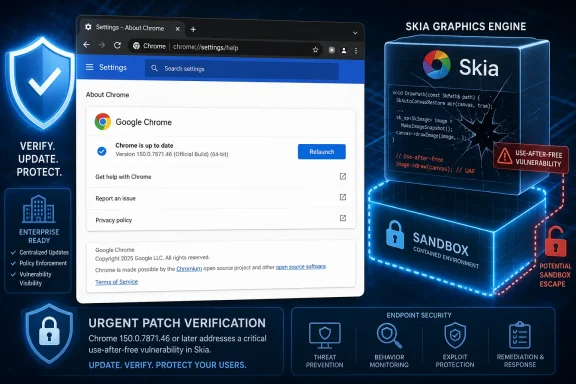 A Graphics Bug Becomes a Security-Boundary Problem
Chrome’s advisory identifies CVE-2026-14419 as a use-after-free vulnerability in Skia. The NVD description says a remote attacker could potentially use a crafted HTML page to perform a sandbox escape in Chrome versions prior to 150.0.7871.46. Chromium assigns the vulnerability its highest security severity: Critical.The vulnerability is categorized as CWE-416: Use After Free. In general terms, this weakness occurs when software continues to use a reference to memory after the associated object has been freed. The exact conditions and exploitation mechanics of CVE-2026-14419 are not described in the supplied public record.
The disclosure also does not provide a complete exploitation narrative. The linked Chromium issue requires permission, so the public material does not document the triggering conditions, affected code path, proof of concept, or reliability of exploitation.
It would therefore be inaccurate to present CVE-2026-14419 as a publicly documented, one-click compromise technique. It would be equally inaccurate to dismiss it as an ordinary stability bug. The supplied description explicitly identifies a potential sandbox escape resulting from a crafted HTML page.
A sandbox is intended to limit what untrusted browser content can do. A vulnerability that potentially crosses that boundary threatens a protection designed to contain damage from malicious content. That security-boundary consequence—not an unsupported claim about a specific attack chain—is the central reason to prioritize the update.
Assessment fact box
- Chrome severity: Critical
- CISA-ADP CVSS 3.1: 9.6, Critical
- CISA SSVC: Exploitation recorded as none; automatable recorded as no; technical impact recorded as total
- NVD assessments: NVD’s own CVSS 4.0, CVSS 3.x, and CVSS 2.0 assessments had not yet been provided in the supplied record
The Score Measures Potential Consequence, Not Current Attack Activity
Several assessment systems appear in the vulnerability record, and they answer different questions. They should not be compressed into a single claim about whether attacks are happening.| Assessment | Recorded result | What it establishes | What it does not establish |
|---|---|---|---|
| Chromium security severity | Critical | Chrome classifies the vulnerability as highly severe | It does not establish exploitation in the wild |
| CISA-ADP CVSS 3.1 | 9.6, Critical | The recorded vector describes a remotely reachable vulnerability requiring user interaction and carrying potentially high cross-boundary impact | It is not a prediction that exploitation will occur |
| CISA SSVC | Exploitation: none; automatable: no; technical impact: total | The supplied SSVC record contains those three determinations | “None” is not proof that exploitation has never occurred |
| NVD CVSS assessments | Not yet provided | NVD had not supplied its own CVSS assessments at the recorded stage | The missing NVD assessments do not erase the CISA-ADP score or Chrome’s rating |
Those findings are compatible. A vulnerability can carry severe potential consequences without public evidence of current exploitation. Likewise, the absence of recorded exploitation does not reduce the fixed-version boundary or eliminate the need to patch.
The precise supplied-record wording should be preserved: CISA’s SSVC record lists exploitation as none. That is narrower and more defensible than claiming that exploitation has never occurred. Public records reflect the information available to their contributors; they cannot prove the absence of private, undetected, or undisclosed activity.
Administrators do not need to declare an active attack campaign in order to accelerate remediation. The combination of Chrome’s Critical classification, a 9.6 CISA-ADP score, potential sandbox escape, and a clear fixed-version threshold is sufficient reason to move the update ahead of ordinary maintenance.
Critical Is Not a Synonym for Zero-Day
Security reporting often blends severity, exploitability, and observed exploitation into a single alarm label. CVE-2026-14419 demonstrates why those concepts should remain separate.Chrome rates the vulnerability Critical. CISA-ADP gives it a Critical score of 9.6. Neither statement establishes that the flaw was exploited before the fix, that exploit code is publicly available, or that attacks have been observed.
CISA’s SSVC record lists exploitation as none. On the supplied evidence, CVE-2026-14419 should therefore not be described as a confirmed zero-day under active exploitation.
That status does not make the update optional. It changes how the issue should be communicated:
- Tell users and administrators to update promptly.
- Explain that the potential impact is severe.
- Do not claim there is a known attack campaign.
- Do not claim that exploitation is impossible.
- Do not turn missing technical detail into an invented exploit narrative.
The Version Boundary Is Clearer Than the Exploit Story
The supplied NVD affected-software configuration identifies Google Chrome versions up to, but excluding, 150.0.7871.46. The CVE description likewise identifies Chrome versions prior to 150.0.7871.46 as vulnerable.That produces a straightforward test:
- A Chrome version earlier than 150.0.7871.46 falls within the affected range.
- Chrome 150.0.7871.46 or later has crossed the published fix boundary for CVE-2026-14419.
Organizations should apply the same standard to managed devices. A deployment report saying that an update was assigned or delivered is not the same as evidence showing that the installed Chrome version satisfies the required threshold.
The remediation goal is measurable: every in-scope Google Chrome installation should report version 150.0.7871.46 or later.
A Concrete Enterprise Verification Procedure
The following workflow is intentionally product-agnostic. It can be implemented in Microsoft Intune, Microsoft Configuration Manager, another endpoint-management platform, a vulnerability scanner, or an organization’s existing software-inventory system.- Create a device query for Google Chrome.
Search the endpoint inventory by the installed-product name and, where supported, by the version metadata associated with the Chrome executable. - Set the compliance condition.
Mark a device compliant only when its detected Chrome version is 150.0.7871.46 or later. Do not use “update deployed,” “installation successful,” or “policy received” as the final compliance test. - Export the initial affected-device list.
Record the device name, assigned user, detected Chrome version, last inventory time, and management status. Separate devices below the threshold from devices that have not reported recently. - Deploy or accelerate the approved Chrome update.
Use the organization’s existing software-deployment mechanism, but target the concrete version condition rather than relying on a general instruction to keep browsers current. - Tell users to relaunch Chrome.
Provide the exact path: ⋮ > Help > About Google Chrome, followed by Relaunch if prompted. - Run a fresh inventory scan after deployment.
Query the installed Chrome version again. The verification result must show 150.0.7871.46 or later. - Create an exception report.
List every device that remains below the threshold, reports no readable version, has not checked in, or failed the deployment. Assign each exception an owner and remediation deadline. - Perform a user-visible spot check.
On a representative sample of Windows endpoints, open Help > About Google Chrome and compare the displayed version with the management platform’s inventory result. Investigate any discrepancy before declaring the deployment complete. - Recheck special-purpose systems separately.
Include kiosks, shared workstations, virtual desktops, test machines, and golden images if Google Chrome is installed on them. - Close the task only on version evidence.
Remediation is complete when the endpoint inventory—and spot checks where required—shows Chrome 150.0.7871.46 or later across the in-scope population.
Record Timeline
The supplied record shows the vulnerability information developing through several stages, but the available material does not support publishing the previously listed July 2026 dates and timestamps. Those unsupported dates should not be used.The defensible sequence is:
- Chrome submitted the CVE information identifying CVE-2026-14419, the CWE-416 classification, the affected-version boundary, the Chrome release advisory, and the permission-restricted Chromium issue.
- CISA-ADP supplied the CVSS 3.1 vector and 9.6 Critical score.
- The SSVC record listed exploitation as none, automatable as no, and technical impact as total.
- NVD added the Google Chrome affected-software configuration covering versions up to, but excluding, 150.0.7871.46.
- NVD’s own CVSS assessments remained unavailable in the supplied record.
Enterprise Risk Lives in the Installed Base
The operational risk from CVE-2026-14419 depends on how many Chrome installations remain below the fixed-version threshold.For a small organization, remediation may consist of asking users to follow the About-page update procedure and confirming the resulting version. For a larger organization, the challenge is identifying and correcting every exception across offices, remote devices, update groups, virtual environments, shared systems, and test machines.
Chrome may also be installed outside the organization’s standard software catalog. Developers may use it for compatibility testing, users may install it alongside an approved browser, and support personnel may maintain multiple browsers. A query limited to centrally assigned Chrome packages may therefore undercount the installed population.
An inventory should answer three questions:
- Where is Google Chrome installed?
- Which detected installations are earlier than 150.0.7871.46?
- Which devices lack sufficiently recent inventory information to establish their status?
Organizations can prioritize sensitive endpoints for early verification, but the final objective should remain comprehensive. Every in-scope Chrome installation below the threshold needs an update, and every device with unknown status needs investigation.
Action checklist for Windows administrators
- [ ] Inventory Google Chrome across managed Windows endpoints.
- [ ] Identify every version earlier than 150.0.7871.46.
- [ ] Mark devices with stale or missing inventory as unknown rather than compliant.
- [ ] Deploy or accelerate the approved Chrome update.
- [ ] Instruct users to open ⋮ > Help > About Google Chrome.
- [ ] Require users to select Relaunch if prompted.
- [ ] Run a new inventory scan after the update.
- [ ] Verify that detected versions are 150.0.7871.46 or later.
- [ ] Spot-check the About page on representative endpoints.
- [ ] Investigate deployment failures and version discrepancies.
- [ ] Check kiosks, shared PCs, virtual desktops, test systems, and golden images.
- [ ] Record temporary exceptions, their owners, and their remediation deadlines.
- [ ] Close the incident only after version-based verification.
What the CVSS Vector Says
The CISA-ADP record supplies the vectorCVSS:3.1/AV:N/AC:L/PR:N/UI:R/S:C/C:H/I:H/A:H.Read by component, that assessment records:
- AV:N — Network attack vector
- AC:L — Low attack complexity
- PR:N — No privileges required
- UI:R — User interaction required
- S:C — Changed scope
- C:H — High confidentiality impact
- I:H — High integrity impact
- A:H — High availability impact
“User interaction required” should be reported accurately without being treated as either irrelevant or a complete defense. The record identifies a crafted HTML page, but it does not describe the exact delivery method or user journey. There is no need to add speculative lists of advertisements, redirects, embedded content, or social-engineering techniques.
Likewise, low attack complexity is a CVSS category, not proof that a reliable exploit is publicly available or easy to build. The supplied record does not provide sufficient technical detail to assess exploit reliability.
The vector supports expedited patching because it combines remote reachability, no required privileges, changed scope, and high recorded impacts. It does not support claims about a currently operational exploit.
NVD’s Missing Score Is Not a Downgrade
The supplied NVD material states that NVD assessments had not yet been provided under CVSS 4.0, CVSS 3.x, or CVSS 2.0. The 9.6 score displayed in the record comes from CISA-ADP rather than an NVD-owned calculation.That attribution matters. Vulnerability databases can contain vendor classifications, contributor assessments, and NVD enrichment at the same time. A security product that displays every available number as an “NVD score” can conceal where the assessment originated.
An absent NVD assessment does not contradict the 9.6 CISA-ADP rating or Chrome’s Critical classification. It means only that NVD had not supplied its own CVSS assessment at the stage represented by the supplied record.
Security teams should verify how their tools handle this distinction. If a dashboard marks CVE-2026-14419 as unscored merely because an NVD-owned score is absent, it may fail to surface the available CISA-ADP assessment and Chrome severity.
A missing enrichment field should prompt review rather than an automatic downgrade. For this vulnerability, the available record already provides enough information to establish the affected product, version threshold, weakness class, potential sandbox-escape impact, Chrome severity, CISA-ADP score, and SSVC status.
The Supplied Record Formally Identifies Google Chrome
The affected-software information supplied for CVE-2026-14419 identifies Google Chrome. It should not be extrapolated into unsupported fixed-version claims for Microsoft Edge, Brave, Vivaldi, Opera, embedded Chromium products, or other software that may use related components.Administrators can check those products through their respective vendors, but Chrome’s version boundary must not be applied to them. Google Chrome is the only formally affected product in the supplied record.
This distinction matters on Windows systems where multiple browsers may coexist. Updating one browser does not establish the status of another, even when the products share upstream technology.
Track each browser as a separate product. Use its vendor’s own affected-version and fixed-version information before declaring it vulnerable or remediated.
What the Public Disclosure Does—and Does Not—Support
The public record supports the following statements:- CVE-2026-14419 is a use-after-free vulnerability categorized as CWE-416.
- The affected component is identified as Skia.
- Google Chrome versions earlier than 150.0.7871.46 are affected.
- A remote attacker could potentially use a crafted HTML page to perform a sandbox escape.
- Chrome rates the vulnerability Critical.
- CISA-ADP assigns a CVSS 3.1 score of 9.6 Critical.
- CISA’s SSVC record lists exploitation as none.
- The SSVC record lists automatable as no and technical impact as total.
- NVD had not supplied its own CVSS assessments in the provided record.
- The linked Chromium issue requires permission.
Restricting analysis to the available evidence does not weaken the security message. The supported facts are already serious: a Critical Chrome vulnerability, a potential sandbox escape, a 9.6 contributor score, and a clear version boundary.
Closing the Patch Loop
The conventional patch workflow should not end when a deployment system reports success. It should end when the organization can demonstrate that affected Google Chrome installations are no longer below 150.0.7871.46.That requires a short but complete loop:
- Discover Chrome installations.
- Compare their versions with 150.0.7871.46.
- Deploy the approved update.
- Tell users to relaunch Chrome when prompted.
- Collect fresh version information.
- Investigate every failed, stale, or unknown result.
- Document completion using version evidence.
CISA’s SSVC record lists exploitation as none, and that should prevent unsupported claims of an active zero-day campaign. It should not become a reason to leave a Critical browser vulnerability unpatched.
CVE-2026-14419 presents administrators with an unusually clear remediation target. The complete exploit story is not public, but the defensive action is: update Google Chrome, relaunch it, and verify that every in-scope installation has reached version 150.0.7871.46 or later.
References
- Primary source: NVD / Chromium
Published: 2026-07-11T15:38:08-07:00
NVD - CVE-2026-14419
 nvd.nist.gov
- Security advisory: MSRC
Published: 2026-07-11T15:38:08-07:00
Original feed URL
Security Update Guide - Microsoft Security Response Center
 msrc.microsoft.com
- Related coverage: security.snyk.io
Use After Free in chromium | CVE-2026-14419 | Snyk
Use After Free in chromium | CVE-2026-14419security.snyk.io
