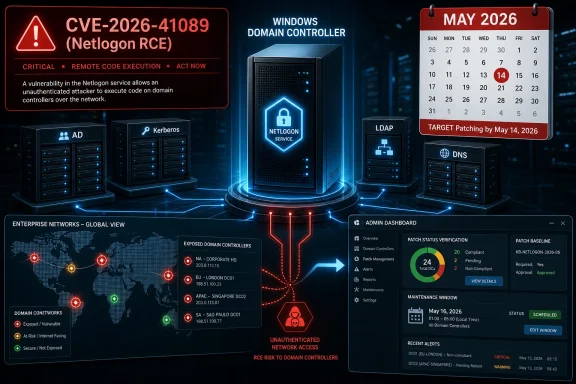
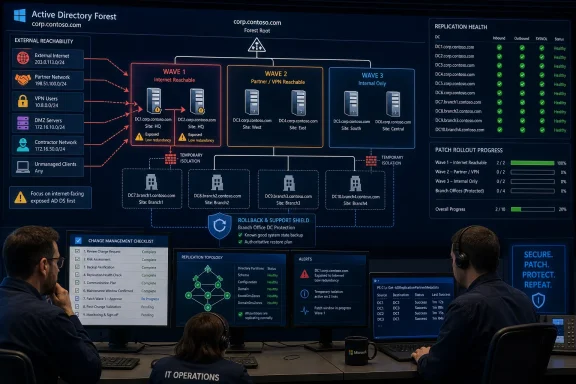
Patch CVE-2026-41089 first on any domain controller that is reachable from outside the tightly controlled server networks you trust: internet-facing paths, partner routes, broad VPN pools, lab networks, DMZ routes, contractor networks, unmanaged client networks, or legacy firewall exceptions. Next patch branch-office and low-redundancy domain controllers where a bad reboot or failed update could strand users. Then complete the remaining domain controllers in the forest during the same approved remediation campaign. The supported remediation described in the WindowsForum coverage is Microsoft’s May 2026 security update path for CVE-2026-41089, so the practical fix is not a registry toggle or firewall-only workaround; it is getting the relevant Windows Server updates onto domain controllers in a defensible order.
If a high-risk domain controller cannot be patched immediately, isolate its reachability as much as possible and escalate for same-day change approval rather than letting it fall back into the next routine maintenance window.
CVE-2026-41089 is a Microsoft-disclosed Windows Netlogon remote code execution vulnerability affecting domain controllers, and WindowsForum’s own user reports have consistently treated it as a domain-controller-first patching problem. That is the spine of the response: do not patch by convenience, server name, or asset count. Patch by reachability, operational fragility, and forest completion.
The wrong first question is “How many domain controllers do we have?” The better question is “Which domain controllers can be reached from networks where compromise, unmanaged devices, or third-party access are realistic?”
That question must be concrete. Do not rely on labels such as “perimeter-adjacent” or “less trusted” unless they map to a routing or firewall test. For this rollout, a domain controller is higher priority if any of the following are true:
The first wave should therefore be small, aggressive, and exposure-driven. Patch the domain controllers with the broadest reach before you patch the neatest redundant pair simply because those servers are easier to reboot.
The table should not replace engineering judgment. It should end the unproductive argument about whether “all DCs are critical.” They are. The order still matters.
Minimum checks:
But “domain controllers first” is only the first decision. The second decision is how to sequence the domain controllers themselves. A domain controller reachable from a broad VPN pool is not in the same risk position as a redundant internal DC reachable only from tightly controlled subnets. A single branch-office DC that users depend on locally is not in the same operational position as one member of a healthy datacenter cluster.
That is why the plan must combine two dimensions:
WindowsForum’s other security threads reinforce the same operational pattern. The LSASS denial-of-service discussion around CVE-2025-53716 focused attention on domain-controller availability. The NTFS remote code execution reports for CVE-2026-20922 and CVE-2026-20840 emphasized using Microsoft advisory metadata to guide patch planning. Older WindowsForum bulletin coverage, including SMB Server and Remote Desktop issues, shows the recurring lesson: when a Windows vulnerability touches core infrastructure or widely reachable services, patch order matters as much as patch intent.
Do not turn those precedents into theater. The useful takeaway is simple: when identity infrastructure is in scope, move fast, but move in an order that matches reachability and resilience.
For this patch cycle, “internal only” should mean all of the following are true:
This is not semantic hair-splitting. It is the difference between a useful patch queue and a comforting label. A domain controller reachable only from tightly controlled server subnets should be patched, but it does not outrank one reachable through a broad VPN or legacy partner route. A lab DC isolated from production can wait until production risk is handled; a lab DC bridged into daily-use networks cannot.
That clarity helps with change control. The emergency change record should say:
The phrase same change cycle should be understood as an operational inference from the supported remediation posture: once the organization has mobilized for this CVE, the remaining domain controllers should be completed during the same approved remediation campaign rather than deferred indefinitely. It should not be presented as a separate Microsoft-specific deadline unless your own change record or advisory source says so.
If a site has multiple healthy domain controllers, patch one, reboot, verify, and move to the next. Confirm replication, authentication, DNS, and SYSVOL/NETLOGON health between steps. Do not patch all DCs in the same site simultaneously unless you have a very specific reason and a tested recovery plan.
If a domain controller is unique to a site, the preparation burden rises. That DC may need extra communication, local support, and a cleaner rollback plan. But uniqueness does not mean “wait until next month.” In a Netlogon RCE patch campaign, uniqueness means “patch carefully and soon.”
Branch-office systems deserve special attention because they combine operational fragility with weaker observability. They may be less exposed than a broadly reachable VPN-connected DC, but they are often harder to recover when something goes wrong. That is why they sit immediately after the highest-reachability systems in the decision table.
The worst interpretation of redundancy is “we have several domain controllers, so we can wait.” The correct interpretation is “we have enough domain controllers to roll this update safely now.”
After each patched DC returns, confirm:
This verification step is where many emergency rollouts fail. Installing the update is not the finish line. A domain controller that patched but did not resume replication cleanly is not a clean success. A DC that patched but left a branch without DNS is not a clean success. The runbook must include proof that identity services returned.
Reasonable short-term containment may include:
For CVE-2026-41089, the better posture is to treat the forest as one remediation campaign:
The supported remediation basis is the Microsoft May 2026 update path described in WindowsForum’s CVE-2026-41089 coverage. The same change cycle language should be treated as a practical operational target: finish while the organization is already mobilized, while exceptions are visible, and while security and infrastructure teams are still aligned.
But the article does not need another long explanation of why domain controllers matter. Administrators already know. The actionable issue is sequencing.
Patch the DCs that are reachable from riskier networks. Patch the DCs that are operationally fragile. Patch the rest before attention dissipates. Verify after every wave. Record the exceptions. Finish the forest.
Use concrete tests, not adjectives. Can VPN clients reach the DC? Can partner networks reach it? Can lab systems route to it? Is it the only DC in a site? Does it hold FSMO roles? Has it rebooted recently? Is replication healthy? Those answers determine the order.
WindowsForum’s CVE-2026-41089 reports, alongside its recurring coverage of LSASS, NTFS, SMB, and Remote Desktop security issues, point to the same practical lesson: when Windows identity or core infrastructure is implicated, patching is not just about installing an update. It is about knowing which systems are exposed, which systems are fragile, and how to close the campaign without leaving a quiet tail of vulnerable servers.
Patch exposed DCs now. Verify them. Patch fragile DCs next. Verify them. Patch the rest. Finish the forest.
If a high-risk domain controller cannot be patched immediately, isolate its reachability as much as possible and escalate for same-day change approval rather than letting it fall back into the next routine maintenance window.
CVE-2026-41089 is a Microsoft-disclosed Windows Netlogon remote code execution vulnerability affecting domain controllers, and WindowsForum’s own user reports have consistently treated it as a domain-controller-first patching problem. That is the spine of the response: do not patch by convenience, server name, or asset count. Patch by reachability, operational fragility, and forest completion.
 The Patch Queue Starts With Reachability, Not With Asset Count
The wrong first question is “How many domain controllers do we have?” The better question is “Which domain controllers can be reached from networks where compromise, unmanaged devices, or third-party access are realistic?”That question must be concrete. Do not rely on labels such as “perimeter-adjacent” or “less trusted” unless they map to a routing or firewall test. For this rollout, a domain controller is higher priority if any of the following are true:
- A device outside controlled server subnets can initiate traffic to it.
- A VPN client pool can reach it directly or through broad internal routing.
- A partner, vendor, contractor, lab, or acquired-network segment can reach it.
- A DMZ, jump host, monitoring network, management subnet, or legacy application path can reach it.
- Firewall rules allow more than the minimum expected domain-controller traffic from broad client or semi-managed networks.
The first wave should therefore be small, aggressive, and exposure-driven. Patch the domain controllers with the broadest reach before you patch the neatest redundant pair simply because those servers are easier to reboot.
Decision Table: Which DC Goes First?
Use this as the bridge-call version of the plan. It is intentionally compact.| Domain controller type | Concrete test | Action |
|---|---|---|
| Exposed DC | Reachable from internet-connected paths, partner routes, broad VPN pools, lab networks, DMZ routes, unmanaged client networks, contractor networks, or legacy firewall exceptions. | Patch in wave 1. If patching is blocked, immediately restrict reachability and escalate for same-day emergency approval. |
| Branch-office DC | Serves a remote site where WAN loss, local authentication dependency, or limited hands-on support would make recovery harder. | Patch after the highest-reachability DCs, with local support and rollback expectations ready. Do not bury it in the long tail. |
| Low-redundancy DC | Unique DC in a site, only Global Catalog locally, only DNS source locally, or one of very few DCs supporting a critical location or workload. | Patch in wave 2 with extra preflight checks. Confirm replication, backups, FSMO placement, and reboot history first. |
| Redundant internal DC | Reachable only from controlled internal server/client networks, with healthy replication and other DCs available for the same site or service role. | Patch in rolling waves after exposed and fragile systems. Do not defer beyond the same approved remediation campaign. |
| Isolated lab DC | No route from production, VPN pools, partner networks, unmanaged clients, or internet-connected paths; disposable or clearly separated test environment. | Patch after production risk is handled, but still update. If the lab is bridged into daily-use networks, treat it as exposed or semi-exposed instead. |
Operational Checks Before Touching the First DC
Before installing the update on the first domain controller, perform a short preflight. Keep it disciplined. The goal is enough confidence to patch safely, not a month-long Active Directory assessment.Minimum checks:
- Replication health
- Confirm inbound and outbound replication are healthy enough for a rolling update.
- Look for lingering replication failures, stale partners, or site links that are already broken.
- Do not start with a domain controller that is already in an unknown replication state unless that is the only high-risk system and leadership accepts the risk.
- FSMO role placement
- Identify which domain controllers hold FSMO roles.
- Know whether the first patch wave includes a role holder.
- If a role holder must be patched early because it is exposed, patch deliberately and verify role availability after reboot.
- Last reboot and pending reboot state
- Check when the DC last rebooted.
- Confirm whether previous updates, driver changes, or servicing operations already require a reboot.
- A domain controller that has not rebooted in a long time may carry hidden restart risk; that does not justify indefinite delay, but it does justify closer monitoring.
- Unique-to-site status
- Identify whether the DC is the only domain controller in its site.
- Check whether it is the only local DNS server, Global Catalog, authentication point, or practical domain controller for branch workloads.
- If it is unique, prepare support coverage before rebooting it.
- Backup and recovery expectations
- Confirm that system-state or equivalent recovery expectations are understood.
- Know whether the plan is restore, rebuild, metadata cleanup, or replacement if the DC fails badly.
- Do not discover during the emergency that nobody knows how the domain controller would be recovered.
- Authentication and dependent services
- Identify obvious services that bind to that DC by name or IP.
- Watch for hard-coded LDAP, DNS, Kerberos, RADIUS, certificate, file, print, or application dependencies.
- Notify the help desk and service owners for the highest-risk waves.
Short Runbook: From Panic to Order
Use this runbook for the actual rollout.- Identify all domain controllers
- Pull the list from Active Directory, configuration management, monitoring, and any separate lab or branch inventories.
- Include read-only domain controllers if present.
- Include domain controllers in child domains and separate forests if they are part of the organization’s real identity estate.
- Rank by reachability
- Put first any DC reachable from external, partner, VPN, lab, DMZ, contractor, unmanaged-client, or legacy-routed networks.
- Validate with firewall rules, routing tables, VPN ACLs, network diagrams, and, where appropriate, controlled connectivity tests.
- Replace vague labels with evidence: “VPN pool A can reach TCP/UDP paths to DC3” is useful; “semi-trusted” is not.
- Mark fragility
- Flag branch-office DCs.
- Flag unique-to-site DCs.
- Flag DCs holding FSMO roles.
- Flag DCs with poor reboot history, older hardware, known storage risk, or limited local support.
- Flag DCs that are the only DNS or Global Catalog option for a location.
- Patch wave 1
- Patch the exposed or broadly reachable domain controllers first.
- Roll one at a time where redundancy allows.
- Reboot as required by the update process.
- If a high-risk DC cannot be patched immediately, restrict network reachability and escalate for same-day change approval.
- Verify authentication and replication
- Confirm the patched DC returns to service.
- Confirm replication resumes.
- Confirm authentication, DNS, SYSVOL/NETLOGON availability, and dependent service health.
- Check event logs and monitoring before moving to the next DC.
- Patch wave 2
- Patch branch-office and low-redundancy domain controllers.
- Use extra care for unique-to-site systems.
- Coordinate local support or remote hands where needed.
- Verify site authentication and local service dependencies before leaving the site.
- Complete the forest
- Patch remaining redundant internal domain controllers.
- Keep the timeline compressed within the same approved remediation campaign.
- Do not let “the riskiest DCs are done” become a reason to leave a vulnerable long tail.
- Record completion
- Document each DC, patch status, reboot status, verification result, and exception.
- Track temporary network restrictions separately so they are not mistaken for permanent remediation.
- Report completion in terms leadership can understand: exposed DCs done, fragile DCs done, remaining forest done.
Use WindowsForum’s Pattern: DCs First, Then Sequence Inside the DC Tier
WindowsForum’s CVE-2026-41089 coverage has not treated this as a generic Windows patching story. The user reports frame it as a Netlogon remote code execution issue where domain controllers carry the operational risk and should be patched first. That is the correct starting point.But “domain controllers first” is only the first decision. The second decision is how to sequence the domain controllers themselves. A domain controller reachable from a broad VPN pool is not in the same risk position as a redundant internal DC reachable only from tightly controlled subnets. A single branch-office DC that users depend on locally is not in the same operational position as one member of a healthy datacenter cluster.
That is why the plan must combine two dimensions:
- Exploitability pressure: who can reach the DC?
- Operational fragility: what breaks if the DC reboots badly or stays down?
WindowsForum’s other security threads reinforce the same operational pattern. The LSASS denial-of-service discussion around CVE-2025-53716 focused attention on domain-controller availability. The NTFS remote code execution reports for CVE-2026-20922 and CVE-2026-20840 emphasized using Microsoft advisory metadata to guide patch planning. Older WindowsForum bulletin coverage, including SMB Server and Remote Desktop issues, shows the recurring lesson: when a Windows vulnerability touches core infrastructure or widely reachable services, patch order matters as much as patch intent.
Do not turn those precedents into theater. The useful takeaway is simple: when identity infrastructure is in scope, move fast, but move in an order that matches reachability and resilience.
Remove Ambiguity From “Internal Only”
Many administrators will say their domain controllers are internal only. Sometimes that is accurate. Sometimes it is an outdated diagram masquerading as a control.For this patch cycle, “internal only” should mean all of the following are true:
- No direct internet-originated path reaches the DC.
- No partner, vendor, contractor, or third-party route reaches the DC.
- VPN client pools do not have broad reach to the DC beyond necessary paths.
- Lab networks, test networks, and acquired-company networks cannot reach it unless intentionally controlled.
- DMZ systems and jump hosts cannot use overly broad rules to reach it.
- Client networks with unmanaged or weakly managed devices do not have unnecessary reachability.
- Firewall rules and routing tables confirm the claim.
This is not semantic hair-splitting. It is the difference between a useful patch queue and a comforting label. A domain controller reachable only from tightly controlled server subnets should be patched, but it does not outrank one reachable through a broad VPN or legacy partner route. A lab DC isolated from production can wait until production risk is handled; a lab DC bridged into daily-use networks cannot.
The May 2026 Update Path Should Simplify Escalation
The WindowsForum CVE-2026-41089 reports describe the remediation in terms of Microsoft’s May 2026 security update path. Treat that as the supported remediation basis for escalation: the organization is not being asked to approve an experimental workaround. It is being asked to approve the vendor update path for a Netlogon remote code execution vulnerability affecting domain controllers.That clarity helps with change control. The emergency change record should say:
- Which domain controllers are in wave 1 and why.
- Which DCs are branch-office or low-redundancy systems.
- Which DCs hold FSMO roles.
- Which DCs are unique to a site.
- What validation will be performed after each reboot.
- What temporary reachability restrictions will be used if immediate patching is blocked.
- When the remaining forest will be completed.
The phrase same change cycle should be understood as an operational inference from the supported remediation posture: once the organization has mobilized for this CVE, the remaining domain controllers should be completed during the same approved remediation campaign rather than deferred indefinitely. It should not be presented as a separate Microsoft-specific deadline unless your own change record or advisory source says so.
Redundancy Changes the Rollout, Not the Need to Patch
Redundancy is not a reason to relax. It is a tool for moving faster with fewer mistakes.If a site has multiple healthy domain controllers, patch one, reboot, verify, and move to the next. Confirm replication, authentication, DNS, and SYSVOL/NETLOGON health between steps. Do not patch all DCs in the same site simultaneously unless you have a very specific reason and a tested recovery plan.
If a domain controller is unique to a site, the preparation burden rises. That DC may need extra communication, local support, and a cleaner rollback plan. But uniqueness does not mean “wait until next month.” In a Netlogon RCE patch campaign, uniqueness means “patch carefully and soon.”
Branch-office systems deserve special attention because they combine operational fragility with weaker observability. They may be less exposed than a broadly reachable VPN-connected DC, but they are often harder to recover when something goes wrong. That is why they sit immediately after the highest-reachability systems in the decision table.
The worst interpretation of redundancy is “we have several domain controllers, so we can wait.” The correct interpretation is “we have enough domain controllers to roll this update safely now.”
What Verification Should Look Like After Each Wave
Verification should be short, repeatable, and written down before the first reboot.After each patched DC returns, confirm:
- The server is reachable on expected management paths.
- Core AD services are running.
- DNS responds if the DC provides DNS.
- SYSVOL and NETLOGON shares are available.
- Replication succeeds with expected partners.
- Authentication works for representative users and services.
- Event logs do not show obvious post-update directory, DNS, Kerberos, Netlogon, or replication failures.
- Monitoring shows the DC as healthy.
- No branch or application team is reporting authentication failures tied to that DC.
This verification step is where many emergency rollouts fail. Installing the update is not the finish line. A domain controller that patched but did not resume replication cleanly is not a clean success. A DC that patched but left a branch without DNS is not a clean success. The runbook must include proof that identity services returned.
Do Not Let Temporary Isolation Become the Fix
Network isolation can reduce immediate exposure when patching is blocked, but it is not the supported remediation for CVE-2026-41089 as framed in the WindowsForum May 2026 coverage. Use isolation to buy hours, not weeks.Reasonable short-term containment may include:
- Removing broad VPN reachability to a DC.
- Tightening partner or vendor routes.
- Blocking lab-to-production paths.
- Restricting DMZ systems from reaching DCs except where explicitly required.
- Removing stale firewall rules that allow unnecessary domain-controller access.
- Forcing administrative access through controlled jump paths.
The Long Tail Is the Enemy
A common failure mode in emergency patching is the heroic first wave followed by silence. The exposed domain controllers get fixed, the bridge call closes, and the remaining DCs drift back into routine maintenance. That leaves a vulnerable long tail.For CVE-2026-41089, the better posture is to treat the forest as one remediation campaign:
- Wave 1: highest-reachability domain controllers.
- Wave 2: branch-office and low-redundancy domain controllers.
- Wave 3: remaining redundant internal domain controllers.
- Closure: documented verification and exception handling.
The supported remediation basis is the Microsoft May 2026 update path described in WindowsForum’s CVE-2026-41089 coverage. The same change cycle language should be treated as a practical operational target: finish while the organization is already mobilized, while exceptions are visible, and while security and infrastructure teams are still aligned.
The Decision Tree for CVE-2026-41089 Belongs on the Wall
If the team needs a yes/no decision tree, use this:- Can the DC be reached from external, partner, VPN, lab, DMZ, contractor, unmanaged-client, or legacy-routed networks?
- Yes: patch in wave 1.
- No: continue.
- Is the DC unique to a site or low redundancy for authentication, DNS, Global Catalog, or local workloads?
- Yes: patch in wave 2 with extra preflight and support coverage.
- No: continue.
- Is it a branch-office DC with limited local support or weak recovery options?
- Yes: patch in wave 2.
- No: continue.
- Is it a redundant internal DC with healthy replication and alternate DCs available?
- Yes: patch in rolling internal waves after exposed and fragile systems.
- No: investigate before placing it late in the queue.
- Is it an isolated lab DC?
- If truly isolated from production, patch after production risk is handled.
- If bridged to production, VPN, daily-use clients, or partner networks, reclassify it by reachability.
- Is patching blocked for a high-risk DC?
- Restrict reachability immediately.
- Escalate for same-day change approval.
- Track the exception until the update is installed and verified.
Why This Is an Identity-Infrastructure Patch, Not Routine Server Hygiene
The contextual point is brief but important: Netlogon on a domain controller is close to the authentication fabric of a Windows environment. That is why WindowsForum’s CVE-2026-41089 user reports emphasize domain controllers rather than treating this as one more Windows Server update. A compromised or unstable domain controller can affect far more than the individual server.But the article does not need another long explanation of why domain controllers matter. Administrators already know. The actionable issue is sequencing.
Patch the DCs that are reachable from riskier networks. Patch the DCs that are operationally fragile. Patch the rest before attention dissipates. Verify after every wave. Record the exceptions. Finish the forest.
Frequently Asked Questions
Should workstations or member servers be patched before domain controllers?
For this CVE-2026-41089 response, WindowsForum’s user reports point to a domain-controller-first posture because the vulnerability concerns Netlogon remote code execution affecting domain controllers. Follow your broader enterprise patch process for the rest of Windows, but do not let workstation or member-server scheduling delay DC remediation.Does “domain controllers first” mean all DCs at the same time?
No. It means domain controllers are the priority tier. Inside that tier, patch by reachability and operational fragility. Exposed or broadly reachable DCs go first, branch-office and low-redundancy DCs go next, and redundant internal DCs follow in rolling waves.What if a domain controller is “internal only”?
Verify the claim. Check routing, firewall rules, VPN ACLs, partner links, lab connectivity, DMZ paths, and unmanaged client reachability. If broad client, VPN, lab, partner, or legacy routes can reach the DC, do not treat it as low priority merely because it is not internet-facing.What should we check before patching a DC?
At minimum, check replication health, FSMO role placement, last reboot or pending reboot state, whether the DC is unique to a site, backup and recovery expectations, and obvious authentication or DNS dependencies. Keep the checks short and operational.What if the DC holds FSMO roles?
Do not panic, but do not patch blindly. Identify the roles, confirm the DC’s health, patch deliberately, reboot as required, and verify role availability and directory health afterward. If it is also exposed, it may still belong in wave 1.What if a branch office has only one domain controller?
Treat it as low redundancy. Patch it promptly, but with more preparation: confirm replication, notify local stakeholders, ensure remote access or local support is available, and verify authentication and DNS after reboot.Can firewall restrictions replace the update?
No. Temporary reachability restrictions can reduce immediate risk if patching is blocked, but they should buy time for the update, not replace it. The supported remediation path described in the WindowsForum CVE-2026-41089 coverage is the Microsoft May 2026 security update path or later updates that include the fix.What does “same change cycle” mean here?
It means the remaining domain controllers should be completed during the same approved remediation campaign once the organization has mobilized for CVE-2026-41089. It is an operational target to avoid a vulnerable long tail, not a separate unsupported claim about a vendor deadline.How do we handle isolated lab domain controllers?
If the lab is genuinely isolated from production, VPN pools, partner networks, and daily-use unmanaged clients, patch it after production risk is handled. If it is bridged into production or reachable from ordinary user networks, classify it by reachability and patch it earlier.What should be documented?
Document every domain controller, its reachability category, redundancy status, FSMO role status, site uniqueness, patch wave, reboot result, verification result, and any temporary reachability restrictions. Exceptions should have owners and deadlines.Final Operating Guidance
For CVE-2026-41089, do not overthink the first move. Patch domain controllers first. Within that set, patch the domain controllers that real network paths expose to higher-risk sources. Then patch the branch-office and low-redundancy systems that could create local outages if handled casually. Then finish the remaining domain controllers in the forest during the same remediation campaign.Use concrete tests, not adjectives. Can VPN clients reach the DC? Can partner networks reach it? Can lab systems route to it? Is it the only DC in a site? Does it hold FSMO roles? Has it rebooted recently? Is replication healthy? Those answers determine the order.
WindowsForum’s CVE-2026-41089 reports, alongside its recurring coverage of LSASS, NTFS, SMB, and Remote Desktop security issues, point to the same practical lesson: when Windows identity or core infrastructure is implicated, patching is not just about installing an update. It is about knowing which systems are exposed, which systems are fragile, and how to close the campaign without leaving a quiet tail of vulnerable servers.
Patch exposed DCs now. Verify them. Patch fragile DCs next. Verify them. Patch the rest. Finish the forest.
References
- Primary source: learn.microsoft.com
- Independent coverage: support.microsoft.com
- Independent coverage: msrc.microsoft.com
Security Update Guide - Microsoft Security Response Center
 msrc.microsoft.com
- Primary source: WindowsForum
CVE-2026-41089 Netlogon RCE: Why Windows Domain Controllers Must Patch First | Windows Forum
CVE-2026-41089 is a Microsoft-disclosed Windows Netlogon remote code execution vulnerability published in the Security Update Guide on May 12, 2026...windowsforum.com