

Microsoft’s Medium Rating Hides a Very Human Failure Mode
The CVSS vector tells the story in compressed form: network attack, low complexity, no privileges required, user interaction required, unchanged scope, low confidentiality impact, low integrity impact, and no availability impact. Translated into plain English, an attacker does not need access to the victim’s machine or account, but the victim does need to open or interact with attacker-controlled content. The result is a browser interface that can make a hostile or deceptive page appear more trustworthy than it is.
That is why the listed impact is “spoofing,” not “information disclosure” or “remote code execution,” even though the CVSS metrics include limited confidentiality and integrity consequences. Spoofing is the mechanism. The loss of confidentiality and integrity is what can follow when a user believes the spoof.
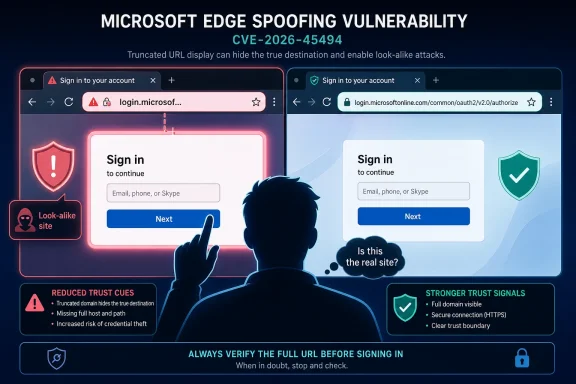
In this case, the issue described around Edge’s tab-splitting behavior is especially awkward because it sits in the browser chrome — the part of the user interface people are trained to trust. When a split-tab address bar shows only a domain prefix rather than the full URL, it reduces the amount of identity information visible at precisely the moment the browser is asking the user to judge legitimacy.
The security impact, then, is phishing enablement. An attacker could craft a domain or page presentation that looks close enough to a trusted site to fool a user, especially in a split-screen scenario where the full address is not immediately visible. The vulnerability does not have to break encryption or defeat authentication to be useful; it only has to make the browser’s trust cues less reliable.
The Address Bar Is a Security Boundary, Even When Vendors Treat It Like a Design Surface
Modern browsers have spent years simplifying the address bar. Paths disappear, protocols are hidden, visual noise is reduced, and the user is nudged toward recognizing a site by its registrable domain rather than by a long string of characters. Much of that is defensible. A full URL can be unreadable to normal users, and attackers have long exploited that complexity with nested paths, misleading subdomains, and percent-encoded junk.
But simplification has a cost. The address bar is not just a navigation widget; it is one of the few remaining security indicators that users can inspect without opening developer tools or certificate details. When a browser chooses to show less of a URL, it is making a judgment about what information is safe to omit.
CVE-2026-45494 shows how that judgment can become brittle in newer interaction models. Split tabs, sidebar browsing, mobile-style compact layouts, vertical tabs, app-like web experiences, and AI-assisted browsing all push browsers toward smaller, cleaner interfaces. Each shrinkage raises the same question: what disappears when space gets tight?
In a spoofing bug, the answer can be trust. If the browser presents a partial identity cue that is easy to mimic, the attacker does not need to compromise the real site. They only need a convincing enough imitation, helped along by a user interface that withholds the distinguishing details.
This Is Not a System Compromise, and That Distinction Matters
Administrators should not read CVE-2026-45494 as a machine-takeover vulnerability. The availability metric is none, and there is no indication that exploitation crashes Edge, installs malware by itself, escapes the sandbox, or executes arbitrary code. A fully patched operating system could still be exposed to the social-engineering path if the browser version is vulnerable and the user lands on the wrong content.
That distinction is important because patch triage depends on the shape of harm. A remote code execution flaw in the browser engine deserves emergency handling because merely rendering content can become a beachhead. A spoofing flaw deserves a different response: patch promptly, warn users about suspicious sign-in prompts, and pay special attention to environments where web authentication and browser trust cues carry business-critical weight.
The CVSS “low” confidentiality and integrity ratings also deserve unpacking. “Low” does not mean “irrelevant.” It means the expected impact is limited rather than total: some information may be disclosed, and some data or user decisions may be altered, but the vulnerability is not rated as enabling wholesale compromise of all browser data or system state.
In the real world, however, a “low” confidentiality impact can still be painful. If a spoofed page convinces a user to enter a password, approve a prompt, paste a token, or download a file, the downstream incident can become much larger than the CVE score suggests. CVSS measures the vulnerability’s direct technical impact, not every consequence of a successful phishing campaign built around it.
Split-Screen Browsing Makes Old Phishing Tricks Feel New Again
The interesting part of this vulnerability is not that attackers might mimic trusted domains. That is as old as the commercial web. The interesting part is that a browser feature intended to improve multitasking can change how users evaluate trust.
Split-tab browsing encourages comparison. A user might keep a bank, dashboard, documentation page, or email tab open beside another site. That side-by-side model feels productive, but it also introduces new interface constraints: narrower panes, shortened labels, condensed address bars, and less room for context.
Attackers thrive in constrained context. A full desktop browser window may reveal a suspicious subdomain, an odd path, or a misleading top-level domain. A compact split view may show only the portion that looks familiar. If the browser displays a domain prefix rather than the full URL, a malicious site can lean into that truncation.
The risk is especially acute for lookalike naming. A user who would hesitate at a full URL might be reassured by a visible fragment that resembles a trusted brand. That is not because users are foolish; it is because the browser has made the decision harder while preserving the illusion that enough information is being shown.
The Attacker Still Needs the User, Which Is Both Comforting and Dangerous
The user-interaction requirement is the main reason this is not a top-tier emergency for most fleets. An attacker must persuade the victim to visit a page, open a link, or otherwise engage with content. That requirement gives defenders room to work: filtering, safe links, user training, conditional access, and browser patching all reduce the odds of success.
But user interaction is not much of a barrier in phishing. Email, messaging platforms, poisoned search results, compromised ad networks, QR codes, helpdesk impersonation, and fake collaboration invites are all built around getting users to click. A vulnerability that improves the credibility of the landing page can be valuable even if it does nothing until the user arrives.
This is why spoofing bugs should not be dismissed as “just UI.” Browser UI is part of the authentication ceremony between user and site. If the ceremony can be staged dishonestly, attackers gain leverage over decisions that security teams cannot fully automate away.
The threat model is particularly relevant for organizations that rely heavily on web-based single sign-on. If users are accustomed to seeing Microsoft 365, Okta, Google Workspace, banking portals, internal dashboards, or SaaS admin panels in the browser, then a more convincing fake page becomes a meaningful risk. The vulnerability does not need to defeat SSO; it only needs to get a user to interact with an imitation.
The Patch Is Simple; the Lesson Is Not
For users, the immediate answer is straightforward: update Edge to a fixed version. The affected range reported for the vulnerability is below 148.0.3967.70, so any managed environment still holding Edge behind that level should treat the browser update as a security fix rather than a cosmetic release. Edge’s rapid update model helps here, but it also creates a familiar enterprise problem: browser patching is only automatic until policy, testing, compatibility holds, or offline devices get in the way.
For administrators, the better question is whether browser update compliance is measured with the same seriousness as Windows cumulative updates. Many organizations have mature operating-system patch dashboards but weaker visibility into browser versions, especially across BYOD, VDI, kiosk systems, shared workstations, and mobile devices. Edge is now infrastructure. Treating it as a bundled accessory is an outdated habit.
There is also a policy lesson. Enterprises that disable or restrict experimental browsing features may reduce exposure to UI-specific flaws, but blanket feature suppression is rarely sustainable. Users want multitasking features, vendors ship them quickly, and attackers look for edge cases in the space between usability and assurance.
The more durable control is layered defense. Keep Edge current, enforce phishing-resistant MFA where possible, train users not to rely on partial address-bar cues, and monitor for credential submission to suspicious domains. None of these controls is glamorous, but spoofing vulnerabilities are rarely beaten by one dramatic fix.
Browser Chrome Has Become Part of the Attack Surface
The old mental model divided browser security into content and chrome. Web pages were dangerous; browser interface was trusted. The browser sandbox, origin policy, URL bar, permission prompts, certificate indicators, and download warnings all existed to keep that distinction intelligible.
That line has blurred. Browsers now translate pages, summarize pages, split pages, install pages as apps, isolate profiles, broker identity, store passkeys, sync sessions, and mediate payments. The browser chrome is no longer a static frame around the web. It is an active product surface, and every product surface can have security bugs.
CVE-2026-45494 belongs to that modern class of vulnerability. It is not about corrupting memory in a rendering engine. It is about the browser presenting identity information in a way that can be abused. That makes it less cinematic but more philosophically important.
Security teams have spent years teaching users to “check the address bar.” That advice was always incomplete, but it had a kernel of truth. If the address bar itself becomes context-dependent, truncated, or misleading under certain layouts, the advice needs updating. Users cannot verify what the browser does not show them.
Why the CVSS Score Does Not Capture the Whole Business Risk
A 5.4 medium score is reasonable on paper. The attack is remote, easy to stage, and does not require privileges, but it requires user interaction and has limited direct technical impact. That is exactly the kind of vulnerability CVSS tends to place in the middle.
The business risk can still be higher in certain environments. A managed service provider, helpdesk team, finance department, developer organization, or cloud administrator may use browser-based workflows where a single mistaken trust decision has outsized consequences. A spoofed admin portal does not need to compromise every Edge user to matter; it only needs one privileged user at the wrong moment.
The vulnerability also intersects with a broader shift in identity security. As organizations move more authentication into the browser, the browser becomes the place where users approve device joins, grant OAuth consent, accept conditional access prompts, and interact with password managers. Spoofing that context can create openings that look “low impact” in vulnerability math and much less low impact in an incident report.
That does not mean CVE-2026-45494 should trigger panic. It means the patching priority should be informed by user role and exposure. A lab machine used for casual browsing is not the same as a workstation used for privileged SaaS administration.
Microsoft’s Disclosure Leaves the Right Kind of Ambiguity
Microsoft’s advisory gives the essentials: the product, the severity, the CVSS vector, the affected versions, and the patched release. It does not provide a step-by-step exploit recipe, and that restraint is appropriate for a phishing-adjacent browser issue. Too much detail would help attackers reproduce the deception faster than defenders could use it.
The user-supplied description fills in the likely practical concern: Edge’s tab-splitting address bars showing only a domain prefix rather than the full URL. If that behavior is the exploitable condition, the bug is a reminder that browser security is not only about cryptographic correctness. A page can be served over HTTPS and still be malicious. A domain can look familiar and still be wrong. A user interface can be clean and still be unsafe.
There is an uncomfortable design tradeoff here. Full URLs are not automatically safer if users cannot parse them, but partial URLs are not automatically safer if attackers can choose the visible part. Browser vendors have tried to solve phishing by emphasizing the registrable domain, but that approach depends on getting the displayed identity exactly right.
In split views, the browser has fewer pixels and the user has less patience. That is where product design and security engineering collide. CVE-2026-45494 suggests the collision produced a patchable mistake.
The Real Fix Is Teaching Users to Distrust Pretty Context
The right user guidance is not “never use split tabs.” That would be unrealistic, and it would miss the point. The better guidance is to treat compact browser layouts as lower-context environments, especially when entering credentials or approving sensitive actions.
If a page asks for a password, payment detail, recovery code, MFA approval, OAuth consent, or administrative change, users should expand the tab, inspect the full address, and preferably navigate from a known bookmark or typed address rather than a link. That is not perfect security advice, but it moves the decision back into a context where more information is visible.
For organizations, this is another argument for phishing-resistant authentication. Passkeys, FIDO2 keys, and well-configured conditional access do not make spoofing irrelevant, but they reduce the value of a fake login page. If a user cannot hand over a reusable password, the attacker’s payoff drops.
Password managers can also help, provided users understand their signals. A password manager that refuses to autofill on the wrong domain is a better trust indicator than a truncated address bar. But that protection fails if users manually copy credentials into a page because it “looks right.”
The Edge Patch Belongs in the Same Conversation as Identity Hygiene
The most practical response is a combination of browser update enforcement and phishing resistance. Edge should be brought to the fixed channel, and administrators should verify version compliance rather than assuming it happened. That is the easy half.
The harder half is reducing the blast radius of deception. Spoofing vulnerabilities exploit the gap between what a user sees and what is true. Organizations close that gap with stronger authentication, safer defaults, domain monitoring, better reporting flows, and security tooling that treats suspicious web destinations as part of identity defense.
This is where home users and enterprises diverge. A home user should update Edge and be cautious with sign-in pages opened from links. An enterprise should do that too, but also check whether browser updates are blocked by policy, whether risky users have phishing-resistant MFA, and whether security teams can detect credential submissions to lookalike domains.
The vulnerability’s “no availability impact” rating may tempt some teams to defer it. That would be a mistake if the environment has high-value browser workflows. Availability is not the only thing worth protecting; trust is also a production dependency.
The Patch Note Says Medium, but the Browser Is Where Trust Happens
The concrete answer to the impact question is that CVE-2026-45494 can enable phishing or deception by allowing Microsoft Edge’s interface to misrepresent, truncate, or inadequately display the true URL context in split-tab browsing. A successful attacker could cause a user to trust a malicious page, leading to limited disclosure of sensitive information or limited unauthorized actions. It does not directly crash the browser, deny service, or provide code execution.
That answer is tidy, but the implication is broader. Browser vendors have spent years turning the web browser into the operating surface for work. When the browser gets identity presentation wrong, the effect is not confined to browsing; it touches authentication, SaaS administration, payments, messaging, and collaboration.
For WindowsForum readers, the lesson is practical rather than abstract. Edge is not just “the browser that comes with Windows.” It is a security boundary that ships continuously, changes interface behavior frequently, and increasingly mediates access to everything else.
What Edge Users Should Do Before the Next Clever URL Trick
CVE-2026-45494 is manageable, but it rewards the organizations that already treat browsers as first-class security assets. The patch closes the known hole; the habits around it determine whether the next spoofing bug has room to work.
- Update Microsoft Edge to version 148.0.3967.70 or later, and verify the installed version on managed and unmanaged devices.
- Treat split-tab and compact browser views as reduced-context modes when signing in, approving prompts, or entering sensitive information.
- Avoid relying on a visible domain fragment as proof that a page is legitimate, especially when arriving from email, chat, search ads, or QR codes.
- Prefer bookmarks, typed addresses, and password-manager autofill behavior over links embedded in unexpected messages.
- Use phishing-resistant MFA for privileged and high-risk accounts so that a convincing fake page cannot easily capture reusable credentials.
- Monitor for lookalike domains and suspicious credential submissions, because spoofing flaws become more dangerous when paired with targeted phishing.
The useful way to think about CVE-2026-45494 is not as a catastrophic Edge failure, but as a warning about where browser security is moving. As Microsoft, Google, Apple, and others keep compressing more work into cleaner browser interfaces, the industry will keep rediscovering that every removed character, hidden path, and simplified trust cue is a security decision. The next generation of browser vulnerabilities may not always break the sandbox; some will simply make the wrong page look right at exactly the wrong time.