CVE-2026-48574 is a Microsoft-tracked Windows Media remote code execution vulnerability disclosed through the Microsoft Security Response Center, affecting Windows media-handling components and carrying enough vendor-confirmed detail to merit prompt patching by Windows users and administrators as of June 2026. The important story is not merely that another RCE has appeared in Windows. It is that media parsing remains one of the operating system’s most stubbornly dangerous attack surfaces: ubiquitous, user-facing, difficult to inventory, and often underestimated because it hides behind ordinary files. Microsoft’s own framing around confidence and technical detail is a reminder that security teams must judge not only severity, but also how much attackers can plausibly learn from the public record.
Microsoft’s Security Response Center entry for CVE-2026-48574 does what modern vulnerability advisories often do: it confirms the existence of a real flaw, names the affected technology family, classifies the impact, and stops short of publishing the kind of implementation-level detail that would turn a patch note into a recipe. That restraint is not evasiveness. It is the operating model of large-vendor disclosure in 2026.
For defenders, the confidence metric attached to this kind of advisory matters because it separates rumor from operational fact. A vulnerability whispered about on social media may be interesting; a vulnerability acknowledged by the vendor of the affected component becomes a patch-management event. Once Microsoft assigns a CVE, ships guidance, and places the issue in its update ecosystem, the existence question is effectively settled.
The narrower question is how much defenders can infer from the sparse wording. “Windows Media Remote Code Execution Vulnerability” tells us the affected class of functionality and the worst-case impact. It does not, by itself, tell us whether exploitation requires a malicious media file, a preview operation, a network stream, a browser handoff, a specific codec path, or interaction with a legacy component still present for compatibility.
That gap is exactly where mature vulnerability management differs from panic. The absence of public exploit code is not the same as safety. The absence of root-cause detail is not the same as uncertainty about whether the bug exists. Microsoft is saying enough to make patching necessary, while withholding enough to avoid accelerating attackers who are already diffing updates.
Media parsers have to accept complicated, sometimes malformed input from untrusted sources. They support containers, codecs, metadata, thumbnails, streams, subtitles, digital rights management hooks, and a long tail of historical formats that enterprises may still encounter in training libraries, archives, surveillance exports, marketing assets, and line-of-business workflows. Every layer that improves compatibility can become another layer that has to be memory-safe, bounds-checked, and hardened against adversarial input.
The phrase remote code execution can be misleading in this context. It does not always mean an attacker can point a packet at a Windows machine and seize control with no user involvement. In media-handling bugs, “remote” often reflects the origin of the malicious content rather than a wormable network service. A user may still need to open a file, browse a folder, load a preview, receive a crafted attachment, or interact with a page that triggers media processing.
That distinction matters, but it should not be comforting. Modern phishing and collaboration workflows are built around getting users to open or preview files. A bug that requires convincing someone to handle a media object is still a serious enterprise risk when email, Teams, SharePoint, browsers, help-desk tickets, and cloud storage all normalize the exchange of untrusted content.
At one end of the spectrum are vague advisories, proof-of-concept claims, or third-party reports where the impact is suspected but the mechanism remains cloudy. In the middle are issues corroborated by researchers, crash traces, exploit attempts, or reverse-engineering hints. At the far end are vulnerabilities acknowledged by the vendor, patched in supported products, and assigned a stable identifier in the public vulnerability ecosystem.
CVE-2026-48574 belongs in the category administrators have to treat as real. Microsoft’s acknowledgement does not mean every technical detail is public. It means the vendor has accepted the report, attached it to Windows Media, and placed it in the servicing stream. For IT operations, that is enough to move the issue out of the “watch” column and into the “remediate” column.
The second half of the metric is just as important: it gestures at how much technical knowledge would-be attackers may already possess. A public advisory with minimal detail gives attackers less help than a full root-cause write-up, but patch release itself changes the equation. Once updates are available, attackers can compare patched and unpatched binaries, identify changed functions, and work backward toward exploitability.
That is why the first days after Patch Tuesday can be more dangerous than the days before it for organizations that delay. Public details may be limited, but the patch becomes a map. In the Windows ecosystem, where many endpoints lag behind update availability, attackers do not need Microsoft to publish a full exploit narrative. They need only enough time, enough targets, and enough diffing skill.
For CVE-2026-48574, the Windows Media label strongly suggests defenders should think in terms of content handling rather than exposed server ports. That does not make it trivial. Content-handling vulnerabilities are often ideal for targeted intrusion because they fit naturally into social engineering: a “video,” “recording,” “webinar clip,” “training asset,” “meeting capture,” or “case evidence” can look plausible in almost any workplace.
Windows has spent years reducing the blast radius of these bugs through mitigations such as Control Flow Guard, sandboxing in some application contexts, exploit protection, attachment marking, Protected View-style workflows in Office, SmartScreen reputation checks, and broader memory-corruption hardening. But media components are frequently invoked by many host applications, and not all paths benefit from the same containment. The same malformed content may be inert in one application and dangerous in another.
Administrators should therefore resist the temptation to ask only, “Is this being exploited in the wild?” That is a useful question, but not the first one. The better first question is, “Where in our environment can untrusted media be parsed before we have a chance to inspect it?” That includes mail clients, web browsers, file preview panes, collaboration platforms, virtual desktop images, media-heavy departments, and any workflow where users receive files from outside the organization.
Windows cumulative updates make the process messier than a single-library patch, but not impossible. Attackers can look for changes in media-related DLLs, codec components, file parsers, metadata handlers, or framework interfaces. They can correlate changed functions with crashable input patterns and then test whether the pre-patch path can be driven through common user workflows.
The operational lesson is uncomfortable but simple. If an organization waits for public exploit code before treating a vendor-confirmed RCE as urgent, it is granting attackers the exact window they need to convert a patched bug into a working exploit. The more widely deployed the affected component, the more economically attractive that research becomes.
Media vulnerabilities are especially attractive because they can be delivered through channels users already trust. A malicious file does not need to announce itself as software. It can arrive as evidence, training material, a promotional clip, a voicemail export, a customer attachment, or a project asset. The exploit path hides behind the mundane.
The bigger consumer problem is not lack of guidance, but alert fatigue. Windows users are told every month to patch something called remote code execution, elevation of privilege, spoofing, information disclosure, or security feature bypass. The terminology becomes wallpaper. “Windows Media RCE” may sound like another abstract entry in an endless table.
It is not abstract if the exploit can be triggered through ordinary content. Media files carry an aura of harmlessness that executable files no longer have. Users know not to run random
Microsoft’s platform defenses help, but they do not absolve users from caution. SmartScreen, Defender, reputation services, and browser isolation are meaningful layers, not magic walls. The safest consumer posture remains the dull one: patch quickly, distrust unsolicited files, and treat media from unknown senders as active content rather than passive entertainment.
A design studio that exchanges large volumes of video with external clients has a different exposure profile than a finance department that rarely handles media. A school district with student-submitted video projects has a different risk profile from a locked-down call center. A legal team reviewing discovery material, a newsroom receiving source footage, a police unit handling exported surveillance clips, and a healthcare provider receiving imaging-adjacent media all have reasons to process untrusted content.
Those workflows deserve temporary compensating controls while updates roll out. That might mean routing unfamiliar media through cloud detonation, disabling preview behavior where practical, limiting automatic thumbnail generation in high-risk repositories, warning users in exposed departments, or using isolated workstations for especially risky content. None of this replaces patching. It buys down risk during the deployment window.
The inventory challenge is also broader than “Windows 11 laptops.” Windows Server systems may not look like media consumers, but server images often contain desktop experience components, remote desktop hosts, application servers, or automation workflows that handle user-uploaded content. Virtual desktop infrastructure can be particularly exposed because it centralizes user interaction while encouraging broad file access from managed environments.
The point is not to overstate CVE-2026-48574 into an existential crisis. It is to avoid understating it because “media” sounds consumer-grade. In enterprise Windows, media handling is everywhere users are.
The modern workplace has trained users to open files from strangers if those strangers appear in the right context. Applicants send resumes and portfolios. Customers send screenshots and recordings. Vendors send demos. Employees share meeting captures. Students upload assignments. Contractors exchange assets. The attack surface is social as much as technical.
A Windows Media RCE fits neatly into this environment. The attacker does not need to persuade a user to run a program; they need to persuade a user or application to process media. Depending on the affected path, that processing might occur through opening, previewing, indexing, thumbnailing, or rendering. Defenders should not assume the only dangerous action is double-clicking a file in Windows Media Player.
That uncertainty is precisely why Microsoft’s limited public detail creates a defensive tension. Publishing exact trigger conditions would help administrators write precise mitigations, but it would also help attackers. In the absence of that precision, organizations should assume multiple media-handling paths may be relevant until the patch is deployed and validated.
A well-run Windows update program already has rings: early test devices, pilot users, broad deployment, exception handling, and compliance reporting. A media RCE should move briskly through that structure, especially on endpoints used for email, browsing, collaboration, and external file intake. The goal is not reckless overnight patching of every machine. The goal is to prevent “routine monthly update” from becoming “we will get to it next quarter.”
The hard cases are predictable. Kiosks, lab machines, shared workstations, VDI pools, offline systems, production-adjacent PCs, and vendor-managed endpoints tend to fall behind. So do machines owned by departments that can veto reboots but not explain their security exposure. Those are the places attackers rely on.
Administrators should also verify that security tools are not merely reporting update approval, but actual installation. A patch approved in WSUS, Intune, Configuration Manager, or another management plane is not a patch applied. Compliance dashboards should be checked against device reality, especially for laptops that sleep through maintenance windows or live outside the corporate network.
That does not mean legacy support is reckless. It means legacy support expands the obligation to harden old code against new attack techniques. A media component written for a more trusting era may now process content from hostile sources at internet scale. Even if the component has been refactored, wrapped, or mitigated, its fundamental job remains risky: parse complex input and turn it into something the system can render.
Security-minded organizations should use vulnerabilities like CVE-2026-48574 as prompts to examine whether they actually need the media capabilities exposed in their environments. Some systems do. Others retain them accidentally because default images are broad, application dependencies are poorly understood, or nobody wants to own the regression testing required to remove features.
Hardening Windows is often less about dramatic lockdowns than about reducing accidental attack surface. If a server does not need to process media, it should not be encouraged to do so. If a department handles risky content, it should do so in a controlled workflow. If preview features create exposure without meaningful productivity gains, they deserve scrutiny.
Microsoft’s approach to CVE-2026-48574 sits in the uneasy middle. The company identifies the affected area and impact, offers patching through its normal channels, and frames confidence in a way that indicates the vulnerability is credible. It does not appear, from the public-facing advisory posture, to be handing over the vulnerable function, file format nuance, or exploit constraints in plain text.
That leaves room for frustration. Security teams want to know whether blocking a file extension helps, whether disabling a preview handler matters, whether Server Core is affected, whether certain Windows versions are more exposed, and whether exploit attempts have been observed. Some of that information may be present in the full update guide fields or product tables, but the broader pattern remains: defenders often get just enough to act, not enough to feel fully informed.
The correct response is to separate decisions that require precision from decisions that do not. Patching a vendor-confirmed Windows Media RCE does not require knowing the exact vulnerable code path. Designing a temporary exception or compensating control may require more nuance, and that is where administrators should lean on Microsoft’s product-specific guidance, telemetry from endpoint tools, and vendor support channels.
The last mile is operational. Are devices patched? Are risky workflows isolated? Are users warned in language that matches their work? Are exceptions tracked? Are unmanaged machines visible? Are security controls actually turned on, or merely licensed? These questions decide whether a vulnerability becomes a contained maintenance item or an incident report.
This is especially true for Windows enthusiasts and IT pros who manage mixed environments. A home lab, a small business, or a lightly managed nonprofit may not have enterprise-grade patch orchestration. But the same principles apply: know which machines process untrusted content, patch them first, and do not confuse “I have automatic updates enabled” with “every machine is current.”
Security culture often overvalues novelty. The most useful response to a Windows Media RCE is not novel. It is disciplined patching, realistic workflow analysis, and a refusal to let sparse public details become an excuse for delay.
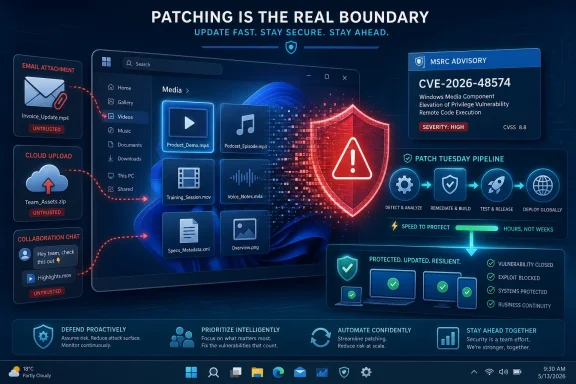 Microsoft’s Quiet Confirmation Is the Loudest Signal
Microsoft’s Security Response Center entry for CVE-2026-48574 does what modern vulnerability advisories often do: it confirms the existence of a real flaw, names the affected technology family, classifies the impact, and stops short of publishing the kind of implementation-level detail that would turn a patch note into a recipe. That restraint is not evasiveness. It is the operating model of large-vendor disclosure in 2026.For defenders, the confidence metric attached to this kind of advisory matters because it separates rumor from operational fact. A vulnerability whispered about on social media may be interesting; a vulnerability acknowledged by the vendor of the affected component becomes a patch-management event. Once Microsoft assigns a CVE, ships guidance, and places the issue in its update ecosystem, the existence question is effectively settled.
The narrower question is how much defenders can infer from the sparse wording. “Windows Media Remote Code Execution Vulnerability” tells us the affected class of functionality and the worst-case impact. It does not, by itself, tell us whether exploitation requires a malicious media file, a preview operation, a network stream, a browser handoff, a specific codec path, or interaction with a legacy component still present for compatibility.
That gap is exactly where mature vulnerability management differs from panic. The absence of public exploit code is not the same as safety. The absence of root-cause detail is not the same as uncertainty about whether the bug exists. Microsoft is saying enough to make patching necessary, while withholding enough to avoid accelerating attackers who are already diffing updates.
Media Bugs Have Always Been Windows’ Soft Underbelly
Windows Media vulnerabilities occupy a peculiar place in the Windows security landscape. They are not as glamorous as kernel privilege escalations, as institutionally terrifying as domain controller bugs, or as headline-friendly as browser zero-days. Yet they sit at the intersection of user behavior, legacy compatibility, file parsing, and automatic handling — a place where many real-world compromises begin.Media parsers have to accept complicated, sometimes malformed input from untrusted sources. They support containers, codecs, metadata, thumbnails, streams, subtitles, digital rights management hooks, and a long tail of historical formats that enterprises may still encounter in training libraries, archives, surveillance exports, marketing assets, and line-of-business workflows. Every layer that improves compatibility can become another layer that has to be memory-safe, bounds-checked, and hardened against adversarial input.
The phrase remote code execution can be misleading in this context. It does not always mean an attacker can point a packet at a Windows machine and seize control with no user involvement. In media-handling bugs, “remote” often reflects the origin of the malicious content rather than a wormable network service. A user may still need to open a file, browse a folder, load a preview, receive a crafted attachment, or interact with a page that triggers media processing.
That distinction matters, but it should not be comforting. Modern phishing and collaboration workflows are built around getting users to open or preview files. A bug that requires convincing someone to handle a media object is still a serious enterprise risk when email, Teams, SharePoint, browsers, help-desk tickets, and cloud storage all normalize the exchange of untrusted content.
The Confidence Metric Tells Defenders How Much Smoke Is Already Fire
The user-supplied MSRC text describes a metric that measures confidence in the existence of the vulnerability and the credibility of known technical details. That language is unusually useful because it captures a truth security teams live with every month: not all CVEs arrive with the same evidentiary weight.At one end of the spectrum are vague advisories, proof-of-concept claims, or third-party reports where the impact is suspected but the mechanism remains cloudy. In the middle are issues corroborated by researchers, crash traces, exploit attempts, or reverse-engineering hints. At the far end are vulnerabilities acknowledged by the vendor, patched in supported products, and assigned a stable identifier in the public vulnerability ecosystem.
CVE-2026-48574 belongs in the category administrators have to treat as real. Microsoft’s acknowledgement does not mean every technical detail is public. It means the vendor has accepted the report, attached it to Windows Media, and placed it in the servicing stream. For IT operations, that is enough to move the issue out of the “watch” column and into the “remediate” column.
The second half of the metric is just as important: it gestures at how much technical knowledge would-be attackers may already possess. A public advisory with minimal detail gives attackers less help than a full root-cause write-up, but patch release itself changes the equation. Once updates are available, attackers can compare patched and unpatched binaries, identify changed functions, and work backward toward exploitability.
That is why the first days after Patch Tuesday can be more dangerous than the days before it for organizations that delay. Public details may be limited, but the patch becomes a map. In the Windows ecosystem, where many endpoints lag behind update availability, attackers do not need Microsoft to publish a full exploit narrative. They need only enough time, enough targets, and enough diffing skill.
Remote Code Execution Is a Category, Not a Single Threat Model
One of the recurring mistakes in enterprise risk discussions is treating RCE as a uniform category. It is not. A wormable pre-authentication network RCE against a default-enabled service is a different animal from a file-parsing RCE that requires user interaction. Both can be serious, but they demand different controls, different timelines, and different communications to leadership.For CVE-2026-48574, the Windows Media label strongly suggests defenders should think in terms of content handling rather than exposed server ports. That does not make it trivial. Content-handling vulnerabilities are often ideal for targeted intrusion because they fit naturally into social engineering: a “video,” “recording,” “webinar clip,” “training asset,” “meeting capture,” or “case evidence” can look plausible in almost any workplace.
Windows has spent years reducing the blast radius of these bugs through mitigations such as Control Flow Guard, sandboxing in some application contexts, exploit protection, attachment marking, Protected View-style workflows in Office, SmartScreen reputation checks, and broader memory-corruption hardening. But media components are frequently invoked by many host applications, and not all paths benefit from the same containment. The same malformed content may be inert in one application and dangerous in another.
Administrators should therefore resist the temptation to ask only, “Is this being exploited in the wild?” That is a useful question, but not the first one. The better first question is, “Where in our environment can untrusted media be parsed before we have a chance to inspect it?” That includes mail clients, web browsers, file preview panes, collaboration platforms, virtual desktop images, media-heavy departments, and any workflow where users receive files from outside the organization.
Patch Diffing Turns Sparse Advisories Into Attacker Homework
Microsoft’s sparse wording limits immediate copycat exploitation, but it cannot prevent determined reverse engineering. Once a cumulative update ships, a skilled attacker can compare old and new versions of relevant binaries, identify changed code paths, and narrow the search for the vulnerable condition. This is not theoretical; it is a normal part of both defensive research and offensive tradecraft.Windows cumulative updates make the process messier than a single-library patch, but not impossible. Attackers can look for changes in media-related DLLs, codec components, file parsers, metadata handlers, or framework interfaces. They can correlate changed functions with crashable input patterns and then test whether the pre-patch path can be driven through common user workflows.
The operational lesson is uncomfortable but simple. If an organization waits for public exploit code before treating a vendor-confirmed RCE as urgent, it is granting attackers the exact window they need to convert a patched bug into a working exploit. The more widely deployed the affected component, the more economically attractive that research becomes.
Media vulnerabilities are especially attractive because they can be delivered through channels users already trust. A malicious file does not need to announce itself as software. It can arrive as evidence, training material, a promotional clip, a voicemail export, a customer attachment, or a project asset. The exploit path hides behind the mundane.
The Consumer Risk Is Boring, Which Makes It Dangerous
For home users, the right answer is mostly unglamorous: install the update, keep Windows Update enabled, and avoid opening unexpected media files. That advice sounds generic because the best defense against this class of vulnerability often is generic. The exploit depends on reaching vulnerable code; patching removes or narrows that path.The bigger consumer problem is not lack of guidance, but alert fatigue. Windows users are told every month to patch something called remote code execution, elevation of privilege, spoofing, information disclosure, or security feature bypass. The terminology becomes wallpaper. “Windows Media RCE” may sound like another abstract entry in an endless table.
It is not abstract if the exploit can be triggered through ordinary content. Media files carry an aura of harmlessness that executable files no longer have. Users know not to run random
.exe attachments. They are less conditioned to distrust a clip, a recording, or a file that appears to be view-only.Microsoft’s platform defenses help, but they do not absolve users from caution. SmartScreen, Defender, reputation services, and browser isolation are meaningful layers, not magic walls. The safest consumer posture remains the dull one: patch quickly, distrust unsolicited files, and treat media from unknown senders as active content rather than passive entertainment.
Enterprise IT Should Think in Workflows, Not Just Assets
Enterprise vulnerability management usually begins with assets: which machines are affected, which update applies, which ring receives it first, and which devices are out of compliance. That is necessary, but for a media RCE it is incomplete. The risk is shaped as much by workflows as by endpoints.A design studio that exchanges large volumes of video with external clients has a different exposure profile than a finance department that rarely handles media. A school district with student-submitted video projects has a different risk profile from a locked-down call center. A legal team reviewing discovery material, a newsroom receiving source footage, a police unit handling exported surveillance clips, and a healthcare provider receiving imaging-adjacent media all have reasons to process untrusted content.
Those workflows deserve temporary compensating controls while updates roll out. That might mean routing unfamiliar media through cloud detonation, disabling preview behavior where practical, limiting automatic thumbnail generation in high-risk repositories, warning users in exposed departments, or using isolated workstations for especially risky content. None of this replaces patching. It buys down risk during the deployment window.
The inventory challenge is also broader than “Windows 11 laptops.” Windows Server systems may not look like media consumers, but server images often contain desktop experience components, remote desktop hosts, application servers, or automation workflows that handle user-uploaded content. Virtual desktop infrastructure can be particularly exposed because it centralizes user interaction while encouraging broad file access from managed environments.
The point is not to overstate CVE-2026-48574 into an existential crisis. It is to avoid understating it because “media” sounds consumer-grade. In enterprise Windows, media handling is everywhere users are.
Exploitability Lives in the Space Between User Interaction and Trust
If a vulnerability requires user interaction, security teams sometimes downgrade it psychologically. That habit is increasingly outdated. User interaction is no longer a high barrier when attackers can personalize lures, compromise legitimate accounts, and deliver payloads through trusted collaboration tools.The modern workplace has trained users to open files from strangers if those strangers appear in the right context. Applicants send resumes and portfolios. Customers send screenshots and recordings. Vendors send demos. Employees share meeting captures. Students upload assignments. Contractors exchange assets. The attack surface is social as much as technical.
A Windows Media RCE fits neatly into this environment. The attacker does not need to persuade a user to run a program; they need to persuade a user or application to process media. Depending on the affected path, that processing might occur through opening, previewing, indexing, thumbnailing, or rendering. Defenders should not assume the only dangerous action is double-clicking a file in Windows Media Player.
That uncertainty is precisely why Microsoft’s limited public detail creates a defensive tension. Publishing exact trigger conditions would help administrators write precise mitigations, but it would also help attackers. In the absence of that precision, organizations should assume multiple media-handling paths may be relevant until the patch is deployed and validated.
The Patch Pipeline Is the Real Security Boundary
For most organizations, the practical security boundary is not the advisory. It is the time between update availability and update completion. CVE-2026-48574 is a test of that pipeline more than a test of anyone’s ability to parse CVSS language.A well-run Windows update program already has rings: early test devices, pilot users, broad deployment, exception handling, and compliance reporting. A media RCE should move briskly through that structure, especially on endpoints used for email, browsing, collaboration, and external file intake. The goal is not reckless overnight patching of every machine. The goal is to prevent “routine monthly update” from becoming “we will get to it next quarter.”
The hard cases are predictable. Kiosks, lab machines, shared workstations, VDI pools, offline systems, production-adjacent PCs, and vendor-managed endpoints tend to fall behind. So do machines owned by departments that can veto reboots but not explain their security exposure. Those are the places attackers rely on.
Administrators should also verify that security tools are not merely reporting update approval, but actual installation. A patch approved in WSUS, Intune, Configuration Manager, or another management plane is not a patch applied. Compliance dashboards should be checked against device reality, especially for laptops that sleep through maintenance windows or live outside the corporate network.
Media Components Make Legacy Decisions Visible
Every Windows Media vulnerability is also a reminder that compatibility has a security cost. Windows carries decades of support expectations. Enterprises build workflows on formats, codecs, and behaviors that outlive the products that popularized them. Microsoft cannot simply amputate every old parser without breaking customers who still depend on it.That does not mean legacy support is reckless. It means legacy support expands the obligation to harden old code against new attack techniques. A media component written for a more trusting era may now process content from hostile sources at internet scale. Even if the component has been refactored, wrapped, or mitigated, its fundamental job remains risky: parse complex input and turn it into something the system can render.
Security-minded organizations should use vulnerabilities like CVE-2026-48574 as prompts to examine whether they actually need the media capabilities exposed in their environments. Some systems do. Others retain them accidentally because default images are broad, application dependencies are poorly understood, or nobody wants to own the regression testing required to remove features.
Hardening Windows is often less about dramatic lockdowns than about reducing accidental attack surface. If a server does not need to process media, it should not be encouraged to do so. If a department handles risky content, it should do so in a controlled workflow. If preview features create exposure without meaningful productivity gains, they deserve scrutiny.
Microsoft’s Disclosure Balances Defender Need Against Attacker Curiosity
There is an old complaint that vendor advisories say too little. It is often true. Sparse advisories can leave defenders guessing about exposure, mitigations, and urgency. But the opposite failure is worse: advisories that provide enough detail for rapid weaponization before patch adoption catches up.Microsoft’s approach to CVE-2026-48574 sits in the uneasy middle. The company identifies the affected area and impact, offers patching through its normal channels, and frames confidence in a way that indicates the vulnerability is credible. It does not appear, from the public-facing advisory posture, to be handing over the vulnerable function, file format nuance, or exploit constraints in plain text.
That leaves room for frustration. Security teams want to know whether blocking a file extension helps, whether disabling a preview handler matters, whether Server Core is affected, whether certain Windows versions are more exposed, and whether exploit attempts have been observed. Some of that information may be present in the full update guide fields or product tables, but the broader pattern remains: defenders often get just enough to act, not enough to feel fully informed.
The correct response is to separate decisions that require precision from decisions that do not. Patching a vendor-confirmed Windows Media RCE does not require knowing the exact vulnerable code path. Designing a temporary exception or compensating control may require more nuance, and that is where administrators should lean on Microsoft’s product-specific guidance, telemetry from endpoint tools, and vendor support channels.
The Windows Security Story Is Now Mostly About Operations
The Windows security model has changed dramatically over the last decade. Memory mitigations are stronger, default protections are better, Defender is no longer a punchline, and cloud-backed reputation systems can block classes of commodity malware that once ran freely. Yet vulnerabilities like CVE-2026-48574 show why platform engineering alone cannot solve the last mile.The last mile is operational. Are devices patched? Are risky workflows isolated? Are users warned in language that matches their work? Are exceptions tracked? Are unmanaged machines visible? Are security controls actually turned on, or merely licensed? These questions decide whether a vulnerability becomes a contained maintenance item or an incident report.
This is especially true for Windows enthusiasts and IT pros who manage mixed environments. A home lab, a small business, or a lightly managed nonprofit may not have enterprise-grade patch orchestration. But the same principles apply: know which machines process untrusted content, patch them first, and do not confuse “I have automatic updates enabled” with “every machine is current.”
Security culture often overvalues novelty. The most useful response to a Windows Media RCE is not novel. It is disciplined patching, realistic workflow analysis, and a refusal to let sparse public details become an excuse for delay.
The Narrow Lessons From CVE-2026-48574
CVE-2026-48574 is not just another line item in Microsoft’s vulnerability machinery; it is a small case study in how Windows risk actually propagates through everyday content. The concrete lessons are familiar, but they matter precisely because they recur.- Microsoft’s acknowledgement makes CVE-2026-48574 a real remediation event, even if public root-cause detail remains limited.
- The Windows Media label points defenders toward untrusted content workflows, not merely toward traditional network-exposed services.
- User interaction should not be treated as a major comfort when attackers can deliver plausible media files through email, cloud storage, and collaboration platforms.
- Patch deployment speed matters because attackers can learn from the update itself once patched and unpatched binaries are available for comparison.
- Administrators should prioritize endpoints and virtual desktops that handle external media, while also checking servers and shared systems that may process uploaded or previewed content.
- Temporary mitigations such as disabling previews, isolating risky file review, and warning exposed departments can reduce risk during rollout, but they are not substitutes for installing Microsoft’s update.
References
- Primary source: MSRC
Published: 2026-06-09T07:00:00-07:00
Security Update Guide - Microsoft Security Response Center
 msrc.microsoft.com
- Related coverage: rapid7.com
Rapid7 Vulnerability Database
Rapid7's VulnDB is curated repository of vetted computer software exploits and exploitable vulnerabilities.www.rapid7.com - Related coverage: thewindowsupdate.com
- Related coverage: unit42.paloaltonetworks.com
Microsoft WSUS Remote Code Execution (CVE-2025-59287) Actively Exploited in the Wild (Updated November 3)
CVE-2025-59287 is a critical RCE vulnerability identified in Microsoft’s WSUS. Our observations from cases show a consistent methodology.unit42.paloaltonetworks.com - Related coverage: osv.dev

OSV - Open Source Vulnerabilities
Comprehensive vulnerability database for your open source projects and dependencies.
osv.dev