Microsoft disclosed CVE-2026-50511 on June 9, 2026, as a Microsoft PC Manager elevation-of-privilege vulnerability in which improper link handling before file access could let an authorized local attacker gain higher privileges on Windows. The terse advisory is easy to underestimate because it lacks the drama of a remote-code-execution bug or a browser zero-day. But the interesting part is not only the flaw; it is the product it landed in. PC Manager is Microsoft’s own cleaner, optimizer, and “health check” utility, and a privilege bug there says something uncomfortable about the expanding trust boundary around convenience tools.
PC Manager began life as a mildly odd Microsoft answer to a category Windows veterans had learned to treat with suspicion: cleanup utilities, memory boosters, startup managers, and “one-click health” apps. Microsoft’s pitch was more reassuring than the third-party version. If users were going to run a utility that poked at storage, startup behavior, browser detritus, system settings, and security posture, better that it come from Redmond than from a download site with three green buttons and two fake ones.
That argument is not wrong. The Windows ecosystem has long suffered from pseudo-maintenance software that overpromises, nags, bundles, or breaks more than it fixes. A Microsoft-signed, Store-distributed utility is plainly preferable to many of the alternatives, especially for less technical users. PC Manager’s appeal is precisely that it wraps scattered Windows functions into a friendlier surface.
But that appeal also explains why CVE-2026-50511 matters. A tool whose job is to clean, scan, optimize, remove, and manage files is not a passive app. It sits close to operations that require careful permission checks, predictable file handling, and disciplined separation between what the user requested and what the system is allowed to touch. When a utility promises to tidy up Windows on your behalf, it necessarily asks for a seat nearer the controls.
That is where elevation-of-privilege bugs thrive. They do not usually kick down the front door. They wait until an attacker already has a foothold as a normal user, then exploit a trusted component that can be tricked into doing privileged work on the attacker’s behalf. In a consumer narrative, that sounds secondary. In an enterprise incident, it can be the difference between a contained user compromise and a machine-level compromise.
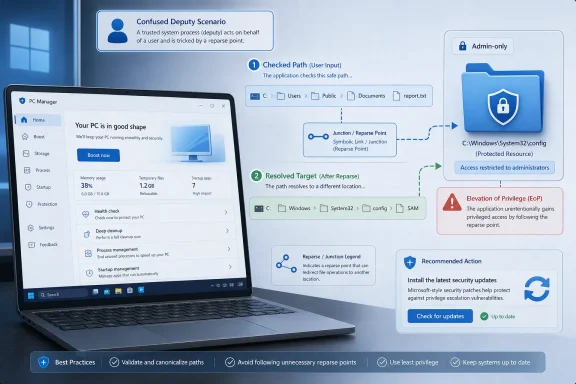
Still, the phrasing tells experienced Windows administrators quite a bit. Link-following flaws are a familiar class of local privilege escalation. The pattern is that a privileged or semi-privileged process intends to open, delete, move, overwrite, or inspect one file path, but an attacker manipulates links or path resolution so the operation lands somewhere else. If the privileged process does not validate the final target at the right moment, a low-privileged user may redirect an operation into a location they should not be able to modify.
The key word is before. A program can check that a path looks safe and then act on a different object after a link, junction, reparse point, or race condition changes what that path resolves to. Secure file handling on Windows is not just about checking strings. It is about opening handles safely, avoiding time-of-check/time-of-use mistakes, constraining reparse behavior, and ensuring that the object being acted upon is the one the program actually authorized.
Microsoft has not publicly described the exact PC Manager feature involved, at least in the short advisory text. That leaves room for uncertainty, and defenders should not pretend otherwise. The flaw may involve cleanup, quarantine-like behavior, storage management, update handling, log processing, or some other file operation inside the product. What matters operationally is that the vulnerability class fits the kind of work PC Manager is designed to do.
Modern intrusions are built in stages. Initial access often arrives through phishing, malicious documents, stolen credentials, exposed remote access, compromised browser sessions, or abused software distribution channels. Once inside, attackers need persistence, privilege, credential access, lateral movement, and defense evasion. Local elevation-of-privilege vulnerabilities are the connective tissue between “we got a user process” and “we own the box.”
That is especially true on endpoints where users do not have administrative rights. Least privilege is supposed to limit blast radius. But least privilege depends on the operating system and installed trusted software not offering convenient ladders upward. Every local EoP in a broadly installed utility weakens the practical value of that control.
For home users, the risk model is simpler but not irrelevant. Malware that lands in a standard user context still wants to disable protections, tamper with system files, install services, harvest data from other profiles, or make itself harder to remove. A Microsoft utility with a privilege boundary flaw can become a more attractive target than some obscure driver because attackers can expect it to exist on machines where users installed it for routine maintenance.
That branding changes the trust calculation. Users who might hesitate to install a random “PC cleaner” are more likely to install Microsoft’s. Administrators who would block third-party optimizers may tolerate PC Manager because it appears to consolidate existing Windows functions rather than replace them. The app borrows trust from the platform.
Borrowed trust is still trust. Once a Microsoft-branded utility touches sensitive file operations, scheduled tasks, startup entries, browser settings, or security-related checks, it becomes part of the system’s effective attack surface. The fact that it is optional does not make it unimportant; optional tools are often the least consistently inventoried pieces of software in a fleet.
That is the first lesson from CVE-2026-50511: Windows security is no longer just a question of the OS build number and the monthly cumulative update. It is also the Store app estate, WinGet packages, helper utilities, inbox-adjacent tools, OEM add-ons, and “official” extras that accumulate around the platform. The edges matter because attackers do not respect product boundaries.
In plain English, we know enough to patch; we do not know enough to write a definitive exploit anatomy. That is not a weakness in the advisory process. It is part of the choreography of coordinated disclosure. Vendors often publish concise descriptions to reduce exposure while updates propagate, especially for local privilege bugs where exploit details can be converted into working proof-of-concept code quickly.
For vulnerability managers, the confidence metric should not be confused with severity. A vulnerability can be confirmed but narrowly exploitable. Another can be less certain but terrifying if the alleged impact is remote unauthenticated code execution on internet-facing infrastructure. CVE-2026-50511’s urgency comes from a different place: vendor confirmation, a known weakness class, local privilege impact, and the likelihood that PC Manager exists on machines where users may not think of it as a security-sensitive component.
That makes it a patch-management hygiene issue with real incident-response implications. It is not a reason to disconnect endpoints from the network. It is a reason to stop treating Microsoft’s utility layer as benign by default.
The classic vulnerable pattern is almost mundane. A service checks that a user-controlled path is under a safe directory. The user swaps that path, or part of it, for a link to a protected location. The service then opens or writes the target with elevated rights. A cleanup utility deletes a file it thinks is temporary; a repair tool rewrites a file it thinks belongs to its own cache; an updater replaces something it thinks it owns. The attacker’s job is to bend that action toward a higher-value target.
Windows has mitigations and APIs to reduce this risk, but developers have to use them correctly. File-system security is full of edge cases that punish string-based assumptions. A path is not proof. A pre-check is not a guarantee. A privileged process that accepts user-influenced file locations must behave as if every segment of the path is hostile until proven otherwise.
This is why cleaner and maintenance tools are such recurring candidates for privilege bugs. Their core function is to traverse, classify, remove, and sometimes repair. They are encouraged by product design to roam across the file system. If they also run components with elevated permissions, the line between helpful automation and confused deputy can get thin.
There is also the problem of visibility. Security teams are good at tracking Windows cumulative updates because the operating system forces the issue. They are less consistently good at tracking every Microsoft Store application, every winget-managed package, and every user-installed utility that lives outside the traditional software inventory. A vulnerability in PC Manager therefore tests not only patching but asset intelligence.
The immediate defensive move is straightforward: determine whether PC Manager is installed, verify that it has updated, and remove it where it is not needed. The deeper move is to treat Store apps and Microsoft-branded utilities as first-class software assets. If a tool can affect system health, storage, startup behavior, or security posture, it deserves the same inventory and update scrutiny as any other endpoint management component.
This is where Microsoft’s own packaging strategy creates friction. The company has spent years moving Windows functionality between Settings, Store apps, inbox components, optional features, WebView-powered experiences, and cloud-connected helpers. That modularity helps Microsoft ship faster. It also forces administrators to widen the aperture of vulnerability management.
That does not mean PC Manager is bad software. It means its usefulness depends on context. On a family PC, a simple Microsoft utility that helps clear junk files and surface obvious issues may be helpful. On a locked-down corporate device, the same utility may be redundant, difficult to support, and one more item to patch.
The security principle is old but still underused: reduce unnecessary privileged code. If a tool is not needed, do not install it. If users can install it from the Store but IT does not support it, consider whether Store policy should be tightened. If it is allowed, make sure it is inventoried and updated like everything else.
There is a cultural point here too. Windows enthusiasts often like utilities because utilities expose knobs. Sysadmins often dislike them because knobs become tickets. Security teams worry because knobs connected to privileged operations become attack paths. PC Manager sits at the intersection of those instincts.
In that storm, a PC Manager EoP can look like background noise. It probably should not be the first item on every emergency bridge. But it also should not disappear into the spreadsheet. Local privilege escalation flaws are exactly the kind of vulnerabilities attackers chain after exploiting something else.
This is the mature way to read the advisory. Do not rank it above actively exploited zero-days merely because it is Microsoft-branded. Do not ignore it because it is “only local.” Place it where it belongs: a confirmed, high-relevance endpoint hardening issue for systems that have PC Manager installed.
The hardest part of vulnerability management is not knowing that critical remote bugs matter. Everyone knows that. The hard part is not letting medium-looking or important-looking local bugs accumulate until they form the path an attacker actually uses.
That shift is mostly rational. Users want simpler controls. Microsoft wants to modernize features without waiting for monolithic OS releases. Administrators want manageability without brittle scripts. But every abstraction has a security cost, and the cost is paid in inventory, update assurance, and privilege-boundary review.
For Microsoft, the obligation is higher because PC Manager competes implicitly with the sketchy utility ecosystem by saying: trust us instead. That promise must include not only cleaner branding and fewer dark patterns but also secure engineering discipline in the mundane places attackers love. File handling is one of those places. Link resolution is one of those places. Local privilege boundaries are very much one of those places.
For defenders, the lesson is to stop sorting software into “Windows” and “apps” as if the distinction maps cleanly to risk. A Microsoft Store utility that manipulates system state can be closer to infrastructure than to entertainment. The patching process should reflect that.
 Microsoft’s Cleaner App Becomes Part of the Attack Surface
PC Manager began life as a mildly odd Microsoft answer to a category Windows veterans had learned to treat with suspicion: cleanup utilities, memory boosters, startup managers, and “one-click health” apps. Microsoft’s pitch was more reassuring than the third-party version. If users were going to run a utility that poked at storage, startup behavior, browser detritus, system settings, and security posture, better that it come from Redmond than from a download site with three green buttons and two fake ones.That argument is not wrong. The Windows ecosystem has long suffered from pseudo-maintenance software that overpromises, nags, bundles, or breaks more than it fixes. A Microsoft-signed, Store-distributed utility is plainly preferable to many of the alternatives, especially for less technical users. PC Manager’s appeal is precisely that it wraps scattered Windows functions into a friendlier surface.
But that appeal also explains why CVE-2026-50511 matters. A tool whose job is to clean, scan, optimize, remove, and manage files is not a passive app. It sits close to operations that require careful permission checks, predictable file handling, and disciplined separation between what the user requested and what the system is allowed to touch. When a utility promises to tidy up Windows on your behalf, it necessarily asks for a seat nearer the controls.
That is where elevation-of-privilege bugs thrive. They do not usually kick down the front door. They wait until an attacker already has a foothold as a normal user, then exploit a trusted component that can be tricked into doing privileged work on the attacker’s behalf. In a consumer narrative, that sounds secondary. In an enterprise incident, it can be the difference between a contained user compromise and a machine-level compromise.
The Advisory Says Little, Which Is Itself the Story
Microsoft’s public wording for CVE-2026-50511 is brief: improper link resolution before file access, sometimes described as link following, in Microsoft PC Manager allows an authorized attacker to elevate privileges locally. That is not a full exploit chain, and it is not meant to be. Security advisories often disclose enough for defenders to identify risk and apply updates without handing attackers a ready-made recipe.Still, the phrasing tells experienced Windows administrators quite a bit. Link-following flaws are a familiar class of local privilege escalation. The pattern is that a privileged or semi-privileged process intends to open, delete, move, overwrite, or inspect one file path, but an attacker manipulates links or path resolution so the operation lands somewhere else. If the privileged process does not validate the final target at the right moment, a low-privileged user may redirect an operation into a location they should not be able to modify.
The key word is before. A program can check that a path looks safe and then act on a different object after a link, junction, reparse point, or race condition changes what that path resolves to. Secure file handling on Windows is not just about checking strings. It is about opening handles safely, avoiding time-of-check/time-of-use mistakes, constraining reparse behavior, and ensuring that the object being acted upon is the one the program actually authorized.
Microsoft has not publicly described the exact PC Manager feature involved, at least in the short advisory text. That leaves room for uncertainty, and defenders should not pretend otherwise. The flaw may involve cleanup, quarantine-like behavior, storage management, update handling, log processing, or some other file operation inside the product. What matters operationally is that the vulnerability class fits the kind of work PC Manager is designed to do.
Local Bugs Are Not Low-Stakes Bugs
The phrase “local attacker” has a calming effect it does not deserve. Yes, CVE-2026-50511 is not the same kind of emergency as an unauthenticated wormable network service flaw. An attacker needs code execution or interactive access on the target machine first. That requirement should affect prioritization, not induce complacency.Modern intrusions are built in stages. Initial access often arrives through phishing, malicious documents, stolen credentials, exposed remote access, compromised browser sessions, or abused software distribution channels. Once inside, attackers need persistence, privilege, credential access, lateral movement, and defense evasion. Local elevation-of-privilege vulnerabilities are the connective tissue between “we got a user process” and “we own the box.”
That is especially true on endpoints where users do not have administrative rights. Least privilege is supposed to limit blast radius. But least privilege depends on the operating system and installed trusted software not offering convenient ladders upward. Every local EoP in a broadly installed utility weakens the practical value of that control.
For home users, the risk model is simpler but not irrelevant. Malware that lands in a standard user context still wants to disable protections, tamper with system files, install services, harvest data from other profiles, or make itself harder to remove. A Microsoft utility with a privilege boundary flaw can become a more attractive target than some obscure driver because attackers can expect it to exist on machines where users installed it for routine maintenance.
PC Manager Is a Small App With a Big Trust Problem
PC Manager occupies an awkward position in Microsoft’s software portfolio. It is not a core Windows component in the same way as the kernel, LSASS, Win32k, or Defender. It is also not just another optional third-party app. It carries Microsoft’s name, arrives through official channels, and presents itself as a caretaker for the operating system.That branding changes the trust calculation. Users who might hesitate to install a random “PC cleaner” are more likely to install Microsoft’s. Administrators who would block third-party optimizers may tolerate PC Manager because it appears to consolidate existing Windows functions rather than replace them. The app borrows trust from the platform.
Borrowed trust is still trust. Once a Microsoft-branded utility touches sensitive file operations, scheduled tasks, startup entries, browser settings, or security-related checks, it becomes part of the system’s effective attack surface. The fact that it is optional does not make it unimportant; optional tools are often the least consistently inventoried pieces of software in a fleet.
That is the first lesson from CVE-2026-50511: Windows security is no longer just a question of the OS build number and the monthly cumulative update. It is also the Store app estate, WinGet packages, helper utilities, inbox-adjacent tools, OEM add-ons, and “official” extras that accumulate around the platform. The edges matter because attackers do not respect product boundaries.
The Vulnerability Metric Points to Confidence, Not Panic
The user-supplied description refers to a metric that measures confidence in the existence of a vulnerability and the credibility of known technical details. That framing is useful here because CVE-2026-50511 sits in the middle ground between rumor and fully public exploit analysis. Microsoft has acknowledged the vulnerability through its Security Update Guide, which gives defenders a high degree of confidence that the issue is real. But the public technical detail is limited, which constrains both attacker replication and defender verification.In plain English, we know enough to patch; we do not know enough to write a definitive exploit anatomy. That is not a weakness in the advisory process. It is part of the choreography of coordinated disclosure. Vendors often publish concise descriptions to reduce exposure while updates propagate, especially for local privilege bugs where exploit details can be converted into working proof-of-concept code quickly.
For vulnerability managers, the confidence metric should not be confused with severity. A vulnerability can be confirmed but narrowly exploitable. Another can be less certain but terrifying if the alleged impact is remote unauthenticated code execution on internet-facing infrastructure. CVE-2026-50511’s urgency comes from a different place: vendor confirmation, a known weakness class, local privilege impact, and the likelihood that PC Manager exists on machines where users may not think of it as a security-sensitive component.
That makes it a patch-management hygiene issue with real incident-response implications. It is not a reason to disconnect endpoints from the network. It is a reason to stop treating Microsoft’s utility layer as benign by default.
Link-Following Bugs Keep Surviving Because File Systems Are Weird
Symbolic links, hard links, junctions, mount points, and reparse points are not exotic tricks to Windows internals people. They are normal mechanisms that make modern file systems flexible. They also make security checks surprisingly hard, because the path a program sees is not always the object it ends up modifying.The classic vulnerable pattern is almost mundane. A service checks that a user-controlled path is under a safe directory. The user swaps that path, or part of it, for a link to a protected location. The service then opens or writes the target with elevated rights. A cleanup utility deletes a file it thinks is temporary; a repair tool rewrites a file it thinks belongs to its own cache; an updater replaces something it thinks it owns. The attacker’s job is to bend that action toward a higher-value target.
Windows has mitigations and APIs to reduce this risk, but developers have to use them correctly. File-system security is full of edge cases that punish string-based assumptions. A path is not proof. A pre-check is not a guarantee. A privileged process that accepts user-influenced file locations must behave as if every segment of the path is hostile until proven otherwise.
This is why cleaner and maintenance tools are such recurring candidates for privilege bugs. Their core function is to traverse, classify, remove, and sometimes repair. They are encouraged by product design to roam across the file system. If they also run components with elevated permissions, the line between helpful automation and confused deputy can get thin.
The Store Does Not Magically Solve Update Discipline
If PC Manager is installed from the Microsoft Store, many users will assume it updates automatically. Often that assumption will be right. But enterprise Windows reality is more complicated than consumer Windows marketing. Store access may be restricted, app updates may be delayed, machines may be offline or kiosk-like, and some organizations may deploy apps through imaging, provisioning, or package-management workflows that do not behave like a consumer laptop.There is also the problem of visibility. Security teams are good at tracking Windows cumulative updates because the operating system forces the issue. They are less consistently good at tracking every Microsoft Store application, every winget-managed package, and every user-installed utility that lives outside the traditional software inventory. A vulnerability in PC Manager therefore tests not only patching but asset intelligence.
The immediate defensive move is straightforward: determine whether PC Manager is installed, verify that it has updated, and remove it where it is not needed. The deeper move is to treat Store apps and Microsoft-branded utilities as first-class software assets. If a tool can affect system health, storage, startup behavior, or security posture, it deserves the same inventory and update scrutiny as any other endpoint management component.
This is where Microsoft’s own packaging strategy creates friction. The company has spent years moving Windows functionality between Settings, Store apps, inbox components, optional features, WebView-powered experiences, and cloud-connected helpers. That modularity helps Microsoft ship faster. It also forces administrators to widen the aperture of vulnerability management.
For Administrators, the Right Question Is Whether PC Manager Belongs at All
CVE-2026-50511 should prompt a practical policy discussion: does PC Manager belong in managed environments? For many organizations, the honest answer may be no. Enterprise fleets already have endpoint detection and response, disk cleanup policy, Intune or Configuration Manager, Defender management, Group Policy, proactive remediation scripts, and monitoring tools. A consumer-oriented utility that overlaps with those functions may add more ambiguity than value.That does not mean PC Manager is bad software. It means its usefulness depends on context. On a family PC, a simple Microsoft utility that helps clear junk files and surface obvious issues may be helpful. On a locked-down corporate device, the same utility may be redundant, difficult to support, and one more item to patch.
The security principle is old but still underused: reduce unnecessary privileged code. If a tool is not needed, do not install it. If users can install it from the Store but IT does not support it, consider whether Store policy should be tightened. If it is allowed, make sure it is inventoried and updated like everything else.
There is a cultural point here too. Windows enthusiasts often like utilities because utilities expose knobs. Sysadmins often dislike them because knobs become tickets. Security teams worry because knobs connected to privileged operations become attack paths. PC Manager sits at the intersection of those instincts.
The Patch Tuesday Context Makes This Easy to Miss
CVE-2026-50511 arrived in the gravitational field of Microsoft’s June 2026 security updates, where bigger numbers and scarier categories compete for attention. Patch Tuesday is now less a single event than a monthly triage storm: Windows kernel bugs, Office bugs, Exchange bugs, Defender bugs, browser fixes, Azure advisories, developer tooling, and a long tail of components few people can instantly place.In that storm, a PC Manager EoP can look like background noise. It probably should not be the first item on every emergency bridge. But it also should not disappear into the spreadsheet. Local privilege escalation flaws are exactly the kind of vulnerabilities attackers chain after exploiting something else.
This is the mature way to read the advisory. Do not rank it above actively exploited zero-days merely because it is Microsoft-branded. Do not ignore it because it is “only local.” Place it where it belongs: a confirmed, high-relevance endpoint hardening issue for systems that have PC Manager installed.
The hardest part of vulnerability management is not knowing that critical remote bugs matter. Everyone knows that. The hard part is not letting medium-looking or important-looking local bugs accumulate until they form the path an attacker actually uses.
Microsoft’s Convenience Layer Needs Enterprise-Grade Scrutiny
PC Manager’s vulnerability is a reminder that Microsoft’s convenience layer has become operationally significant. Windows is no longer secured solely by patching the OS and hoping users do not install junk. Microsoft itself now ships more optional, app-like, service-backed, Store-updated pieces around the operating system, and each one needs a place in the risk model.That shift is mostly rational. Users want simpler controls. Microsoft wants to modernize features without waiting for monolithic OS releases. Administrators want manageability without brittle scripts. But every abstraction has a security cost, and the cost is paid in inventory, update assurance, and privilege-boundary review.
For Microsoft, the obligation is higher because PC Manager competes implicitly with the sketchy utility ecosystem by saying: trust us instead. That promise must include not only cleaner branding and fewer dark patterns but also secure engineering discipline in the mundane places attackers love. File handling is one of those places. Link resolution is one of those places. Local privilege boundaries are very much one of those places.
For defenders, the lesson is to stop sorting software into “Windows” and “apps” as if the distinction maps cleanly to risk. A Microsoft Store utility that manipulates system state can be closer to infrastructure than to entertainment. The patching process should reflect that.
The Practical Read for WindowsForum Readers
CVE-2026-50511 is not a reason to panic, but it is a useful test of whether your Windows maintenance habits are as modern as your Windows deployment. If you installed PC Manager out of curiosity, update it or remove it. If you manage endpoints, inventory it before assuming exposure. If you build or evaluate privileged utilities, treat file-system links as hostile input rather than a corner case.- Microsoft confirmed CVE-2026-50511 as a local elevation-of-privilege vulnerability in Microsoft PC Manager disclosed on June 9, 2026.
- The public description points to improper link resolution before file access, a vulnerability class often associated with symbolic-link, hard-link, junction, or reparse-point abuse.
- The attacker must already be authorized locally, so this is primarily a post-compromise privilege-escalation risk rather than an internet-facing entry point.
- PC Manager’s role as a cleanup and system-health utility makes file-handling bugs especially relevant because the app is designed to inspect and manipulate system state.
- Administrators should verify whether PC Manager is present, ensure it is updated through the Microsoft Store or approved package channels, and remove it where it has no managed purpose.
- The broader lesson is that Microsoft-branded optional utilities deserve the same inventory and patch discipline as traditional endpoint software.
References
- Primary source: MSRC
Published: 2026-06-09T07:00:00-07:00
Security Update Guide - Microsoft Security Response Center
 msrc.microsoft.com
- Related coverage: aha.org
- Official source: microsoft.com
CVE-2026-31431: Copy Fail vulnerability enables Linux root privilege escalation across cloud environments | Microsoft Security Blog
A high-severity Linux vulnerability, “Copy Fail” (CVE-2026-31431), enables root privilege escalation across cloud environments and Kubernetes workloads. With a working exploit already in the wild, organizations should act quickly to detect, mitigate, and reduce risk.www.microsoft.com - Related coverage: threats.kaspersky.com
Kaspersky Threats — KLA80106
threats.kaspersky.com
- Related coverage: cve.imfht.com

Microsoft PC Manager Vulnerabilities (10 CVEs) | Shenlong CVE Platform
All 10 CVE vulnerabilities found in Microsoft PC Manager, with AI-generated Chinese analysis, references, and POCs.
cve.imfht.com
- Related coverage: vulnerability.circl.lu
Vulnerability-Lookup
Vulnerability-Lookup - Fast vulnerability lookup correlation from different sources.vulnerability.circl.lu
- Related coverage: stack.watch
- Related coverage: absolute.com
- Related coverage: safe.security
Windows Win32k Elevation of Privilege Vulnerability [CVE-2021-1732]
In this research paper, you can learn about Windows Win32k elevation of privilege vulnerability (CVE-2021-1732) and how it works. Download it here.safe.security
- Official source: pcmanager.microsoft.com
Cleanup PC, protection for your computer | Microsoft PC Manager
Official Microsoft PC Manage website; thorough analysis, thorough cleaning, toolkit. Releasing occupied resources and cleaning system fragments will make your Windows run like new.pcmanager.microsoft.com
- Official source: answers.microsoft.com
Microsoft PC Manager is not available in Windows Store - Microsoft Q&A
I'm using Windows 10 Version 22H2, Build 19045.4046, but Microsoft PC Manager is not available in the Windows Store. Can you tell me if the Microsoft PC Manager will be available for this version?answers.microsoft.com - Related coverage: windowscentral.com
Microsoft's PC Manager app submitted to Microsoft Store, though it's still hidden | Windows Central
Microsoft's PC Manager app allows users to manage storage, control which apps run at startup, and optimize systems in other ways.www.windowscentral.com - Official source: apps.microsoft.com
Microsoft PC Manager - Free download and install on Windows | Microsoft Store
Microsoft PC Manager is a utility app for your PC that effortlessly enhances PC performance with just one click. Enjoy seamless storage clean-up, efficient file management, and a host of other powerful features designed to keep your PC running smoothly.apps.microsoft.com - Related coverage: minitool.com
PC Manager Is Not Available in the Microsoft Store, Try This Trick
If Microsoft PC Manager is not available in the Microsoft Store, you can try the trick in this post to solve the issue.www.minitool.com
- Related coverage: windowsreport.com
PC Manager is still not available in the Store for many, but you can try this trick
Microsoft’s dedicated PC Manager app has been on the Microsoft Store for a while, but for many, it is still not available. Even when you go to the Microsoft Store, the Get (download) button is missing. This prompted us to launch an investigation! So, after a few hours of talking to... windowsreport.com
- Related coverage: winhelponline.com
Microsoft PC Manager is Missing from Microsoft Store? » Winhelponline
The Microsoft PC Manager app offers features such as one-click boost, storage clean-up, file management, and protection of your default settings from…www.winhelponline.com - Related coverage: makeuseof.com
How to Install and Configure the Microsoft PC Manager on Windows 11
Tired of third-party cleanup and optimizer apps? Here's how to get Microsoft's own PC Manager app on Windows 11. www.makeuseof.com
- Official source: news.microsoft.com
- Official source: download.microsoft.com
- Related coverage: wiz.io
CVE-2022-50511 Impact, Exploitability, and Mitigation Steps | Wiz
Understand the critical aspects of CVE-2022-50511 with a detailed vulnerability assessment, exploitation potential, affected technologies, and remediation guidance.www.wiz.io - Official source: msrc-ppe.microsoft.com
- Official source: learn.microsoft.com
Security Advisories and Bulletins | Microsoft Learn
learn.microsoft.com - Related coverage: datacomm.com
- Related coverage: sra.io