

Chromium’s CVE-2026-5289 is a high-severity use-after-free in Navigation that matters less as a standalone browser crash and more as a potential sandbox-escape primitive for a remote attacker who has already compromised the renderer process. Google’s own description says the flaw affected Chrome versions prior to 146.0.7680.178, and Microsoft’s Security Update Guide mirrors that upstream disclosure for downstream visibility on Edge-adjacent patch tracking. The practical implication is straightforward: if you are running a Chromium-based browser build older than that fixed version, this vulnerability belongs on the urgent side of your patch queue. teresting thing about CVE-2026-5289 is not just the memory-safety bug itself, but where it sits in the browser architecture. Navigation is one of the core control paths in Chromium, which means bugs here can intersect with tab lifetime, frame lifecycle, process boundaries, and sandbox enforcement in ways that are far more sensitive than a simple rendering glitch. In modern browsers, navigation bugs are rarely just navigation bugs; they often become stepping stones in chains that begin with a renderer compromise and end with broader system access.
Google’s disclosure frames the issue as a use-after-free in Navigation, which is a classic memory lifetime error. That matters because use-after-free bugs often lead to unpredictable behavior: crashes in the best case, and attacker-influenced memory corruption in the worst case. Here, the stated threat model is already advanced: a remote attacker who had compromised the renderer process could potentially use the flaw to perform a sandbox escape via a crafted HTML page. That distinction is important because it tells defenders this is not merely a single-click drive-by scenario; it is a post-exploitation escalation path.
From an enterprise s CVE-2026-5289 especially relevant for organizations that treat browser compromise as a boundary that still needs a second stage of containment. In other words, the browser sandbox is supposed to be the last real line before an attacker reaches the OS, and a sandbox escape collapses that assumption. Microsoft’s inclusion of the issue in its update guidance underscores how Chromium vulnerabilities propagate into downstream ecosystems that depend on the same engine.
Historically, this fits a long pattern ihigh-value bugs increasingly cluster around process isolation, renderer trust boundaries, and memory lifetime management. That is why browser teams spend so much time hardening multi-process architecture and why vulnerability disclosures often mention the renderer explicitly. The browser has become an operating environment in its own right, and the vulnerabilities most likely to matter are the ones that break the walls between its internal compartments.
Navigation sits at the center of how a browser decides what content to load, what process should own it, and what state should be preserved or discarded. A flaw in this code path is dangerous because it can blur the lines between objects that are expected to live and die with exact timing. When those assumptions fail, the browser can end up dereferencing memory that has already been freed, which is the textbook recipe for use-after-free exploitation.
The reason this class remains so important in 2026 is that attackers understand browser internals better than ever. A renderer compromise is often the first step in a multi-stage exploit chain, and navigation-related primitives can help an attacker move from a constrained content process into something much more powerful. That is why a vulnerability like CVE-2026-5289 is not just another CVE in a long list; it is a reminder that the hardest part of browser security is not blocking malicious pages outright, but preserving isolation once a page is already running code.
That wording also tells us something subtle about how the Chrisk. If the renderer compromise is already assumed, then the vulnerability is probably valuable because it bypasses the browser’s core confinement model rather than because it enables arbitrary remote code execution from a clean slate. In practical terms, that can still be devastating, especially in enterprise environments where a compromised browser session can expose credentials, internal web apps, and authenticated cloud services.
Google’s release-note structure typically keeps exploit details limited until a majority of users are patched, and this case appears to follow that familiar pattern. That is not unusual; browser vendors often withhold fine-grained exploit mechanics to reduce the risk of weaponization during rollout. The tradeoff is that defenders get just enough information to act, but not enough to exactly reconstruct the exploit chain.
For enterprise defenders, this matters because the Security Update Guide is more ta compatibility map between upstream browser security work and Microsoft’s release cadence. In practical terms, it helps administrators answer a question that matters more than the abstract CVE: has my deployed browser build actually received the fix yet?
Microsoft also references the same Chromium issue tracker entry in its record, which reinforces the upstream-downstream linkage and gives security teams a breadcrumb trail for validation. That is useful because the browser patch supply chain can otherwise become confusing very quickly. Chrome, Edge, extended stable channels, managed releases, and OEM-delivered browsers can all be on slightly different timelines.
The disclosure’s mention of a crafted HTML page is also telling. It suggests the attacker’s delivery mechanism could be ordinary web content, which is the most scalable way to reach victims. Once a malicious page is able to influence the renderer, the navigation bug may help break out of the sandbox and move the compromise to a more privileged context.
That said, the public description does not imply this is a trivial exploit. Use-after-free bugs in a mature codebase often require careful grooming, timing, and architecture-specific tuning. The vulnerability is serious because of what it can lead to, not because every attacker can weaponize it instantly.
For consumer users, the best move is to let the browser update and restart it. Many people assume the bhe moment the patch was published, but that is not always true in practice. Open tabs, managed update policies, offline systems, and delayed restart behavior can all leave the vulnerable build in place longer than expected.
For IT departments, the question is more formal: what exact browser build is present on each endpoint, and which update ring delivered it? Because the vulnerability affects a core navigation path, it is the kind of issue that should be included in rapid patch validation rather than deferred to the next routine maintenance cycle.
The biggest concern is not just code execution, but the way browser compromise can lead to token theft, session hijacking, and lateral movement through cloud applications. If an attacker can first gain renderer execution and then use CVE-2026-5289 to escape the sandbox, they may end up with access that survives across multiple services. In a modern Microsoft-centric environment, that can mean Outlook, Teams, and browser-based admin consoles all become part of the exposure surface.
Chrome users should pay attention to the version number and let auto-update complete. If you are on a chromium-based browser from another vendor, you should verify whether that vendor has already integrated the upstream Chromium fix. The brand name matters less than the underlying engine version.
That broader context matters because Chrome and Edge are now deeply intertwined in enterprise operations. When Google lands n surfaces the corresponding vulnerability in its own security guidance so administrators can track downstream impact. This makes the browser ecosystem look less like separate products and more like a shared security supply chain with different labels on the package.
The other thing to watch is whether this vulnerability becomes part of a broader chain in the threat actor ecosystem. History suggests that high-value browser flaws often resurface in chained attacks once enough analysts have had time to study them. If that happens here, the significance of the issue will extend beyond patching into incident response, detection engineering, and browser telemetry review.
Source: NVD / Chromium Security Update Guide - Microsoft Security Response Center
Google’s disclosure frames the issue as a use-after-free in Navigation, which is a classic memory lifetime error. That matters because use-after-free bugs often lead to unpredictable behavior: crashes in the best case, and attacker-influenced memory corruption in the worst case. Here, the stated threat model is already advanced: a remote attacker who had compromised the renderer process could potentially use the flaw to perform a sandbox escape via a crafted HTML page. That distinction is important because it tells defenders this is not merely a single-click drive-by scenario; it is a post-exploitation escalation path.
From an enterprise s CVE-2026-5289 especially relevant for organizations that treat browser compromise as a boundary that still needs a second stage of containment. In other words, the browser sandbox is supposed to be the last real line before an attacker reaches the OS, and a sandbox escape collapses that assumption. Microsoft’s inclusion of the issue in its update guidance underscores how Chromium vulnerabilities propagate into downstream ecosystems that depend on the same engine.
Historically, this fits a long pattern ihigh-value bugs increasingly cluster around process isolation, renderer trust boundaries, and memory lifetime management. That is why browser teams spend so much time hardening multi-process architecture and why vulnerability disclosures often mention the renderer explicitly. The browser has become an operating environment in its own right, and the vulnerabilities most likely to matter are the ones that break the walls between its internal compartments.
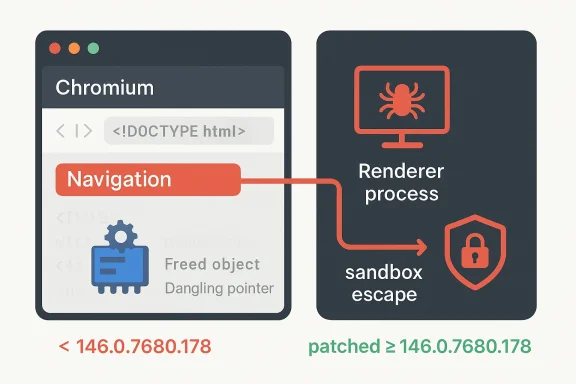 Why Navigation Bugs Matter
Navigation sits at the center of how a browser decides what content to load, what process should own it, and what state should be preserved or discarded. A flaw in this code path is dangerous because it can blur the lines between objects that are expected to live and die with exact timing. When those assumptions fail, the browser can end up dereferencing memory that has already been freed, which is the textbook recipe for use-after-free exploitation.The reason this class remains so important in 2026 is that attackers understand browser internals better than ever. A renderer compromise is often the first step in a multi-stage exploit chain, and navigation-related primitives can help an attacker move from a constrained content process into something much more powerful. That is why a vulnerability like CVE-2026-5289 is not just another CVE in a long list; it is a reminder that the hardest part of browser security is not blocking malicious pages outright, but preserving isolation once a page is already running code.
The exploit chain problem
The advisory language is careful: the attacker must already have compromised the renderer process. That suggests CVE-2026-5289 is probably not the initial entry point but part of a chain. This is a meaningful clue for defenders, because it changes how you think about urgency, telemetry, and incident response.- It is a likely post-compromise escalation issue, not a simple one-shot bug.
- It increases the value of any renderer exploit that can be chained into a broader breakout.
- It makes sandbox integrity the real asset under attack, not just browser stability.
- It can matter even when the browser appears to be “just crashing.”
What Google Disclosed
Google’s public description, as mirrored in Microsoft’s guidance, says the issue was fixed in Chrome 146.0.7680.178 and that the flaw could allow a remote attacker who had compromised the renderer process to potentially perform a sandbox escape through a crafted HTML page. The severity label is High, which is consistent with a bug that does not automatically yield system-level code execution on its own, but can significantly improve an attacker’s position inside the browser trust model.That wording also tells us something subtle about how the Chrisk. If the renderer compromise is already assumed, then the vulnerability is probably valuable because it bypasses the browser’s core confinement model rather than because it enables arbitrary remote code execution from a clean slate. In practical terms, that can still be devastating, especially in enterprise environments where a compromised browser session can expose credentials, internal web apps, and authenticated cloud services.
Google’s release-note structure typically keeps exploit details limited until a majority of users are patched, and this case appears to follow that familiar pattern. That is not unusual; browser vendors often withhold fine-grained exploit mechanics to reduce the risk of weaponization during rollout. The tradeoff is that defenders get just enough information to act, but not enough to exactly reconstruct the exploit chain.
Why the version number matters
The fixed build number is not trivia. It is the most reliable operational marker for vulnerability status in Chromium-based environments, especially because downstream vendors may ingest the upstream fix on different schedules. If your browser version is below 146.0.7680.178, you should assume exposure until proven otherwise. If your browser is Chrome-derived, the patch lineage matters more than the exact brand name on the product badge.- Patch status should be checked by build number, not by browser marketing label.
- Enterprise fleets may lag consumer channels by days or weeks.
- Embedded Chromium builds can remain vulnerable even when standalone Chrome is patched.
- Downstream browsers may backport the fix without matching Google’s exact version string.
Microsoft’s Security Update Guide Role
Microsoft’s Security Update Guide exists in part because Chromium vulnerabilities do not stay inside Chrome. Microsoft Edge shares the Chromium codebase, so Microsoft uses the guide to show when downstream Edge builds have absorbed an upstream Chromium fix and are no longer vulnerable. That is why a Chromium CVE can appear in Microsoft’s documentation even though Google authored the patch.For enterprise defenders, this matters because the Security Update Guide is more ta compatibility map between upstream browser security work and Microsoft’s release cadence. In practical terms, it helps administrators answer a question that matters more than the abstract CVE: has my deployed browser build actually received the fix yet?
Microsoft also references the same Chromium issue tracker entry in its record, which reinforces the upstream-downstream linkage and gives security teams a breadcrumb trail for validation. That is useful because the browser patch supply chain can otherwise become confusing very quickly. Chrome, Edge, extended stable channels, managed releases, and OEM-delivered browsers can all be on slightly different timelines.
Why downstream tracking is operationally valuable
The downstream mirror is especially useful for organizations that standardize on Microsoft-managed estates. Windows admins often need one place to confirm whether a browser vulnerability is relevant to their fleet, and Microsoft’s guide reduces ambiguity. It is not just a duplication of Google’s advisory; it is a translation layer for enterprise patch management.- It helps administrators map Chromium advisories to Edge exposure.
- It reduces the chance of patching the wrong channel or build.
- It supports change management workflows that rely on Microsoft documentation.
- It gives security teams a quicker way to determine whether they are still at risk.
Attack Surface and Likely Exploitability
A use-after-free in navigation is dangerous because navigation code touches objects that govern document lifecycle, frame transitions, and cross-process coordination. Those are not isolated subsystems; they sit in the plumbing that every web page depends on. That makes them attractive to attackers because the bug may be reachable from common browsing behavior, even if exploitation requires a multi-step chain.The disclosure’s mention of a crafted HTML page is also telling. It suggests the attacker’s delivery mechanism could be ordinary web content, which is the most scalable way to reach victims. Once a malicious page is able to influence the renderer, the navigation bug may help break out of the sandbox and move the compromise to a more privileged context.
That said, the public description does not imply this is a trivial exploit. Use-after-free bugs in a mature codebase often require careful grooming, timing, and architecture-specific tuning. The vulnerability is serious because of what it can lead to, not because every attacker can weaponize it instantly.
What defenders should assume
Security teams should treat the flaw as a credible sandbox-escape candidate rather than a theoretical memory bug. Even if there is no public exploitation report attached to the disclosure, the combination of a renderer prerequisite and a sandbox escape path is enough to justify urgent remediation.- Assume malicious web content can be part of the delivery chain.
- Assume exploitation may follow an initial renderer compromise.
- Assume the browser sandbox may not be sufficient containment once the bug is reachable.
- Assume that patch delay increases operational risk rapidly.
Patch Guidance for Windows and Chrome Users
The simplest remediation is also the most important one: update to a Chromium build that includes the fix, which Google identifies as 146.0.7680.178 or later. If you are using Chrome on Windows, macOS, Linux, or another Chromium-based distribution, that version threshold should be your first check. Microsoft’s entry confirms the upstream fix path and anchors the issue for downstream patch validation.For consumer users, the best move is to let the browser update and restart it. Many people assume the bhe moment the patch was published, but that is not always true in practice. Open tabs, managed update policies, offline systems, and delayed restart behavior can all leave the vulnerable build in place longer than expected.
For IT departments, the question is more formal: what exact browser build is present on each endpoint, and which update ring delivered it? Because the vulnerability affects a core navigation path, it is the kind of issue that should be included in rapid patch validation rather than deferred to the next routine maintenance cycle.
Verification checklist
A good response plan is short and disciplined.- Confirm the installed Chromium-based browser version on every managed endpoint.
- Compare that build against the fixed version threshold.
- Validate whether your browser deployment channel has already rolled the update.
- Force a restart where policy permits, because pending restarts delay protection.
- Recheck any alternate Chromium-based apps that embed their own browser engines.
Enterprise Impact
Enterprise environments absorb browser risk differently than consumer desktops. A household user may see a browser crash and reboot; an enterprise user may be sitting inside a managed session with access to email, documents, SharePoint, SaaS dashboards, and internal applications. That makes a sandbox escape materially more valuable to an attacker because the browser is often the front door to the organization’s identity layer.The biggest concern is not just code execution, but the way browser compromise can lead to token theft, session hijacking, and lateral movement through cloud applications. If an attacker can first gain renderer execution and then use CVE-2026-5289 to escape the sandbox, they may end up with access that survives across multiple services. In a modern Microsoft-centric environment, that can mean Outlook, Teams, and browser-based admin consoles all become part of the exposure surface.
Why patch timing is critical
Enterprises are often slower than consumers because they use release rings, compatibility testing, and change control. That is understandable, but it is also what attackers count on. The longer a high-severity Chromium bug remains unpatched, the more time threat actors have to turn it into a reliable chain.- Managed update deferrals create measurable exposure windows.
- Browser restarts are often postponed by active users.
- Shared workstations can keep vulnerable sessions alive.
- VDI and remote app stacks may inherit browser lag from image update cycles.
Consumer Impact
For home users, the exposure profile is simpler but still serious. The main risk is not that every website will exploit the bug, but that a malicious or compromised page could be used as part of a chain to compromise the browser more deeply. That makes routine habits like ignoring updates or leaving the browser open for days more consequential than they may seem.Chrome users should pay attention to the version number and let auto-update complete. If you are on a chromium-based browser from another vendor, you should verify whether that vendor has already integrated the upstream Chromium fix. The brand name matters less than the underlying engine version.
Signs users should not ignore
Browser warnings are not the only sign of trouble. Unexpected crashes, tabs that reopen oddly, or browser behavior that changes after visiting a suspicious site can be worth investigating, especially if you have not yet applied the latest patch.- Update delays are a real security risk.
- Restarting the browser may be required for the fix to take effect.
- Chromium-based browsers other than Chrome can still be affected.
- Suspicious page behavior should not be dismissed as “just a glitch.”
How This Fits the Larger Chromium Pattern
CVE-2026-5289 is part of a broader 2026 pattern in which Chromium security continues to revolve around memory safety, process isolation, and reachability from crafted web content. Google’s March 2026 stable updates included a long series of security fixes, underscoring how much attack surface a modern browser exposes. Even when a vulnerability is not publicly marked as exploited in the wild, the release cadence itself shows how aggressively browser vendors are working through high-risk defects.That broader context matters because Chrome and Edge are now deeply intertwined in enterprise operations. When Google lands n surfaces the corresponding vulnerability in its own security guidance so administrators can track downstream impact. This makes the browser ecosystem look less like separate products and more like a shared security supply chain with different labels on the package.
A memory-safety problem with system-level consequences
The deeper theme is that browser memory bugs remain one of the best paths to meaningful attacker leverage. Even as mitigations improve, attackers keep finding value in subtle lifetime errors because they can be combined with other primitives. That is why a “use-after-free in Navigation” headline should not be read as a narrow coding bug; it should be read as a sign that the browser boundary is still under constant stress.- Memory lifetime errors remain central to browser exploitation.
- Sandboxing lowers risk but does not eliminate it.
- Shared Chromium lineage spreads urgency across multiple products.
- Vendor patch notes are now part of the threat-intelligence pipeline.
Strengths and Opportunities
The good news is that this issue appears to have a clear upstream fix path, a well-defined affected-version boundary, and downstream documentation that helps administrators validate exposure. Those are not trivial advantages when you are dealing with a browser security event that could otherwise be easy to misclassify. The broader Chromium security model also means that once a fix lands, it can propagate relatively quickly across major browser products.- The affected version threshold is clearly stated.
- The vulnerability is documented by both Google and Microsoft.
- Administrators can verify exposure by checking build numbers.
- The downstream Security Update Guide helps with Edge tracking.
- The issue reinforces browser hardening priorities for vendors.
- The fix can be operationalized quickly in managed environments.
- The disclosure gives defenders enough detail to act without overexposing exploit mechanics.
Risks and Concerns
The hard part is that the vulnerability sits in a component that is both central and difficult to isolate. If threat actors can pair a renderer compromise with a navigation exploit, they may be able to defeat a major part of the browser’s containment story. That risk is especially pronounced in environments where update lag, restart deferral, or embedded Chromium runtimes leave multiple weak points open at once.- The issue may be part of a larger exploit chain.
- Renderer compromise assumptions lower the bar for attackers.
- Delayed restarts can leave patched systems temporarily exposed.
- Embedded Chromium apps may not update on the same schedule as Chrome.
- Enterprise patch rings can extend exposure windows.
- Users may falsely assume “the browser updated” means “the browser is protected.”
- Sandboxing can fail in ways that are difficult for users to notice.
Looking Ahead
The next question is not whether browser vendors will continue to find and fix bugs like CVE-2026-5289 — they will — but how quickly enterprises can turn disclosure into verified protection. That will depend on better inventory, tighter update enforcement, and more disciplined restart behavior across fleets. It will also depend on whether security teams treat Chromium-based browsers as one risk family rather than several unrelated products.The other thing to watch is whether this vulnerability becomes part of a broader chain in the threat actor ecosystem. History suggests that high-value browser flaws often resurface in chained attacks once enough analysts have had time to study them. If that happens here, the significance of the issue will extend beyond patching into incident response, detection engineering, and browser telemetry review.
- Monitor vendor patch notes for downstream browser versions.
- Verify whether Edge and other Chromium-based products have ingested the fix.
- Check embedded Chromium runtimes in enterprise apps.
- Enforce restart completion after browser updates.
- Review telemetry for suspicious renderer behavior or exploit-like crashes.
Source: NVD / Chromium Security Update Guide - Microsoft Security Response Center
