

Dell and Microsoft spent the first days of June 2026 showing two different sides of the same Windows PC reset: Dell announced a lower-cost 13-inch XPS laptop aimed at students, while Microsoft continued testing a more customizable Windows 11 Start menu in Insider builds. Neither move is revolutionary by itself. Together, they suggest the Windows ecosystem is trying to remember something it forgot during the premium-AI-PC boom: people buy PCs to get work done, not to admire a vendor’s roadmap. The question now is whether restraint can become a product strategy instead of a temporary marketing posture.
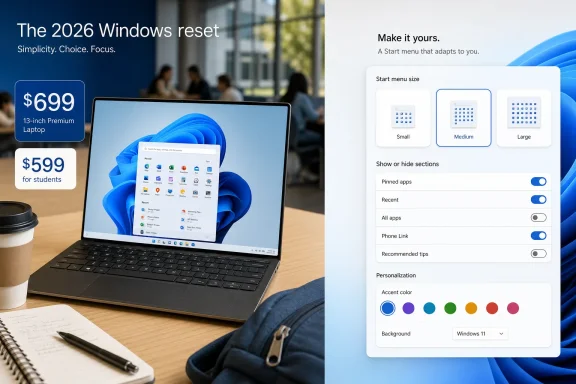
The new XPS 13 is interesting precisely because it is not trying to be the most spectacular laptop in Dell’s lineup. It is not the flashiest Copilot+ PC pitch, not the most aggressively futuristic industrial design, and not the machine Dell would use to demonstrate the outer edge of Intel’s silicon roadmap. Its headline is simpler: an XPS that starts at $699 for ordinary buyers and $599 for eligible students during the back-to-school season.
That is a bigger shift than the spec sheet alone suggests. For years, XPS has been Dell’s shorthand for premium Windows hardware: thin bezels, solid materials, high-quality displays, and pricing that often put it closer to Apple’s MacBook Air than to the broader Windows laptop aisle. The 2026 model does not abandon that identity, but it does compress it into a price band where Windows machines have historically been numerous, uneven, and frequently compromised.
Dell is also doing this at a moment when the laptop market is unusually sensitive to price. Students, families, and small businesses have been asked to absorb higher costs across software subscriptions, cloud storage, security tools, and peripherals. A Windows laptop that feels premium but starts under $700 is not just a cheaper XPS; it is Dell admitting that the middle of the market deserves better than plastic shells and apology-grade displays.
The company’s pitch is especially pointed because Apple has made education pricing and entry-level hardware part of its own long game. Dell does not need to beat the MacBook on every axis to matter here. It needs to give buyers who want Windows, x86 compatibility, local repair familiarity, and institutional manageability a machine that does not feel like a consolation prize.
There are caveats. The lowest-cost configuration is not the hero configuration that will appear in every product beauty shot or reviewer fantasy. Entry models in this class typically start with modest memory and storage, and the more desirable versions with higher-end Intel processors, more RAM, and larger SSDs will climb quickly. The old laptop game has not vanished; the base price gets people in the door, and the configuration ladder collects its toll.
Still, it matters that Dell is putting the XPS name at this level at all. The Windows market has never lacked cheap laptops. It has lacked cheap laptops that users can recommend without a long paragraph of warnings about screen quality, fan noise, flex, battery life, or the strange feeling that the machine was designed by a procurement spreadsheet.
If Dell executes well, this XPS 13 could become the rare Windows notebook that satisfies three audiences at once. Students get a machine that looks and feels adult. Parents get a price that does not require pretending a four-year-old laptop is “still fine.” IT departments get a mainstream PC from a vendor they already know how to buy from, support, image, and replace.
For a student machine, the practical hierarchy is different. It needs to wake reliably, run Office and a browser without drama, handle video calls, survive a backpack, last through a meaningful stretch away from the wall, and avoid becoming embarrassingly sluggish before graduation. If Intel’s newer low-power chips can deliver that experience inside a 1-kilogram-class XPS, the platform argument becomes less abstract.
This is where the new XPS 13 could be more valuable to Intel than a prestige flagship. A $1,499 showcase machine is expected to be good. A $699 machine that feels polished is persuasive, because it suggests the Windows ecosystem can scale quality downward rather than reserving it for people willing to pay premium rent.
That said, Dell and Intel cannot simply market their way around the lived reputation of Windows ultraportables. Buyers have long memories of machines that ran hot, woke in a bag, drained overnight, or delivered battery estimates that dissolved under a few browser tabs and a Teams call. A student-focused XPS will have to prove itself in ordinary abuse, not in controlled demo loops.
A nice display came with weak speakers. A thin chassis came with poor thermals. A decent processor came with 8GB of memory soldered forever. A good keyboard arrived next to a mediocre trackpad. The result was a market full of machines that looked competitive in spec tables but aged poorly in real use.
Apple has exploited that weakness ruthlessly. The MacBook Air became the default recommendation not because it was cheap in absolute terms, but because it reduced the number of traps. A buyer could assume the screen, trackpad, standby behavior, battery life, keyboard, speakers, and chassis would be at least good enough. Windows OEMs too often asked buyers to become detectives.
Dell’s new XPS 13 is therefore a test of whether a Windows OEM can make the safe recommendation at a lower price. If the answer is yes, it gives Windows fans a stronger counterargument than “but you can find something cheaper.” Cheap was never the problem. Trust was.
This is not the most glamorous Windows feature Microsoft will ship in 2026. It will not dominate a Build keynote or sell a Copilot subscription. But for many users, it may matter more than another AI sidebar, because the Start menu is where Windows either respects your habits or reminds you that the operating system has opinions.
Windows 11’s original Start menu was a classic case of modern design over-correcting for past clutter. Microsoft simplified the surface, centered the taskbar, stripped away Live Tiles, and leaned into a cleaner grid. But it also removed flexibility that many Windows users had internalized as part of the platform’s identity.
The new settings are a partial admission that one Start menu cannot serve everyone. A tablet user, a developer with dozens of pinned tools, a student with five daily apps, and an administrator jumping between consoles do not need the same launch surface. “Automatic,” “Small,” and “Large” are not radical options, but they are a return to the basic Windows principle that the PC should bend toward the user.
“Recent” is more honest. It describes a relationship the user can understand: here are things you opened or touched recently. That may seem minor, but it changes the emotional contract of the Start menu from suggestion to recall.
Microsoft has spent much of the Windows 11 era fighting the perception that the OS is too eager to steer. Edge prompts, Microsoft account nudges, OneDrive defaults, widgets, Copilot placement, and Start menu recommendations have all contributed to the feeling that Windows is not always a neutral workspace. Even when individual features are defensible, their cumulative effect has been corrosive.
Giving users section-level toggles is therefore more than a convenience. It is a pressure valve. If someone wants a pure pinned-app launcher, they should be able to build one. If another user likes recent files and account visibility, that should be available too. The mistake was never that Microsoft experimented with a cleaner Start menu; the mistake was treating the first answer as if it should be everyone’s answer.
The Start menu sits at the center of that operational layer. Its size determines how much hunting you do. Its sections determine whether it feels like a launcher, a document recall tool, or a mixed promotional surface. Its account controls determine whether identity is useful or merely decorative. Small changes here have disproportionate impact because they are repeated dozens of times a day.
This is why Microsoft’s Start menu changes should be judged less like a visual refresh and more like a productivity repair. A larger Start menu can reduce scrolling for app-heavy users. A smaller one can get out of the way on compact screens. Hiding sections can lower visual noise. Renaming Recommended can reduce the sense that Windows is inserting itself between the user and the task.
The danger is that Microsoft treats these controls as enthusiast concessions rather than defaults worth discovering. If the settings are buried, inconsistently rolled out, or tied to confusing Insider-era language, many users will never benefit. Windows does not just need more options; it needs options that ordinary people can find before frustration becomes muscle memory.
That would be a healthy correction. The PC industry has spent enormous energy trying to convince users that the next upgrade cycle will be driven by AI acceleration, neural processors, and new categories of productivity assistance. Some of that will become useful. Some of it is already useful in narrow contexts. But users do not forgive bad fundamentals because a machine can summarize a meeting.
A laptop that is too expensive for its audience is a failed product no matter how elegant it looks. A Start menu that gets in the way is a failed interface no matter how clean its icons are. The basics have not become obsolete just because vendors found a new story to tell investors.
This is especially true in education. Students do not need a philosophical debate about local AI inference before they can write papers, manage research, code assignments, attend online classes, and edit media projects. They need dependable machines and interfaces that do not waste time. If Windows wants to remain the default computing environment for the next generation, it must win those mundane moments.
The key question will be manageability and configuration discipline. A laptop that looks appealing at retail can become less interesting if business-ready SKUs are delayed, overpriced, or fragmented. IT departments do not want a maze of near-identical models with different wireless modules, display panels, firmware quirks, and support paths.
Microsoft’s Start menu work also has an enterprise shadow. Many organizations have spent years controlling, simplifying, or replacing parts of the Windows shell experience through policy. If Microsoft gives users more built-in ways to reduce clutter and tailor Start, it may lower the need for some heavy-handed customization. But that only helps if the controls can be managed predictably and documented clearly.
The best version of this future is not one where every enterprise Start menu becomes identical. It is one where Microsoft exposes enough policy and user choice that organizations can set sensible boundaries without flattening the PC into a kiosk. Windows has always been strongest when it supports both central administration and personal workflow.
Copilot+ branding, NPUs, recall-like features, local models, and app integrations can only succeed if users believe the underlying PC experience is stable, respectful, and worth upgrading for. If Windows feels noisy, expensive, or controlling, AI features become another layer of vendor ambition. If Windows feels fast, affordable, and adjustable, AI features have room to become tools rather than intrusions.
Dell’s move helps by making modern hardware more attainable. Microsoft’s Start work helps by making the daily interface less rigid. Neither guarantees success, but both point toward a more grounded Windows strategy than simply attaching AI to every surface and hoping the market follows.
The companies should take the hint. The next great Windows PC does not need to be a concept machine. It needs to be a machine people can afford, recommend, carry, repair, manage, and understand. The next great Windows feature does not need to be magical. It needs to make the user feel a little more in control than they did yesterday.
 Dell Rediscovers the Power of the Boring Good Laptop
The new XPS 13 is interesting precisely because it is not trying to be the most spectacular laptop in Dell’s lineup. It is not the flashiest Copilot+ PC pitch, not the most aggressively futuristic industrial design, and not the machine Dell would use to demonstrate the outer edge of Intel’s silicon roadmap. Its headline is simpler: an XPS that starts at $699 for ordinary buyers and $599 for eligible students during the back-to-school season.That is a bigger shift than the spec sheet alone suggests. For years, XPS has been Dell’s shorthand for premium Windows hardware: thin bezels, solid materials, high-quality displays, and pricing that often put it closer to Apple’s MacBook Air than to the broader Windows laptop aisle. The 2026 model does not abandon that identity, but it does compress it into a price band where Windows machines have historically been numerous, uneven, and frequently compromised.
Dell is also doing this at a moment when the laptop market is unusually sensitive to price. Students, families, and small businesses have been asked to absorb higher costs across software subscriptions, cloud storage, security tools, and peripherals. A Windows laptop that feels premium but starts under $700 is not just a cheaper XPS; it is Dell admitting that the middle of the market deserves better than plastic shells and apology-grade displays.
The company’s pitch is especially pointed because Apple has made education pricing and entry-level hardware part of its own long game. Dell does not need to beat the MacBook on every axis to matter here. It needs to give buyers who want Windows, x86 compatibility, local repair familiarity, and institutional manageability a machine that does not feel like a consolation prize.
The $599 Number Is a Message, Not Just a Discount
The student price will get the attention, and it should. A $599 XPS 13 is a clean marketing line, the kind of number that can survive a social feed, a parent’s budget conversation, and a campus bookstore comparison chart. But the more important figure may be the $699 standard starting price, because that is where Dell is trying to move the XPS brand from aspiration to accessibility.There are caveats. The lowest-cost configuration is not the hero configuration that will appear in every product beauty shot or reviewer fantasy. Entry models in this class typically start with modest memory and storage, and the more desirable versions with higher-end Intel processors, more RAM, and larger SSDs will climb quickly. The old laptop game has not vanished; the base price gets people in the door, and the configuration ladder collects its toll.
Still, it matters that Dell is putting the XPS name at this level at all. The Windows market has never lacked cheap laptops. It has lacked cheap laptops that users can recommend without a long paragraph of warnings about screen quality, fan noise, flex, battery life, or the strange feeling that the machine was designed by a procurement spreadsheet.
If Dell executes well, this XPS 13 could become the rare Windows notebook that satisfies three audiences at once. Students get a machine that looks and feels adult. Parents get a price that does not require pretending a four-year-old laptop is “still fine.” IT departments get a mainstream PC from a vendor they already know how to buy from, support, image, and replace.
Intel Gets a Pragmatic Showcase Instead of a Benchmark Pageant
The XPS 13 announcement also gives Intel something it badly needs: a mainstream design win that is not framed entirely around peak performance. The laptop market has spent the past two years obsessed with AI TOPS, battery-life charts, Arm-versus-x86 narratives, and whether Windows can match the sleep-and-resume polish of Apple Silicon. Those fights matter, but they do not describe how most people choose a back-to-school laptop.For a student machine, the practical hierarchy is different. It needs to wake reliably, run Office and a browser without drama, handle video calls, survive a backpack, last through a meaningful stretch away from the wall, and avoid becoming embarrassingly sluggish before graduation. If Intel’s newer low-power chips can deliver that experience inside a 1-kilogram-class XPS, the platform argument becomes less abstract.
This is where the new XPS 13 could be more valuable to Intel than a prestige flagship. A $1,499 showcase machine is expected to be good. A $699 machine that feels polished is persuasive, because it suggests the Windows ecosystem can scale quality downward rather than reserving it for people willing to pay premium rent.
That said, Dell and Intel cannot simply market their way around the lived reputation of Windows ultraportables. Buyers have long memories of machines that ran hot, woke in a bag, drained overnight, or delivered battery estimates that dissolved under a few browser tabs and a Teams call. A student-focused XPS will have to prove itself in ordinary abuse, not in controlled demo loops.
The Windows Laptop Aisle Has Been Too Comfortable With Compromise
The broader Windows PC industry should be slightly embarrassed that a $699 XPS feels newsworthy. That reaction says less about Dell’s announcement than about the condition of the middle tier. For years, PC makers have treated $600-to-$800 laptops as a zone where every good decision must be paired with a bad one.A nice display came with weak speakers. A thin chassis came with poor thermals. A decent processor came with 8GB of memory soldered forever. A good keyboard arrived next to a mediocre trackpad. The result was a market full of machines that looked competitive in spec tables but aged poorly in real use.
Apple has exploited that weakness ruthlessly. The MacBook Air became the default recommendation not because it was cheap in absolute terms, but because it reduced the number of traps. A buyer could assume the screen, trackpad, standby behavior, battery life, keyboard, speakers, and chassis would be at least good enough. Windows OEMs too often asked buyers to become detectives.
Dell’s new XPS 13 is therefore a test of whether a Windows OEM can make the safe recommendation at a lower price. If the answer is yes, it gives Windows fans a stronger counterargument than “but you can find something cheaper.” Cheap was never the problem. Trust was.
Microsoft’s Start Menu Retreat Is Really a User-Control Story
While Dell is trying to make the Windows laptop feel more approachable, Microsoft is trying to make Windows 11 feel less prescriptive. The new Start menu work in Insider builds adds exactly the kind of controls that should have been present earlier: different Start sizes, the ability to hide or show major sections, a renamed Recent area, and more control over how the menu presents identity and activity.This is not the most glamorous Windows feature Microsoft will ship in 2026. It will not dominate a Build keynote or sell a Copilot subscription. But for many users, it may matter more than another AI sidebar, because the Start menu is where Windows either respects your habits or reminds you that the operating system has opinions.
Windows 11’s original Start menu was a classic case of modern design over-correcting for past clutter. Microsoft simplified the surface, centered the taskbar, stripped away Live Tiles, and leaned into a cleaner grid. But it also removed flexibility that many Windows users had internalized as part of the platform’s identity.
The new settings are a partial admission that one Start menu cannot serve everyone. A tablet user, a developer with dozens of pinned tools, a student with five daily apps, and an administrator jumping between consoles do not need the same launch surface. “Automatic,” “Small,” and “Large” are not radical options, but they are a return to the basic Windows principle that the PC should bend toward the user.
The Recommended Section Was Always a Trust Problem
The renaming of Recommended to Recent may sound cosmetic, but language matters in an operating system. “Recommended” implies judgment. It suggests the system knows what you should open, and it sits uncomfortably close to Microsoft’s broader habit of using Windows surfaces to promote services, files, accounts, or cloud-connected behaviors.“Recent” is more honest. It describes a relationship the user can understand: here are things you opened or touched recently. That may seem minor, but it changes the emotional contract of the Start menu from suggestion to recall.
Microsoft has spent much of the Windows 11 era fighting the perception that the OS is too eager to steer. Edge prompts, Microsoft account nudges, OneDrive defaults, widgets, Copilot placement, and Start menu recommendations have all contributed to the feeling that Windows is not always a neutral workspace. Even when individual features are defensible, their cumulative effect has been corrosive.
Giving users section-level toggles is therefore more than a convenience. It is a pressure valve. If someone wants a pure pinned-app launcher, they should be able to build one. If another user likes recent files and account visibility, that should be available too. The mistake was never that Microsoft experimented with a cleaner Start menu; the mistake was treating the first answer as if it should be everyone’s answer.
Personalization Is Not the Same as Decoration
Windows personalization is often discussed in terms of wallpaper, themes, colors, and icons. But the more meaningful form of personalization is operational. It is whether the machine supports the way a person actually moves through work.The Start menu sits at the center of that operational layer. Its size determines how much hunting you do. Its sections determine whether it feels like a launcher, a document recall tool, or a mixed promotional surface. Its account controls determine whether identity is useful or merely decorative. Small changes here have disproportionate impact because they are repeated dozens of times a day.
This is why Microsoft’s Start menu changes should be judged less like a visual refresh and more like a productivity repair. A larger Start menu can reduce scrolling for app-heavy users. A smaller one can get out of the way on compact screens. Hiding sections can lower visual noise. Renaming Recommended can reduce the sense that Windows is inserting itself between the user and the task.
The danger is that Microsoft treats these controls as enthusiast concessions rather than defaults worth discovering. If the settings are buried, inconsistently rolled out, or tied to confusing Insider-era language, many users will never benefit. Windows does not just need more options; it needs options that ordinary people can find before frustration becomes muscle memory.
The Same Lesson Is Emerging From Hardware and Software
The Dell XPS 13 and the Windows 11 Start menu are not the same story, but they rhyme. Dell is lowering the cost of a premium hardware experience. Microsoft is lowering the friction of a core software experience. Both moves suggest that the next phase of Windows competition may be less about spectacle and more about removing irritants.That would be a healthy correction. The PC industry has spent enormous energy trying to convince users that the next upgrade cycle will be driven by AI acceleration, neural processors, and new categories of productivity assistance. Some of that will become useful. Some of it is already useful in narrow contexts. But users do not forgive bad fundamentals because a machine can summarize a meeting.
A laptop that is too expensive for its audience is a failed product no matter how elegant it looks. A Start menu that gets in the way is a failed interface no matter how clean its icons are. The basics have not become obsolete just because vendors found a new story to tell investors.
This is especially true in education. Students do not need a philosophical debate about local AI inference before they can write papers, manage research, code assignments, attend online classes, and edit media projects. They need dependable machines and interfaces that do not waste time. If Windows wants to remain the default computing environment for the next generation, it must win those mundane moments.
The Enterprise Angle Is Quiet but Important
For IT professionals, the new XPS 13 is not merely a consumer laptop announcement. A lower-cost premium Windows notebook could become attractive in organizations that want to standardize on well-built machines without moving every user into a high-end configuration. The student framing may dominate the launch, but small businesses, nonprofits, and distributed teams will be watching the same price-performance equation.The key question will be manageability and configuration discipline. A laptop that looks appealing at retail can become less interesting if business-ready SKUs are delayed, overpriced, or fragmented. IT departments do not want a maze of near-identical models with different wireless modules, display panels, firmware quirks, and support paths.
Microsoft’s Start menu work also has an enterprise shadow. Many organizations have spent years controlling, simplifying, or replacing parts of the Windows shell experience through policy. If Microsoft gives users more built-in ways to reduce clutter and tailor Start, it may lower the need for some heavy-handed customization. But that only helps if the controls can be managed predictably and documented clearly.
The best version of this future is not one where every enterprise Start menu becomes identical. It is one where Microsoft exposes enough policy and user choice that organizations can set sensible boundaries without flattening the PC into a kiosk. Windows has always been strongest when it supports both central administration and personal workflow.
The AI PC Needs a Better Front Door
There is an irony in all of this. Microsoft and its partners want 2026 to be remembered as the year AI PCs became normal, yet the most persuasive Windows stories may involve a cheaper laptop and a Start menu that finally listens better. That does not mean AI is irrelevant. It means AI has to enter through a front door users trust.Copilot+ branding, NPUs, recall-like features, local models, and app integrations can only succeed if users believe the underlying PC experience is stable, respectful, and worth upgrading for. If Windows feels noisy, expensive, or controlling, AI features become another layer of vendor ambition. If Windows feels fast, affordable, and adjustable, AI features have room to become tools rather than intrusions.
Dell’s move helps by making modern hardware more attainable. Microsoft’s Start work helps by making the daily interface less rigid. Neither guarantees success, but both point toward a more grounded Windows strategy than simply attaching AI to every surface and hoping the market follows.
The companies should take the hint. The next great Windows PC does not need to be a concept machine. It needs to be a machine people can afford, recommend, carry, repair, manage, and understand. The next great Windows feature does not need to be magical. It needs to make the user feel a little more in control than they did yesterday.
The XPS 13 and Start Menu Tell Microsoft’s Partners Where to Look
The clearest lesson from this week is that Windows still has room to win on fundamentals. Dell’s new XPS 13 and Microsoft’s Start menu changes are not flashy in the way the industry usually rewards, but they attack real sources of friction that users actually notice.- Dell’s lower-cost XPS 13 matters because it brings a recognizable premium Windows brand into a price range where many buyers previously expected compromise.
- The student discount is useful marketing, but the standard $699 starting price is the more durable signal for the broader Windows laptop market.
- Microsoft’s Start menu changes matter because they turn a rigid Windows 11 surface into something closer to a user-controlled workspace.
- Renaming Recommended to Recent is small but revealing, because it moves the Start menu away from vendor suggestion and toward user recall.
- The success of both moves will depend less on announcement language than on execution, configuration clarity, battery life, update reliability, policy support, and whether ordinary users can find the new controls.
- The Windows ecosystem’s AI ambitions will be easier to accept if the everyday PC experience first becomes cheaper, quieter, and more respectful.
References
- Primary source: thurrott.com
Published: 2026-06-01T23:10:44.631058
xps-13-2026 - Thurrott.com
 www.thurrott.com
- Related coverage: techradar.com
Dell announces the new XPS 13 as a budget-priced MacBook Neo rival | TechRadar
A MacBook Neo rival?www.techradar.com - Related coverage: windowscentral.com
"Prime competition for MacBook Neo": Dell's new XPS 13 starts at $599, and it has a few features that Apple lacks | Windows Central
Backlit keyboard, multi-monitor support, up to 32GB of RAM, and the latest Intel chips make the new XPS 13 one enticing laptop.www.windowscentral.com - Related coverage: techspot.com
Dell's new XPS 13 starts at $599 and is gunning directly for the MacBook Neo | TechSpot
The company is launching the laptop at a promotional price of $599 for students as part of a back-to-school offer that runs through September. After that, the...www.techspot.com - Related coverage: dell.com
The New XPS 13: A Commitment Delivered | Dell
For students and young professionals who refuse to settle, meet the most accessible XPS ever built. Meet the new XPS 13: Dell’s thinnest, lightest XPS with touch, Wi-Fi 7, backlit keys, long battery life, and accessible pricing.www.dell.com - Related coverage: gadgets360.com
Dell XPS 13 (2026) Launched With 2.5K Display, Up to Intel Core Ultra 7 Series 3 Processor: Price, Specifications | Technology News
Dell XPS 13 (2026) was launched in select global markets on Sunday, months after the US-based company reintroduced the XPS lineup.www.gadgets360.com
- Related coverage: tomshardware.com
Dell XPS 13 targets MacBook Neo with Intel's Wildcat Lake — $699 starting price, $599 for students | Tom's Hardware
Dell's thinnest XPS 13 ever.www.tomshardware.com - Related coverage: phoronix.com
Dell Uses Intel Wildcat Lake To Deliver Their Cheapest XPS 13 Ever - Phoronix
Dell is using Computex to announce their new XPS 13 that comes at their lowest price ever of $599 USD for students and $699 for everyone elsewww.phoronix.com
- Related coverage: itpro.com
Dell sets the stage for a MacBook Neo showdown with budget XPS 13 laptop range | IT Pro
Dell has announced the launch of the new XPS 13 laptop range as the company sets the stage for a showdown with the MacBook Neo.www.itpro.com - Related coverage: tech.yahoo.com
Dell XPS 13 laptop launches at $699 to rival Apple MacBook Neo
The XPS 13 undercuts the MacBook Neo on some specs but costs $100 more at its base price for most buyerstech.yahoo.com - Related coverage: tomsguide.com
Dell just announced the new $699 XPS 13 — and it could be a MacBook Neo killer | Tom's Guide
The new $699 Dell XPS 13 could be a true rival to the MacBook Neo. Here's what you need to know about the thinnest and most affordable XPS laptop yet.www.tomsguide.com - Related coverage: heygotrade.com
Dell Launches $699 XPS 13 to Rival Apple MacBook Neo
Dell unveiled a $699 XPS 13 laptop at COMPUTEX 2026 to challenge Apple's MacBook Neo, with student pricing at $599. www.heygotrade.com
- Related coverage: scscc.club
- Related coverage: i.dell.com
- Related coverage: oneclubsober.com
- Related coverage: ineasysteps.com
