

Microsoft Edge’s Custom Primary Password is being retired on a fixed schedule: new users lost access on March 5, 2026, existing opted-in users are being warned now, and the feature is removed for opted-in users on June 4, 2026. Windows admins should migrate affected profiles to device-based authentication before that cutoff by using Edge’s password settings or the
The practical move is straightforward: in Edge, go to Settings and more > Settings > Passwords and autofill > Microsoft Password Manager > More settings, enable password and passkey autofill if needed, and choose “Prompt for the device sign-in options before viewing or filling website password.” In managed environments, check the Microsoft Edge policy path Administrative Templates > Microsoft Edge > Password manager and protection > “Configures a setting that asks users to enter their device password while using password autofill,” and stop relying on the Custom Primary Password option. After June 4, Edge automatically falls back to device authentication such as Windows Hello, device password, or OS-level sign-in.
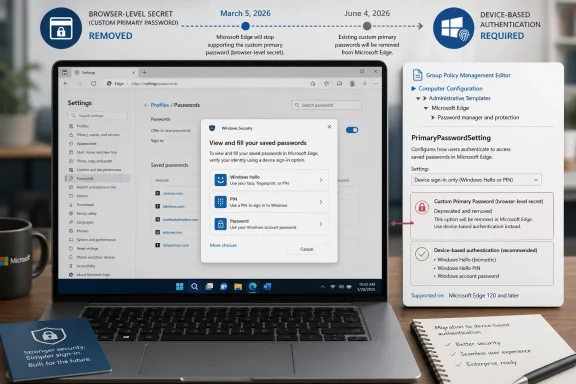
This is not a soft deprecation hiding in release notes. Microsoft has already split the retirement into three operational phases: no Custom Primary Password for new users as of March 5, 2026; in-product warnings for existing users; and full removal for opted-in users on June 4, 2026.
That matters because Custom Primary Password was one of those small Edge features that could become disproportionately important in real deployments. It let a user protect saved-password autofill with a browser-specific password rather than simply delegating that check to the operating system. For some home users, it was a convenience boundary; for some admins, it was an imperfect but visible extra step before credentials flowed into a web form.
Microsoft’s replacement is not another Edge-only secret. The company is moving saved-password protection behind device-based authentication: Windows Hello, the device password, or the OS sign-in mechanism already tied to the user session. Microsoft Learn also says the policy-backed feature is removed with Edge 149, and users who had it enabled are automatically migrated to “Prompt for the device sign-in options.”
The admin question, then, is not whether Custom Primary Password is worth defending. That battle is over. The question is whether your users experience the change as a planned authentication migration or as one more unexplained browser behavior shift on the morning the old option disappears.
That setting moves the saved-password prompt to the supported model Microsoft is keeping. Instead of asking for a Custom Primary Password created inside Edge, the browser will use the device’s authentication path. On Windows, that means Windows Hello where available, or the device password or other OS-level sign-in flow where Hello is not configured.
For admins, the cleaner route is policy. Microsoft’s Edge policy is
The important part is the direction of travel: do not set or preserve
A reasonable admin checklist is short. Identify Edge profiles where Custom Primary Password is enabled, update policy intent to device authentication, communicate the user-facing prompt change, and verify that Windows Hello or the expected device sign-in method works on the machines where saved-password autofill is allowed. The work is less about flipping a switch than about preventing a security prompt from becoming a help desk mystery.
Microsoft’s own Edge policy language has long framed password autofill authentication as an additional privacy layer, not malware protection. That distinction is not academic. A prompt before autofill can help stop a nearby person from casually using a saved password in an unlocked session, but it is not a serious defense against a compromised device.
That limitation explains the strategic shift. Microsoft is consolidating authentication prompts around the device identity rather than asking Edge to maintain its own browser-specific password ceremony. Windows Hello, PIN, face recognition, fingerprint, and system sign-in are the authentication surfaces Microsoft wants users to understand as the front door.
For security-minded admins, this is the uncomfortable but useful takeaway: Edge’s retirement of Custom Primary Password does not weaken a hardened Windows deployment if device authentication is strong. It does, however, expose weak endpoint practices. If users share Windows accounts, leave sessions unlocked, or use poor device passwords, the browser can no longer paper over that with a separate Edge-only prompt.
In practical terms, this means the migration is about user experience as much as browser version. One Windows device may host multiple Edge profiles with different sign-in states, policy scopes, and password-manager behaviors. A personal Microsoft account profile, a work profile, and an unmanaged local profile may not all behave the same way.
That profile-level reality should shape your rollout communications. Tell users that the change affects how Edge verifies identity before viewing or filling saved website passwords, not how they sign in to Windows and not necessarily how every password manager behaves. If your organization allows saved-password autofill in Edge, the visible change will be the authentication prompt, not a password vault deletion.
WindowsForum readers have already been tracking the broader theme in discussions around Edge password management, Windows Hello, and Microsoft’s passwordless push. The sharper point for admins is that this is not a generic passwordless announcement. It is a specific removal of a browser-level unlock path, with a specific deadline and a specific policy object attached to it.
The tradeoff is that your browser password policy becomes more dependent on endpoint authentication hygiene. If Windows Hello enrollment is consistent and device sign-in requirements are strong, Edge’s new behavior aligns with the rest of the Windows security model. If device authentication is uneven, the browser inherits that unevenness.
This is where the change should trigger a quick review of real-world Windows sign-in practices. Are users on shared PCs using unique Windows accounts? Are unmanaged personal devices allowed to sync Edge passwords into work-adjacent workflows? Are help desk scripts ready to explain that Edge is asking for the device sign-in option, not the retired Custom Primary Password?
There is also a usability upside. A browser-specific master password can become a stranded secret, especially when users rarely need it or forget how it differs from their Microsoft account password and Windows sign-in. Device authentication reduces that confusion by reusing the authentication ceremony the OS already owns.
For organizations that have been moving toward passkeys, Windows Hello for Business, or stronger local sign-in controls, the Edge change fits the larger Microsoft arc. The company is slowly collapsing separate password prompts into device-backed identity checks. That does not eliminate passwords overnight, but it does make the browser less of an island.
Start with Group Policy or your MDM-delivered Edge policy templates. Look for
Then audit user-facing documentation. Any guide that tells users to create, change, or remove a Custom Primary Password should be treated as expiring content. Replace it with the supported path: Edge settings, Microsoft Password Manager, More settings, and the device sign-in prompt before viewing or filling website passwords.
The last cleanup target is exception handling. If a department used Custom Primary Password because its users shared Windows sessions, the correct response is not to hunt for a hidden Edge workaround. The correct response is to fix the session-sharing model or disable browser password autofill where device-level identity cannot be trusted.
This is also a useful time to point users toward broader Edge password hygiene. WindowsForum has covered Microsoft Edge password management and secure password deployment before, and those topics now sit closer to the center of the browser’s security model. Saved-password convenience is still there, but the authentication story is now explicitly tied to the operating system.
The harder cases are users who do not know what they enabled. They may describe the feature as “Edge asks for another password before filling passwords,” “my browser has a master password,” or “I have to unlock saved passwords separately.” Those descriptions should now map to the retirement plan.
Admins should avoid overpromising what can be detected from a distance unless they have verified their own telemetry and policy reporting. The verified Microsoft facts tell us the feature is retiring, the policy name, the migration target, and the removal timing. They do not, by themselves, provide a universal inventory command that every tenant can run to identify every affected profile.
That uncertainty should be handled plainly. Check policy state where you manage Edge centrally, watch for help desk tickets from users seeing deprecation notices, and include the migration instructions in internal messaging before June 4. If your environment has browser-profile reporting, use it; if it does not, do not pretend the operating system alone will reveal every Edge profile preference.
The good news is that Microsoft’s auto-migration target is known. Affected users are moved to Prompt for the device sign-in options, rather than losing saved-password protection entirely. The risk is not that Edge suddenly stops protecting saved passwords; the risk is that users and support teams misunderstand the new prompt and treat expected behavior as a fault.
Tell users what will happen in plain English: Edge is retiring its Custom Primary Password and will use the device sign-in method instead. If Edge asks for Windows Hello, a PIN, fingerprint, face recognition, or the device password before filling a saved website password, that is expected. If they previously used a separate Edge-only password, that password is no longer the long-term unlock mechanism.
For help desks, the key is to distinguish three different password concepts. A website password signs the user into a site. A Microsoft account or work account password signs them into an identity provider. A Windows Hello PIN or device password confirms they are the person using the device.
Custom Primary Password blurred that map because it added a fourth browser-specific secret. Its removal simplifies the story, but only after users understand the replacement. Until then, some will assume Edge has “forgotten” their password, when in reality Edge is asking the OS to confirm identity before filling it.
Custom Primary Password represented an older style of browser security thinking: add a secret around a vault and ask the user to manage it. Device-based authentication represents Microsoft’s current style: bind sensitive actions to the device identity and reuse biometrics, PINs, and OS sign-in prompts. That is more coherent, but it also centralizes trust in the endpoint.
For Windows enthusiasts, this is another example of Edge becoming less separable from Windows security architecture. For admins, it means browser controls increasingly depend on endpoint controls. If you like that integration, this retirement looks like cleanup. If you prefer browser-level separations, it looks like one more independent control disappearing.
The truth is somewhere less theatrical. Custom Primary Password was not a silver bullet, and device authentication is not magic. The security outcome depends on whether the Windows account, device sign-in, and browser profile are actually assigned to the right person and protected with appropriate controls.
Microsoft Edge’s Custom Primary Password retirement is a small product change with a large administrative lesson: browser security prompts are being folded into the Windows device identity model, and admins who manage Edge can either align with that model deliberately or let users discover it through surprise prompts. The deadline is June 4, 2026, but the useful work is happening now: clean the policy, migrate the profiles, harden the device sign-in path, and make sure the next password prompt your users see feels expected rather than suspicious.
PrimaryPasswordSetting policy to move users away from the old browser-level unlock.The practical move is straightforward: in Edge, go to Settings and more > Settings > Passwords and autofill > Microsoft Password Manager > More settings, enable password and passkey autofill if needed, and choose “Prompt for the device sign-in options before viewing or filling website password.” In managed environments, check the Microsoft Edge policy path Administrative Templates > Microsoft Edge > Password manager and protection > “Configures a setting that asks users to enter their device password while using password autofill,” and stop relying on the Custom Primary Password option. After June 4, Edge automatically falls back to device authentication such as Windows Hello, device password, or OS-level sign-in.
 Microsoft Has Put the Browser Master Password on a Countdown
This is not a soft deprecation hiding in release notes. Microsoft has already split the retirement into three operational phases: no Custom Primary Password for new users as of March 5, 2026; in-product warnings for existing users; and full removal for opted-in users on June 4, 2026.That matters because Custom Primary Password was one of those small Edge features that could become disproportionately important in real deployments. It let a user protect saved-password autofill with a browser-specific password rather than simply delegating that check to the operating system. For some home users, it was a convenience boundary; for some admins, it was an imperfect but visible extra step before credentials flowed into a web form.
Microsoft’s replacement is not another Edge-only secret. The company is moving saved-password protection behind device-based authentication: Windows Hello, the device password, or the OS sign-in mechanism already tied to the user session. Microsoft Learn also says the policy-backed feature is removed with Edge 149, and users who had it enabled are automatically migrated to “Prompt for the device sign-in options.”
The admin question, then, is not whether Custom Primary Password is worth defending. That battle is over. The question is whether your users experience the change as a planned authentication migration or as one more unexplained browser behavior shift on the morning the old option disappears.
The Setting to Change Before Users Discover It for You
For individual Windows users, the migration path starts inside Edge rather than Windows Settings. Open Microsoft Edge, select the three-dot Settings and more menu, then go to Settings > Passwords and autofill > Microsoft Password Manager > More settings. From there, confirm that “Autofill passwords and passkeys” is enabled, then select “Prompt for the device sign-in options before viewing or filling website password.”That setting moves the saved-password prompt to the supported model Microsoft is keeping. Instead of asking for a Custom Primary Password created inside Edge, the browser will use the device’s authentication path. On Windows, that means Windows Hello where available, or the device password or other OS-level sign-in flow where Hello is not configured.
For admins, the cleaner route is policy. Microsoft’s Edge policy is
PrimaryPasswordSetting, under Administrative Templates > Microsoft Edge > Password manager and protection. The policy is a mandatory, per-profile setting with an integer value, and it has historically supported choices including automatic behavior, device password, Custom Primary Password, and disabling autofill.The important part is the direction of travel: do not set or preserve
WithCustomPrimaryPassword as your desired end state. Microsoft says that option is being removed with Edge 149, and affected users will be migrated to the device sign-in prompt. If your management baseline still references Custom Primary Password, your documentation is already stale even if the browser has not yet forced the issue everywhere.A reasonable admin checklist is short. Identify Edge profiles where Custom Primary Password is enabled, update policy intent to device authentication, communicate the user-facing prompt change, and verify that Windows Hello or the expected device sign-in method works on the machines where saved-password autofill is allowed. The work is less about flipping a switch than about preventing a security prompt from becoming a help desk mystery.
The Old Edge Password Gate Was Never a Full Security Boundary
Custom Primary Password had an appealing mental model: saved passwords were in the browser, so the browser asked for a separate password before filling them. That sounded like compartmentalization, especially on shared or lightly supervised PCs. But it was also a second secret users had to remember, reset, explain, and support.Microsoft’s own Edge policy language has long framed password autofill authentication as an additional privacy layer, not malware protection. That distinction is not academic. A prompt before autofill can help stop a nearby person from casually using a saved password in an unlocked session, but it is not a serious defense against a compromised device.
That limitation explains the strategic shift. Microsoft is consolidating authentication prompts around the device identity rather than asking Edge to maintain its own browser-specific password ceremony. Windows Hello, PIN, face recognition, fingerprint, and system sign-in are the authentication surfaces Microsoft wants users to understand as the front door.
For security-minded admins, this is the uncomfortable but useful takeaway: Edge’s retirement of Custom Primary Password does not weaken a hardened Windows deployment if device authentication is strong. It does, however, expose weak endpoint practices. If users share Windows accounts, leave sessions unlocked, or use poor device passwords, the browser can no longer paper over that with a separate Edge-only prompt.
The Migration Is Small, but the Blast Radius Is Profile-Level
ThePrimaryPasswordSetting policy applies per profile. That detail is easy to miss, and it is exactly where admin assumptions can go wrong. A machine-level inventory of Edge installations will not necessarily tell you which browser profiles are affected by the Custom Primary Password retirement.In practical terms, this means the migration is about user experience as much as browser version. One Windows device may host multiple Edge profiles with different sign-in states, policy scopes, and password-manager behaviors. A personal Microsoft account profile, a work profile, and an unmanaged local profile may not all behave the same way.
That profile-level reality should shape your rollout communications. Tell users that the change affects how Edge verifies identity before viewing or filling saved website passwords, not how they sign in to Windows and not necessarily how every password manager behaves. If your organization allows saved-password autofill in Edge, the visible change will be the authentication prompt, not a password vault deletion.
WindowsForum readers have already been tracking the broader theme in discussions around Edge password management, Windows Hello, and Microsoft’s passwordless push. The sharper point for admins is that this is not a generic passwordless announcement. It is a specific removal of a browser-level unlock path, with a specific deadline and a specific policy object attached to it.
Device Authentication Becomes the New Password Manager Control Plane
Once Custom Primary Password is gone, Edge’s saved-password protection follows the device. That sounds simpler, and in many environments it will be. Users already know their Windows Hello PIN, fingerprint, face sign-in, or device password because they use it to unlock the PC.The tradeoff is that your browser password policy becomes more dependent on endpoint authentication hygiene. If Windows Hello enrollment is consistent and device sign-in requirements are strong, Edge’s new behavior aligns with the rest of the Windows security model. If device authentication is uneven, the browser inherits that unevenness.
This is where the change should trigger a quick review of real-world Windows sign-in practices. Are users on shared PCs using unique Windows accounts? Are unmanaged personal devices allowed to sync Edge passwords into work-adjacent workflows? Are help desk scripts ready to explain that Edge is asking for the device sign-in option, not the retired Custom Primary Password?
There is also a usability upside. A browser-specific master password can become a stranded secret, especially when users rarely need it or forget how it differs from their Microsoft account password and Windows sign-in. Device authentication reduces that confusion by reusing the authentication ceremony the OS already owns.
For organizations that have been moving toward passkeys, Windows Hello for Business, or stronger local sign-in controls, the Edge change fits the larger Microsoft arc. The company is slowly collapsing separate password prompts into device-backed identity checks. That does not eliminate passwords overnight, but it does make the browser less of an island.
Policy Cleanup Is the Admin Task Microsoft Will Not Do for You
Microsoft can remove the UI option and auto-migrate affected users, but it cannot clean up your internal baselines, screenshots, onboarding docs, security exceptions, or help desk runbooks. Those are the places where this retirement will linger longest. The browser may move on in June, while a three-year-old “set a Custom Primary Password” instruction keeps confusing users.Start with Group Policy or your MDM-delivered Edge policy templates. Look for
PrimaryPasswordSetting, especially any configuration that maps to Custom Primary Password. If your baseline still describes Custom Primary Password as the recommended state, rewrite it now around device sign-in prompts or around disabling saved-password autofill where that is your actual policy.Then audit user-facing documentation. Any guide that tells users to create, change, or remove a Custom Primary Password should be treated as expiring content. Replace it with the supported path: Edge settings, Microsoft Password Manager, More settings, and the device sign-in prompt before viewing or filling website passwords.
The last cleanup target is exception handling. If a department used Custom Primary Password because its users shared Windows sessions, the correct response is not to hunt for a hidden Edge workaround. The correct response is to fix the session-sharing model or disable browser password autofill where device-level identity cannot be trusted.
This is also a useful time to point users toward broader Edge password hygiene. WindowsForum has covered Microsoft Edge password management and secure password deployment before, and those topics now sit closer to the center of the browser’s security model. Saved-password convenience is still there, but the authentication story is now explicitly tied to the operating system.
What Impacted Profiles Will Look Like in the Field
The easiest impacted user to identify is the one who already knows the phrase “Custom Primary Password.” Those users previously opted in, and Microsoft says they will see in-product deprecation notifications. They are also the users most likely to notice that the browser-level password prompt is changing.The harder cases are users who do not know what they enabled. They may describe the feature as “Edge asks for another password before filling passwords,” “my browser has a master password,” or “I have to unlock saved passwords separately.” Those descriptions should now map to the retirement plan.
Admins should avoid overpromising what can be detected from a distance unless they have verified their own telemetry and policy reporting. The verified Microsoft facts tell us the feature is retiring, the policy name, the migration target, and the removal timing. They do not, by themselves, provide a universal inventory command that every tenant can run to identify every affected profile.
That uncertainty should be handled plainly. Check policy state where you manage Edge centrally, watch for help desk tickets from users seeing deprecation notices, and include the migration instructions in internal messaging before June 4. If your environment has browser-profile reporting, use it; if it does not, do not pretend the operating system alone will reveal every Edge profile preference.
The good news is that Microsoft’s auto-migration target is known. Affected users are moved to Prompt for the device sign-in options, rather than losing saved-password protection entirely. The risk is not that Edge suddenly stops protecting saved passwords; the risk is that users and support teams misunderstand the new prompt and treat expected behavior as a fault.
June 4 Is a Deadline for Communication, Not Just Configuration
The June 4, 2026 removal date is close enough that admins should treat this as a change-management item, not a future browser curiosity. A password prompt changing shape can generate disproportionate anxiety because users associate password UI changes with phishing, account compromise, or broken sync. Clear wording matters.Tell users what will happen in plain English: Edge is retiring its Custom Primary Password and will use the device sign-in method instead. If Edge asks for Windows Hello, a PIN, fingerprint, face recognition, or the device password before filling a saved website password, that is expected. If they previously used a separate Edge-only password, that password is no longer the long-term unlock mechanism.
For help desks, the key is to distinguish three different password concepts. A website password signs the user into a site. A Microsoft account or work account password signs them into an identity provider. A Windows Hello PIN or device password confirms they are the person using the device.
Custom Primary Password blurred that map because it added a fourth browser-specific secret. Its removal simplifies the story, but only after users understand the replacement. Until then, some will assume Edge has “forgotten” their password, when in reality Edge is asking the OS to confirm identity before filling it.
Where This Fits in Microsoft’s Passwordless Campaign
Microsoft has been pushing Windows and Microsoft 365 users toward passwordless authentication for years, and Edge has become a practical battleground for that effort. Browsers are where passwords are saved, reused, autofilled, leaked, generated, synced, and increasingly replaced by passkeys. Changing the unlock path for saved passwords is a small UI move with a larger identity-management message behind it.Custom Primary Password represented an older style of browser security thinking: add a secret around a vault and ask the user to manage it. Device-based authentication represents Microsoft’s current style: bind sensitive actions to the device identity and reuse biometrics, PINs, and OS sign-in prompts. That is more coherent, but it also centralizes trust in the endpoint.
For Windows enthusiasts, this is another example of Edge becoming less separable from Windows security architecture. For admins, it means browser controls increasingly depend on endpoint controls. If you like that integration, this retirement looks like cleanup. If you prefer browser-level separations, it looks like one more independent control disappearing.
The truth is somewhere less theatrical. Custom Primary Password was not a silver bullet, and device authentication is not magic. The security outcome depends on whether the Windows account, device sign-in, and browser profile are actually assigned to the right person and protected with appropriate controls.
The Admin Playbook Before Edge Forces the Issue
The cleanest migration is the one users barely notice. That requires acting before the removal date, not after. The work is practical, documentable, and small enough that postponing it would be the strangest choice.- Review any Edge policy baseline that configures
PrimaryPasswordSetting, and remove Custom Primary Password as a target state before the June 4, 2026 cutoff. - Move users to “Prompt for the device sign-in options before viewing or filling website password” through Edge settings or managed policy.
- Verify that Windows Hello, device password, or the intended OS-level sign-in method works reliably on devices where Edge saved-password autofill is allowed.
- Update help desk scripts so support staff can explain that Edge is switching from a browser-specific password to device-based authentication.
- Rewrite user documentation that mentions creating, changing, or removing a Custom Primary Password, because that workflow is expiring.
- Treat shared Windows accounts as a separate security problem, because device-based authentication only works well when the device session belongs to the person using it.
Microsoft Edge’s Custom Primary Password retirement is a small product change with a large administrative lesson: browser security prompts are being folded into the Windows device identity model, and admins who manage Edge can either align with that model deliberately or let users discover it through surprise prompts. The deadline is June 4, 2026, but the useful work is happening now: clean the policy, migrate the profiles, harden the device sign-in path, and make sure the next password prompt your users see feels expected rather than suspicious.
References
- Primary source: learn.microsoft.com
Microsoft Edge Browser Policy Documentation PrimaryPasswordSetting | Microsoft Learn
Windows and Mac documentation for supported Microsoft Edge Browser policy: Configures a setting that asks users to enter their device password while using password autofilllearn.microsoft.com - Independent coverage: support.microsoft.com
Keep your saved passwords private in Microsoft Edge | Microsoft Support
Keep your saved passwords private in Microsoft Edgesupport.microsoft.com - Independent coverage: pcworld.com
Microsoft Edge starts phasing out key password manager feature | PCWorld
You will no longer be able to create a master password for Edge's password manager. Existing master passwords will eventually be deprecated, too.www.pcworld.com - Independent coverage: windowscentral.com
Microsoft deprecates Edge’s custom primary password option | Windows Central
Microsoft confirms Edge's primary custom password feature is being retired in favor of Windows Hello.www.windowscentral.com - Independent coverage: aphnetworks.com
Edge’s Master Password is gone. Your face now protects your passwords | APH Networks
From PC World: Microsoft has made a major change to its Edge browser, removing support for the so-called Master Password feature. www.aphnetworks.com
- Independent coverage: winbuzzer.com
Microsoft Edge Retires Custom Primary Password in Windows Hello Push
Microsoft Edge now routes saved-password access through Windows Hello and device checks, reducing one reusable secret while making local sign-in more important. winbuzzer.com
- Independent coverage: pcsofter.com
Microsoft Retires Custom Primary Passwords for Edge’s Built-in Password Manager - PCSofter.COM - Technology & Software News
Microsoft is phasing out the custom primary password feature for its Edge browser’s native password manager, opting to replace it entirely with device-based authentication methods such as Windows Hello. The move marks a significant shift for the browser’s security toolkit—one that has grown so...www.pcsofter.com
- Independent coverage: cyberriskleaders.com
Microsoft removes master password support in Edge - Cyber Risk Leaders
Microsoft has retired the master password feature for its Edge browser from June 4, requiring users to use device-based authentication such as Windows Hello to access saved passwords.cyberriskleaders.com - Primary source: WindowsForum
Edge Ends Custom Primary Password: Saved Passwords Now Use Windows Hello | Windows Forum
Microsoft Edge removed its Custom Primary Password option for opted-in users on June 4, 2026, shifting saved-password protection to device-based...windowsforum.com
