

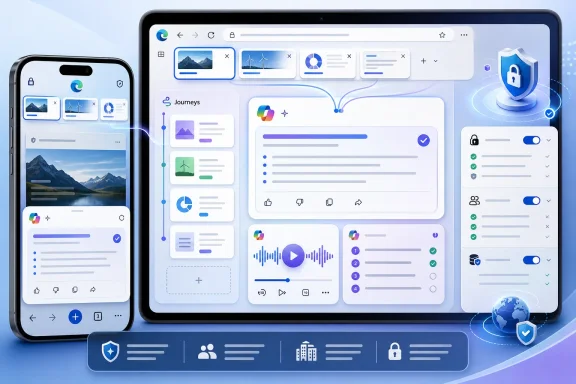
Microsoft’s May 2026 Edge update brings Copilot-powered tab summaries, browsing-history recall, AI-generated podcasts, quizzes, writing help, and mobile Vision features to Edge on iOS and Android, moving several desktop-only browser AI tools onto phones. The update is not just another Copilot button; it is Microsoft’s clearest attempt yet to make the browser itself feel like an assistant. For Windows users and IT pros, the interesting part is not whether Copilot can summarize a recipe page. It is that Edge is becoming a memory-bearing, context-aware front end for the web.
For years, mobile browsers have mostly competed on speed, sync, privacy posture, password handling, and how little they get in the user’s way. Safari owns the iPhone by default, Chrome owns Android by gravity, and Edge has lived in the strange middle ground of being good enough, cross-platform enough, and Microsoft-account-friendly enough to matter mostly to people already living in Windows and Microsoft 365.
This update changes the pitch. Microsoft is no longer asking users to choose Edge mobile because it syncs favorites with Windows or because it has a respectable reading mode. It is asking them to use Edge because the browser can now interpret the mess they create while browsing.
That is a more compelling argument than it sounds. Mobile research is awful. Tabs multiply, search results disappear, and switching between pages on a phone still feels like rifling through index cards in a wind tunnel. If Copilot can look across open tabs, summarize the useful bits, and answer follow-up questions without forcing the user to bounce between pages, Edge gains a real job.
The ZDNET piece is striking because it comes from a writer who explicitly says he is not a Copilot enthusiast. That matters. Microsoft has spent the last two years making AI feel less like an optional assistant and more like wallpaper pasted over every product surface. When a Copilot skeptic says Edge mobile has become useful because of AI, Microsoft has landed closer to product utility than product coercion.
This is the sort of AI feature that browsers should have been racing toward from the beginning. A browser already knows what the user is looking at. It already manages documents, sessions, searches, and identity. Adding a language model to that context is more natural than bolting a chatbot onto an operating system taskbar and hoping users invent reasons to click it.
The practical use case is simple. A user researching a phone, a router, a hotel, or a medical symptom opens half a dozen pages and asks Edge to summarize the differences. That does not require the AI to be magical. It requires it to be good enough at extraction, comparison, and compression to save five minutes of thumb work.
That caveat is important. Generative AI remains fallible, and browser summaries can flatten nuance or invent confidence where the source material is messy. The right mental model is not “Copilot read the web for me.” It is “Copilot made a first pass through the pile.” For many consumer tasks, that is enough. For legal, financial, medical, or administrative decisions, it is only the beginning.
On mobile, that could be genuinely useful. People research in fragments: ten minutes on a train, two searches during lunch, three tabs before bed. A browser that can identify “you were comparing mesh Wi-Fi systems” or “you were reading about Iceland itineraries” gives users a way back into intent, not just URLs.
But Journeys also reveals the trust bargain at the center of the AI browser. To be useful, Edge needs to remember more. To be trusted, it needs to make that remembering legible and controllable. The feature’s value depends not merely on accuracy, but on whether users understand what is being summarized, what is stored, what is sent for processing, and how easily they can turn it off.
For enterprise administrators, this is where the consumer convenience story becomes a governance story. Browsing history is not trivial metadata. It can include internal documentation, SaaS dashboards, competitive research, HR portals, procurement pages, and incident response material. A feature that organizes browsing activity into AI-readable workstreams may be helpful, but it is also the kind of thing security teams will want policies for before it becomes muscle memory.
This is Microsoft borrowing from the broader AI-notebook trend, where text is no longer treated as text alone. A web page becomes a briefing. A group of tabs becomes a spoken explainer. The browser stops being a window and starts being a format converter for attention.
The quiz feature points in the same direction. Study and Learn mode can turn a page into a guided session or an interactive quiz. For students, certification candidates, and anyone trying to digest technical material, that is more useful than a generic summary. It asks the browser to test comprehension, not just reduce word count.
There is a risk, though, that these features encourage a false sense of mastery. A quiz generated from a page is only as good as the model’s understanding of the page and the page’s own quality. In a browser, where the source could be official documentation, a vendor blog, a scraped content farm, or a forum post, the AI’s confidence can easily outrun the material.
This is the unavoidable tradeoff. A context-blind chatbot is less invasive but less helpful. A context-rich browser assistant can save time, connect threads, and reduce repetitive searching, but it sits closer to the user’s raw activity than almost any other consumer AI surface.
Microsoft says these experiences require permissions and are being integrated into Edge rather than hidden behind a separate Copilot Mode. That design choice cuts both ways. Integration makes the features easier to discover and less awkward to use. It also means users who came to Edge for ordinary browsing will see AI as part of the furniture.
The browser is a uniquely intimate place for this experiment. Operating systems know what apps you run. Productivity suites know what documents you create. Browsers know what you wonder about before you are ready to say it out loud. If Microsoft wants Edge to become the AI browser for mainstream users, it has to win a privacy argument that is harder than the feature demo.
AI gives Microsoft a wedge. Safari is cautious and deeply tied to Apple’s platform-level AI rollout. Chrome has Gemini integrations, but Google must balance browser utility against search advertising, Android defaults, and its own sprawling AI product map. Microsoft can make Edge the aggressive experiment: the place where the browser becomes an assistant first and a page renderer second.
That does not mean Edge will suddenly displace Safari or Chrome as the default mobile browser. Defaults are powerful. Muscle memory is powerful. Many users do not want their browser to become more ambitious.
But Edge does not need to win everyone. It needs to become the browser users deliberately open for certain tasks. Research. Comparison. Summarization. Study. Long-form reading converted into audio. If mobile Edge becomes the “I need help making sense of this” browser, Microsoft has created a new lane.
The immediate question is not whether these AI tools are good. Some of them clearly are. The question is whether organizations can govern them with the same precision they expect for sync, password management, extensions, and data loss controls.
A managed browser that summarizes internal web apps could be a gift to employees drowning in information. It could also become another route by which sensitive context is processed, retained, or exposed in ways users do not fully understand. The difference between those outcomes is policy, transparency, logging, and administrative control.
Microsoft’s challenge is that it wants Copilot to feel seamless to consumers and controllable to enterprises. Those goals are often in tension. The more invisible and ambient the assistant becomes, the more administrators will ask where the boundaries are.
In the old model, a session is a set of pages. In the new model, a session is a task: research this topic, compare these options, continue what I was doing yesterday, turn this into something I can listen to, quiz me until I understand it. That is a meaningful shift.
If it works, browser tabs become less like static pages and more like raw material. Copilot becomes the layer that extracts structure from the chaos. The user’s job changes from managing tabs to interrogating the bundle of information those tabs represent.
That is why this update feels more important than another AI sidebar. Microsoft is not merely putting Copilot next to the web. It is letting Copilot operate on the web session as a unit. That is the beginning of an AI-native browser, even if the current version still feels uneven, permission-heavy, and occasionally overhyped.
Source: ZDNET I'm no Copilot fan, but these 6 new AI skills turned Edge into my favorite mobile browser
 Microsoft Turns the Mobile Browser Into the Copilot Front Door
For years, mobile browsers have mostly competed on speed, sync, privacy posture, password handling, and how little they get in the user’s way. Safari owns the iPhone by default, Chrome owns Android by gravity, and Edge has lived in the strange middle ground of being good enough, cross-platform enough, and Microsoft-account-friendly enough to matter mostly to people already living in Windows and Microsoft 365.This update changes the pitch. Microsoft is no longer asking users to choose Edge mobile because it syncs favorites with Windows or because it has a respectable reading mode. It is asking them to use Edge because the browser can now interpret the mess they create while browsing.
That is a more compelling argument than it sounds. Mobile research is awful. Tabs multiply, search results disappear, and switching between pages on a phone still feels like rifling through index cards in a wind tunnel. If Copilot can look across open tabs, summarize the useful bits, and answer follow-up questions without forcing the user to bounce between pages, Edge gains a real job.
The ZDNET piece is striking because it comes from a writer who explicitly says he is not a Copilot enthusiast. That matters. Microsoft has spent the last two years making AI feel less like an optional assistant and more like wallpaper pasted over every product surface. When a Copilot skeptic says Edge mobile has become useful because of AI, Microsoft has landed closer to product utility than product coercion.
The Browser Is Learning to Read the Room
The headline feature is multi-tab reasoning. Instead of asking Copilot to summarize one page at a time, users can ask it to synthesize information from several open tabs. On desktop, this has obvious appeal for comparison shopping, travel planning, product research, and news reading. On mobile, the appeal is sharper because the physical cost of tab switching is higher.This is the sort of AI feature that browsers should have been racing toward from the beginning. A browser already knows what the user is looking at. It already manages documents, sessions, searches, and identity. Adding a language model to that context is more natural than bolting a chatbot onto an operating system taskbar and hoping users invent reasons to click it.
The practical use case is simple. A user researching a phone, a router, a hotel, or a medical symptom opens half a dozen pages and asks Edge to summarize the differences. That does not require the AI to be magical. It requires it to be good enough at extraction, comparison, and compression to save five minutes of thumb work.
That caveat is important. Generative AI remains fallible, and browser summaries can flatten nuance or invent confidence where the source material is messy. The right mental model is not “Copilot read the web for me.” It is “Copilot made a first pass through the pile.” For many consumer tasks, that is enough. For legal, financial, medical, or administrative decisions, it is only the beginning.
Journeys Are Browser History With an Editorial Voice
The more consequential feature may be Journeys, Microsoft’s attempt to turn browsing history into topic-based continuity. Traditional history is a chronological junk drawer. Journeys tries to infer that several searches and pages belong to the same task, then presents that cluster as something the user can resume.On mobile, that could be genuinely useful. People research in fragments: ten minutes on a train, two searches during lunch, three tabs before bed. A browser that can identify “you were comparing mesh Wi-Fi systems” or “you were reading about Iceland itineraries” gives users a way back into intent, not just URLs.
But Journeys also reveals the trust bargain at the center of the AI browser. To be useful, Edge needs to remember more. To be trusted, it needs to make that remembering legible and controllable. The feature’s value depends not merely on accuracy, but on whether users understand what is being summarized, what is stored, what is sent for processing, and how easily they can turn it off.
For enterprise administrators, this is where the consumer convenience story becomes a governance story. Browsing history is not trivial metadata. It can include internal documentation, SaaS dashboards, competitive research, HR portals, procurement pages, and incident response material. A feature that organizes browsing activity into AI-readable workstreams may be helpful, but it is also the kind of thing security teams will want policies for before it becomes muscle memory.
Podcasts and Quizzes Make Edge Feel Less Like a Browser
The podcast generator is the flashiest addition. Ask Copilot to turn a page or open tabs into an audio summary, wait for generation, and then listen. It sounds gimmicky until you imagine the target behavior: the user who opens a long article, a report, or several research tabs and wants the browser to convert reading into commute audio.This is Microsoft borrowing from the broader AI-notebook trend, where text is no longer treated as text alone. A web page becomes a briefing. A group of tabs becomes a spoken explainer. The browser stops being a window and starts being a format converter for attention.
The quiz feature points in the same direction. Study and Learn mode can turn a page into a guided session or an interactive quiz. For students, certification candidates, and anyone trying to digest technical material, that is more useful than a generic summary. It asks the browser to test comprehension, not just reduce word count.
There is a risk, though, that these features encourage a false sense of mastery. A quiz generated from a page is only as good as the model’s understanding of the page and the page’s own quality. In a browser, where the source could be official documentation, a vendor blog, a scraped content farm, or a forum post, the AI’s confidence can easily outrun the material.
Microsoft’s Strongest AI Argument Is Also Its Biggest Privacy Problem
The best Copilot-in-Edge features all depend on context. Open tabs, past searches, browsing history, current screen contents, and prior chats make the assistant more useful. They also make it more sensitive.This is the unavoidable tradeoff. A context-blind chatbot is less invasive but less helpful. A context-rich browser assistant can save time, connect threads, and reduce repetitive searching, but it sits closer to the user’s raw activity than almost any other consumer AI surface.
Microsoft says these experiences require permissions and are being integrated into Edge rather than hidden behind a separate Copilot Mode. That design choice cuts both ways. Integration makes the features easier to discover and less awkward to use. It also means users who came to Edge for ordinary browsing will see AI as part of the furniture.
The browser is a uniquely intimate place for this experiment. Operating systems know what apps you run. Productivity suites know what documents you create. Browsers know what you wonder about before you are ready to say it out loud. If Microsoft wants Edge to become the AI browser for mainstream users, it has to win a privacy argument that is harder than the feature demo.
Edge’s Mobile Opportunity Comes From Safari and Chrome Standing Still
Microsoft’s mobile browser problem has always been structural. Apple controls the iPhone default. Google controls Android habits, search distribution, and the Chrome ecosystem. Edge can be excellent and still feel unnecessary.AI gives Microsoft a wedge. Safari is cautious and deeply tied to Apple’s platform-level AI rollout. Chrome has Gemini integrations, but Google must balance browser utility against search advertising, Android defaults, and its own sprawling AI product map. Microsoft can make Edge the aggressive experiment: the place where the browser becomes an assistant first and a page renderer second.
That does not mean Edge will suddenly displace Safari or Chrome as the default mobile browser. Defaults are powerful. Muscle memory is powerful. Many users do not want their browser to become more ambitious.
But Edge does not need to win everyone. It needs to become the browser users deliberately open for certain tasks. Research. Comparison. Summarization. Study. Long-form reading converted into audio. If mobile Edge becomes the “I need help making sense of this” browser, Microsoft has created a new lane.
IT Departments Will See Productivity and Policy in the Same Frame
For WindowsForum readers, the enterprise angle is not theoretical. Edge is already a common managed browser in Microsoft-heavy environments, and mobile Edge is often part of the same identity and compliance story. Copilot features that seem harmless on a personal phone can look different when the tabs contain SharePoint pages, admin portals, dashboards, or customer data.The immediate question is not whether these AI tools are good. Some of them clearly are. The question is whether organizations can govern them with the same precision they expect for sync, password management, extensions, and data loss controls.
A managed browser that summarizes internal web apps could be a gift to employees drowning in information. It could also become another route by which sensitive context is processed, retained, or exposed in ways users do not fully understand. The difference between those outcomes is policy, transparency, logging, and administrative control.
Microsoft’s challenge is that it wants Copilot to feel seamless to consumers and controllable to enterprises. Those goals are often in tension. The more invisible and ambient the assistant becomes, the more administrators will ask where the boundaries are.
The Real Competition Is the Shape of Browsing Itself
The ZDNET article frames the update as six new skills that made Edge more appealing on mobile. That is fair, but the broader story is that Microsoft is trying to redefine what a browser session is.In the old model, a session is a set of pages. In the new model, a session is a task: research this topic, compare these options, continue what I was doing yesterday, turn this into something I can listen to, quiz me until I understand it. That is a meaningful shift.
If it works, browser tabs become less like static pages and more like raw material. Copilot becomes the layer that extracts structure from the chaos. The user’s job changes from managing tabs to interrogating the bundle of information those tabs represent.
That is why this update feels more important than another AI sidebar. Microsoft is not merely putting Copilot next to the web. It is letting Copilot operate on the web session as a unit. That is the beginning of an AI-native browser, even if the current version still feels uneven, permission-heavy, and occasionally overhyped.
Edge’s New Tricks Matter Most When They Stay Boring
The useful version of AI in a browser is not theatrical. It is quiet, bounded, and easy to verify. Edge’s new mobile features are promising precisely where they reduce friction without asking users to surrender judgment.- Copilot can now summarize and answer questions across multiple open tabs in mobile Edge, making research on a phone less dependent on constant tab switching.
- Journeys turns browsing history into topic-based sessions, which may help users resume research but also raises sharper privacy and governance questions.
- AI-generated podcasts and quizzes push Edge beyond page viewing into attention-shifting tools for listening and learning.
- The strongest use cases are research, comparison shopping, studying, travel planning, and digesting long pages on small screens.
- The same context that makes Copilot useful — tabs, history, screen contents, and prior chats — is what enterprises and privacy-conscious users must scrutinize.
- Edge’s best chance on mobile is not replacing Safari or Chrome outright, but becoming the browser people open when ordinary browsing turns into a task.
Source: ZDNET I'm no Copilot fan, but these 6 new AI skills turned Edge into my favorite mobile browser
