

Microsoft’s May 12, 2026 Windows 11 cumulative update KB5089549 is failing on some Windows 11 24H2 and 25H2 PCs when the EFI System Partition has too little free space, with Microsoft saying the issue is fixed in the May 26 optional preview update KB5089573 and later releases. The failure is not a dramatic blue-screen crisis, but it is a revealing one: a modern Windows servicing stack is once again being tripped by a tiny hidden partition most users never see. For administrators, the lesson is less “install the preview update immediately” than “Windows’ oldest plumbing still defines the reliability of its newest release cadence.”
The bug lands in a particularly awkward place for Microsoft. Patch Tuesday updates are supposed to be the most routine part of the Windows security contract: download, reboot, return to work. Instead, affected machines reach the reboot phase, stall around the mid-30 percent mark, undo the changes, and leave users with the familiar non-explanation that something did not go as planned. In the Windows Update history page, the useful clue is error code 0x800f0922; in deeper logs, the story points to insufficient free space on the EFI System Partition.
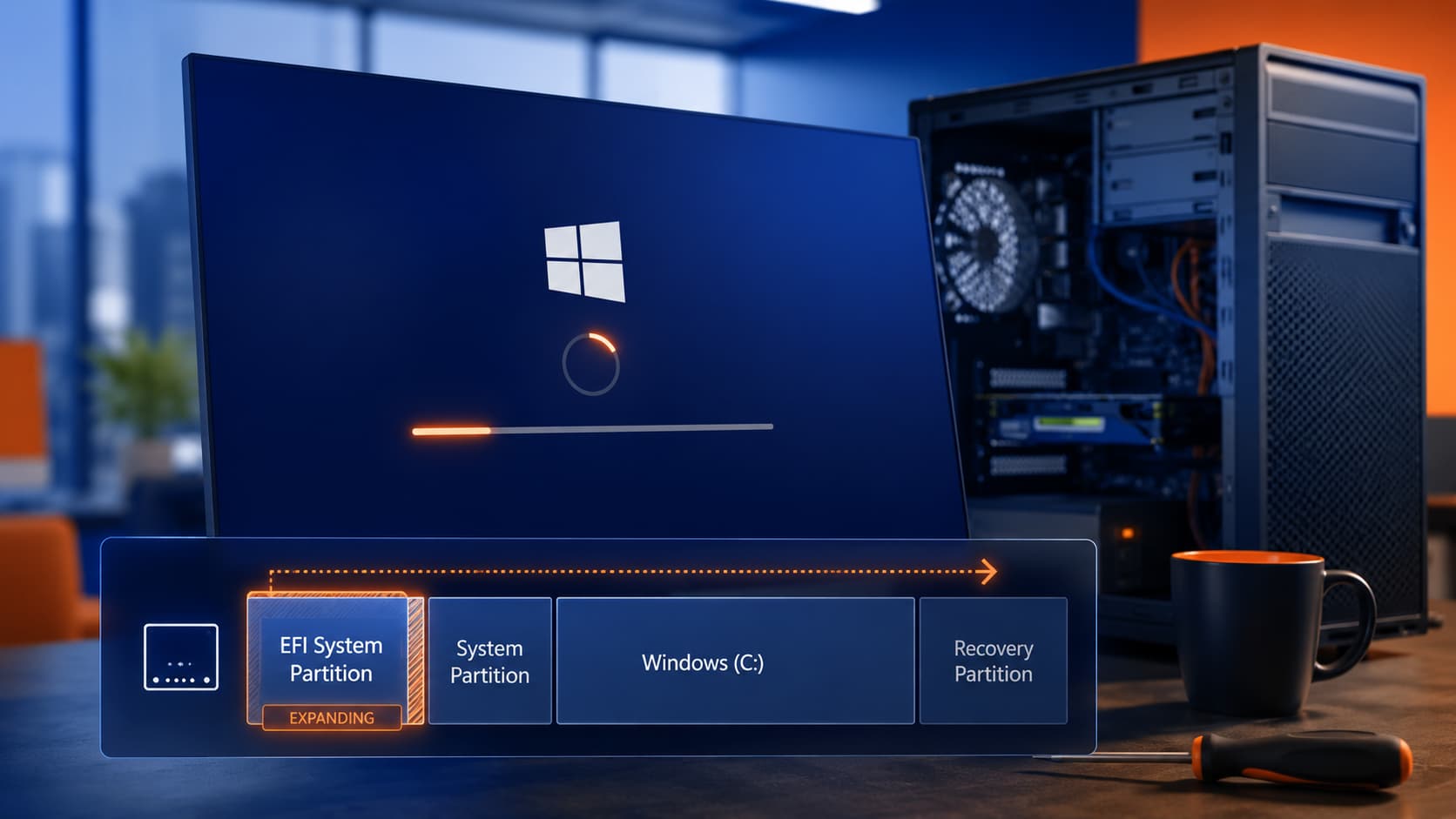
The EFI System Partition, or ESP, is not a place where users store documents, games, or Teams recordings. It is the small FAT32 partition used by UEFI firmware to find the Windows Boot Manager and the files needed to begin the startup chain. On a healthy Windows 11 installation, it is intentionally hidden from File Explorer because casual tinkering there can turn a working PC into a recovery project.
That invisibility is part of why this bug feels so out of proportion. Users see a normal Windows security update fail, but the underlying condition sits in a partition they probably did not create manually and may not know exists. The failure is therefore not “low disk space” in the usual sense. A PC can have hundreds of gigabytes free on C: and still fail if the ESP has been squeezed down to only a few megabytes of remaining capacity.
Microsoft’s documentation ties the issue to devices with limited free space on the ESP, especially machines with 10MB or less available. The update downloads normally, but the install cannot complete after reboot. Windows then rolls back the update, reports 0x800f0922, and leaves the user with a system that is still running but not current on that month’s security payload.
That last distinction matters. This is not a widespread boot-killer in the reported pattern; Windows’ rollback mechanism is doing its job. But a rollback that protects the machine from a failed install still leaves it without the intended security update. For home users, that is annoying. For managed fleets, it is drift.
That creates the usual preview-update dilemma. Optional cumulative previews are not security updates, and many cautious users and administrators skip them by design. They exist partly to let Microsoft ship non-security fixes ahead of the next Patch Tuesday, but they are also treated by many IT shops as test-ring material rather than broad-production code.
In this case, the optional update is also a repair vehicle. If KB5089549 failed on a device and the machine remains blocked, installing KB5089573 may be the cleanest route out of the loop. If the affected PC is otherwise stable and the organization does not deploy optional previews, the fix is expected to arrive in the next cumulative update as well, with the next Patch Tuesday scheduled for June 9, 2026.
That means there is no single answer for every user. A home PC that keeps trying and failing to install May’s update may benefit from taking the optional fix now. An enterprise fleet with update rings, compliance windows, and change controls may prefer to validate KB5089573 in a small ring or wait for the June security release, assuming risk policy allows that delay.
In this incident, the more useful evidence appears in the CBS logs under
Windows Latest also points to a PowerShell command for checking ESP size and free space:
That command is useful, but it also illustrates the gulf between Windows as a consumer operating system and Windows as a piece of infrastructure. A normal user should not need to know the GPT type GUID for the EFI partition to understand why a monthly update failed. Yet when servicing breaks at this layer, the friendly Settings app is often only the first page of a much longer diagnostic trail.
The better reading of 0x800f0922 this month is therefore conditional. If KB5089549 failed on Windows 11 24H2 or 25H2, especially during reboot at roughly 35–36 percent, and if logs mention ESP space, this specific Microsoft-confirmed issue is a strong suspect. If the same error appears in a different update, at a different stage, or with different logs, administrators should resist treating ESP space as the only possible cause.
The trouble is that PCs are not static diagrams in a deployment guide. They receive firmware updates, OEM boot components, recovery tooling, bootloader changes, dual-boot modifications, encryption-related updates, and sometimes vendor utilities that treat the ESP as a convenient staging area. A machine that began life with a reasonable amount of free ESP space can become constrained after years of upgrades and maintenance.
Cloned disks and long-lived installations add another wrinkle. A PC that has moved from Windows 10 to Windows 11, or from one SSD to another, may carry forward an older partition layout. The user experiences it as a modern Windows 11 system. The servicing stack experiences it as a collection of historical decisions, some made by Microsoft, some by the OEM, and some by whatever migration tool touched the disk along the way.
That is why the 10MB threshold is so important. Windows is not saying every small ESP will fail. It is saying that devices with very little remaining room are vulnerable to this installation path. In practical terms, the machine can be “healthy” in daily use until an update asks the boot partition to accommodate one more operation.
For enthusiasts, the temptation is obvious. If the ESP is too small, make it larger. In some cases, that is exactly what a repair technician or experienced administrator might do, especially on systems with chronically undersized partitions. But it is not the workaround Microsoft is steering ordinary users toward now that an update-level fix exists.
That restraint is sensible. The confirmed issue is not that Windows 11 can never operate with a small ESP; it is that a recent servicing change interacted badly with systems that had very limited free space there. If Microsoft can alter the update process so it no longer halts on those machines, that is preferable to asking millions of users to manipulate hidden partitions with elevated tools.
There are exceptions. If an organization repeatedly sees ESP space failures across update cycles, or if a device has an unusually tiny partition inherited from old imaging practices, partition remediation may belong in the fleet health backlog. But that is a planned maintenance task with backups and recovery media, not a late-night consumer fix after Windows Update fails.
That is the core operational risk. A single failed endpoint is a help-desk ticket. A pattern of failures across a hardware model, disk image, or inherited partition scheme becomes a compliance problem. Security dashboards do not care that the root cause was hidden 100MB from the front of the disk; they care that the device is missing a required cumulative update.
This is also why Microsoft’s fix landing in an optional preview is useful but imperfect. Optional previews can reduce pain before the next Patch Tuesday, but security-conscious environments often avoid broad deployment of preview updates. That leaves administrators balancing two risks: deploy a non-security preview to unblock a security baseline, or wait for the next security cumulative update that includes the fix.
For small businesses without formal rings, the calculus may be simpler. If a Windows 11 machine is stuck failing KB5089549 and Microsoft has shipped a fix in KB5089573, installing the optional update may be the practical move. For larger organizations, the more mature response is to identify affected devices, confirm the failure mode, test the preview, and decide whether the risk of waiting until June 9 is acceptable.
The problem is not simply that an update failed. Software fails. The problem is that the failure mode was produced by a layer of the PC most users cannot reasonably inspect and that Windows does not explain clearly at the point of failure. Microsoft can document the issue after the fact, but the user experience remains a spinning circle, a rollback, and a hexadecimal code.
There is a philosophical tension here. Windows needs to abstract away the complexity of modern PC boot architecture, because otherwise normal users would drown in firmware, partitions, certificates, recovery environments, and boot managers. But when that abstraction leaks, the leak is severe. The hidden layer becomes the only layer that matters.
This is the servicing contract Microsoft must keep tightening. A cumulative update should either succeed, clearly defer itself with an actionable reason, or remediate its own prerequisite problem safely. A vague rollback protects the system, but it does not complete the job.
OEMs can add firmware update machinery and recovery components. Imaging teams can deploy partition layouts that were reasonable at the time but stingy by today’s standards. Users can clone disks, dual-boot Linux, repair bootloaders, and carry old partition maps across multiple hardware generations. None of that excuses a Microsoft update tripping over a small ESP, but it explains why these bugs seem to appear on “some PCs” rather than cleanly across all Windows 11 installations.
For IT departments, that means this incident should prompt a look at standards. If deployment images still use older ESP sizing assumptions, it may be time to revise them. If certain OEM models consistently show cramped boot partitions after firmware updates, that deserves inventory-level attention. If a migration process preserves problematic layouts indefinitely, it may be creating future support calls.
The hidden partition is not glamorous infrastructure, but it is infrastructure. Treating it as a one-time installation detail is no longer enough when monthly servicing, firmware trust chains, Secure Boot changes, and recovery features all depend on the same small slice of disk.
The same caution applies to skipping it. If a machine cannot install KB5089549 and remains unpatched, waiting for the next Patch Tuesday may be acceptable for a home user who understands the tradeoff, but it is harder to justify in high-risk environments. The right answer depends on exposure, compliance requirements, and how quickly the organization can validate the preview update.
Microsoft’s statement that later updates include the fix matters because it gives administrators an endpoint. This is not a permanent fork where affected devices must live on a special workaround. The fix becomes part of the normal cumulative stream, which is exactly how Windows servicing is supposed to recover from a bad interaction.
Still, the incident is a reminder that “cumulative” cuts both ways. Each new update contains the past month’s security work and the fixes for recent regressions. That model simplifies patching, but it also means a blockage in the update mechanism can hold back multiple layers of remediation at once.
For enthusiasts, the most useful move is to check rather than guess. Confirm the update KB, confirm the Windows version, inspect Windows Update history, and look for the ESP clue in logs if necessary. If the machine is affected, KB5089573 or a later cumulative update is the supported path forward.
For administrators, the larger move is inventory. Systems with extremely low ESP free space should not be surprises discovered during Patch Tuesday. If you can identify them ahead of time, you can decide whether to remediate partition layouts, adjust update rings, or simply monitor for recurrence.
The bug lands in a particularly awkward place for Microsoft. Patch Tuesday updates are supposed to be the most routine part of the Windows security contract: download, reboot, return to work. Instead, affected machines reach the reboot phase, stall around the mid-30 percent mark, undo the changes, and leave users with the familiar non-explanation that something did not go as planned. In the Windows Update history page, the useful clue is error code 0x800f0922; in deeper logs, the story points to insufficient free space on the EFI System Partition.
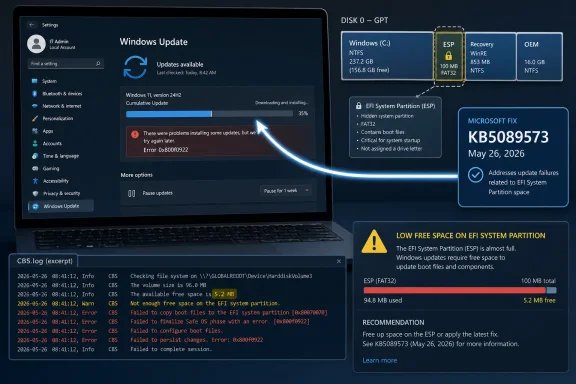 A Tiny Boot Partition Becomes the Month’s Biggest Servicing Story
The EFI System Partition, or ESP, is not a place where users store documents, games, or Teams recordings. It is the small FAT32 partition used by UEFI firmware to find the Windows Boot Manager and the files needed to begin the startup chain. On a healthy Windows 11 installation, it is intentionally hidden from File Explorer because casual tinkering there can turn a working PC into a recovery project.That invisibility is part of why this bug feels so out of proportion. Users see a normal Windows security update fail, but the underlying condition sits in a partition they probably did not create manually and may not know exists. The failure is therefore not “low disk space” in the usual sense. A PC can have hundreds of gigabytes free on C: and still fail if the ESP has been squeezed down to only a few megabytes of remaining capacity.
Microsoft’s documentation ties the issue to devices with limited free space on the ESP, especially machines with 10MB or less available. The update downloads normally, but the install cannot complete after reboot. Windows then rolls back the update, reports 0x800f0922, and leaves the user with a system that is still running but not current on that month’s security payload.
That last distinction matters. This is not a widespread boot-killer in the reported pattern; Windows’ rollback mechanism is doing its job. But a rollback that protects the machine from a failed install still leaves it without the intended security update. For home users, that is annoying. For managed fleets, it is drift.
Microsoft’s Fix Is Real, but the Timing Is Awkward
Microsoft says the problem is resolved by the May 26, 2026 preview update, KB5089573, which moves Windows 11 24H2 and 25H2 systems to builds 26100.8524 and 26200.8524. The company’s advice is straightforward: install the latest update for your device because it contains the fix and other improvements. Windows Latest reports that Microsoft previously rolled back the problematic behavior server-side and has now addressed the root cause in the optional update.That creates the usual preview-update dilemma. Optional cumulative previews are not security updates, and many cautious users and administrators skip them by design. They exist partly to let Microsoft ship non-security fixes ahead of the next Patch Tuesday, but they are also treated by many IT shops as test-ring material rather than broad-production code.
In this case, the optional update is also a repair vehicle. If KB5089549 failed on a device and the machine remains blocked, installing KB5089573 may be the cleanest route out of the loop. If the affected PC is otherwise stable and the organization does not deploy optional previews, the fix is expected to arrive in the next cumulative update as well, with the next Patch Tuesday scheduled for June 9, 2026.
That means there is no single answer for every user. A home PC that keeps trying and failing to install May’s update may benefit from taking the optional fix now. An enterprise fleet with update rings, compliance windows, and change controls may prefer to validate KB5089573 in a small ring or wait for the June security release, assuming risk policy allows that delay.
Error 0x800f0922 Remains Windows’ Most Unhelpful Clue
The most irritating part of this failure is not the rollback; it is the ambiguity. Error 0x800f0922 has appeared in different Windows Update contexts over the years, including servicing failures, reserved partition problems, and component or feature installation issues. It is a code that can point in the right general direction while still forcing the administrator to prove the actual cause.In this incident, the more useful evidence appears in the CBS logs under
C:\Windows\Logs\CBS\CBS.log, where entries can indicate insufficient free space on the EFI System Partition. That is not a path most consumers will ever inspect, and it is not a friendly experience even for many technically confident users. Microsoft’s rollback screen does not say, “Your hidden boot partition is too full.” It says something went wrong and undoes the update.Windows Latest also points to a PowerShell command for checking ESP size and free space:
Get-Partition | Where-Object GptType -eq '{c12a7328-f81f-11d2-ba4b-00a0c93ec93b}' | Get-Volume | Format-List Size, SizeRemainingThat command is useful, but it also illustrates the gulf between Windows as a consumer operating system and Windows as a piece of infrastructure. A normal user should not need to know the GPT type GUID for the EFI partition to understand why a monthly update failed. Yet when servicing breaks at this layer, the friendly Settings app is often only the first page of a much longer diagnostic trail.
The better reading of 0x800f0922 this month is therefore conditional. If KB5089549 failed on Windows 11 24H2 or 25H2, especially during reboot at roughly 35–36 percent, and if logs mention ESP space, this specific Microsoft-confirmed issue is a strong suspect. If the same error appears in a different update, at a different stage, or with different logs, administrators should resist treating ESP space as the only possible cause.
The ESP Was Never Designed for Today’s Servicing Expectations
The ESP is small because it was supposed to be small. It holds boot files, not the operating system. For many systems, that has been enough for years. A clean installation may allocate a few hundred megabytes to the partition and leave much of it unused.The trouble is that PCs are not static diagrams in a deployment guide. They receive firmware updates, OEM boot components, recovery tooling, bootloader changes, dual-boot modifications, encryption-related updates, and sometimes vendor utilities that treat the ESP as a convenient staging area. A machine that began life with a reasonable amount of free ESP space can become constrained after years of upgrades and maintenance.
Cloned disks and long-lived installations add another wrinkle. A PC that has moved from Windows 10 to Windows 11, or from one SSD to another, may carry forward an older partition layout. The user experiences it as a modern Windows 11 system. The servicing stack experiences it as a collection of historical decisions, some made by Microsoft, some by the OEM, and some by whatever migration tool touched the disk along the way.
That is why the 10MB threshold is so important. Windows is not saying every small ESP will fail. It is saying that devices with very little remaining room are vulnerable to this installation path. In practical terms, the machine can be “healthy” in daily use until an update asks the boot partition to accommodate one more operation.
The Workaround Most Users Should Avoid Is Also the One Power Users Understand
There is a manual way to solve an ESP capacity problem: resize the partition or otherwise free space inside it. That sentence should make careful administrators sit up straight, because resizing boot partitions is not the same as uninstalling a driver or clearing a temp folder. The ESP sits on the boot path. Damage it, and the operating system may no longer start.For enthusiasts, the temptation is obvious. If the ESP is too small, make it larger. In some cases, that is exactly what a repair technician or experienced administrator might do, especially on systems with chronically undersized partitions. But it is not the workaround Microsoft is steering ordinary users toward now that an update-level fix exists.
That restraint is sensible. The confirmed issue is not that Windows 11 can never operate with a small ESP; it is that a recent servicing change interacted badly with systems that had very limited free space there. If Microsoft can alter the update process so it no longer halts on those machines, that is preferable to asking millions of users to manipulate hidden partitions with elevated tools.
There are exceptions. If an organization repeatedly sees ESP space failures across update cycles, or if a device has an unusually tiny partition inherited from old imaging practices, partition remediation may belong in the fleet health backlog. But that is a planned maintenance task with backups and recovery media, not a late-night consumer fix after Windows Update fails.
The Security Risk Is the Delay, Not the Rollback
The good news is that the rollback path appears designed to preserve bootability. The bad news is that a failed security update still fails. KB5089549 was a monthly cumulative security update, and users blocked from installing it are not receiving the complete intended patch set until they install a later update that succeeds.That is the core operational risk. A single failed endpoint is a help-desk ticket. A pattern of failures across a hardware model, disk image, or inherited partition scheme becomes a compliance problem. Security dashboards do not care that the root cause was hidden 100MB from the front of the disk; they care that the device is missing a required cumulative update.
This is also why Microsoft’s fix landing in an optional preview is useful but imperfect. Optional previews can reduce pain before the next Patch Tuesday, but security-conscious environments often avoid broad deployment of preview updates. That leaves administrators balancing two risks: deploy a non-security preview to unblock a security baseline, or wait for the next security cumulative update that includes the fix.
For small businesses without formal rings, the calculus may be simpler. If a Windows 11 machine is stuck failing KB5089549 and Microsoft has shipped a fix in KB5089573, installing the optional update may be the practical move. For larger organizations, the more mature response is to identify affected devices, confirm the failure mode, test the preview, and decide whether the risk of waiting until June 9 is acceptable.
Microsoft’s Servicing Machine Still Depends on Edge Cases It Cannot Fully Hide
Windows Update has improved enormously from the era when a bad driver or half-applied patch could leave users stranded with little recourse. Rollbacks, repair options, safeguard holds, known issue rollbacks, and clearer health dashboard entries all make the platform more resilient. This incident shows the limits of that progress.The problem is not simply that an update failed. Software fails. The problem is that the failure mode was produced by a layer of the PC most users cannot reasonably inspect and that Windows does not explain clearly at the point of failure. Microsoft can document the issue after the fact, but the user experience remains a spinning circle, a rollback, and a hexadecimal code.
There is a philosophical tension here. Windows needs to abstract away the complexity of modern PC boot architecture, because otherwise normal users would drown in firmware, partitions, certificates, recovery environments, and boot managers. But when that abstraction leaks, the leak is severe. The hidden layer becomes the only layer that matters.
This is the servicing contract Microsoft must keep tightening. A cumulative update should either succeed, clearly defer itself with an actionable reason, or remediate its own prerequisite problem safely. A vague rollback protects the system, but it does not complete the job.
OEMs and Old Images Share the Blame for a Microsoft Problem
It would be too easy to frame this as only a Microsoft bug. Microsoft owns Windows Update, and Microsoft confirmed the issue, so Microsoft owns the user impact. But the conditions that make ESP failures likely are often created over the lifetime of a device, not on the day a cumulative update ships.OEMs can add firmware update machinery and recovery components. Imaging teams can deploy partition layouts that were reasonable at the time but stingy by today’s standards. Users can clone disks, dual-boot Linux, repair bootloaders, and carry old partition maps across multiple hardware generations. None of that excuses a Microsoft update tripping over a small ESP, but it explains why these bugs seem to appear on “some PCs” rather than cleanly across all Windows 11 installations.
For IT departments, that means this incident should prompt a look at standards. If deployment images still use older ESP sizing assumptions, it may be time to revise them. If certain OEM models consistently show cramped boot partitions after firmware updates, that deserves inventory-level attention. If a migration process preserves problematic layouts indefinitely, it may be creating future support calls.
The hidden partition is not glamorous infrastructure, but it is infrastructure. Treating it as a one-time installation detail is no longer enough when monthly servicing, firmware trust chains, Secure Boot changes, and recovery features all depend on the same small slice of disk.
The Optional Update Is a Fix, Not a Free Pass
KB5089573 should reduce or eliminate this specific failure for affected machines, but it does not make optional previews magically risk-free. Preview updates are cumulative, and they can contain other non-security fixes and changes. Installing one to solve a Windows Update failure may be reasonable; installing every preview everywhere because one preview fixed one issue is not a policy.The same caution applies to skipping it. If a machine cannot install KB5089549 and remains unpatched, waiting for the next Patch Tuesday may be acceptable for a home user who understands the tradeoff, but it is harder to justify in high-risk environments. The right answer depends on exposure, compliance requirements, and how quickly the organization can validate the preview update.
Microsoft’s statement that later updates include the fix matters because it gives administrators an endpoint. This is not a permanent fork where affected devices must live on a special workaround. The fix becomes part of the normal cumulative stream, which is exactly how Windows servicing is supposed to recover from a bad interaction.
Still, the incident is a reminder that “cumulative” cuts both ways. Each new update contains the past month’s security work and the fixes for recent regressions. That model simplifies patching, but it also means a blockage in the update mechanism can hold back multiple layers of remediation at once.
The Practical Read for WindowsForum Readers
This episode is not a reason to panic, but it is a reason to stop treating 0x800f0922 as a generic shrug. The confirmed Microsoft issue has a recognizable pattern: Windows 11 24H2 or 25H2, the May 2026 security update KB5089549, failure during reboot around 35–36 percent, rollback, and evidence of low ESP free space. Match that pattern before taking action.For enthusiasts, the most useful move is to check rather than guess. Confirm the update KB, confirm the Windows version, inspect Windows Update history, and look for the ESP clue in logs if necessary. If the machine is affected, KB5089573 or a later cumulative update is the supported path forward.
For administrators, the larger move is inventory. Systems with extremely low ESP free space should not be surprises discovered during Patch Tuesday. If you can identify them ahead of time, you can decide whether to remediate partition layouts, adjust update rings, or simply monitor for recurrence.
The Boot Partition Just Joined the Patch Management Checklist
This month’s lesson is concrete enough to write down, and narrow enough not to overstate.- Windows 11 update KB5089549 can fail on some 24H2 and 25H2 devices when the EFI System Partition has very little free space.
- The common symptom is a reboot-phase failure around 35–36 percent, followed by an automatic rollback and error code 0x800f0922.
- Microsoft says KB5089573, released May 26, 2026, resolves the root cause, and later cumulative updates include the same fix.
- Users who avoid optional preview updates can wait for the next Patch Tuesday release, but affected machines remain behind until a later update installs successfully.
- Manually resizing or editing the EFI System Partition should be treated as an advanced recovery or maintenance task, not a casual workaround.
- IT teams should consider ESP free space part of fleet health, especially on upgraded, cloned, OEM-modified, or long-lived Windows installations.
References
- Primary source: Windows Latest
Published: Mon, 01 Jun 2026 01:56:00 GMT
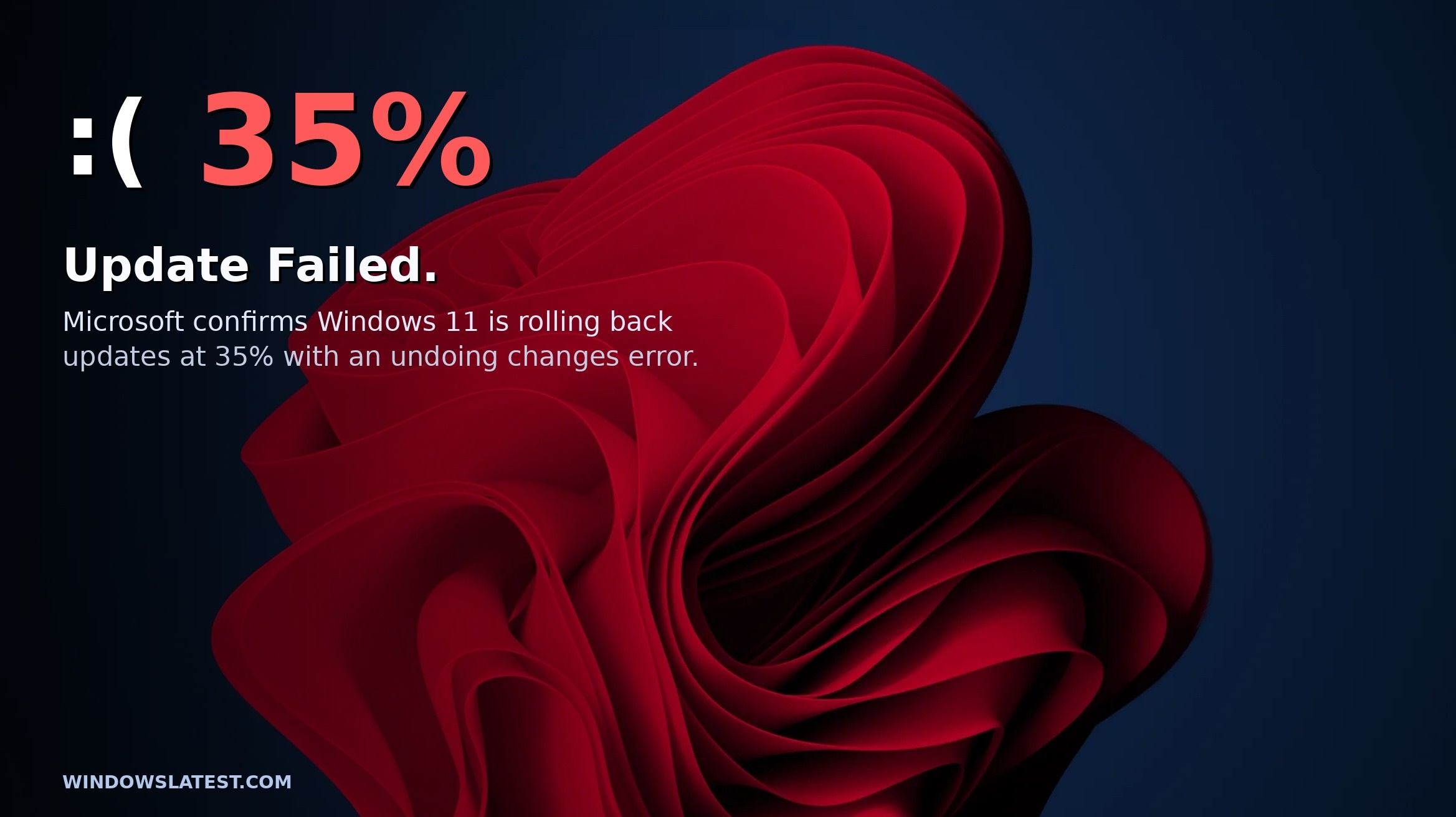
Microsoft confirms Windows 11 update is failing on some PCs, explains if you need a workaround
Microsoft confirms Windows 11 update is failing at 35% on some PCs, releases a fix, and publishes a workaround. www.windowslatest.com
- Related coverage: windows.gadgethacks.com
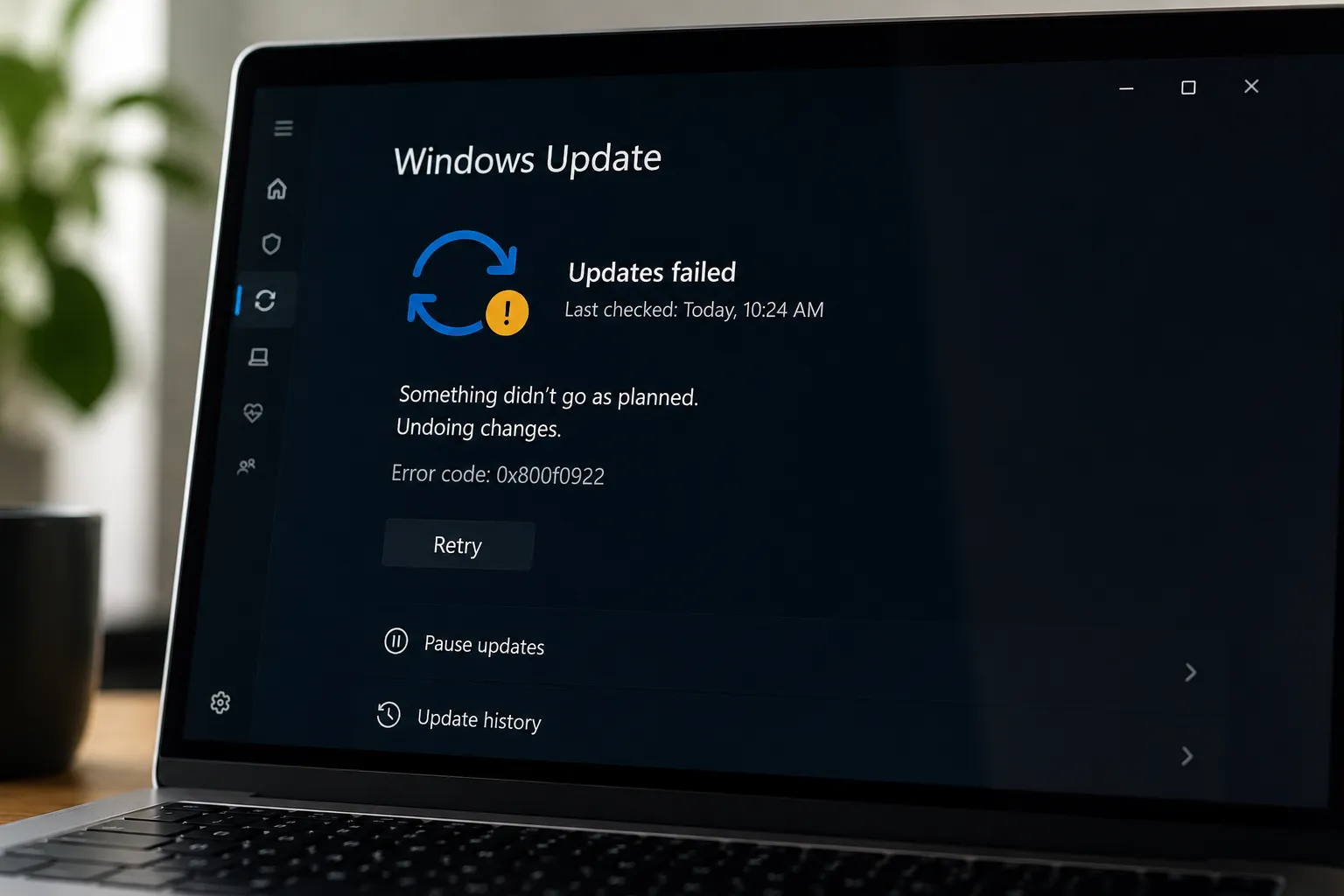
Windows 11 May 2026 Update Fails for Some PCs: What the EFI Partition Error Means
The May 2026 Patch Tuesday update is failing to install on a subset of Windows 11 machines, stalling mid-reboot at roughly 35–36% completion and rolling... windows.gadgethacks.com
- Related coverage: windowscentral.com
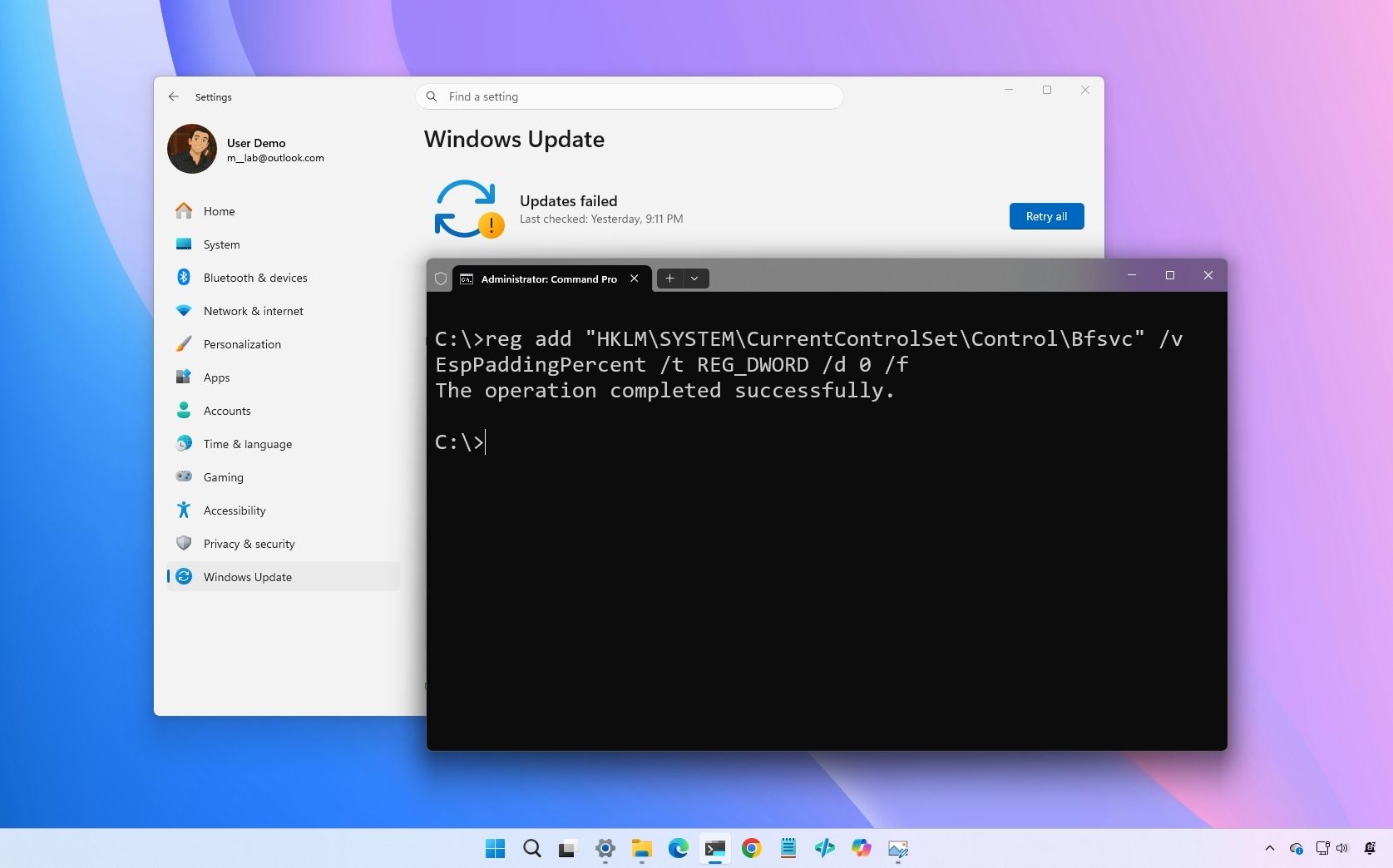
Microsoft confirms Windows 11 May update is failing with error 0x800f0922
Microsoft confirms that the Windows 11 May 2026 update fails with error 0x800f0922 on some computers, but a rollback and a fix are already available. www.windowscentral.com
- Official source: support.microsoft.com
May 12, 2026—KB5089549 (OS Builds 26200.8457 and 26100.8457) - Microsoft Support
 support.microsoft.com
- Related coverage: securityonline.info

Boot Partition Bottleneck: Microsoft Confirms Windows 11 Update KB5089549 Fails with Error 0x800f0922
Microsoft confirms Windows 11 update KB5089549 fails and rolls back at 35% with error 0x800f0922 on systems with low EFI partition storage. Learn the fix. securityonline.info
- Related coverage: windowsforum.com

KB5089573 May 2026 Preview: Windows 11 ESP Space Causes Install Rollback (0x800f0922)
Microsoft released the May 2026 non-security preview update KB5089573 for Windows 11 versions 25H2 and 24H2 on May 26, 2026, moving those systems to OS builds 26200.8524 and 26100.8524 while also documenting a serious installation failure tied to the earlier May security update. The preview is... windowsforum.com
- Related coverage: illinitechs.com
Windows Update 0x800f0922 Fix for EFI Partition Errors
Fix Windows Update 0x800f0922 by checking and enlarging an older EFI partition, especially on cloned or upgraded PCs. illinitechs.com
- Related coverage: computerbase.de

Windows 11: Microsoft bestätigt Installationsfehler beim regulären Mai-Update
Beim regulären Mai-Update für Windows 11 kann es zu Installationsfehlern kommen. Nun bietet Microsoft einen Workaround an.www.computerbase.de
- Related coverage: techradar.com
