

Google Photos appears to be preparing a new Auto trim tool for its mobile video editor, restoring the practical core of an older “Basic cut” preset removed during last year’s editor redesign. The feature is not publicly available yet, and there is no rollout date.
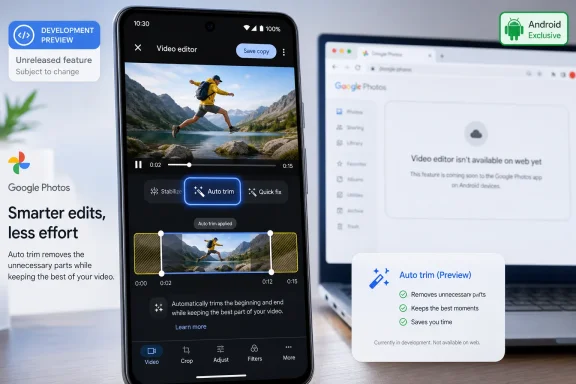
As reported by Android Authority, Auto trim was discovered in Google Photos version 7.83.0.943371825 during an APK teardown. Google has reportedly renamed the editor’s existing “Auto” area to Quick fix, where the unreleased trimming option would live.
The former Presets section included shortcuts such as Basic cut and Slow-mo. The broader redesign removed that section, taking Basic cut with it. Auto trim looks to restore the former tool’s main behavior rather than introduce a more capable editor.
It is designed to identify the useful portion of a clip and remove excess footage from the beginning and end. That could be useful for quickly shortening recordings that start before the action begins or continue after it ends.
The limitation is important: Auto trim reportedly does not remove unwanted sections from the middle of a video. A clip with pauses, mistakes, or filler between important moments will still need conventional manual cuts.
Google has not publicly confirmed the feature, its supported platforms, or whether it will be restricted by device, region, subscription, or account type. The discovery concerns the Android app; there is no indication yet that Auto trim is coming to the Google Photos website or the iOS client.
For Windows users who rely on Google Photos through a browser, that distinction matters. The tool may eventually help trim phone-shot clips before they are downloaded or shared, but it is not evidence of a new Windows editing capability. Desktop users needing precise cuts will still want a local editor such as Clipchamp or another timeline-based application.
For now, Auto trim remains an unreleased Android-side test, with manual editing still required for anything beyond trimming a clip’s opening and closing seconds.
As reported by Android Authority, Auto trim was discovered in Google Photos version 7.83.0.943371825 during an APK teardown. Google has reportedly renamed the editor’s existing “Auto” area to Quick fix, where the unreleased trimming option would live.
 A return for one-tap trimming
The former Presets section included shortcuts such as Basic cut and Slow-mo. The broader redesign removed that section, taking Basic cut with it. Auto trim looks to restore the former tool’s main behavior rather than introduce a more capable editor.It is designed to identify the useful portion of a clip and remove excess footage from the beginning and end. That could be useful for quickly shortening recordings that start before the action begins or continue after it ends.
The limitation is important: Auto trim reportedly does not remove unwanted sections from the middle of a video. A clip with pauses, mistakes, or filler between important moments will still need conventional manual cuts.
Still a work in progress
APK teardowns reveal code and incomplete interface elements in a shipped app build, not an announced product commitment. Google can change, delay, or abandon features found this way, so users should not expect Auto trim merely because they install version 7.83.0.Google has not publicly confirmed the feature, its supported platforms, or whether it will be restricted by device, region, subscription, or account type. The discovery concerns the Android app; there is no indication yet that Auto trim is coming to the Google Photos website or the iOS client.
For Windows users who rely on Google Photos through a browser, that distinction matters. The tool may eventually help trim phone-shot clips before they are downloaded or shared, but it is not evidence of a new Windows editing capability. Desktop users needing precise cuts will still want a local editor such as Clipchamp or another timeline-based application.
What to do
There is nothing administrators or end users need to deploy or configure. Avoid sideloading modified builds solely to access the option: it is unreleased, and the reported functionality is better treated as a preview of Google’s development work than a supported feature.For now, Auto trim remains an unreleased Android-side test, with manual editing still required for anything beyond trimming a clip’s opening and closing seconds.
References
- Primary source: Android Headlines
Published: 2026-07-13T12:14:27+00:00
Google Photos Could Add Auto Trim for Quicker Video Edits
Google Photos is bringing back the functionality of the Basic cut preset to the video editor as 'Auto trim'. However, it's not here yet. www.androidheadlines.com
- Related coverage: androidauthority.com
Google Photos could bring back a handy video editing tool under a new name
Google Photos is resurrecting its "Basic cut" video tool as "Auto trim" inside a new Quick fix menu. Here's what we know about it!www.androidauthority.com
