

Windows 10 Hide Bluetooth device from This PC or My Computer or Windows Explorer

simoom

Honorable Member
Joined
Dec 6, 2015
Messages
2
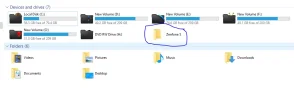
using Windows 10 in ASUS X555LN notebook with integrated Broadcom Bluetooth driver. After installing the Bluetooth software, when i pair my phone with the PC, my phone appears in the Explorer with additional hard disk partitions (Devices and drives). I do not want to unpair my bluetooth device, just want to remove the device icon from showing in Explorer. seeking for help. thanks
 

Attachments

  • Capture2.webp
    Capture2.webp
    21.9 KB · Views: 359

Neemobeer

Windows Forum Team
Staff member
Joined
Jul 4, 2015
Messages
8,998
This is probably a setting on your phone. I have storage mode disabled on my phone when it gets plugged into a computer.
 

Solution

davehc

Essential Member
Premium Supporter
Joined
May 1, 2008
Messages
5,554
I cannot try it, but, would it be sufficient in the folder options, to "Hide empty drives"?
 

Back
Top