Marcos Voy
New Member
- Joined
- Jan 28, 2016
- Messages
- 1
- Thread Author
- #1
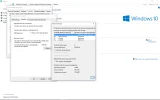
I just can't change the virtual memory (the screenshot shows exactly why) the window is half cut and I can't expand it with mouse to apply my changes. This is a Bug cause earlier (just after installing windows 10) I had changed it to one of My HDDs. I needed to format this HDD so I used TAB to select the "apply button" and go back to "let windows choose for you" But now I really need to put my virtual memory back in a HDD as my main drive is a SSD and I don't want to make it work more than necessary.
I don't know when it happened, I thought it was going to be fixed in any future update but nothing until now. (I think it's been 2 months since I noticed the problem).
I don't know when it happened, I thought it was going to be fixed in any future update but nothing until now. (I think it's been 2 months since I noticed the problem).