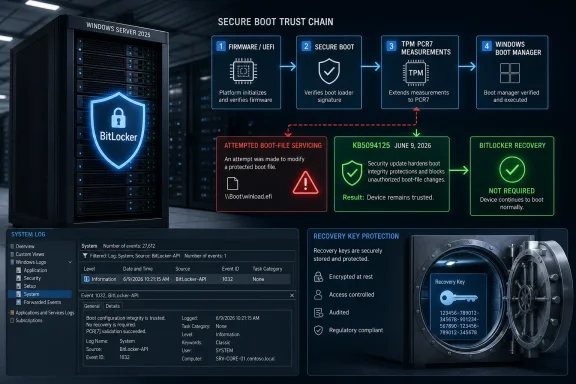
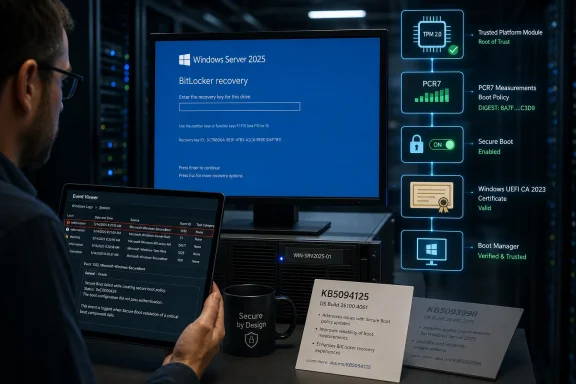
Microsoft’s June 9, 2026 Windows 10 cumulative update KB5094127 can trigger a one-time BitLocker recovery-key prompt on some managed PCs when BitLocker, Secure Boot, PCR7 validation, and the 2023-signed Windows Boot Manager transition collide under a specific Group Policy configuration. That is the plain technical answer; the more uncomfortable answer is that Windows 10’s extended-life era is already behaving like an enterprise archaeology project. Microsoft is not simply patching an old operating system. It is asking IT departments to keep an aging security stack aligned with a moving Secure Boot trust chain, and BitLocker is where that tension becomes visible.
This is not a consumer panic story, at least not in the usual sense. Microsoft says the affected systems are unlikely to be personal devices and that recovery should be required only once if the policy configuration is not changed again. But for corporate IT, “only once” can still mean a help-desk spike, a field-office outage, or a Monday morning queue of users staring at a blue BitLocker screen with no idea where their recovery key lives.
KB5094127 is not a normal Windows 10 patch in the emotional sense, even if it looks like one in Windows Update metadata. Windows 10 has crossed into the phase where many users are either enrolled in Extended Security Updates, running long-term servicing builds, or operating under organizational exceptions that exist because hardware, software, budgets, and migration plans rarely line up with Microsoft’s preferred calendar.
That makes every post-mainstream Windows 10 update a kind of stress test. The codebase still needs security fixes. Enterprises still need predictable behavior. Microsoft still needs to modernize boot security, certificate handling, and platform validation in ways that do not freeze the ecosystem in 2021 amber.
The BitLocker prompt lands precisely at that junction. The issue is not merely that a patch asks for a recovery key. It is that the recovery prompt appears when Windows decides the measured boot environment has changed enough that the TPM should not automatically release the disk encryption secret.
That is BitLocker doing what BitLocker is designed to do. It is also BitLocker doing it at the worst possible time: after a routine monthly update, on a device whose user may have no context for PCR registers, Secure Boot databases, or why yesterday’s laptop now behaves like evidence in a forensic lab.
That phrasing is technically defensible and politically convenient. Enterprises sometimes customize BitLocker validation profiles for legitimate historical reasons: older hardware quirks, security baselines inherited from prior Windows versions, compliance templates, or vendor guidance that made sense at the time. What Microsoft now labels unrecommended may not have looked reckless when it was deployed.
The affected device must also report PCR7 binding as “Not Possible” in System Information, have the Windows UEFI CA 2023 certificate present in the Secure Boot Signature Database, be eligible for the 2023-signed Windows Boot Manager to become the default, and not already be running that newer boot manager. This is not a broad “Windows update breaks encryption” scenario. It is a narrowly defined interaction between boot-chain trust, TPM measurements, and a non-default BitLocker policy.
Still, narrow problems can be operationally wide if they hit the right fleet. A multinational with tens of thousands of Windows 10 laptops does not need a large percentage of affected machines to create a noisy incident. If those laptops belong to traveling staff, factory-floor operators, point-of-sale managers, or remote workers without easy IT access, a one-time recovery prompt becomes a real business interruption.
That distinction is why these incidents punch above their numerical weight. Users generally do not know their recovery keys because they are not supposed to. In managed environments, keys are usually escrowed in Active Directory, Microsoft Entra ID, Intune, MBAM-era infrastructure, or another recovery workflow. That is good security practice, but it also means the user at the keyboard cannot solve the problem alone.
For IT administrators, the good news is that this particular KB5094127 issue is described as a one-time event. Enter the recovery key once, the system should boot, and subsequent restarts should not repeat the recovery screen as long as the policy configuration remains unchanged. That narrows the blast radius.
But it does not erase the operational pain. The first restart after patching is exactly when organizations expect machines to return quietly to service. A BitLocker prompt inserts human coordination into what should have been an automated maintenance cycle.
In ideal modern configurations, BitLocker can bind protection to stable measurements that reflect Secure Boot integrity without being overly sensitive to every firmware or bootloader change. When the platform can use PCR7 binding cleanly, the TPM has a reliable basis for deciding whether to release the encryption key at boot.
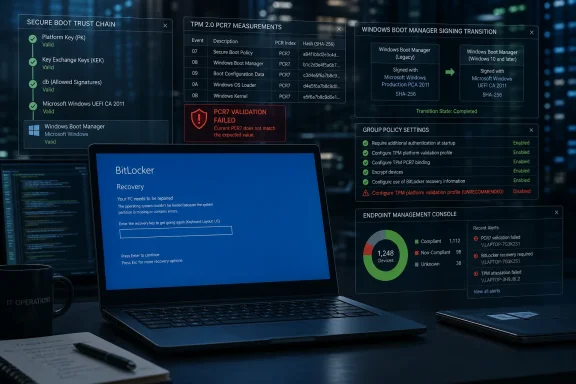
The problem begins when PCR7 binding is “Not Possible” and policy choices still explicitly include PCR7 in the validation profile. That is a recipe for brittle behavior. Add a Secure Boot certificate transition and a boot manager signing change, and Windows may see enough of a shift to require recovery.
From a security architecture standpoint, that caution is not crazy. If the boot chain changes, disk encryption should not blindly trust it. From an enterprise operations standpoint, however, this is the kind of purity that can convert an invisible security improvement into a visible service desk event.
That transition is necessary. Bootkits and pre-OS malware remain among the nastier classes of Windows compromise because they live below the layer most endpoint tools can easily inspect. Microsoft cannot leave the Windows boot chain untouched forever just because changing it may expose messy firmware states or stale enterprise policies.
But the transition also reveals how heterogeneous the PC fleet really is. Corporate Windows estates are a museum of firmware versions, OEM images, TPM implementations, BIOS settings, security baselines, and deployment histories. Two laptops with the same Windows version can have very different boot-chain realities because they have lived different lives.
That is why Microsoft’s condition list is so specific. The issue is not “Secure Boot update bad.” It is the combination of an eligible certificate state, a not-yet-updated boot manager, a PCR7 binding failure, BitLocker enabled on the OS drive, and an explicit Group Policy profile that puts PCR7 in the path. The problem is a stack, not a single switch.
Microsoft can reasonably argue that each incident has a different trigger, a limited population, and a documented mitigation. Administrators can reasonably respond that users do not care which exact PCR register, certificate store, or boot manager state caused the prompt. They care that Windows Update again created a scenario where encrypted machines asked for recovery keys after reboot.
That repeated pattern erodes confidence in patch predictability. Enterprises have been trained for years to deploy monthly updates quickly because attackers reverse-engineer patches and exploit laggards. But BitLocker recovery incidents push in the opposite direction: test longer, stage more carefully, inventory more deeply, and assume boot-related changes carry hidden risk.
The security irony is obvious. A feature designed to protect systems from unauthorized boot changes can make administrators more cautious about applying the very updates meant to keep those systems secure. That is not an argument against BitLocker or Secure Boot. It is an argument for Microsoft to treat boot-chain servicing as a first-class enterprise change-management event, not as just another known issue in a monthly patch note.
It is also the kind of workaround that assumes the organization already knows which machines are vulnerable. That is not always true. Many Windows 10 fleets have been managed across multiple eras: on-prem Group Policy, SCCM, co-management, Intune, local exceptions, vendor images, and emergency changes made by people who have since left the company.
The prerequisite checks are not impossible. Administrators can verify whether BitLocker is enabled on the OS drive, inspect the TPM validation policy, check PCR7 binding status in msinfo32, and audit Secure Boot certificate state. But at scale, those checks become a data problem.
The best-run organizations will script detection, segment deployment rings, confirm recovery-key escrow, and remediate the policy before pushing KB5094127 widely. The organizations most likely to be hurt are the ones that enrolled Windows 10 machines in ESU because they are already resource-constrained, migration-blocked, or dependent on legacy applications that make endpoint management harder than it should be.
For consumers, the practical advice remains familiar: know where your recovery key is before you need it. Microsoft accounts may store recovery keys for some personal devices, while business or school devices often store them with the organization. That difference matters when the blue recovery screen appears.
Still, the consumer reassurance should not be overread. Enthusiasts sometimes tinker with firmware, Secure Boot, TPM settings, boot managers, dual-boot setups, and local policies. WindowsForum readers are exactly the kind of people who may have machines that are “personal” in ownership but “enterprise-like” in configuration.
The safest interpretation is this: ordinary unmanaged home PCs are not the target population, but any BitLocker-protected machine with customized boot validation deserves caution before the June update. The more a device has been tweaked, imaged, migrated, or firmware-updated over the years, the less comfort one should take from broad consumer language.
ESU customers are not asking for novelty. They are paying, directly or indirectly, for security continuity while they finish migrations, replace hardware, validate applications, or manage budget cycles. A BitLocker recovery prompt after a security update is exactly the sort of friction ESU is supposed to help them avoid.
To be fair, Microsoft is maintaining an operating system that it desperately wants to retire. The company has spent years pushing Windows 11’s hardware security baseline, TPM 2.0 requirements, virtualization-based security, and newer boot protections. Windows 10 ESU exists because the market did not move as quickly as Microsoft wanted.
But that does not absolve Microsoft of predictability. If anything, ESU raises the bar for patch behavior because the remaining Windows 10 population is more likely to include business-critical, slow-to-change systems. The customers still here are not casual tourists. They are the people with the hardest migration problems.
When a cumulative update touches Secure Boot reporting, boot manager signing state, or certificate readiness, it is no longer just an OS patch in the ordinary sense. It becomes part of the platform trust chain. That means it can interact with TPM measurements and BitLocker protectors in ways that feel more like a firmware update than a normal Windows fix.
This is where Microsoft’s communication needs to evolve. A known issue note is useful, but it arrives inside a patch ecosystem where many administrators rely on automation and reporting dashboards. If a Windows update can trigger disk encryption recovery under known conditions, those conditions should be machine-detectable and surfaced aggressively before installation.
Imagine Windows Update for Business, Intune, or Defender for Endpoint flagging devices with PCR7 binding not possible, explicit TPM validation profiles, and pending Secure Boot certificate transitions before rollout. That would turn a surprise recovery prompt into a planned remediation task. The underlying technical problem would still exist, but the operational character would change.
That workflow can be smooth in a mature organization. It can also be messy. Recovery-key escrow may be incomplete. Device records may be stale. Users may be offline, traveling, or working outside support hours. Some machines may be shared, kiosk-like, or assigned to roles rather than individuals.
The one-time nature of the prompt helps, but it does not eliminate risk. A single failed reboot can still interrupt a presentation, delay a shift, halt a lab instrument, or take a remote employee out of service until identity verification and key retrieval are complete.
This is the recurring lesson of endpoint security: cryptographic correctness is only half the job. The other half is designing the recovery path so that a legitimate user is not stranded when the system behaves exactly as engineered.
A staged deployment is the minimum. The better move is to use this incident to discover where BitLocker policy, Secure Boot state, PCR7 binding, and recovery-key escrow are out of alignment. If an environment cannot answer those questions quickly, KB5094127 is not the root problem; it is the messenger.
This is also an opportunity to retire old BitLocker baselines. Explicit platform validation profiles may have been copied forward from older templates without anyone asking whether they still match Microsoft’s current guidance. Security policy drift is real, and Windows estates accumulate it quietly.
The organizations that come out best will be the ones that treat this as both a patch issue and a hygiene issue. The June update may force a recovery prompt once. A poorly understood BitLocker configuration can keep creating surprises every time firmware, certificates, bootloaders, or OS servicing changes.
Microsoft will almost certainly ship a fix or clearer mitigation for this specific KB5094127 scenario, and many affected machines will move past it after a single recovery-key entry. But the pattern is harder to patch than the bug: Windows security is increasingly anchored below the operating system, while enterprise readiness is still measured at the level of users, help desks, and deployment rings. As Windows 10 recedes into extended support and Windows 11 becomes the presumed future, the organizations left straddling both worlds will need to treat the boot chain as operational infrastructure, not background plumbing.
This is not a consumer panic story, at least not in the usual sense. Microsoft says the affected systems are unlikely to be personal devices and that recovery should be required only once if the policy configuration is not changed again. But for corporate IT, “only once” can still mean a help-desk spike, a field-office outage, or a Monday morning queue of users staring at a blue BitLocker screen with no idea where their recovery key lives.
 Windows 10 Enters the Extended-Support Era With a Familiar Tripwire
KB5094127 is not a normal Windows 10 patch in the emotional sense, even if it looks like one in Windows Update metadata. Windows 10 has crossed into the phase where many users are either enrolled in Extended Security Updates, running long-term servicing builds, or operating under organizational exceptions that exist because hardware, software, budgets, and migration plans rarely line up with Microsoft’s preferred calendar.That makes every post-mainstream Windows 10 update a kind of stress test. The codebase still needs security fixes. Enterprises still need predictable behavior. Microsoft still needs to modernize boot security, certificate handling, and platform validation in ways that do not freeze the ecosystem in 2021 amber.
The BitLocker prompt lands precisely at that junction. The issue is not merely that a patch asks for a recovery key. It is that the recovery prompt appears when Windows decides the measured boot environment has changed enough that the TPM should not automatically release the disk encryption secret.
That is BitLocker doing what BitLocker is designed to do. It is also BitLocker doing it at the worst possible time: after a routine monthly update, on a device whose user may have no context for PCR registers, Secure Boot databases, or why yesterday’s laptop now behaves like evidence in a forensic lab.
Microsoft’s “Unrecommended Configuration” Is Doing a Lot of Work
Microsoft’s description matters. The company says the problem can occur on systems with an “unrecommended” BitLocker Group Policy configuration, specifically where the policy for the TPM platform validation profile for native UEFI firmware configurations has been configured and PCR7 is included in the validation profile.That phrasing is technically defensible and politically convenient. Enterprises sometimes customize BitLocker validation profiles for legitimate historical reasons: older hardware quirks, security baselines inherited from prior Windows versions, compliance templates, or vendor guidance that made sense at the time. What Microsoft now labels unrecommended may not have looked reckless when it was deployed.
The affected device must also report PCR7 binding as “Not Possible” in System Information, have the Windows UEFI CA 2023 certificate present in the Secure Boot Signature Database, be eligible for the 2023-signed Windows Boot Manager to become the default, and not already be running that newer boot manager. This is not a broad “Windows update breaks encryption” scenario. It is a narrowly defined interaction between boot-chain trust, TPM measurements, and a non-default BitLocker policy.
Still, narrow problems can be operationally wide if they hit the right fleet. A multinational with tens of thousands of Windows 10 laptops does not need a large percentage of affected machines to create a noisy incident. If those laptops belong to traveling staff, factory-floor operators, point-of-sale managers, or remote workers without easy IT access, a one-time recovery prompt becomes a real business interruption.
The Recovery Screen Is a Security Feature That Feels Like Failure
BitLocker recovery prompts are emotionally different from ordinary update bugs. A broken printer driver is annoying. A missing taskbar icon is disruptive. A BitLocker recovery screen looks like the machine has locked its owner out of their own data.That distinction is why these incidents punch above their numerical weight. Users generally do not know their recovery keys because they are not supposed to. In managed environments, keys are usually escrowed in Active Directory, Microsoft Entra ID, Intune, MBAM-era infrastructure, or another recovery workflow. That is good security practice, but it also means the user at the keyboard cannot solve the problem alone.
For IT administrators, the good news is that this particular KB5094127 issue is described as a one-time event. Enter the recovery key once, the system should boot, and subsequent restarts should not repeat the recovery screen as long as the policy configuration remains unchanged. That narrows the blast radius.
But it does not erase the operational pain. The first restart after patching is exactly when organizations expect machines to return quietly to service. A BitLocker prompt inserts human coordination into what should have been an automated maintenance cycle.
PCR7 Is the Small Acronym Behind the Big Headache
The uncomfortable part of this story is that the underlying technology is not obscure to Windows security engineers but is deeply obscure to everyone else. PCR stands for Platform Configuration Register, a TPM measurement slot used to record aspects of the boot process. PCR7 is tied to Secure Boot state and policy, which is why it matters when Windows is validating whether the boot environment is trustworthy.In ideal modern configurations, BitLocker can bind protection to stable measurements that reflect Secure Boot integrity without being overly sensitive to every firmware or bootloader change. When the platform can use PCR7 binding cleanly, the TPM has a reliable basis for deciding whether to release the encryption key at boot.
The problem begins when PCR7 binding is “Not Possible” and policy choices still explicitly include PCR7 in the validation profile. That is a recipe for brittle behavior. Add a Secure Boot certificate transition and a boot manager signing change, and Windows may see enough of a shift to require recovery.
From a security architecture standpoint, that caution is not crazy. If the boot chain changes, disk encryption should not blindly trust it. From an enterprise operations standpoint, however, this is the kind of purity that can convert an invisible security improvement into a visible service desk event.
Secure Boot’s Certificate Transition Keeps Coming Back to the Surface
The 2023-signed Windows Boot Manager is part of a broader Secure Boot trust-chain transition that Microsoft has been pushing through the Windows ecosystem. Secure Boot is not a static checkbox in firmware setup; it depends on certificate databases, signing authorities, bootloaders, revocation lists, and the gradual replacement of older trust anchors.That transition is necessary. Bootkits and pre-OS malware remain among the nastier classes of Windows compromise because they live below the layer most endpoint tools can easily inspect. Microsoft cannot leave the Windows boot chain untouched forever just because changing it may expose messy firmware states or stale enterprise policies.
But the transition also reveals how heterogeneous the PC fleet really is. Corporate Windows estates are a museum of firmware versions, OEM images, TPM implementations, BIOS settings, security baselines, and deployment histories. Two laptops with the same Windows version can have very different boot-chain realities because they have lived different lives.
That is why Microsoft’s condition list is so specific. The issue is not “Secure Boot update bad.” It is the combination of an eligible certificate state, a not-yet-updated boot manager, a PCR7 binding failure, BitLocker enabled on the OS drive, and an explicit Group Policy profile that puts PCR7 in the path. The problem is a stack, not a single switch.
The Repeat Pattern Is the Real Story
PCWorld’s report points out that similar BitLocker recovery surprises have appeared before, including earlier incidents around recent Windows updates. That recurrence is what makes the story bigger than KB5094127.Microsoft can reasonably argue that each incident has a different trigger, a limited population, and a documented mitigation. Administrators can reasonably respond that users do not care which exact PCR register, certificate store, or boot manager state caused the prompt. They care that Windows Update again created a scenario where encrypted machines asked for recovery keys after reboot.
That repeated pattern erodes confidence in patch predictability. Enterprises have been trained for years to deploy monthly updates quickly because attackers reverse-engineer patches and exploit laggards. But BitLocker recovery incidents push in the opposite direction: test longer, stage more carefully, inventory more deeply, and assume boot-related changes carry hidden risk.
The security irony is obvious. A feature designed to protect systems from unauthorized boot changes can make administrators more cautious about applying the very updates meant to keep those systems secure. That is not an argument against BitLocker or Secure Boot. It is an argument for Microsoft to treat boot-chain servicing as a first-class enterprise change-management event, not as just another known issue in a monthly patch note.
Microsoft’s Workaround Is Sensible, but It Shifts the Burden Back to IT
Microsoft’s current guidance is to remove the problematic Group Policy configuration before installing the update, effectively steering devices away from the unrecommended validation profile. For administrators who have good policy control, clean inventory, and reliable BitLocker key escrow, that is a practical mitigation.It is also the kind of workaround that assumes the organization already knows which machines are vulnerable. That is not always true. Many Windows 10 fleets have been managed across multiple eras: on-prem Group Policy, SCCM, co-management, Intune, local exceptions, vendor images, and emergency changes made by people who have since left the company.
The prerequisite checks are not impossible. Administrators can verify whether BitLocker is enabled on the OS drive, inspect the TPM validation policy, check PCR7 binding status in msinfo32, and audit Secure Boot certificate state. But at scale, those checks become a data problem.
The best-run organizations will script detection, segment deployment rings, confirm recovery-key escrow, and remediate the policy before pushing KB5094127 widely. The organizations most likely to be hurt are the ones that enrolled Windows 10 machines in ESU because they are already resource-constrained, migration-blocked, or dependent on legacy applications that make endpoint management harder than it should be.
“Personal Devices Are Unlikely to Be Affected” Is Reassuring but Not Absolute
Microsoft’s statement that personal devices not managed by IT departments are unlikely to hit this issue is important. Most home Windows 10 PCs will not have administrators manually configuring TPM platform validation profiles. Many will not have BitLocker enabled in the same enterprise-managed sense at all, though device encryption can still exist on supported hardware.For consumers, the practical advice remains familiar: know where your recovery key is before you need it. Microsoft accounts may store recovery keys for some personal devices, while business or school devices often store them with the organization. That difference matters when the blue recovery screen appears.
Still, the consumer reassurance should not be overread. Enthusiasts sometimes tinker with firmware, Secure Boot, TPM settings, boot managers, dual-boot setups, and local policies. WindowsForum readers are exactly the kind of people who may have machines that are “personal” in ownership but “enterprise-like” in configuration.
The safest interpretation is this: ordinary unmanaged home PCs are not the target population, but any BitLocker-protected machine with customized boot validation deserves caution before the June update. The more a device has been tweaked, imaged, migrated, or firmware-updated over the years, the less comfort one should take from broad consumer language.
Windows 10 ESU Turns Patch Tuesday Into a Triage Exercise
The article’s sting is sharpened by Windows 10’s lifecycle. KB5094127 is framed as available to Windows 10 users in the Extended Security Updates track and supported Windows 10 21H2 and 22H2 contexts that remain eligible. That means the affected audience is disproportionately serious: enterprises, institutions, and users who have a reason not to be on Windows 11 yet.ESU customers are not asking for novelty. They are paying, directly or indirectly, for security continuity while they finish migrations, replace hardware, validate applications, or manage budget cycles. A BitLocker recovery prompt after a security update is exactly the sort of friction ESU is supposed to help them avoid.
To be fair, Microsoft is maintaining an operating system that it desperately wants to retire. The company has spent years pushing Windows 11’s hardware security baseline, TPM 2.0 requirements, virtualization-based security, and newer boot protections. Windows 10 ESU exists because the market did not move as quickly as Microsoft wanted.
But that does not absolve Microsoft of predictability. If anything, ESU raises the bar for patch behavior because the remaining Windows 10 population is more likely to include business-critical, slow-to-change systems. The customers still here are not casual tourists. They are the people with the hardest migration problems.
The Boot Chain Is Becoming a Change-Control Boundary
For years, administrators have treated firmware and bootloader changes as sensitive but occasional events. Monthly Windows updates, by contrast, are routine. The KB5094127 BitLocker warning blurs that boundary.When a cumulative update touches Secure Boot reporting, boot manager signing state, or certificate readiness, it is no longer just an OS patch in the ordinary sense. It becomes part of the platform trust chain. That means it can interact with TPM measurements and BitLocker protectors in ways that feel more like a firmware update than a normal Windows fix.
This is where Microsoft’s communication needs to evolve. A known issue note is useful, but it arrives inside a patch ecosystem where many administrators rely on automation and reporting dashboards. If a Windows update can trigger disk encryption recovery under known conditions, those conditions should be machine-detectable and surfaced aggressively before installation.
Imagine Windows Update for Business, Intune, or Defender for Endpoint flagging devices with PCR7 binding not possible, explicit TPM validation profiles, and pending Secure Boot certificate transitions before rollout. That would turn a surprise recovery prompt into a planned remediation task. The underlying technical problem would still exist, but the operational character would change.
The Help Desk Pays for Every Hidden Assumption
The human part of this bug is easy to underestimate. A BitLocker recovery event is not solved by a clever explanation of PCR7. It is solved by a user contacting IT, proving identity, receiving or entering a recovery key, and then successfully booting the device.That workflow can be smooth in a mature organization. It can also be messy. Recovery-key escrow may be incomplete. Device records may be stale. Users may be offline, traveling, or working outside support hours. Some machines may be shared, kiosk-like, or assigned to roles rather than individuals.
The one-time nature of the prompt helps, but it does not eliminate risk. A single failed reboot can still interrupt a presentation, delay a shift, halt a lab instrument, or take a remote employee out of service until identity verification and key retrieval are complete.
This is the recurring lesson of endpoint security: cryptographic correctness is only half the job. The other half is designing the recovery path so that a legitimate user is not stranded when the system behaves exactly as engineered.
Administrators Should Treat KB5094127 as a Fleet-Discovery Moment
The right response to KB5094127 is not to avoid patching indefinitely. June’s cumulative update includes security fixes, and the longer Windows 10 remains deployed, the more important those fixes become. But administrators should resist treating this as a simple install-and-pray Patch Tuesday item.A staged deployment is the minimum. The better move is to use this incident to discover where BitLocker policy, Secure Boot state, PCR7 binding, and recovery-key escrow are out of alignment. If an environment cannot answer those questions quickly, KB5094127 is not the root problem; it is the messenger.
This is also an opportunity to retire old BitLocker baselines. Explicit platform validation profiles may have been copied forward from older templates without anyone asking whether they still match Microsoft’s current guidance. Security policy drift is real, and Windows estates accumulate it quietly.
The organizations that come out best will be the ones that treat this as both a patch issue and a hygiene issue. The June update may force a recovery prompt once. A poorly understood BitLocker configuration can keep creating surprises every time firmware, certificates, bootloaders, or OS servicing changes.
The June Patch Teaches the Same Lesson in a Smaller Font
The practical facts are narrow, but they point to a larger truth about Windows maintenance in 2026.- KB5094127 was released on June 9, 2026 for eligible Windows 10 21H2 and 22H2 systems, including ESU-covered deployments.
- The BitLocker recovery prompt is expected only on systems that meet a specific set of conditions involving BitLocker on the OS drive, PCR7 policy, Secure Boot state, the Windows UEFI CA 2023 certificate, and the boot manager signing transition.
- Microsoft says the affected population is limited and that unmanaged personal devices are unlikely to encounter the issue.
- Affected users should need to enter the BitLocker recovery key only once if the policy configuration remains unchanged.
- Administrators should verify recovery-key escrow and remove the unrecommended Group Policy configuration before broad deployment where applicable.
- The recurring nature of BitLocker recovery incidents makes boot-chain servicing a planning issue, not just a troubleshooting footnote.
Microsoft will almost certainly ship a fix or clearer mitigation for this specific KB5094127 scenario, and many affected machines will move past it after a single recovery-key entry. But the pattern is harder to patch than the bug: Windows security is increasingly anchored below the operating system, while enterprise readiness is still measured at the level of users, help desks, and deployment rings. As Windows 10 recedes into extended support and Windows 11 becomes the presumed future, the organizations left straddling both worlds will need to treat the boot chain as operational infrastructure, not background plumbing.
References
- Primary source: PCWorld
Published: Thu, 11 Jun 2026 13:10:00 GMT
June's Windows 10 patch has a BitLocker user lockout problem... again | PCWorld
Microsoft's KB5094127 update may force some Windows 10 users to enter their BitLocker recovery key. Here's what's happening.www.pcworld.com - Related coverage: windowslatest.com
Windows 10 KB5094127 improves File Explorer search, direct download links for offline installers (.msu)
Windows 10 KB5094127 Patch Tuesday update is rolling out as part of Microsoft's Extended Security Updates program. www.windowslatest.com
- Related coverage: computerworld.com
Windows 10: A guide to the updates – Computerworld
Here's what those enrolled in the Windows 10 Extended Security Updates program need to know about each monthly security update. Now updated for KB5094127, released on June 9, 2026. www.computerworld.com
- Official source: support.microsoft.com
June 9, 2026—KB5094127 (OS Builds 19045.7417 and 19044.7417) - Microsoft Support
 support.microsoft.com
- Related coverage: windowsforum.com
Windows 10 KB5094127 (June 2026): File Explorer, Secure Boot, BitLocker Warnings | Windows Forum
Microsoft released Windows 10 KB5094127 on June 9, 2026, for Windows 10 ESU and supported LTSC 2021 systems, raising version 22H2 to build 19045.7417 and...windowsforum.com - Related coverage: windowscentral.com
Microsoft fixes annoying BitLocker lockout — but only for Windows 11, leaving Windows 10 stuck | Windows Central
Windows 11 25H2 users get a BitLocker bug fix, while Windows 10 remains stuck with recovery headaches until Microsoft rolls out a broader solution.www.windowscentral.com
- Related coverage: scworld.com
Windows 10 KB5094127 update fixes vulnerabilities, enhances Secure Boot monitoring | brief | SC Media
The KB5094127 update primarily focuses on security enhancements and bug fixes, as Microsoft is no longer introducing new features to Windows 10.www.scworld.com - Related coverage: techpulse.be
Windows 10-update triggert opnieuw BitLocker-paniek - TechPulse
Er is opnieuw sprake van BitLocker-paniek na een Windows-update. Na het installeren van de KB5094127-update voor Windows 10 moet je mogelijk plotseling je BitLocker-code invoeren.techpulse.be - Related coverage: crowdstrike.com
BitLocker recovery in Microsoft environments using Active Directory and GPOs
PDF documentwww.crowdstrike.com