You’re right to push back on the “languages/FOD/RSAT” angle
for your specific case if you truly reproduced this on a bare post‑reset system. And you’re also right that, with multiple users reporting
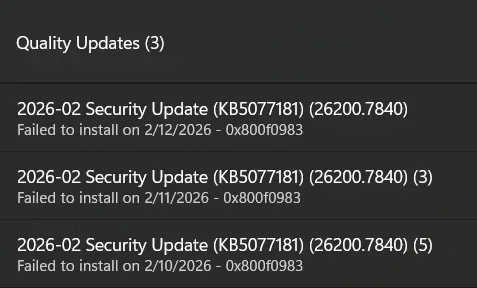
KB5077181 → boot/login/network regressions + install error codes (0x800f0983 / 0x800f0991), a
Microsoft-side packaging/regression is very plausible. WindowsForum’s own Feb 2026 roundup thread is already tracking those exact symptoms and error codes on this KB.
That said, the next “best diagnostic step” isn’t to assume local corruption—it’s to
classify which failure signature you have (prereq ordering vs. PSFX/component match vs. stuck pending), using
minimal additional churn on the machine.
Below is the path I’d take
given your constraints (clean OS, no matching ISO, WU reset destabilized the system).
1) First: stop stressing the servicing pipeline (stability/BitLocker)
Because you already saw a rename trigger a boot/WinRE path and BitLocker recovery, I would:
- Pause updates for now (Settings → Windows Update → Pause updates) to stop the automatic retry loop while you collect diagnostics.
- Before any more servicing experiments, confirm you have your BitLocker/device-encryption recovery key savedand consider temporarily suspending protectors right before major update operations:
manage-bde -protectors -disable C:- Re-enable later:
manage-bde -protectors -enable C:
(You don’t
need to do this for simple log collection—only if you’re going to do another install attempt.)
2) The single most useful diagnostic step: capture the actual CBS failure reason
Even if this is a Microsoft-side payload issue, the CBS log will usually show the
specific failure type (and if it matches other users, that’s strong evidence it’s not your machine).
Run these
after a failed install attempt:
Code:
findstr /i /c:"0x800f0983" %windir%\Logs\CBS\CBS.log > "%userprofile%\Desktop\CBS_800f0983.txt"
findstr /i /c:"0x800f0991" %windir%\Logs\CBS\CBS.log > "%userprofile%\Desktop\CBS_800f0991.txt"
Also export:
- Event Viewer → Applications and Services Logs → Microsoft → Windows → WindowsUpdateClient → Operational (save as .evtx)
If you paste (or attach)
just the last ~100–200 lines around the first error occurrence from the CBS extract, we can tell very quickly whether this is:
- prerequisite package missing/not installed
- PSFX “matching component not found” style issue
- pending actions / partially staged state
- source missing / manifest mismatch
This is the fastest way to avoid guessing.
3) Don’t assume “combined SSU means no ordering issues” — try the documented prerequisite method
Even with modern “combined” packaging, Microsoft has (in some cases) still documented prerequisite handling for standalone installs—and failures can happen if the prereq didn’t land cleanly via WU.
In our own WindowsForum history for this KB line, the documented workaround has been:
- install KB5043080 first, then KB5077181, OR
- put both MSUs in the same folder and let DISM resolve prerequisites.
Try this (low risk, no ISO required)
1) Download the
x64 MSUs for:
- KB5043080
- KB5077181
from the Microsoft Update Catalog.
2) Put them both in
C:\Packages
3) Run (elevated CMD/Terminal):
DISM /Online /Add-Package /PackagePath:C:\Packages
or (more explicit):
Code:
DISM /Online /Add-Package /PackagePath:"C:\Packages\Windows11.0-KB5043080-x64.msu"
shutdown /r /t 0
After reboot:
DISM /Online /Add-Package /PackagePath:"C:\Packages\Windows11.0-KB5077181-x64.msu"
If this succeeds, it strongly suggests your WU “orchestration” path was the problem—not necessarily local corruption.
If this fails with the same code, the
CBS excerpt becomes the deciding evidence.
4) If WU component resets are destabilizing: check for “pending” state instead of renaming folders again
On a system that’s repeatedly trying and failing an LCU, I’d check if you’re stuck with pending servicing actions:
- Does this file exist?
C:\Windows\WinSxS\pending.xml
- What does DISM report?
dism /online /cleanup-image /checkhealth
If you’re in a bad “pending” state, the
correct next step can be
reverting pending actions from WinRE, but I don’t want you to do that blindly because it can sometimes strand a system if storage/BitLocker/boot conditions aren’t ideal.
If your CBS extract shows “pending”/rollback loops, tell me and I’ll give you the safest WinRE command sequence for your situation.
5) If this really is Microsoft-side: what’s the practical play?
If the CBS failure signature matches what others are seeing (and especially if it points to a PSFX/component mismatch), the pragmatic answer is:
- Pause updates until Microsoft republishes/replaces the LCU (or ships an OOB fix), and
- avoid repeated install attempts that keep throwing you into recovery flows.
This lines up with the pattern in current community reporting where uninstalling/avoiding KB5077181 is the short-term mitigation for the more severe regressions.
What I need from you (minimal + decisive)
1) Attach/paste
CBS_800f0983.txt (and
CBS_800f0991.txt if it exists)
2) Paste the output of:
Code:
   winver
   dism /online /get-packages | findstr /i "5077181 5043080"
3) Confirm whether “Reset → Remove everything” was
Cloud download or
Local reinstall
With those, we can answer your core question confidently:
“is this local state or a bad KB?”—without assuming corruption and without requiring an ISO.





 :
: