

Windows 11 administrators should usually pilot KB5089573 now only on test rings or affected machines, because the May 26, 2026 optional preview update targets Windows 11 24H2 and 25H2, moves systems to builds 26100.8524 and 26200.8524, and is not the next mandatory security patch. The practical decision is less “is this update good?” than “does your estate benefit enough from earlier performance and servicing fixes to accept preview-channel risk?” If you manage production endpoints, the safest default is measured deployment: verify eligibility, test the phased behavior, watch for side effects, and let the next security cycle carry the change broadly unless you have a specific reason to move faster.
KB5089573 is an optional preview cumulative update. That one adjective, optional, does more work than the performance headline. Microsoft is making production-quality fixes available ahead of the next mandatory security release, but it is not asking every administrator to treat this as an emergency patch.
For a home enthusiast, “install now” can be a reasonable experiment. For a sysadmin, it is a change-control question. The update applies to Windows 11 version 24H2 and 25H2 only, and successful installation should leave those systems on OS builds 26100.8524 or 26200.8524, respectively.
The shortest decision tree is this: install KB5089573 now on a small validation ring if you manage Windows 11 24H2 or 25H2 devices and want early exposure to Microsoft’s latest performance and servicing changes. Install it sooner on machines affected by the EFI System Partition-related 0x800f0922 failure condition, after normal backup and recovery checks. Defer it for broad production deployment if your environment is stable, heavily regulated, or sensitive to shell and servicing regressions.
The actual path is straightforward. On a test Windows 11 24H2 or 25H2 device, open Settings, go to Windows Update, check for updates, and choose the optional preview update if it is offered. After installation and reboot, confirm the build with winver or your normal endpoint inventory tooling, and verify that the device reports 26100.8524 on 24H2 or 26200.8524 on 25H2.
If the update is not offered, that absence is not automatically a problem. Microsoft says the update may arrive in phases, which means two otherwise similar devices may not see the same availability or behavior at the same time. That phased rollout is precisely why enterprise administrators should avoid interpreting one successful laptop as proof that the update is ready for the whole fleet.
That matters because modern Windows performance complaints are rarely about raw throughput alone. Many current PCs have enough CPU, RAM, and storage to complete tasks quickly once they begin. The irritation lives in the gaps: the Start menu hesitation, the search panel delay, the sluggish flyout, the sense that Windows is doing something before it lets the user do the thing they asked for.
A low-latency profile is therefore a user-perception feature as much as a systems feature. It may improve the everyday feel of Windows without changing the core capacity of the machine. That is good product work, but it also makes the update harder to evaluate with traditional enterprise metrics.
Admins should resist turning this into a morality play about whether Microsoft has “finally fixed Windows 11 performance.” Preview updates are not confessions; they are staging areas. KB5089573 is better understood as Microsoft advancing performance tuning through the servicing pipeline while still preserving the option to phase, observe, and adjust.
In enterprise terms, KB5089573 belongs in the same mental bucket as a release candidate for your fleet. It is close enough to production that ignoring it entirely would be lazy, but early enough that treating it as routine Patch Tuesday hygiene would be reckless. The value is in learning before the deadline.
This is where administrators can gain an advantage over ordinary coverage of the update. The story is not merely that Microsoft shipped a performance update. The story is that Microsoft shipped it in a form that lets IT departments answer three different questions before the next security cycle: does it install cleanly, does it change user experience in measurable ways, and does it create any compatibility or support noise in your specific environment?
That distinction is especially important because Windows 11 fleets are not uniform. A cleanly imaged laptop, a developer workstation, a kiosk device, and a machine upgraded several times across feature releases may all be “Windows 11 24H2” on paper. Their driver stacks, firmware histories, recovery partitions, endpoint agents, and shell extensions can make them very different servicing targets.
For managed environments, the phased rollout means your first task is not to make every endpoint look identical immediately. Your first task is to identify which devices are eligible, which are being offered the update, and which policies or management tools control optional preview availability. If your update rings suppress previews, the update may not appear through normal user-facing channels even though the device is otherwise eligible.
This is also why help desk messaging matters. If users read that KB5089573 makes Windows 11 faster, some will go looking for it. If only part of the estate sees it, support staff need a plain explanation: the update is optional, it applies to specific Windows 11 releases, and Microsoft may offer it gradually.
The phased rollout also limits the usefulness of anecdotal performance reports. One user’s faster Start menu does not prove the same result across a fleet, and one user’s unchanged experience does not prove the performance work is absent. Administrators should measure what they can, but they should not pretend this is a clean A/B test handed down from Redmond.
This matters because update failures tied to system partitions are unpleasant in exactly the way administrators hate. They can be machine-specific, hard for users to describe, and disruptive during reboots. A device can look healthy in day-to-day use while carrying just enough partition baggage to make cumulative updates fail.
If you have Windows 11 24H2 or 25H2 machines that previously hit the documented 0x800f0922 condition, KB5089573 deserves faster testing. Not reckless deployment, but a targeted attempt to clear a known servicing blocker. In that scenario, the preview update is not mainly a performance bet; it is a possible escape hatch before the next mandatory patch window.
The caveat is that “EFI System Partition has very little free space” is not the same as “every 0x800f0922 error has the same cause.” Administrators should avoid flattening all update failures into one explanation. Use the KB as a known remedy for the known condition, not as a universal cure for Windows Update pain.
Enterprise administrators do not get to make that decision on vibes. They need evidence from representative hardware. That means testing on the device classes that actually generate tickets: older laptops, VPN-heavy machines, developer boxes with virtualization enabled, systems with third-party security agents, docking-station regulars, and devices with complicated upgrade histories.
The right pilot is not necessarily large. It is diverse. A dozen carefully chosen machines can teach more than a hundred identical new laptops, especially when the update touches user-facing shell behavior and servicing reliability.
This is also the place to watch Microsoft’s broader performance strategy. WindowsForum has covered Microsoft’s related work around performance logging and driver-quality scrutiny in Windows 11. KB5089573 fits that pattern: Microsoft is not treating performance as a single optimization pass, but as a servicing and telemetry problem that spans shell code, scheduling behavior, drivers, and update reliability.
The second ring should include technically tolerant users whose workflows are real but recoverable. Do not choose only the people who never complain. Choose the people who open Start and Search constantly, use Action Center, launch many desktop apps, and will notice whether latency improved or whether something feels off.
The third ring is where the decision becomes broader. If installation succeeds, support noise stays quiet, and no line-of-business workflows regress, you can decide whether to expand ahead of the next security cycle. If the fleet is stable and there is no urgent EFI partition-related failure, waiting remains a perfectly professional choice.
Administrators should also decide in advance what success means. “No disasters” is not the same as “worth accelerating.” If the only benefit is a subtle improvement in perceived responsiveness, many organizations will prefer to let the change arrive with the normal security cadence.
Microsoft’s challenge is that responsiveness work can sound both welcome and suspicious. If Windows can be made faster now, users reasonably ask why it was not faster before. If the performance improvement is phased, users wonder whether they have it. If it is delivered through an optional preview update, administrators wonder whether they are being asked to test something that will soon be mandatory anyway.
That skepticism is healthy. Windows servicing has trained IT departments to separate Microsoft’s release notes from the observed behavior of their own machines. KB5089573 should get the same treatment.
Still, dismissing the update because it is “only” a preview would be a mistake. Preview updates are where administrators can buy time. They reveal future servicing payloads before those payloads are bundled into the security rhythm that everyone has to absorb.
Admins should use KB5089573 as an excuse to look at update failure patterns, not merely update availability. Which Windows 11 24H2 and 25H2 machines have failed recent cumulative updates? Which failures cluster around the same hardware models or image lineage? Which devices have recovery, boot, or partition layouts that differ from your current standard?
This is the kind of housekeeping that rarely appears in consumer coverage. But in the real world, servicing health is performance. A machine that cannot move cleanly through cumulative updates is a machine that will consume attention, miss fixes, and eventually force riskier remediation.
The performance story may get users excited, but the servicing story should get administrators moving. If the update helps clear a known installation failure condition, targeted deployment may be justified even in organizations that normally avoid previews.
Performance value is the most subjective. You can observe whether Start, Search, Action Center, flyouts, and app launches feel more responsive, but that does not automatically translate into business justification. Some environments care deeply about interactive latency; others will consider it nice but nonessential.
Servicing need is more concrete. If devices are encountering the documented 0x800f0922 failure condition tied to very little free space on the EFI System Partition, KB5089573 becomes more than a preview of future polish. It becomes a candidate remediation step that should be tested promptly on affected hardware.
Rollout risk is the governor. Because Microsoft says availability may vary by device during the phased rollout, you should expect uneven behavior and plan communications accordingly. The update is not a crisis, and your deployment process should not manufacture one.
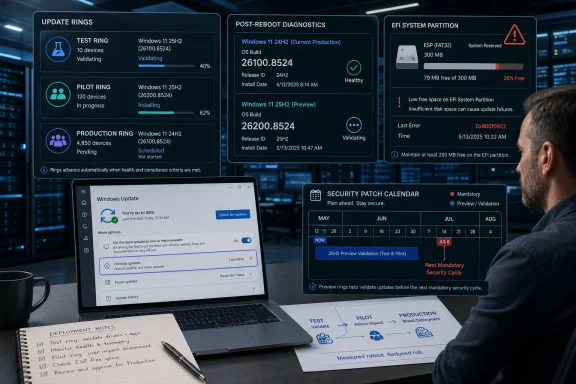 The Admin Answer Is Pilot, Don’t Blanket-Deploy
KB5089573 is an optional preview cumulative update. That one adjective, optional, does more work than the performance headline. Microsoft is making production-quality fixes available ahead of the next mandatory security release, but it is not asking every administrator to treat this as an emergency patch.For a home enthusiast, “install now” can be a reasonable experiment. For a sysadmin, it is a change-control question. The update applies to Windows 11 version 24H2 and 25H2 only, and successful installation should leave those systems on OS builds 26100.8524 or 26200.8524, respectively.
The shortest decision tree is this: install KB5089573 now on a small validation ring if you manage Windows 11 24H2 or 25H2 devices and want early exposure to Microsoft’s latest performance and servicing changes. Install it sooner on machines affected by the EFI System Partition-related 0x800f0922 failure condition, after normal backup and recovery checks. Defer it for broad production deployment if your environment is stable, heavily regulated, or sensitive to shell and servicing regressions.
The actual path is straightforward. On a test Windows 11 24H2 or 25H2 device, open Settings, go to Windows Update, check for updates, and choose the optional preview update if it is offered. After installation and reboot, confirm the build with winver or your normal endpoint inventory tooling, and verify that the device reports 26100.8524 on 24H2 or 26200.8524 on 25H2.
If the update is not offered, that absence is not automatically a problem. Microsoft says the update may arrive in phases, which means two otherwise similar devices may not see the same availability or behavior at the same time. That phased rollout is precisely why enterprise administrators should avoid interpreting one successful laptop as proof that the update is ready for the whole fleet.
Microsoft’s Performance Pitch Is Real Enough, but It Is Not the Whole Story
The headline feature attracting attention is the new low-latency performance work. WindowsForum readers have already been tracking Microsoft’s broader push toward faster-feeling Windows 11 surfaces, including app launch paths and shell elements such as Start, Search, Action Center, and related flyouts. The point is not a magical benchmark win; it is the kind of responsiveness users notice when they click something and Windows appears to answer faster.That matters because modern Windows performance complaints are rarely about raw throughput alone. Many current PCs have enough CPU, RAM, and storage to complete tasks quickly once they begin. The irritation lives in the gaps: the Start menu hesitation, the search panel delay, the sluggish flyout, the sense that Windows is doing something before it lets the user do the thing they asked for.
A low-latency profile is therefore a user-perception feature as much as a systems feature. It may improve the everyday feel of Windows without changing the core capacity of the machine. That is good product work, but it also makes the update harder to evaluate with traditional enterprise metrics.
Admins should resist turning this into a morality play about whether Microsoft has “finally fixed Windows 11 performance.” Preview updates are not confessions; they are staging areas. KB5089573 is better understood as Microsoft advancing performance tuning through the servicing pipeline while still preserving the option to phase, observe, and adjust.
The Preview Channel Is the Risk, Not the Performance Code
The preview label changes the deployment calculus. Optional preview updates often contain fixes that will later roll into a mandatory security update, but they arrive before that broader patch cycle has forced every eligible device through the same path. That timing is useful for validation and dangerous for complacency.In enterprise terms, KB5089573 belongs in the same mental bucket as a release candidate for your fleet. It is close enough to production that ignoring it entirely would be lazy, but early enough that treating it as routine Patch Tuesday hygiene would be reckless. The value is in learning before the deadline.
This is where administrators can gain an advantage over ordinary coverage of the update. The story is not merely that Microsoft shipped a performance update. The story is that Microsoft shipped it in a form that lets IT departments answer three different questions before the next security cycle: does it install cleanly, does it change user experience in measurable ways, and does it create any compatibility or support noise in your specific environment?
That distinction is especially important because Windows 11 fleets are not uniform. A cleanly imaged laptop, a developer workstation, a kiosk device, and a machine upgraded several times across feature releases may all be “Windows 11 24H2” on paper. Their driver stacks, firmware histories, recovery partitions, endpoint agents, and shell extensions can make them very different servicing targets.
Phased Rollout Makes One Device a Sample, Not a Verdict
Microsoft’s phased rollout language should be read as a warning against overgeneralization. When a feature or fix arrives gradually, the absence of the update on one device and the presence of it on another can both be normal. That complicates troubleshooting, but it also gives administrators time to observe.For managed environments, the phased rollout means your first task is not to make every endpoint look identical immediately. Your first task is to identify which devices are eligible, which are being offered the update, and which policies or management tools control optional preview availability. If your update rings suppress previews, the update may not appear through normal user-facing channels even though the device is otherwise eligible.
This is also why help desk messaging matters. If users read that KB5089573 makes Windows 11 faster, some will go looking for it. If only part of the estate sees it, support staff need a plain explanation: the update is optional, it applies to specific Windows 11 releases, and Microsoft may offer it gradually.
The phased rollout also limits the usefulness of anecdotal performance reports. One user’s faster Start menu does not prove the same result across a fleet, and one user’s unchanged experience does not prove the performance work is absent. Administrators should measure what they can, but they should not pretend this is a clean A/B test handed down from Redmond.
The EFI Partition Fix Is the Operational Reason to Move Early
The most concrete reason to consider KB5089573 before the next security cycle is not the low-latency profile. It is Microsoft’s note that the update addresses the 0x800f0922 failure condition seen when the EFI System Partition has very little free space. That is a servicing issue, not a vibes issue.This matters because update failures tied to system partitions are unpleasant in exactly the way administrators hate. They can be machine-specific, hard for users to describe, and disruptive during reboots. A device can look healthy in day-to-day use while carrying just enough partition baggage to make cumulative updates fail.
If you have Windows 11 24H2 or 25H2 machines that previously hit the documented 0x800f0922 condition, KB5089573 deserves faster testing. Not reckless deployment, but a targeted attempt to clear a known servicing blocker. In that scenario, the preview update is not mainly a performance bet; it is a possible escape hatch before the next mandatory patch window.
The caveat is that “EFI System Partition has very little free space” is not the same as “every 0x800f0922 error has the same cause.” Administrators should avoid flattening all update failures into one explanation. Use the KB as a known remedy for the known condition, not as a universal cure for Windows Update pain.
Enthusiasts Can Chase Snappiness; Enterprises Need Evidence
There is a split audience for KB5089573. Enthusiasts are allowed to be curious. If a personal Windows 11 24H2 or 25H2 machine is backed up and you are comfortable uninstalling or troubleshooting preview updates, installing KB5089573 is a defensible way to see whether Microsoft’s latest responsiveness work changes the feel of your PC.Enterprise administrators do not get to make that decision on vibes. They need evidence from representative hardware. That means testing on the device classes that actually generate tickets: older laptops, VPN-heavy machines, developer boxes with virtualization enabled, systems with third-party security agents, docking-station regulars, and devices with complicated upgrade histories.
The right pilot is not necessarily large. It is diverse. A dozen carefully chosen machines can teach more than a hundred identical new laptops, especially when the update touches user-facing shell behavior and servicing reliability.
This is also the place to watch Microsoft’s broader performance strategy. WindowsForum has covered Microsoft’s related work around performance logging and driver-quality scrutiny in Windows 11. KB5089573 fits that pattern: Microsoft is not treating performance as a single optimization pass, but as a servicing and telemetry problem that spans shell code, scheduling behavior, drivers, and update reliability.
A Sensible Ring Plan Beats a Heroic Weekend Rollout
For managed Windows estates, KB5089573 should move through rings. Start with IT-owned devices running Windows 11 24H2 and 25H2. Include at least one machine that represents each important hardware and software profile. Confirm build numbers after installation and record whether the update was offered automatically, manually selected, or deployed through management tooling.The second ring should include technically tolerant users whose workflows are real but recoverable. Do not choose only the people who never complain. Choose the people who open Start and Search constantly, use Action Center, launch many desktop apps, and will notice whether latency improved or whether something feels off.
The third ring is where the decision becomes broader. If installation succeeds, support noise stays quiet, and no line-of-business workflows regress, you can decide whether to expand ahead of the next security cycle. If the fleet is stable and there is no urgent EFI partition-related failure, waiting remains a perfectly professional choice.
Administrators should also decide in advance what success means. “No disasters” is not the same as “worth accelerating.” If the only benefit is a subtle improvement in perceived responsiveness, many organizations will prefer to let the change arrive with the normal security cadence.
The Low-Latency Story Exposes a Windows 11 Trust Problem
There is a reason performance updates generate outsized attention. Windows 11’s reputation has been shaped not only by what it can do, but by whether it feels immediate while doing it. Users do not file tickets saying “latency budget exceeded.” They say the Start menu is slow, Search feels laggy, or the machine seems worse than it should be.Microsoft’s challenge is that responsiveness work can sound both welcome and suspicious. If Windows can be made faster now, users reasonably ask why it was not faster before. If the performance improvement is phased, users wonder whether they have it. If it is delivered through an optional preview update, administrators wonder whether they are being asked to test something that will soon be mandatory anyway.
That skepticism is healthy. Windows servicing has trained IT departments to separate Microsoft’s release notes from the observed behavior of their own machines. KB5089573 should get the same treatment.
Still, dismissing the update because it is “only” a preview would be a mistake. Preview updates are where administrators can buy time. They reveal future servicing payloads before those payloads are bundled into the security rhythm that everyone has to absorb.
The Update Is Also a Reminder to Audit the Boring Stuff
The EFI System Partition note is the least glamorous part of KB5089573, and probably the most useful for administrators. Performance changes make headlines; cramped system partitions make weekends disappear. A fleet that cannot reliably install cumulative updates is a security problem waiting to become an operations problem.Admins should use KB5089573 as an excuse to look at update failure patterns, not merely update availability. Which Windows 11 24H2 and 25H2 machines have failed recent cumulative updates? Which failures cluster around the same hardware models or image lineage? Which devices have recovery, boot, or partition layouts that differ from your current standard?
This is the kind of housekeeping that rarely appears in consumer coverage. But in the real world, servicing health is performance. A machine that cannot move cleanly through cumulative updates is a machine that will consume attention, miss fixes, and eventually force riskier remediation.
The performance story may get users excited, but the servicing story should get administrators moving. If the update helps clear a known installation failure condition, targeted deployment may be justified even in organizations that normally avoid previews.
The Decision Tree Hangs on Three Questions
KB5089573 should be evaluated through three lenses: performance value, servicing need, and rollout risk. If you need all three to be favorable before installing, you will probably wait. If one of them is urgent, especially servicing need, you may move sooner.Performance value is the most subjective. You can observe whether Start, Search, Action Center, flyouts, and app launches feel more responsive, but that does not automatically translate into business justification. Some environments care deeply about interactive latency; others will consider it nice but nonessential.
Servicing need is more concrete. If devices are encountering the documented 0x800f0922 failure condition tied to very little free space on the EFI System Partition, KB5089573 becomes more than a preview of future polish. It becomes a candidate remediation step that should be tested promptly on affected hardware.
Rollout risk is the governor. Because Microsoft says availability may vary by device during the phased rollout, you should expect uneven behavior and plan communications accordingly. The update is not a crisis, and your deployment process should not manufacture one.
The KB5089573 Choice in Plain Admin Language
The cleanest policy is conditional adoption. KB5089573 is worth installing now in labs, on IT pilot machines, and on affected endpoints where the EFI System Partition-related update failure is blocking progress. It is not worth rushing to every Windows 11 24H2 and 25H2 device solely because “faster Windows” makes a good headline.- Install KB5089573 first on representative Windows 11 24H2 and 25H2 test devices, then confirm OS builds 26100.8524 or 26200.8524 after reboot.
- Treat the low-latency performance work as a user-experience improvement to validate, not as an emergency fix that overrides normal change control.
- Prioritize affected devices if you have seen the documented 0x800f0922 failure condition associated with very little free space on the EFI System Partition.
- Expect rollout differences between devices because Microsoft is delivering the update in phases.
- Hold broad production deployment until your pilot shows clean installation, acceptable user experience, and no support-impacting side effects.
- Let the next mandatory security cycle carry the update broadly if your environment is stable and you have no specific servicing blocker to resolve.
References
- Primary source: learn.microsoft.com
Windows 11 - release information | Microsoft Learn
Learn release information for Windows 11 releaseslearn.microsoft.com - Independent coverage: support.microsoft.com
Find what you need with Microsoft Search | Microsoft Support
Find what you need with Microsoft Searchsupport.microsoft.com - Independent coverage: blogs.windows.com
Announcing Windows 11 Insider Preview Build 28020.1812 (Canary Channel)
Hello Windows Insiders, today we are releasing Windows 11 Insider Preview Build 28020.1812 to the Canary Channel. (KB 5083824) What’s new in Canary Build 28020.1812 Changes and Improvements gblogs.windows.com - Primary source: WindowsForum
Windows 11 KB5089573 Low Latency Profile: Faster Start, Search, and Action Center | Windows Forum
Microsoft released the optional Windows 11 KB5089573 preview update on May 26, 2026, for Windows 11 24H2 and 25H2 systems, bringing a phased performance...windowsforum.com
